MAPS™ ISDN Protocol Emulator
(ISDN and LAPD Protocol Emulation)
Background
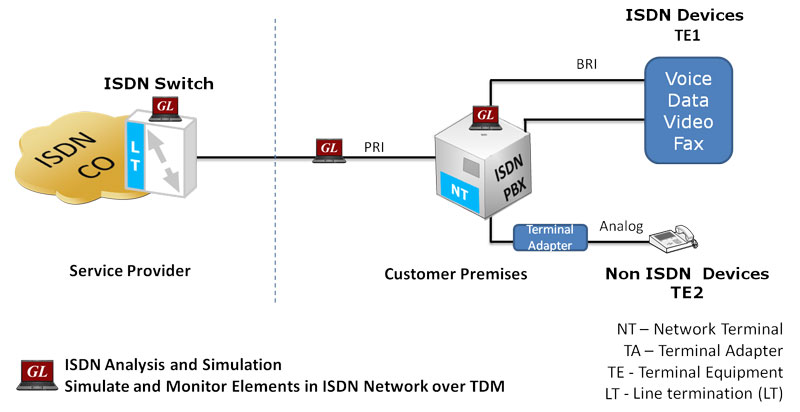
The Integrated Services Digital Network (ISDN) system allows voice, data and video to be transmitted simultaneously across the world using end-to-end digital connectivity. ISDN, based on the telephony network, was conceived to provide multiple voice and non-voice services over a single network and a digital user network interface over regular phone lines, instead of dedicated and isolated user-network interfaces.
ISDN is an integrated solution for providing basic telephony and data services, and additional supplementary telephony services. ISDN services are grouped in three service categories:
- Bearer service
- Teleservice
- Supplementary service
The user-to-network interface is provided in two flavors:
- Basic interface structure - two B-channels and one 16 Kbit/s D-channel (2B+D)
- Primary rate B-channel interface structure - 30 B-channels and one 64 Kbit/s D-channel, (30B+D)
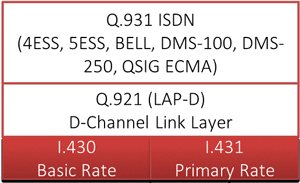
From the point of view of the OSI architecture, an ISDN line has a stack of three protocols
- Layer 1 - Physical Layer
- Layer 2 - Data Link Layer (known as LAPD protocol)
- Layer 3 - Network Layer (the ISDN protocol)
Overview
GL’s MAPS™-ISDN is an advanced protocol simulator/tester for ISDN simulation over TDM (T1 E1) and generates high volumes of ISDN traffic. The tester can simulate ISDN signaling as defined by ITU-T Q.931, 5ESS, 4ESS, BELL, DMS-100, DMS-250, and QSIG ECMA standards. MAPS™ application can also emulate signaling as per Q.921, referred to as LAPD (Link Access Protocol - D Channel), a Data Link protocol used over ISDN's D channel. This test tool is used to perform testing using ISDN and LAPD protocol messages over T1 E1, and offers a complete solution for testing, troubleshooting, and maintenance of devices and networks implementing PRI ISDN.
MAPS™-ISDN also incorporates the flexibility to modify ISDN and LAPD call parameters & message contents (arbitrary manipulation of messages, information elements and message sequence on the different protocols). This flexibility ensures that the MAPS™-ISDN communicates with the system under test. It is even possible to emulate a complete ISDN connection (switch to subscriber) all in the same PC with a dual interface card or dual portable analyzer unit.
The application is enhanced to support ISDN and LAPD conformance test suite to provide reliable communication over the network. MAPS™ ISDN and LAPD Conformance test suite is a product that helps service providers to check their ISDN network for conformity to its standard specifications - ITU-T Q.931 for ISDN and Q.921 for LAPD.
The ISDN Conformance test suite is used to conform various ISDN and LAPD call states over T1 E1, offering a complete solution for testing, troubleshooting, and maintenance of devices and networks implementing PRI ISDN. It is useful to test ISDN products designed for either U or S/T interface, including network terminations, Type 1 terminating equipment, and terminal adapters.
MAPS™ ISDN can be configured to simulate ISDN calls on the trunks that contain D-Channel using NFAS options. This allows a single D channel to control multiple PRI trunks. With NFAS option, a single D-channel can control a maximum of 479 B-channels, i.e., up to 20 trunks (or a maximum of 478 with one B-channel as a backup). In case of GL's Dual T1 E1 Analyzer, a maximum of 95 B-Channels, i.e., up to 4 trunks is supported.
The application supports powerful utilities like Message Editor and Script Editor which allow new scenarios to be created or existing scenarios to be modified using ISDN messages and parameters.
GL also provides a GUI based ISDN protocol analyzer (optional application – xx100) for on-line capture and decode of the signaling in real-time both during tests and as a stand-alone tracer for live systems.
Main Features
- ISDN Switch and Subscriber simulation over TDM (E1/T1)
- Ability to generate high volumes of ISDN traffic over established calls – DTMF/MF digits, voice files, single /dual tones
- Multiple T1 E1 line interfaces supported
- Access to all ISDN Message Parameters such as Setup, Connect, Release messages, and more
- Access to LAPD SABME, UA, RR, DISC signaling messages at layer 2.
- Supports complete ISDN and LAPD conformance test suite
- Simulated ISDN conformance call states include U0 (Null state), U01 (Call Initiated call), U3 (Outgoing call proceeding), U4 (Call delivered), U8 (Connect request), U10 (Active), U11 (Disconnect request), U19 (Release request), U25 (Overlap receiving), and R0 (Null state)
- Simulated LAPD conformance call states include TEI Assigned state, Multiple Frame Established state, and Timer Recovery state
- Example Scenarios in ISDN conformance Test Suite
- Verification of Device behavior for events in a given state
- Verification of Bearer capability negotiation
- Verification of enbloc & overlap signaling
- Verification and Validation of protocol related timers.
- Sequence Number Verification in LAPD
- Verification of Re-Transmission of messages in a given state.
- Verification of State Variables V(S) and V(R) in LAPD
- Verify if N(R) counter is using modulo 128 addition in LAPD
- Provides various release cause codes such as rejected, no user response, user busy, congested, and so on to troubleshoot the problems in ISDN
- Supports NFAS testing for T1 only
- User controlled access to optional ISDN parameters such as timers
- Impairments can be applied to messages to simulate error conditions
- Ready-to-use scripts for quick testing
- Bulk Call Simulation for Performance testing, Load testing, Functional testing, and Regression testing of network elements
Frequently Asked Questions
- What is MAPS™ ISDN Protocol Emulator?
- MAPS™ ISDN is a protocol simulation and testing solution designed to emulate ISDN signaling over TDM-based T1 E1 interfaces. It can simulate both the subscriber and network/switch sides of an ISDN connection and is used for functional, conformance, troubleshooting, and load testing of ISDN devices and networks.
- Which ISDN and LAPD standards does MAPS™ support?
- MAPS™ ISDN supports ITU-T Q.931 for ISDN signaling and ITU-T Q.921 for LAPD, along with standards and variants including SR-4994, 4ESS, 5ESS, BELL, DMS-100, DMS-250, and QSIG ECMA.
- What is LAPD, and how is it supported by MAPS™ ISDN?
- LAPD (Link Access Protocol – D Channel) is the Layer 2 data-link protocol used on the ISDN D-channel. MAPS™ can emulate LAPD signaling at both user and network terminals, including messages such as SABME, UA, RR, and DISC.
- Can MAPS™ ISDN simulate both incoming and outgoing calls?
- Yes. MAPS™ can operate as a caller or as a network-side callee. It supports call generation and reception using configurable scripts, message templates, and profiles, enabling users to create and test different ISDN signaling scenarios.
- Does MAPS™ ISDN support ISDN and LAPD conformance testing?
- Yes. The solution supports ISDN and LAPD conformance test suites for validating devices and networks against standards such as ITU-T Q.931 and Q.921. Tests can cover call states, bearer capability negotiation, signaling, timers, retransmissions, LAPD sequence numbers, and state variables.
- Can MAPS™ ISDN be used for load and stress testing?
- Yes. Bulk Call Simulation and Load Generation capabilities allow multiple tests to run simultaneously or sequentially. Users can configure parameters such as calls per second (CPS), maximum active calls, call rates, and call duration, as well as different traffic-distribution patterns.
- Does MAPS™ ISDN support NFAS testing?
- Yes. MAPS™ supports Non-Facility Associated Signaling (NFAS) testing for T1. NFAS allows one D-channel to control multiple PRI trunks; the MAPS™ implementation can support configurations involving up to 20 trunks and 479 B-channels, depending on the hardware configuration.
- Can users customize ISDN messages and call flows?
- Yes. MAPS™ provides Message Editor, Profile Editor, and Script Editor tools for modifying protocol messages, information elements, parameter values, call sequences, and test scenarios. This enables both standard and customized testing of a device under test (DUT).
- Can error conditions and abnormal call scenarios be tested?
- Yes. Users can apply impairments to signaling messages and create erroneous call flows to simulate faults and abnormal network conditions. This can help evaluate how a DUT responds to protocol errors and unexpected signaling behavior.
- What traffic can be generated over established ISDN calls?
- MAPS™ supports traffic handling over established calls, including voice files, DTMF/MF digits, single and dual tones, and other supported traffic types depending on the configuration and licensed options.
- Does MAPS™ ISDN provide call statistics and diagnostic information?
- Yes. MAPS™ provides statistics including total, active, completed, passed, and failed calls, as well as calls per second. It can also track transmitted and received protocol messages and provide event logs, captured errors, and call-status information.
- Can MAPS™ ISDN display signaling message sequences?
- Yes. Each call scenario can provide message traces with decoded signaling messages and graphical ladder diagrams showing the call flow with timestamps, helping engineers analyze signaling behavior and troubleshoot failures.
- Can MAPS™ ISDN tests be automated?
- Yes. The application includes scheduling capabilities for bulk and manual call simulations and can automatically load pre-saved configuration files. It also supports command-line control through its client-server architecture, with interfaces for Python, TCL, C++, and other clients; CLI functionality requires an additional license.
- What hardware is required to run MAPS™ ISDN?
- MAPS™ ISDN operates with compatible T1 E1 hardware and associated basic software. GL lists options including Dual T1 E1 Express PCIe boards, Quad/Octal T1 E1 hardware, and tProbe™ T1 E1 units, depending on the required test configuration.
- What types of testing can MAPS™ ISDN be used for?
- MAPS™ ISDN can support functional testing, protocol conformance testing, regression testing, troubleshooting, performance testing, and stress/load testing of PRI ISDN network elements and devices.
Supported Protocols Standards
Protocol Stack |
Supported Protocols | Standard / Specification Used |
| Q.921 (LAPD) | ITU-T Q.921 | |
| SR-4994 | National ISDN PRI Standard | |
| Q.931 | ITU-T Q.931 / Q.932(Facility IE) / Q.955.3 (MLPP Procedures) | |
| 4ESS | ISDN PRI (TR-41449) | |
| 5ESS | ISDN PRI (Lucent Tech - 5ESS 2000) | |
| BELL | ISDN PRI (Bell Core SR-NWT-002343) | |
| DMS-100 | Nortel's Switch DMS 100 NIS-A2111-1 | |
| DMS-250 | Nortel's Switch DMS 250 NIS-A2111-4 | |
| QSIG ECMA | Standard ECMA-143 4th Edition - December 2001 |
ISDN Call Simulation
Typical ISDN Signaling Procedure:
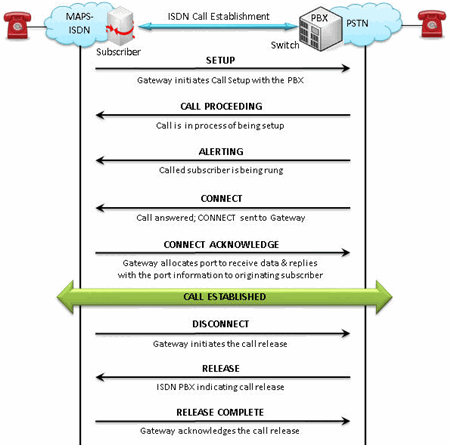
ISDN Call Messages
ISDN Call Generation and Reception
MAPS™ ISDN is configured as both Subscriber and at the network end as Switch simulating the ISDN signaling call and handling TDM traffic – voice, file, digits, VF, FAX, IVR over the established call.
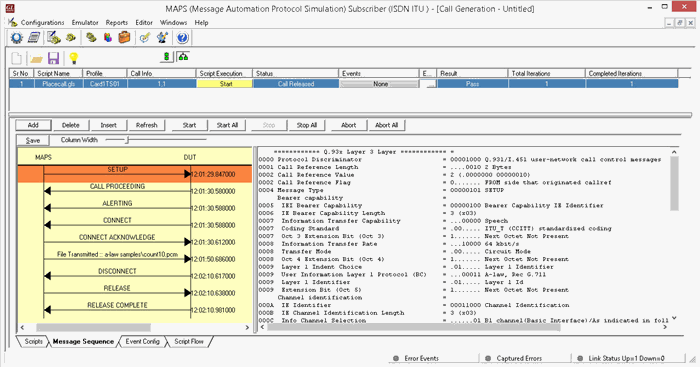
ISDN Basic Call Generation
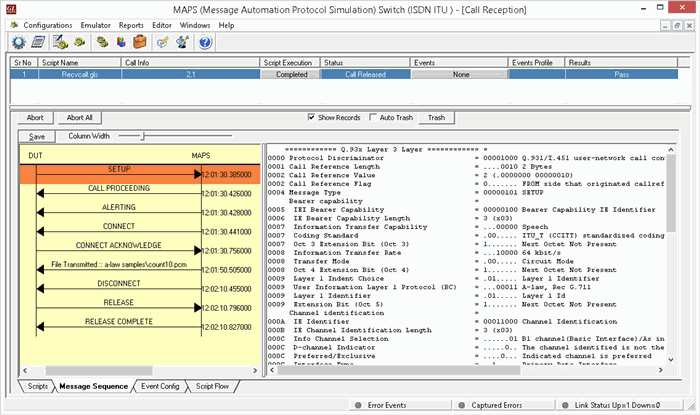
ISDN Call Reception
LAPD Call Simulation
Typical LAPD Signaling Procedure:
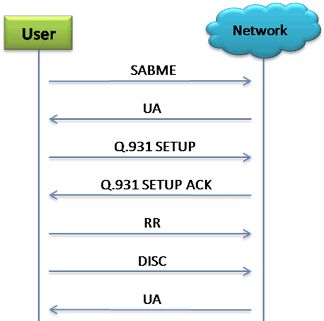
LAPD Signaling Messages
LAPD Call Generation and Reception
The following screen shows MAPS™ LAPD emulator configured to simulate LAPD signaling messages at both User and Network terminals in the network.
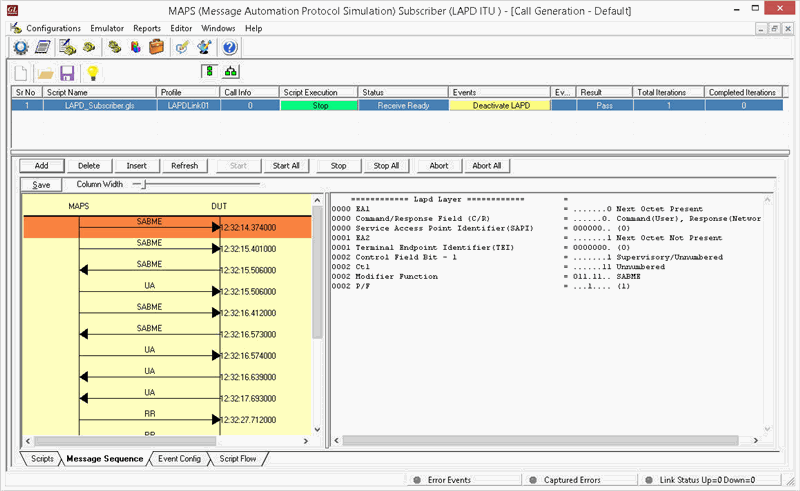
LAPD Call Generation
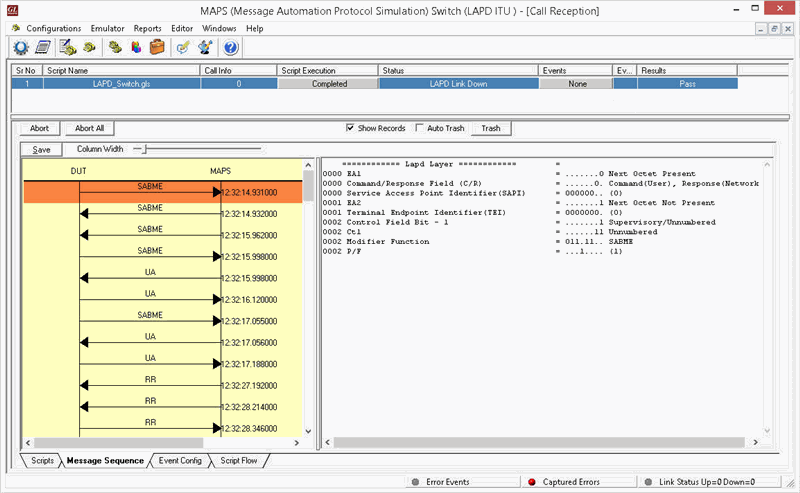
LAPD Call Reception
ISDN Conformance
As an example, the conformance script below is used to test the Null State of the DUT. The DUT in the Null call state, on receipt of a RELEASE COMPLETE message, is expected to send no message and remain in the Null call state. The MAPS™ then sends status enquiry to the DUT to conform the Null State.
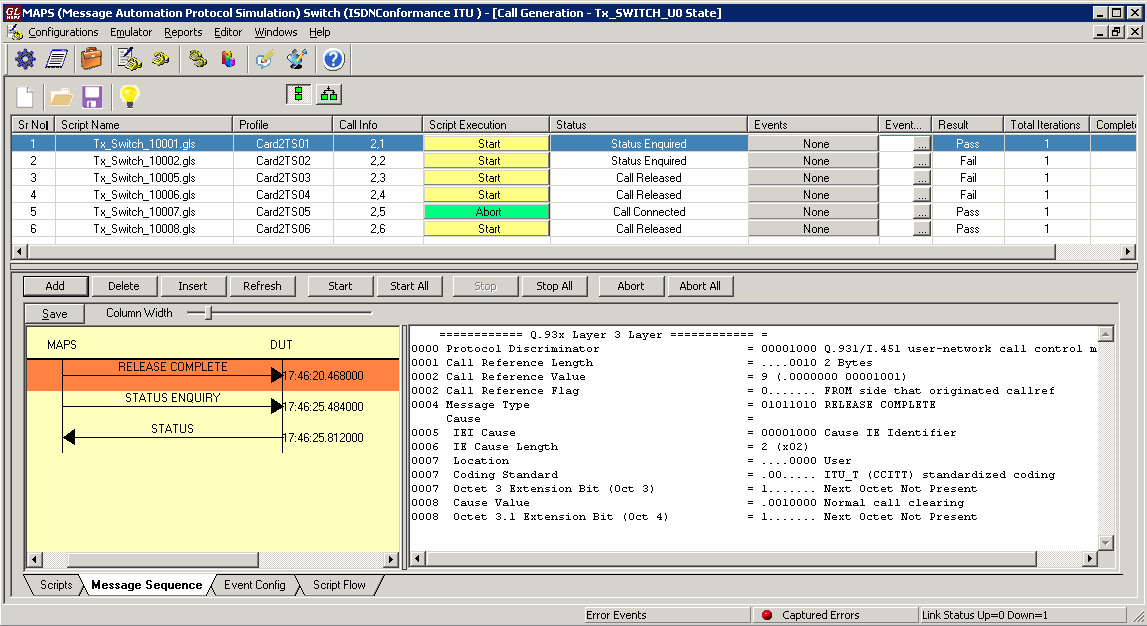
ISDN U0 Null Call State Conformance Call Generation

ISDN U0 Null Call State Conformance Reception
LAPD Conformance
The loaded lapd TEI assign call state conformance script verifies that the DUT (Subscriber) sends either UA/ DM message in response to SABME from switch. The DUT (Subscriber) is expected to be either in Multiple Frame Established state (7.0) or TEI Assigned state (4.0) after sending the response.
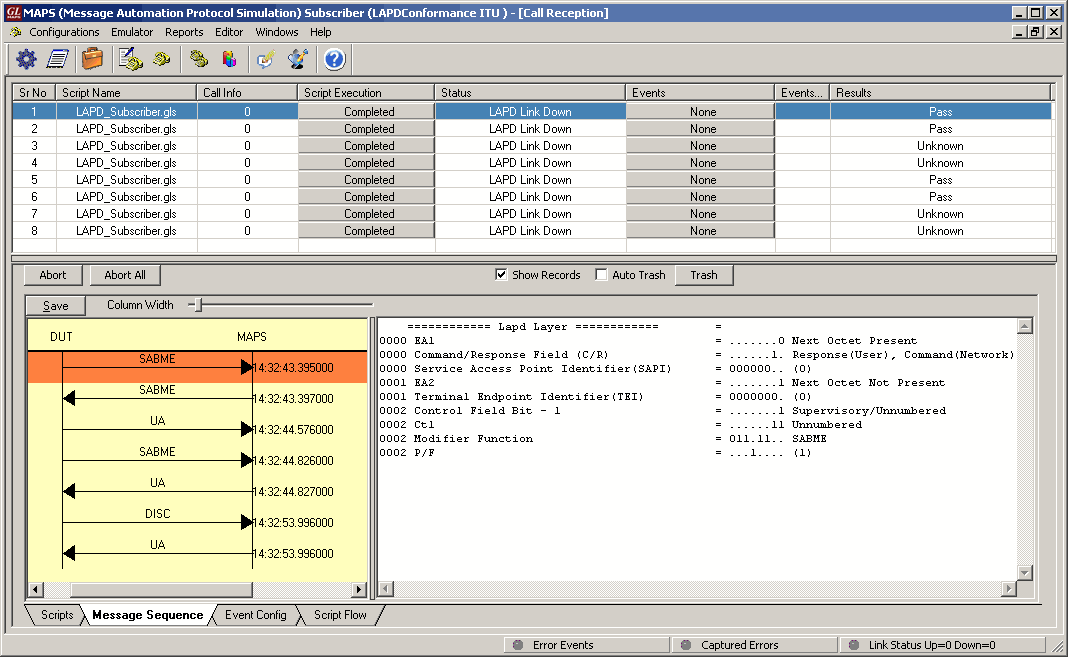
LAPD TEI Assign call state Conformance Generation
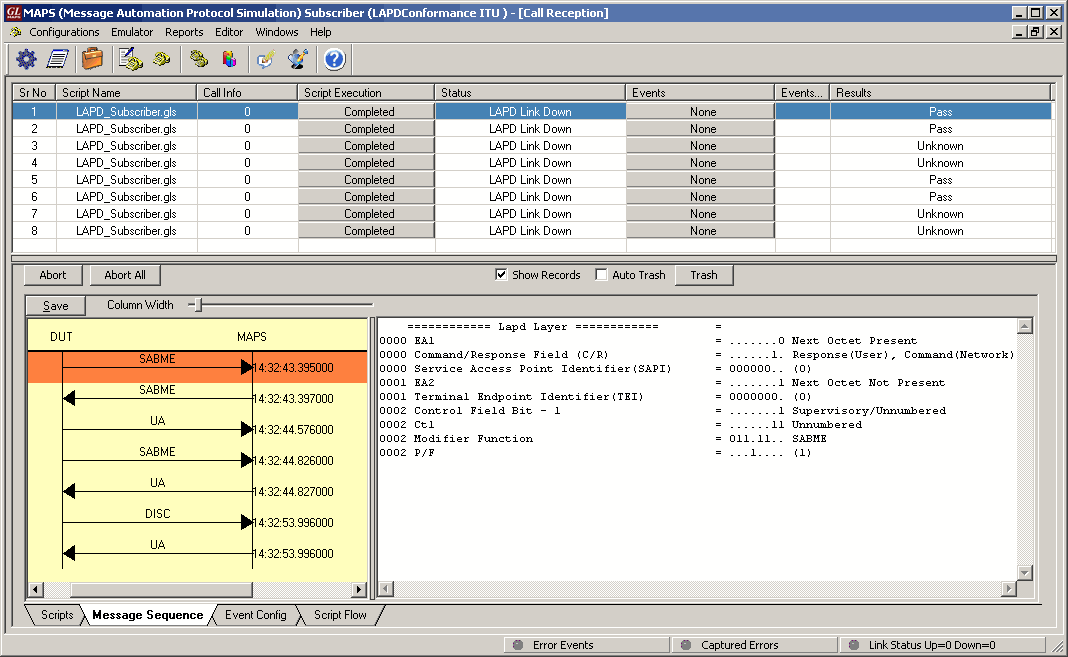
LAPD TEI Assign call state Conformance Reception
Simulating ISDN NFAS Calls
NFAS is a standard option available for ISDN PRI call processing system that allows a single D channel to control multiple PRI trunks, resulting in freeing up one channel on each trunk to carry other traffic.
NFAS grouping allows number of trunks to be classified into groups, with each group having a unique D-Channel identifier. Each NFAS group can consist of a trunk containing the primary D-channel and up to 19 additional trunks (supporting a maximum of 479 B-channels). This is illustrated as shown in the figure below.
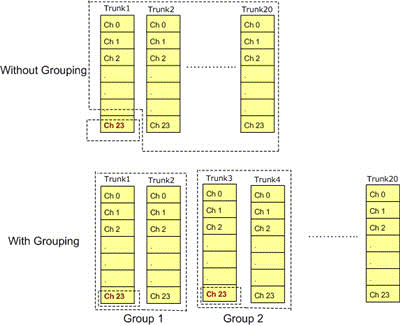
NFAS Grouping
MAPS™ ISDN can be configured to simulate ISDN calls on the trunks that contain D-Channel using NFAS options. This allows a single D channel to control multiple PRI trunks.
Consider the following illustration which explains ISDN calls simulation on 4 PRI trunks with NFAS option using Octal T1 E1 boards connected in loopback.
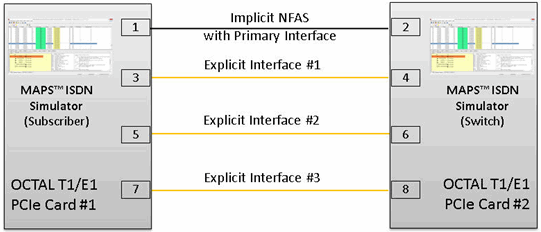
ISDN Calls with NFAS Option
In loopback mode with GL's Octal/Quad T1E1 Analyzer, user can create 3 NFAS Group members with one Primary D-Channel as shown in the figure.
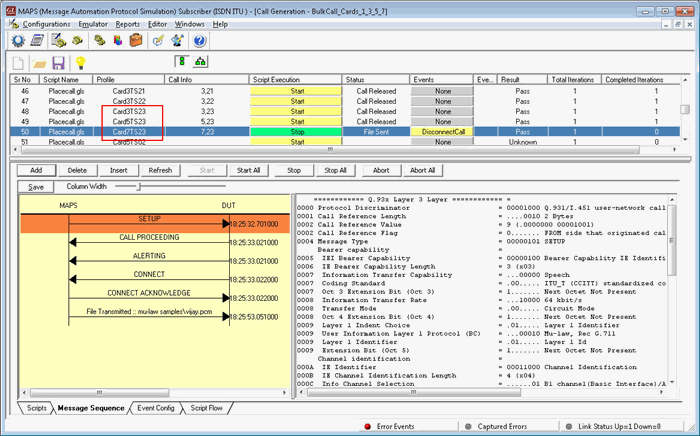
ISDN NFAS Call Generation
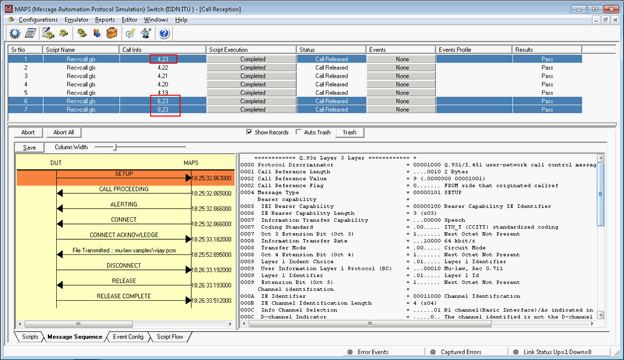
ISDN NFAS Call Reception
General MAPS™ Features
- Call Simulation & Control
- Multi-protocol, Multi-interface Simulation
- Script based and protocol independent software architecture
- Auto generate and respond to signaling messages
- Traffic Handling Capabilities (requires additional license)
- Fault Insertion, and Erroneous Call Flows Testing
- Automation
- Pre-processing tools
- Easy script builder for quick testing to advance testing
- Customization of test configuration profiles
- Unlimited ability to customize the protocol fields and call control scenarios
- Centralized Control and Remote Access
- Command Line Interface (requires additional license)
- Option to send reports to database accessible via web interface
- Centralized control of multiple MAPS™ applications remotely from single client application
- Reports and Statistics
- Call Status, Link Status, and Message Statistics
- Capture Events, and Error Events
Call Simulation and Control
The signaling and traffic simulation in a call is completely implemented using scripts. Commands in the scripts are executed in controlled way to simulate protocol and traffic behavior. Most of the commands used in the scripts are generic and independent of specific protocol.
MAPS™ application acts as either the Caller or resides at the network terminal acting as Callee. The Call Generation feature simulates an outgoing call by sending call control messages to the DUT using scripts and profiles. The profiles allow necessary parameters of call control messages to be changed during runtime. Call generated from other entity can be automatically detected in call reception window by pre-setting the required answer scripts in the Incoming Call Handler.
The call control scripts can also automatically handle the traffic over the established call. MAPS™ supports transmission and detection of various traffic types over IP (RTP, GTP), ATM, & TDM - such as, digits, voice file, single tone, dual tones, fax, sms, email, http, ftp, and video. MAPS™ also includes support for wide range of codec rates – visit www.gl.com/traffic-simulation.html and www.gl.com/voice-codecs.html webpage for more details.
Message Sequence - Each call scenario provides the trace with full decoding of the messages exchanged between the MAPS™ and the DUT, and graphical ladder diagrams of the call flow with time stamp. Impairments can be applied to messages to simulate error conditions that occur in real-time networks.
Event-Driven Control - Scripts execution, being event-based, allows redirection of script execution on-the-go with user-defined events. The custom parameters in the events can also be changed during script execution using event profiles.
Script Contents & Script Flow - The script flow and the contents window displays the Script Name, Sub-script Name, Script line number, and script statements to be successfully executed, which help the users in troubleshooting a particular call scenario.
Bulk Call Simulation and Load Testing
MAPS™ supports automated stress/load testing capabilities through Load Generation and Bulk Call Simulation features. Bulk Call Simulation allows quick configurations to easily create multiple test entries with different scripts and profiles. Multiple tests can be run simultaneously or sequentially (queue up tasks in succession). Load generation feature further allows specifying the patterns with which the bulk calls can be generated. Load generation can be customized with different statistical distribution patterns such as Uniform, Ramp, Sawtooth, Fixed, Normal, Step, and Step-Sawtooth distribution. Call duration also can be randomized using similar statistical distribution. This feature also helps users configure Stress/Load Testing parameters such as Call per second (CPS), Max Active Call, Minimum and Maximum Call Rates, Start Call Rates, and other parameters.
Scheduler
Scheduler can be used to schedule the simulation of bulk calls or manual calls at a specific start time. The pre-saved master configuration files for test setup and call simulation are automatically loaded to automate the test procedure.
Customization of Test Setup Parameters
The test setup profiles (.xml files) allow users to configure the necessary parameters in order to establish communication between MAPS™ and the DUT. It includes configuring parameters of the network nodes, the network properties, and transport related configurations such as T1 E1 timeslots, IP Address and port numbers for both MAPS™ and the DUT.
Once the transport layer is configured properly, protocol specific signaling messages and traffic can be transmitted and received successfully. All parameters setup in test setup are global and are accessible to all scripts. These parameters initialize protocol engines and the transport modules specific to the protocol.
Customization of Test Parameters, Call Flow, and Protocol Messages Using Pre-Processing Tools
- Message Editor - The Message Templates (GL’s proprietary *.HDL files) comprises of protocol encoding parameters with preset values. It is required to create a message template for every message in a protocol. The message templates are called within the scripts to perform scenario based testing.
- Profile Editor – Profiles (*.xml files) are used to change the values of the fields in the messages (i.e. Message Template in MAPS™) during the course of a call. The multiple profiles with varying parameter values that allow users to configure call instances in call generation and to receive calls.
- Script Editor - The script editor allows the user to create / edit scripts and to define variables for the fields in the messages. The script uses pre-defined message templates to build call flow and perform send and receive actions. Script editor provides options to run the test for multiple iterations in sequential or random flow. Commands allow retransmission of messages with specific interval.
Command Line Interface
Supports scripting through a Command Line Interface (CLI) such as the Python, and TCL, using MAPS™ client-server functionality (requires additional license)
MAPS™ can be configured as server-side application, to enable remote controlling of the application through multiple command-line based clients. Supported clients include C++, TCL, Python and others. TCL provides a simple scripting language, with programming facilities such as looping, procedures, and variables. The TCL Client application includes a MapsTclIfc.dll file, a packaged library that enables communication with the Server from a TCL environment.
User can remotely perform all functions such as start test bed setup, load scripts and profiles, apply user events such as send digits/file/tones, detect digits/file/tones, dial, originate call, terminate call, start and stop traffic and so on. User can also generate and receive calls through commands. This client application is distributed along with MAPS™ Server application. Multiple MAPS™ CLI servers can be controlled remotely from single client application (such as TCL, Python, etc).
Call Statistics, Events, Link Status
Call Status & Message Statistics - By default, all call handling scripts (irrespective of the type of the functions) are assessed by MAPS™ to provide statistical information about Total Calls, Active Calls, Completed Calls, Passed Calls, Failed Calls, and Calls/Sec. It is also possible to categorize the statistical information as per the call handling scripts. In addition, Call Generation and Call Reception windows provide useful call status & script execution results.
In addition, Message Stats option for any specific protocol, logs number of times the messages are being transmitted (Tx Count) and received (Rx Count), thus allowing user to monitor the occurring events.
Events Reporting – MAPS™ provides Event Log, Error Events, and Captured Errors windows that log the captured events and errors encountered during the progress of the call.
Link Status - Link Status window indicates transport related information of the protocol, for example, if SCTP is used as transport, it indicates if the association is Up or Down in the Link Status window. MAPS™ IuCS ATM uses SSCOP transport and the associated link status is indicated as Up or Down in the Link Status window.
Resources
Please Note: The XX in the Item No. refers to the hardware platform, listed at the bottom of the Buyer's Guide, which the software will be running on. Therefore, XX can either be ETA or EEA (Octal/Quad Boards), PTA or PEA (tProbe Units), XUT or XUE (Dual PCIe Express) depending upon the hardware.