MAPS™ ISDN SIGTRAN Protocol Emulator
Simulate ISDN protocol over IP (ISDN Sigtran) between SG and MGC, supporting conversion and transport of signaling and media (voice) from legacy TDM to NGN IP networks.
Request a Quote Brochure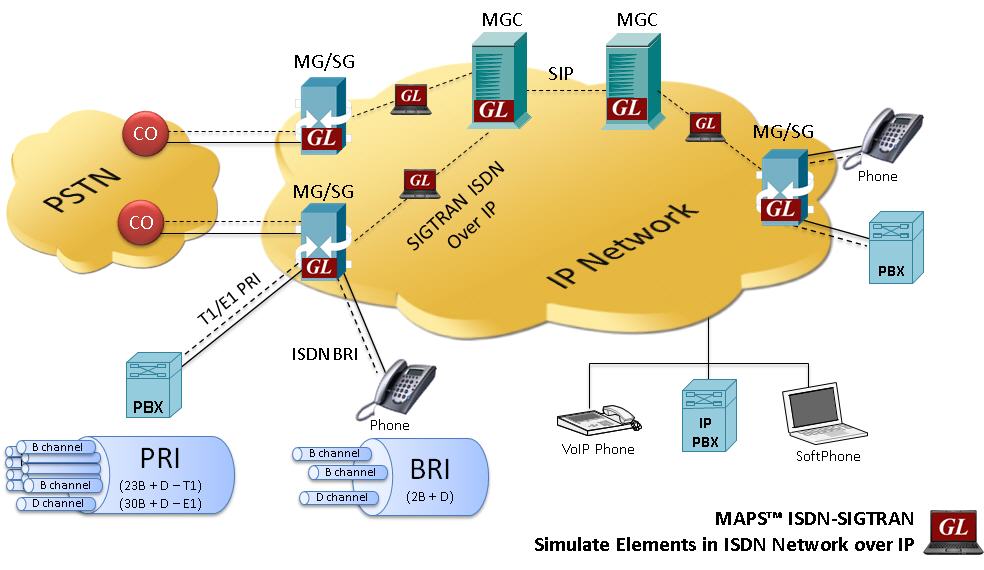
Background
ISDN is a very common protocol in the legacy network. There are two types - PRI (Primary Rate Interface or 23B +D) for T1 E1 lines and BRI (Basic Rate Interface, or 2B + D) for lower speed digital lines. As PSTN networks migrate to Next Generation Networks (NGNs), a need for conversion and transport of signaling and media (voice) is necessary. NGNs are IP based systems, therefore protocols have been developed to reliably transport/adapt Q.920s (data link layer) and Q.930s (Layer 3 user messages) TDM protocols.
This adaptation is performed by two IP based protocols within SIGTRAN, called SCTP and IUA. SIGTRAN, shortened form of Signaling Transmission, is the standard for conversion, transport, and encapsulation of SS7 and ISDN over IP. It is one of the most important transition elements in moving from legacy TDM to NGN IP networks.
ISDN end-points in Next Generation Network
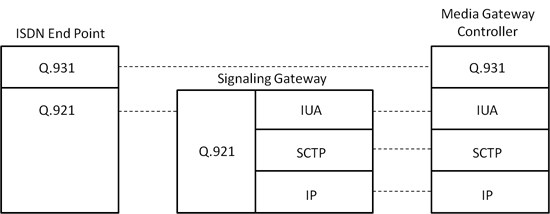
As shown above, a Signaling Gateway (SG) on the TDM side connects to standard PRI T1 E1 lines (or BRI) and translates the ISDN messages to SIGTRAN IP format. It supports the same application and call management functions as ISDN but uses two protocol layers on top of Internet Protocol (IP): Stream Control Transport Protocol (SCTP) and ISDN Q.921-User Adaptation Layer (IUA). The SG talks to a Media Gateway Controller, which in turn performs further routing and signaling decisions within the NGN. The protocol architecture of ISDN SIGTRAN is shown below.
Overview
Message Automation & Protocol Simulation (MAPS™) is a powerful protocol test simulation platform supporting a wide range protocols such as SIGTRAN (SS7 over IP), SS7 over TDM (T1 E1), ISDN over TDM (T1 E1), GSM-A & GSM-Abis over TDM, Megaco, SIP, and MGCP over IP.
GL’s MAPS™ SIGTRAN ISDN over IP is an advanced protocol simulator/tester used for ISDN simulation over IP. The tester can simulate a complete ISDN connection SG to MGC, where ISDN signaling is defined by the ITU-T Q.921 / Q.931 standards. MAPS™ SIGTRAN ISDN over IP is a powerful tool that can be used to perform detailed testing of ISDN protocol messages over IP, and offers a complete solution for testing, troubleshooting, and maintenance of devices and networks implementing PRI ISDN and BRI ISDN.
MAPS™ SIGTRAN ISDN over IP can act as the SG when testing the MGC or as the MGC when testing the SG as shown below.
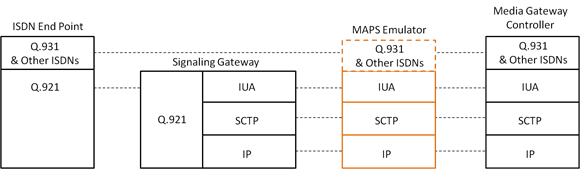
Location of MAPS™ SIGTRAN ISDN over IP Emulator in the Network
MAPS™ SIGTRAN ISDN over IP also incorporates the flexibility to modify ISDN call parameters & message contents (arbitrary manipulation of messages, information elements and message sequence on the different protocols). This flexibility ensures that the MAPS™ SIGTRAN ISDN over IP communicates with the system under test.
The application is available as -
- MAPS™ ISDN SIGTRAN Emulator (Item # PKS135)
MAPS™ ISDN SIGTRAN Emulator supports both PRI (Primary Rate Interface or 23B +D) and BRI (Basic Rate Interface, or 2B + D) ISDN network types. ISDN BRI is referred to as 2B + D, as it includes 2 bearer ‘B’ channels each with 64 kbit/s rate and one 16 kbit/s signaling channel ('D' channel or data channel). ISDN PRI when carried over an E1 includes 30 'B' channels and over T1 has 23 ‘B’ channels of 64 kbit/s, shared with 'D' channel of 64 kbit/s.
MAPS™ ISDN SIGTRAN protocol test tool simulates complete ISDN connection from TDM to Signaling Gateway (SG) and Media Gateway Controller (MGC) supporting both PRI ISDN (with traffic) and BRI ISDN interfaces. MAPS™ ISDN SIGTRAN connects to traditional ISDN interfaces and IP-enabled signaling nodes and offloads TDM traffic to IP networks. The various supported TDM traffic types include File, Digits, Tones, FAX, IVR, Dynamic VF, and Voice Quality Testing. MAPS™ can be configured to auto start the traffic over ISDN signaling or manually define traffic at run time.
MAPS™ SIGTRAN ISDN over IP supports powerful utilities like Message Editor and Script Editor which allows creating new scenarios or modifying the existing scenarios using ISDN messages and parameters.
Also available is an independent GUI based SIGTRAN (ISDN over IP) Protocol Analyzer for online capture and decode of the signaling in real-time both during tests and as a stand-alone tracer for live systems.
Main Features
- Simulates ISDN signaling over IP (ISDN-SIGTRAN)
- Generates and process all ISDN messages such as Setup, Connect, Release messages, and more
- Switch and Subscriber Emulation
- Supports interfacing with both high-speed PRI (Primary Rate Interface or 23B +D) and low-speed BRI (Basic Rate Interface, or 2B + D) digital lines.
- User controlled access to optional ISDN parameters such as timers
- Provides various release cause codes such as rejected, no user response, user busy, congested, and so on to troubleshoot the problems in ISDN
- Impairments can be applied to messages to simulate error conditions
- Supports TDM traffic (including digits, voice file, tones, IVR, FAX, Dynamic VF, IVR and Voice Quality Testing) over IP.
- Supports Client-Server functionality requires additional license; clients supported are Python, Java, TCL and others
- Automation, Remote access, and Schedulers to run tests 24/7
Supported Protocols Standards
| Supported Protocols | Standard / Specification Used |
|---|---|
| Q.931 | ITU-T Q.931 / Q.932(Facility IE) / Q.955.3 (MLPP Procedures) |
| IUA | RFC 4233 Integrated Services Digital Network (ISDN) Q.921-User Adaptation Layer |
ISDN Sigtran protocol stack
Call Simulation over ISDN SIGTRAN
Given below is a typical ISDN call scenario that can be simulated using MAPS™ at either of the peer ends (Switch/ Subscriber):
The Sigtran call procedure is as shown below with two telecom switches exchanging the ISUP messages. Detailed call flows are provided in ITU-T Recommendation Q.784.1.
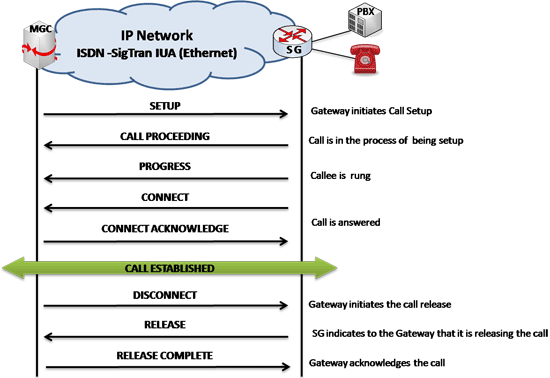
Typical ISDN SIGTRAN Call Procedure
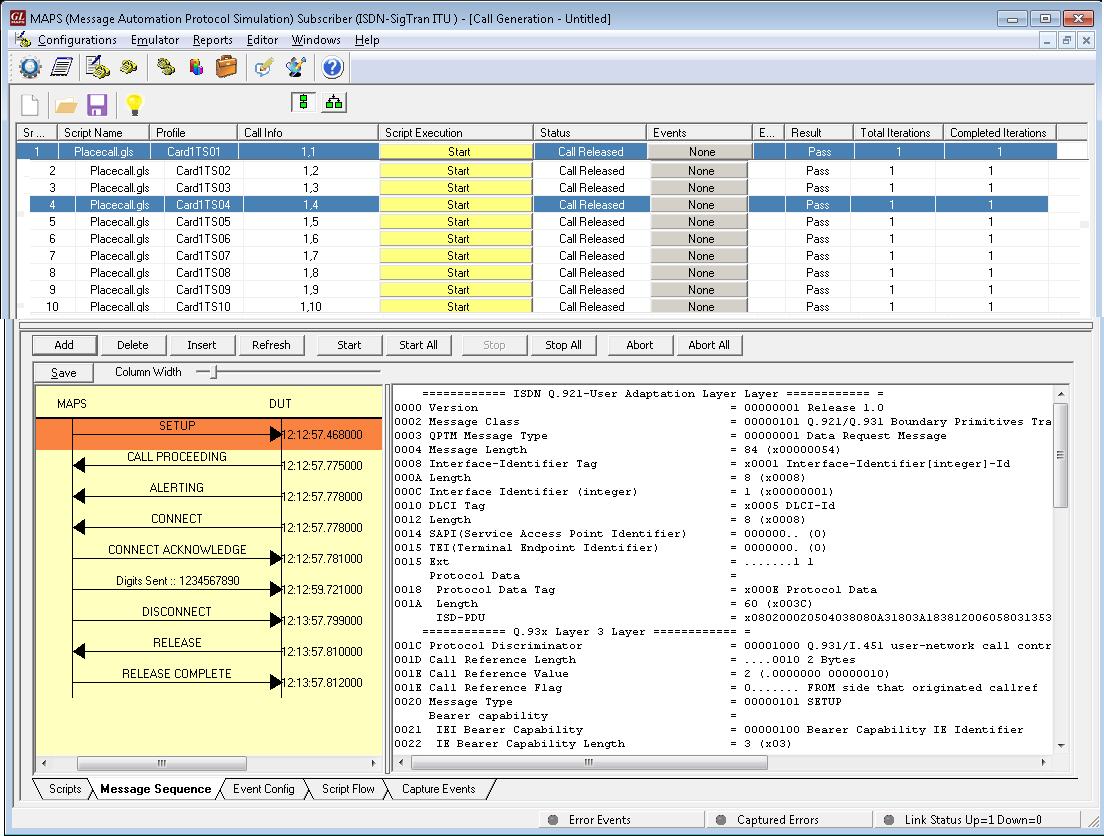
TDM Traffic Simulation over ISDN SIGTRAN (Call Generation)
MAPS™ ISDN SIGTRAN application can be configured as SUBSCRIBER and SWITCH terminals to simulate ISDN signaling over IP and TDM traffic in PRI ISDN network.
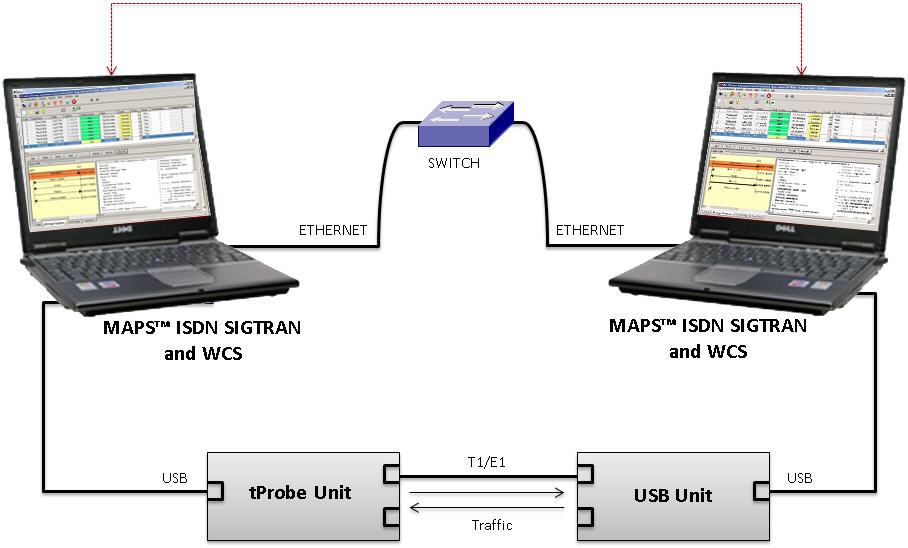
Test Setup Simulating TDM Traffic
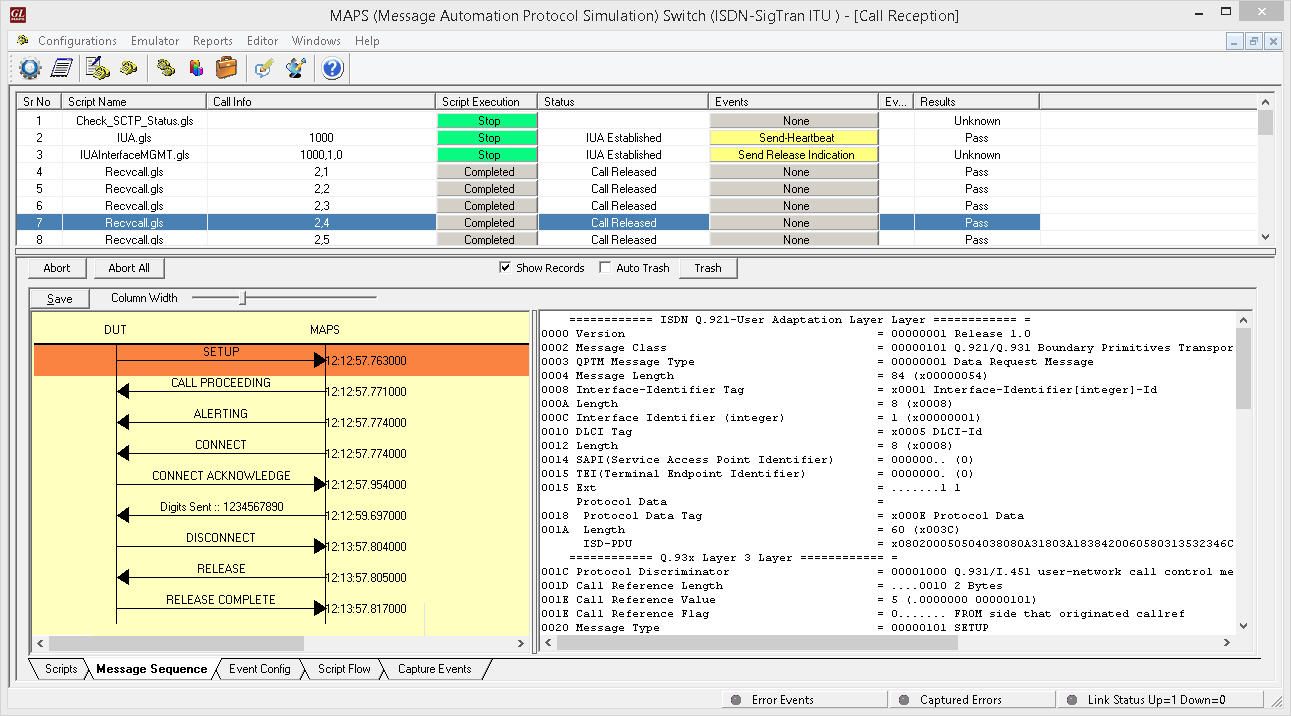
TDM Traffic Simulation over ISDN SIGTRAN (Call Reception)
A Typical MAPS™ Sigtran Test System
A typical MAPS™ ISDN Sigtran consists of:
- A TCL interface communicating over TCP/IP to a Rack PC with T1/E1 Analyzer Software
- The Rack PC consists of MAPS™ Client IFC, MAPS™ CLI Server, T1/E1 Analyzer Software (including Windows Client Server software) and a Dual T1/E1 Card
- A patch panel for RJ-11 connections to the outside world (DUT)
- TCL Client – Acts as User Interface, which executes TCL Scripts.
- MAPS TCL Interface (MAPS Client IFC) – acts as an interface between MAPS™ CLI Server and its client TCL. It interprets the TCL Commands and forms the appropriate command as understood by MAPS CLI Server and vice versa.
- MAPS™ CLI Server is an executable that inherits all features of MAPS™ without GUI. It listens to a TCP message socket to receive and execute commands from client and sends the responses back to client.

T1/E1 Windows Client Server - Windows Client/Server software performs all ISDN emulation primitives including signaling, tone detection, call progress signals, file transfer, and many more functions.
TCL application consists of three functional modules: Tool Command Language (Tcl) Client and Script, MAPS™ Tcl Interface, and MAPS™ Server
In CLI, MAPS™ Server constitutes two server modules, namely MAPS™ CLI server and GL WCS server.
- MAPS™ CLI Server
MAPS™ CLI Server is an executable which inherits all features of MAPS™ without the graphical user interface. Instead it listens to TCP message socket to receive and execute commands from the client and sends the responses back to the client.
- GL's Windows Client Server
GL's Windows Client/Server software allows the user of T1/E1 analysis cards the capability of remote operation, automation, and multi-site connectivity.
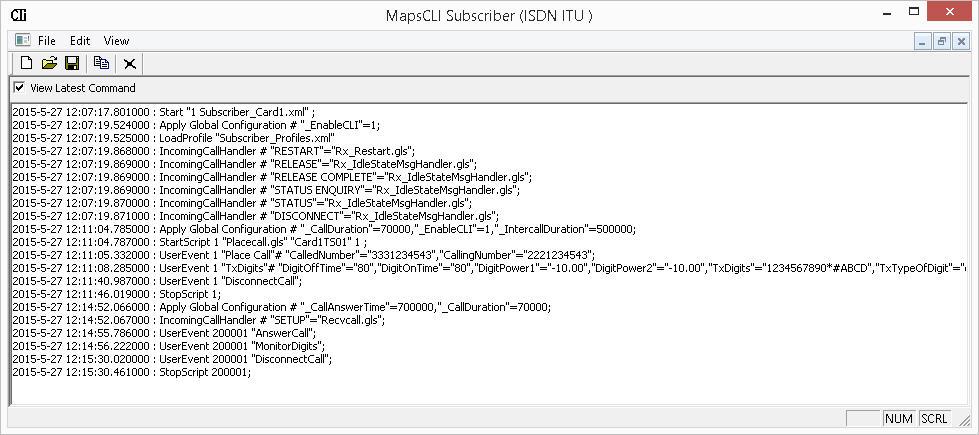
TCL client receives report event from the CLI server as shown in the figure below:

TCL client placing the call
Resources
Please Note: The XX in the Item No. refers to the hardware platform, listed at the bottom of the Buyer's Guide, which the software will be running on. Therefore, XX can either be ETA or EEA (Octal/Quad Boards), PTA or PEA (tProbe Units), XUT or XUE (Dual PCIe Express) depending upon the hardware.
| Item No. | Item Description |
| PKS135 | MAPS™ ISDN SIGTRAN (ISDN IP) |
| PKS130 | MAPS™ SIGTRAN Emulator |
| MAPS™ SIGTRAN Conformance Test Suite (Additional License), requires PKS130 | |
| Related Software | |
|---|---|
| PKS164 | MAPS™ UMTS IuPS interface |
| XX165 | T1 or E1 UMTS Protocol Analyzer |
| OLV165 | Offline UMTS Protocol Analyzer |
| LTS206 | OC-3 / STM-1 UMTS Protocol Analysis |
| LTS306 | OC-12 / STM-4 UMTS Protocol Analysis |
| PKS140 | MAPS™ LTE S1 Emulator |
| PKS142 | MAPS™ LTE eGTP Emulator |
| PKS120 PKS121 PKS122 PKS123 PKS124 |
MAPS™ SIP Emulator MAPS™ SIP Conformance Test Suite (Test Scripts) MAPS™ MEGACO Emulator MAPS™ MEGACO Conformance Test Suite (Test Scripts) MAPS™ MGCP Emulator |
| PKS160 PKS102 |
MAPS™ UMTS-IuCS MAPS™ UMTS-IuH RTP Soft Core for RTP Traffic Generation |
| PKS120 | MAPS™ SIP Emulator |
| PKV100 | PacketScan™ (Online and Offline) |
| PKB100 | RTP Toolbox™ |
| PKS110 | Packet H.323 |
| MAPS™ UMTS IuCS ATM with Lightspeed1000™ | |
| LTS100 | Lightspeed1000™ - Dual OC-3/12 STM-1/4 PCIe Card |
| LTS105 | Lightspeed1000™ - Portable Dual OC-3/12 STM-1/4 USB Unit |
| LTS220 | MAPS UMTS IuCS ATM over OC-3 / STM-1, requires LTS214 |
| LTS214 | OC-3 / STM-1 SSCOP Server |
| LTS217 | OC-3 / STM-1 AAL2 Traffic Core |
| LTS320 | MAPS UMTS IuCS ATM over OC-12 / STM-4, requires LTS314 |
| LTS314 | OC-12 / STM-4 SSCOP Server |
| LTS317 | OC-12 / STM-4 AAL2 Traffic Core |