MAPS™ LTE for S1 Interface Emulator
Emulation of LTE – S1 interface (any interface excluding Air interface) between eNodeB (Evolved Node B), and MME elements.LTE S1 Conformance for MME (Mobility Management Entity) with conformance script.
Brochure Request a Quote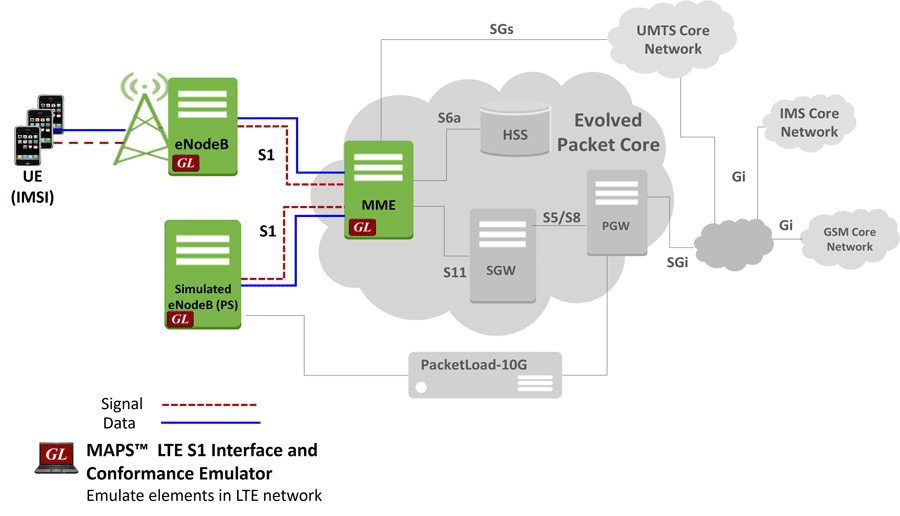
Background
The above diagram depicts some of the internals of the Long Term Evolution (LTE) network. The user (UE) has very high speed RF connection to the nearest local tower. This high speed connection is always ON, as long as the mobile is powered up. LTE is an all IP infrastructure with service priority built in – audio and video are given priority. All necessities like IP address, authentication, and security are validated. Instant resources over RF (the air) and IP (internal network) are made available depending on what the user is attempting to do. Also, LTE is designed for compatibility with older 2G and 3G mobile systems.
eNode B is the base station in the LTE/SAE S1 interface and also includes MME (to handle signaling of control plane) as shown in the network diagram above.Overview
GL’s Message Automation & Protocol Simulation (MAPS™) designed for testing LTE – S1 interface (any interface excluding Air interface) can emulate eNodeB (Evolved Node B), and MME (Mobility Management Entity).
MAPS™ is also designed for testing LTE S1 Conformance which MME and conformance script to emulate various network side procedures conforming various success/failure test cases and automating the entire eNodeB (DUT) testing.
The application is available as
- MAPS™ - LTE-S1 (Item # PKS140) for S1-MME interface
- MAPS™ LTE S1 Conformance (Item #PKS154)
MAPS™ is also capable of emulating S11 and S5/S8 (LTE-eGTP) interfaces. Refer to MAPS™ LTE eGTP (S3, S4, S5, S8, S10, S11 and S16) webpage for more details. Other interfaces such as S4, S11, and S12 will also be supported by the application in near future.
The application gives the users the unlimited ability to edit S1-AP/NAS messages and call scenarios (message sequences). "Message sequences" are generated through scripts. "Messages" are created using message templates.
Possible applications include:
- Emulate up to 500 Smartphones (UEs) powering up and down
- Authenticate and confirm security procedures
- QoS requests for greater or lesser bandwidth
- Temporary addressing management for mobility and security
GL Communications has enhanced its MAPS™ protocol emulation tool to emulate multi-protocol and multi-interface offering a complete range of test solutions, covering the entire 5G, 4G, 3G and 2G network.
By mimicking real-world customer behavior in lab environments, our solutions allow mobile operators and equipment manufacturers to verify their wireless networks before deployment. In other words, one can setup a virtual real-time network emulating all the network elements using “MAPS 4G Wireless Lab Suite”. The test suit supports emulation of S1-MME, S11, S5/S8, and other eGTP interfaces along with Diameter interfaces.
The product supports Mobile traffic core – GTP (ETH101) emulation for user-plane packet transmission and reception services between any two nodes in LTE and UMTS networks. Mobile Traffic Core – Gateway (ETH102) module allows emulation of Gateway Traffic to test media gateway telephony interfaces over IP. These modules also support generation and verification of data traffic such as Email, FTP, Web (HTTP), Video, and more.
MAPS™ LTE S1 emulator is enhanced with CSV based UE/Subscriber configuration option to allow massive UE emulation. In real time scenario, there exists huge number of subscribers with unique UE parameters.
GL's MAPS™ LTE Conformance Test Suite (PKS154) is designed with 50+ test cases, as per 3GPP TS 36.413 (LTE S1) specifications. It includes inbuilt conformance scripts (*.gls) for MME conformance in S1 interface as per 3GPP standards. Test cases include general Evolved Universal Terrestrial Radio Access Network (E-UTRAN); S1 Application Protocol (S1AP) messaging and call flow scenarios over LTE network. Logging and pass/fail results are also reported. Test cases verify conformance of actions such as UE attach/detach, periodic updating, E-RAB setup, Handover procedure, UE context release, and error indication.
GL also provides a GUI based LTE Analyzer for on-line capture and decode of the signaling in real-time both during tests and as a stand-alone tracer for live systems.
Main Features
- Setup a virtual real-time network emulating 4G-LTE network elements using ‘MAPS™ 4G Wireless Lab Suite’
- Emulate eNodeB and MME
- Supports LTE Control plane
- Generates hundreds of UE Signaling (Load Testing)
- Generates and process S1/NAS (valid and invalid) messages
- Supports GTP Traffic (GTP User Plane Data) which includes verification like HTTP traffic generation capability, GGSN/PGW can actually be connected to real IP network to emulate Gateway testing
- Insertion of impairments to create invalid messages
- Customization of call flow and message templates using Script and Message Editor
- Ready-to-use scripts for quick testing
- Scripted call generation and automated call reception
- Provides call statistics and events status
- Auto generation feature allows Massive UE simulation for high density load testing
- Supports large number of subscribers with CSV based profiles for bulk call generation
- Automation, Remote access, and Schedulers to run tests 24/7
- Supports PacketLoad PCAP playback feature
- Supports LTE Conformance testing as per 3GPP TS 36.413 (LTE S1) with 50+ test cases
Supported Protocols Standards
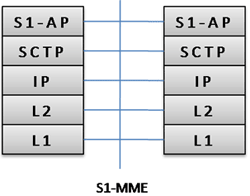 Control Plane for S1-MME Interface |
|
|||||||||
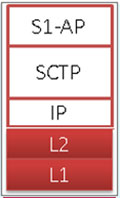 Conformance Protocol Stack |
|
|||||||||
- S1 Application Protocol (S1-AP): Application Layer Protocol between the eNodeB and the MME.
- SCTP for the control plane (SCTP): This protocol guarantees delivery of signaling messages between MME and eNodeB (S1). SCTP is defined in RFC 2960 [35].
LTE S1 Interface Procedure
In LTE S1 interface, MAPS™ acts as either eNodeB to test MME (DUT) or MME to test eNodeB (DUT) simulating the following call control procedure:
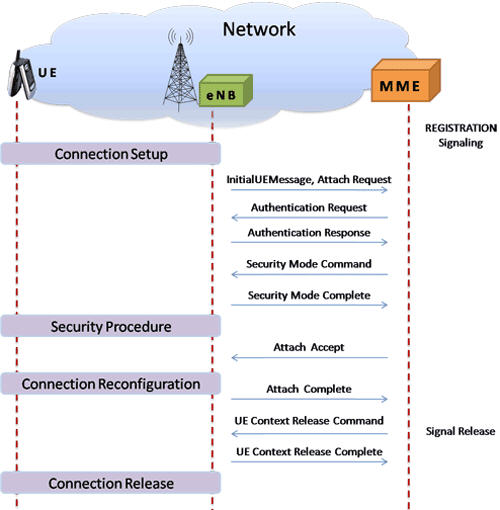
LTE-S1 signaling scenario (messages between eNodeB (eNB) and MME (Mobility Management Entity))
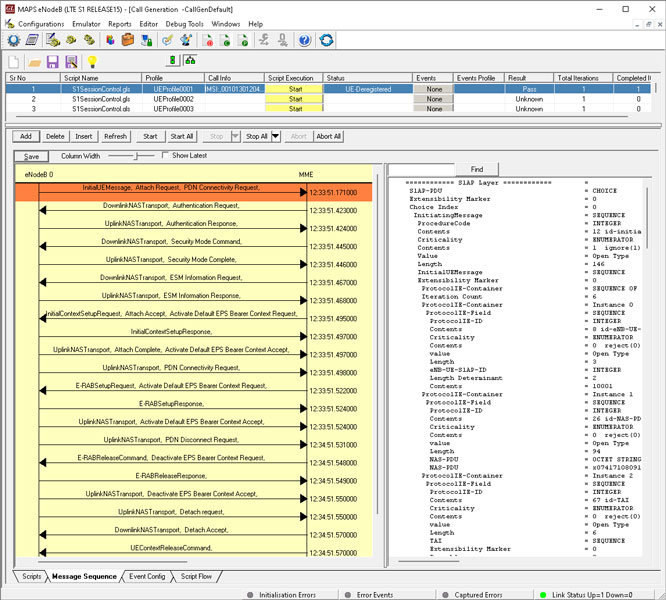
LTE S1 interface Call Control Procedure at eNodeB Node (Call Generation)
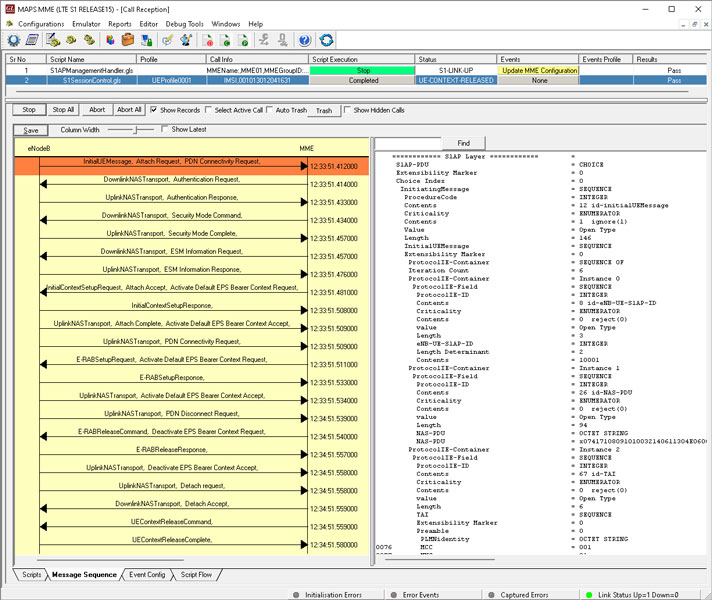
LTE S1 interface Call Control Procedure at MME Node (Call Reception)
As seen in the configuration scenario below, MAPS™ LTE S1 emulator can be configured as MME with conformance script to simulate various network side procedures conforming various success/failure test cases and automating the entire eNodeB (DUT) testing.
Supported Test Cases
- Paging success/failure
- Paging via IMSI success/failure
- UE attach success, UE detach, UE tracking area update
- Periodic updating
- Service Request
- E-RAB Setup procedures
- GBR E-RAB setup success
- Non GBR E-RAB setup success
- E-RAB setup failure
- E-RAB release
- E-RAB Modify - priority trigger, QCI changes, UE AMBR
- E-RAB Modify failure
- Setup context - Fail, Success
- UE Context Release, Modification
- Handover
- Success Handover S1 interface
- Handover prepare failure
- Handover resource allocation failure
- Handover failed: Multiple E-RAB ID instances
- Handover Cancel
- S1 Setup
- S1 Setup Success
- setup failure and resend setup
- Reset all resource, partial resource
- Error Indication
- Location report
The following depicts the success and failure Handover procedures between the source and target eNodeB entities and MME, where MAPS™ LTE S1 Conformance acts as MME:

Handover of S1 interface
The below screenshot depicts, MAPS™ LTE S1 Conformance loaded with S1SessionControl.gls conformance script, which ensures that the on initiation of handover procedure from DUT Source eNodeB (UE), MME sends handover request to the Target eNodeB.

Success Handover S1 Conformance Script
Handover prepare failure
The below screenshot depicts, MAPS™ LTE S1 Conformance loaded with S1SessionControl.gls conformance script, which ensures that MME will initiate the handover preparation failure towards source eNodeB with proper cause, when Source eNodeB (UE) initiates the handover procedure and the Target eNodeB initiates handover failure with cause.

Handover prepare failure S1 Conformance Script
Mobile Traffic Core - GTP (ETH101)
Mobile Traffic Core - GTP (ETH101) - module supports stateful user-plane packet transmission and reception services between any two nodes (GTP-U protocol entity) in LTE S1 (eNodeB and MME), and LTE (SGW, PDNGW) networks. It allows simultaneous simulation of multiple sessions per user. Currently, supports HTTP traffic simulation with the base requirements such as port number, server IP address, and pre-canned HTTP traffic file. Each GTP traffic is identified by a Tunnel ID, UDP port (2152 is default for GTP-U traffic), and the multiple HTTP connections are differentiated by Connection ID. The Mobile Traffic Core-GTP (ETH101) module can also support generation and verification of data traffic such as Email, FTP, HTTP, and more
Failure Handover S1 Conformance Script
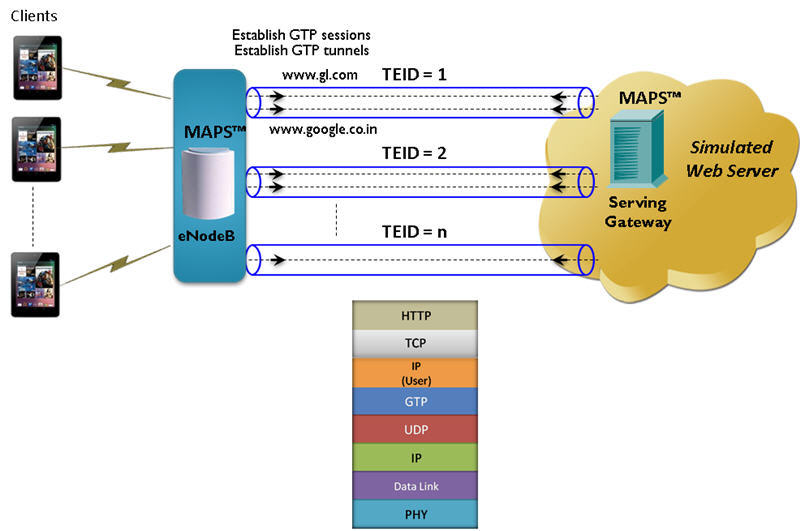
Mobile Traffic Core - GTP Protocol Stack
The occurring traffic events can also be verified in the MobileIpCore Server window as show in the below screenshots. Event Log contains a log of events reported by scripts.
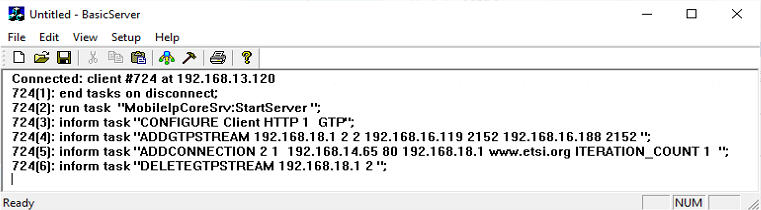
MobileIpCore Server Log for Traffic
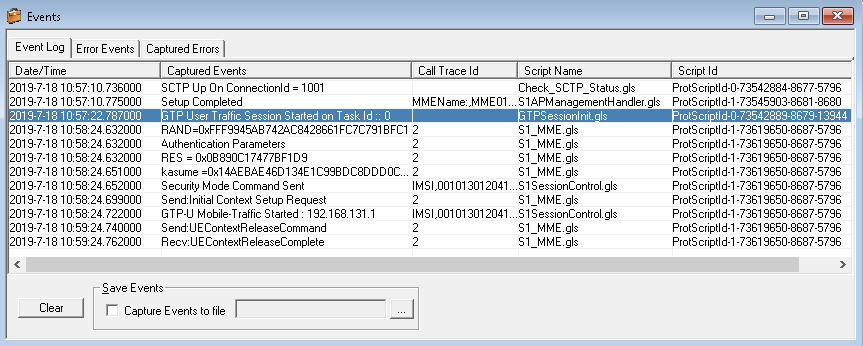
Mobile Traffic Core - Event log
Mobile Traffic Core - Gateway (ETH102)
Mobile Traffic Core - Gateway module allows simulation of Gateway and transfer user plane data from RNC to GGSN. It handles GTP tunnels on both direction of SGSN. It can also act as GGSN for user-plane traffic by encapsulating IP traffic over GTP. This module is supported in MAPS™ LTE S1, MAPS™ GnGp, MAPS™ LTE eGTP-c
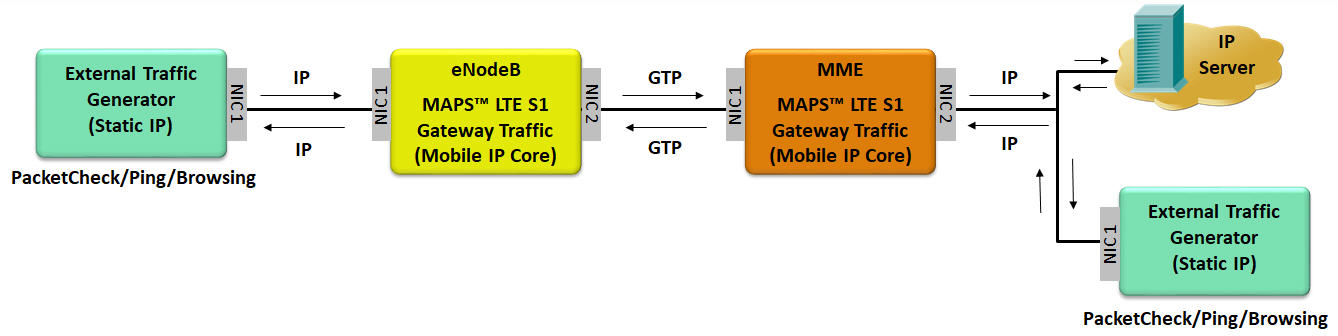
Mobile Gateway Traffic Simulation
References
| Item No. | Item Description |
| PKS140 | MAPS™ LTE S1 Emulator |
| PKS154 | MAPS™ LTE S1 Conformance Test Suite |
| PKS139 | MAPS™ Diameter Emulator |
| PKS141 | MAPS™ LTE X2-AP Emulator |
| GTP Mobile Traffic Options | |
|---|---|
| ETH100 ETH101 ETH102 ETH103 |
PacketCheck™ Mobile Traffic Core – GTP Mobile Traffic Core - Gateway Mobile Traffic Core - Gb |
| Item No. | MAPS™ for Wireless Network |
| PKS140 | MAPS™ LTE S1 Emulator |
| PKS142 | MAPS™ LTE eGTP (S3, S4, S5, S8, S10, S11 & S16) Emulator |
| PKS141 | MAPS™ LTE X2 AP Emulator |
| PKS146 | MAPS™ SGs Interface Emulation |
| PKS147 | MAPS™ Lb Interface Emulator |
| PKS148 | MAPS™ SLs Interface Emulator |
| Item No. | MAPS™ for IP Network |
| PKS122 PKS123 |
MAPS™ MEGACO Emulator MAPS™ MEGACO Conformance Test Suite (Test Scripts) |
| PKS124 | MAPS™ MGCP Protocol Emulation with Conformance Test Suite |
| Item No. | Traffic Options |
| GTP Mobile Traffic Options | |
|---|---|
| ETH101 ETH102 ETH103 |
MobileTrafficCore - GTP MobileTrafficCore - Gateway MobileTrafficCore for Gb Interface |
| RTP Traffic Options | |
| PKS102 | RTP Soft Core (additional) |
| PKS103 | RTP IuUP Softcore |
| PKS200 PKS202 PKS203 PKS204 PKS205 PKS206 |
RTP Pass Through Fax Emulation Fax Port Licences - 2 Fax Ports, RO Fax Port Licences - 8 Fax Ports, RO Fax Port Licences - 30 Fax Ports, RO Fax Port Licences - 60 Fax Ports, RO Fax Port Licences - 120 Fax Ports, RO |
| PKS211 | T.38 Fax Simulation |
| PKS107 | RTP EUROCAE ED-137B |
| PKS108 | RTP Voice Quality Measurements |
| PKS109 | MAPS™ High Density RTP Generator |
| PKS111 | MAPS™ Remote Controller |
| PKS112 | Message Session Relay Protocol for MAPS-SIP |
| PKS170 | CLI Support for MAPS™ |
| PKS106 | RTP Video Traffic Generation |
| PCD103 | Optional Codec – AMR – Narrowband (requires additional license) |
| PCD104 | Optional Codec - EVRC (requires additional license) |
| PCD105 | Optional Codec – EVRC-B (requires additional license) |
| PCD106 | Optional Codec – EVRC-C (requires additional license) |
| PCD107 | Optional Codec – AMR - Wideband (requires additional license) |
| PCD108 | Optional Codec - EVS (requires additional license) |
| PCD109 | Optional Codec - Opus (requires additional license) |
| Item No. | Related Software |
| PKS120 | MAPS™ SIP Emulator |
| PKV100 | PacketScan™ (Online and Offline) |
| PKV120 | PacketScan™ HD w/4 x 1GigE |
| PKV120p | PacketScan™ HD w/4 x 1GigE - Portable |
| PKV122 | PacketScan™ HD w/2 x 10GigE |
| PKV122p | PacketScan™ HD w/2 x 10 GigE - Portable |
PKV124 |
|
PKV124P |
|
| PKV123 | PacketRecorder™ HD & PacketRePlay™ HD |
| PKV121 | PacketScan™ FB |
| PKB100 PKB105 |
RTP Toolbox™ G.168 Echo Canceller Test Compliance Suite |
| PKV107 | LTE (Long Term Evolution) Analyzer (Optional with PacketScan™) |