MAPS™ SIGTRAN (SS7 over IP) Protocol Emulator
Simulate SS7 protocol over IP (SIGTRAN) between Signaling Gateway (SG) and Media Gateway Controller (MGC), interworking between TDM and IP network.
Brochure Request a Quote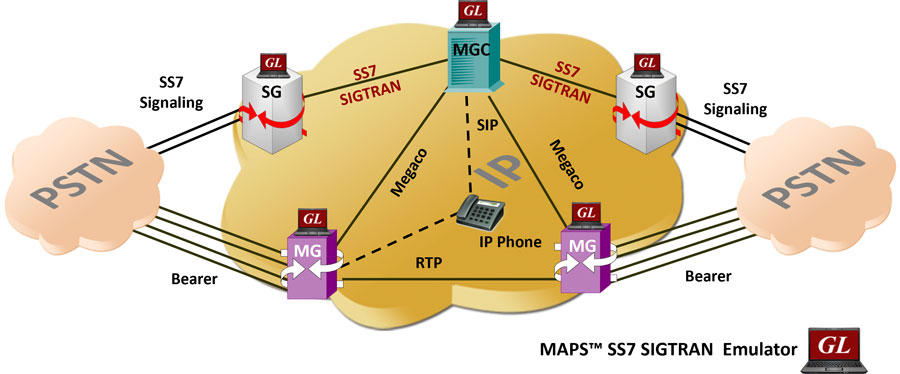
Background
SIGTRAN protocols are an extension of the SS7 protocol family, but carried over IP. A Signaling Gateway (SG) translates the SS7 TDM layers to SIGTRAN IP format. It supports the same application and call management functions as SS7 but uses two protocol layers on top of Internet Protocol (IP): Stream Control Transport Protocol (SCTP) and M3UA (MTP3 User Adaptation Layer.
M3UA enables SS7 protocol's User Parts (e.g. ISUP, SCCP and TUP) to run over IP instead of TDM lines.
ISUP, or ISDN User Part, is used to set up and release calls through the PSTN. In an IP network, ISUP is carried as payload by SCTP, as are SCCP and TUP. When a call is terminated in the IP Network, a soft switch translates SIGTRAN into SIP or MGCP signaling. If the call is terminated in the PSTN, an SG reconverts SIGTRAN to SS7 TDM.
Overview
Message Automation & Protocol Simulation (MAPS™) is a powerful protocol test simulation platform supporting a wide range protocols such as SIGTRAN (SS7 over IP), SS7 over TDM (T1 E1), ISDN over TDM (T1 E1), GSM-A & GSM-Abis over TDM, Megaco, SIP, and MGCP over IP.
GL's MAPS™ SIGTRAN (PKS130) is an advanced protocol simulator/tester for SS7 simulation over IP Networks. It can simulate a Signaling Gateway and Softswitch ISUP signaling specification as defined by ITU-T standards. The application supports testing network elements, error tracking, regression testing, load testing/call generation and generation of high volumes of ISUP traffic. MAPS™ SIGTRAN functionality covers the ITU and ANSI variant of SS7 implementing M3UA, M2PA, M3UA, and ISUP protocols. It is able to run pre-defined test scenarios against ISUP test objects in a controlled & deterministic manner.
The application is available as
- MAPS™ SIGTRAN Emulator (Item # PKS130)
- MAPS™ SIGTRAN Conformance Scripts (requires additional license)
MAPS™ SIGTRAN Conformance Scripts (requires additional license) is designed for compliance tests and functional tests, where test objects can be accurately and reliably validated for compliance with ITU-T standard Q.761-764 and Q.784. It is suitable for manufacturers, network operators and service providers to address all stages of the development cycle, regression testing through to type approval, and acceptance testing.
MAPS™ application supports powerful utilities like Message Editor and Script Editor which allow new scenarios to be created or existing scenarios to be modified using ISUP messages and parameters.
MAPS™ SIGTRAN in an SS7overIP environment connects to traditional SS7 nodes or IP-enabled signaling nodes and offloads TDM SS7 traffic to IP networks. It is also capable of operating in an environment that interworks between TDM and SS7overIP. It supports TDM traffic simulation over IP networks. Various traffic types include File, Digits, Tones, FAX, IVR, Dynamic VF, and Voice Quality Testing. MAPS™ can be configured to auto start the traffic over SS7 signaling or manually define traffic at run time.
GL also offers MAPS™ Media Gateway Controller (MGC - PKS300), a multi interface simulator, which can be configured with Signaling Gateway (SG) to handle call control and Media Gateway (MG) in the network to perform end-to-end test scenario by simulating SIGTRAN, MEGACO and MGCP interfaces. GL recommends purchasing additional MG simulation with appropriate RTP licenses for high density traffic simulation.
Also available is an independent GUI based SIGTRAN (SS7 over IP) Protocol Analyzer for online capture and decode of the signaling in real-time both during tests and as a stand-alone tracer for live systems.
Main Features
- SS7 simulation over IP
- User-friendly GUI for configuring the SS7 M3UA, M2PA, M2UA Layers
- User Configurable Signaling Links
- Supports ASP (Application Server Process) or SGP (Signaling Gateway Process) termination types over IP
- CIC Management features: Circuit Blocking & Unblocking, Circuit Group Blocking & Circuit Group Unblocking, Circuit Reset & Group Reset
- Circuit Mapping features: CIC mapped to Timeslot (Timeslot Based / CIC Based), and Only CIC (Without traffic, user can provide CIC range for each SSP, CIC is generated randomly or User Provided)
- Access to all ISUP Message Parameters Initial Address, Subsequent Address, Release messages, and more
- User controlled access to optional ISUP parameters such as timers
- Subsequent Address Message (SAM) configurations available
- Generates and processes SIGTRAN valid and invalid messages.
- Supports calls suspend, call resume, call hold and call retrieve.
- Offloads TDM Traffic (digits, voice file, tones, IVR, FAX, Dynamic VF, and Voice Quality) over IP
- Supports SIGTRAN conformance testing (requires additional license)
- With MAPS™ MGC Multi-interface (requires additional licenses), both end-to-end signaling (using SIGTRAN) and RTP media (using MEGACO) simulation can be performed
- Supports Client-Server functionality requires additional license; clients supported are Python and Java
- Automation, Remote access, and Schedulers to run tests 24/7
Supported Protocols Standards
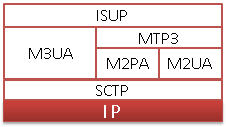
SS7 Sigtran Protocol Stack
| Supported Protocols | Specification Used |
SS7 SIGTRAN Interface |
|
|---|---|
ISUP ITU |
ITU - Q.761, Q.762, Q.763 and Q.764 |
ISUP ANSI |
ANSI - T1.113.1 to T1.113.4 |
ISUP UK |
ND1007:2007/01 TSG/SPEC/007 |
M3UA ITU |
RFC 3332 |
M3UA ANSI |
RFC 3332 |
M2PA |
RFC 4165 |
M2UA |
RFC 3331 |
Call Simulation over SS7 SIGTRAN
The Sigtran call procedure is as shown below with two telecom switches exchanging the ISUP messages. Detailed call flows are provided in ITU-T Recommendation Q.784.1.
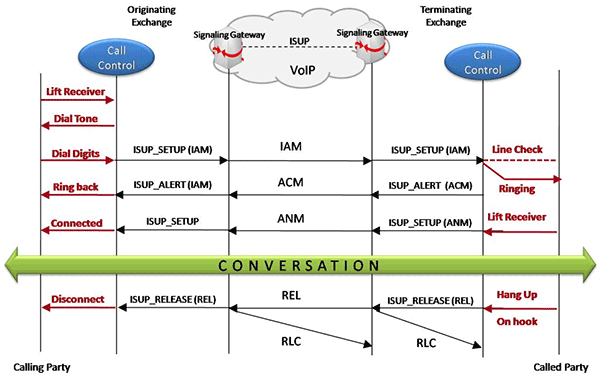
Typical SIGTRAN Call Procedure
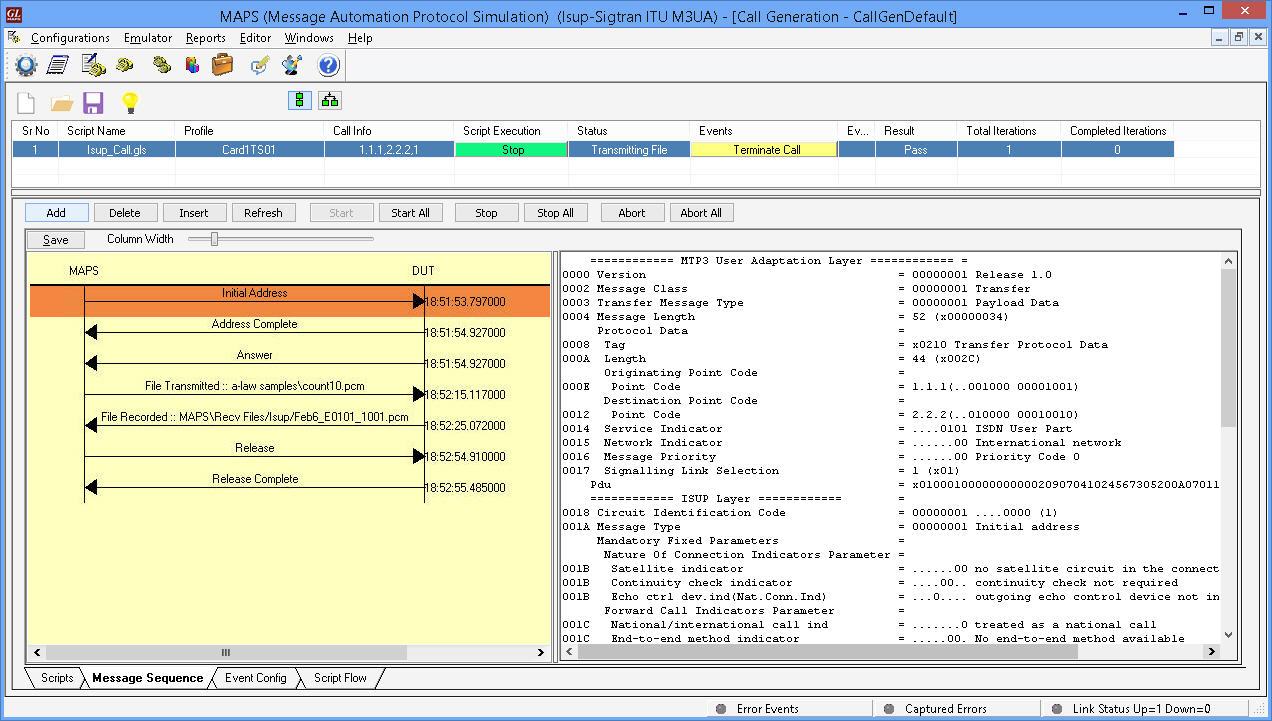
TDM Traffic Simulation over SS7 IP (Call Generation)
MAPS™ SIGTRAN application can be configured as SIGNALING GATEWAY (SGW) and MEDIA GATEWAY CONTROLLER (MGC) terminals to simulate SS7 signaling over IP and TDM traffic.
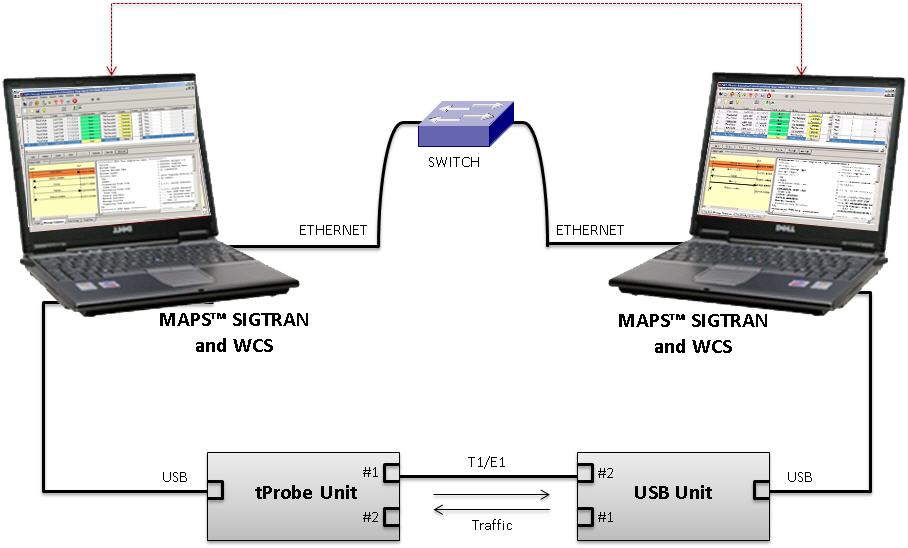
Test Setup Simulating TDM Traffic
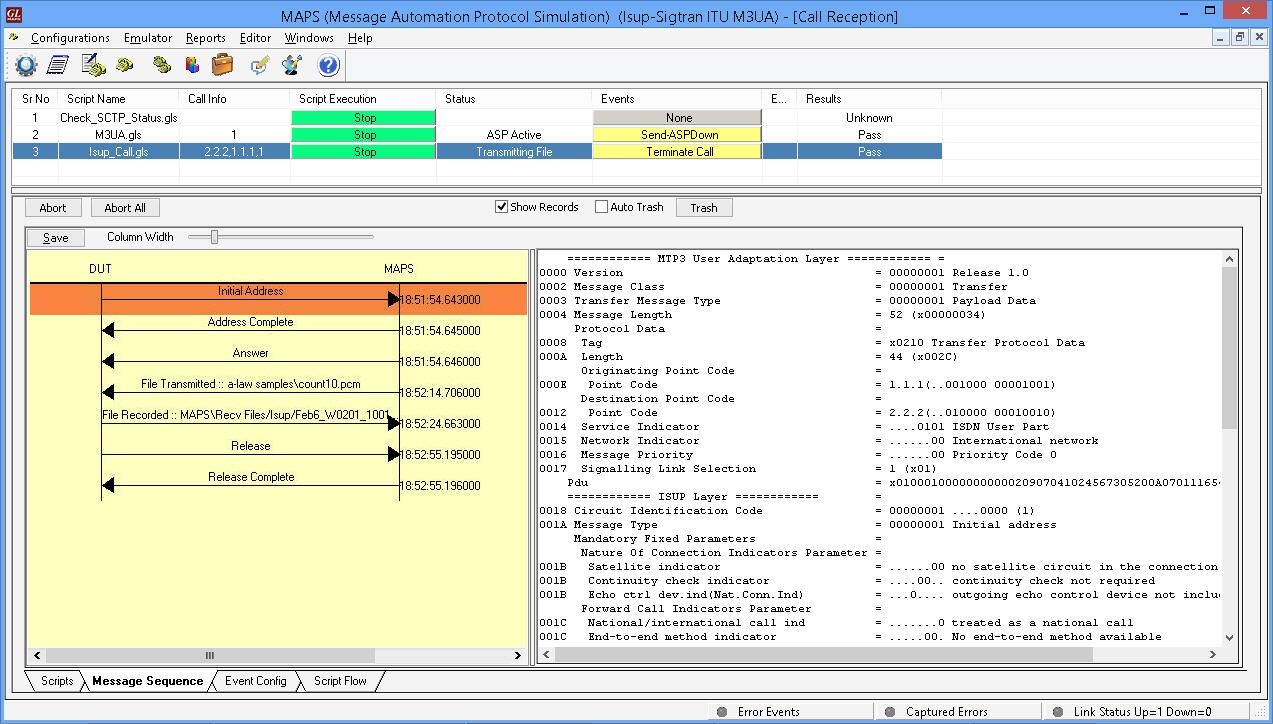
TDM Traffic Simulation over SS7 IP (Call Reception)
A Typical MAPS™ Sigtran Test System
A typical MAPS™ Sigtran consists of:
- A TCL interface communicating over TCP/IP to a Rack PC with T1/E1 Analyzer Software
- The Rack PC consists of MAPS™ Client IFC, MAPS™ CLI Server, T1/E1 Analyzer Software (including Windows Client Server software) and a Dual T1/E1 Card
- A patch panel for RJ-11 connections to the outside world (DUT)
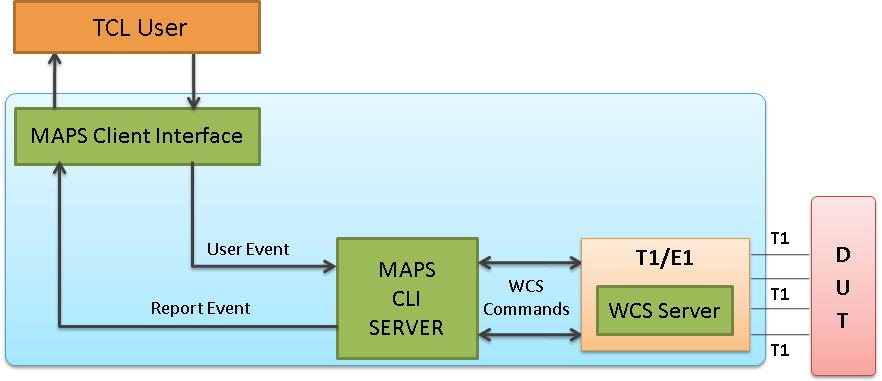
- TCL Client – Acts as User Interface, which executes TCL Scripts.
- MAPS TCL Interface (MAPS Client IFC) – acts as an interface between MAPS™ CLI Server and its client TCL. It interprets the TCL Commands and forms the appropriate command as understood by MAPS CLI Server and vice versa.
- MAPS™ CLI Server is an executable that inherits all features of MAPS™ without GUI. It listens to a TCP message socket to receive and execute commands from client and sends the responses back to client.
T1/E1 Windows Client Server - Windows Client/Server software performs all SS7 emulation primitives including signaling, tone detection, call progress signals, file transfer, and many more functions.
TCL application consists of three functional modules: Tool Command Language (Tcl) Client and Script, MAPS™ Tcl Interface, and MAPS™ Server
In CLI, MAPS™ Server constitutes two server modules, namely MAPS™ CLI server and GL WCS server.
- MAPS™ CLI Server
MAPS™ CLI Server is an executable which inherits all features of MAPS™ without the graphical user interface. Instead it listens to TCP message socket to receive and execute commands from the client and sends the responses back to the client.
- GL's Windows Client Server
GL's Windows Client/Server software allows the user of T1/E1 analysis cards the capability of remote operation, automation, and multi-site connectivity.

TCL client receives report event from the CLI server as shown in the figure below.
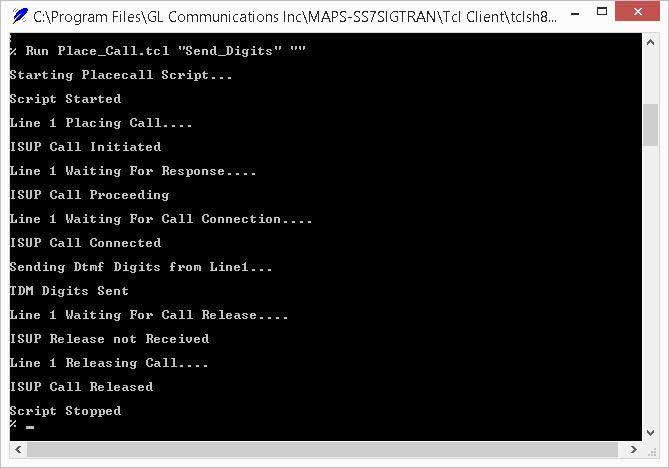
TCL client placing the call
Resources
Please Note: The XX in the Item No. refers to the hardware platform, listed at the bottom of the Buyer's Guide, which the software will be running on. Therefore, XX can either be ETA or EEA (Octal/Quad Boards), PTA or PEA (tProbe Units), XUT or XUE (Dual PCIe Express) depending upon the hardware.
| Item No. | Item Description |
| PKS130 | MAPS™ SIGTRAN Emulator |