Windows Client/Server for T1 E1 or T3 E3 Analysis
Overview
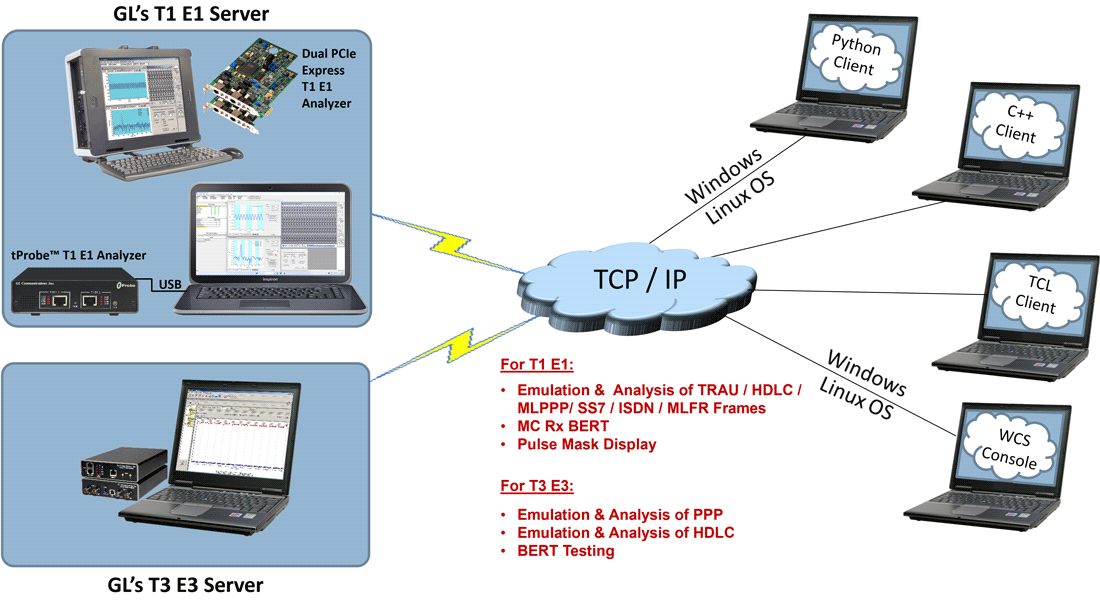
GL's Windows Client/Server software allows the user of T1 E1 or T3 E3 analysis/emulation application, the capability of remote operation, automation, and multi-site connectivity. T1 E1 or T3 E3 hardware in a server is easily controlled through software clients at remote or local sites via TCP/IP sockets. Connectivity can be via Dial-Up, LAN, WAN, or more typically the Internet. Server software can run multiple tasks simultaneously at the request of the client software.
Windows Client Server (WCS) (XX600) is available as a part of the T1 E1 analyzer basic application. However, with additional licenses, various modules can be obtained to suit a wide range of testing requirements. The WCS software supports Python scripting on both Windows® and Linux® operating systems.
Client application is distributed freely with GL's WCS application and can be used as a template for more complex tasks. Example, clients are available in C++, C#, Windows/Linux Python (version 3.6 or above), and Windows Tool Command Language (TCL). WCS clients are available via console/terminal Command Line Interface (CLI) and accessible remotely through SSH or from Python scripts running in Windows® or Linux® operating system.
Windows/Linux Client (WLC) is a Command Line Interface (CLI) application that issues commands to T1 E1 and T3 E3 WCS servers and display replies into Console/PowerShell/Terminal Windows. WLC works in Windows and Linux versions. However, through SSH or another remote access terminal it can be used on any operating system. WLC is a portable Windows/Linux WCS client communication library compatible with WCS server.
WLC has two groups of commands:
- WLC commands: Display WLC command help, connect to WCS Server, disconnect from WCS Server, pass commands to WCS servers and display replies, save, and execute scripts etc.
- WCS commands: Controls T1 E1 or T3 E3 cards and display responses from the WCS server commands and tasks
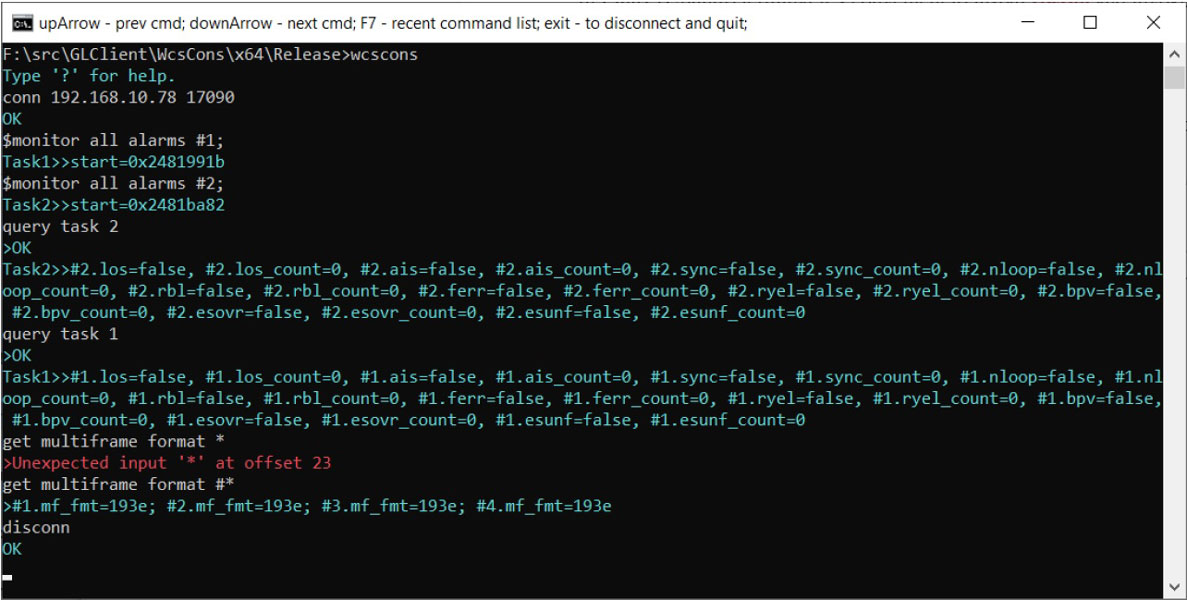
WCS Console
A list of WCS Modules is given below.
Typical applications include:
- Supports for framed and unframed transmission/reception of signals
- Intrusive/Non-Intrusive T1 E1 Testing
- Performance monitoring and testing of multiple site locations from a single client
- Shared use of T1 E1 test equipment from multiple client locations
- Automated factory testing on production lines
- Integration of T1 E1 testing into more complex testing systems
- Examples of monitoring Tasks
- Monitor Signaling Bits
- Detect and report DTMF/MF/MFC-R2 digits on channels as they occur
- Precision Delay Measurement
- Traffic Classifier
- Collection of call records from remote locations based on signaling (SS7, CAS, ISDN, etc.)
- Monitor, report, and record alarms at various sites every two seconds or as they occur
- Record/Playback functions
- File based Record/Playback
- Client Data Tx Rx
- Intrusive Testing
- Supports auto and manual error insertions along with Bulk delay to apply delay on the entire T1 E1 trunk.
- Dual VF Tx Rx (earlier called as Simplified Audio Client) to perform analog Tx/Rx and Digital T1 testing functionalities
- Simple modifiable scripts to run each and every G.168 tests
- Perform BERT on selected timeslots involving multiple paths simultaneously
- Optional applications - (requires additional licenses)
- Jitter Generation, Measurement and Pulse Mask
- SS1 Signaling Analysis and Emulation
- SS7 and ISDN Decode Agent
- Remote Protocol Analyzers to remotely analyze SS7, ISDN, GR303, V5, HDLC, and Frame Relay protocols
- Fax Emulation – 2 to 120 Fax Ports
- DSP Operations (requires additional licenses)
- Supports Static DSP commands for Amplification/Attenuation, Delay, Filter, File Tx/Rx, Logical operations, Echo Cancel, and more. The enhanced Tone detection, ADSI (Analog Data Services Interface ) commands support Caller ID detection including CID, CIDCW (Call Waiting), VMWI (Visual Message Waiting Indicator) signal types
- Dynamic DSP Capability
- Supports following protocol emulation applications:
- MAPS™ SS7
- MAPS™ SS7 Conformance
- MAPS™ MAP
- MAPS™ ISDN, ISDN Emulator
- MAPS™ CAS, CAS Emulator
- MAPS™ CAP
- MAPS™ FXO FXS
- MAPS™ MLPPP, MLPPP Emulator
- MAPS™ GSM A
- MAPS™ GSM Abis
- MAPS™ INAP
- Other Protocol Emulation Modules - HDLC, T1-facility data link, E1-maintenance data link, MLPPP, ATM, ISDN, Multi-link Frame Relay, and TRAU protocols
GL Server Functions
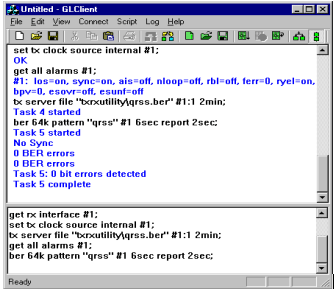
The Server performs 'actions' and 'tasks'. An 'action' is in response to a 'command' initiated by a Client. The Server performs the action immediately and notifies the Client of the result. An example of such commands - actions are board configurations. A 'task' is more complicated, and usually involves real time generation and processing of data, i.e. perform BERT for 10 minutes on a T1, as shown here. Multiple tasks can be initiated without completion of previous tasks. The Server informs the Client on tasks: started, status, complete, etc. Typical tasks are real time transmission and recording of files, bit error rate (BER) testing, alarm monitoring, Digital Signal Processing (DSP) operations, ds0 power monitoring, dtmf/mf/mfcr2 digit detection and generation, protocol decoding and simulation, error insertion, and so on. For a complete list refer to the User's Manual.
Supported Platforms:
GL's popular forms of T1 E1 analysis hardware such as
- Octal/Quad T1 E1 Analyzer Boards - 8/4 port PCIe based cards for higher scalability and performance
- Dual Express T1 E1 Boards – 2 port PCIe based cards for compatibility with newer motherboards
- tProbe™ T1 E1 Analyzer Unit - an enhanced version of USB based T1 E1 VF & Serial Data analyzer with expansion capabilities
A T1 E1 Server can be configured with as many as four cards in a single PC. Processing constraints should be taken into account.
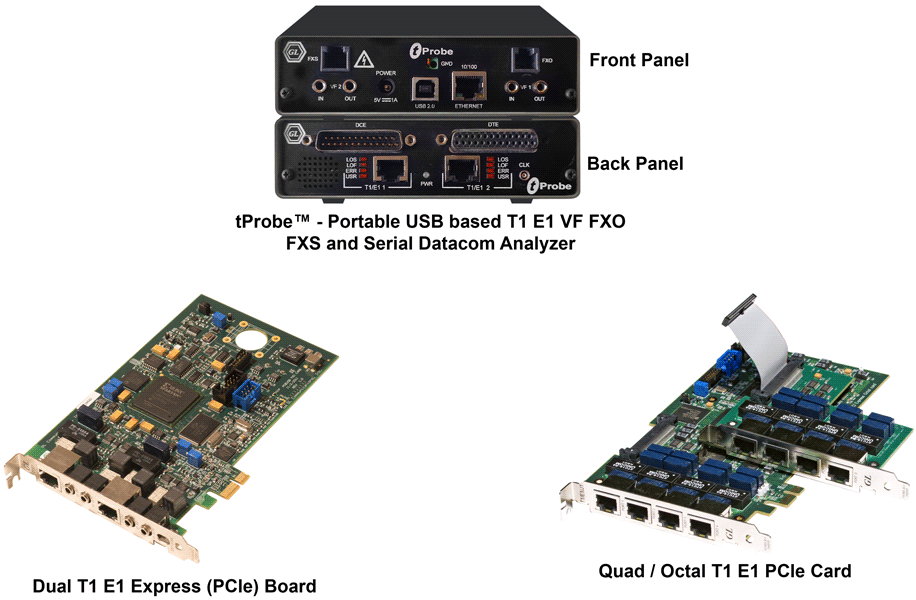
Screenshot of all T1 E1 Platforms
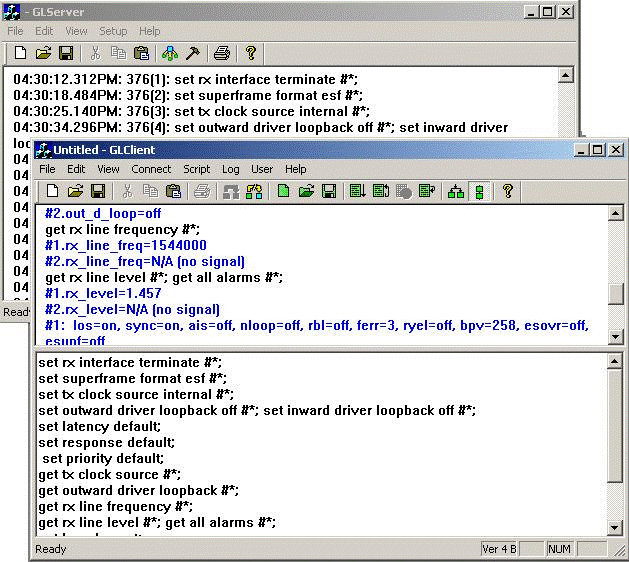
Screen Shot of Server
Screen Shot of Connect to Server
C++ Client
A Client communicates with the Server via TCP/IP encapsulated commands/tasks/responses. GL provides sample-working clients written in C++, Windows TCL. The user may expand on these, as the user desires. Both commands and tasks are high-level functions, e.g. perform a BERT, perform HDLC decoding on TS0 and provide packets. A client can initiate multiple tasks simultaneously or sequentially (queue up tasks in succession). All exchanges between the Client and Server are displayed and can be logged to a file for later viewing. Batches of commands/tasks can be saved or loaded for efficiency. 'Cut' and 'paste' features are also provided. The frame shown here shows that hundreds of tasks can be queued up for processing and many can be executing simultaneously.
To download C++ Client Source Code.
Client Software
Windows/Linux Python Client Module
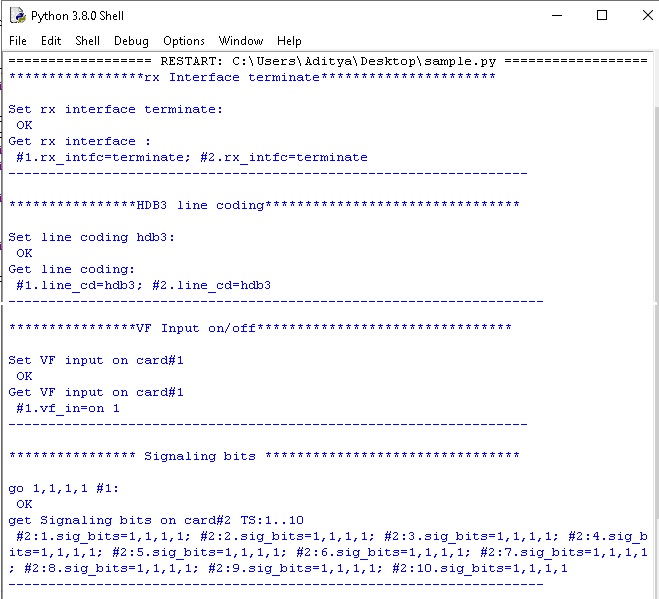
Windows Client Server (WCS) commands can be issued in Python scripts running in Windows or Linux. The Windows Client Python Module (WCPM) wcli_t1_e1.pyd provides a client interface to the T1 E1 WCS servers. It allows a Windows/Linux Python program to connect to one or more GL’s T1 E1 WCS servers (GWS) and execute server commands, asynchronous tasks and receive replies from GWSs. WCPM enables connection to multiple GWSs allowing the python program to control T1 E1 equipment at multiple computers and geographical locations via TCP/IP.
All the complexity of TCP/IP communications is completely hidden from users and is reduced to invoking functions with string parameters and functions returning string responses.
WCPM complies with python naming convention standards and development practices. When WCPM functions are invoked incorrectly a proper exception is thrown making it easy to diagnose and correct the problem.
The Linux Client Python Module wcli_t1_e1.so can be used on any Linux operating system .
The Real-World applications include:
- Support for framed and unframed transmission/reception of signals
- Intrusive/Non-Intrusive T1 E1 Testing
- Performance monitoring and testing of multiple site locations from a single client
- Shared use of T1 E1 test equipment from multiple client locations
- Automated factory testing on production lines
- Integration of T1 E1 testing into more complex testing systems
VB Client (legacy)
GL's VB Client is a Windows based GUI Client application that communicates with the GL's Server Software to execute and display basic functions on T1 and E1 lines. The VB Client application can be invoked as a stand-alone Client or in the case when it is co-resident with GL's T1 E1 analyzer cards, from the special application drop down menu --> WCS VB client. GL can provide free assistance in developing additional capability in the VB Client or GL Server.
C# Client for .NET (Complete source code available for free download)
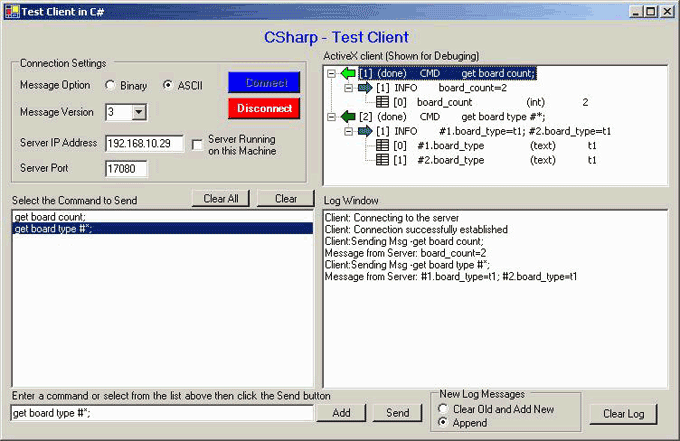
C-Sharp (C#) Client is a Windows based GUI Client developed in C# language, that works with GL's Server Software to execute and display basic functions on T1 and E1 lines. Using this client, you can connect to a GLServer running on local or remote machine. You can send basic commands to the server as well as see the reply sent back by the server. Example screen shots are provided below. The source code is provided free of charge, and provides a reliable framework for rapidly developing applications with GL's Server using the .Net platform. GL can provide free assistance in developing additional capability into the C# Client or GL Server.
Instructions for building & running the C# client source code:
You must have Microsoft's Visual C# .Net version 7.1 (Microsoft's .Net framework version 1.1.4322) or above installed on your machine to build the source code. Unzip the downloaded zip file into an empty directory on your local machine. It will create a new directory called "CSharpClient". Open this directory and then double click on the file named "CSharpClient.sln" to open the C# project and then use the "Start" button on the Visual C# IDE (or use F5 key) to build and run the C# client.
To download C# Client Source Code.
C# Client Software
Windows TCL Client
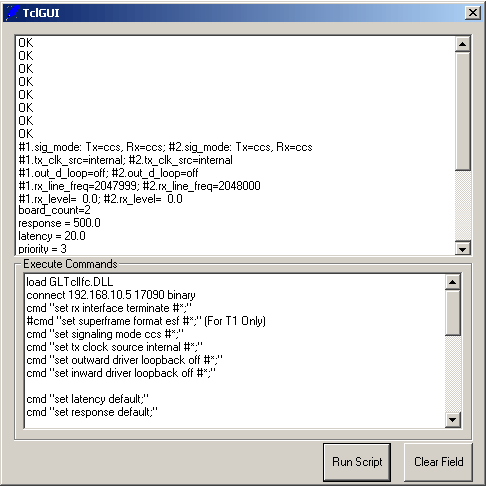
Windows Tool Command Language (TCL) Client is a client application that allows you to connect remotely to GL's T1 E1 analyzer via TCP/IP and perform various functions such as Intrusive/Non-Intrusive T1 E1 Testing, Monitoring Byte Values, Power level, Frequency, DC Offset, Transmit Tone, Digits, Signaling Bits, Error Insertion, Playback and record a data file. The TCL Client application includes a GLTclIfc.dll file, a packaged library that enables communication with the WCS Server from a TCL environment.
The advantage of such communication is to enable the user to process the response of a server query and to use it accordingly with the added benefits of a fully capable flow control engine. Windows TCL provides a simple scripting language, with programming facilities such as looping, procedures, and variables. Thus, users can now use the entire vast range of commands in the WCS Server in a much more beneficial way than the WCS Client.
Main Features of Windows TCL Client:
- Works with GL's field proven T1 E1 internal cards or Laptop T1 E1 external units
- All commands are simple and self-explanatory
- Commands can be customized to implement interactive menu options to play a file, wait for a digit, play another file based on the digit, and so on
- Values returned from the server can be easily accessed and stored as user-defined variables
- The commands provide easy access to the latest messages using various keywords such as task-clear, and last
- Streamlines both the source script and the output by executing only the messages that user requested
- For and While loops in scripts make task execution simpler
- Includes remote monitoring capability
This application can be invoked by double-clicking on TClsh84.exe file in \Program Files\GL Communications Inc\TCL Client directory to invoke a command-line client, and double-click on TclGUI.exe file in \Program Files\GL Communications Inc\TCL Client directory to invoke a windows-based TCL client application.
To download TCL Client Source Code
Windows TCL Client Software
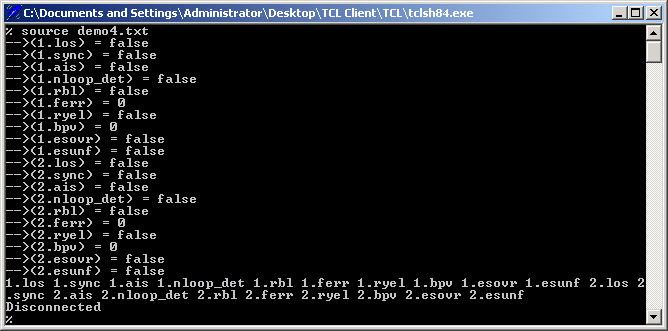
Windows TCL Client Command Line Interface
Get the latest TCL Interpreter from http://www.tcl.tk/software/tcltk/
Client Development Tools and Demo Applications
Client Core Library- GLXClient ActiveX Control
- GLDClient DLL
- GLDMClient DLL
- GLSClient Automation Server
The basic module for many GL Client Development tools is the GL Client Core Library. This library may be linked directly to application programs written in C/C++. It also has been wrapped in many other GL development tools that can be incorporated easily into applications written in other languages.
GLXClient ActiveX Control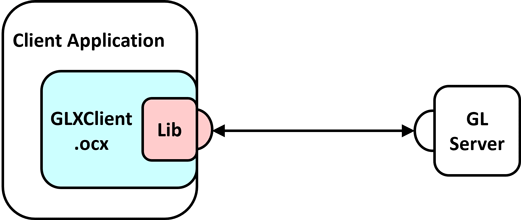
The GLXClient ActiveX Control brings Windows ActiveX technology to the GL Client/Server paradigm. Developers can use graphic development tools to incorporate the GLXClient ActiveX control into their applications.
GLDClient DLL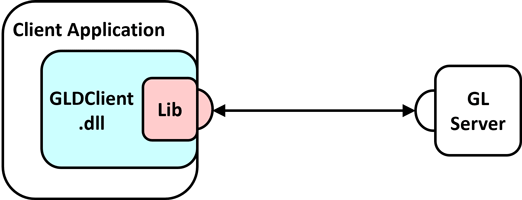
The GLDClient DLL provides a generic interface to core client services. Applications written in any language that supports Windows Dynamic Link Libraries can use this tool.
GLDMClient DLL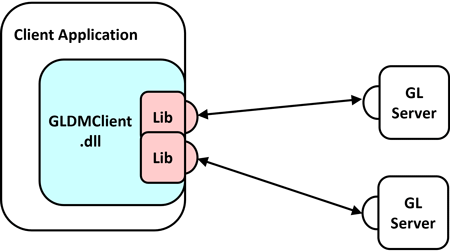
The GLDMClient DLL provides client applications with multi-server support through a DLL interface. Applications written in any language that supports Windows Dynamic Link Libraries can use this tool.
GLSClient Automation Server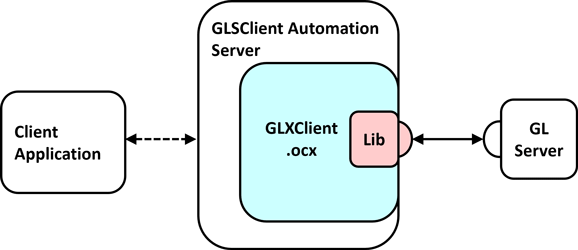
The GLSClient Automation Server builds on the GLXClient ActiveX Control to provide client services to Automation Clients such as VBScript
Demonstration Clients
In addition to the above client development tools, GL maintains a growing library of sample client applications written for commonly used platforms such as Visual Basic and Windows TCL/Tk. Please enquire about sample client code written for these and other platforms.
| Module Name | Description | Uses Module(s) |
| GLClient.lib | GL Client Core Library. Provides connection management and transaction management services. C++ source code is available. | |
| GLClient.exe | GL C++ Client Application. Demonstrates steps needed to connect to servers, send commands, read responses, and run scripts. C++ Source code available. | GLClient.lib |
| GLXClient.ocx | GL Client ActiveX Control. Allows easy integration of client services into Windows Applications. Provides visual transaction register. C++ Source Code available. | GLClient.lib |
| GLXClientExe.exe | GL ActiveX Client Application. Demonstrates use of programming interface provided by GLXClient.ocx ActiveX control including use of ActiveX events. C++ source code available. | GLXClient.ocx |
| GLDClient.dll | GL Client DLL. Provides a Windows DLL wrapper for the GLClient library, allowing its services to be used by Windows applications written in many different programming languages. C/C++ source code available. | GLClient.lib |
| GLDClientTest.exe | GL Client DLL Test Application. Demonstrates use of programming interface provided by GLDClient.dll in Windows applications, including use of callbacks to handle events. C++ source code available. | GLDClient.dll |
| GLDConsole - ClientTest.exe | GL Client DLL Test Application. Demonstrates use of programming interface provided by GLDClient.dll in Windows Console applications, including use of callbacks and special requirements for pumping Windows messages. C++ source code available. | GLDClient.dll |
| GLDMClient.dll | GL Client Multi-Server DLL. Provides a Windows DLL wrapper for the GLClient library that allows client applications to communicate with multiple servers. C/C++ source code available. | GLClient.lib |
| VBClient.exe | GL Visual Basic Client Application. A relatively full-featured client application that demonstrates the use of the GLXClient ActiveX control in a Visual Basic Application. VB code available. | GLXCleint.ocx |
| GLClient.tcl | GL TCL/Tk Client Application. A relatively full-featured stand-alone client application that demonstrates the requirements for a client application written with Windows TCL/Tk. Source code is available. |
Basic WCS Operations
- Dual VF Tx Rx (XX605 Included with the basic software)
Dual VF Tx Rx (earlier called as Simplified Audio Client) is a client-server based application that provides an alternate & simple GUI to perform analog Tx/Rx and Digital T1 testing functionalities. Dual VF Tx Rx supports analog operational mode featuring two VF interfaces per unit, with each VF interface providing independent Tx/Rx functionality. It includes spectral displays and in-built speakers for analyzing analog signals. Now, Dual VF Tx Rx (xx605) is available as a part of T1 E1 analyzer basic applications
- Error Insertion
This application permits inserting single, fixed, automatic, random, and burst error into the incoming bit stream. Bulk delay feature helps to simulate network delay along the T1 E1 links Maximum CRC and Frame error rate that can be inserted in the Error Insertion (T1/ESF) application has been increased to 1:1 from 1:100
- BERT provides commands that allow you to run full-frame or fractional bit error rate tests. Data rates of 64 kbps (64k) and 56 kbps (56k) are supported. The test is based on the transmission of a known pattern onto the specified transmit timeslots, and the receipt of that same pattern, perhaps with errors, on the corresponding receive timeslots
- Monitoring Alarms: Monitoring alarms is very similar to querying alarms, except that monitoring alarms is carried out over some period of time, whereas an alarm query delivers alarm status at some instant in time
- Monitoring Signaling Bits, Power, S/N: Commands in client-server allow you to monitor the signaling bits , signal-to-noise ratio, and average power level of a signal arriving on one or more receive timeslots
- Framing Format: GL Server supports commands that allow you set and/or query the framing format
- Interface: Supports Terminate, Monitor, and Bridge Rx interface options
- Clock Source: Provides options to set the transmit clock source and query the clock source currently being used by a specified port or ports
- Loopback: GLServer supports commands that allow user to loop back a DS1 signal at various points
- VF: Provides options to set and/or query the VF options such as gain, encoding, and drop and insert VF ports
Optional WCS Modules (Licensed Applications)
- WCS module XX610 - File based Record/Playback
- receives raw data from T1 E1 line and sends it to the client as task data messages
- receives data from the client via task data messages and transmits this data on T1 E1
- WCS module XX620 - Transmit/Detect digits (Place Call/Answer Call)
- WCS module XX625 - Channel Associated Signaling (CAS) Simulation
- WCS module XX626 - SS1 Analysis and Emulation
- WCS module XX629 - ISDN Emulation
- WCS module XX012 - Pulse Mask Compliance, Jitter Generation, and Jitter Measurement
- WCS module XX630 - DSP Functionality
- WCS module XX631 - Dynamic DSP Capability
- WCS module XX634 - Multi-Channel HDLC Emulation and Analysis & File based High Throughput HDLC Record/Playback
- WCS module XX635, XX636 - PPP, MLPPP, & Multi-Channel (MC) Emulation and Analysis
- WCS module XX640, XX641 - File based HDLC Record/Playback & Remote Record/Playback
- WCS module XX643 - MTP2 Emulation
- WCS module XX646 - Multi-Channel TRAU Tx/Rx Emulation and Analysis
The WCS TRAU Tx/Rx Test (TrauTerr) module is a GUI based client as well as command-line based client application, which can simulate & analyze TRAU/CCU (BTS or BSC end) on GL's T1 E1 cards. The application is capable of generating and receiving TRAU traffic (with or without impairments) based on the codec type, and time alignment (if specified). The frames are transmitted through the 16 or 8 kbps channels. Traffic source can be sequence number, HDL files (containing trau frames), flat binary file, and user-defined frames (ASCII HEX string/ file). This application can be used to test the correctness of the received data, by comparing with predefined patterns.
- WCS module XX649 - Scripted ISUP Simulator (MAPS™ SS7)
- WCS module XX647 Scripted ISUP Conformance Testing (MAPS™ SS7 Conformance)
- WCS module XX648 - Scripted ISDN Simulator (MAPS™ ISDN)
- WCS module XX649 - Scripted MAP Simulator (MAPS™ MAP)
- WCS module XX650 - File based HDLC Record/Playback over SA-bits
- WCS module XX651 - Scripted CAS Simulator (MAPS™ CAS)
- WCS module XX696 - MAPS™ CAP GL's MAPS™ can emulate CAP (CAMEL Application Part) supplementary services such as unified messaging, prepaid, toll-free (Freephone), and fraud control. These services are available in GSM, GPRS, UMTS over TDM and IP networks.
This module allows performing real-time Transmission and Recording of files from multiple client locations.
WCS - Client Data Tx/Rx
ClientDataTxRx is another WCS Server side module that provides the capability for "clients" to Tx & Rx T1 E1 data to & from the server. Instead of using the Tx & Rx files from the server location, the module uses the files at the Client location (in the case that the Server and Client are not the same PC). Now, the client can transmit and receive files or T1 E1 data directly to the server. Its main functions are:
This module is used detect and report DTMF/MF/MFC-R2 digits on channels as they occur from multiple client locations.
This application simulates any user defined CAS protocol by providing signaling bit transitions and forward/backward frequency tones/digits. Supported Protocols include: E1 MFC-R2, T1 Winkstart (R1 wink), T1 Loopstart and T1 Groundstart, E1 European Digital CAS (EUC), and any user-defined CAS protocol.
SS1 Analyzer detects and analyzes tone sequences that make up SS1 dial digits. Sequences of pulse and guard tones are detected, decoded, and assembled into their corresponding dial digits.The SS1 Dialer application provides the ability to setup and dial tone sequences that make up SS1 dial digits.
A Server client application is used for configuring the ISDN Layer parameters, Called/Calling Numbering Plan/Type, type of ISDN service, Place call or accept call for each timeslot or for the whole trunk, Switch and Subscriber Emulation, Simple NFAS setup for T1, and performs various other tasks on remote WCS clients.
This Client-Server application in Universal boards is used for detection, monitoring, and plotting of transmitted pulses. It includes Monitor Pulse Mask and Pulse Mask Display (pulsemaskchk.dll) modules that can be remotely controlled using simple commands by client applications. Some of the commands supported are CheckPulseMask, validate pulse, stop pulse mask validation, and others.
The Jitter measurement can be performed through commands with the Windows Client-Server application. The jitter ranges can be monitored on a specified port using simple commands by a client application.
Scripted DSP commands provide the ability to specify a sequence of digital signal processing steps to be performed on incoming and/or outgoing timeslots. The WCS DSP Operation module allows real-time as well as offline testing using DSP commands to perform functions such as Amplification/Attenuation, Delay, Filter, File Tx/Rx, Logical operations, Echo Cancel, Tone detection, ADSI (Analog Data Services Interface ) decoder, and so on. The new Tone Decoder and ADSI decoder DSP commands allows detecting Caller ID including CID, CIDCW (Call Waiting), VMWI (Visual Message Waiting Indicator) signal types.
Complex echo paths and complex block diagram operations can be easily simulated using the following functions: sum, invert, filter, delay, amplify, attenuate, bxor, bor, brev, bnot, band, infile, outfile, white noise, tone, dual tone, phase shift, dtmf digits, mf digits, mfcr2 digits, power monitor, signaling bits monitor, const, bytes, and many other operators.
Scripted DSP commands provide the ability to perform dynamic or time-varying operations via schedules. A schedule is a CSV file which specifies a sequence of digital signal processing steps to be performed at specified time offset for each operator on incoming and/or outgoing signals.
The Dynamic DSP Operation module allows real-time as well as offline testing using DSP commands to perform functions such as Amplification/Attenuation, Delay, Filter, File Tx/Rx, Logical operations, Echo Cancel, and so on.
The HDLCTerr module performs multi-channel HDLC emulation and analysis. It permits frame error testing and transmission of memory generated sequences of fixed or variable length HDLC frames, GL *.HDL Trace file frames, and various bandwidth streams.
The HDLCHpio module performs file-based HDLC record and playback actions. It permits receive/transmit of HDLC streams of various bandwidth (hyper channel, timeslot, and multiple sub-channel streams per timeslot).
Automated testing of PPP and MLPPP can be accomplished using client-server based PPP, MLPPP, & Multi-Channel (MC) Emulation and Analysis (MLPPPTerr) module. The PPP, MLPPP, & Multi-Channel (MC) Emulation and Analysis module is an application that displays the command syntax, sends and receives MLPPP frames with or without impairments, and logs the events.
The File based HDLC Record/Playback (Hdlcfunc) module is an application that allows HDLC Traffic Capture/Playback. It also allows transmission/reception of *.HDL frames files located on the server and on client.
This client application simulates MTP2 and MTP3 layers of the SS7 stack. It can act as a peer end to test an SS7 stack
An advanced protocol simulator/tester for SS7 simulation over TDM (E1/T1).MAPS-SS7 can simulate Service Switching Point (SSP) and ISUP signaling specification as defined by the ITU-T standards. It supports testing network elements, error tracking, regression & conformance testing, load testing, and generation of high volumes of ISUP traffic. MAPS-SS7 functionality covers the ITU and ANSI variant of SS7 implementing MTP2, MTP3, and ISUP protocols.
Suitable for conformance tests and functional tests, where test objects can be accurately, reliably and comfortably validated for compliance with ITU-T standard Q.761-764 and Q.784.
An advanced protocol simulator/tester for ISDN simulation over TDM (T1 E1) and generates high volumes of ISDN traffic. The tester can simulate ISDN signaling as defined by the ITU-T standards. Currently it is used to perform testing using ISDN protocol messages over T1 E1, and offers a complete solution for testing, troubleshooting, and maintenance of devices and networks implementing PRI ISDN.
GL's MAPS™ MAP (Mobile Application Part) Emulator is an advanced protocol simulator that can simulate various MAP signaling interfaces (C, D, E, F, H, and & Packet-switched interfaces such as Gc, Gr, Gf, Gd) in GSM/UMTS networks as defined by 3GPP standards.
The File based HDLC Record/Playback over SAbits (SaBitsFunc) module is an application that allows receive and transmit of HDLC frames in *.hdl file format.
GL's MAPS™ CAS (Channel Associated Signaling) Emulator is an advanced protocol simulator for simulating CAS signaling over TDM (T1 E1). MAPS™ CAS automates the testing procedure with the ready scripts on a single or on all timeslots. Calls are established, once the signaling information such as the signaling bits, MF, DTMF, or tones are detected. Client application simulating all CAS protocols, including wink-start, loop-start, ground start, R1, MFC-R2, etc.
- WCS module XX624 - Scripted FXO FXS Simulator (MAPS™ FXO FXS)
MAPS™ emulates functions of Foreign Exchange Subscriber (FXS) by analog phone lines and Foreign Exchange Office (FXO) by phones using the FXO and FXS ports on a tProbe™. MAPS™ provides a facility to automate the place call/answer incoming calls on both FXO and FXS ports.
- WCS module XX652 - Scripted MLPPP Conformance Testing (MAPS™ MLPPP)
- WCS module XX654 - Inverse Multiplexing for ATM Emulation
- WCS module XX655 - Multi-link Frame Relay (MFR) Emulation
- WCS module XX660 - File based Record/Playback over FDL
- WCS module XX670 - Multi-Channel BER Testing
GL's MAPS™ MLPPP Emulator is an advanced protocol simulator for PPP/MLPPP simulation over TDM (T1 E1). Ready scripts are capable of generating and receiving MC-MLPPP/PPP traffic (with or without impairments) automating the test procedure.
Inverse Multiplexing for ATM (IMA) can be emulated on up to 16 T1 E1 lines using GL's client-server based IMA Emulation software module. All the operations that are performed using GUI can also be performed in CLI making it suitable for automated testing.
The MFR Emulation module is used to simulate FR links and MFR bundles with or without impairments. The traffic can be transmitted and received by creating virtual channels on the selected FR links or MFR bundles. All the operations that are performed using GUI can also be performed in CLI making it suitable for automated testing
The File based Record/Playback over FDL (FdlFunc) module is an application that allows to receive and transmit HDLC frames and signals in *.hdl file format over facility data link (FDL).
Multi-channel BER Testing server function allows the user to take advantage of the more advanced features of the HD boards. It supports transmit and receive of *.ber files, bit inversion on Rx pattern, and logic errors insertion for Tx and Rx patterns.
- WCS module XX680 - Traffic Classifier
- WCS module XXFT0 - Fax Emulation - 2 to 120 Fax Ports
- WCS module XX690 - SS7 Decode Agent
- WCS module XX691 - ISDN Decode Agent
- WCS module XX692 - Scripted GSM A Interface Simulator (MAPS™ GSM A)
- WCS module XX693 - Scripted GSM Abis Interface Simulator (MAPS™ GSM Abis)
- WCS module PKS136 - MAPS™ INAP Emulator (MAPS™ INAP)
Traffic Classifier is an application that can analyze the traffics such as voice, fax, data, and tones (dial tone, ring-back tone, busy tone, so on) and also identify dialing digits and other events happening on a T1 E1 network
The software can transmit and receive the fax information as electrical signals over the T1 E1 lines. The contents (text or images) are sent as a graphic image. The receiving end reconverts the coded image and creates a copy of the document.
A console client application that monitors SS7 Links, decodes multiple SS7 protocol standards, filters user-specified protocol parameters, builds CDRs, and streams over TCP/IP to remote site.
A console client application that monitors ISDN Links, decodes multiple ISDN protocol standards, filters user-specified protocol parameters, builds CDRs, and streams over TCP/IP to remote site.
An advanced protocol simulator/tester for GSM simulation over A Interface that can simulate BSSMAP and DTAP messages and signaling specification as defined by 3GPP standards. The tester supports testing network elements MSC and BSS, Error tracking, regression testing, conformance testing, load testing/call generation and generation of high volumes of GSM traffic.
An advanced protocol simulator/tester for GSM simulation over Abis Interface that can simulate BTSM messages and signaling specification as defined by 3GPP standards. The tester supports testing network elements BTS and BSC, Error tracking, regression testing, conformance testing, load testing/call generation and generation of high volumes of GSM traffic.
An advanced protocol simulator/tester for INAP (Intelligent Network Application Part) services. The tester supports testing network elements gsmSCF and gsmSSF, error tracking, regression testing, conformance testing, and load testing/call generation. It is able to run pre-defined test scenarios against INAP test objects in a controlled & deterministic manner
Resources
Please Note: The XX in the Item No. refers to the hardware platform, listed at the bottom of the Buyer's Guide, which the software will be running on. Therefore, XX can either be ETA or EEA (Octal/Quad Boards), PTA or PEA (tProbe Units), XUT or XUE (Dual PCIe Express) depending upon the hardware.
| Item No. | Item Description | Command Type | |
| XX600 | Basic Client/Server Scripted Control Software (Included with Basic Software) | Precise and Sequential control of T1 or E1 Lines – Client/Server – Uses TCP/IP, included with basic software | |
| XXFT0 | Fax Emulation - includes xx600, requires one of the licenses below: XXFT2 - 2 Fax ports XXFT3 - 8 Fax ports XXFT4 - 30 Fax ports XXFT5 - 60 Fax ports XXFT6 - 120 Fax ports |
Fax Emulation for T1 E1 and Analog Interfaces (FXO and FXS), | |
| XX605 | Dual VF Tx Rx (earlier called as Simplified Audio Client) (Included with Basic Software) - (optional xx626) | GUI based analog/digital audio Tx/Rx Functions | |
| XX606 | Pulse Shape & Jitter Measurement (includes xx600) | Pulse Shape and Jitter Measurement Data of T1 E1 signals (Universal and tProbes only), included with basic software | |
| XX610 | w/ Transmit and Receive File Capability | Ability to Tx Rx Files directly over T1 or E1 lines – server based; ability to Tx Rx data directly from client; includes xx600 |
|
| XX620 | Transmit/Detect digits (Place Call/ Answer Call) (includes xx600) |
1. Transmit MF/MFR2/DTMF digits 2. Monitor MF/MFR2/DTMF digits 3. Monitor Digits using .mtd files 4. Tone generation using .mtg files 5. Tone Detection using .mtd files |
|
| XX625 | Channel Associated Signaling (CAS) Simulation (includes xx600, requires xx610, xx620 and xx630) | Channel Associated Signaling (CAS) Simulation | |
| XX626 | SS1 Signaling Analyzer (includes xx600, xx605, xx610, xx620, and xx630) | SS1 Signaling analysis | |
| XX630 | DSP Functionality (includes xx600) | DSP Options: Delay/Attenuate/Amplify/ Filter/Tone Transmission/TxRx Loopback/ Sum/Logical operation/File TxRx/ White Noise/Alaw mlaw/ Transmit MF/MFR2/DTMF digits Active Speech Level Per P.56/ Multiplex & De-multiplex/ Echo Cancel |
|
| XX631 | Dynamic DSP Capability (includesxx600, requires xx630) | Dynamic DSP Functionality | |
| XX629 | ISDN Emulation (includes xx600 and xx640; recommended xx610 and xx620 for traffic generation and reception) | ISDN Emulation | |
| XX634 | Multi-Channel HDLC Emulation and Analysis & File based High Throughput HDLC Record/Playback (includes xx600) | HDLCHpio and HDLCTerr test | |
| XX635 | PPP Emulation and Analysis (includes xx600, requires xx634) | PPP frames Tx & Rx | |
| XX636 | MC-MLPPP Emulation and Analysis (includes xx600, requires xx634, and xx635) |
MC-MLPPP Tx/Rx | |
| XX640 | File based HDLC Record/Playback (includes xx600) | HDLC Frames Tx & Rx | |
| XX641 | File based HDLC Remote Record/Playback (includes xx600 and xx640) |
HDLC Remote Capture | |
| XX643 | MTP2 Emulation (includesxx600) | MTP2 Protocol Emulation | |
| XX646 | Multi-Channel TRAU Tx/Rx Emulation and Analysis | TRAU Frames Tx & Rx w/error testing | |
| XX649 | Scripted ISUP Simulator (MAPS™ SS7) -includes xx600, requires xx610 and xx620 for traffic generation; xx643 is included; | Service Switching Point (SSP) and ISUP signaling Simulation over T1 E1 | |
| XX649 | Scripted MAP Simulator (MAPS™ SS7) | Simulate MAP messages and signaling over D interface in GSM/UMTS circuit switch networks | |
| XX647 | Scripted ISUP Conformance Testing (MAPS™ SS7 Conformance) - requires xx649 | ISUP compliance testing as per ITU-T standard Q.761-764 and Q.784 | |
| XX648 | Scripted ISDN Simulator (MAPS™ ISDN) - includes xx600, requires xx610 and xx620 for traffic generation | ISDN simulation over TDM (T1 E1) | |
| XX650 | File based HDLC Record/Playback over SA-bits (includesxx600) | SA bits Tx & Rx. | |
| XX651 | Scripted CAS Simulator (MAPS™ CAS) - includes xx600, requires xx610, xx620, and xx630 | Simulating CAS signaling over TDM (T1 E1) | |
| XX652 | Scripted MLPPP Conformance Testing (MAPS™ MLPPP) - includes xx600, and xx634 | PPP/MLPPP over TDM (T1 E1)compliance testing as per RFC 1661, RFC1990 | |
| XX654 | Inverse Multiplexing for ATM Emulation – includes GUI, includes xx600 | Inverse Multiplexing for ATM (IMA) Emulation on up to 16 T1 E1 lines | |
| XX655 | MFR Emulation (includes xx600, requires xx634) | MFR Emulation | |
| XX656 | ITU SS7 INAP CS1 CS2 Emulation | ||
| XX660 | File based Record/Playback over FDL (includes xx600) | FDL Tx & Rx | |
| XX670 | Multi-Channel BER Testing (includes xx600, requires xx610) | Multi-Channel Rx BERT | |
| XX680 | Traffic Classifier (includes xx600) | Traffic Classifier | |
| XX690 | Console based SS7 Protocol Decode Agent (includes xx600) | SS7 Decode Agent | |
| XX691 | Console based ISDN Protocol Decode Agent (includes xx600) | ISDN Decode Agent | |
| XX692 | Scripted GSM A Interface Simulator (MAPS™ GSM A)- includes xx600 and xx643; requires xx610 and xx620 for traffic generation | GSM over A Interface simulation | |
| XX693 | Scripted GSM Abis Interface Simulator (MAPS™ GSM Abis)- includes xx600, and requires xx646 | GSM over Abis Interface simulation | |
| Related Software | |||
|---|---|---|---|
| TT3600 | T3 Basic Client Server Scripted Control Software | ||
| EE3600 | E3 Basic Client Server Scripted Control Software | ||
| XX019 | Tx/Rx File Utility - A console Program that can be invoked from any user program for capturing or transmission of files | ||
| XX020 | Record and Playback of Files - Simple GUI based software can record an entire T1 or E1 or individual timeslots in both directions | ||
| XX051 | Synchronous Trunk Record Playback | ||
| XX031 | Call Capture and Analysis- GUI based software that provides the capability to record complete calls directly from T1 E1 lines, non-intrusively. Call capture can be manually or automatically triggered by signals from both directions (east and west) of transmission | ||
| XX068 | Semi-Automated and Scripted Echo Canceller Testing Suite Semi and Scripted Echo Testing using WCS |
||
| Related Hardware | |||
| FTE001 ETE001 |
QuadXpress T1 E1 Main Board (Quad Port– requires additional licenses) OctalXpress T1 E1 Main Board plus Daughter Board (Octal Port– requires additional licenses) |
||
| PTE001 | tProbe™ Dual T1 E1 Laptop Analyzer with Basic Analyzer Software | ||
| PTE025 | w/ Data Communications Board for Interfaces RS-232, RS-449, RS-422, RS-423, EIA-530, V.35 Interfaces | ||
| PTE015 | w/ 2Wire FXO and FXS Optional Board; uses xx600, requires xx624 (MAPS FXO FXS) | ||
| XTE001 |
Dual T1 E1 Express (PCIe) Boards (requires additional licenses) | ||
| Brochure |
| T1 E1 Client Server Brochure |
| GL Product Lists |
| Presentation |
| T1 E1 Client Server - Presentation |
 Back to List of T1 E1 Basic and Optional Applications Index Page