Dynamic DSP Operations
Overview
Scripted DSP commands provide the ability to perform dynamic or time-varying operations via schedules. A schedule is a CSV file which specifies a sequence of digital signal processing steps to be performed at specified time offset for each operator on incoming and/or outgoing signals.
The Dynamic DSP Operation module allows real-time as well as offline testing using DSP commands to perform functions such as Amplification/Attenuation, Delay, and Filter.
Offline and Real-time Operations
Offline Dynamic DSP Operations
- Amplify ("AmplifyDspOp" - dynamic amplification)
- Attenuate ("AttenDspOp" - dynamic attenuation)
- Delay ("DelayDspOp" - dynamic delay)
- Filter ("FiltDspOp" - dynamic filter models)
Real-time Dynamic DSP Operations
- Delay / Attenuate ("AttenDspOp" and "DelayDspOp")
- Filter ("FiltDspOp")
Schedule (*.csv) Files
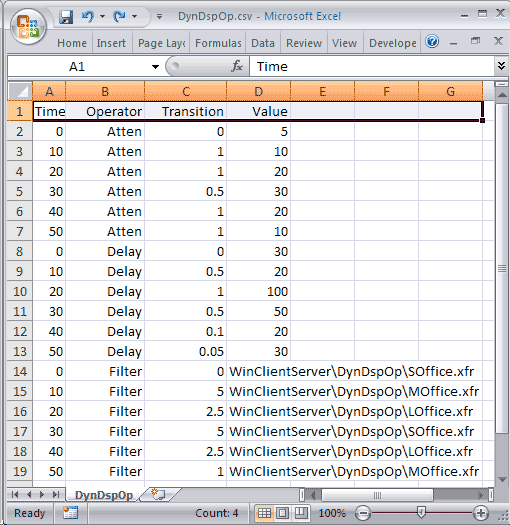
The dynamic capability can be most readily specified in a Schedules which are invoked through configuration (*.ini) files. Different instances of the same operator (the delay operator for example) can be scheduled by assigning a different identifier for each instance in a composite DSP operation.
Test Script Execution
Offline Operators
- Attenuate DSP Operation
- Delay DSP Operation
- Filter DSP Operation

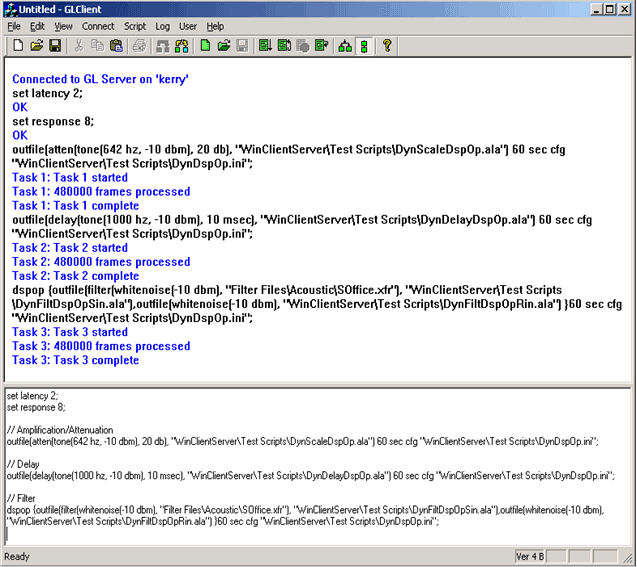
Example: The dynamic attenuate operation is implemented in WCS using the following script fragment:
set latency 4;
set response 6;
outfile(atten(tone(642 hz, -10 dbm), 20 db), "WinClientServer\DynDspOp\ DynScaleDspOp.ala") 60 sec cfg "WinClientServer\DynDspOp\DynDspOp.ini";
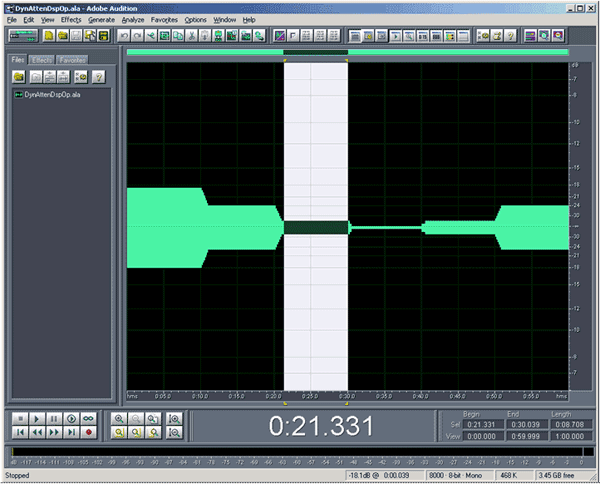
10 - 20 sec: Power = -26.21 dBov = -20.07 dBm.
Target power is -10 dBm (source signal power) -10 dB (attenuation) = -20 dBm. Observe that power tapers down over transition interval of 1 second.
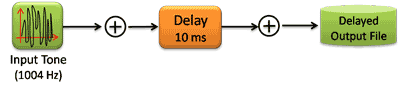
Example: The dynamic delay operation is implemented in WCS using the following script fragment:
set latency 4;
set response 6;
outfile(delay(tone(1000 hz, -10 dbm), 10 msec), "WinClientServer\DynDspOp\ DynDelayDspOp.ala") 60 sec cfg "WinClientServer\DynDspOp\DynDspOp.ini";
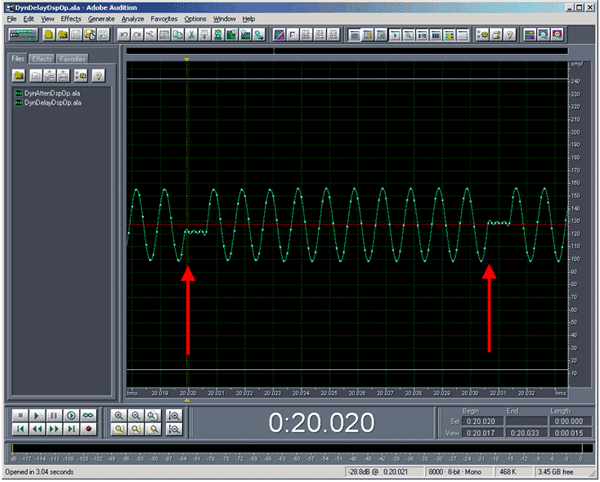
Between 20.0 and 21.0 sec., samples are repeated to insert more delay. Note the processing blocksize is 10 ms. For unclocked DSP operations (no tx or rx DSP operations), the processing block size is the sum of the latency and the response time.

Example: The dynamic filter operation is implemented in WCS using the following script fragment:
set latency 4;
set response 6;
Dspop {outfile(filter(whitenoise(-10 dbm), "WinClientServer\DynDspOp\SOffice.xfr"), "WinClientServer\DynDspOp\DynFiltDspOpSin.ala"), outfile(whitenoise(-10 dbm), "WinClientServer\DynDspOp\DynFiltDspOpRin.ala") } 60 sec cfg "WinClientServer\ DynDspOp\DynDspOp.ini";
This script produces two output files:
DynFiltDspOpRin.ala: The original noise signal in A-Law compressed form.
DynFiltDspOpSin.ala: The dynamically filtered noise signal in A-Law compressed form.
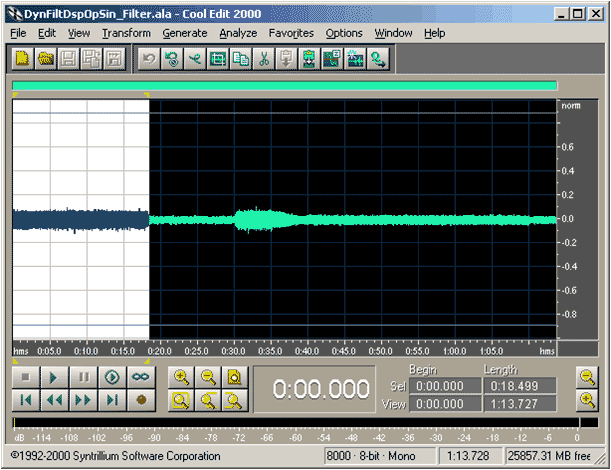
0 - 10 sec: Power = -32.36 dBov = -26.21 dBm.
Target power is -10 dBm (source signal power) -16.36 dB (SOffice.xfr attenuation) = -26.36 dBm
Real-time Operators
- Real-Time Delay/Attenuate ("delay" and "atten" DSP Operations)
- Real-Time Filter DSP Operation
Real-time testing of the dynamic filtering capability is carried as depicted in the following diagram:
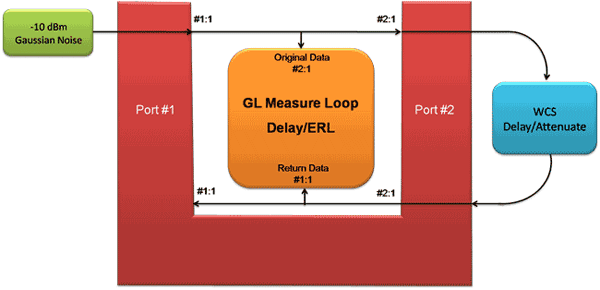
Example: The dynamic echo path is implemented in WCS using the following script fragment:
set latency 4;
set response 6;
tx(atten(delay(rx(#2:1), 10 msec), 5 db), #2:1) 60 sec cfg "WinClientServer\DynDspOp\ DynDspOp.ini" priority 1;
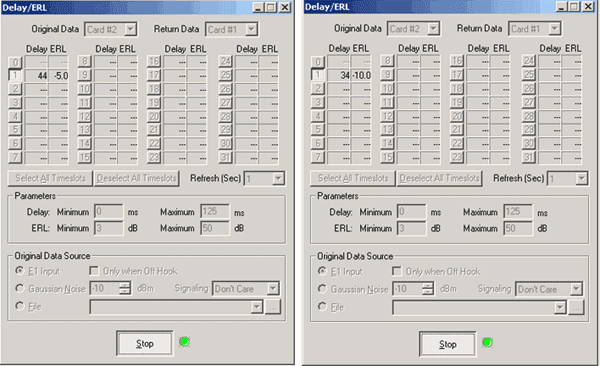
Real-time testing of the dynamic filtering capability is carried as depicted in the following diagram:

Example: The dynamic echo path is implemented in WCS using the following script fragment
set latency 4;
set response 6;
tx(filter(rx(#2:1), " WinClientServer\DynDspOp\SOffice.xfr"), #2:1) 60 sec cfg "WinClientServer\DynDspOp\DynDspOp.ini" priority 1;
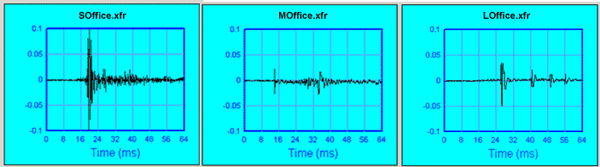
The small, medium, and large office filters at 5 secs, 15 secs, and 25 secs as set in the schedule file is clearly visible in the DEC view pane.
Resources
Please Note: The XX in the Item No. refers to the hardware platform, listed at the bottom of the Buyer's Guide, which the software will be running on. Therefore, XX can either be ETA or EEA (Octal/Quad Boards), PTA or PEA (tProbe Units), XUT or XUE (Dual PCIe Express) depending upon the hardware.
| Item No. | Item Description |
|---|---|
| XX631 | Dynamic DSP Capability |
| XX630 | DSP Functionality |
| Related Software | |
| XX062 | Echo Path Delay/Loss Simulation Software w/GLCView |
| XX063 | Echo Path Delay/Loss Measurement Software |
| XX065 | G.168 Echo Canceller Test Suite |
| XX066 | Digital Echo Canceller |
| XX067 | Automated Echo Canceller Testing for TDM-TDM |
| PKB080 | Automated Echo Canceller Testing for VoIP-TDM |
| XX068 | Semi-Automated and Scripted Echo Canceller Testing Suite |
| Related Hardware | |
| FTE001 ETE001 |
QuadXpress T1E1 Main Board (Quad Port– requires additional licenses) OctalXpress T1E1 Main Board plus Daughter Board (Octal Port– requires additional licenses) |
| PTE001 | tProbe™ Dual T1 E1 Laptop Analyzer with Basic Analyzer Software |
| XTE001 |
Dual T1 E1 Express (PCIe) Boards (requires additional licenses) |
| Brochure |
| T1E1 Client Server Brochure |
| Presentation |
| Static - Dynamic DSP Operations Presentation |
 Back to Scripted DSP Capability Page