EC Compliance Testing per G.168 Using Manual Methods
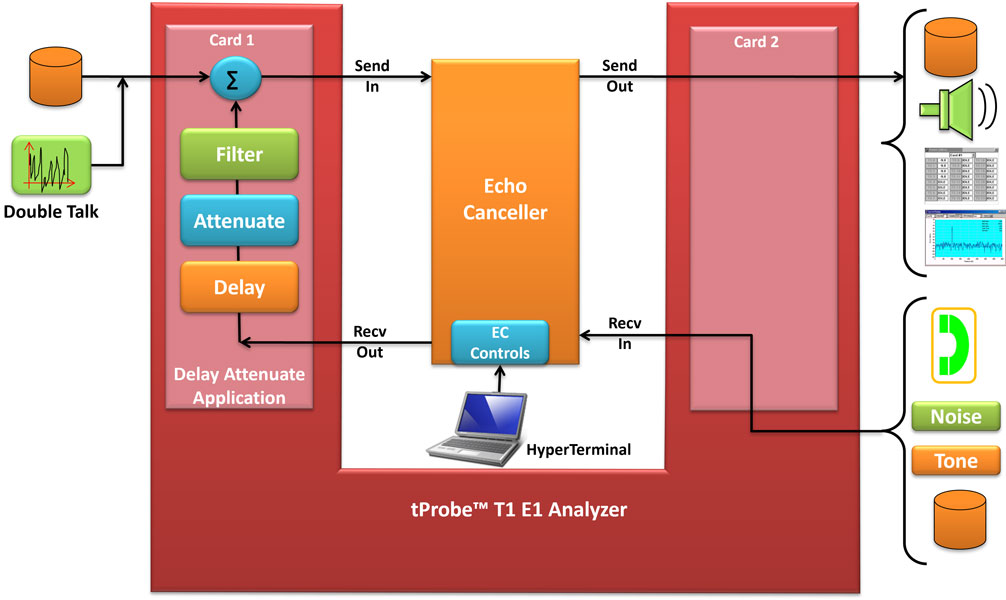
Testing Echo Cancellers
GL's Manual Test Suite for testing compliance of ECs with G.168 provides the ultimate flexibility for almost any type of network environment and configuration including :
- Conventional Telephone Networks
- Networks With Satellite Connectivity
- Wireless Networks such as Cellular and PCS
The system uses two of GL's T1 or E1 Cards (Dual HD Cards, USB cards, and Universal cards). One Card emulates the Far End circuit, provides the stimulus to the Echo Canceller, and captures its response. The second Card emulates the Near End circuit, i.e. models the echo path, and injects noise and voice signals. This PC based system also controls the Echo Canceller modes (NLP on/off, freeze, disable, etc.) and provides a captured PCM stream for analysis.
Main Features
- Far End emulation is performed with GL's GUI-based File Playback and File Record Software (part # XX020)
- Near End emulation of hybrids by using GL's GUI based Delay/Attenuate Software (part # XX062)
- Echo canceller control using standard terminal emulation software, e.g. Hyperterminal
- Millisecond-level visibility and Analysis using GL's GLCView software
- Additional analysis capability using Syntrillium's Adobe Audition Software or Goldwave Software
- All T1 E1 framing formats, signaling modes, and receiver interface strategies supported
- Complete set of G.168 echo path models for emulation of Near End echo paths
- G.168 CSS Single- and Double-Talk files recorded at various power levels
- Detailed procedures for conducting G.168 compliance tests and analyzing results
- VF Input and Output available at telephone handset for subjective evaluation of echo canceller performance
- GL's family of T1 E1 cards and its T1 E1 Analyzer GUI Software and Windows Client Server Software are general-purpose products supporting a wide range of T1 E1 testing requirements
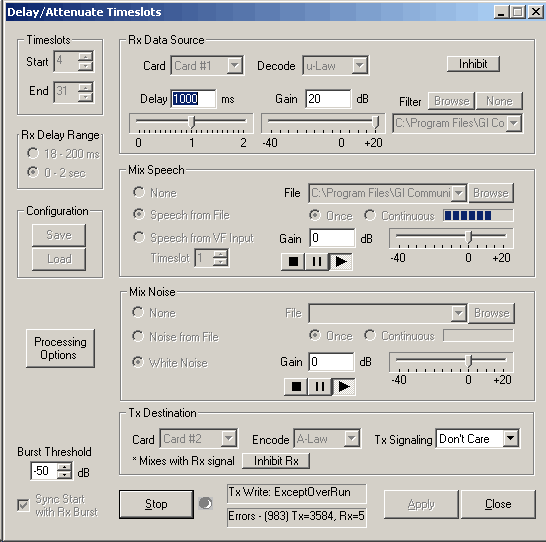
Delay/Attenuate Software Supports Hybrid Simulation
This application allows you to apply delay, attenuation, and/or filtering to a received signal on any number of timeslots. You may also mix in additional signals from a number of sources, including
- Speech and/or Noise signals from files
- Speech signals inserted via VF input
- Gaussian noise signals generated internally
Transmitted signaling bits may be Onhook/Offhook, user-specified, or passed through from received to transmitted timeslots. Below the Delay/Attenuate Timeslots screen.
For more information, visit GUI Based Echo Canceller Testing
The Delay/Attenuate Timeslots application may receive and transmit on either one or two boards. While there are a number of different operating configurations, the most common and useful are:
- Looping back a processed signal- Applying delay, attenuation, and filtering to a received signal and retransmitting the processed signal on the same board on which it was received. Speech and/or noise may also be mixed in.
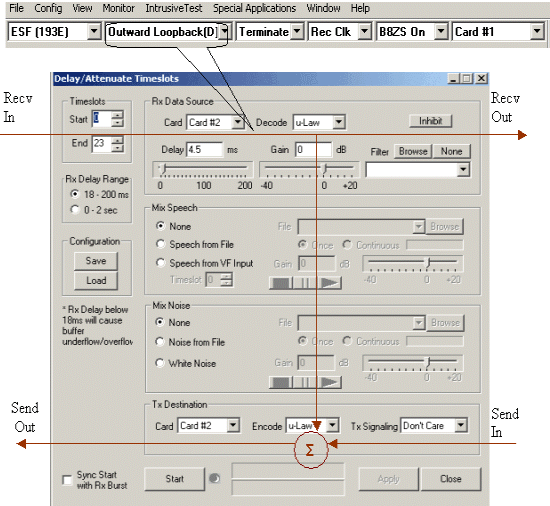
Note that the layout of the Delay/Attenuate Timeslots Dialog closely matched this diagram
- Applying pure delay to a signal- A received signal is delayed before being retransmitted
- Inserting a Simulated Echo Loop- A two-board system is inserted into a T1 or E1 trunk and is used to simulate an echo path having known characteristics
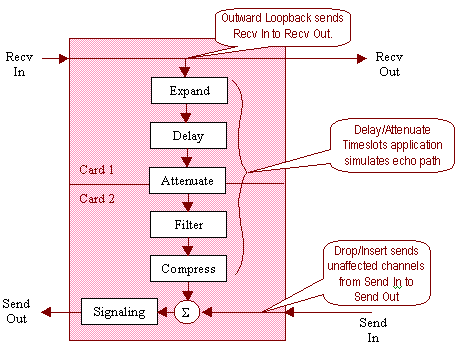
The layout of the Delay/Attenuate Timeslots application has been designed to closely resemble the above block diagrams.
Total Visibility and Analysis with GLCView
GLCView is a GL Software tool developed especially for G.168 testing. Among this product's features:
- Displays files captured during G.168 testing
- Linear and Power displays shown
- Zoom in on power window down to millisecond-level time scale
- User-settable power calculation window from 1 ms to 35 ms
- Multiple files viewable in single window
- Print out graphs
Supported G.165 and G.168 Tests
| Tests | G.165 | G.168 | |
| Test 1: Steady state residual and returned echo level test (G.168 version 04/2000 only) |
NLP On NLP Off |
Yes Yes |
Yes Yes |
| Test 2: Convergence test | Test 2A: NLP On Test 2A Part b (G.168 version 01/2007): Re-convergence with NLP On Test 2B: NLP Off Test 2B Part b (G.168 version 01/2007): Re-convergence with NLP Off Test 2C with NLP On: Convergence test in presence of background noise Test 2C with NLP off: Convergence test in presence of background noise Test 2C-c (G.168 version 01/2007) for noise level -55 dBmO: Convergence test with NLP Off and background noise |
No No Yes No No No No |
Yes Yes Yes Yes Yes Yes Yes |
| Test 3: Double talk test | Test 3A: low cancelled-end level Test 3B: high cancelled-end level Test 3B Part b (G.168 version 01/2007): stability test with low cancelled-end levels Test 3C: simulated conversation |
Yes Yes No No |
Yes Yes Yes Yes |
| Test 4: Leak rate test | Yes | Yes | |
| Test 5: Infinite return loss convergence test | Yes | Yes | |
| Test 6: Non-Divergence on narrow-band signal test | Optional | Yes | |
| Test 7: Stability test | Optional | Yes | |
| Test 8: Overload test | Yes | No | |
| Test 8: Non-convergence of EC on SS5/SS6/SS7 tones in-band signaling and continuity check tones | No | Yes | |
| Test 9: Comfort noise test | Yes | Yes | |
| Test 10: Facsimile test | Test 10A (with NLP On and NLP Off): Canceller operation on the calling station side Test 10B (with NLP On and NLP Off): Canceller operation on the called station side |
No No |
Yes Yes |
| Test 12: Residual acoustic echo test | No | Yes | |
| Test 13: Performance with ITU-T low-bit rate coders in echo path | No | Yes | |
| Test 14: Low speed modem test | No | Yes | |
| Test 15: DC Off sets | Test 15A: Test 15B: |
No No |
Yes Yes |
| Test 16: DTMF tests | Test 16A: DTMF transparency in the presence of a dial tone Test 16B: DTMF transparency in the presence of speech |
No No |
Yes Yes |
Note: The G.165 and G.168 Tests differ in the time to perform the tests. For example, Test 1 steady state residual test requires 180 seconds in G.168, but it does not specify the exact time in G.165. With small modifications of the test procedures (mainly the times), we can use the G.168 test procedures to perform the G.165 tests. As per the customer's requirement the manual test procedures can be modified. Contact GL for further details
Resource:
Please Note1: The XX in the Item No. refers to the hardware platform, listed at the bottom of the Buyer's Guide, which the software will be running on. Therefore, XX can either be ETA or EEA (Octal/Quad Boards), PTA or PEA (tProbe Units), XUT or XUE (Dual PCIe Express) depending upon the hardware.
| Item No. | Item Description |
| XX065 | G.168 Test Suite for T1 or E1 Echo Cancellers (Manual Testing Procedures) GLCView Software Provided |
| XX020 | Record and Playback of Files |
| XX051 | Synchronous Trunk Record Playback |
| XX062 | Echo Path Delay/Loss Simulation Software |
| XX063 | Echo Path Delay/Loss Measurement Software |
| Related Software | |
| XX066 | Digital Echo Canceller |
| XX067 | Automated Echo Canceller Testing with or without VQT |
| XX068 | Semi-Automated and Scripted Echo Canceller Testing Suite |
| XX610 | File based Record/Playback (included) |
| XX630 | DSP Functionality (included) |
| PKB081 | Automated Acoustic Echo Cancellation (AEC) Compliance Test Software |
| Related Hardware | |
| PTE001 | tProbe™ Dual T1 E1 Laptop Analyzer with Basic Analyzer Software |
| FTE001 | QuadXpress T1 E1 Main Board (Quad Port– requires additional licenses) |
| ETE001 | OctalXpress T1 E1 Main Board plus Daughter Board (Octal Port– requires additional licenses) |
| XTE001 |
Dual T1 E1 Express (PCIe) Boards (requires additional licenses) |
| Recommended Accessories | |
| SA013 | T1 E1 On Site Training Class (not including travel or hotel) |
| SA021 | File Edit Software |
| SA026 | Adobe Audition Multitrack Sound File Viewing and Editing Software |
| SA048 | Goldwave Software |
| SA017A | RJ48C to RJ48C Straight Cable, 10ft. cable |
| SA017A | RJ48C to RJ48C Crossover Cable, 10ft. cable |
| SA008a | Handset Adapter with Handset |
| SA022 | Extended 1 Yr. Software Upgrades and Hardware Warranty, and Comprehensive Support for Basic and Optional Software |
 Back to Echo Canceller Testing Solutions Main Page