Goldwave
Sound File Viewing & Editing Software
Overview
GoldWave is a sound editor, player, recorder, analyzer, and converter. Goldwave is third party software that is used with many GL'sProducts. It allows listening, viewing, and analysis of single or dual recorded files from T1 and E1 lines. It also permits sophisticated editing of voice files. Other features of the program include:
- Viewing from a variety of file formats including *.pcm, A-Law, Mu-Law, *.wav, and others
- Stereo display of single or dual files
- Inserting silence, removing noise, Noise Reduction, data reversal, filters help restore and remaster audio
- Viewing of two files side by side for comparison purposes
- Zoom-in and zoom-out features
- Accurate measurement of timing information
- Spectral displays
This utility program is useful (and should be ordered) with the following software packages.
- Call Capture Analysis (XX031)
- Record and Playback File Software (XX020)
- Transmit/Receive File Utility Software (XX019)
- Scripted Control Software (XX600)
A sample screen is provided below:
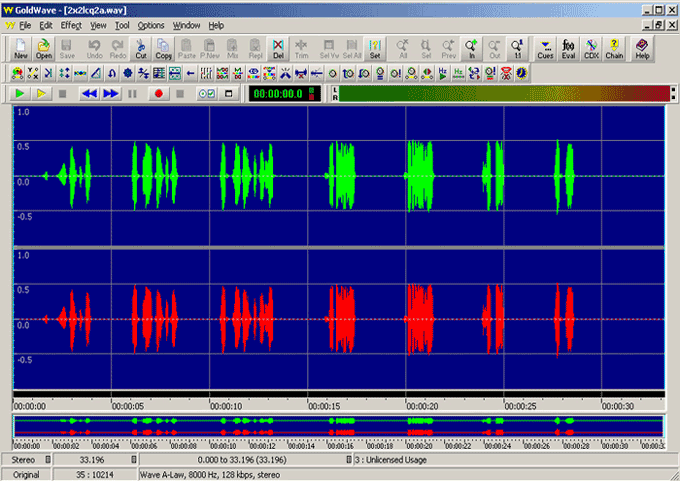
Procedure to view a captured file in 'stereo' mode (single) file using Goldwave:
GL T1 or E1 Cards can be used to capture real-time data with an application called 'Call Capture Analysis'. Other applications that can record data are 'Multiple Card Capture' and Tx/Rx File Utility.
The graphical software program should be installed in order to directly invoke captured files through GL's T1E1 analyzer. To view a captured file open Goldwave software either by clicking on the Goldwave software or by selecting the 'View PCM' from the 'Call Capture and Analysis' selection of the T1/E1 GUI.
Procedure to view a captured file in 'stereo' mode ('two' files simultaneously) using Goldwave:
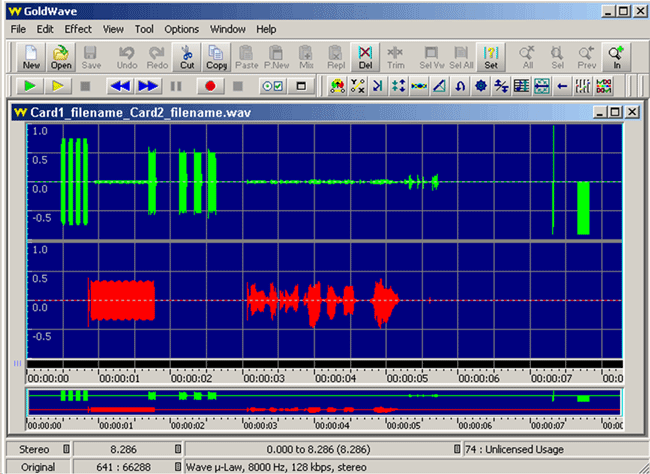
Invoke 'View PCM' from 'Call Capture and Analysis' in the special applications of the T1/E1 card. The user can select single or dual files (using the control key) for graphical view of the selected file/s. Goldwave is automatically invoked and the files are displayed in stereo mode. Goldwave can be used to visualize any number of files.
Example: On selecting "Samp_wst.pcm" and "Samp_est.pcm", a single "Samp_wst_ Samp_est.wav" file is created and the graph is displayed one below the other.
A sample screen for dual files is provided below:
Resources
Please Note: The XX in the Item No. refers to the hardware platform, listed at the bottom of the Buyer's Guide, which the software will be running on. Therefore, XX can either be ETA or EEA (Octal/Quad Boards), PTA or PEA (tProbe Units), XUT or XUE (Dual PCIe Express) depending upon the hardware.
| Item No. | Item Description |
| SA048 | Goldwave Software |
| Related Software | |
|---|---|
| XX019 | Transmit/Receive File Utility Software |
| XX020 | Record and Playback of Files |
| XX051 | Synchronous Trunk Record Playback |
| XX031 | Enhanced T1 / E1 Call Capture/Analysis Software |
| SA021 | File Edit Software |
| STE40 | Mux-Demux Software |
 Back to Miscellaneous Software Index Page