Fully Automated EC Compliance Testing
per ITU G.168
Overview
Auto EC Test Software (XX067) is an application used to perform echo cancellation compliance testing automatically. per ITU G.168 specification. ITU G.168 spec refers to characteristics of Line Echo Cancellers (LEC). Line Echo Cancellers are either high density standalone devices, i.e. many T1s or E1s in a landline network. Or they may be embedded in Gateways (between an IP and TDM networks or between Wireless and TDM networks) as shown below
AutoECTest uses GL’s T1 E1 hardware platforms and can be used in TDM, Wireless, and VoIP configurations. Some typical scenarios are discussed below-

Landline to Landline - In such calling scenarios, two LECs are involved in each call. Each LEC cancels echo at its "tail circuit". It possible that the delay in each tail circuit could be as great as 128 ms.
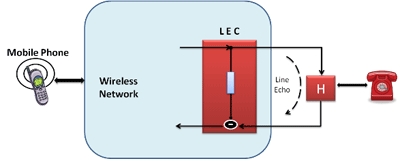
Wireless to Landline - Only one tail is involved in wireless to landline calls, and therefore only one LEC is required at the landline end.
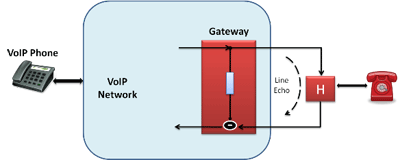
VoIP to Landline - Only one tail is involved in VoIP to landline calls. The LEC is usually in a Gateway.
Auto EC Test Viewer (AEC001) supplements AutoEC Test software using which the EC test results are analyzed and graphically viewed.
- Automatic Echo Canceller Test Software (Application item# XX067)
- Automatic Echo Canceller Test Viewer Software (Application item# AEC001)
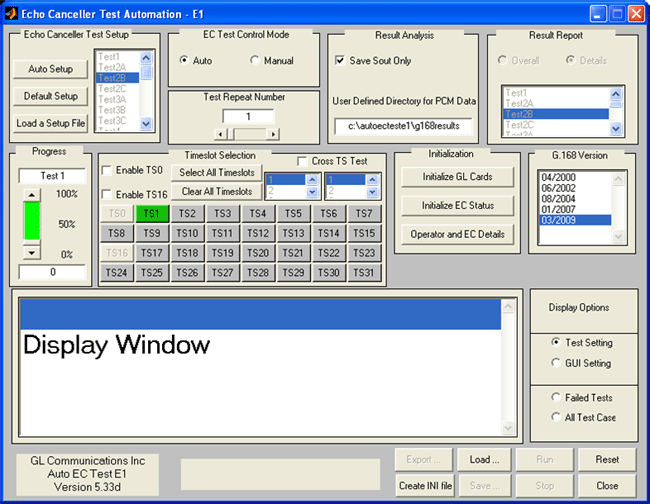
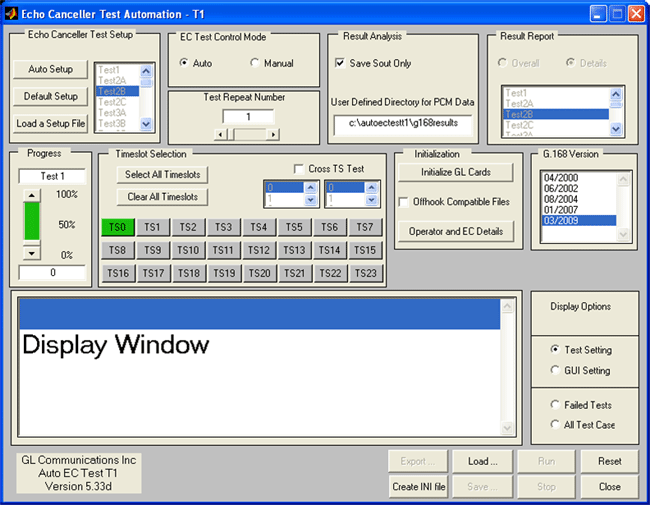
Automatic Echo Canceller Test Software (Application item# XX067)
The Auto EC Test Software uses GL's T1 E1 Analyzer products and the customers LEC hardware to perform Automated Echo Canceller testing in accordance with ITU-T Specifications G.168. In the last 10 to 12 years, ITU G.168 has under gone many revisions with greater and greater detail and specificity. AutoECTest software has been updated accordingly.
- G.168 (04/2000)
- G.168 (06/2002)
- G.168 (08/2004)
- G.168 (01/2007)
- and most recently G.168 (03/2009)
Rin and Sin files (stimulus and echo) are prepared and generated in real-time by Auto EC Test software in accordance with user inputs.
There are two solutions for different scenarios:
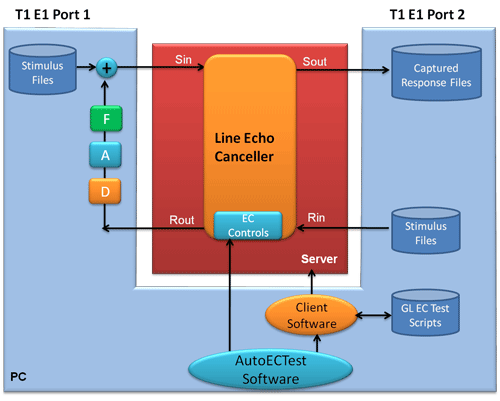
Solution 1 uses WCS (Windows Client Server) software to transmit/receive files and to simulate the echoes in real time, The diagram below shows this diagrammatically.
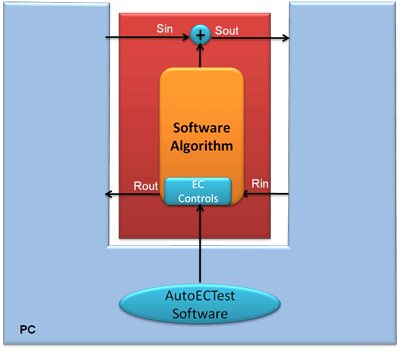
Solution 2 is designed for special applications where the LEC is still in development form, i.e. software only. Also, no GL hardware is required, as everything is file based.
Features
- Simulation of echo path with various delay, attenuation, hybrid filters, noise level, etc.
- Real-time as well as off-line analysis with tabular Pass/Fail results
- Auto or Manual control of the EC during testing
- Auto analysis of the response according to G.168 (2000/2002/2004/2007/2009) requirement
- Detailed graphical and tabular results for individual and overall test
- Option to zoom-in on any test results to investigate further
- Simulates long haul delay
- MS-Windows OS (WIN 2000 or XP) with User-Friendly Graphical User Interface
- Compatible with GL's Dual PCIe express card and tProbe™ T1/E1 units
Theory of operation
Real-Time Approach - Sin is created real-time from the Rout by the Windows Client Server (WCS) Software to perform real-time functions.
All four port captures (Rin, Rout, Sin, and Sout),a nd the echo path simulation are realized by the WCS scripts. It is applicable to TDM, VoIP, and VoATM Networks. In this design, users are permitted to set:
Test # 1 to 16B of G. 168 (03/2009), G.168(01/2007), G.168 (08/2004), G.168 (06/2002), and G.168 (04/2000) (Test 14 is optional)
- Framing format (D4 and ESF for T1, CAS and CCS for E1)
- Timeslots
- Levels for pseudo speech/noise
- Levels for noise
- Hybrid filter types including multiple echo paths
- Echo path delays and ERL
The software applies the Rin and captures the Sout (the output of the Echo Canceller). Sin may be generated in real-time by WCS and double talk signals may be mixed with the echo for some tests. During the application of Rin and Sin, the Echo Canceller is manually or automatically controlled for
- Zeroing the contents of the echo canceller's H-register.
- Enabling and inhibiting echo canceller convergence.
- Enabling and disabling the non-linear processor.
- If the echo canceller has a comfort noise feature, enabling and disabling the comfort noise generator.
Rout and Sout files are captured and automatically assessed. Graphical and tabular data is provided for all tests for easy interpretation. Objective test results are displayed and user can easily identify passed or failed tests. Users can zoom-in on any test result to further investigate. The detailed graphical analysis of tests is also a click away to gauge overall performance of the echo canceller.
Using AutoECTest Software (Basic setup without customer's EC hardware)
The AutoECTest Software (xx067) is intended to work with GL hardware (T1 or E1 dual cards) and the customers EC hardware. But it can also be used to test development EC software, that is, the customer's EC hardware is not required. For more information, visit AutoECTest webpage.
Test Cases supported
GL's Semi-Automated and Scripted Echo Canceller Testing Suite provides support for the basic set of G.168 (2000/2002/2004/2007/2009) compliance tests. For more details, visit Manual EC Testing webpage.
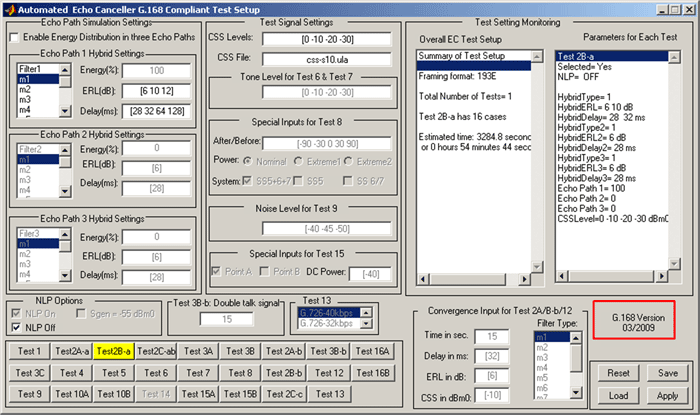
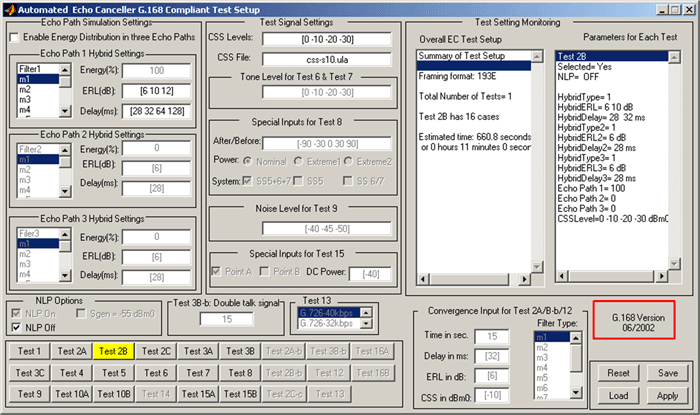
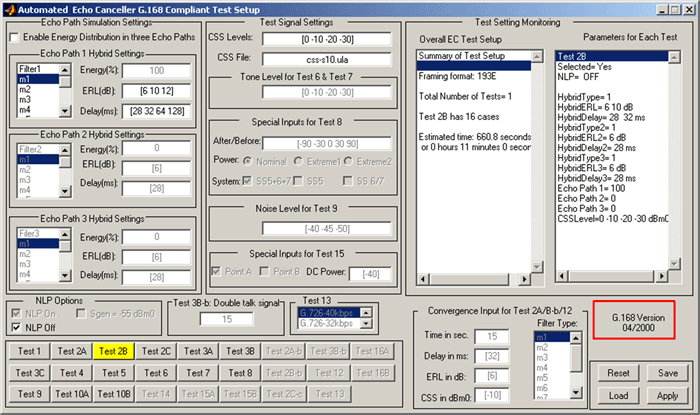
For the G.168 - version 03/2009, the Test cases are as shown in the figure below.
Setting up Test parameters per G.168 in AutoECTest
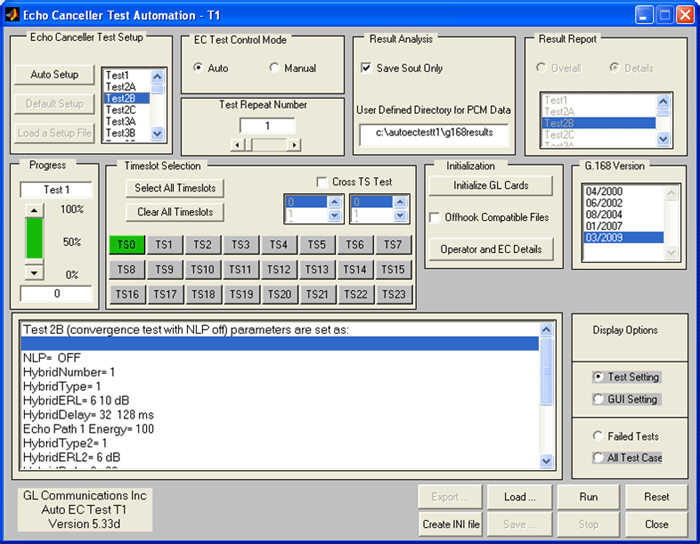
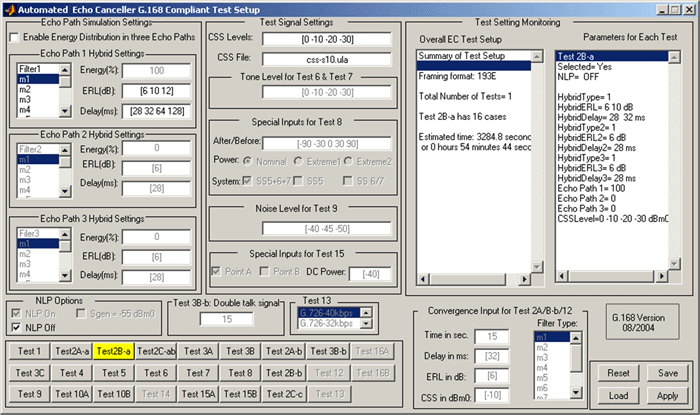
This program allows you to set the parameters for each test per ITU-T G.168. These parameters include: CSS level, NLP options (on/off), Noise level, Hybrid models (m1 ~ m7 or m1~m8), ERL, and Delay, etc. The parameters can be saved into a file. A preset configuration file can be read in for establishing the test cases to be run. The settings for the test cases are as depicted in the screenshot below.
AutoECTest Results
AutoECTest performs a full analysis (with detailed displays) that results in a "Pass" or "Fail".
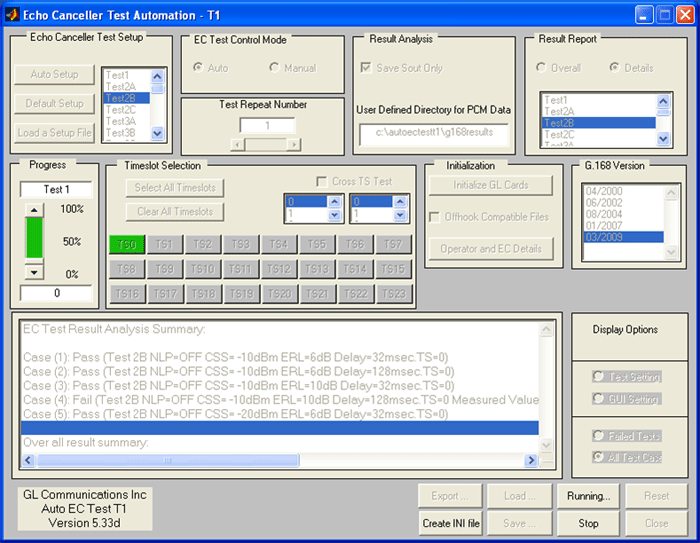
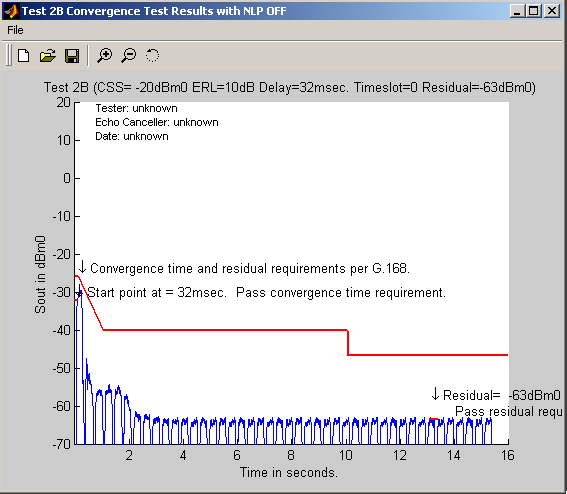
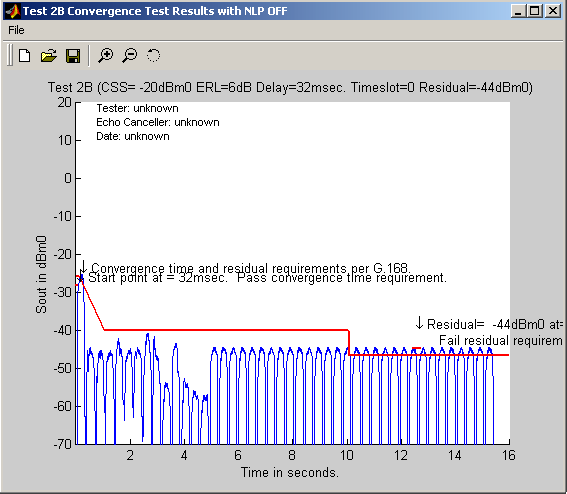
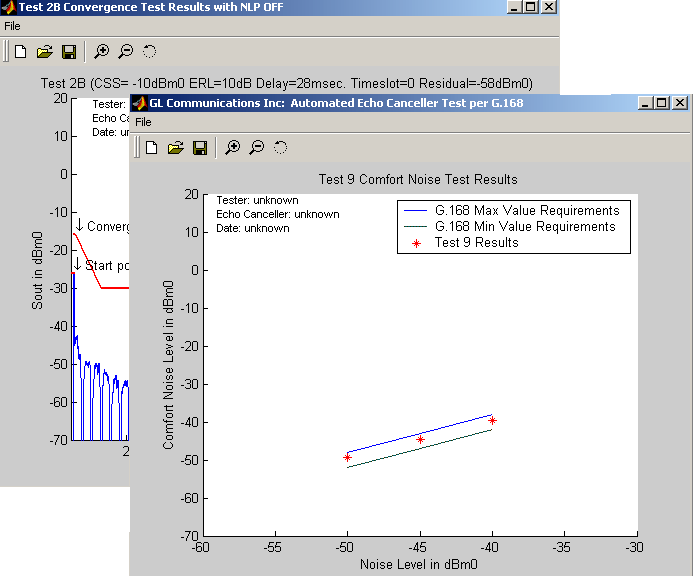
The graphs below depict the result analysis per G.168. For the "Pass" cases, both the convergence time and the residual should meet the requirements of G.168
For the 'Fail' cases, either one (convergence or residual) or both (convergence and residual) does not meet the requirements of G.168.

Screenshots
- Echo Canceller Test Result Analysis Summary
- Selection of Individual Test Case Analysis Results
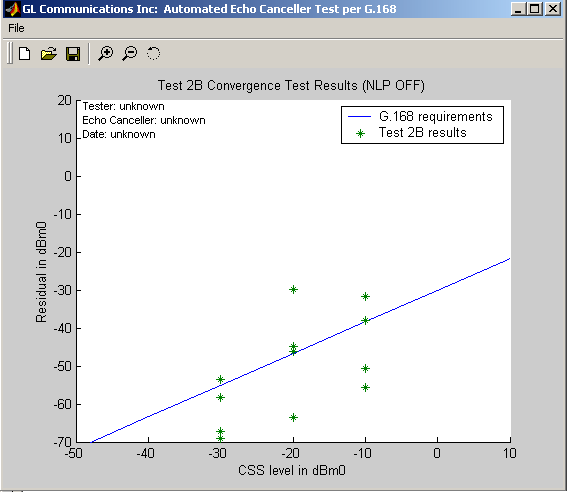
- Graph of Overall G.168 Requirements and Test 2B Results
- Detailed Graph of Individual Test Case which Passed Test 2B
- Detailed Graph of Individual Test Case which Failed Test 2B
- Zoomed in Graph Showing Why Test Case Failed
- Test 2B Convergence Time Requirements and Test Results
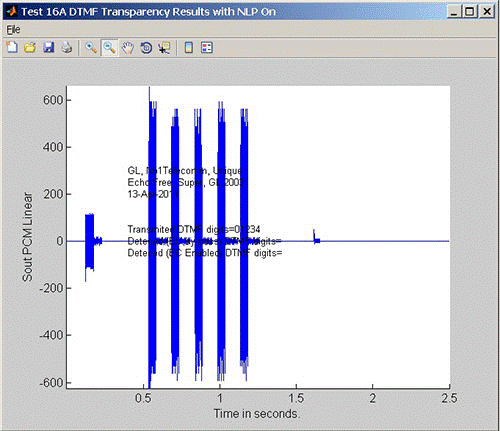
- Detailed Graph of Individual Test Case - Test 16A
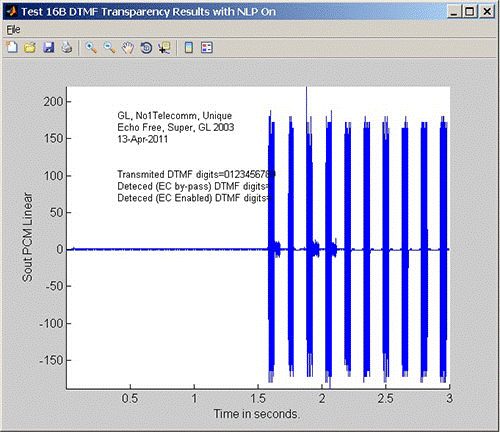
- Detailed Graph of Individual Test Case - Test 16B
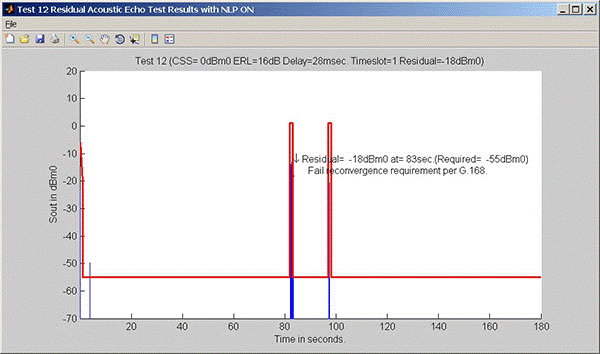
- Detailed Graph of Individual Test Case - Test 12
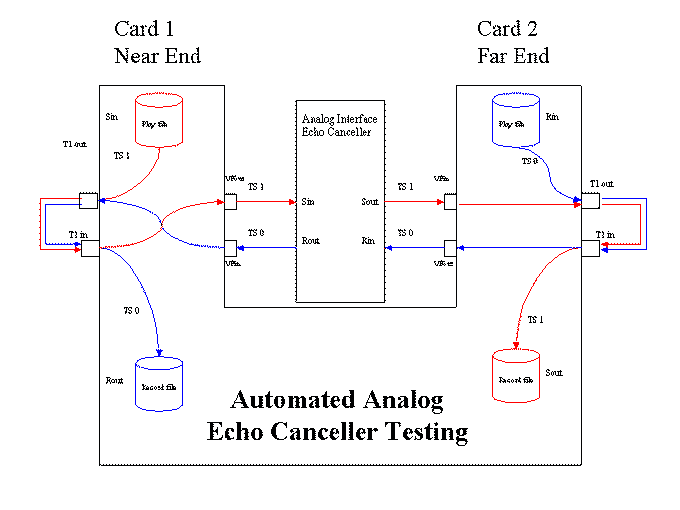
- Automated Analog Echo Canceller Testing
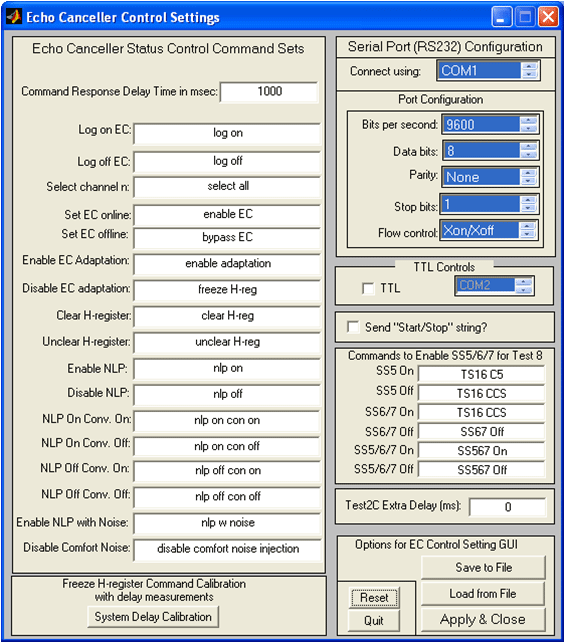
- Echo Canceller RS 232 Control Setup
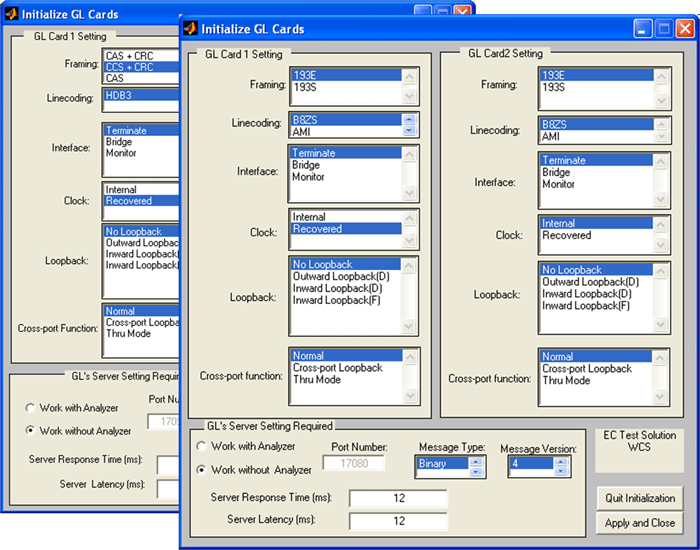
- Initialize GL Card Setup
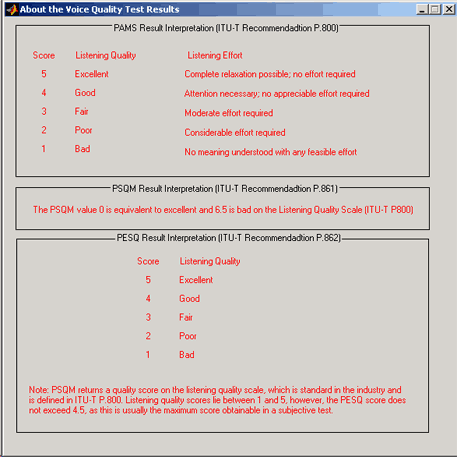
- VQT Test Scenarios
Automatic Echo Canceller Test Viewer Software (Application item# AEC001)
AutoEC Test results can be analyzed and graphically viewed in the GL's AutoECTest Viewer (Automatic Echo
Canceller Test Viewer) application AutoECTestViewer can view the results from either T1 or E1 version of AutoECTest.
AutoECTest Test software has been designed to automatically test EC (echo cancellers) compliance with
ITU-T G.168 Specification, G.168 (03/2009), G.168 (01/2007), G.168 (08/2004), G.168 (06/2002), and G.168 (04/2000)
There are three (3) core functions of AutoEC Test applications:
- Test EC for G.168 compliance
- Analyze the result files, formally named as Sout PCM data files, and save the results into a MAT file contains the complex binary data format
- Present the test results in graphical, CSV, or text formats
Core functionalities 2 & 3 distinguish AutoECTest Viewer from AutoEC Test application.
The MAT file contains a complex data structure, which has one record for each test case. For each test case, the corresponding record contains the test parameters (such as Test name, CSS level, ERL, delay, filter type, and so on), analysis results (such as pass/fail flag, residual values and locations, G.168 requirements, and so on), and pointers to the Sout file names and locations.
If the Sout files are available and stored in the location specified, then, the offline analysis function is activated. In addition, the graphical presentation of the AutoECTest results is repeatable.
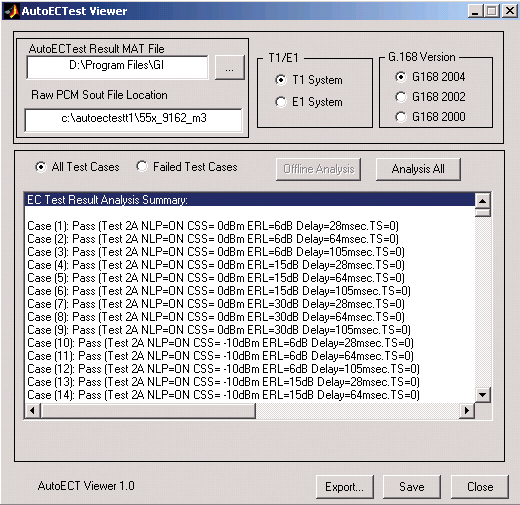
If the Sout files are not available, then, AutoEC Viewer can only generate the AutoECTest result reports in both text and CSV formats. The screen below depicts the passed test cases:
Features
- Supports *.csv and *.xls format files for AutoEC Test results analysis
- Results can be saved in *.txt format files
- Graphical view of the Sout PCM data file (if it is available), including the G.168 requirement masks
- Offline analyze of the Sout PCM data files (if available)
Analysis of Test Cases using AutoECTest Viewer
For offline analysis and graphical presentation of the AutoECTest application, the raw Sout PCM data files should be necessarily stored in the location mentioned. Users may create this directory manually, and copy the raw Sout PCM data files to this directory.
'Failed' is defined as that the Sout results fail to meet one or more G.168 (03/2009), G.168(01/2007), G.168 (08/2004), G.168 (06/2002), and G.168 (04/2000) requirements. The screen depicts the failed test cases.
For example, the G.168 (03/2009), G.168(01/2007), G.168 (08/2004), G.168 (06/2002), and G.168 (04/2000) requirements for Test 2B Part A include the convergence requirements, the residual requirement and the peak value requirement.
The five G.168 requirements for Test 2B Part A are:
- The first 50 ms convergence requirement
- Convergence requirement from 50 ms to 1 sec
- Convergence requirement from 1 sec to 10 secs
- Residual requirement from 10 secs to 3 mins
- Peak value requirement from 10 secs to 3 mins
Every requirement is met for a "Pass" test case, otherwise, test cases are declared as "Failed".
AutoECTest Viewer Results
Graphical Presentation
The graphical presentation of the Sout file for any test case can be viewed with the Sout file located in the specified "Raw PCM Sout File Location" directory.

Offline analysis of AutoECTest results is performed on the Sout PCM data. Normally, the AutoECTest result MAT file contains the final results. "Analysis All" option allows the users to re-analyze all Sout files.
Analyzing Sout files are computational extensive as Sout files are large. For example, Test 2A or Test 2B, the test duration is 3 minutes, which is 180 seconds by 8000 samples/second. It is of 1440000 samples, and is calculated using double precision so the size of the data files remains around 2.88Mbytes.
After the offline analysis (individual test case analysis or all test case analysis), the result data structure values will be changed accordingly. Generally, the new values should be the same to the old values, but marginally differences may exist.
Save Results
"Overall result summary" option displays the complete summary of the EC Test results.
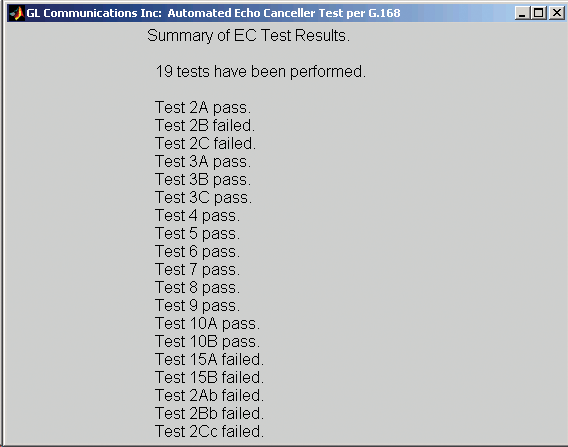
The AutoECTest results can be exported as a *.csv file. The CSV file can be imported into Excel for further processing. The AutoECTest results can also be saved as a *.txt file. The text file screen depicts the condensed information of the AutoECTest results. Further a simple script can be written to parse and process those data.
For Voice Quality Test Solutions
- Solution 1. Voice Quality Test Solutions
- This software is designed to test the functionality of the voice enhancement devices per G.160, including
- Voice quality tests per P800/P861/P862
- Noise reduction tests
- Automatic level control tests
- Noise compensation tests
- Test results are presented in easy to hear "audible" and easy to understand graphical formats
- Required software xx067 and includes xx019 Tx/Rx File Utility or xx600, xx610, and xx630 WCS components
- Also required VQT001 and VQT003. Consult with GL for design choices
- Additional recommended software xx020, xx062, and xx066
- Solution 2. Voice Enhancement Device Test Per G.160 and G.169 (Discontinued - please Contact Us for more info)
Resources
Please Note: The XX in the Item No. refers to the hardware platform, listed at the bottom of the Buyer's Guide, which the software will be running on. Therefore, XX can either be ETA or EEA (Octal/Quad Boards), PTA or PEA (tProbe Units), XUT or XUE (Dual PCIe Express) depending upon the hardware..| Item No. | Item Description |
|---|---|
| XX067 | Automated Echo Canceller Testing w/o VQT (Includes xx019 or xx600, xx610, and xx630 w/dongle) |
| AEC001 | Automated Echo Canceller Test Viewer |
| XX019 | Tx/Rx File Utility (with File Based Approach) (included) |
| XX610 | Transmit and Receive File Capability (included) |
| XX630 | DSP Functionality (included) |
| Related Software | |
| PKB080 | Auto EC Test TDM-VoIP G.168 Test Software |
| PKB081 | Automated Acoustic Echo Cancellation (AEC) Compliance Test Software |
| XX020 | Record and Playback of Files |
| XX051 | Synchronous Trunk Record Playback |
| XX031 | Enhanced T1 / E1 Call Capture/Analysis Software |
| XX062 | Echo Path Delay/Loss Simulation Software |
| XX063 | Echo Path Delay/Loss Measurement Software |
| XX065 | Manual G.168 Echo Canceller Test Suite |
| XX066 | Digital Echo Canceller |
| XX068 | Semi-Automated and Scripted Echo Canceller Testing Suite (w/ C++ Client, w/ LabView Client, w/ Matlab Client) |
| VBA032 | Near Real-time Voice-band Analyzer |
| PKB070 | Audio Processing Utility |
| Related Hardware | |
| PTE001 | tProbe™ T1 E1 Base Unit |
| XTE001 | Dual Express (PCIe) T1 E1 Boards |
| FTE001 | QuadXpress T1E1 Main Board (Quad Port– requires additional licenses) |
| ETE001 | OctalXpress T1E1 Main Board plus Daughter Board (Octal Port– requires additional licenses) |
| Recommended Accessories | |
| XX064 | Wireless / Landline Echo + Delay + Voice Quality Measurement Accessories (Two Wireless Adapters, 2/4 Wire Hybrid Landline Auto-Answer Unit, Cables, w/Adobe Audition) |
| SA013 | T1 / E1 On Site Training Class (not including travel or hotel) |
| SA021 | File Edit Software |
| SA026 | Adobe Audition Multitrack Sound File Viewing and Editing Software |
| SA017A | RJ48C to RJ48C Straight Cable, 10ft. cable |
| SA017A | RJ48C to RJ48C Crossover Cable, 10ft. cable |
| SA008a | Handset Adapter with Handset |
| SA022 | Extended 1 Yr. Software Upgrades and Hardware Warranty, and Comprehensive Support for Basic and Optional Software |
 Back to Echo Canceller Testing Solutions
Main Page
Back to Echo Canceller Testing Solutions
Main Page