V5.x Protocol Analyzer
Overview
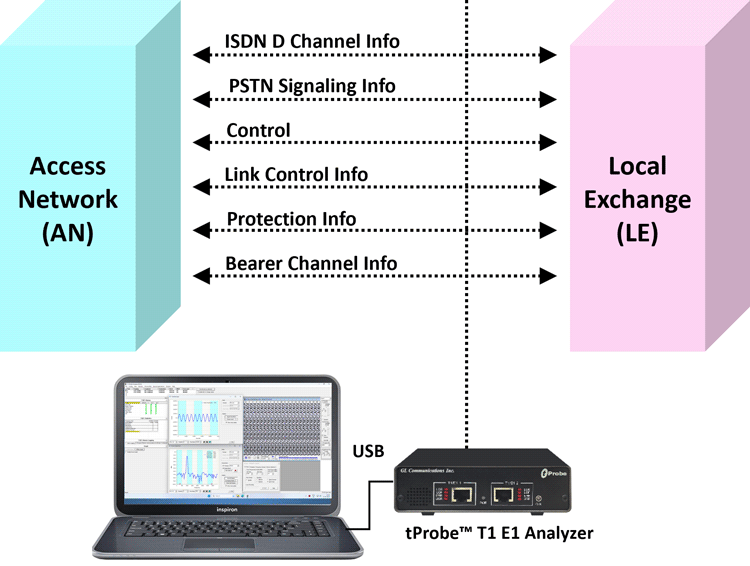
V5.x is a switching and signaling telecommunication protocol between Access Network (AN) and Local Exchange (LE) and operates only on E1 circuits.
GL's V5.x analyzer can be used to capture and analyze a stream of frames from the link between LE and AN. The analyzer provides V5.x based on ETSI / ITU standard in order to decode according to the corresponding standards. Supports capturing and decoding of LAPV5, ISDN Call Signaling - Q.93 as layer 3, Link Control Protocol (LCP), Protection Protocol (PP), Bearer Channel Connection (BCC), and PSTN
GL Communications supports the following types of V5.x analyzers:
- Real-time V5.x Analyzer (Pre-requisites: GL's field proven E1 or T1 internal cards or USB Laptop E1 or T1 external units, required licenses and Windows Operating System).
- Remote /Offline V5.x Analyzers (Pre-requisites: Hardware Dongle, and Windows Operating System).
V 5.x Analyzer Main Features
- Displays Summary, Detail, Hex-dump, Statistics, and Call Trace Views, the contents of this view can also be copied to clipboard.
- Summary View displays LAPV5.x information and V5.x messages.
- Detail View displays easy to understand decodes of user selected frame from the Summary View.
- Hex dump View displays the frame information in HEX and ASCII format the contents of this view can also be copied to clipboard.
- Statistics View displays statistics based on frame count, byte count, frames/sec, bytes/sec etc for the entire capture data.
- Call Detail Records isolates call specific information i.e. status of each call (i.e. Active/Completed), duration of completed call, Device No, Timeslot, Call ID, Call Status and Layer 3 Address.
- Call Detail Recording feature includes data link groups that help in defining the direction of the calls in a given network and form logical groups comprised of unidirectional (either 'Forward' or 'Backward') data links.
- Capability to export Summary View details to comma separated values (CSV) format for subsequent import into a database or spreadsheet.
- Capability to export detail decodes information to an ASCII file.
- Supports filter and search based on LAPV5 parameters and Q.933 layer parameters such as C/R, SAPI, EF Address, CTL, P/F, Call Reference #, ISDN Message Type, Called Party Number, Channel Number, Progress Description.
- Any protocol field can be added to the summary view, filtering, and search features providing users more flexibility to monitor required protocol fields.
- Remote monitoring capability using GL's Network Surveillance System.
- Option to create multiple aggregate column groups and prioritize the groups as per the requirement to display the summary results efficiently
- Allows the user to create search/filter criteria automatically from the current screen selection
Additional features supported by real-time/remote V5.x are:
- Supports capturing and decoding of LAPV5, ISDN Call Signaling - Q.93 as layer 3, Link Control Protocol (LCP), Protection Protocol (PP), Bearer Channel Connection (BCC), and PSTN.
- Streams can be captured on the selected time slots (contiguous or non-contiguous), sub-channels or full bandwidth. Frames may also be contained in either one, n x 64 kbps, or n x 56 kbps data channels.
- The following variations are accommodated in the software: inverted or non-inverted data, byte reversal or non-reversal.
- Supports decoding of frames with FCS of 16 bits and 32 bits, or none.
- Recorded trace files can be played back using HDLC Playback application.
- Multiple remote clients may access a single T1 E1 server. Also, the T1 E1 server is fully functional while being accessed as a server. Thus, a user may perform T1 E1 operations locally on the server while a client is accessing the same server, in real time. (For Remote Analyzers only).
- Supports real-time filtering based on the frame length value.
- Multiple streams of V5.x traffic on various T1 E1 channels can be simultaneously decoded with different GUI instances.
Additional features supported by Offline V5.x Analyzer:
- Trace files for analysis can be loaded through simple command-line arguments.
- Multiple trace files can be loaded simultaneously with different GUI instances for offline analysis.
Protocols Supported
The list of protocols that are supported by GL's V5.x analyzer are as given below:
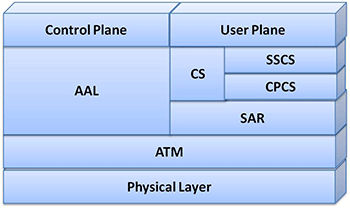
The supported protocol standards in V5 analyzer are V5 ITU and V5 ETSI.
| Supported Protocols | Specification Used |
|---|---|
| LAPV5, PSTN, BCC, PP, Link Control | IIU-T Q921, G.964 & G.965 |
| ISDN Q.931 | IIU-T Q.931 |
For more details, visit protocol glossary webpage.
Summary, Detail and Hex dump Views
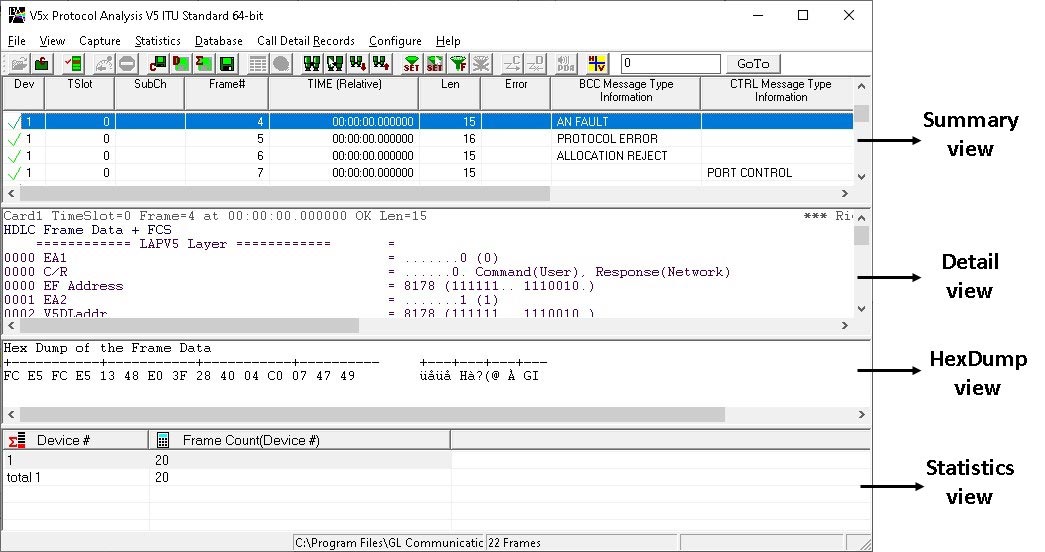
The V5.x analyzer application is invoked from the main menu of GL's E1 Analyzer for real-time analyzer. The remote/offline V5.x analyzer is invoked from the installation directory of the remote V5.x Analyzer. The analyzer displays Summary, Detail and Hex dump view in different panes. Summary View displays Device No, Time Slots, Sub Channel, Frame Number, Time, Frame Length, Frame Errors, C/R, CTL, P/F, FUNC, V5Link-Add, N (S), N(R), V5.x messages etc. for all frames. User selects a frame in Summary View to analyze and decode in the Detail View. Hex dump View displays the captured data for the selected frame in hex format.
Real-time/Remote and Offline Analysis
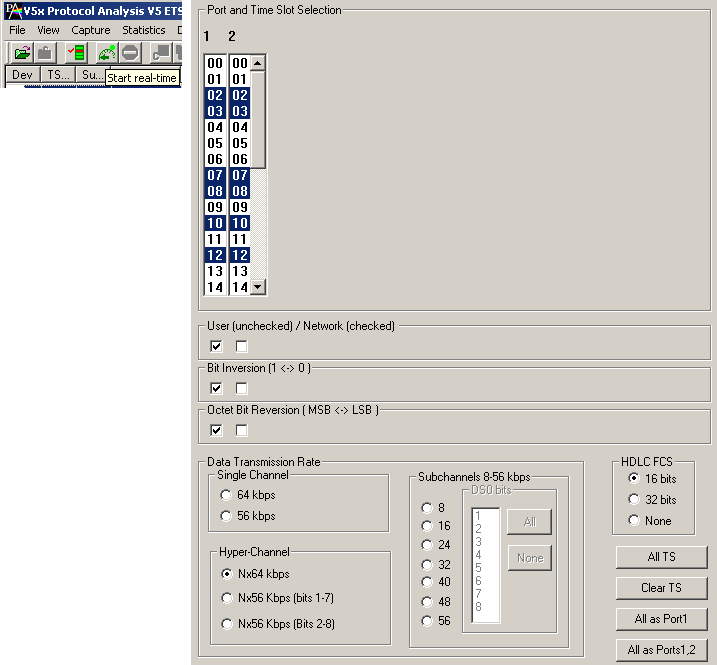
User can capture and analyze V5.x frames using either real time or remote analyzer All or filtered traffic can be recorded into a trace file. The recorded trace file can be used for offline analysis or exported to a comma-delimited file, or ASCII file. Real-time capturing requires user to specify timeslots, bit inversion, octet bit reversion, user/network side, FCS, and data transmission rate. Recorded trace file can be played back on E1 using HDLC Playback application.
Filtering and Search
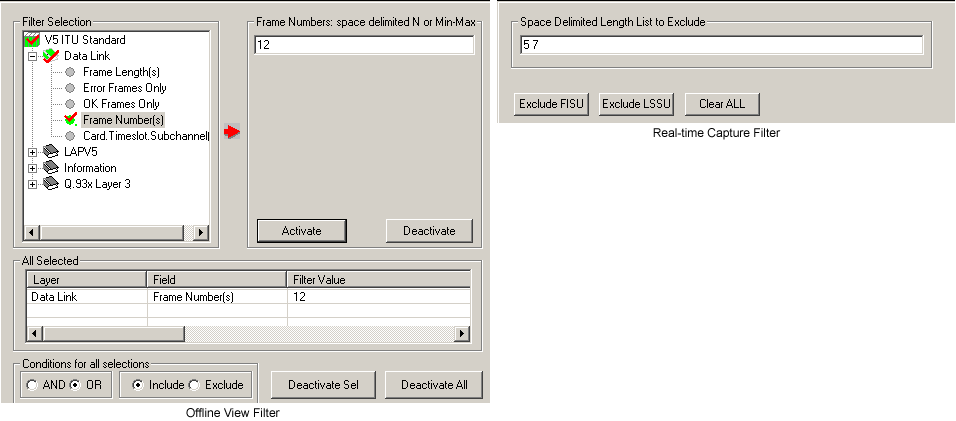
User can record all or filtered traffic into a trace file and also can create search/filter criteria automatically from the current screen selection. The filter and search options add a powerful dimension to the V5.x Analyzer that isolates required frames from the captured frames in real-time/remote/offline.
Users can specify custom values for frame length to filter frames during real-time capture. The frames can also be filtered after completion of capture according to C/R, V5Link-Add, CTL, P/F, N(S), N(R), FUNC, INFORMATION and more. Similarly, Search capability helps user to search for a particular frame based on specific search criteria.
Aggregate Column Group
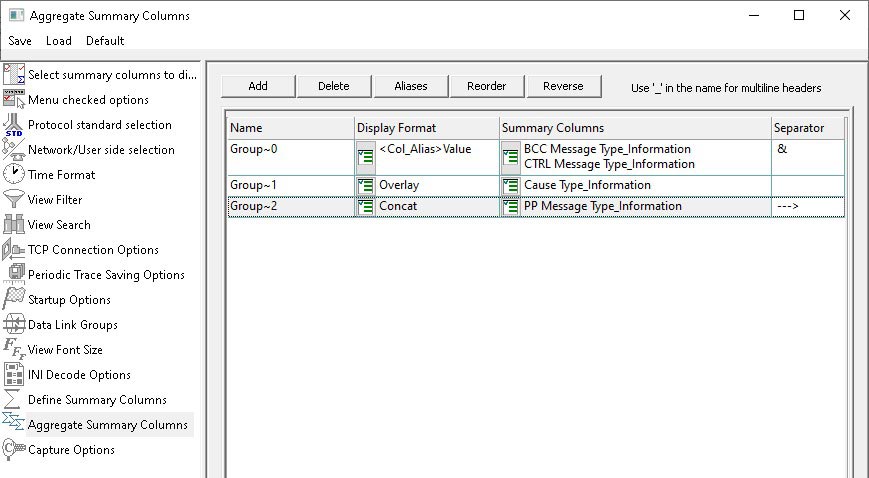
Aggregate Summary Column Group
The enhanced feature of the protocol analyzer is aggregate column groups. The user can also create multiple aggregate column groups and prioritize the groups as per the requirement to display the summary results in an efficient way.
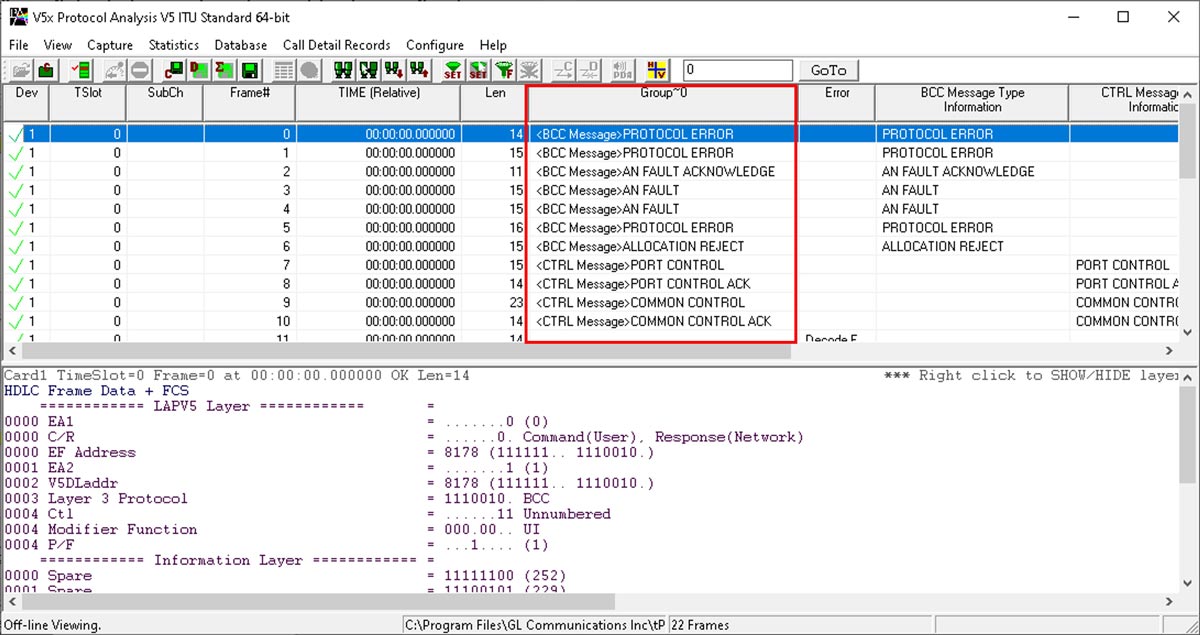
Display of Aggregate Summary Column Group
The updated results are as shown below. Here the root aggregate group~0 summary columns are displayed first and then Group~1 and Group~2 as per the assigned priority if the higher group values are null.
Statistics and Call Detail Record View
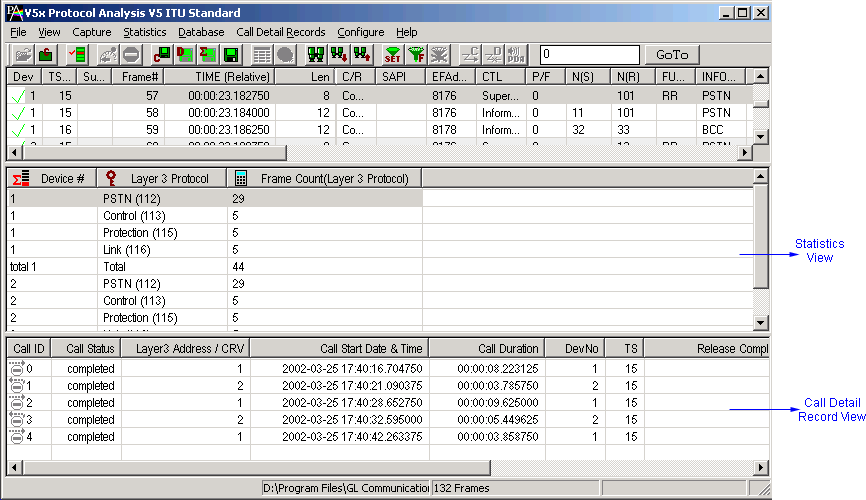
Statistics is an important feature available in V5.x analyzer and can be obtained for all frames both in real-time as well as offline mode. Numerous statistics can be obtained to study the performance and trend in the V.5x network based on protocol fields and different parameters.
Important call specific parameters like. status of each call (i.e. active/completed), duration of completed call, Call Status, Call ID, Device Number, Timeslot and Layer 3 Address for each individual call from the captured data are displayed in Call Detail Records View. Call Detail Recording feature includes data link groups that help in defining the direction of the calls in a given network and form logical groups comprised of unidirectional (either 'Forward' or 'Backward') data links. Additionally, users are provided with the option to search a particular call detail record from the captured traces.
Enhanced Trace Saving Options
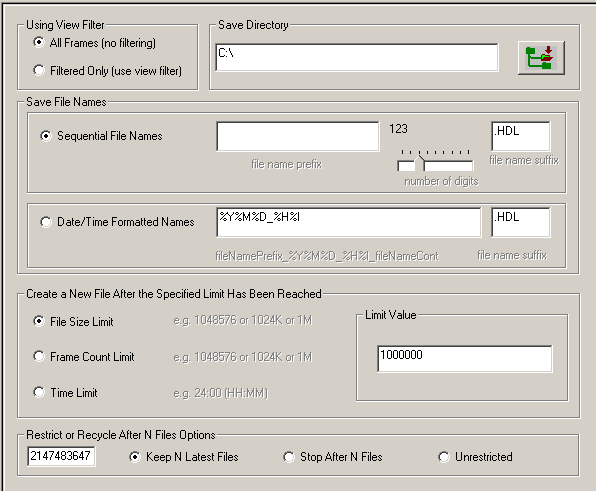
Users can control the captured trace files by saving the trace using different conventions such as trace files with user-defined prefixes, trace file with date-time prefixes, and slider control to indicate the total number of files, file size, frame count, or time limit. This feature also allows the captured frames to be saved into a trace file based on the filtering criteria set using display filter feature.
Save/Load All Configuration Settings
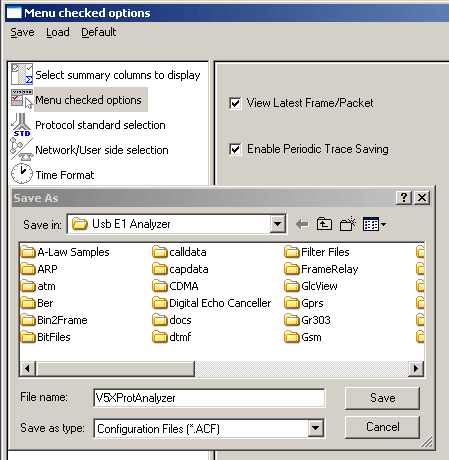
Protocol Configuration window provides a consolidated interface for all the important settings required in the analyzer. This includes various options such as protocol selection, startup options, stream/interface selection, filter/search criteria and so on. Any protocol field can be added to the summary view, filtering, and search features from this GUI providing the users more flexibility to monitor required protocol fields. All the configuration settings done in any of these options can be saved to a file, loaded from a configuration file, or user may just revert to the default values using the default option.
Bridge and Monitor Connections
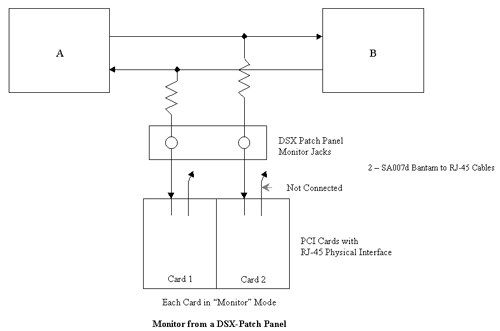
- Monitor from a DSX-Patch Panel
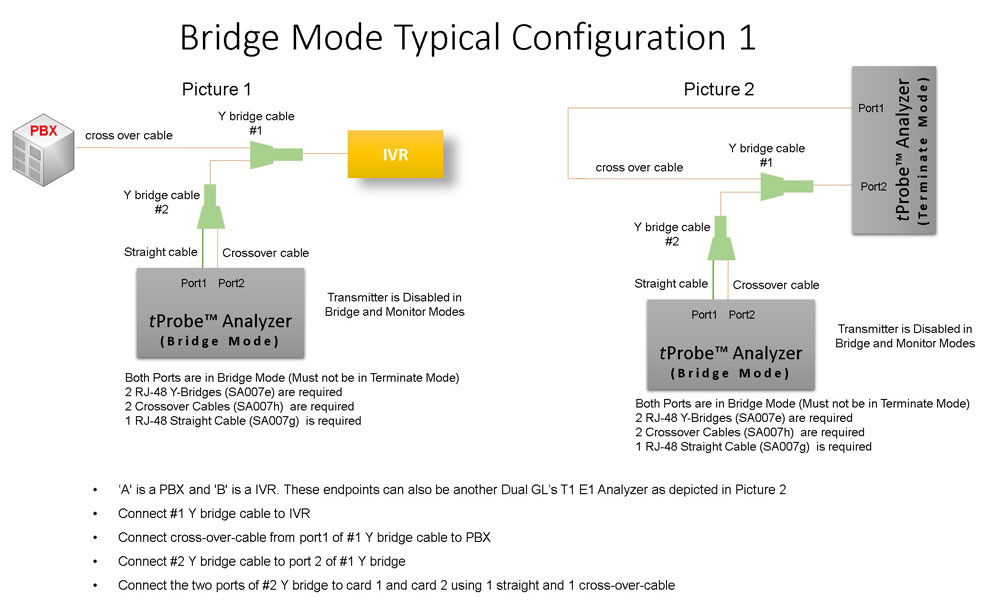
- Bridge Mode Connections for Monitoring T1 E1 Signals for RJ-45
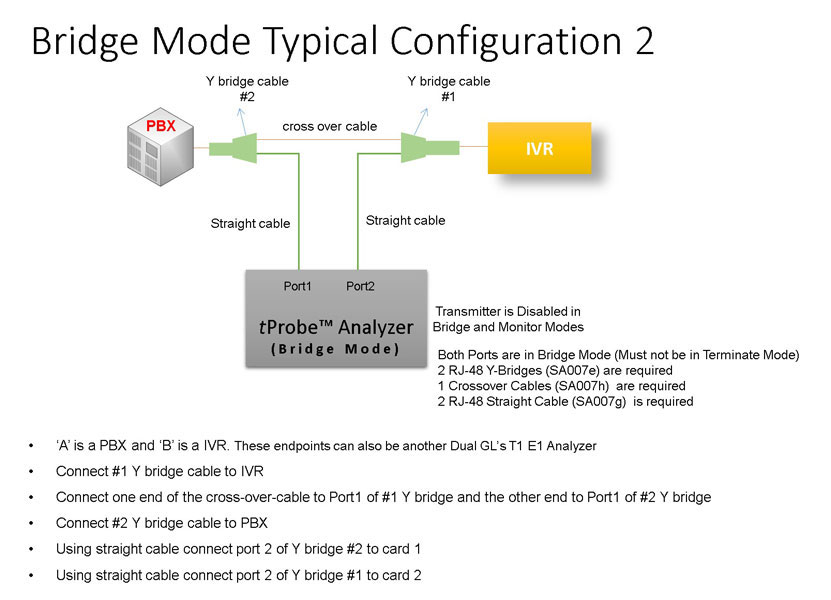
- Bridge Mode Connections Alternative Method
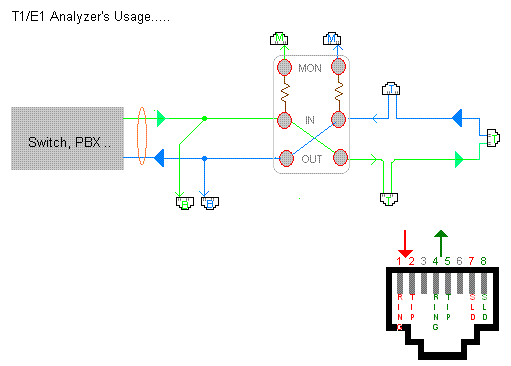
- RJ-45 Connections
Resources
Please Note: The XX in the Item No. refers to the hardware platform, listed at the bottom of the Buyer's Guide, which the software will be running on. Therefore, XX can either be ETA or EEA (Octal/Quad Boards), PTA or PEA (tProbe Units), XUT or XUE (Dual PCIe Express) depending upon the hardware.
| Item No. | Item Description |
|---|---|
| XX110 | E1 Real-time V 5.x Analyzer Software |
| OLV110 | E1 Offline/ Remote V 5.x Analyzer Software |
| Related Software | |
| XX020 | Record/Playback File Software |
| XX610 | File based Record/Playback (Client side) ClientDataTxRx (Server side) |
| Related Hardware | |
| PTE001 | tProbe™ Dual T1 E1 Laptop Analyzer with Basic Analyzer Software |
| XTE001 | Dual T1 E1 Express (PCIe) Boards (requires additional licenses) |
| FTE001 | QuadXpress T1 E1 Main Board (Quad Port– requires additional licenses) |
| ETE001 | OctalXpress T1 E1 Main Board plus Daughter Board (Octal Port– requires additional licenses) |
 Back to Protocol Analysis Index Page