HDLC Protocol Analyzer
(HDLC Analysis, Playback, Simulation)
Overview
The HDLC is a protocol operating at the data link layer. The HDLC protocol embeds information in a data frame allowing data flow control and error correction. Each flag consists of eight bits - (01111110).
At the end of the frame, a Frame Check Sequence (FCS) is used to verify the data integrity. The FCS also known as cyclic redundancy check (CRC) is calculated using polynomial xˆ16 + xˆ12 + xˆ5 + 1 (FCS 16 bits) or xˆ0+xˆ1+xˆ2+xˆ4+xˆ5+xˆ7+xˆ 8+xˆ10+xˆ11ˆxˆ12+xˆ16+xˆ22+xˆ23+xˆ26+xˆ32 (FCS 32 bits). Idle periods in the data channel contain only flags.
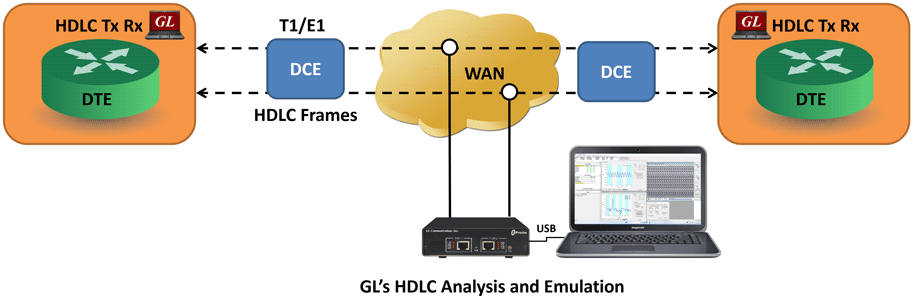
GL's HDLC protocol analyzer provides the capability to capture, and analyze HDLC data on a full duplex T1 or E1 line. The data channel may utilize all or a fractional part of the T1 or E1 line. Also there may be multiple data channels within the T1or E1 line. After setting the HDLC data channel parameters and starting the decoding process, the main screen displays the received HDLC frames in hex format. Flags are stripped, all other data is presented, including CRC bytes.
GL Communications supports the following types of HDLC analyzers:
- Real-time HDLC Analyzer (Pre-requisites: GL's field proven E1 or T1 internal cards or USB Laptop E1 or T1 external units, required licenses and Windows Operating System)
- Remote/Offline HDLC Analyzer (Pre-requisites: Hardware Dongle and Windows Operating System)
In addition the following HDLC applications are supported that further help in transmitting and capturing pre-defined HDLC frames:
- HDLC Playback
- HDLC Impairment Utility
- HDLC Tx RxTest Application
- Automated HDLC Testing using Client-Server
HDLC Analyzer Main Features
- Displays Summary, Detail, Hex dump, Statistics, and Call Detail Views; the contents of this view can also be copied to clipboard.
- Summary View displays timeslot, sub channel, frame#, device#, LAPD, LAPF specific information and IP information like source/destination IP address, TCP source port, TCP destination port etc.
- Supports decoding of LAPF, LAPD, LAPD+IP, LAPX+IP, X.25, Cisco HDLC Protocols.
- Detail View displays decodes of user-selected frames from the Summary View.
- Statistics View displays statistics based on frame count, byte count, frames/sec, bytes/sec etc for the entire captured data
- Hex dump View displays the frame information in HEX and ASCII format; the contents of this view can also be copied to clipboard.
- Supports filtering and search features based on C/R, SAPI, TEI, CTL, P/F, N(S), N(R) and FUNC
- Any protocol field can be added to the summary view, filtering, and search features providing users more flexibility to monitor required protocol fields.
- Capability to export Summary View details information to a comma delimited file for subsequent import into a database or spreadsheet.
- Capability to export detailed decode information to an ASCII file.
- Status bar displaying information regarding running percent utilization, Number of frames captured, CRC errors and Frame errors etc.
- Option to create multiple aggregate column groups and prioritize the groups as per the requirement to display the summary results efficiently
- Allows the user to create search/filter criteria automatically from the current screen selection
- Remote monitoring capability using GL's Network Surveillance System.
Additional features supported by Real-time/Remote HDLC Analyzer:
- Streams can be captured on the selected time slots (contiguous or non-contiguous), sub-channels or full bandwidth. Frames may also be contained in either one, n x 64 kbps, or n x 56 kbps data channels.
- Other variations accommodated in the software are inverted or non-inverted data, byte reversal or non-reversal.
- Real-time capture filter can be set for filtering frames based on frame length.
- Multiple streams of HDLC traffic on various T1/E1 channels can be simultaneously decoded with different GUI instances.
- Supports decoding of frames with FCS of 16 bits and 32 bits, or none.
- Captured frames can later be used for traffic simulation using HDLC Transmit/Receive/Playback application.
- Multiple remote clients may access a single T1/E1 server, the T1/E1 server is fully functional while being accessed as a server. Thus, a user may perform T1/E1 operations locally on the server while a client is accessing the same server, in real time (For Remote Analyzers only).
Additional features supported by Offline HDLC Analyzer:
- Trace files for analysis can be loaded through simple command-line arguments.
- Multiple trace files can be loaded simultaneously with different GUI instances for offline analysis.
Supported Protocols
Following is a description of the protocols supported by GL's HDLC analyzer:
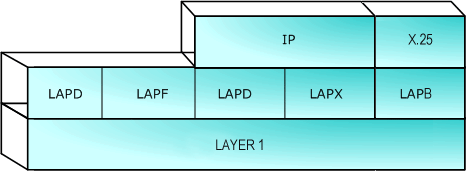
The supported protocol standards in HDLC analyzer are LAPF, LAPD, LAPD+IP, LAPX+IP, X.25, Cisco HDLC Protocols.
| Supported Protocols | Specification Used |
|---|---|
| LAPD | CCITT Q.920/921 |
| LAPF | ITU-T Q.922 |
| IP | RFC 791 |
| TCP | RFC 793 |
| UDP | RFC 768 |
| ICMP | RFC 792 |
| STUN | RFC 3489 |
| DNS | RFC 1035 |
| DHCP | RFC 1533, 2131 |
| HTTP | RFC 2616 |
| FTP | RFC 959 |
| SNMP | RFC 1157,1155,1902,3416,2863,2578,3418,2011,2012 etc |
| LAPB, X.25 | ITU-T Recommendation X.25 |
| Cisco HDLC | - |
| ARP | RFC 826 |
Summary, Detail and Hex dump Views
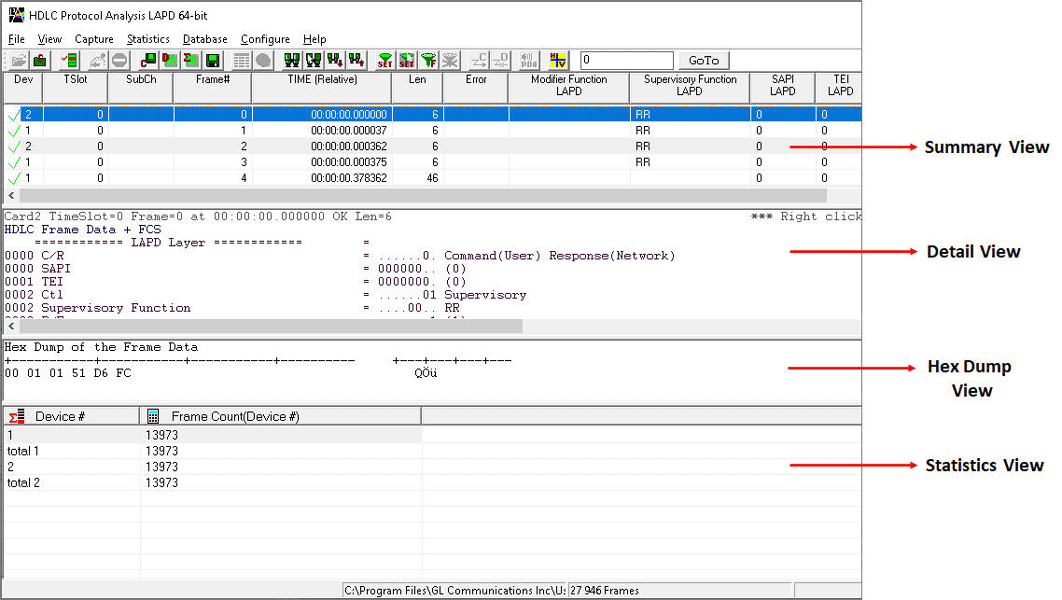
The HDLC analyzer application is invoked from the main menu of GL's T1/E1 Analyzer for real-time analyzer. The offline HDLC analyzer is invoked from the installation directory of the offline HDLC Analyzer. The analyzer displays Summary, Detail and Hex dump View in different panes. The Summary View displays Frame Number, Time, Length, Error, C/R, SAPI, TEI, CTL, P/F, N(S), N(R), FUNC etc. User can select a frame in Summary View to analyze and decode each frame in the Detail View. The selected frame is analyzed and decoded according to HDLC frame specifications. The Hex dump View displays the frame information in HEX and ASCII. The contents of Detail and Hex Dump view the contents of this view can also be copied to clipboard
Real-time/Remote and Offline Analysis
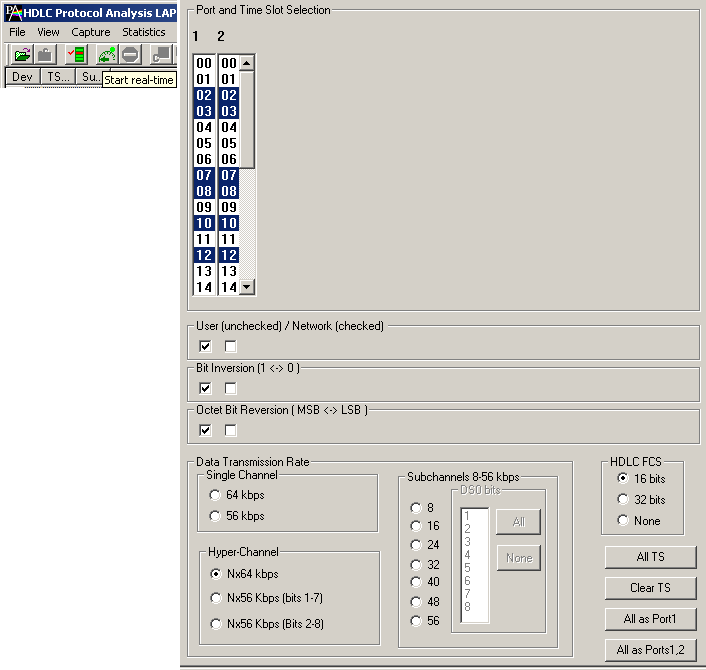
Users can capture and analyze multi HDLC links using either real-time or remote analyzers, and record all or filtered traffic into a trace file. The recorded trace file can be used for offline analysis or exported to a comma-delimited file, or ASCII file. Real-time capturing requires user to specify timeslots, bit inversion, octet bit reversion, user/network side, FCS, and data transmission rate. Recorded trace file can be transmitted back on T1/E1 using the HDLC File Playback option. Sub channel and N x 56 hyper channel enables user to analyze data captured by fractional DS0 and DS1 link respectively.
Filtering and Search
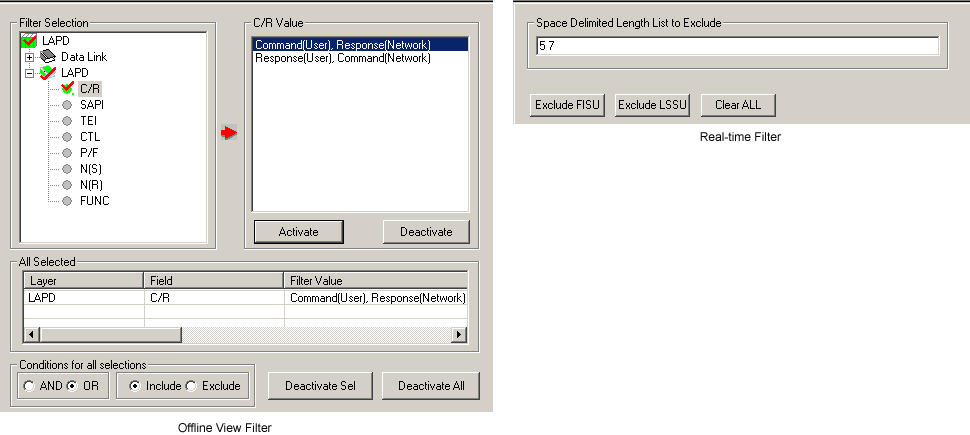
The user can record all or filtered traffic into a trace file and can create search/filter criteria automatically from the current screen selection. The filter and search options add a powerful dimension to the HDLC analyzer that isolates required frames from the captured frames in real-time/remote/offline.
Users can specify custom values for frame length to filter frames during real-time capture. The frames can also be filtered after completion of capture according to CTL, C/R, Modifier Function, N(R), N(S), P, P/ F, SAPI, Supervisory function and TEI. Similarly, search capability helps user to search for a particular frame based on specific search criteria.
Aggregate Column Group
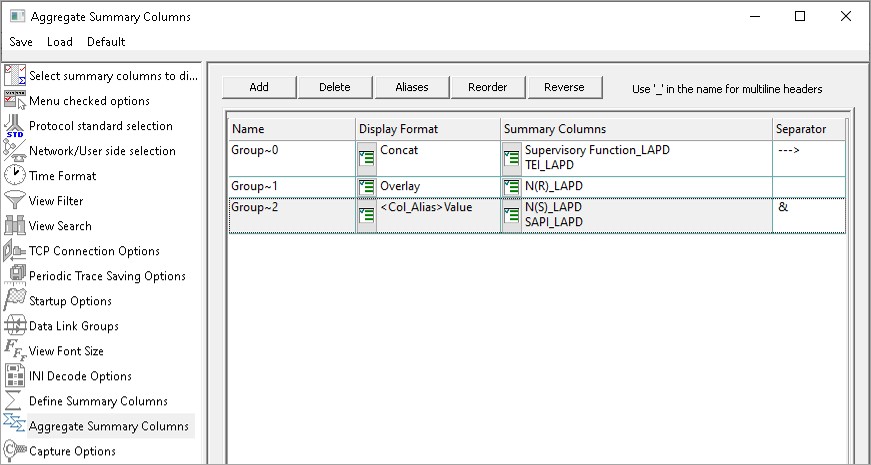
Aggregate Summary Column Group
The enhanced feature of the protocol analyzer is aggregate column groups. The user can also create multiple aggregate column groups and prioritize the groups as per the requirement to display the summary results in an efficient way.
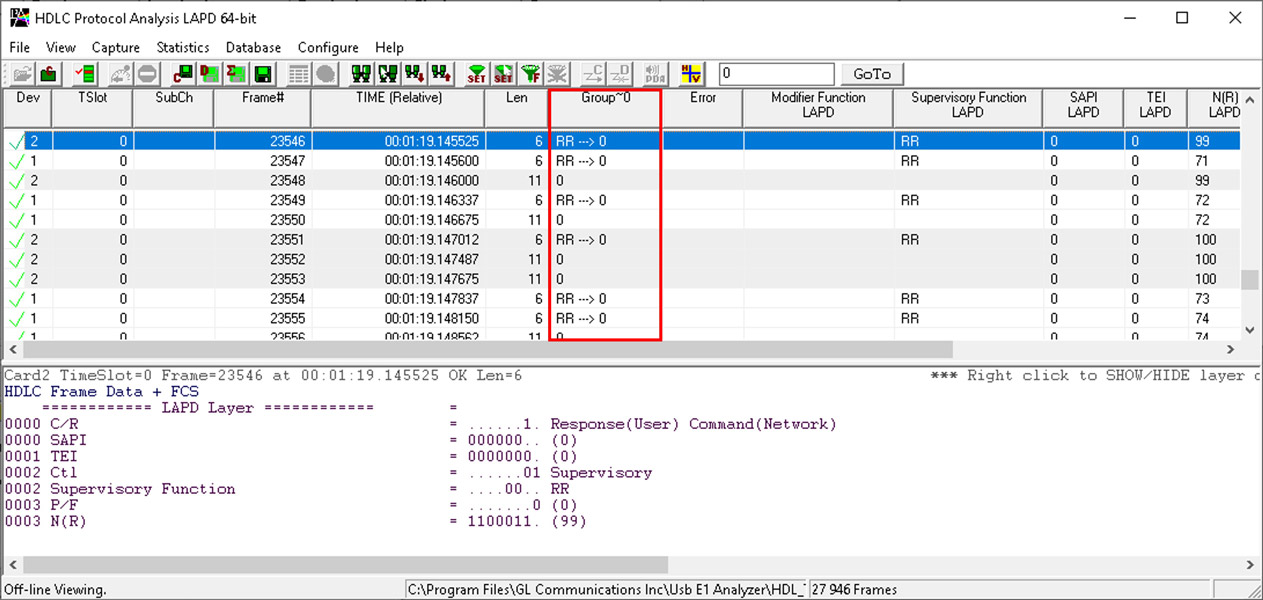
Display of Aggregate Column Group in Summary View
The updated results are as shown below. Here the root aggregate group~0 summary columns are displayed first and then Group~1 and Group~2 as per the assigned priority.
Statistics View
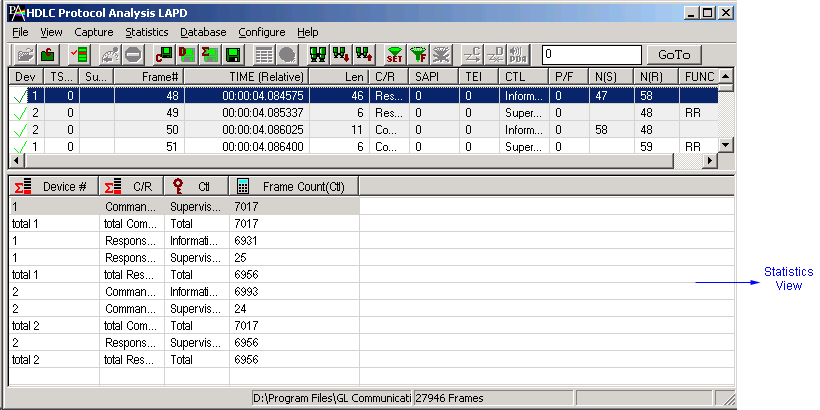
Statistics is an important feature available in HDLC analyzer and can be obtained for all frames both in real-time as well as offline mode. Numerous statistics can be obtained to study the performance and trend in the HDLC network based on protocol fields and different parameters.
Enhanced Trace Saving Options
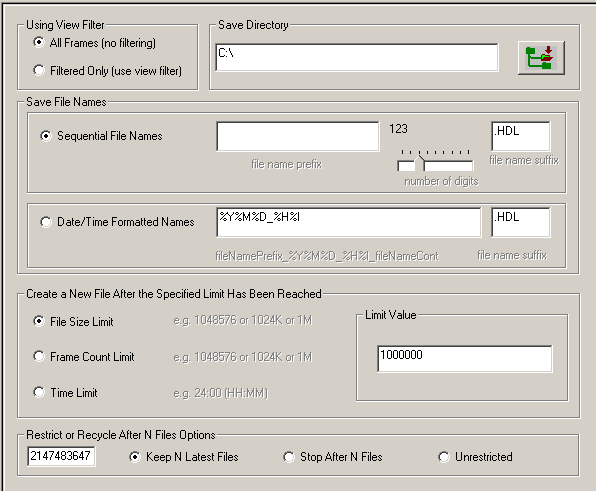
Users can control the captured trace files by saving the trace using different conventions such as trace files with user-defined prefixes, trace file with date-time prefixes, and slider control to indicate the total number of files, file size, frame count, or time limit. This feature also allows the captured frames to be saved into a trace file based on the filtering criteria set using display filter feature.
Save/Load All Configuration Settings
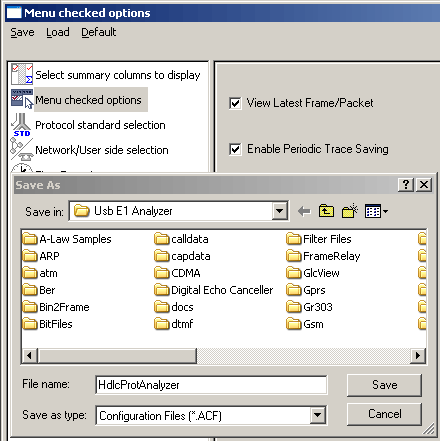
Protocol Configuration window provides a consolidated interface for all the important settings required in the analyzer. This includes various options such as protocol selection, startup options, stream/interface selection, filter/search criteria and so on. Any protocol field can be added to the summary view, filtering, and search features from this GUI providing the users more flexibility to monitor required protocol fields. All the configuration settings done in any of these options can be saved to a file, loaded from a configuration file, or user may just revert to the default values using the default option.
Automated HDLC Testing using Client-Server
GL's Windows Client/Server software allows the user of T1/E1 analysis cards, the capability of remote operation, automation, and multi-site connectivity. Server software can run multiple tasks simultaneously at the request of the Client software. GL provides client -server based HDLC capture, playback, emulation & analysis modules.
WCS module XX640, XX641-File based HDLC Record/Playback & Remote Capture/PlaybackThe File based HDLC Record/Playback (Hdlcfunc) module is an optional application that allows HDLC Traffic Capture/Playback. It also allows transmission/reception of *.HDL frames files located on the server and on client.
Features
- Displays the command syntax.
- Receiving HDLC frames in HDL files located on the server.
- Transmitting HDLC frames from an HDL file located on the server.
- Receiving HDLC frames in HDL files located on the client.
- Transmitting HDLC frames from an HDL file located on the client.
For more information on this application visit HDLC Record/playback and Remote Record/Playback webpage.
The HDLCTerr module performs multi-channel HDLC emulation and analysis. It permits frame error testing and transmission of memory generated sequences of fixed or variable length HDLC frames, GL *.HDL Trace file frames, and various bandwidth streams.
The HDLCHpio module performs file-based HDLC record and playback actions. It permits receive / transmit of HDLC streams of various bandwidth (hyper channel, timeslot, and multiple sub-channel streams per timeslot).
For more information on these applications visit HDLC Frames Encode/Decode, and Error Testing webpage.
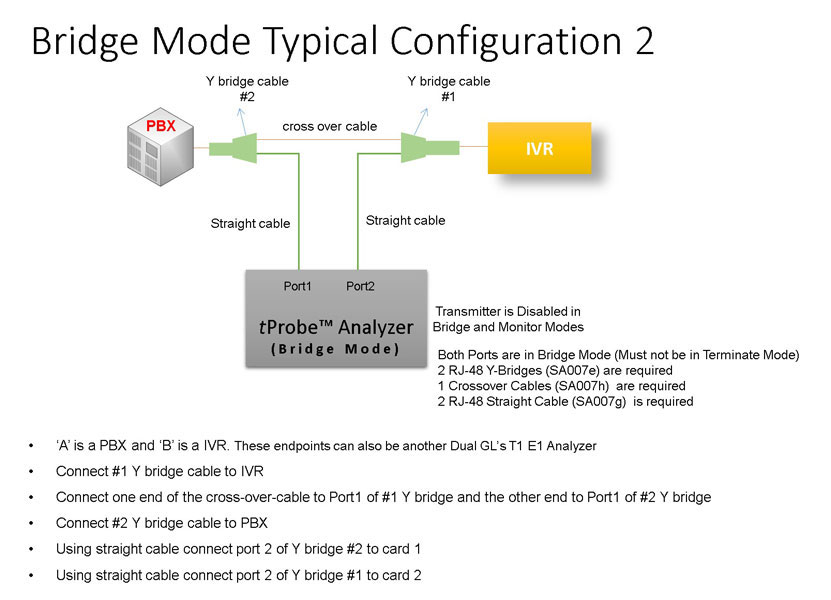
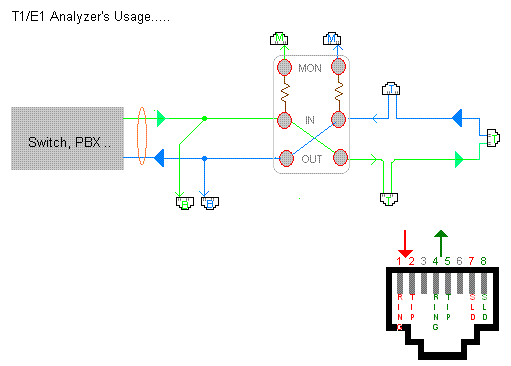
Bridge and Monitor Connections
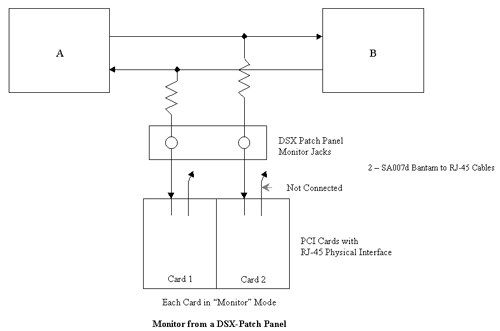
- Monitor from a DSX-Patch Panel
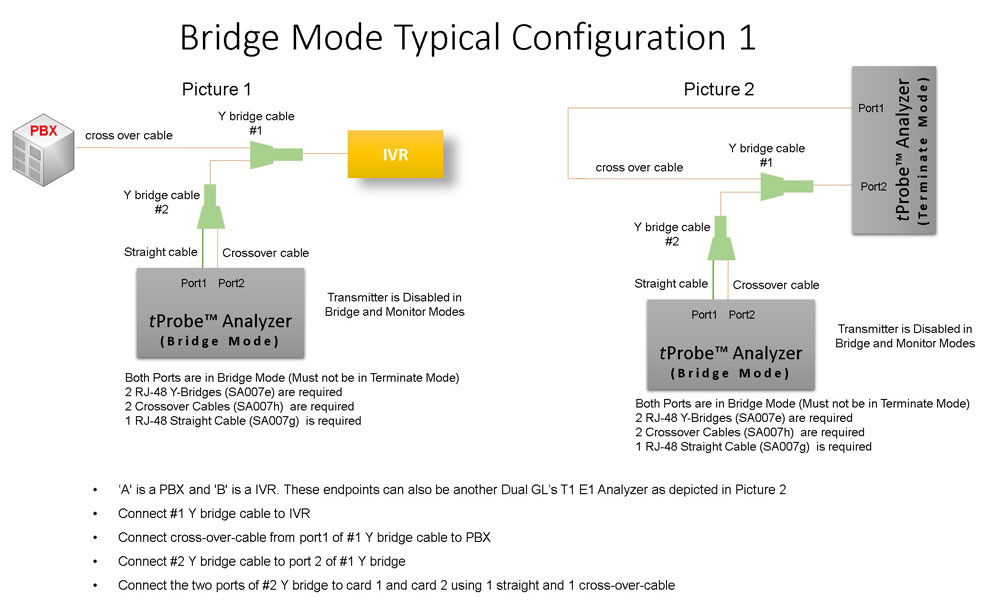
- Bridge Mode Connections for Monitoring T1/E1 Signals for RJ-45
- Bridge Mode Connections Alternative Method
- RJ-45 Connections
Resources:
Please Note: The XX in the Item No. refers to the hardware platform, listed at the bottom of the Buyer's Guide, which the software will be running on. Therefore, XX can either be ETA or EEA (Octal/Quad Boards), PTA or PEA (tProbe Units), XUT or XUE (Dual PCIe Express) depending upon the hardware.
| Item No. | Item Description |
| XX090 | T1 or E1 Real-Time HDLC Decode/Store/Impairment/Rx-Tx Test Applications |
| OLV090 | Offline/ Remote HDLC Protocol Analyzer |
| Related Software | |
|---|---|
| XX100 | ISDN Analysis Software (T1 or E1) |
| XX120 | SS7 Analyzer Software (T1 or E1) |
| XX130 | Real-time Frame Relay Protocol Analyzer (T1 or E1) |
| XX634 | Multi-Channel HDLC Emulation and Analysis & File based High Throughput HDLC Record/Playback |
| XX640 | File based HDLC Record/Playback |
| XX641 | File based HDLC Remote Record/Playback |
| Related Hardware | |
| PTE001 | tProbe™ Dual T1 E1 Laptop Analyzer with Basic Analyzer Software |
| PTE025 | Data Communications Board for RS-232, RS-449, RS-422, RS-423, EIA-530, V.35 Interfaces |
| XTE001 | Dual T1 E1 Express (PCIe) Boards (requires additional licenses) |
| FTE001 | QuadXpress T1E1 Main Board (Quad Port– requires additional licenses) |
| ETE001 | OctalXpress T1E1 Main Board plus Daughter Board (Octal Port– requires additional licenses) |
 Back to Protocol Analysis Index Page