SS7 and ISDN Console Based Decode Agent Clients
Overview
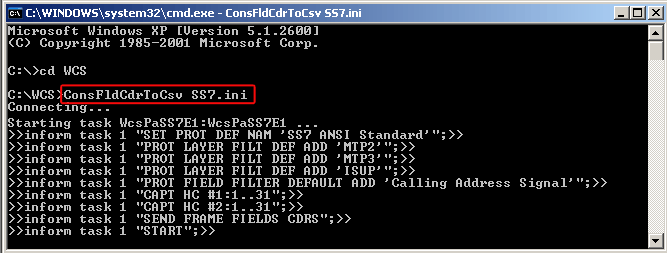
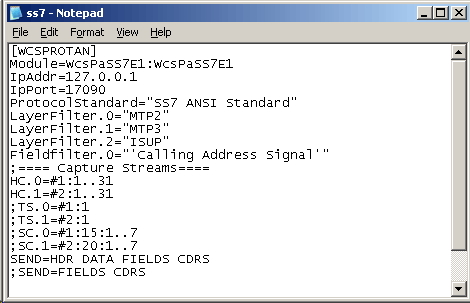
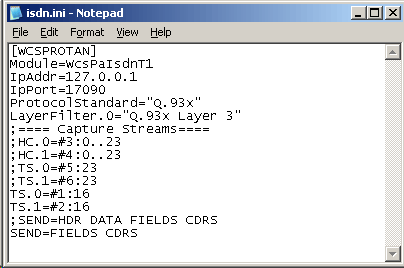
ConsFldCdrToCsv is a console based client application for Windows Client Server (WCS) Protocol Decode Agent Modules (PDAM). Currently the console client application monitors SS7/ISDN Links, decodes multiple SS7/ISDN protocol standards, filters user-specified protocol parameters, builds Call Data Records (CDRs), and streams over TCP/IP to remote site. The client is controlled by an *.ini file that is passed as a parameter. SS7.ini / ISDN.ini is the ini configuration files comprising of the decoding parameters required to perform SS7 / ISDN real-time analysis.
Screenshots
- ConsFldCdrToCsv SS7.ini command execution in the command prompt window
- Sample SS7.ini file
- Sample ISDN.ini file
Applications
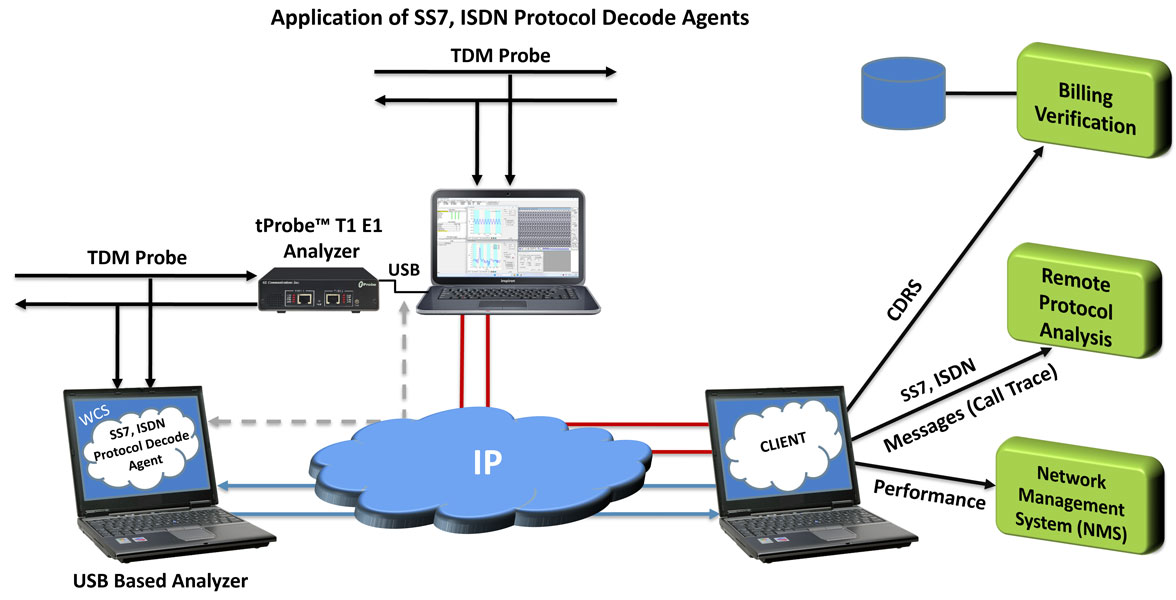
- Remote performance monitoring - SS7/ISDN messages with call trace for Remote Protocol Analysis
- Billing verification - Probes collect specific information to relay CDRs for Billing information
- Network management system (NMS) and customized Network Surveillance
Main Features
- Monitors and decodes multiple SS7/ISDN protocol standards from a remote client
Example: Module = WcsPaIsdnT1 , ProtocolStandard="Q.93x" - Allows applying filters based on protocol layers and fields to limit the amount of data sent to client-
Example: LayerFilter.0="MTP2" , FieldFilter.0=OPC - Allows capturing on specified timeslots, Nx64 hyper-channels, or sub-channels.
Example: TS.0=#1:1..10 - The timeslots 1 to 10 are selected in the device number 1 to capture frames - Allows the following types of information to be sent to the remote client -
Example: SEND=HDR DATA FIELDS CDR - Frame header information (HDR)
- Frame raw data (DATA)
- Frame protocol decode field names and values (FIELDS)
- CDR field names and values (CDRS) in *.csv format
Output File Structure
The Frames and CDR files in the CSV file formats will be created once ConsFldCdrToCsv SS7.ini command is performed successfully.
The frame header, raw data and field information is recorded into Frames.CSV file. The frame header and raw data information is recorded in hexadecimal representation (two characters per octet).
The CDR information is recorded in CDR.CSV file
Resources
Note: PCs which include GL hardware/software require Intel or AMD processors for compliance.
Please Note: The XX in the Item No. refers to the hardware platform, listed at the bottom of the Buyer's Guide, which the software will be running on. Therefore, XX can either be ETA or EEA (Octal/Quad Boards), PTA or PEA (tProbe Units), XUT or XUE (Dual PCIe Express) depending upon the hardware.
| Item No. | Item Description |
| XX690 | SS7 Decode Agent |
| XX691 | ISDN Decode Agent |
| Related Software | |
| XX100 | T1 or E1 Real-Time ISDN Protocol Analyzer |
| OLV100 | Offline / Remote ISDN Analyzer |
| XX120 | T1 or E1 Real-Time SS7 Protocol Analyzer |
| OLV120 | Offline / Remote SS7 Analyzer |
| XX105 | T1 or E1 Real-Time ISDN Protocol Emulator |
| Related Hardware | |
| PTE001 | tProbe™ Dual T1 E1 Laptop Analyzer with Basic Analyzer Software |
| XTE001 | Dual T1 E1 Express (PCIe) Boards (requires additional licenses) |
| FTE001 | QuadXpress T1 E1 Main Board (Quad Port requires additional licenses) |
| ETE001 | OctalXpress T1 E1 Main Board plus Daughter Board (Octal Port requires additional licenses) |
| Brochures |
| t1e1 client server - Brochure |
| Presentation |
| T1E1 Client Server - Presentation |
 Back to Client/Server Scripted Control Software Page