TRAU Emulation and Analysis
Overview
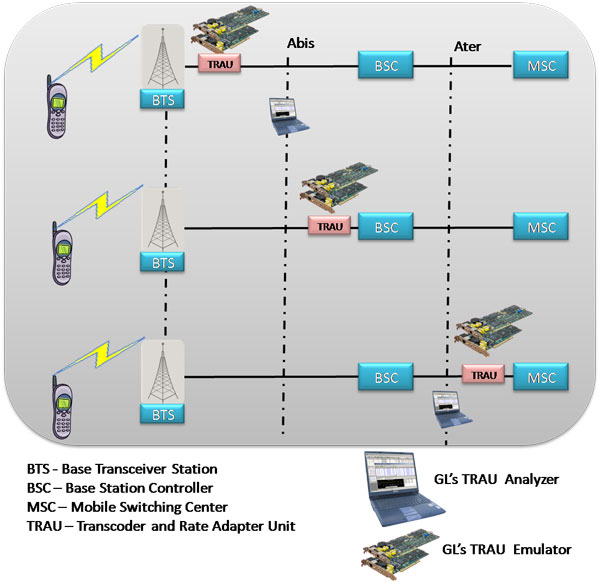
GSM technology dominates the wireless communication services in the world. A-bis interface (between Base Transceiver Station - BTS and Base Station Controller - BSC) within GSM network carries voice, data and signaling. The BSC is responsible for the exchanges of messages towards Mobile Switching Center - MSC and BTS. To slash the bandwidth consumption on the BSC-to-MSC interface of the backhaul network, service providers use transcoders or voice compression technology. Although BSC performs transcoding, in some places, the transcoders, also known as TRAU (Transcoder/Rate Adapter Unit), are found as a separate sub-system. TRAU at the BTS and BSC/MSC perform compression/decompression of speech channels within the radio cellular network. Transcoders may be at the A-bis interface (BTS to BSC links), and A-ter interface (BSC to MSC links). TRAU carries speech, data, O&M frames at full rate or half (8/16 kbps) rate and control information, over T1 E1 in a GSM network.
GL's T1 E1 Analyzer is equipped with TRAU Toolbox™, TRAU Traffic Playback, and TRAU Analyzer applications for emulation and analysis of traffic at A-bis interface. The T1 E1 Analyzer also includes client-server based applications for TRAU emulation at Abis & Ater interfaces with complete automation and remote-access capabilities.
The following is a list of TRAU applications that help in transmitting and capturing pre-defined TRAU frames
TRAU Analyzer
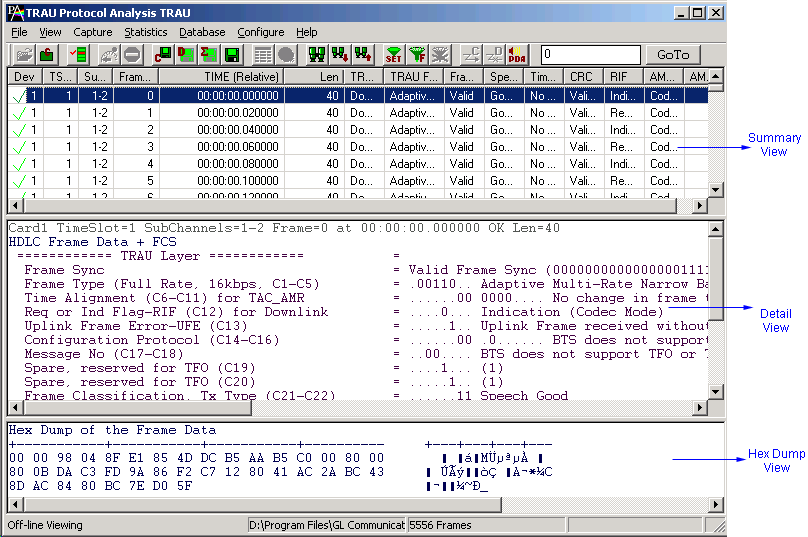
GL's TRAU Analyzer is used to non-intrusively monitor TRAU frames at the Abis interface (BTS to BSC links), and A-ter interface (BSC to MSC links). Application can automatically detect and capture TRAU frames of half rate (HR-8 kbps) or full rate (FR-16 kbps). Various codecs such as FR, EFR, AMR, AMR-WB, HR and Data are used for compression/decompression of speech (both directions). TRAU frames are decoded as per the specifications GSM 08.60 V 8.2.0 Release and GSM 08.61 V 8.1.0 Release. A-bis Signaling can be monitored using GSM Analyzer (optional application).
GL Communications supports the following types of TRAU analyzers:
- Real-time TRAU Analyzer: (Pre-requisites: GL's field proven E1 or T1 internal cards or USB Laptop E1 or T1 external units, required licenses and Windows Operating System)
- Offline TRAU Analyzers: (Pre-requisites: Hardware dongle and Windows Operating System)
For more details, visit TRAU Analyzer webpage.
TRAU Packet Data Analysis
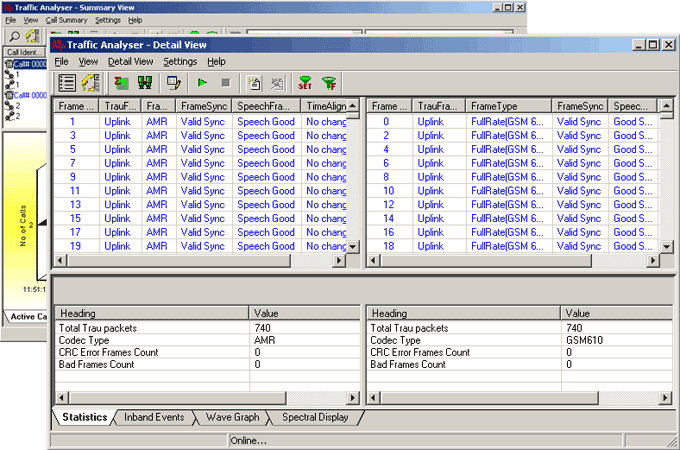
TRAU Packet Data Analysis (PDA) is a part of the TRAU Protocol Analyzer and when invoked it displays call information in tabular and graphical formats (PDA - Summary View) as well as detailed frame- by- frame information (PDA - Detail View). Analysis of TRAU calls, including detail statistics, wave graph, oscilloscope, spectral display for various codecs can be done using TRAU Packet Data Analysis (PDA) feature. It also allows users to play voice files to speaker, write speech data to a file, filter calls, detect digits and view graphs such as Active Calls, and Traffic Monitoring to identify the frames and classify traffic.
For more details, visit TRAU PDA webpage.
TRAU Traffic Playback
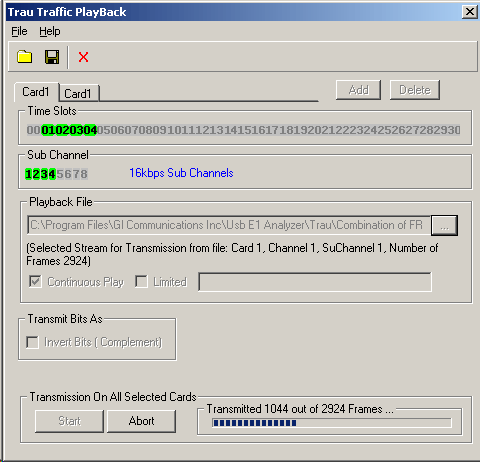
The TRAU Traffic Playback is an application used to generate TRAU traffic on T1 E1. The tool provides the ability to playback the recorded TRAU HDL file(s) using TRAU Analyzer on selected/all subchannels of T1 E1 lines. The application allows the user to transmit a single file or multiple files on the desired subchannels at any given time. TRAU frames are time-aligned as per the control information in the frame.
EFR, FR (GSM 6.10), HR, AMR, AMR-WB, O&M, Data, Data 14.5 and Idle Speech frame types, which are stored in the recorded TRAU files, can be used for transmission.
For more details, visit TRAU Traffic Playback webpage.
TRAU Toolbox™ (Emulation)
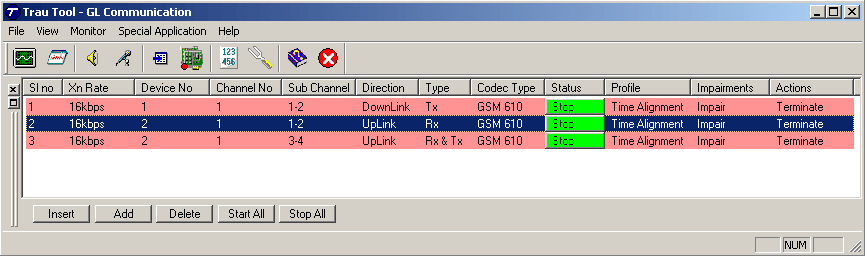
TRAU Toolbox™ is an ideal tool to test network elements at A-bis and A-ter interface. The tool can be used to create, monitor, and terminate multiple TRAU/GSM traffic (TRAU sessions). Once the TRAU session is created, different kinds of audio/voice/digits can be generated and analyzed on GSM call with various codecs. TRAU Toolbox™ can emulate TRAU node at BSC/MSC end or CCU node at BTS end including the compression/decompression of speech that takes place at TRAU side or Mobile side. TRAU frames are time-aligned according to control information. The traffic generated by a BTS is transported to the corresponding BSC across a network is referred to as the backhaul network. The TRAU Toolbox™ can be used to test this backhaul network.
For more details, visit TRAU Toolbox™ webpage.
Automated TRAU Testing using Client-Server (requires additional licenses)
GL's Windows Client/Server software allows the user of T1 E1 analysis cards, the capability of remote operation, automation, and multi-site connectivity. Server software can run multiple tasks simultaneously at the request of the client software.
WCS Module XX646 - Multi-Channel TRAU Tx/Rx Emulation and Analysis
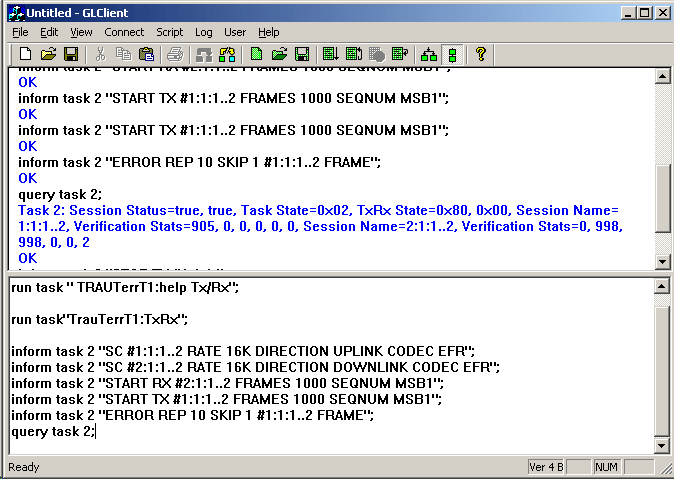
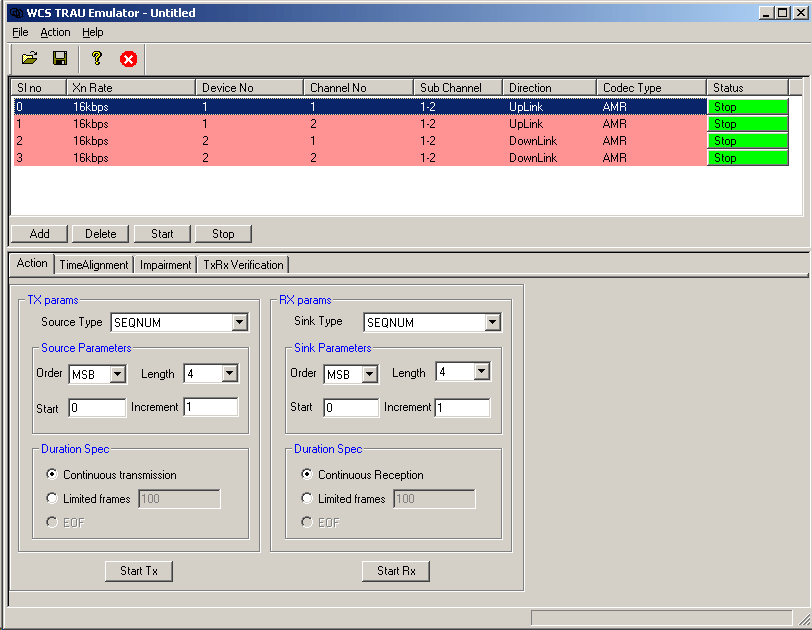
The Multi-Channel TRAU Tx/Rx Emulation and Analysis (TrauTerr) module is an optional application that allows testing of TRAU frames. The WCS TRAU Tx/Rx Emulation (TrauTerr) module is available as a GUI based client as well as command-line based client application, which simulate TRAU/CCU (BTS or BSC end) on GL's T1 E1 cards. The application is capable of generating and receiving TRAU traffic (with or without impairments) based on the codec type, and time alignment (if specified). The frames are transmitted through the 16 or 8 kbps channels. Traffic source can be sequence number, HDL files (containing packets/frames), flat binary file, and user-defined frames (ASCII HEX string/file). This application can be used to test the correctness of the received data, by comparing with predefined patterns.
For more details, visit TrauTerr webpage.
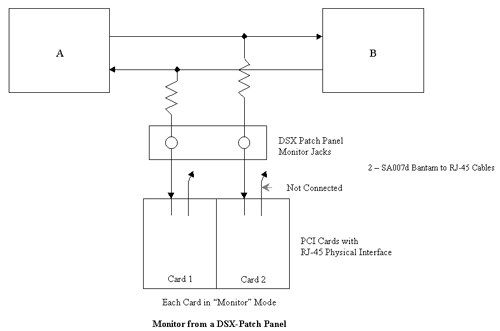
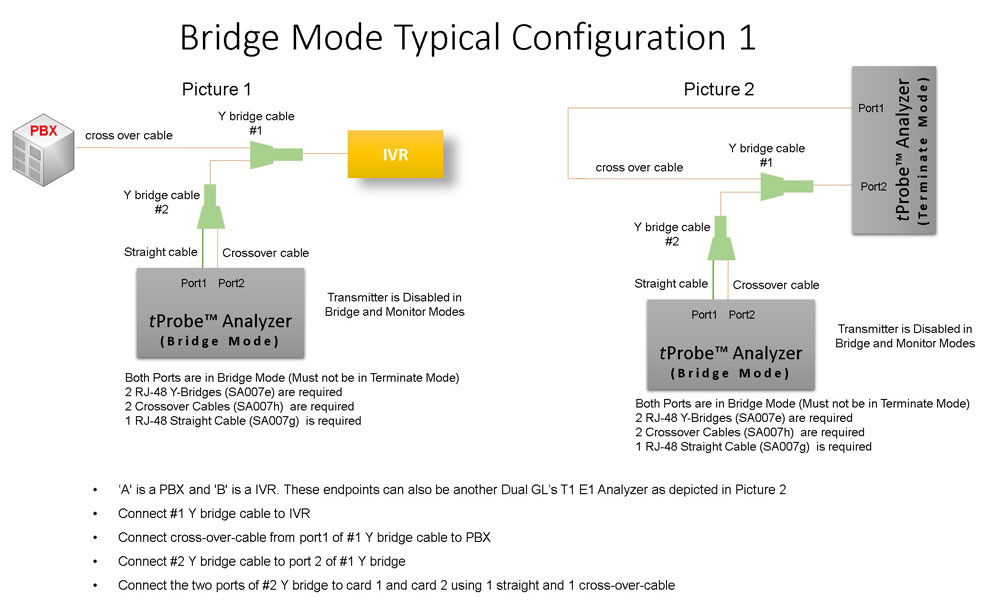
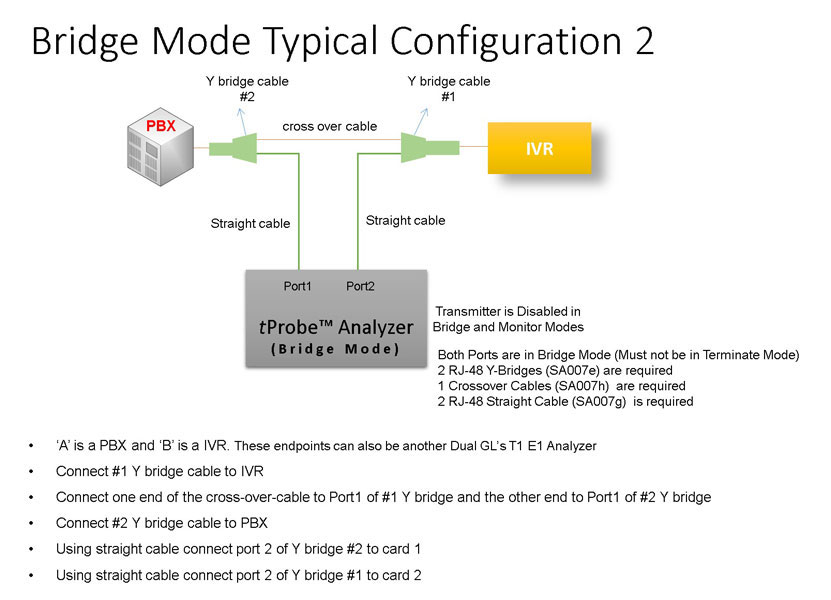
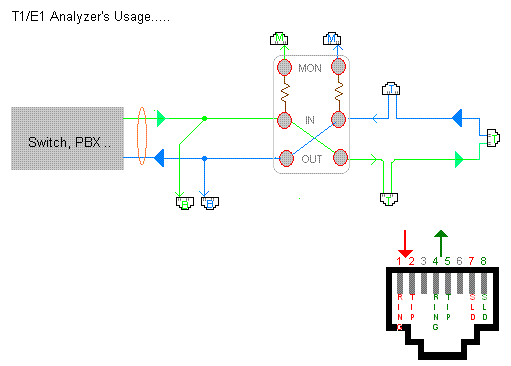
Bridge and Monitor Connections
- Monitor from a DSX-Patch Panel
- Bridge Mode Connections for Monitoring T1 E1 Signals for RJ-45
- Bridge Mode Connections Alternative Method
- RJ-45 Connections
Resources
Note: PCs which include GL hardware/software require Intel or AMD processors for compliance.
Please Note: The XX in the Item No. refers to the hardware platform, listed at the bottom of the Buyer's Guide, which the software will be running on. Therefore, XX can either be ETA or EEA (Octal/Quad Boards), PTA or PEA (tProbe Units), XUT or XUE (Dual PCIe Express) depending upon the hardware.
| Item No. | Item Description |
| XX153 |
T1 E1 Real-time TRAU Protocol Analyzer TRAU Traffic Playback TRAU Toolbox™ |
| OLV153 | Offline TRAU Analyzer |
| XX646 | Multi-Channel TRAU Tx/Rx Emulation and Analysis |
| Related Software | |
|---|---|
| XX090 | HDLC Capture and Playback Software (T1 or E1) |
| XX150 | GSM Protocol Analyzer |
| XX155 | T1 or E1 Real-Time GPRS Protocol Analyzer |
| Related Hardware | |
| PTE001 | tProbe™ T1 E1 Base Unit |
| FTE001 | QuadXpress T1 E1 Main Board (Quad Port™ requires additional licenses) |
| ETE001 | OctalXpress T1 E1 Daughter Board (Octal Port™ requires additional licenses) |
| XTE001 | Dual T1 E1 Express (PCIe) Boards (requires additional licenses) |
| Brochure |
| T1 E1 trau protocol analysis emulation brochure |
| Sample Messages |
| Presentation |
| TRAU Product Presentation |
 Back to Protocol Analysis Index Page