TRAU Toolbox™ (Emulator)
Overview
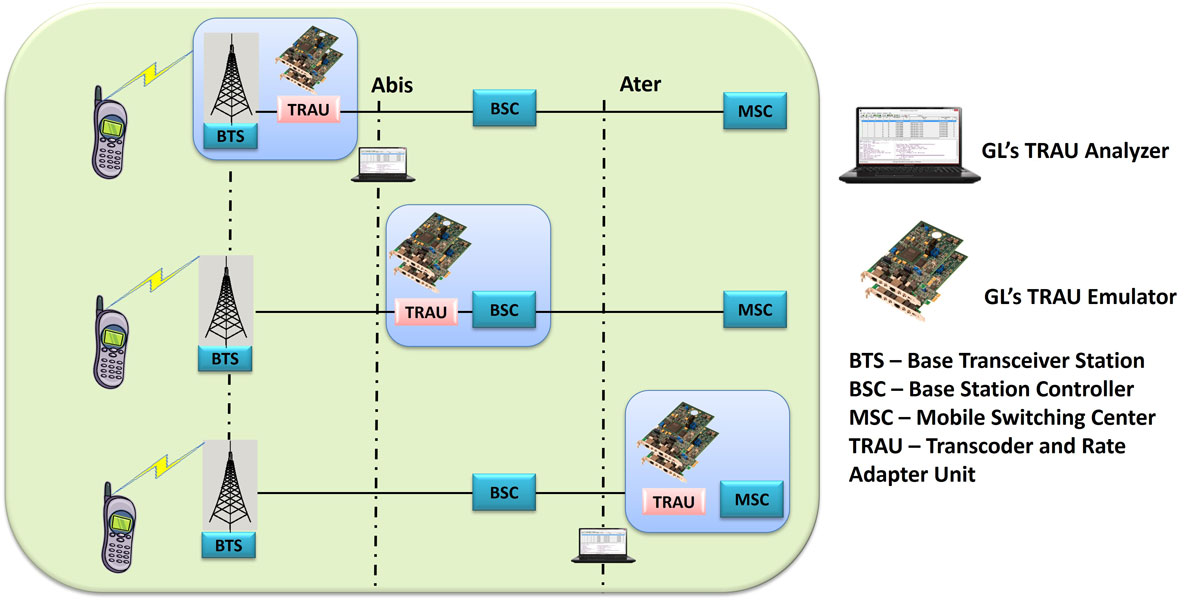
TRAU (Transcoder/Rate Adaptor Unit) at the A-bis interface (BTS to BSC links), and A-ter interface (BSC to MSC links) performs transcoding (speech compression, decompression) for speech channels and data rate adaptation (RA) for data channels within the radio cellular network. This enables the use of lower rates (16 or 8 kbps) over the A-bis interface instead of the 64 kbps.
The information between the Channel Codec Unit (CCU) and the remote TRAU is transferred in "TRAU frames" for every 20 ms, which has both the speech/data and the TRAU associated control signals are transferred.
GL's TRAU Toolbox™ is an ideal tool to test network elements at A-bis and A-ter interface. The tool can be used to create, monitor, and terminate multiple TRAU/GSM traffic (TRAU sessions). Once the TRAU session is created, different kinds of audio/voice/digits can be generated and analyzed on GSM call with various codecs. TRAU Toolbox™ can emulate TRAU node at BSC/MSC end or CCU node at BTS end including the compression/decompression of speech that takes place at TRAU side or Mobile side. TRAU frames are time-aligned according to control information. The traffic generated by a BTS is transported to the corresponding BSC across a network is referred to as the backhaul network. The TRAU Toolbox™ can be used to test this backhaul network.
Main Features
- Used to test the backhaul network.
- Users can create TRAU GSM traffic sessions by specifying the device number, channel & subchannel.
- Can create multiple sessions of Uplink or downlink in 8/16 Kbps
- Work on 3 modes: Transmission (Tx) side or only Receiving (Rx) side or both Rx & Tx.
- Supports speech codec for verification of correct voice transmission which includes GSM codecs such as GSM 6.10(FR), Half Rate (HR), Enhanced full rate (EFR), Adaptive multi Rate (AMR - Rates 4.75, 5.15, 5.90, 6.70, 7.4, 7.95, 10.2, & 12.2 kbps), Adaptive Multi Rate-Wide Band (AMR-WB Rates 6.60, 8.85, 12.65 kbps) and Data, Data 14.5kbps Sync, and Data 14.5kbps(Extended Data).
- Phase Alignment can be applied to AMR or AMR-WB modes to change the mode to the requested modes.
- Logical AND, OR or XOR impairments can be applied to a TRAU frames.
- Idle speech frames can be generated in case of GSM and EFR downlink codec if there is no speech frames to transmit.
- Capability to apply DTX to EFR and AMR codec
- Supports Loopback and Pass Through modes
- Time Alignment Delay or advance can be inserted in the TRAU frames.
- Graphical display features include the ability to monitor TRAU stream contents using an oscilloscope and spectrum analyzer.
- Other features allow the user to generate and analyze test tones, in-band signaling tones such as DTMF, MF, MFR2, playback and record voice files.
Applications for Data Transmissions
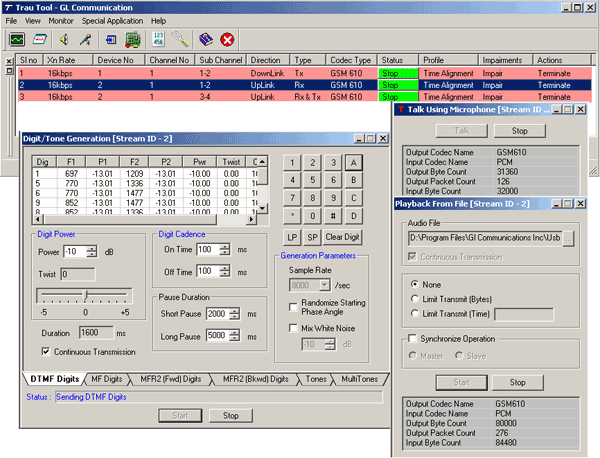
The following are the TRAU Toolbox™ applications that are used to transfer data on the specified TRAU sessions:
- Talk Using Microphone
- Playback from File
- Digit/Tone Generation
The Talk using Microphone application is used to transmit the real-time voice generated using the default audio device (microphone) on the selected TRAU session. Similarly, the Playback from File applications allows the user to send voice files, *.WAV, and *.PCM files. The Digit/Tone Generation application allows the user to send standard or user-defined tone or digits on a session.
Applications for Data Capture
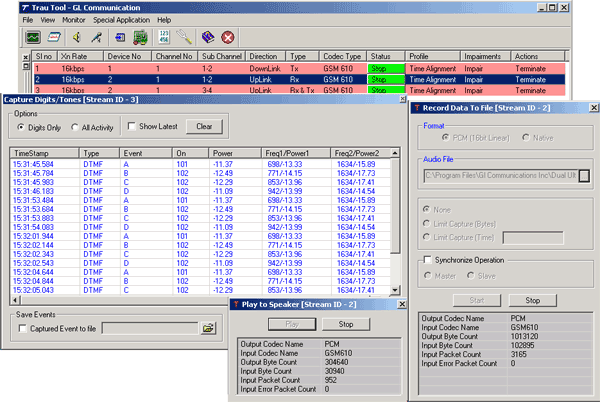
The following are the TRAU Toolbox™ applications used to capture data:
- Play to Speaker
- Record data to file
- Capture/Digits Tones
The Play to Speaker application will play the incoming voice directly to the system's speaker. On the other hand, the Record Data to File application can record the incoming data on a session to a file. The recorded file will be in linear PCM (16-bit linear) format. Capture Digits/Tones allows the user to detect digits and tones. It provides option to view all activities or just the captured digits.
Monitoring Applications
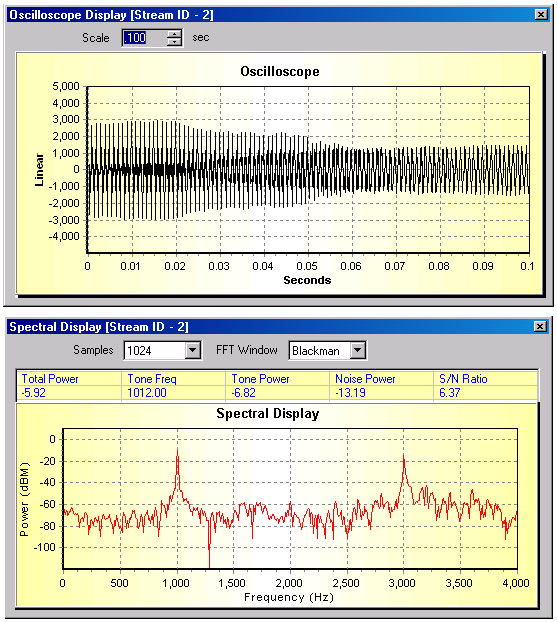
The following are the Monitoring Applications used to monitor the data reception:
- Oscilloscope
- Spectral Display
Oscilloscope displays the PCM codes (amplitude of the incoming signal) for any selected session graphically in real-time as a function of time.
The data received on a specified receive timeslot can be viewed in the spectral domain (spectral amplitude Vs frequency) using Spectral Display application. A Fast Fourier Transform (FFT) is applied to successive sample sets of the incoming data and displayed in graphic form. Using FFT length the frequency resolution can be adjusted from 32 points to 8192 points
Resources
Note: PCs which include GL hardware/software require Intel or AMD processors for compliance.
Please Note: The XX in the Item No. refers to the hardware platform, listed at the bottom of the Buyer's Guide, which the software will be running on. Therefore, XX can either be ETA or EEA (Octal/Quad Boards), PTA or PEA (tProbe Units), XUT or XUE (Dual PCIe Express) depending upon the hardware.
| Item No. | Item Description |
| XX153 | T1 E1 Real-time TRAU Protocol Analyzer |
| TRAU Traffic Playback | |
| TRAU Toolbox™ | |
| OLV153 | Offline TRAU Analyzer |
| Other Related TRAU Applications | |
|---|---|
| XX646 | Multi-Channel TRAU Tx/Rx Emulation and Analysis |
| Related Hardware | |
| PTE001 | tProbe™ T1 E1 Base Unit |
| FTE001 | QuadXpress T1 E1 Main Board (Quad Port™ requires additional licenses) |
| ETE001 | OctalXpress T1 E1 Daughter Board (Octal Port™ requires additional licenses) |
| XTE001 | Dual T1 E1 Express (PCIe) Boards (requires additional licenses) |
| Brochure |
|---|
| T1 E1 TRAU Protocol Analysis Emulation Brochure |
| Sample Messages |
| Presentation |
|---|
| TRAU Product Presentation |
* Specifications and features subject to change without notice.
 Back to TRAU product Page