PacketScanPX™ - Wirespeed filter, capture and analysis
Combines the features of PacketScan™ analyzer with the capabilities of PacketExpert™ hardware capture and filter.
Request a Demo / Quote Brochure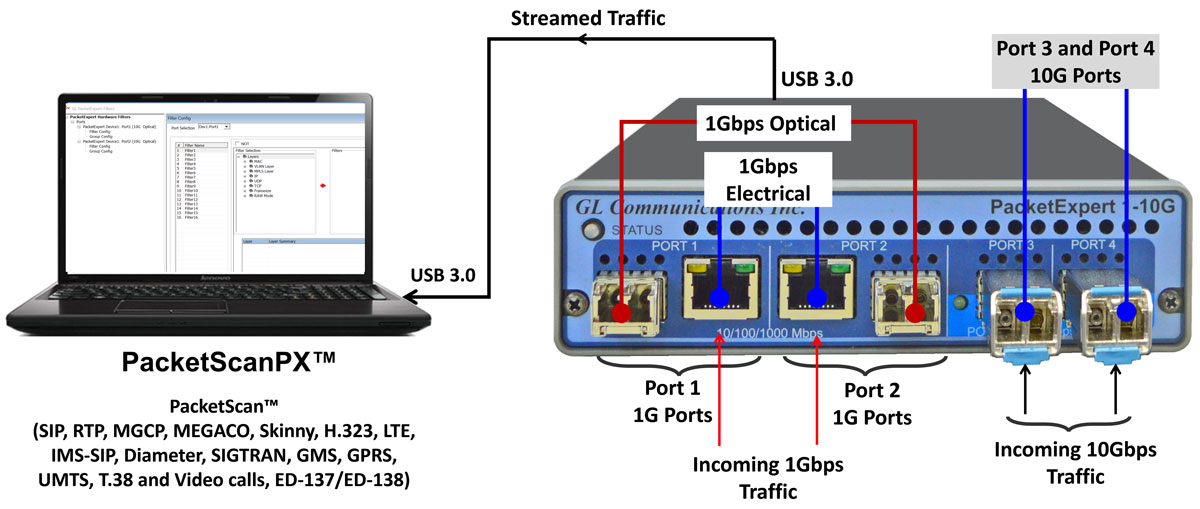
Overview
PacketScanPX™ is a unified application that combines the wirespeed hardware capture capabilities of PacketExpert™ with the deep protocol analysis features of PacketScan™ to overcome the limitations of software-only packet capture at capture rates up to 3 Gbps. While PacketScan™ provides powerful decoding, KPI visualization, call-flow analysis, and troubleshooting across VoIP, IMS, LTE, 5G, and IP networks, its capture performance depends on the PC’s onboard NIC. PacketExpert™ complements this by enabling hardware-assisted wirespeed capture, precise timestamping, and selective traffic filtering up to 3 Gbps. By integrating both into PacketScanPX™, users can perform real-time selective capture and deep protocol analysis within a single workflow, reducing packet loss, improving timestamp accuracy, minimizing storage requirements through hardware filtering, and simplifying troubleshooting in lab and field network monitoring environments.
PacketExpert™ Hardware is a versatile Ethernet testing tool, with various testing functionalities, one of which is the wirespeed capture functionality. This is a quad port unit, of which 2 are 10 Gbps SFP+ based ports, and other 2 are 10/100/1000 Mbps Electrical/Optical ports. For some of the functionalities, the 10 Gbps SFP+ ports can be downshifted to support 1Gbps ports, thus offering 4 Electrical / 4 Optical 1 Gbps ports for ethernet testing. SFP ports can be used as RJ45 ports by plugging in the appropriate Electrical (Copper) SFPs. The same 10Gbps ports can also be converted to 2.5Gbps Electrical interface using appropriate SFPs.
GL's PacketScanPX™ - an All-IP Network Monitoring software offers powerful features to capture and monitor live signaling and traffic over IP (version 4 and 6). The application can capture, segregate, monitor and collect statistics of all types of calls over IP. Almost all VoIP and Wireless protocols and traffic types over IP network, as listed here, can be captured, and decoded for troubleshooting network problems.
- Supports decoding of almost all industry standard signaling protocols – See Protocol List for more details
- SIP, SIP-I, SIP-T, H.323, MEGACO, MGCP, Skinny (SCCP)
- IMS-SIP, Diameter
- LTE (requires additional licensing)
- SIGTRAN – SS7, ISDN (requires additional licensing)
- GSM A and Abis over IP (requires additional licensing)
- GPRS Gb and Gn over IP (requires additional licensing)
- UMTS IuCs and IuPs over IP (requires additional licensing)
- T.38 and Video calls
- ED-137/ED-138 (requires additional licensing)
PacketScanPX™ allows to set hardware level filters for capture flexibility. Up to 16 hardware level filters can be defined per port. Filters can be set for various header fields like Source/Destination MAC/IP addresses, UDP/TCP ports, 802.1Q VLAN Id/Priority fields, IP ToS/DSCP fields, Frame size etc. and also a user defined raw hex filter of 120 byte length, with an offset (to filter 120 bytes of raw hex data anywhere within the packet). Further, the individual filters can be combined into groups and the groups can be further combined into super groups for additional flexibility.
Key Features
- Combines PacketExpert™ hardware-assisted wirespeed capture with PacketScan™ deep protocol analysis in a single integrated application
- Supports hardware-assisted capture upto 3 Gbps wirespeed
- Enables selective capture using hardware-level filtering (up to 16 filters per port)
- Provides nanosecond-level hardware timestamping for accurate delay, jitter, and call-flow timing analysis
- Performs deep packet inspection across VoIP, SIP, IMS, LTE, 5G, SIGTRAN, and IP networks
- Displays call ladder diagrams and session-level correlation for faster troubleshooting
- Generates KPIs such as call success rate, setup time, packet loss, latency, jitter, and MOS
- Supports filter-based capture using MAC, IP, VLAN, MPLS, TCP/UDP ports, and protocol fields
- Reduces packet loss during capture using hardware-assisted selective filtering
- Enables portable high-speed capture and protocol analysis for lab and field deployments
Solutions for Packet Capture and Analysis
| Solution | Capture Capability | Key Capabilities |
|---|---|---|
| PacketScan™ (Software Analyzer) | Uses standard PC NIC (typically up to ~1 Gbps depending on system) |
|
| PacketScanPX™ (Portable Wirespeed Capture + Analysis) | PacketExpert™ hardware-assisted wirespeed capture up to 3 Gbps Supports multi-port capture rates as below:
|
|
| PacketScan™ HD + FastRecorder™ (High-Density Monitoring Appliance) | Supports high-density capture across interfaces including:
|
|
Working Principle
GL's PacketScanPX™ can capture and analyze Ethernet traffic on either 1G or 10G ports. On software start, user must select which port to capture on – 1G or 10G ports. User can select the specific ports (single port or both ports) on which to capture traffic and can change this on each capture. User can also apply hardware level filters (in addition to the software level filters) to filter traffic at the hardware itself. The captured and filtered packets are multiplexed and temporarily stored on the onboard DDR3 memory, before being transferred to the host PC through the USB 3.0 port. PacketScanPX™ software picks up the traffic from the DDR3 memory, further applies the software level filters (PacketScan™ Capture filters), and does real time analysis.
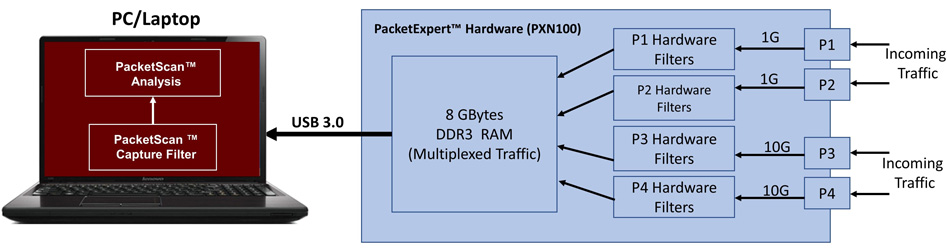
Block Diagram with Various Components
PacketExpert™ Hardware Filters
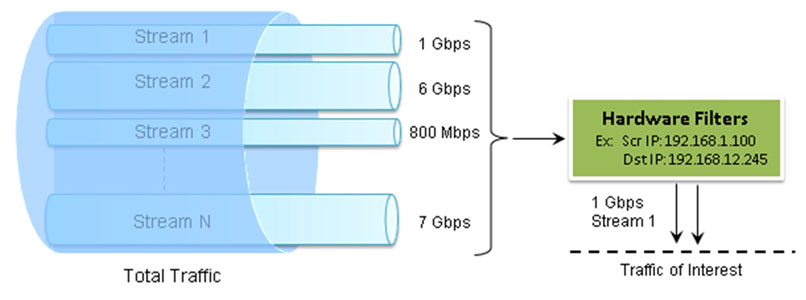
Capture Traffic of Interest
PacketScanPX™ includes a powerful "Wirespeed filter" that allows users to filter out unwanted traffic, and continuously capture/ analyses the traffic of interest.
Some of the main features of the Wirespeed packet filter are listed below:
- Filter packets and analyze packets of interest
- Filters can be set to each field (Packet Mode) and to each bit in the packet (Raw mode) for greater flexibility
- Up to 16 filters can be defined per port. Each filter supports filtering on the following fields:
- Source/Destination MAC Address, Ethernet Len/Type field
- VLAN Id/Priority
- MPLS Label
- IP Source/Destination Address, ToS/DS field, Protocol field
- UDP Source/Destination Ports
- TCP Source/Destination Ports
- Frame Size
- Raw hex bytes/mask of 120 bytes length along with an offset
- Each field can be set to match to a fixed value or Range of values
- A 'Not' feature is available for each filter – user can either capture a packet that matches the filter or capture all packets that do not match the filter.
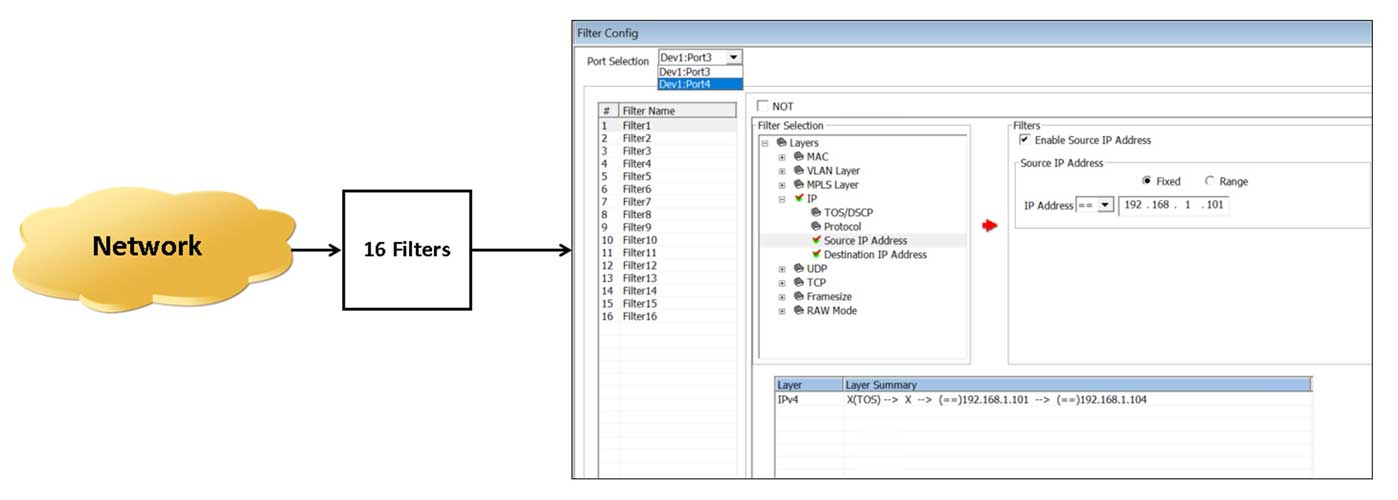
Wirespeed Filter
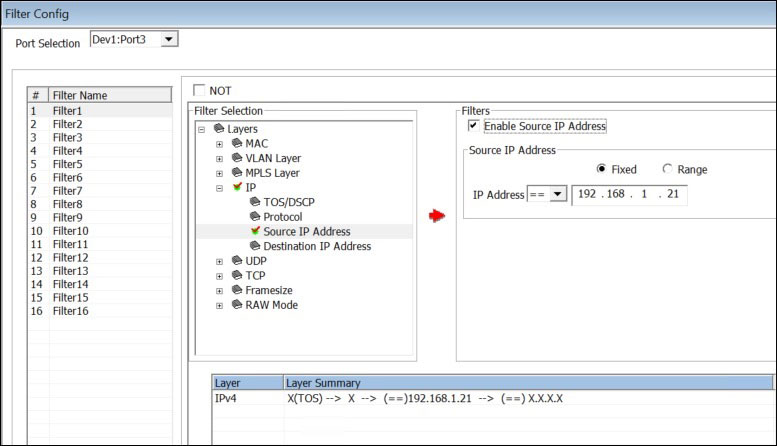
Wirespeed Filter - various protocol fields
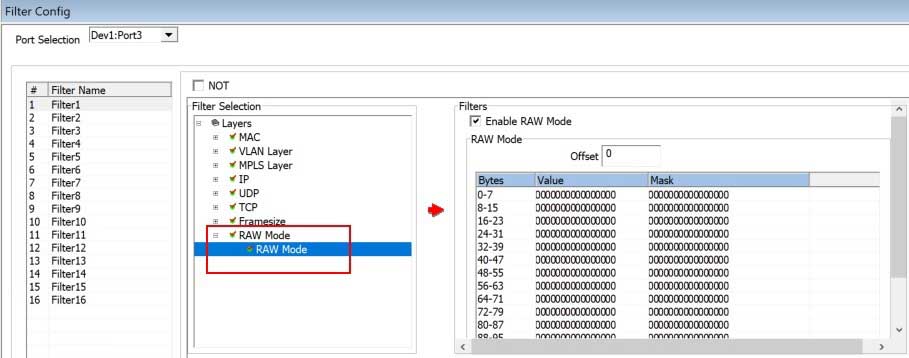
Wirespeed Filter - Raw Mode
Group Mode Filter Configuration:
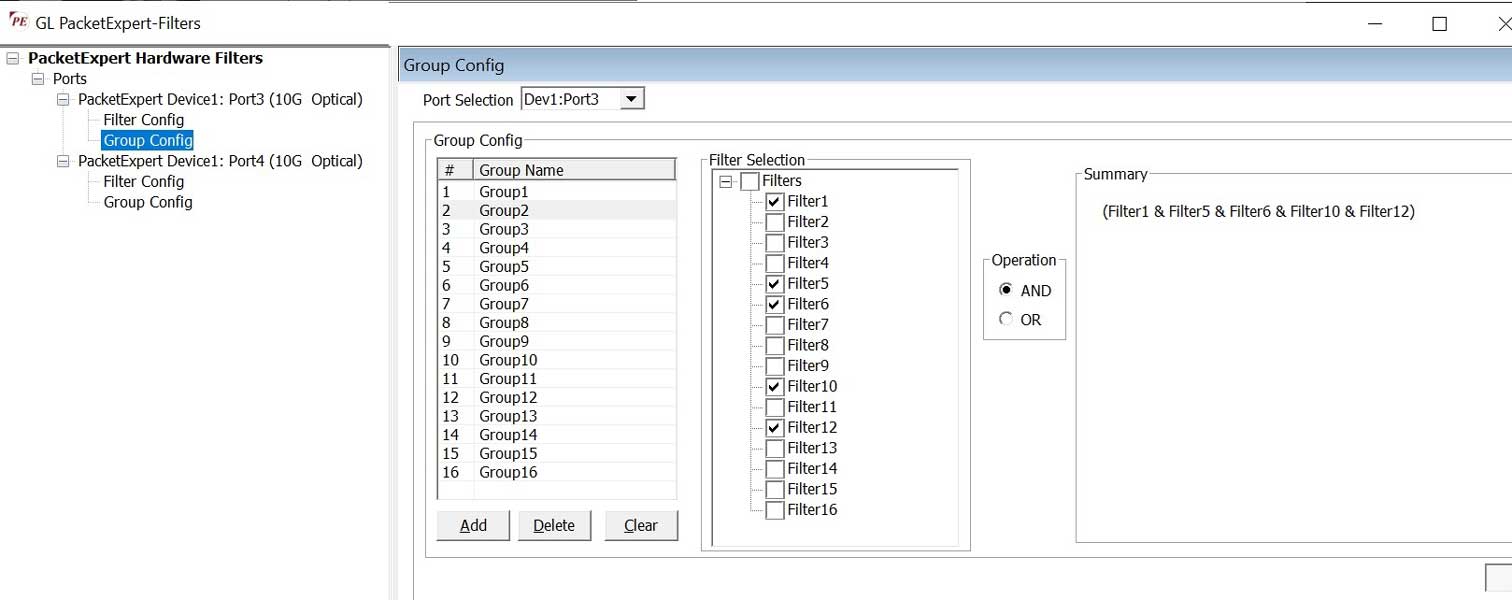
Grouping Filters
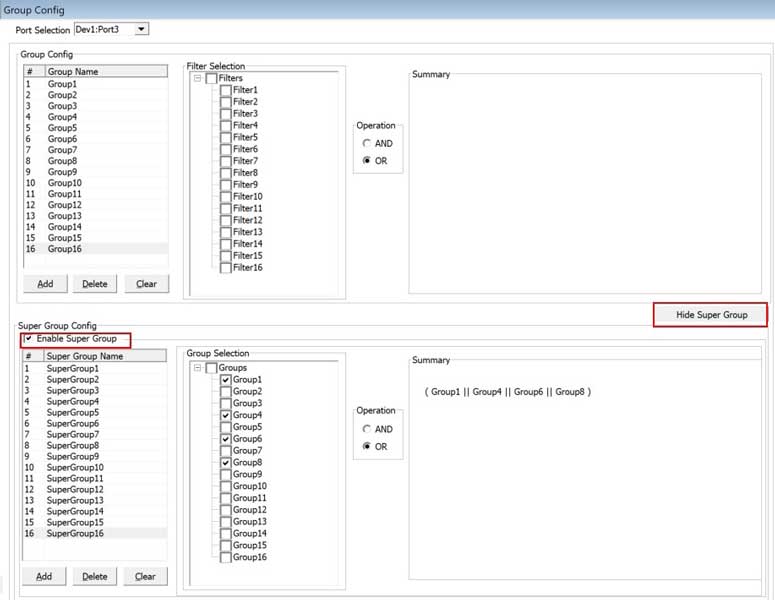
Super Grouping
Resources
Note: PCs which include GL hardware/software require Intel or AMD processors for compliance.
| Item | Description |
| PKV125 | PacketScanPX™ Accessories USB 3.0 cable (1) Power adapter
|
| PXN100 | PacketExpert™ 10GX Accessories USB 3.0 cable (1) Power adapter
|
| PXN101 | 10G option for PXN100 |
| PXN105 | PacketExpert™ Wirespeed Record / Playback for PXN100 |
| PKV100 | PacketScan™- (Online and Offline) |
| PKV120 | PacketScan™ HD w/4 x 1GigE |
Specifications are subject to change without notice.
