Intrusive Method of Speech Quality Assessment
Click for WebViewer™ Live Demo
Overview
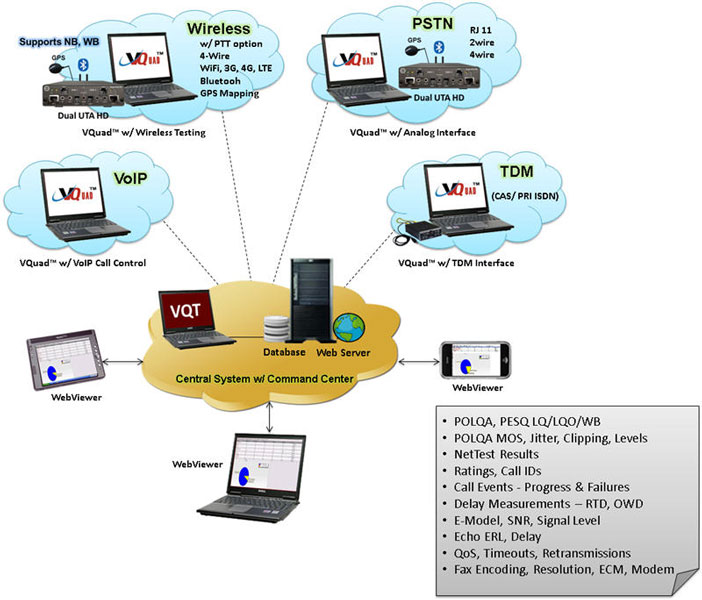
Today's telecommunication network is a combination of Wireless networks, VoIP networks and traditional PSTN networks. With voice communication traversing through varieties of bearer networks, maintaining voice quality for Wireless networks and VoIP networks is very necessary because of the limitations of their networking characteristics and technical immaturity.
In these years of development of modern telecommunication networks, implementations of new technologies such as NGN, 3G, 4G and LTE voice quality has become critical to the customer. Service operators require a complete voice quality testing solution in order to verify the quality of their service, therefore provide a better service for the customer.
The Network Monitor Voice Quality Testing solution from GL Communications provides a complete solution for Wireless, VoIP, TDM and PSTN telecommunication operators.
Simple and effective methods of testing voice and data are sorely needed - GL's mobile test solution provides this capability with the flexibility of connecting to and between any network, any service, and any interface.
The solution consists:
- Distributed VQuad™ Nodes - These nodes control individual or multiple wireless, landline or VoIP telephony terminals. All the results including Voice, Data (NetTest), Video analysis, Echo measurements, Fax events are automatically transferred to the Central Database for access via the GL WebViewer™.
- Voice Quality Testing Software (VQT) - provides POLQA (ITU-T P.863) and PESQ (ITU-P.862.1/2) results based on specifications. Fully automated and remotely accessible. All results are automatically transferred to the Central Database for access via the GL WebViewer™. Included with the PESQ results are Jitter, Clipping, Signal and Noise Levels and POLQA analysis results include POLQA MOS, E-Model R-Factor, Signal Level, Noise Level, Delay, and Jitter.
- Remote Client WebViewer™ - remotely access all results associated with the VQuad test including Call Control (Call Failure and Call Dropped), Voice Quality, Round Trip Delay, One Way Delay, Echo Measurement, Data Testing, Fax events from PC or Mobile Device. Provide user-defined reports as well as statistics. Remotely view status of entire network with ability to remotely control any node within network from the WebViewer™ web page.
Network Monitor VQT Components
Distributed VQuad™ Node (Network Node)
VQuad™ Node Sites can connect to any mobile, landline or VoIP device and provide automated Voice, Data, and Video Quality analysis on the associated network. Each individual node provides call control automation through scripts. VQuad™ Scripting, portability for mobile drive testing, remote accessibility, and centralized data retrieval, analysis and control are just a few attributes of GL’s next generation Voice, Data, and Video Testing solution.
Each VQuad™ node site can be equipped with interfaces for:
- Any Communication Device (Mobile phone, Smart phones (iPhone, Android), Military/Mobile radio, Bluetooth®, WiMax, WiFi)
- 2-Wire POTS (connect to PSTN, ATA,media gateway)
- 4-Wire Analog interfaces Balanced headset (mic/speaker), RJ22 (phone Handset), PTT (Push to Talk), and Mobile phones
- SIP Call Agent (simulate SIP softphone and configure Proxy and Registrar)
- VoIP Ethernet (connects directly to any SoftPhone or any digital/VoIP hardware phone)
- Analog / Digital / VoIP Phone Handsets
The VQuad™ is used for Call Control of a variety of interfaces, Voice Quality testing (transmitting sample Reference voice files and recording Degraded voice at the far-end), Network Delay testing, Echo Measurement testing, Data Testing (NetTest results from PC and Mobile Devices), Video Conference Testing, and Fax Tx Rx testing of the network. Each VQuad™ supports complete bi-directional testing.
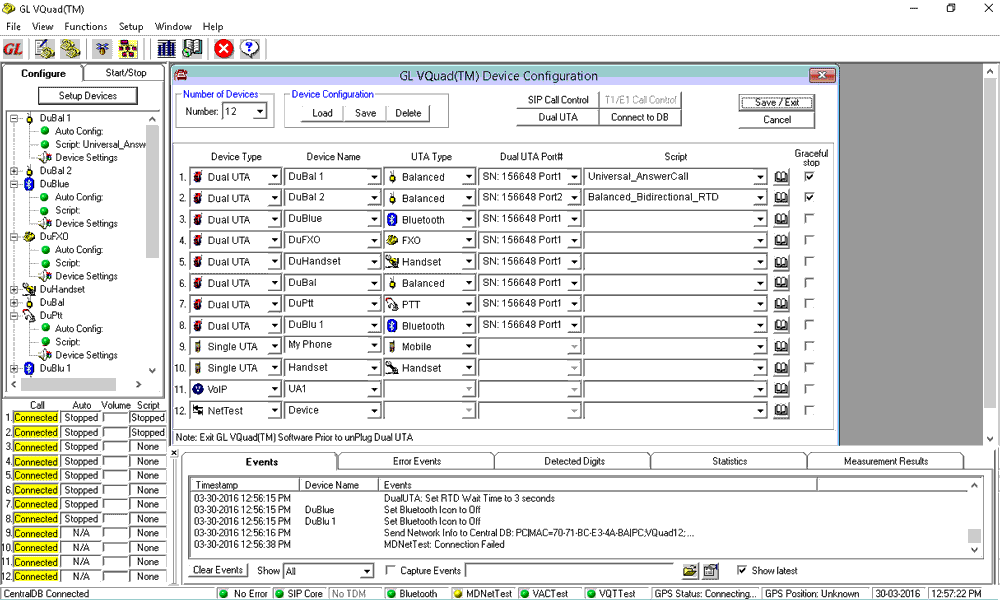
Screen Shot of VQuad™
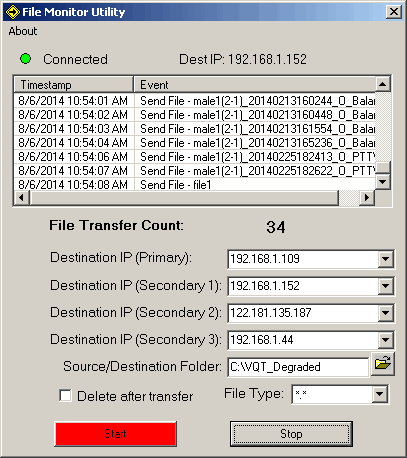
Screen Shot of File Monitor Utility
Main Features
- Each local VQuad™ Node can control remote VQuad™ systems to expand testing for an entire network. All results and events are automatically transferred to a Central Database (optional WebViewer™ required).
- Testing mobile end-to-end voice, data, and video quality
- Echo Measurement testing over TDM, VoIP, 2-Wire FXO, 4-Wire Analog, and Wireless using Echo Measurement and Analysis (EMU) utility
- Automated Data Testing for Apple/Android Mobile Devices and for PC Internet connection (Broadband 3G/4G, WiFi, Wired) including TCP, UDP, VoIP, Route, HTTP, FTP, DNS and SMS
- Data testing supports remotely deployed GL Data Server target points for end-to-end testing.
- Fax Testing using the Dual UTA HD 2-wire FXO or 4-wire analog interfaces. Supports up to 4 simultaneous T.30 faxes
- Enhanced VQuad™ scripting for generating a variety of automated Voice, Video, and Data quality tests.
- Simulates voice communications and collects degraded voice for each network node.
- GL VQT Automatic Mode allows automatic execution of the VQT algorithms (POLQA NB/WB/SWB, PESQ LQ/LQO/WB)
- End-to-end voice and data testing of mobile phones, Smart phones (iPhone, Android), Military/Mobile radio, Bluetooth®, WiMax, and WiFi
- Automatic Round Trip Delay (RTD), One Way Delay (OWD), Data Test results, Voice Test results, Video Test results, Echo measurements and Fax events with complete results sent to GL VQT
- The Indoor Tracking System (ITS) in VQuad™ is developed to test the VQT in remote and unreachable GPS signal locations
- The GPS mapping provides real-time GPS information during the VQuad™ test as well as saved to the VQT database.
- Automated SIP Call Control along with send/receive voice files over already established calls
- Manual or Automatic call control (SIP protocol) with user-defined parameters for authentication and proxy
- EC Testing and Measurements, Data Testing from PC or Mobile Device, Round Trip Delay, and One Way Delay Measurements
- Two Analog ports per Dual UTA HD using industry standard RJ-11 connections.
- EC Testing and Measurements, Round Trip Delay, and One Way Delay Measurements.
- 2-wire FXO and 4-wire analog supports fax generation
- WB 2-Wire FXO interface connects to any PSTN, ATA, and next generation Gateways
- Very accurate One-Way and Round Trip Delay (RTD) measurements for 2-Wire and 4-Wire interfaces using the enhanced correlator algorithm
- Wide Band (WB) and Narrow Band (NB) support (for HD and SD Audio)
- Full FXO Functionality via flexible Scripts
- WB 4-Wire Analog interface connects to Balanced headset (mic/speaker), RJ22 phone Handset, PTT (Push to Talk) mobile radio (DoD, Emergency Services, Government) and Mobile phones.
- Also supports No Call Control (NOCC), where the T1/E1 call is connected without any call control required.
- EC Testing and Measurements, and VQT analysis
Wireless Phones / Radios
GPS and ITS
VoIP Interface
WB 2-Wire FXO, 4-Wire Analog Interfaces
TDM Interface
Voice Quality Testing (VQT) Software
GL's Voice Quality Testing (VQT) software requires two files for operation. These files are typically referred to as the 'reference' and 'degraded' files. The software can act as a stand-alone product or can work along side with other GL products, including VQuad™, APS, etc. VQT software automatically compares the two files ('reference' and 'degraded') and provides an ITU-standard score (POLQA, PESQ).
The algorithms supported by the GL VQT include
- Perceptual Objective Listening Quality Analysis (POLQA) per ITU-T P.863
- Perceptual Evaluation of Speech Quality (PESQ) per Rec. P.862.1 and P.862.2
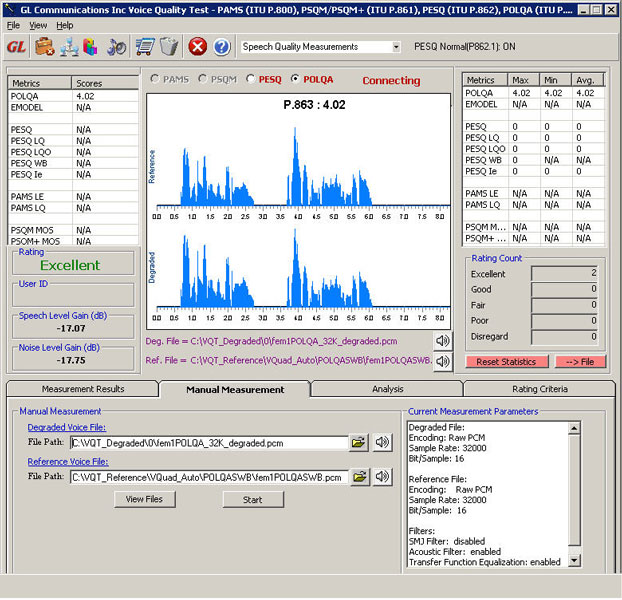
Screen Shot of VQT Main Screen
Main Features:
- Allows users to perform manual or automated voice quality assessments
- VQT algorithm results - POLQA, PESQ LQ/LQO/WB, are displayed both in tabular as well as graphical formats.
- Evaluate audio quality with MOS, E-Model, SNR, jitter, clipping, signal level, noise level, and delay measurements
- POLQA supports 12 bit degraded file (NB, WB, SWB), 8-bit a-Law and mu-Law voice files, Raw PCM as well as WAV files with auto-detect sampling for WAV files, along with user-specified Sampling Rate (specify any rate between 8K to 48K)
- Supports POLQA ITU-T P.863 for next generation voice quality testing supporting NB (8000 sampling), WB (16000 sampling) and SWB (Super Wideband) (48000 sampling)
- All results along with call control information are sent to central database. Query results remotely using the WebViewer™.
- Full support for IPv6 as well as IPv4 (includes VQT, GL Listener, and VQTCLI)
- VQT CLI and API enhanced to fully support both Windows® and Linux
For complete details, refer to Voice Quality Testing webpage.
Voice Band Analysis (VBA)
The Near Real-time Voice-band Analyzer (VBA) is an analysis tool for monitoring voice band traffic over VoIP, TDM, 2-Wire, 4-Wire Analog and wireless networks. All results from VBA are automatically sent to WebViewer™ central database (Oracle or MSAccess). The results that can be queried over web interface include Active Speech Level, Activity Factor, RMS Factor, DC Level, Noise Level, Echo Return Loss, Echo Delay, and Echo Dispersion statistics along with the additional analytical Call information.
For complete details, refer to Near Real-time Voice Band Analyzer webpage.
Echo Measurement Utility (EMU) Software
The Echo Measurement Utility is used for Echo, delay, and voice quality analysis of voice calls in VoIP, TDM, 2-Wire, 4-Wire Analog, and Mobile networks
- Ability to automate the entire test process using VQuad™ scripting; including sending the results to the central database for access via GL's WebViewer™.
- EMU uses EMU Client software to automatically detect the incoming degraded voice files and send the measurements to database after analysis
- Supports both line and acoustic echo measurements
For complete details, refer to Echo Measurement Utility webpage.
GLNetTest from PC and Mobile Devices
GL's VQuad™ solution is enhanced to support Data Testing using the GLNetTest application from PC and from mobile device (using Mobile Device Controller).
Using the VQuad™-NetTest package along with a standard PC internet connection, automated tests including TCP, UDP, HTTP, VoIP, Route, FTP, DNS and SMS are supported. The PC internet connection can be wired Ethernet, WiFi, or even Broadband card (both LTE and 3G fully supported).
- Automated Data Testing (NetTest) including TCP, UDP capacity, VoIP, Route, HTTP, FTP, DNS and SMS.
- Statistics and complete results are available through the WebViewer for both Mobile Device NetTests and PC based NetTests.
- Note that the NetTest requires a GL Data Server at each target location. Mobile device communicates with Mobile Device Controller from anywhere in the world
- Note also that the Mobile Device requires a GL deployed app (Apple or Android based) for operation. Both IOS (iPhone/iPad) and Android supported with downloadable GL app.
- Network independent, supports 3G, 4G, WiMax, and LTE. PC based supports WiFi, wired, and Broadband card (3G, 4G, LTE).
- VQuad™ scripting, when connected to the GLNetTest app, provides automation, mobility, remote accessibility.
- Fully automated and remote testing with all results accessible via WebViewer™.
- Multiple interfaces connected to same VQuad™ providing simultaneous testing.
For complete details, refer to Automated Data Testing webpage.
Fax Analysis and Simulation
VQuad™ with Dual UTA HD supports sending and receiving up to 4 independent and simultaneous T.30 faxes. The user can configure the Tx and Rx fax rate from 2400 baud to 33600 baud with V.34 fully supported. Interfaces supported for fax generation include 2-wire FXO and 4-wire analog.
- Capability of 4 independent and simultaneous T.30 faxes (selectable up to V.34).
- Supports fax rate ranging from 2400baud up to 33600baud (V.34 fully supported).
- Supports Fax Tx Rx for 2-wire analog (FXO) and 4-wire analog networks.
- VQuad™ Fax events include messages, summary, and errors log.
- Ability to auto save fax (both East and West directions) to PCM file for enhanced analysis using GL Insight™ and GL Fax Extractor.
- VQuad™ scripting supports fax send or receive session's configurations.
For complete details, refer to Fax Emulation using VQuad™ webpage.
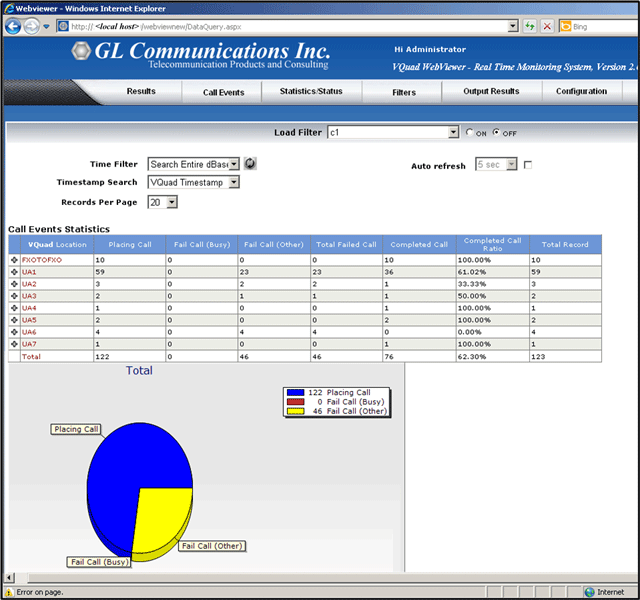
Screen Shot of WebViewer™
Remote Client WebViewer™
GL's WebViewer™ facilitates VQT, Call Control, DataTest (NetTest for PC and Mobile Devices) results, Video Test results, Echo Measurement, Fax Events and all VQuad™ associated results display using a simple web browser. The results are accessed from database that stores real-time and historic data.
The WebViewer™ is a simple, easy to use Web browser which can operate on both PC and Mac systems (including iPhone and iPad).
- Multiple VQT applications automatically save all results to a centralized VQT database.
- WebViewer™ queries the VQT central database and displays the results in both tabular and graphical formats.
- Multi-user support, and user-friendly interface is remotely accessible via browser based clients (PC and IOS devices supported).
- Display real-time status of the entire VQuad™ Network and remote control any of the nodes associated with the network
- Customize search with a variety of user-defined parameters to display all returned events per timestamp or per call.
- Customized report generation with result statistics, tabular data, bar graphs, and line graphs
- All results/statistics can be sent to user-defined reports for output to Text or Excel or pdf formats.
- Enhanced Google map plotting supporting country or region selection
For complete details, refer to WebViewer™ webpage.
Resources
Note: PCs which include GL hardware/software require Intel or AMD processors for compliance.
| Brochures |
|---|
| Intrusive Speech Quality Assessment Brochure |
| Supported Codecs |
| Presentation |
|---|
| Intrusive Network VQT Presentation |
* Specifications are subject to change without notice.
 Back to Network Test, Monitoring, & Surveillance Solutions Index Page