Fax Emulation Using VQuad™
Overview
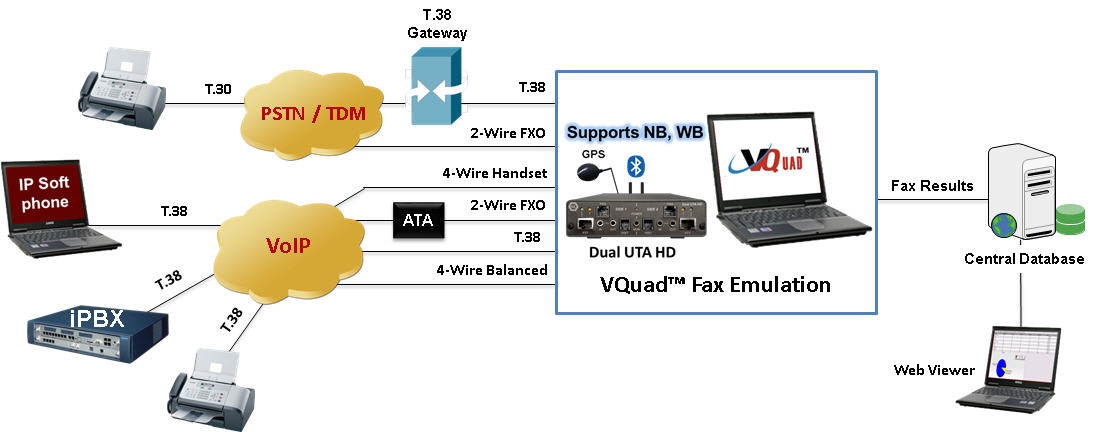
VQuad™ coupled with Dual UTA HD provides easy and flexible "quality of service" assessment across almost every network interface - whether its IP, TDM, Analog, or Wireless - one platform handles all possibilities - Voice, Data, Video Quality, and now Fax Quality. Fax is not going away – not by a long shot. For financial and legal reasons fax is a necessity.
GL's VQuad™ has been enhanced to support sending and receiving of up to 4 independent and simultaneous T.30 faxes over the Dual UTA HD hardware platform. The user can configure the TX and RX fax rate from 2400 bps to 33,600 bps with V.34 fully supported. Interfaces supported for fax generation include 2-wire FXO and 4-wire analog.
Fax emulation is fully automated using VQuad™ scripts and can be initiated remotely such that one VQuad can control both sides of the fax. VQuad™ Fax provides all pertinent real-time fax messaging with proper time sequences. In other words, one can follow the fax session from start to finish on both the send and receive sides.
In addition to the fax messages, VQuad™ Fax also provides fax summary for each fax (fax completed or failed along with fax results). VQuad™ Fax provides all errors associated with each fax with proper time sequence and an understanding of what the error might indicate. All results (errors and summary) can be sent automatically to the WebViewer™ Central Database for query using the WebViewer™ browser.
In order to fully support GL Fax Analysis products, VQuad™ Fax provides the ability to automatically save the fax session (both East and West directions) to a PCM file. This file can be exported to GLInsight™ or GL Fax Demodulator/Decoder analysis software packages for further analysis of the fax session. GL's Fax Demodulator/Decoder can be configured for fully automated analysis.
GL's WebViewer™ provides access and display, in real time, to all results associated with VQuad™ including the Fax events, errors, and summary logs.
Main Features
- Fax Emulation supporting up to 4 independent and simultaneous sessions with speeds up to 33600 bps (V.34).Supports both Tx and Rx fax emulation using VQuad™ with Dual UTA HD analog interfaces (2-wire FXO, 4-wire balanced, 4-wire Handset, PTT).
- VQuad™ Fax events include messages, summary, and errors log
- Ability to auto save fax (both East and West directions) to PCM file for enhanced analysis using GL Insight™ and GL Fax Demodulator/Decoder
- VQuad™ scripting supports both fax send and receive session configuration
- Support for querying Fax events/results/errors over web interface.
VQuad™ Fax Events
VQuad™ Fax Emulation includes three event screens, Fax Messages, Fax Summary and Fax Errors. The Fax Messages is shown in chronological order for simple understanding of the fax process. Multiple Fax Message screens can be displayed simultaneously thus showing full duplex fax sessions.
The Fax Summary includes one event per fax (Fax Send and Fax Receive) which shows initial settings and final settings upon fax completion (i.e. Fax Speed, Line Sent, Bad Lines, Pages Received). The Fax Summary also provides insight whether the Fax was successful or the Fax failed in which case an Error will be generated.
The Fax Error screen provides all Fax Errors associated with the Fax Send/Receive. Additional information is provided for each Fax error in order to understand the cause of the error. All event screens can be saved to text file in real-time.
The Fax status as shown on the Fax Event screen displays Total Successful and Total Failed faxes for each VQuad™ device ID.
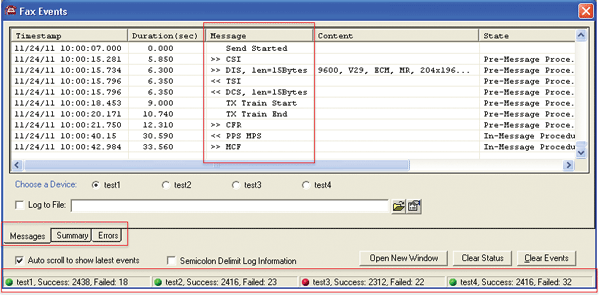
FAX Events - Messages Log
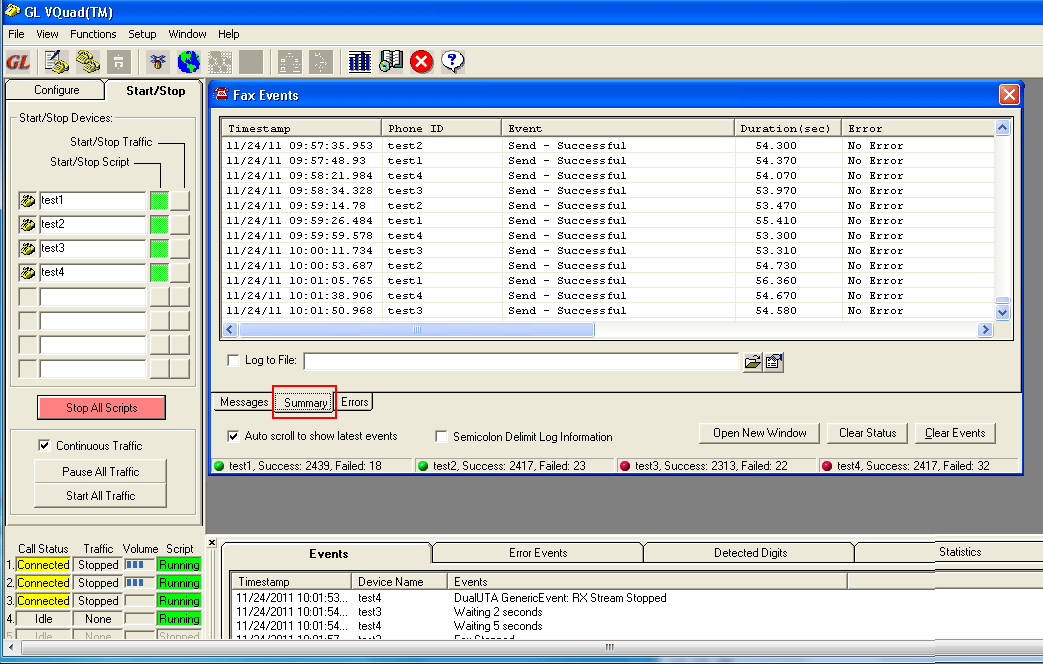
Screenshot of VQuad™ Fax Events Summary Log
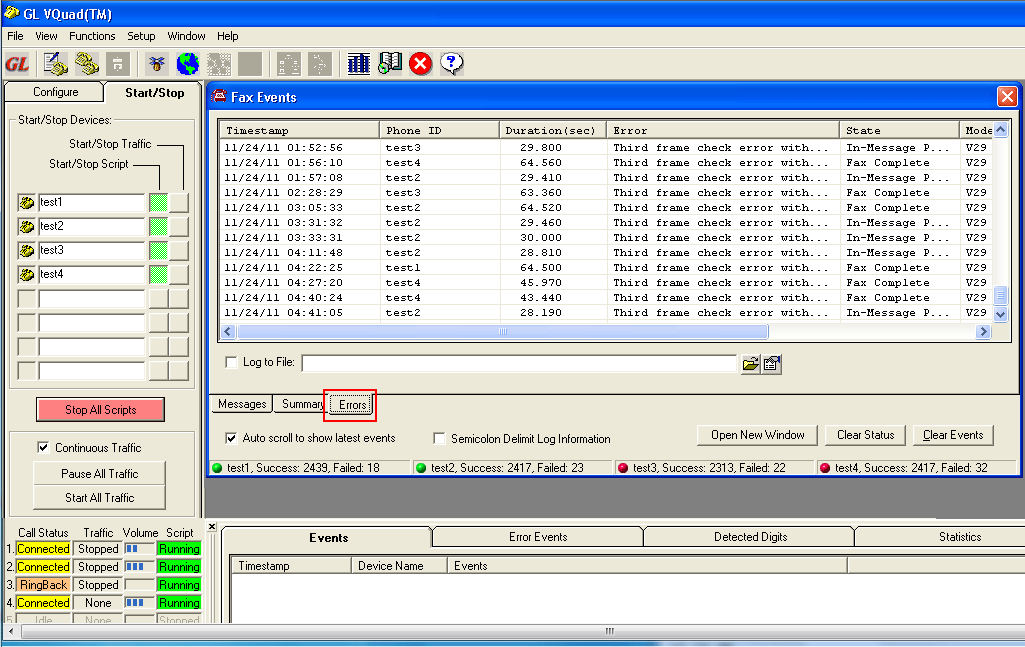
Screenshot of VQuad™ Fax Events Errors Log
Fax Tx/Rx Configuration
VQuad™ scripting provides the ability to send and receive a fax session along with specifying necessary fax configuration settings.
The settings include Max Transmit Rate and Min Receive Rate which can effectively restrict available fax sessions.
The other configuration settings include:
- ECM (Error Correction mode) on / off option to automatically detect and correct errors
- RX Image Coding (receive fax only) options - MH (Modified Huffman), MR (Modified read), MMR (Modified Modified READ)
- Auto saved fax (both east and west) to PCM file can be analyzed using GL Insight and GL Fax Extractor
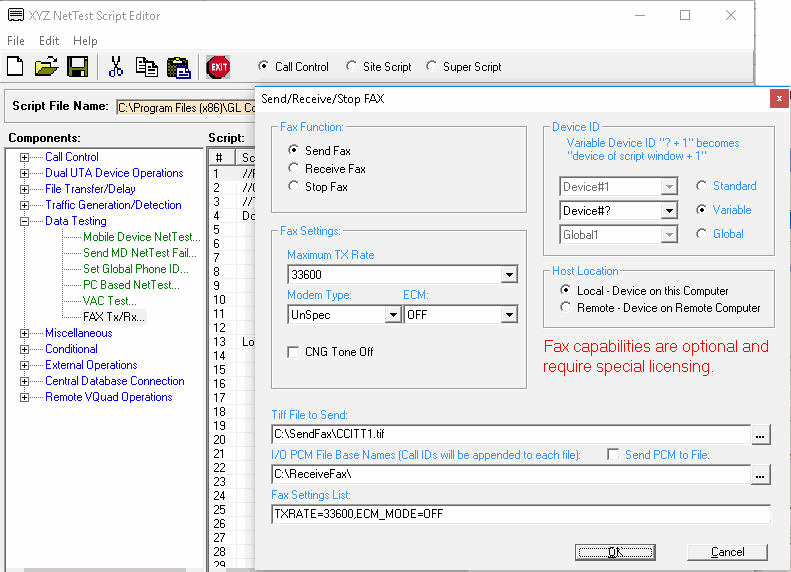
Fax Tx/Rx Configuration
Remote Client WebViewer™
The VQuad™ Fax emulation summary and error results can be sent to the WebViewer™ Central database. These events can be queried using the WebViewer™ web based browser. From the WebViewer™, one can filter the results based on specific Error, Starting or Ending speed, Completed pages, Tx/Rx Lines including Bad Lines, Resolution and ECM settings.
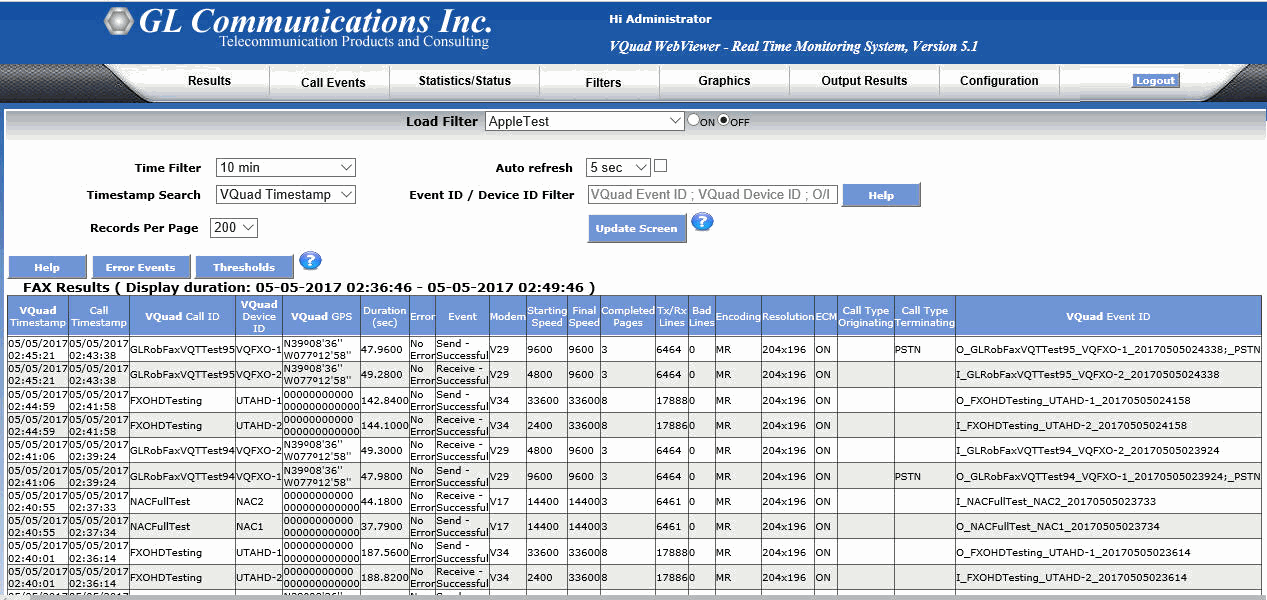
Fax Results View in WebViewer™
Additional Information
Resources
* Specifications are subject to change without notice.
 Back to Complete Voice Quality Testing Solutions Index Page