Near Real-time Voice-band Analyzer
Overview
The Near Real-time Voice-band Analyzer (VBA) is an analysis tool for monitoring voice band traffic over VoIP, TDM, 2-Wire and wireless networks. It can host an arbitrary number of analysis algorithms. Built-in algorithms include ITU-T P.56 Active Voice Level analysis, Line Echo (Hybrid) analysis, and licensed modules include 2-Wire Echo Analysis, Traffic Classifier and Fax analysis. Other analysis modules such as ITU-T P.561, P.562, and P.563 can be hosted as plug-ins.
The VBA application operates on previously captured files, making it a near-real time (as opposed to a strictly real-time) tool.
VBA records its output into two files, the first containing overall channel measurements, and the second containing event records. It produces summary measurements of the captured signals, including active speech levels, noise level, percent time active, DC offset and the like. The optional VBA FaxScan™ module (require additional license) can be used to analyze both 2-wire and 4-wire voiceband captures for Fax traffic and output fax signaling frames in a log file and fax image in TIFF format. This package has been designed to work with other GL Communications Inc. tools such as PacketScan™, Call Capture and Analysis, and many other recording tools.
VBA works in conjunction with GL's TDM, Packet, and Wireless non-intrusive capture products:
- VBA with GL's TDM T1 E1 Call Capture and Analysis, or
- VBA with GL's VoIP PacketScan™ / MLPPP Analyzer
- VBA with GL's GSM, CDMA, and 3G Call Capture Products
- VBA with GL's 2-Wire Voice/Data Capture Products
Voice Band Analyzer (VBA) application works with NetSurveyorWeb™ Lite application to analyze monitoring voice band traffic over variety of networks including VoIP, TDM, 2-Wire and Wireless and provide useful metrics that are of interest to service providers.
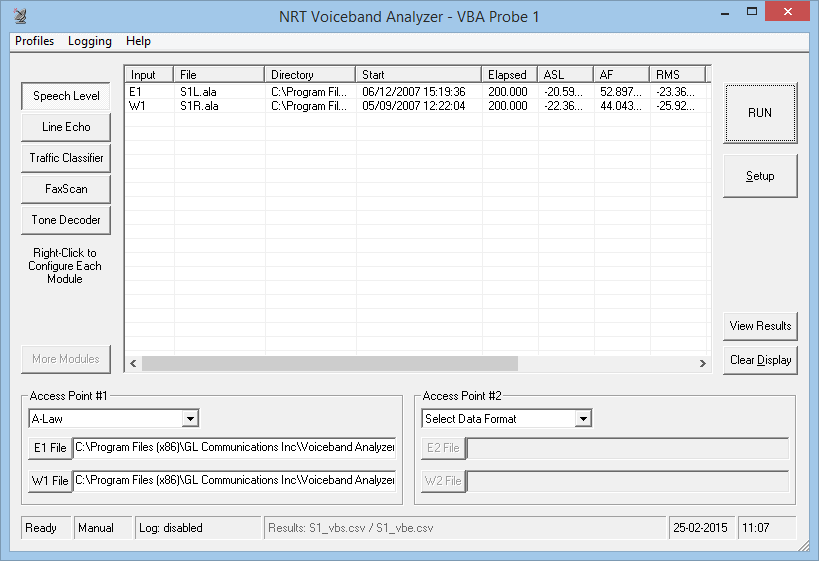
Screenshot of Voice-band Analyzer Main Window
Main Features
- Near real-time (NRT) non-intrusive analysis platform.
- Supports 1, 2, 3, and 4-port signal data analysis
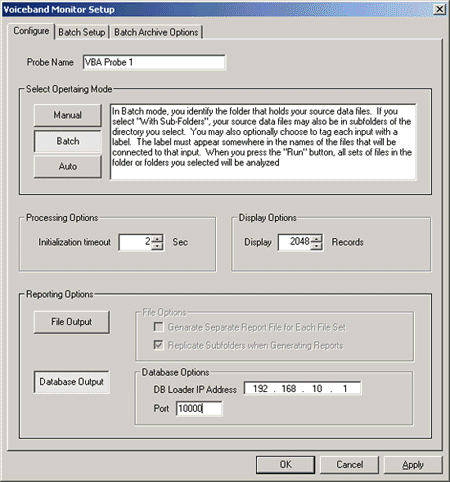
- Manual, batch, and automatic processing modes.
- Accepts the following encoding formats –
A-Law µ-Law MS Wave 16 kHz G.722 wideband 16-bit 8 kHz PCM (Intel)
16-bit 8 kHz PCM (Motorola)16-bit 16 kHz PCM (Intel)
16-bit 16 kHz PCM (Motorola)13-bit PCM 14-bit PCM
- Hosts built-in P.56 Active Voice Level analysis, Hybrid Echo analysis, and other licensed analysis algorithms such as 2-Wire Echo Analysis, Traffic Classifier and Fax analysis
- Allows to implement Psophometric and C-Message signal conditioning before the Active Speech Level analysis; reports C-Message filtered files in dBrnC
- With a Tone Decoder module, the VBA monitors the captured receiving signal and decodes the tone type as DTMF, MF, Frequency-Shift Keying (FSK), Teletype (TTY), Special Information Tone (SIT), Specific Area Message Encoding (SAME), Voice Mail Waiting Indication (VMWI), Paging Tones, or any Custom Tones. The module also detects and decodes the Type 1 Caller ID, Type 2 Caller ID - Call Waiting (CID-CW), silence, ring-back, busy or other phone tones.
- Allows the grouping of files together into data sets and automatically routes file data to appropriate inputs using user-specified file naming conventions. GL Call Capture and Analysis (CCA) rules are built-in.
- User-selectable analysis output fields
- Native analysis output mode directly compatible with Microsoft® Excel and other readily available analysis tools.
- Database interfaces available on request.
- Source signal file management options
- Directly compatible with many GL data capture products, including Call Capture and Analysis (T1 E1 lines), 2-Wire Voice/Data Capture and PacketScan™ (VoIP) / MLPPP Analyzer. .
- Compatible with products of other vendors provided only that their file-naming conventions could be used to group files into sets and associate files with algorithm inputs.
Optional Licensed Modules with VBA
- With FaxScan™ module (requires VBA038 licensing), process WinPCAP, 2-Wire and 4-Wire voice band capture files to analyze the T.38 packets, T.30 frames, and decode of a Fax call with TIFF image, and general call-flow indicators for detail analysis.
- With Traffic Classifier module (requires VBA036 licensing), the VBA analyzes the captured files and identifies the amount of Fax, Voice, Digits, Tones, and Silent types of traffic present in the network and generates corresponding reports.
- With 2-Wire Line Echo Analysis module (requires VBA033 licensing), the VBA can measure hybrid line echo generated using the captured files at both end points, and output Echo Return Loss (ERL), Echo Delay, and Echo Dispersion values.
Processor: 1.66 GHz, single-core, non-hyper threaded.
| Algorithm | Number of Channels |
|---|---|
| P.56 Active Speech Level | 470 |
| Line Echo | |
| Tail = 16 ms. | 70 |
| Tail = 32 ms. | 44 |
| Tail = 64 ms. | 27 |
| Tail = 128 ms. | 16 |
Working Principle
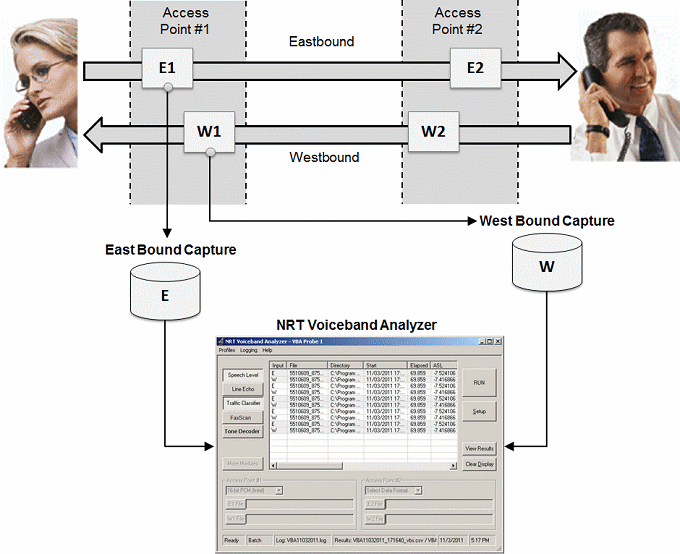
GL's VoIP & TDM probes gather information intrusively and feed it to VBA for analysis. The VBA then instantly detects the voice file captures and stores the results if necessary. The real-time and historic data collected by the probes can be output to a remote database by configuring the options.
The output can be stored either in *.xls / *.txt files or in the database. VBA Analysis Probes run on multiple computers and send VBA summary information and binary frame data via TCP connection to a Database Loader to load data into a database.
The Database Loader inserts the received data into database tables via ODBC. It can selectively suspend or resume loading data from connected probes. It also periodically updates the data link status in the DbLoaderStatus table to reflect the data link status of the connected probes.
GL's web server will provide real-time and historic views of the data through various "browser based" clients.
The VBA operates in three fundamental modes:
- Manual:
The user specifies manually the files to be analyzed. Simultaneously two sets of files can be analyzed with appropriate data format selected. - Batch:
Using batch mode, users can analyze an entire set of assembled data files in a folder or in subfolders at once. File naming conventions are used to group files and identify the appropriate input for each file. The results are recorded and stored in a destination folder in *.CSV format, where they may be viewed with spreadsheet applications such as Microsoft® Excel. - Automatic:
This is similar to Batch processing, except the process continues indefinitely until the user manually stops the execution. The specified folders are continuously scanned for the arrival of new files. The results are recorded and stored in a destination folder in *.CSV format, where they may be viewed with spreadsheet applications such as Microsoft® Excel.
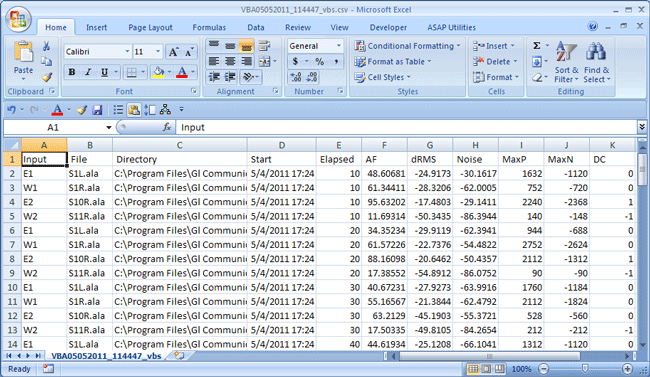
Screenshot of recorded result file in Microsoft® Excel
Built-in and Optional VBA Algorithms
The active speech level is measured in accordance with P.56 Method B. Line Echo modules displays Echo Return Loss - ERL (dB), Echo Delay (ms), and Echo Dispersion (ms). Traffic Classifier displays the amount of Fax/Voice/Digits/Tones/Silent types of traffic present in the network. FaxScan™ used to analyze voice band traffic files for Fax traffic and output Fax signaling frames in a log file.
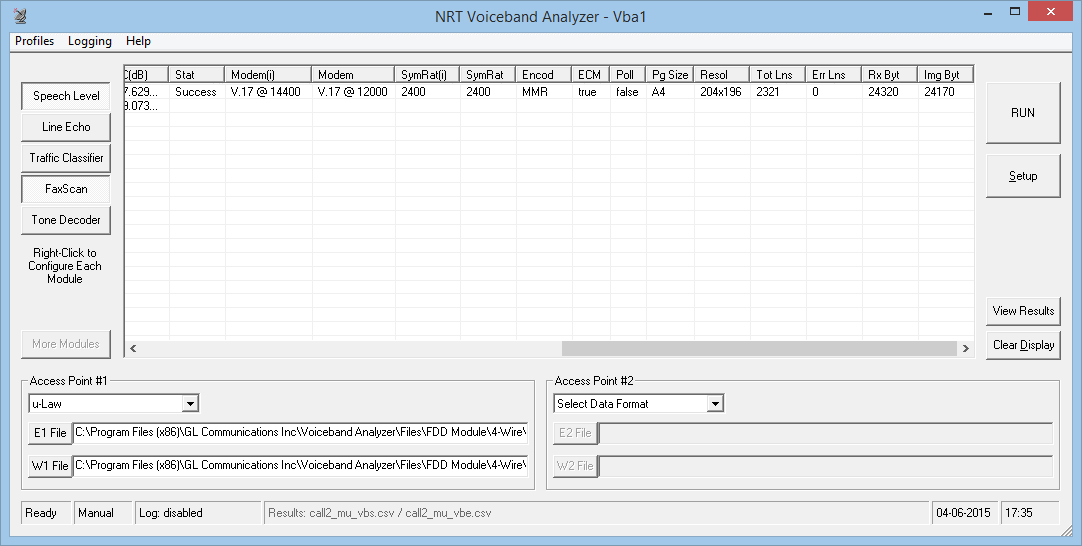
Screenshot of active speech level and Fax analysis
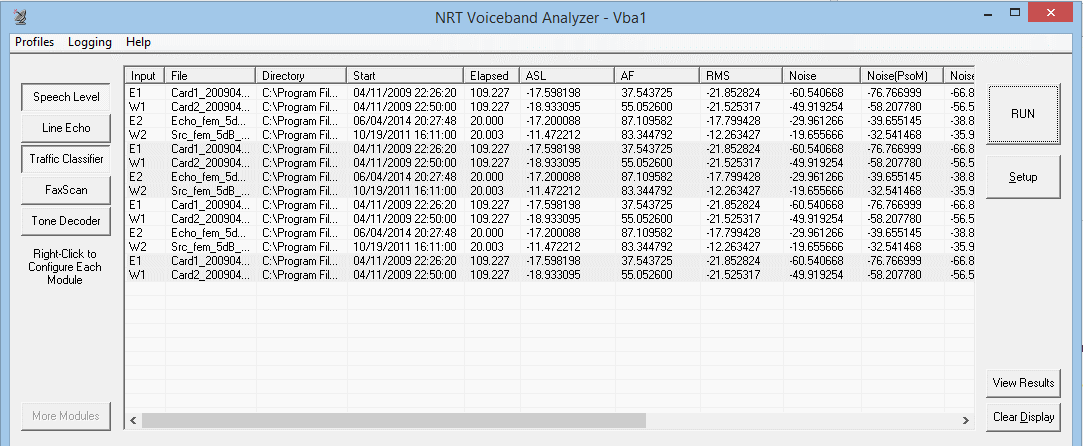
Screenshot of line and traffic classifier
Algorithms
VBA GUI supports various modes of operation while analyzing voice band for speech level, line echo.
P.56 Active Speech Level
In the Active Speech Level algorithm, parameters such as Sample Rate, Smoothing Constant, Hangover-time, and Threshold Margin all have fixed values. The ASL modelers allows you to apply Signal Conditioning (either a Psophometric or a C-Message channel profile) to the signal before the Active Speech Level analysis is performed. C-Message is normally used in North American systems, where T1 µ-Law is the norm. The Report Active Signal Sections (as Events) option allows to save the timing of active voice segments to a VBA event file (S1_vbe.csv).
The Active Speech Level is reported either in units of dBm (P.56 standard) or as dB relative to a full-scale sine wave (PCM standard). All the parameters have fixed values. In addition to active speech level, the application displays Activity factor, RMS factor, Noise Level, Possibly Clipped Samples, Maximum Positive Sample Value, Maximum Negative Sample Value and DC level.
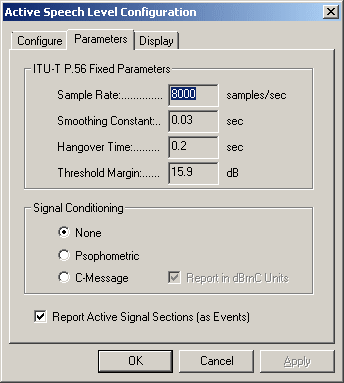
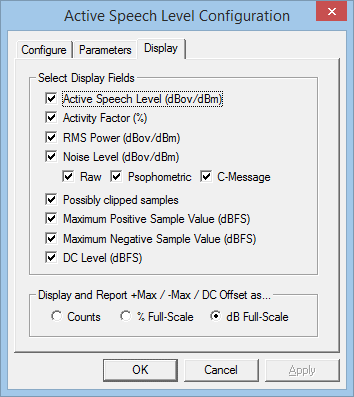
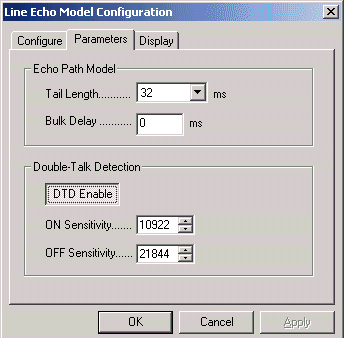
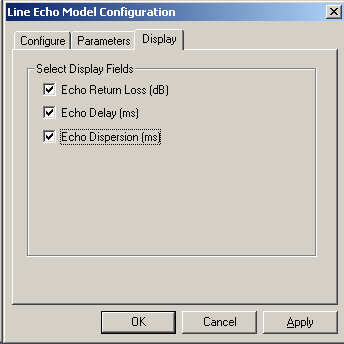
Line Echo Model Configuration
At telephone exchange hybrids, subscriber's 2-wire line gets connected to a 4-wire line. At this point, there is possibility of electrical line echoes being generated due to mismatch in impedance at the hybrid circuits. The Line Echo analysis module in VBA can measure echo thus generated using the captured files at both end points, and outputs Echo Retrun Loss (ERL), Echo Delay, and Echo Dispersion values.
Line Echo has two classes of variable parameters: Echo Path Model and Double-Talk Detection parameters. Echo Path Model parameter allows setting values for 'Tail Length' and 'Bulk Delay' (Tail Offset), while, double talk detection (DTD) allows raising or lowering the ON Sensitivity and OFF Sensitivity. The Tail Length is the expected duration of the significant portion of the echo. If the significant portion of the echo is expected to be not less than some known time delay, you can specify this delay as a "Bulk Delay", also known commonly as 'Tail Offset'.
The application displays the echo parameters such as Echo Return Loss (ERL) (dB), Echo Delay (ms) and Echo Dispersion (ms).
Traffic Classifier Configuration (optional module)
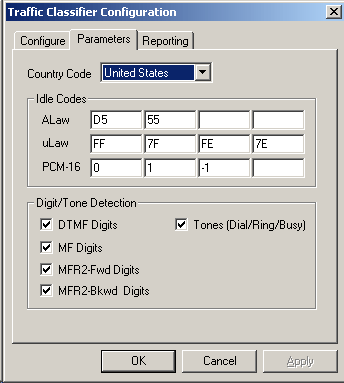
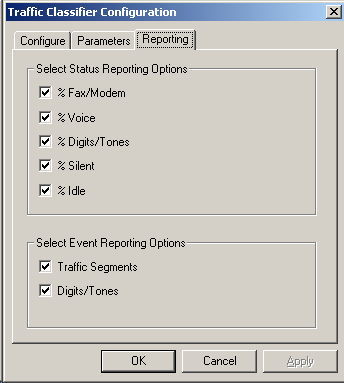
Traffic Classifier algorithm allows VBA to choose to display the amount of Fax/Voice/Digits/Tones/Silent types of traffic present in the network and generate corresponding reports. Traffic Classifier allows Idle Code settings for signaling bits and options to detect DTMF, MF, MFR2-fwd, MFR2-bkwd digits, and Tones (Dial/Ring/Busy).
The Traffic Classifier module can display the amount of Fax/Voice/Digits/Tones/Silent types of traffic present in the network and generate corresponding reports
Analysis using FaxScan™
FaxScan™ application is used to process 2-Wire and 4-Wire voice band capture files as well as Win PCAP captures to provide analysis of the T.38 packets, T.30 frames, decode a Fax TIF image, and general call-flow indicators for detail analysis.
Fax sessions can contain standard G3 or V.34-based sessions. FaxScan™ can
- process up to V.34 T.30 recordings in 2wire, 4 wire, µlaw, alaw, 16 bit, and 13 bit PCM captures (requires VBA038 License)
- process V.34 T.38 and SIP/RTP PCAP captures (requires PKV104 License) Win PCAP captures can be processed from T.38 packets alone or as part of a capture file with multiple SIP calls.
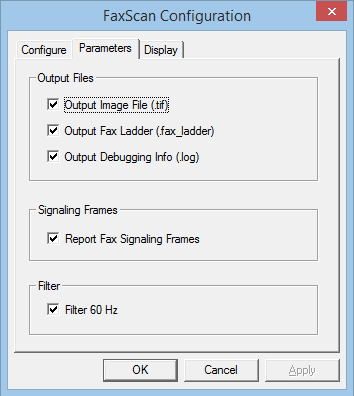
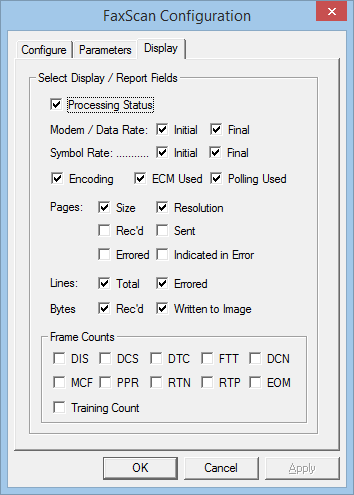
The FaxScan™ application allows you to choose the output fields such as Fax processing status, Standard, Data Rate, Resolution, Encoding, Page Size, Error Lines, Total Lines, Total Bytes, Total Pages, and Frame Counts. The total lines decoded is a good indication as to the success of the decode process. A typical page should indicate over 1000 lines.
Tone Decoder
The Tone Decoder module within VBA features a highly efficient FFT module, which can convert a raw captured file to spectrum data.
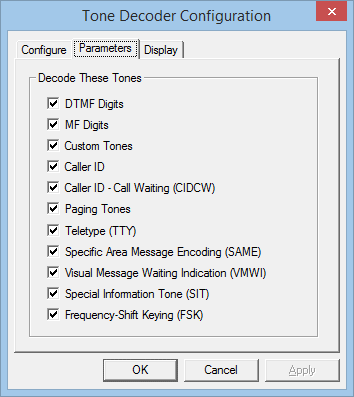
With this module, the VBA can monitor the signal arriving at the receive end, detects, and decodes the tone types such as DTMF, MF, Frequency-Shift Keying (FSK), Teletype (TTY), Special Information Tone (SIT), Specific Area Message Encoding (SAME), Voice Mail Waiting Indication (VMWI), Paging Tones, or any Custom Tones from the captured PCM wave file or wave stream
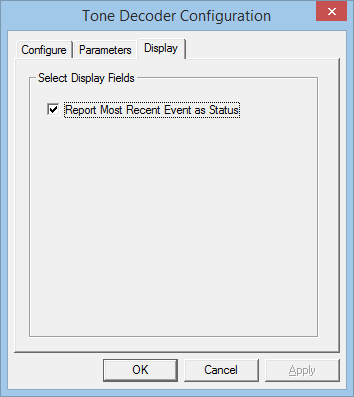
The display tab in the Tone Decoder Configuration will report recent call events as status in the MREvent column.
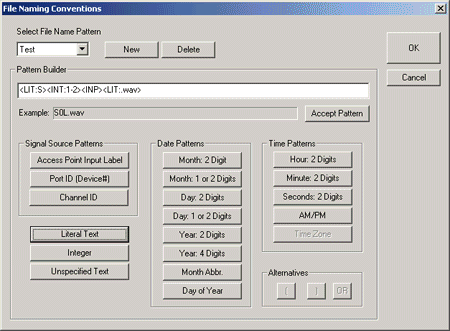
File Naming Convention in Batch and Auto Setup
The file name convention allows users to identify source data files and to group them into data sets in Batch or Auto Mode operations. The naming conventions used are CCA - Standard, CCA-MFCR2, and CCA-ISDN, which is the GL Communications Inc. Call Capture and Analysis application.
The illustrations for the types of file naming conventions are as below:
For Example:
- CCA-Standard naming convention is is May06_E10101_0123.ab, where
<Mon><DAY><LIT:_><INP><PORT:2><CHAN:2><LIT:_><INT:4><LIT:.><TXT:1-3>.
- CCA MFCR2 naming convention is May06_E10101.012, where it stands for
<Mon><DAY><LIT:_><INP><PORT:2><CHAN:2><LIT:.><INT:3>
- CCA ISDN naming convention is 0123456789_01234567890123456_May06_E10101_0123.abc, where it stands for <INT:1-25><LIT:_><INT:1-25> <LIT:_><Mon><DAY><LIT:_><INP><PORT:2><CHAN:2><LIT:_><INT:1-10><LIT:_><INT:4> <LIT:.><TXT:1-3>
User-friendly naming Convention
File naming conventions allows users to configure their own naming convention according to the requirement and to create a corresponding pattern.
For Example:
<DAY:1,2><LIT:.><HR><LIT:.><MIN><LIT:.><SEC><LIT:_><INP>< LIT:.><TXT:1-3>
<LIT:S><INT:1-2><INP><LIT:.wav>
Typical Configurations
VBA with VoIP Probe (minimum configuration)
- Rack PC with VBA032 - VoiceBand Analyzer
- PKV100 - PacketScan™ Probe (requires separate PC)
VBA with TDM Probe (minimum configuration)
- Rack PC with VBA032 - VoiceBand Analyzer
- FTE001 - Octal/Quad Xpress T1 E1 Cards
- XX031 Multiple Call Capture and Analysis w/ MFC-R2
VBA with GSM Probe (minimum configuration)
- Rack PC with VBA032 - VoiceBand Analyzer
- FTE001 - Octal/Quad Xpress T1 E1 Cards
- XX153 - Real Time TRAU Protocol Analyzer
VBA with FXO RJ11 Hardware Tap and Audio Capture Software (minimum configuration)
- Rack PC with VBA032 - VoiceBand Analyzer
- VBA033 - 2-Wire Echo Analysis Module
- VQT035 - 2-Wire Voice/Data Capture
Resources
Please Note: The XX in the Item No. refers to the hardware platform, listed at the bottom of the Buyer's Guide, which the software will be running on. Therefore, XX can either be ETA or EEA (Octal/Quad Boards), PTA or PEA (tProbe Units), XUT or XUE (Dual PCIe Express) depending upon the hardware.
* Specifications are subject to change without notice.