File Based TRAU Record/Playback
(Client/Server Based)
Overview
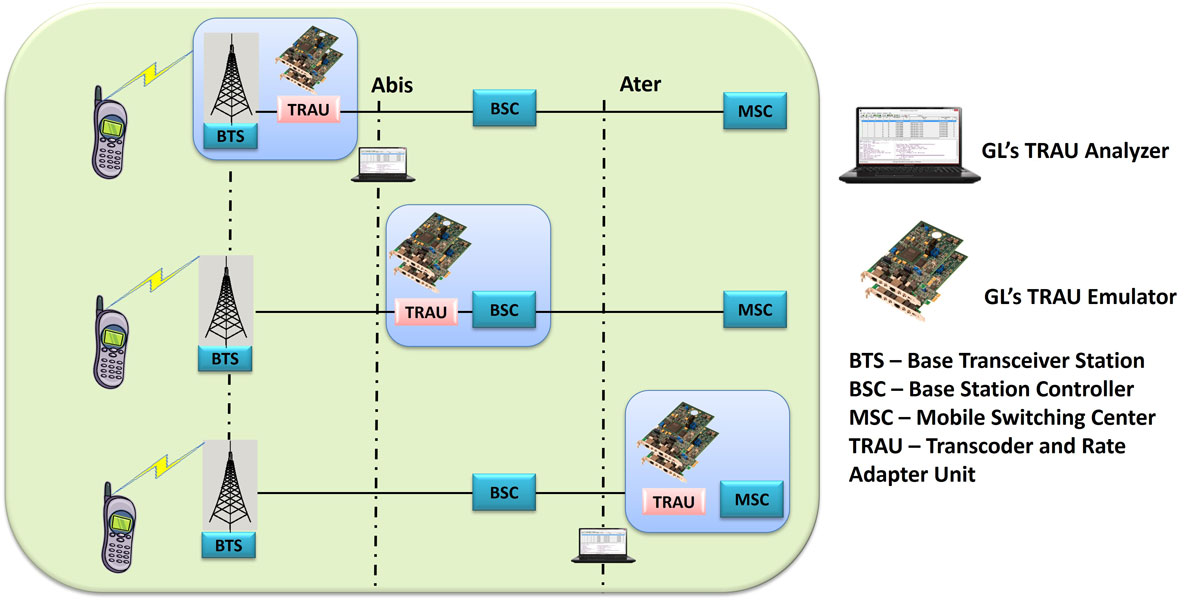
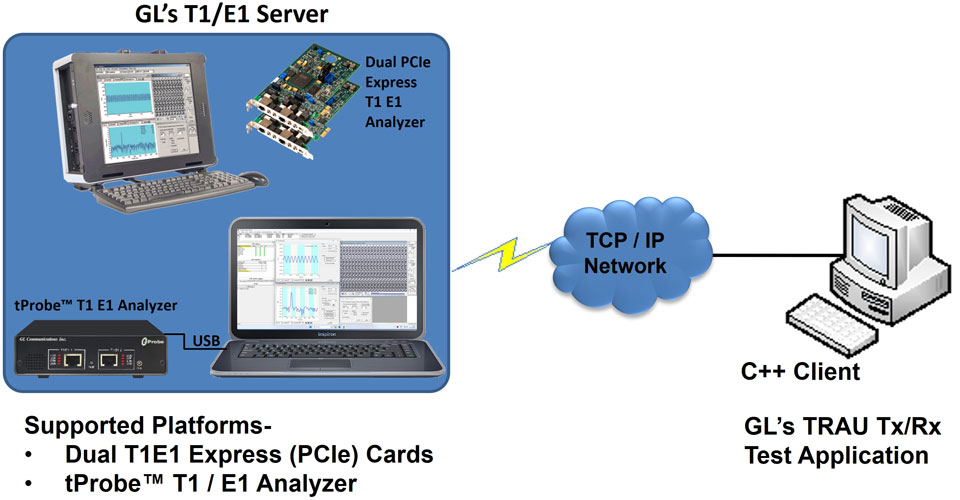
The File based TRAU Record/Playback (Traufunc) module is an optional command-line based client application that allows Capture/Playback of TRAU traffic. They are similar to File based HDLC Record/Playback module with additional TRAU broadcasting transmission and multiple receive features per task. The module also allows to check for command syntax and also transmission / reception of TRAU frames in *.hdl file format.
Features:
- Checks for the command syntax.
- Receiving TRAU frames in .HDL file format located on the server.
- Transmitting TRAU frames from .HDL file located on the server.
Important Syntax Notation Notes
- Whenever TrauFuncT(E)1:Xxx is used in a command syntax that implies TrauFuncT1: XXX must be used for T1 cards and TrauFuncE1: XXX must be used for E1 cards.
- All the parameters must be entered in the order defined by the syntax. [parm] means that the parameter is optional and can be omitted.
- The command is case sensitive for ex: parameters in capital like CONT, EOF must be entered as in capitals.
- Parm1/Parm2/Parm3 - parameter is mandatory, one of the choices Parm1, Parm2 or Parm3 must be specified
- Parameters specified in syntax with all small letters are usually substituted by a specific name or value. While parameters in all capitals must be entered as they are specified
| Syntax Specification | Usage in a specific command | OK or ERROR description |
|---|---|---|
| 'file_name' | 'c:\data files\myData.hdl' | Ok |
| 'file_name' | c:\data files\myData.hdl | error (quotes must be present) |
| CONT | CONT | Ok |
| CONT | Cont | Error(must be all capitals) |
| EOF | EOF | Ok |
| EOF | Eof | error(must be all capitals) |
| limit_frame_count | 10000 | Ok |
| limit_frame_count | 1M | Error(must be a decimal number) |
| 8K | 8K | Ok |
| 8K | 8k | Error('k') |
| 0xSM | 0xFE | Ok |
| 0xSM | FE | Error(must be entered as 0xFE) |
| buffer_size | 100000 | Ok |
| buffer_size | 10000 | Error(must be at least 65536bytes) |
| buffer_size | 1M | Error(must be a decimal number) |
Examples:
- Displaying syntax of all commands implemented in this dll
- Transmission of TRAU frames from an hdl file located on the server
- For T1 Card run task "TrauFuncT1:TxFile" using " file.hdl CONT 8K SC:80 " #1:10;
For E1 Card
run task "TrauFuncE1:TxFile" using " file.hdl CONT 8K SC:80 " #1:10;
This will transmit the file continuously on single stream of 8Kbps on card 1, Time Slot 23and sub channels 1. - For T1 Card run task "TrauFuncT1:TxFile" using " file.hdl EOF 8K SC:F0 " #1:23;
For E1 Card
run task "TrauFuncE1:TxFile" using " file.hdl EOF 8K SC:F0 " #1:23;
This will broadcast the file till the end frame on 4 streams of 8Kbps on card 1, Time Slot 23 and sub channels 1,2,3,& 4. - For T1 Card run task "TrauFuncT1:TxFile" using " file.hdl 2000 8K SC:01 " #1:1;
For E1 Card
run task "TrauFuncE1:TxFile" using " file.hdl 2000 8K SC:01 " #1:1;
This will transmit 2000 frames on card 1, Time Slot 1 and sub channels 8.
Note: The transmitting file should consist of a single stream. - Receiving TRAU frames into an hdl file located on the server
Syntax
run task "TrauFuncT(E)1:RxFile" using " 'file_name' buffer_size CONT/limit_frame_count 8K/16K SC:BitMask UPLINK/DOWNLINK
                                      " ts_spec;
This command will receive TRAU frames and store it in specified path and it is in the HDL file format. - For T1 Card: run task "TrauFuncT1:RxFile" using "trau.hdl 10000000 CONT 16K SC:FF UPLINK " #1:23;
For E1 Card:
run task "TrauFuncE1:RxFile" using "trau.hdl 10000000 CONT 16K SC:FF UPLINK " #1:23;
This will receive 4 streams of 16Kbps each on TS 23 cards 1 continuously. - For T1 Card: run task "TrauFuncT1:RxFile" using "trau.hdl 10000000 2000 16K SC:C0 UPLINK " #1:23;
For E1 Card:
run task "TrauFuncE1:RxFile" using "trau.hdl 10000000 2000 16K SC:C0 UPLINK " #1:23;
This will receive 2000 frames on single stream of 16Kbps, TS 23 cards 1.
Syntax:
run task "TrauFuncT(E)1:help" #*; Syntax:
run task "TrauFuncT(E)1:TxFile" using " 'file_name' CONT/EOF/limit_frame_count 8K/16K SC:BitMask " ts_spec;
where,
file_name: Full path of a HDL server file in single quotes to transmit
CONT: Transmit file in round robin fashion (after the last frame transmit the 1st frame)
EOF: Transmit the file till End Of File (EOF)
limit_frame_count: Transmit the file till the specified frame limit. If file is shorter than specified frame limit and transmission is
continuous (i.e CONT), start transmitting the 1st frame after the last frame till limit_frame_count is reached.
SC:BitMask :sub channel mask. Refer following table.
| Sub Channel Mask | Sub Channel |
|---|---|
| For 16kbps: | |
| SC:C0 | 1 & 2 |
| SC:30 | 3 & 4 |
| SC:0C | 5 & 6 |
| SC:03 | 7 & 8 |
| For 8kbps: | |
| SC:80 | 1 |
| SC:40 | 2 |
| SC:20 | 3 |
| SC:10 | 4 |
| SC:08 | 5 |
| SC:04 | 6 |
| SC:02 | 7 |
| SC:01 | 8 |
For Example:
For example:
For additional syntax download the sample script
Application Notes
Resources
Please Note: The XX in the Item No. refers to the hardware platform, listed at the bottom of the Buyer's Guide, which the software will be running on. Therefore, XX can either be ETA or EEA (Octal/Quad Boards), PTA or PEA (tProbe Units), XUT or XUE (Dual PCIe Express) depending upon the hardware.
| Item No. | Item Description |
| Related Software | |
|---|---|
| XX153 |
T1 E1 Real-time TRAU Protocol Analyzer TRAU Traffic Playback TRAU Toolbox™ |
| OLV153 | Offline TRAU Protocol Analyzer |
| XX150 | GSM Protocol Analyzer |
| XX646 | w/TRAU Tx/Rx Test |
| Related Hardware | |
| PTE001 | tProbe™ Dual T1 E1 Laptop Analyzer with Basic Analyzer Software |
| PTE025 | Datacom Analyzer Board for RS-232, RS-449, RS-422, RS-423, EIA-530, V.35 Interfaces |
| FTE001 | QuadXpress T1 E1 Main Board (Quad Port™ requires additional licenses) |
| ETE001 | OctalXpress T1 E1 Daughter Board (Octal Port™ requires additional licenses) |
| XTE001 | Dual T1 E1 Express (PCIe) Boards (requires additional licenses) |
| Brochures |
| T1 E1 Client Server TRAU Emulation Brochure |
| Presentations |
| TRAU Product Presentation |
 Back to Client/Server Scripted Control Software Page