MAPS™ SIP Protocol Emulator
GL's Message Automation & Protocol Simulation (MAPS™) designed for SIP testing can emulate User Agents (User Agent Client- UAC, User Agent Server-UAS), Redirect and Registrant servers.
Request a Demo / Quote Brochure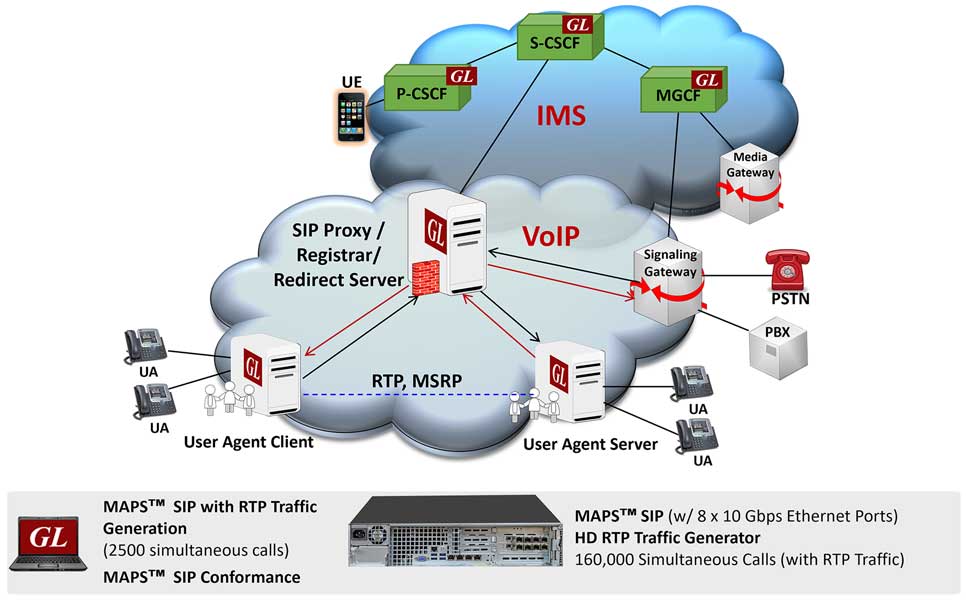

Overview
GL's Message Automation & Protocol Simulation (MAPS™) designed for SIP testing can emulate User Agents (User Agent Client- UAC, User Agent Server-UAS) Redirect and Registrant servers. This test tool/traffic generator can be used to emulate any interface in a SIP network and perform protocol conformance testing (SIP protocol implementations).
The application is available as
- MAPS™ SIP Protocol Test Tool (Item # PKS120)
- MAPS™ SIP Conformance Test Suite (Item # PKS121)
- MAPS™ High Density Call Generator (Item # PKS109)
- MAPS™ SIP Message Session Relay Protocol (Item # PKS112)
The application gives the users the unlimited ability to edit SIP messages and control scenarios (message sequences). "Message sequences" are generated through scripts. "Messages" are created using message templates.
MAPS™ can be used to emulate any interface of the VoIP network. Single MAPS™ instance can act as more than one SIP entity at a time and can generate any SIP message on wire in VoIP network and hence equipment needed to test are reduced. MAPS™ SIP supports UDP, TCP, TLS transport types. Secure Real-time Transport Protocol (or SRTP) traffic supported over TLS (Transport Layer Security) Transport and TLS Library (OpenSSL) uses a Certificate and Key.
With the purchase of the RTP Core license (PKS102), MAPS™ SIP supports the transmission and detection of various RTP traffic types, including digits, voice files, single tones, dual tones, IVR, FAX*, and Video*. With standard RTP traffic, the application supports up to 2,500 simultaneous calls at a rate of 250 calls per second (CPS). It is compatible with nearly all industry-standard voice codec.
The MAPS™ SIP Conformance Scripts (PKS121) is designed with 400+ test cases, as per SIP specification of ETSI TS 102-027-2 v4.1.1 (2006-07) standard. Test cases include general messaging and call flow scenarios for multimedia call session setup and control over IP networks. Logging and pass/fail results are also reported. Test cases verify conformance of actions such as registration, call control, registrants, proxies and redirect servers.
MAPS™ SIP also supports generation of high volume of calls with traffic for load testing network using MAPS™ High Density RTP Generator (PKS109) network appliance.
MAPS™ RTP High Density (requires a special purpose network appliance and PKS109 RTP High Density licenses) is a specialized 1U rack mounted network appliance designed to easily achieve up to 1,60,000 endpoints per appliance. The appliance is available with 8 x 1/10 Gbps ports. Using a stack of multiple servers, a larger test system with 800K-1000K calls (all controlled from a single Master Controller) is achievable for enterprise to carrier grade testing.
GL also provides a high-density network monitoring appliance (supports SIP, RTP, UMTS, LTE, and IMS) for online capture and decode of the signaling in real time.
** Some of these traffic types requires additional licenses – contact GL for more information
RTP traffic simulation is supported for almost all standard codecs. Also, supports various traffic events simulation during the course of a call, which is listed below:
Signaling Events
- Answer Call - Used to Accept the Call from DUT
- Place Call - Places the Call to another End by initiating the Invite Message.
- Terminate - Terminates the call using BYE Method
RTP Traffic Events – digits, tones, files
- Send File, Receive File, Stop Send File
- Send Digits, Detect Digits, Stop Send Digits
- Send Test Tone, Detect Test Tone
- Send Tone, Detect Tone, Stop Send Tone
MAPS™ SIP provides Bulk Video Call Simulation using pre-recorded MP4 video streams transmitted over RTP, supporting industry-standard video codecs. On a high-performance computing platform, it can generate more than 500 simultaneous video calls and provides detailed RTP traffic statistics, including Listening MOS, Conversational MOS, Packet Loss, Discarded Packets, Out-of-Sequence Packets, Duplicate Packets, Delay, and Jitter.
MAPS™ SIP supports FAX over IP (FoIP) simulation and monitoring. With Additional licensing, both RTP G.711 Pass Through Fax Simulation and T.38 Fax Simulation over UDPTL simulation are supported.
MAPS™ SIP supports Message Session Relay Protocol for instant messaging over SIP sessions, simulating SIP/MSRP User Agents end-points in an NG9-1-1 network and send and receive communications over ESInets. The NG9-1-1 calls can be IM Only Calls, Audio and IM Calls, and Video and IM Calls between multiple UAs.
MAPS™ SIP supports Interactive Voice Response (IVR) testing that recognizes and responds to voice prompts using DTMF digits or voice, allowing automated IVR traversal and testing.
MAPS™ SIP handles simulation of Audio and Video along with IM call, during which the pre-recorded audio/video is sent and received using RTP and text messages using MSRP during the same call. During this call type, there will be three media lines, one for Audio, one for Video and another for text messages using MSRP.
MAPS™ SIP also supports command line interface to remotely control MAPS™ from client environment. Multiple MAPS™ CLI servers can be controlled from a client environment (such as Python, Java) via APIs for complete automation.
GL also provides a Packet Analyzer for on-line capture and decode of the SIP signaling in real-time both during tests and as a stand-alone tracer for live systems.
Main Features
Signaling |
|
Traffic |
|
Bulk Call Capability |
|
Other Features |
|
CLI |
|
Applications |
|
Supported Protocols Standards
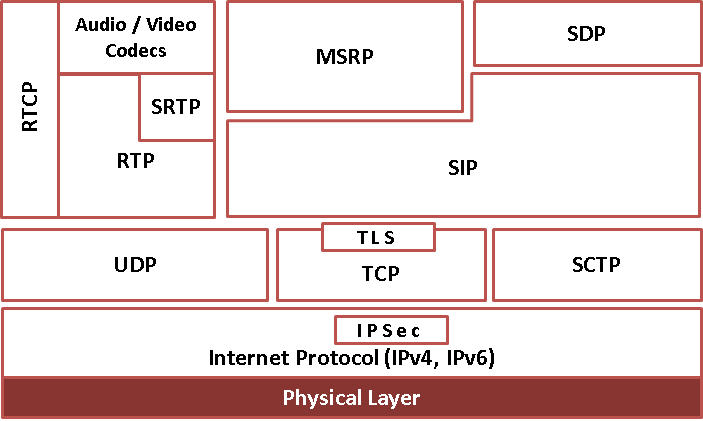
SIP Protocol Stack
| Supported Protocols | Specification Used |
|---|---|
| SIP SIP Conformance |
RFC 3261 |
| SIP Extensions | RFC 3262 - Reliability of Provisional Responses in the Session Initiation Protocol (SIP)
|
Secure Real-time Transport Protocol (SRTP) |
RFC 3711 - Secure Real-time Transport Protocol (SRTP) |
Message Session Relay Protocol (MSRP) |
RFC 4975 - Message Session Relay Protocol (MSRP) |
SIP Simulation
With MAPS SIP (PKS120), you can simulate complex call scenarios, modify SIP headers, automate test process, generate all types of traffic – Fax T.38, Voice, Video, Digits, Tones, and user-defined. Test scenarios can be manually executed using the Call Generation and Call Reception windows. The Load generation features allows for bulk call testing with parameters such as Call per second (CPS), Max Active Call, Minimum and Maximum Call Rates, Start Call Rates, and different statistical distribution patterns.
Following are typical applications where MAPS SIP tool is useful -
- Test PBX, Switch, Gateways/Routers
- Test IVR, Voice Mail, VoIP phones
- Generate/Accept tens & thousands of calls
- Voice, Fax, Digits, Tones, Data, Video traffic generation
- Automate Regression testing
- Feature testing
- Remote operation
- Scripting: Python, TCL, Java, VBScript Client APIs
- Voice, Data Quality, Quality of Service
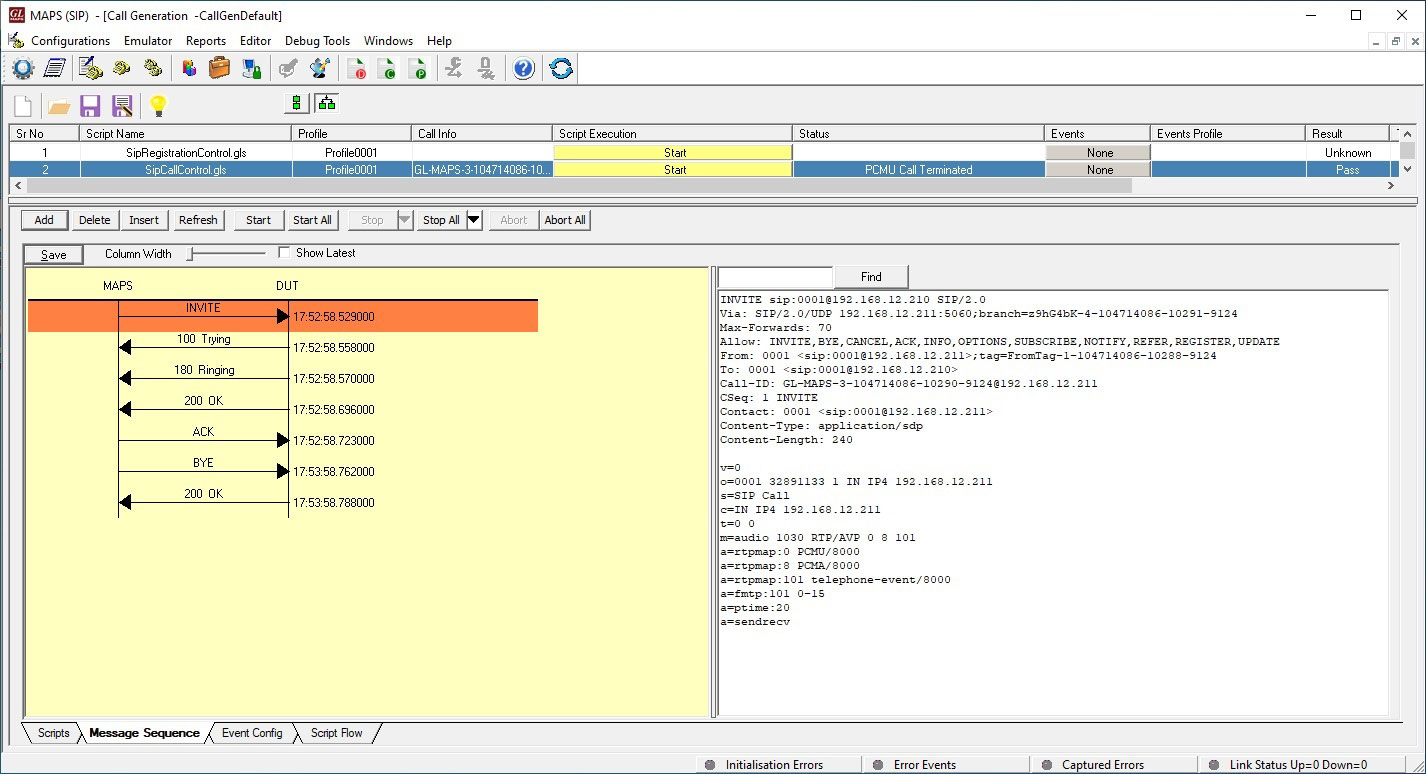
Call Generation at UAC
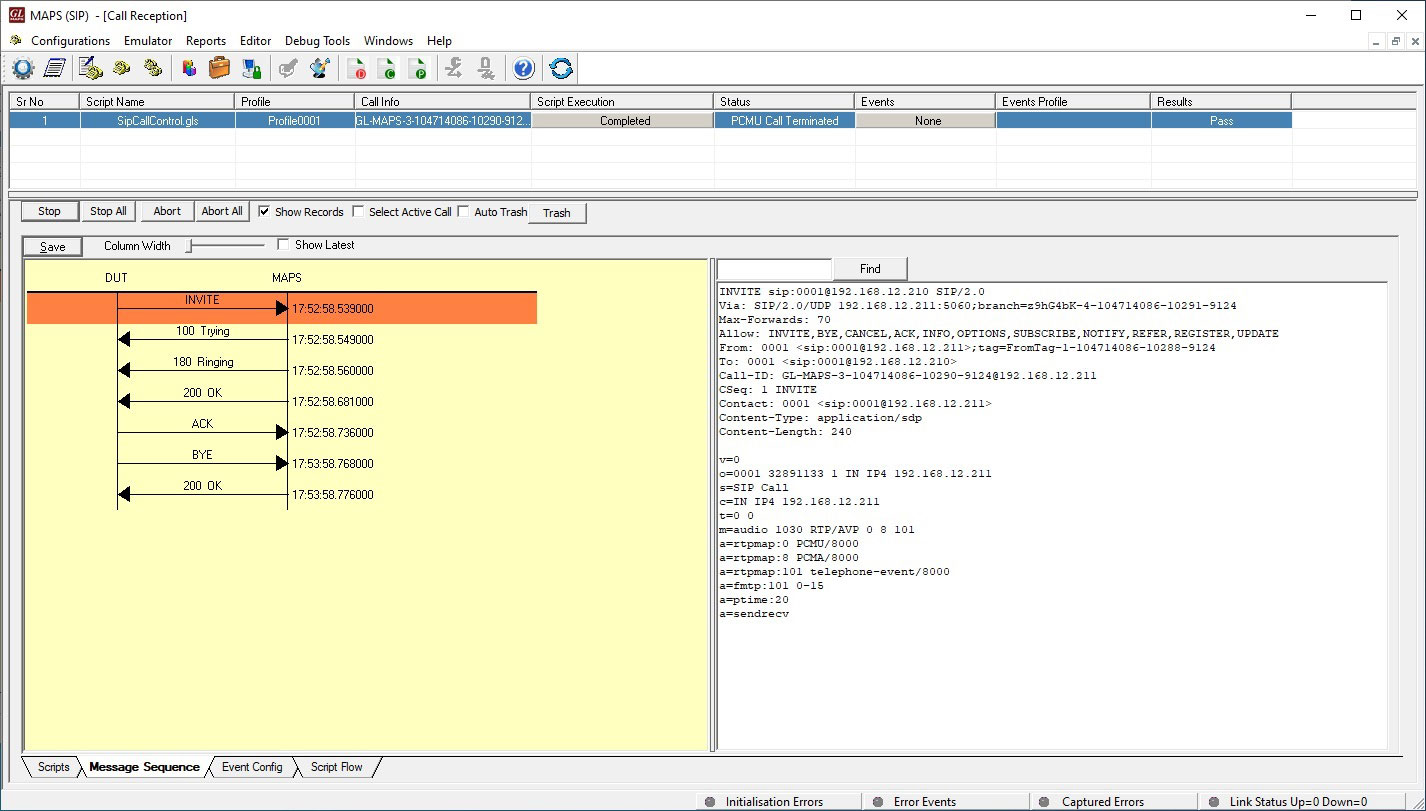
Call Reception at UAS
UAC, UAS Conformance
MAPS™ SIP can be configured to act as UAC and sends request messages to conform UAS (DUT). MAPS™ SIP can also be configured at DUT to act as UAS, loaded with answer scripts to handle the incoming messages. UAS replies with 180 Ringing message for the initial INVITE request message from UAC, thus testing UAC.
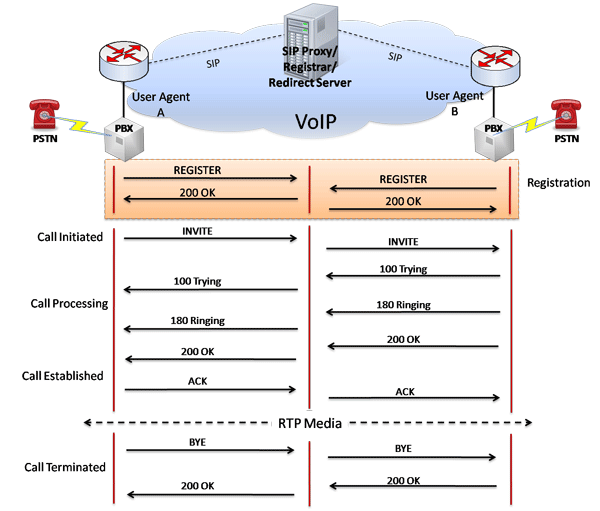
Typical SIP Procedure
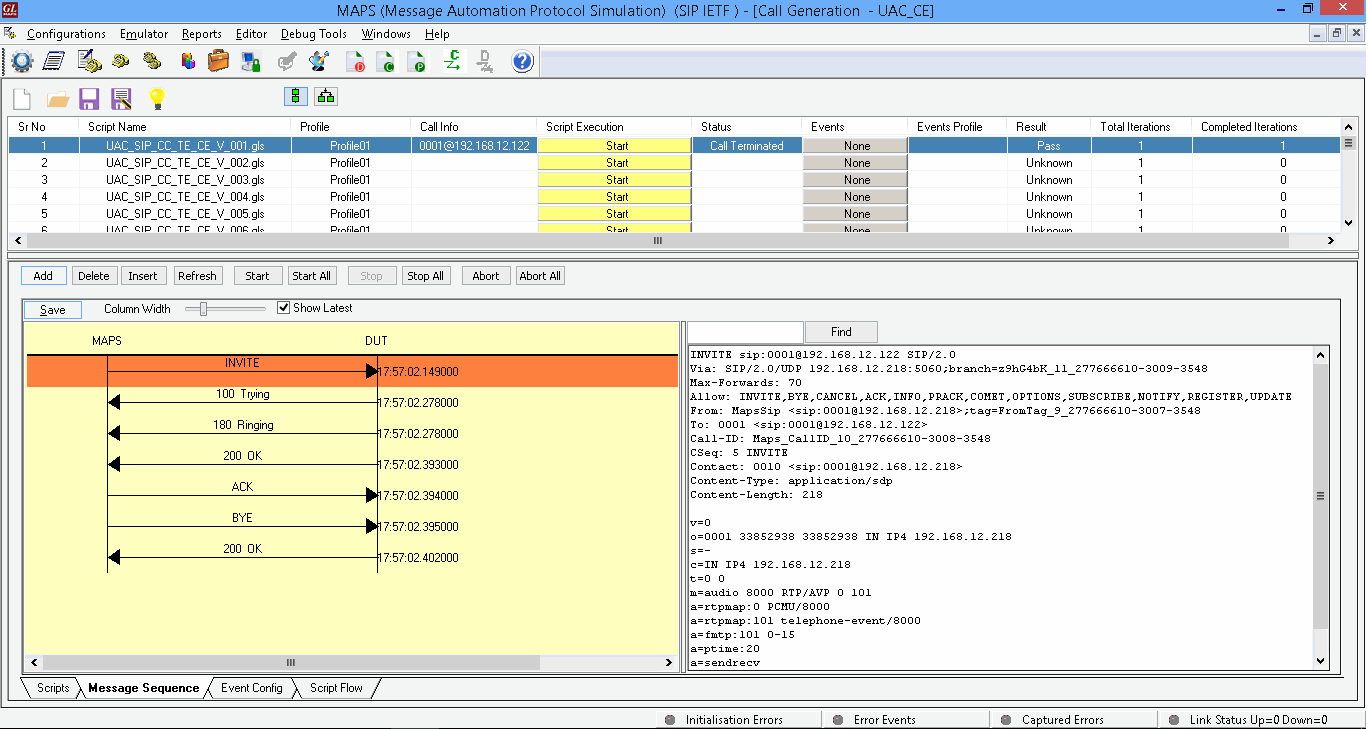
Call Generation at UAC
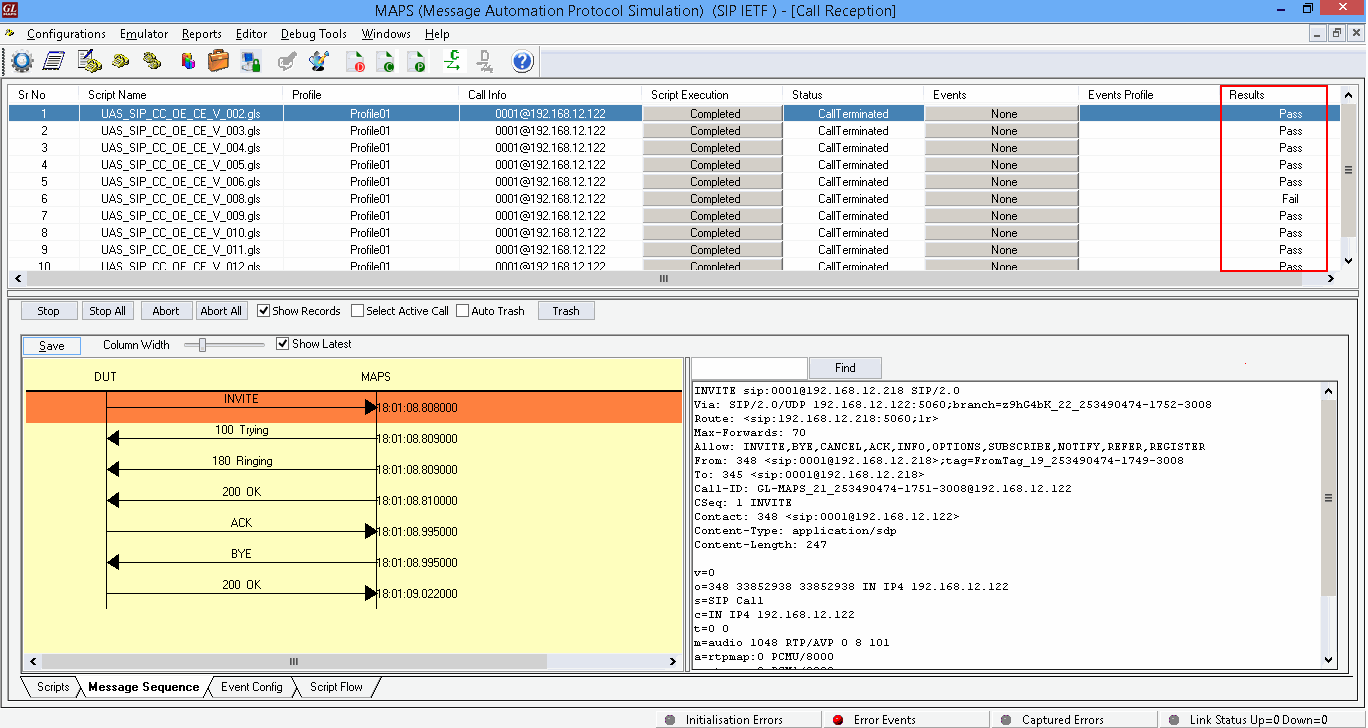
Call Reception at UAS
Proxy Conformance
With the set of Proxy Conformance inbuilt scripts, MAPS™ can be configured to act as UAC and UAS simultaneously so that entire Proxy testing can be automated.

DUT as Proxy Server
Here, MAPS™ acts as both UAS and UAC sending and receiving SIP messages while testing proxy (DUT). All the requests received from UAC (MAPS™) are replied back with the unmodified messages as seen in the message sequence window below.
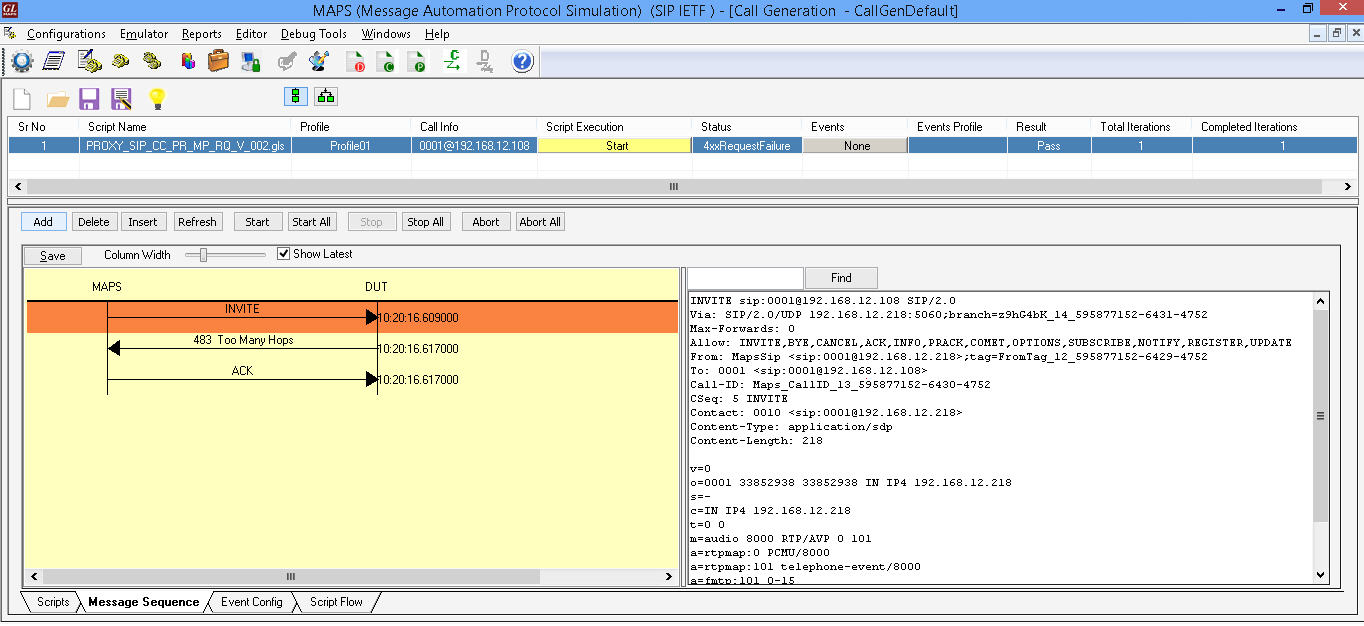
Proxy Conformance Testing
Registrant Conformance
DUT as Registrant generates REGISTRATION SIP messages. The set of Registrant Conformance inbuilt scripts in MAPS™ tests to ensure that MAPS™ acts as Registrar and processes the received registration request messages from Registrant (DUT).
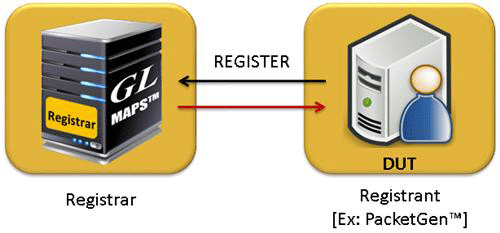
DUT as Registrant

Registrant Conformance Testing
Redirect Server Conformance
Receives requests and looks up the intended recipient of the request in the location database created by a registrar. MAPS™ acts as UAC and sends messages to test Redirect Server (DUT). Redirect Server is an entity that receives a request and sends back a reply containing a list of the current location of a particular user.
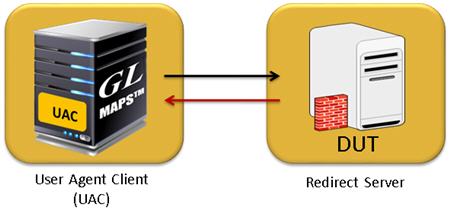
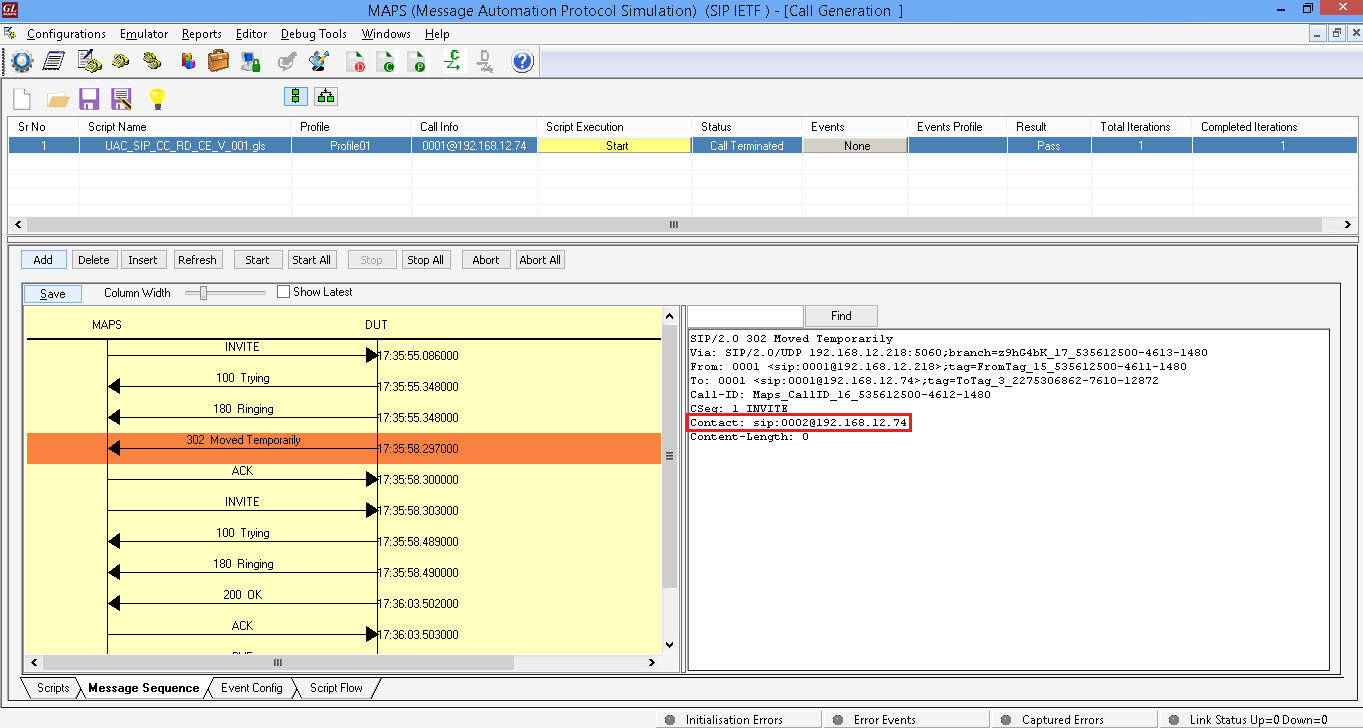
End-to-End- Gateway Testing
As shown in the figure below, MAPS™ is an ideal tool to evaluate Gateway / ATA product features such as call connectivity, call signaling, traffic generation, voice quality testing, codec, and hundreds of other features. For more details, contact GL Communications.
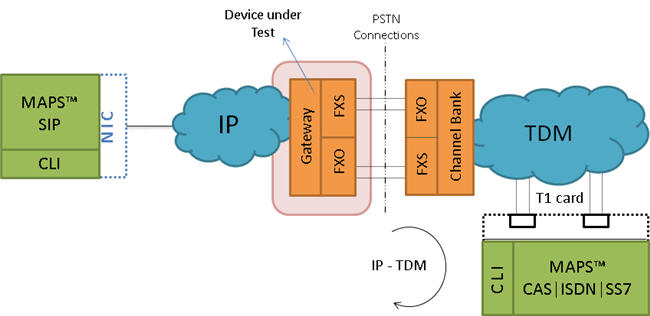
End-to-End Gateway Testing
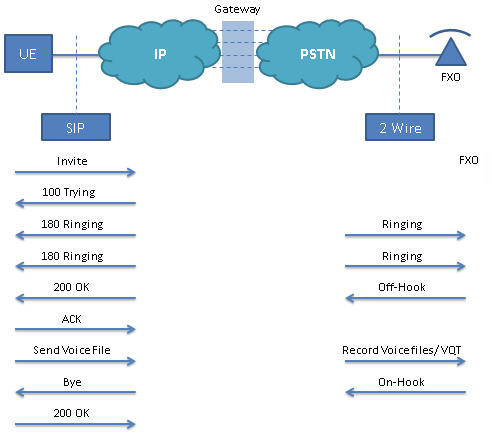
Gateway Testing Call Scenario
Instant Messaging using SIP/MSRP
GL offers enhanced MAPS™ SIP emulator supporting Instant Messaging (IM) delivery conforming with RFC 4975/4976 - Message Session Relay Protocol (MSRP) protocol.
MAPS™ SIP software supports simulation of SIP/RTP sessions as well as instant messaging sessions over SIP using MSRP protocol (requires PKS112 licenses). The supported call types are IM Only Calls, Audio and IM Calls, and Video and IM Calls between multiple UAs.
MAPS™ SIP can simulate the end-points (SIP/RTP or SIP/MSRP User Agents) in an NG9-1-1 network and send and receive communications over ESInets. The software is capable of simulating high volume SIP sessions for load testing, and reporting thresholds.
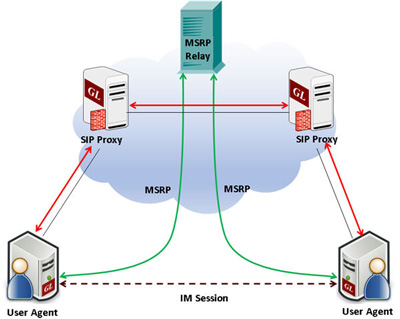
MAPS™ SIP allows SIP vendors, wireless carriers, NG9-1-1service providers, and emergency communications centers to test IP applications for satisfactory working of NG9-1-1 services prior to deployment.
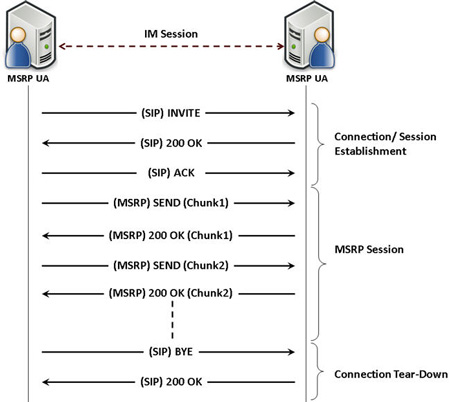
Unlike regular SMSs, IM requires a series of instant messages exchanged between two or more parties treated as a single conversational message session. Such a “session-mode” IM is possible using Message Session Relay Protocol (MSRP) where a series of related instant messages using SIP are treated similar to audio or video media sessions. MSRP supports multiple sessions to different end-points to be established over a single TCP connection.
Given below is a typical IM simulation between SIP/MSRP endpoints.
The following call generation screenshot depicts the MAPS™ SIP simulating ‘Audio and IM Calls’. During this call type, two different sessions will be established. There will be two media lines, one for audio using RTP session and another for instant messaging using MSRP session which are handled simultaneously.
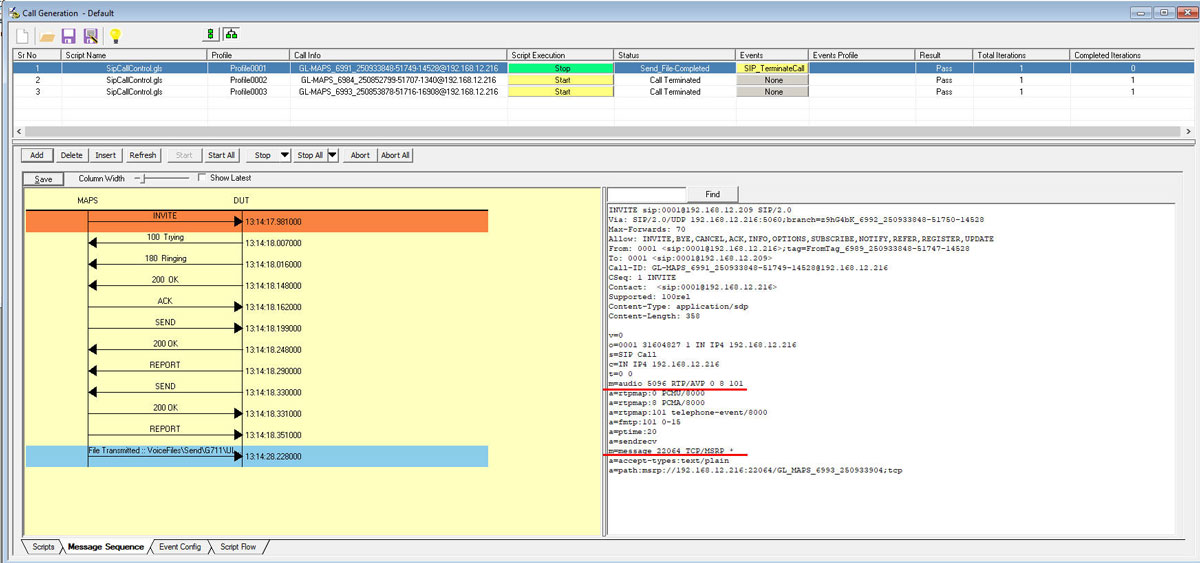
Audio and IM Call Generation
MAPS™ SIP also provides user defined statistics feature, which can be configured to provide MSRP statistics including metrics such as Total MSRP Messages Sent, Received, Bytes Sent, and Bytes Received. These statistics are calculated and updated periodically on run time.
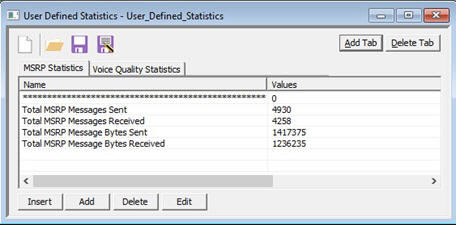
User Defined MSRP Statistics
Resources
| MAPS™ SIP Protocol Emulation | |
| Item No. | MAPS™ for Wireless Network |
| PKS120 |
MAPS™ SIP Emulator |
| PKS121 | MAPS™ SIP Conformance Test Suite (Test Scripts) |
| PKS126 | MAPS™ SIP I Emulator |
| PKS127 | MAPS™ IMS Emulator |
| PKS118 | MAPS™ ED-137 Radio (Includes PKS107, & PKS102) |
| PKS119 | MAPS™ ED-137 Telephone (Includes PKS102) |
| PKS117 | MAPS™ ED-137 Recorder (Includes PKS102) |
| PKS140 | MAPS™ LTE S1 Emulator |
| PKS142 | MAPS™ LTE eGTP (S3, S4, S5, S8, S10, S11 & S16) Emulator |
| Item No. | Traffic Options |
| GTP Mobile Traffic Options | |
|---|---|
| ETH101 ETH102 ETH103 |
Mobile Traffic Core - GTP Mobile Traffic Core - Gateway Mobile Traffic Core - GPRS Gb Interface |
| RTP Traffic Options | |
| PKS102 | RTP Soft Core (additional) |
| PKS103 | RTP IuUP Softcore |
| PKS200 PKS202 PKS203 PKS204 PKS205 PKS206 |
RTP Pass Through Fax Emulation Fax Port Licences - 2 Fax Ports, RO Fax Port Licences - 8 Fax Ports, RO Fax Port Licences - 30 Fax Ports, RO Fax Port Licences - 60 Fax Ports, RO Fax Port Licences - 120 Fax Ports, RO |
| PKS211 | T.38 Fax Simulation |
| PKS107 | RTP EUROCAE ED-137B |
| PKS108 | RTP Voice Quality Measurements |
| PKS109 | MAPS™ High Density RTP Generator |
| PKS111 | MAPS™ Remote Controller |
| PKS112 | Message Session Relay Protocol for MAPS-SIP |
| PKS170 | CLI Support for MAPS™ |
| PKS106 | RTP Video Traffic Generation |
| PCD103 | Optional Codec – AMR – Narrowband (requires additional license) |
| PCD104 | Optional Codec - EVRC (requires additional license) |
| PCD105 | Optional Codec – EVRC-B (requires additional license) |
| PCD106 | Optional Codec – EVRC-C (requires additional license) |
| PCD107 | Optional Codec – AMR - Wideband (requires additional license) |
| PCD108 | Optional Codec - EVS (requires additional license) |
| PCD109 | Optional Codec - Opus (requires additional license) |
| Item No. | Related Software |
| PKS120 | MAPS™ SIP Emulator |
| PKV100 | PacketScan™ (Online and Offline) |
| PKV120 | PacketScan™ HD w/4 x 1GigE |
| PKV120p | PacketScan™ HD w/4 x 1GigE - Portable |
| PKV122 | PacketScan™ HD w/2 x 10GigE |
| PKV122p | PacketScan™ HD w/2 x 10 GigE - Portable |
| PKV124 | PacketScan™ HD w/40/100 GigE |
| PKV124P | PacketScan™ HD w/40/100 GigE - Portable |
| PKV123 | PacketRecorder™ HD & PacketRePlay™ HD |
| PKV121 | PacketScan™ FB |
| PKB100 PKB105 |
RTP Toolbox™ G.168 Echo Canceller Test Compliance Suite |
| PKV105 | SIGTRAN Analyzer (requires PKV100) |
| PKV107 | LTE (Long Term Evolution) Analyzer (Optional with PacketScan™) |