VoIP Testing using VQuad™

Overview
Testing on the extreme end-point of a VoIP softphone network has become a priority for many service providers. This method of testing represents what an end user is actually experiencing.
Voice quality testing within VoIP networks is growing; a major concern is testing VoIP softphones that will be used with VoIP networks. GL’s VQuad™ with VoIP option along with Voice Quality Testing (VQT PESQ) software provides the ability to perform manual or automated Wideband audio tests using HD codecs on the VoIP network.
The VQuad™ provides direct connection to the VoIP network with up to 12 instances connected simultaneously. Using the VQuad™ software, the user may configure automatic call control (SIP protocol) along with automatic generation / reception of voice files. Path confirmation using digits or frequency tones is also available in an automated or manual operation.
The VQuad™ along with the Dual UTA HD can connect to a VoIP network in several ways including through an ATA (the Dual UTA HD simulates the analog phone), through a Softphone (the Dual UTA HD provides Balanced I/O ports), via wireless (the Dual UTA HD connects to any mobile phone using Bluetooth technology), and through the customer’s phone itself (the Dual UTA HD can replace the handset of ANY Analog, Digital, or VoIP phone). The VQuad™ can also act as an end point and directly connect to the VoIP network via SIP protocol.
SIP Call Control within VQuad™ is capable of handling multiple SIP cores (4 SIP Core), and supports up to 12 User Agents. The VQuad™ when simulating the VoIP end point User Agent or the Analog 2-wire Phone supports full Call Control included supplementary services such as 3-Way Calling. The VQuad™ also supports path confirmation, send/record voice synchronously for VQT PESQ results and full scripting of the test. Additional measurements include Round Trip Delay, One Way Delay and a variety of Echo testing.
VQuad™ supports Data Testing including TCP, UDP, VoIP, HTTP, FTP, DNS and SMS. The Data Tests are configured via the VQuad™ scripting and support the PC Ethernet connection (wired, WiFi, Broadband 3G/4G) or mobile device. Using the optional GL’s Mobile Device Controller application and the supporting downloadable apps on the Smartphones (iPhone, Android), the VQuad™ can remotely perform the data tests when the phone is within a voice call or outside a voice call.
VQuad™ with Dual UTA HD can be purchased as a single unit (VQT280), which includes VQuad™, Dual UTA HD, and PC. Control via Ethernet Remote Desktop (with support for mouse/keyboard).
Main Features:
- Connect at endpoint of a VoIP network
- Supports WideBand (WB) audio using HD codecs such as G.722 and AMR WB.
- All VoIP Codec are supported including -
- G.711 (µ-law/A-law - 64kbps)
- G.711 App II (ALaw and µ-Law with VAD)
- G.729, G.729B (8 kbps)
- G.726 (5 bit 40 kbps/4 bit 32 kbps/3 bit 24 kbps/2 bit 16 kbps)
- G.726 (40/32/24/16 kbps with VAD)
- GSM (13.2 kbps)
- AMR (4.75kbps, 5.15kbps, 5.9kbps, 6.7kbps, 7.4kbps, 7.95kbps, 10.2kbps, 12.2 kbps) (requires additional license)
- AMR WB (Wideband codec - 6.60kbps, 8.85kbps, 12.65kbps, 14.25kbps, 15.85kbps, 18.25kbps, 19.85kbps, 23.05kbps, 23.85 kbps) (requires additional license)
- EVRC (Rates - 1/8, ½ and 1), EVRC0 (requires additional license)
- EVRCB (Rates - 1/8, ¼, ½ and 1), EVRCB0 (requires additional license)
- EVRC_C (requires additional license)
- SMV (Modes - 0, 1, 2 and 3- Available if licenses are provided or owned, please call GL)
- iLBC (15.2kbps and 13.33kbps)
- SPEEX (Narrow Band, Wideband))
- G.722
- G.722.1 (24 kbps and 32 kbps Wideband)
- GSM HR (rate – 5.6kbps, packet time multiples of 20msec.)
- GSM EFR (rate - 12.2kbps, packet time fixed at 20msec.)
- Supports outband DTMF/MF digits for RFC4733 and RFC2833.
- Impair outgoing traffic using a noise file or user-defined white noise
- Connect directly to ATA, Softphone, Phone Handset, or Wireless via Bluetooth®
- Fax generation for 2-wire FXO and 4-wire analog interfaces
- Connect at endpoint of a VoIP network using SIP protocol with user-defined parameters for Authentication and Proxy
- SIP Call Control within VQuad™ is capable of handling up to 4 SIP cores, and each SIP core supports up to 12 User Agents.
- Up to 12 interfaces connected to a single VQuad™ system
- Manual or Automatic call control (SIP protocol) with user-defined parameters for authentication and proxy
- Automatic send/receive of voice files over already established calls
- Round Trip Delay, One Way Delay, Echo measurements, and Data Testing
- Compact and portable solution for testing end-to-end voice quality
- GL VQT Automatic Mode allows automatic execution of the VQT algorithms (PESQ LQ/LQO/WB)
- Additional measurements include Clipping, Jitter, Latency, Noise and Signal Levels
Visit Voice Codecs webpage for more comprehensive information.
Voice Quality Testing (VQT) Results
GL's VQT may be executed automatically (real-time and/or post-processing) or manually by entering a Reference File and Degraded File. Regardless of how GL's VQT is initiated, algorithms for POLQA and PESQ MOS and PESQ LQ are executed simultaneously for the two voice files and results are shown in graphically as well as in tabular format. GL’s VQT supports POLQA WB Analysis (ITU-P.863). GL's VQT also displays cumulative statistics for large scale testing over long periods of time.
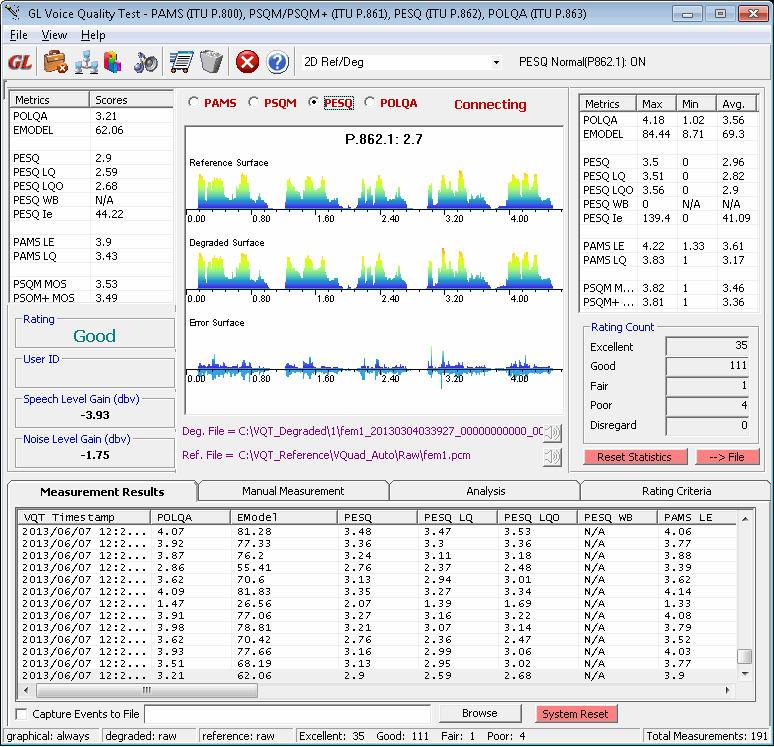
VQT Measurement Results
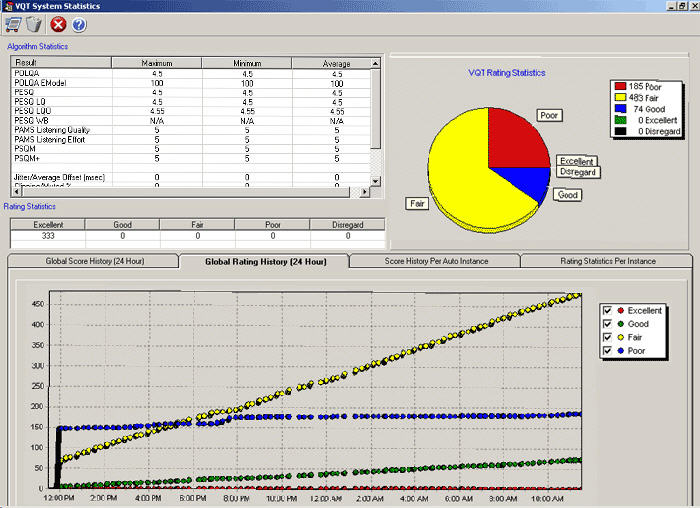
VQT Cumulative Statistics
SIP Call Control
VQuad™ allows users to configure and simulate a user agent (UA) for l SIP call generation and reception using public URL and contact IP addresses. VQuad with SIP supports registration with a registrar server. VQuad™ allows user to place calls between VoIP phones with different user agents.

The user can configure some codecs for call generation or reception through "CodecOptions.ini" file located in the installation folder. This file contains options such as packetisation time (ptime), payload type, and codec options. It also allows the user to select the codecs to be included in the test scenario, i.e, if the test requires only A-law or u-law offered then, those can be selected and the others omitted.
The codec packaging details can be edited in the CodecOptions.ini file directly, with the following restrictions
- [CODEC_TYPE] - Allows user to select codecs to be offered in call setup.
- [Packetisation_Time] - Minimum Packetisation time varies for codecs.
- Payload Type _ Unique value for each codec
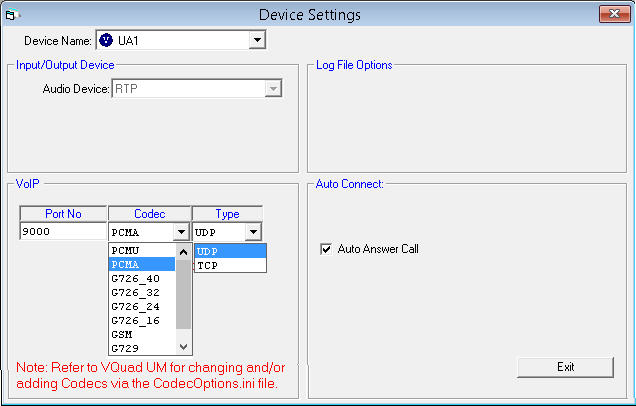
VoIP Device Settings
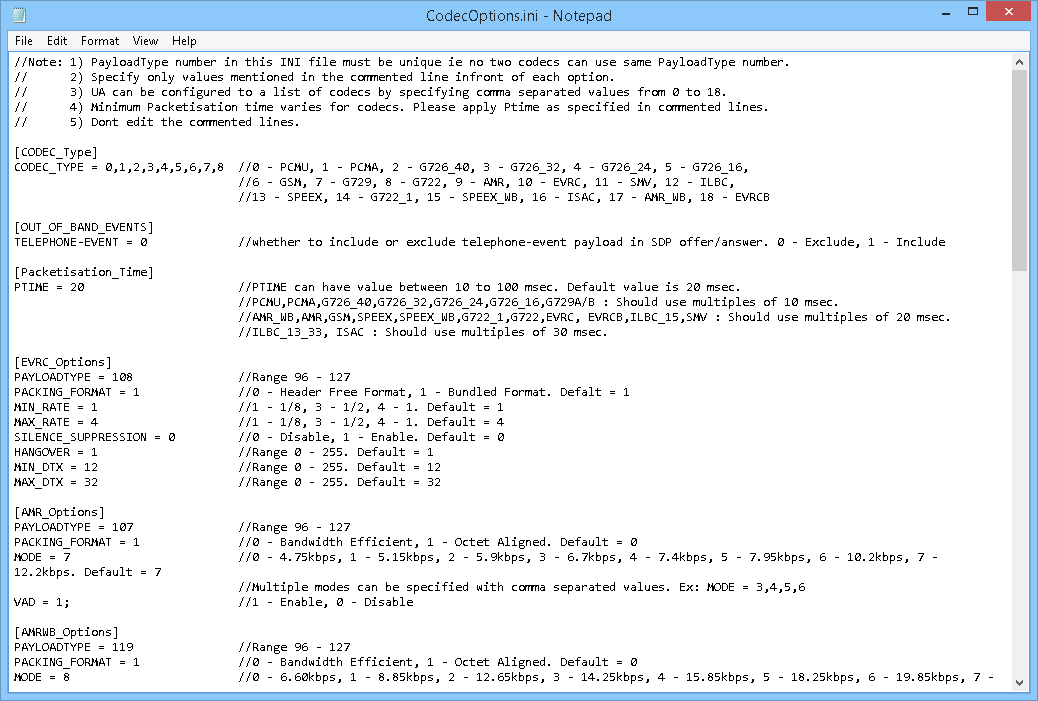
CodecOptions.ini File Configuration
Additional Information
- VQT Software
- VQuad™
- Testing Analog Telephone Adapters (ATAs)
- Testing VoIP, Analog and Digital Phones
- Automated/Manual Data Testing
- VQuad™ Fax Emulation
- WebViewer™
Resources
Note: PCs which include GL hardware/software require Intel or AMD processors for compliance.
| Item No. | Item Description |
| VQT010 | VQuad™ Software (Stand Alone) |
| VQT013 | VQuad™ with SIP (VoIP) Call Control |
| VQT015 | VQuad™ with T1 E1 Call Control |
| VQT280 | VQuad™ Probe HD (with Dual UTA HD) Accessories Power Adapter 12V, 3Amps (1) 3.5 mm jack audio cable (2) RJ 11 cable (2) |
| VQT281 | VQuad™ Probe HD w/o Dual UTA HD |
| VQT285 | VQuad™ Probe HD Upgrade |
| VQuad™ Miscellaneous | |
|---|---|
| VQT601 | Mobile Device Controller (MDC) Software |
| VQT022 VQT022a |
VQuad™ Fax Emulation (2 simultaneous ports)
VQuad™ Fax Emulation (8 simultaneous ports) |
| VQT251 | Dual UTA HD Next generation Dual UTA with FXO Wideband support Accessories USB Cable 2.0 (1) 3.5 mm jack audio cable (2) RJ 11 cable (2) |
| VQT252 | Dual UTA HD – Bluetooth Option |
| VQT461 | Dual UTA HD Smartphone ACC Cable |
| VQT Analysis | |
| VQT002 | Voice Quality Testing (PESQ only) |
| VQT006 | VQT w/ POLQA Server license (no limitations) |
| VQT007 | VQT POLQA v3, server license for 20 nodes |
| VBA032 | Near Real-time Voice-band Analyzer |
| EMU037 | Echo Measurement Utility (EMU) Software |
| VQT040 | Webviewer™ |
| Brochures |
| Complete VQT Brochure |
| GL Product Lists |
| Presentation |
| Voice, Video and Data Quality Testing Presentation |
* Specifications are subject to change without notice.
 Back to Complete Voice Quality Testing Solutions Index Page