Overview
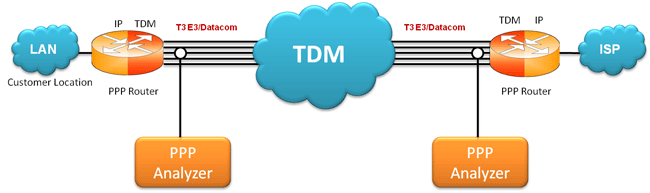
The PPP Analyzer captures a host of PPP protocols exchanged between the two nodes over T3/E3 links & provides useful analysis, which includes distribution of protocols, protocol fields, frame lengths and frame status. User can obtain detailed analysis of the protocol and can perform various statistics measurements.
The GL's PPP Analyzer can be used to capture and decode a host of PPP protocols exchanged between pairs of nodes over T3/E3/Serial Data Communications links. It provides useful analysis of the PPP, MLPPP, and MC-MLPPP protocols which includes distribution of protocols, protocol fields, frame lengths and frame status.
A user can obtain detail analysis of the protocol and can perform various statistics measurements. PPP analyzer also supports Packet Data Analysis module (requires additional license) to perform detail analysis of PPP packets over IP and segregates them into SIP / H323 / Megaco / MGCP / T.38 Fax calls.
Main Features
- Supports a host of protocols PPP, IPCP, BCP, BPDU, PAP, CHAP, HTTP, SNMP, STUN, FTP, DNS, and DHCP
- Ability to test and perform numerous measurements across WAN- LAN or LAN-LAN connection
- Ability to test and analyze HDLC based PPP protocol in synchronous environment
- Search and filtering capabilities for both real-time as well as offline analysis
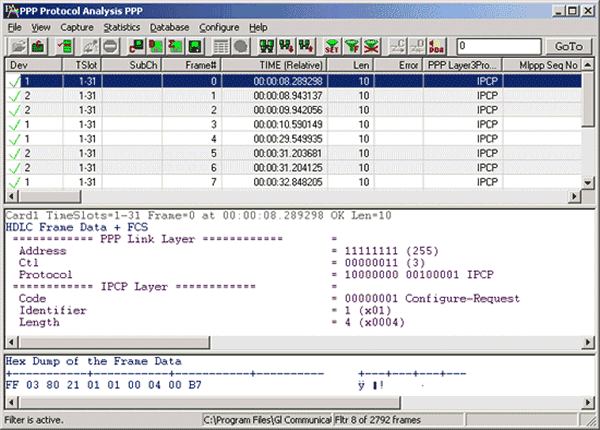
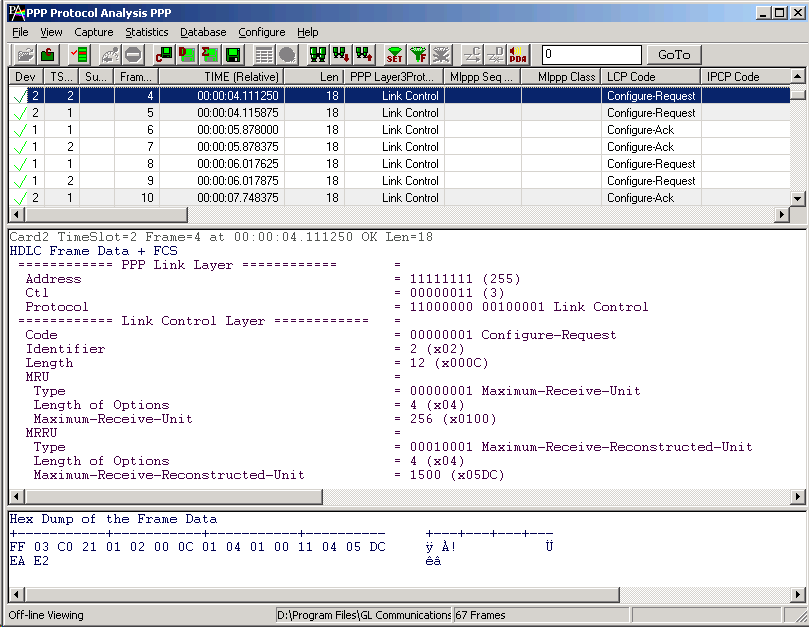
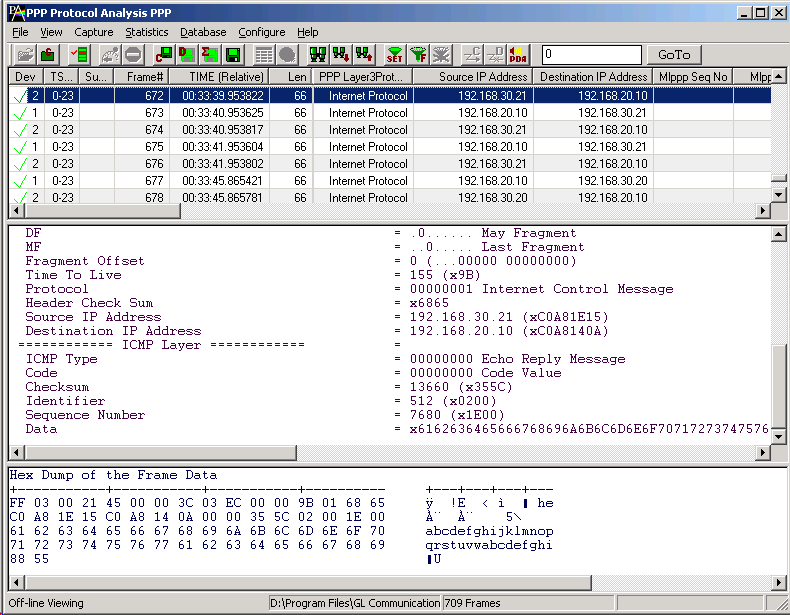
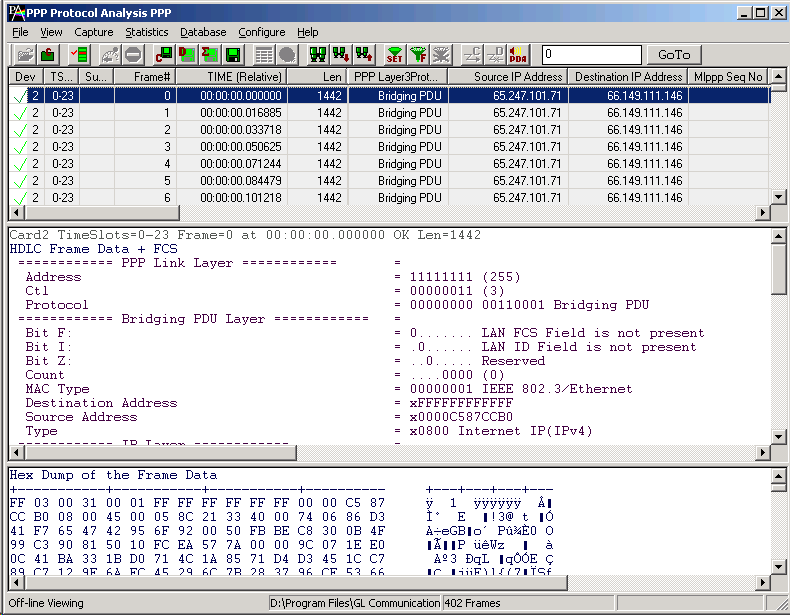
- Provides Summary, Detail, Statistics, and Hex dump views
- Summary view provides the information about few important fields (Dev #, Layer 3 Protocol, LCP message type and higher protocol specific information like Destination and Source IP address, Destination and Source TCP as well as UDP port details, HTTP/FTP message type, and so on)
- Statistics view displays statistics based on frame count, byte count, frames/sec, bytes/sec etc for the entire capture data
- Hex Dump View displays raw frame data as hexadecimal and ASCII octet dump
- Detail View displays decodes of a user-selected frames from the Summary View; the contents of this view can also be copied to clipboard
- Also supports Packet Data Analysis module for real-time IP call analysis including SIP, RTP, MEGACO, H.323, & MGCP, & T.38 Fax calls
- Detailed information of all the captured Frames or only the filtered frames can be exported to ASCII file for the further off-line analysis and printed.
- Capability to export summary as well as detail information to an ASCII file for subsequent import into a database or spreadsheet
- Ability to capture and decode both PPP routed protocols, PPP bridged protocols
- User can decode frames from the recorded trace files and can be played back using HDLC playback application
References
- RFC 1661 PPP links in HDLC framing
- RFC 1662 PPP links in HDLC framing
Protocols Supported
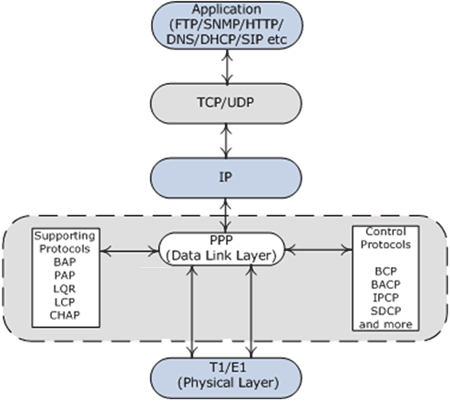
A list of protocols that are supported by GL's PPP analyzer are as given below:
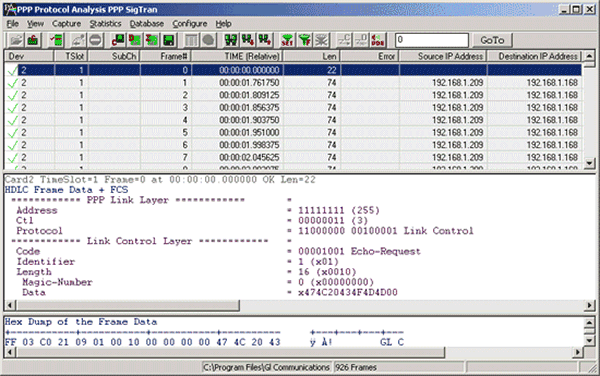
The supported protocol standards in PPP analyzer are PPP, PPP SIGTRANs.
Summary, Detail and Hexdump Views
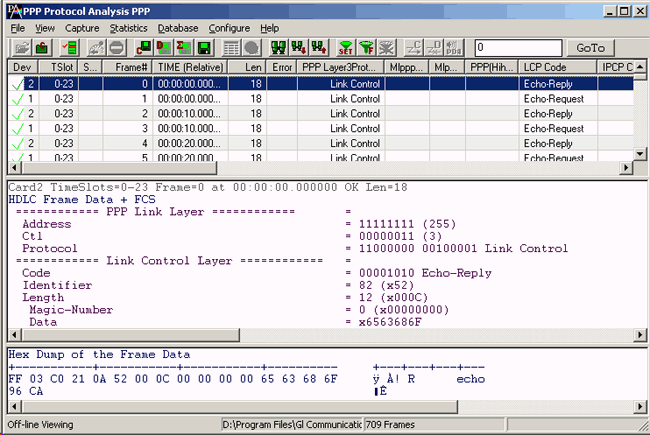
The PPP analyzer application is invoked from the main menu of GL's T3/E3 Analyzer for real-time analyzer. The analyzer displays summary, detail, call trace, statistics, and hex dump views in different panes. The summary pane displays Dev#, Frame #, Time relative, Len, Error, Layer 3 protocol, LCP code, IPCP code, BCP code, PPP Message type, Source/Destination IP address, TCP Source/Destination Port, UDP Source/Destination Port, Message Type, and so on. The User can select a frame in summary view to analyze and decode each frame in the detail view. The Hex dump view displays the frame information in HEX and ASCII format
Real-time Analysis
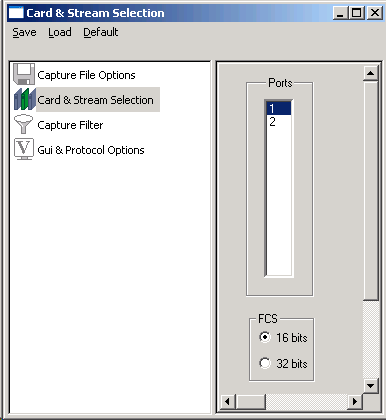
Multiple ports can be selected for a single instance of analyzer to capture the frames simultaneously. The recorded trace file can then be analyzed offline and exported to ASCII file, or printed
The real-time capturing requires users to specify ports, and Frame Check Sequence (FCS).
Filtering and Search
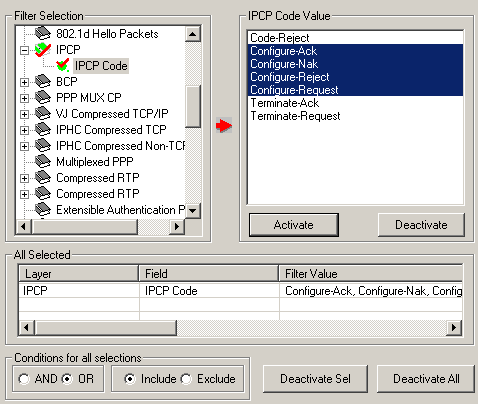
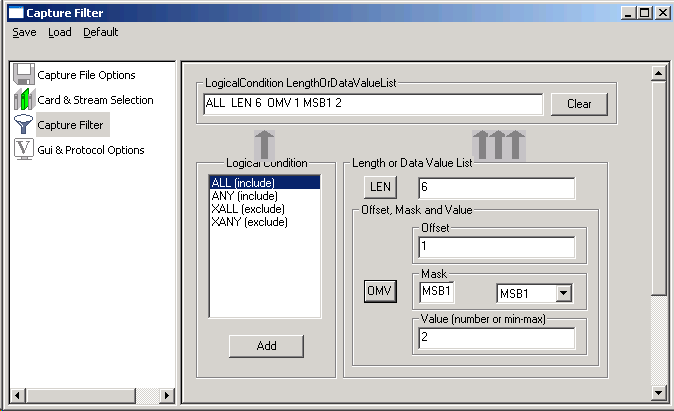
Users can record all or filtered traffic into a trace file. Filtering and search capability adds a powerful dimension to the PPP Analyzer. This feature can isolate required frames from the captured frames in real-time, as well as offline. In real-time capturing, filter based on length of frames can be set. The frames can also be filtered after completion of capture based on Frame Number, Time, Length, Error, Layer3 Protocol, LCP Code, IPCP code, TCP and UDP source and destination port, PPP Message type, and so on. Similarly, search capability helps user to search for a particular frame based on specific search criteria.
Statistics View
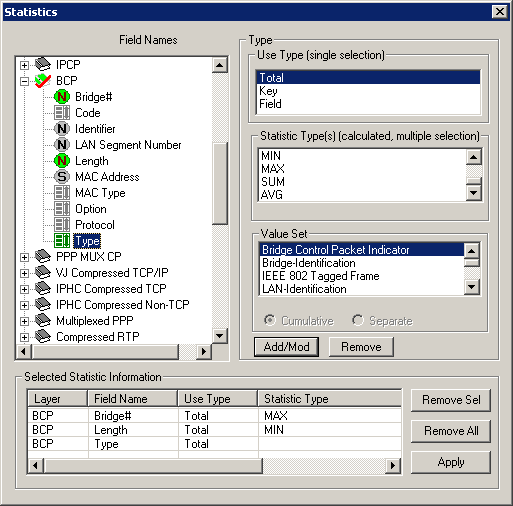
Statistics is an important feature available in PPP analyzer and can be obtained for all frames both in real-time as well as offline mode. Numerous statistics can be obtained to study the performance and trend in the PPP network and it is based on protocol fields and different parameters e.g. Use Type (Key/Total/Field), Statistic type (Frame count, Byte count, Frames/Sec) and patterns like Range List, Wild card.
Enhanced Trace Saving Options
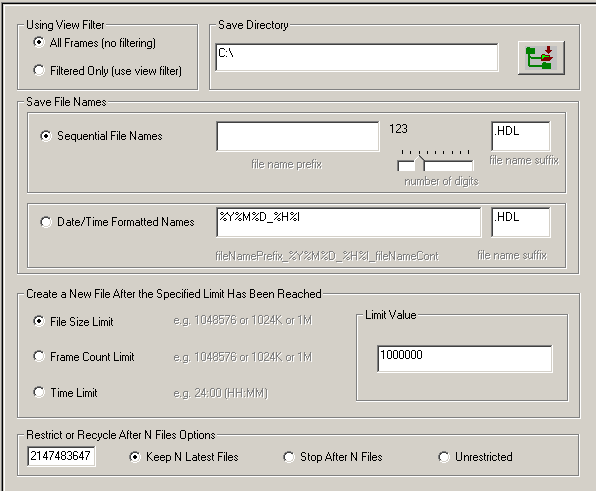
Users can control the captured trace files by saving the trace using different conventions such as trace files with user-defined prefixes, trace file with date-time prefixes, and slider control to indicate the total number of files, file size, frame count, or time limit. This feature also allows the captured frames to be saved into a trace file based on the filtering criteria set using display filter feature.
Packet Data Analyzer (PDA)
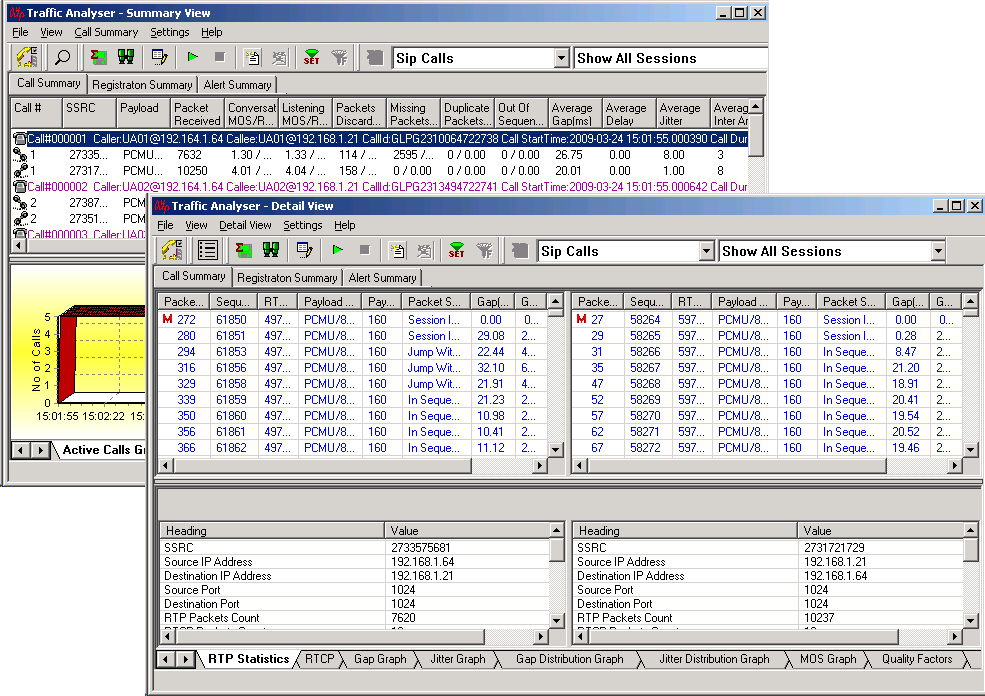
PPP Packet Data Analyzer (PDA) is a real-time IP and VoIP analyzer that non-intrusively analyzes and captures live IP traffic, and segregates them into SIP / H323 / Megaco / MGCP / T.38 Fax calls. It also collects statistics, CDRs, detailed protocol traces, ladder diagrams, and a host of other useful information about VoIP calls.
Its real-time nature makes it an outstanding tool for live monitoring of VoIP traffic as well as long-term traffic statistics gathering. It can also monitor, report, analyze, and capture calls for infinite time, limited only by the finite space of your hard disk or network hard drive.
For more information, refer to Packet Data Analysis in PPP webpage for more details.
Packet Data Analyzer (PDA)
Resources
| Item No. | Item Description |
| TT3135 / EE3135 | T3 / E3 PPP Analyzer (GUI) Analysis and decode of PPP over T3/E3 |
| Related Software | |
|---|---|
| TT3001 | T3 / T1 / E1 Analyzer Basic Software |
| EE3001 | E3 / E1 Analyzer Basic Software |
| TT3020/ EE3020 | T3/ E3 Record Playback Software (GUI) File Record Send over T3/E3 |
| TT3090 / EE3090 | T3 / E3 HDLC Tx/Rx Test + Analyzer (GUI) Send Receive Analyze HDLC over T3/E3 |
| TT3130 / EE3130 | T3 / E3 Frame Relay Analyzer (GUI) Analysis and decode of Frame Relay over T3/E3 |
| TT3160 | T3 ATM Analyzer (GUI) Analysis and decode of ATM cells over T3 |
| TT3600 / EE3600 | T3 / E3 Basic Client Server Scripted Control Software Precise & Sequential Control of T3/E3 Analyzer via Client Server - Uses TCP/IP |
|
Related Hardware |
| TE3001 | Portable (USB) Dual T3 E3 / T1 E1 Hardware Unit - requires TT3001 or EE3001 |
| PTE001 | tProbe™ Dual T1 E1 Laptop Analyzer with Basic Analyzer Software |
| PTE025 | tProbe Data Communications Board for RS-232, RS-449, RS-422, RS-423, EIA-530, V.35 Interfaces |
 Back to List of T3E3 Basic and Optional Applications Main Page