T3/E3 Record Playback Data Applications
Overview
This software permits the user to transmit and / or capture any signal on T3 or E3 lines with GL's T3/E3 Analyzer. Typical applications include transmission or capture of prerecorded video files, traffic loading applications and protocol analysis. Files of any length can be transmitted and captured continuously (without loss) over T3/E3 line. Repeated transmission and capture of a single file is also possible.
Playback from File (Transmit File Application):
The transmit file application permits transmission of a file of any length or transmission of data from memory in Hex format as represented in the logical diagram below.
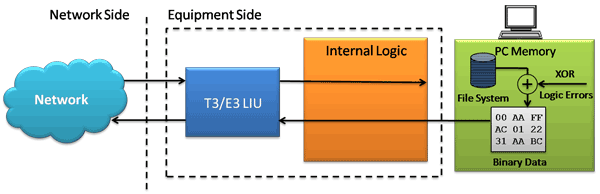
Logical Diagram for Playback from File (Transmit File) in T3 (DS3)/ E3 Analyzer
Features:
- From Memory and /or File Playback - In file playback, files of any length can be transmitted continuously (without loss). In memory playback, data to be transmitted (in HEX) with maximum size of 4 bytes
- Transmit flat binary file or user selected file over T3/E3
- Transmit without any size constraint
- Playback over framed or unframed T3/E3
- Continuous playback or single instance playback; Use Continuous File Transmission mode to transmit a file continuously over T3/E3 line
- Insert Single Error feature supports manual insertion of single error along with the data stream play back
- Byte offset is used to index into a file after the set number of bytes. Users may set the current offset in Mbytes or use the sliders for the same
- Send Idle Code at End of Playback option transmits the defined idle code byte when the file transmission reaches 100% (end of file)
- Statistics such as Underruns, MissedXfer, Skipped Bytes and Blocks can be observed Performance and Results pane for the selected port
Playback from File
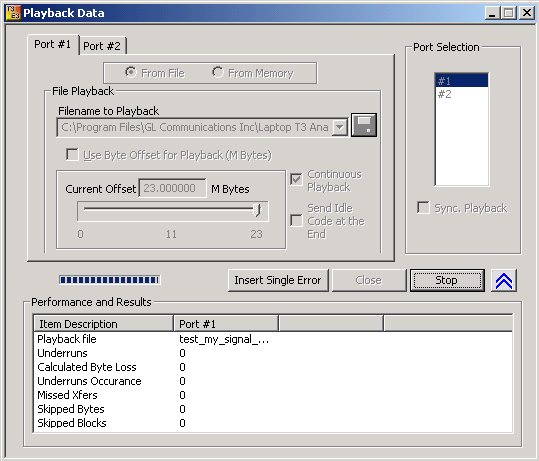
Playback from File (Transmit File) Options
Playback from Memory
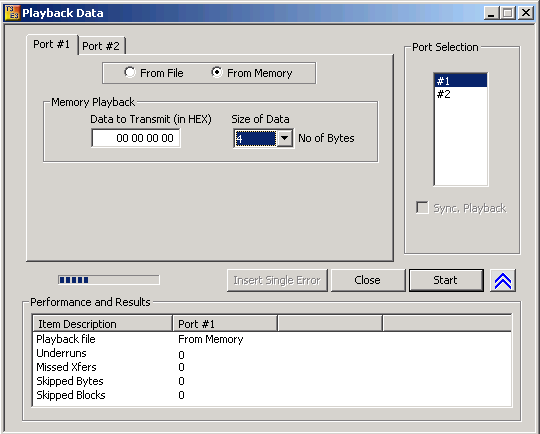
Playback from Memory (Transmit Data) Options
Record Data to File
This application permits continuous or limited capture of data on the T3/E3 lines and save in binary file format. In addition, it supports synchronized capture for multiple cards i.e., capture from multiple cards is started simultaneously.
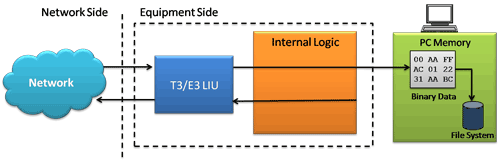
Logical Diagram for Record Data to File Application in T3 (DS3)/ E3 Analyzers
Features:
- Capture incoming data into binary flat file
- Each T3/E3 signal can be captured into separate files
- Sync Capture - Synchronized capture from both ports
- Unframed T3/E3 or Framed T3/E3
- Limited Capture (specific number of Megabytes) - Capture up to user selected size or manually stop the capture
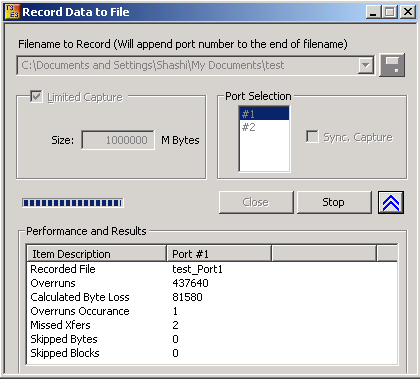
Record Data to File Options
 Back to List of T3E3 Basic and Optional Applications Main Page