This application works with CCA (Call Capture and Analysis) and VBA (Voice Band Analyzer) applications and generates Call Summary and Call Detail reports. CDR provides comprehensive information on each and every call occurring on T1 E1 lines, including,
This is an analysis tool for monitoring voice band network traffic. The VBA can host different analysis modules for monitoring speech and noise levels, line echo, and acoustic echo. This application can now be invoked from T1/E1 Analyzer – Special Applications menu or from command line. This application can now be invoked from T1/E1 Analyzer – Special Applications menu or from command line. It hosts number of analysis algorithms, which includes ITU-T P.56 Active Voice Level analysis, Line Echo (Hybrid) analysis, Acoustic Echo analysis, and Traffic Classifier analysis. Other analysis modules such as ITU-T P.561, P.562, and P.563 can be hosted as plug-ins.
Scripted DSP commands provide the ability to specify a sequence of digital signal processing steps to be performed on incoming and/or outgoing timeslots. The WCS DSP Operation module allows real-time as well as offline testing using DSP commands to perform functions such as Amplification/Attenuation, Delay, Filter, File Tx/Rx, Logical operations, Echo Cancel, and so on.
Complex echo paths and complex block diagram operations can be easily simulated using the following functions: sum, invert, filter, delay, amplify, attenuate, bxor, bor, brev, bnot, band, infile, outfile, white noise, tone, dual tone, phase shift, dtmf digits, mf digits, mfcr2 digits, power monitor, signaling bits monitor, const, bytes, and many other operators.
This Client-Server application is used for performing complete ISDN switch and subscriber emulation. The functions that can be performed using client-server are
For more details, please click here

CCA now includes a new feature to trigger capturing of calls based on various types of traffic in addition to trigger capturing based on signaling, tone, ISDN calls, and SS7 calls. The traffic activated trigger includes
Detecting the above types of traffic requires use of the traffic classifier. A 2048 byte (256 ms) block of data is sent to the traffic classifier. The traffic classifier determines if the data is one of the accepted types of traffic. If the condition is met, then capture of the traffic data commences.
Unlike the other traffic options, triggering on voice traffic can be fine-tuned to the power level of the voice data. Setting the voice power level can be used to filter out weak or undesirable voice data.
There is also an option “Any Signal”. Selecting this feature bypasses the traffic classifier and detects the power level of the data. If it exceeds the input data in “Any Power Level”, then capture commences.
Setting the “Silence Options” slider allows for hang-ups during the capture of traffic or “Any Signal” data. For example, if DTMF traffic is being captured, and then non DTMF data is detected, capture continues until the hang-up time limit set by “Silence Options” is exceeded. If the data reverts back to DTMF, the capture continues as it was before the hang-up.
If the hang-up time limit is 400 milliseconds, only one hang-up is allowed before capture is terminated. Each buffer of data is of size 2048 bytes (256 ms).
The traffic classifier uses four different algorithms to choose from: Linear, Quadratic, Hybrid, or Hybrid Filtered.
The “Hybrid” algorithm is used by default in the Multiple Call Capture.


New commands
Enhancements
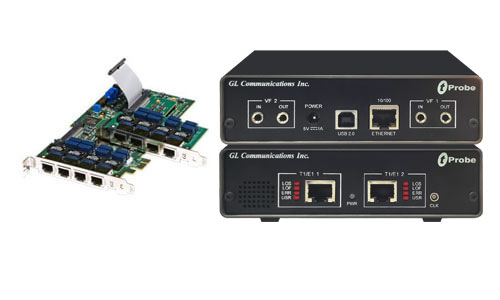
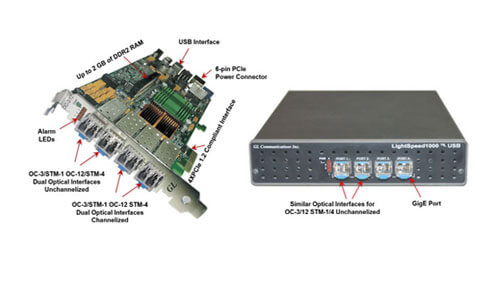
GL has added to its T1/E1 Analyzer hardware test suite new hardware called “Universal T1/E1 Analyzer”. These cards easily plug into PCI 2.1 Compliant slots of any Pentium PC. The advantage it offers over the prior version of HD PCI T1/E1 analyzers is that it includes integrated hardware support for both T1 as well as E1 lines, thus allowing easy switching between T1 and E1 interface testing. For more details, please click here
This mode is similar to the standard “Outward Loopback” except that the signal received on Card 1 (Port 1) can be transmitted out onto Card 2 (Port 2). Likewise the signal received on Card 2 (Port 2) can be transmitted out onto Card 1 (Port 1). The hardware defaults to this mode (cross-port loopback) when the board is powered up or down. This feature allows you to monitor T1/E1 lines “in-line” while still being protected from loss of power to the board.
When Thru Mode is selected, the data that would normally be transmitted on Card 1 (Port 1) is diverted to transmit on Card 2 (Port 2) and the data that would normally be transmitted on Card 2 (Port 2) is diverted to transmit on Card 1 (Port 1). The receive paths are completely unaffected. This mode is particularly useful for Drop and Insert applications in which the board analyzes and may insert traffic running between two pieces of T1/E1 equipment. This feature eliminates complex cabling.
The quality of the transmission signal is determined by the way the signal fits within a predefined template known as a pulse mask. To perform this test, place your device in a mode where it is constantly transmitting a known data pattern. As the port counts increase on the data transmission equipment, so does the need for testing the transmission signal for pulse mask compliance quickly and reliably. GL has developed solutions to perform pulse mask compliance testing using Monitor Pulse Mask and Pulse Mask Display for both T1 and E1 applications.
Monitor Pulse Mask - captures the hex values of the pulse on the transmitting line.
Pulse Mask Display - The T1 (E1) Pulse Mask Application compares incoming T1 (E1) pulses against the pulse shape mask specified by the ITU G.703 standard and ANSI T1.102-1993. The measured signal should fit within a predefined template called a pulse mask. This feature is also available with the Client Server software for automation and remote access applications.
For each T1 line, the transmit data path is selected and measured at the end of the transmission line. The amplitude of the isolated signal at time zero should be within 20% of 3.0 volts. If the amplitude requirement is met, then the signal is scaled linearly to determine if it fits the pulse mask.
Screen Shot of T1 Pulse Mask Display
However, the specification for E1 requires that all the pulses meet the template and not just an isolated pulse. For the 75 Ohm coax cable, the amplitude must be 2.37V ± 10% at T0. For the 120 Ohm twisted pair, the amplitude must be 3.0V ± 10%. If the amplitude requirement is met, then the signal is scaled linearly to determine if it fits the pulse mask.
Jitter can be measured in the incoming T1 E1 signal. Jitter can also be introduced onto the outgoing T1 E1 signal. Software for this application will be available soon. Jitter Measurement has a receive buffer to handle the jitter delay that characterizes T1/E1 signal transmissions.
This Client-Server application is used for performing complete ISDN switch and subscriber emulation. The functions that can be performed using client-server are -
For more details, please click here
This Client-Server application in Universal boards is used for detection, monitoring, and plotting of transmitted pulses. It includes Monitor Pulse Mask and Pulse Mask Display modules that can be remotely controlled using simple commands by client applications. Some of the commands supported are CheckPulseMask, validate pulse, stop pulse mask validation, and others.
For more details, please click here
The SS7 Protocol Decode Agent Module (PDAM) monitors SS7 links, captures frame header information, decodes multiple SS7 protocol standards, filters user-specified protocol parameters, builds call detail records(CDRs) and streams the decoded fields and/or CDRs to the comma delimited files (CDR.CSV and/or FRAMES.CSV) over TCP/IP to remote site. It can also capture filtered data in real-time using layer filter and field filter keys. For more details, please visit our web page
The ISDN Protocol Decode Agent Module (PDAM) monitors ISDN links, captures frame header information, decodes multiple ISDN protocol standards, filters user-specified protocol parameters, builds call detail records(CDRs) and streams the decoded fields and/or CDRs to the comma delimited files (CDR.CSV and/or FRAMES.CSV) over TCP/IP to remote site. It can also capture filtered data in real-time using layer filter and field filter keys. For more details, please visit our web page
The emulator now allows the users to set various release causes during simulation. These include rejected, no user response, user busy, congested, and so on for disconnection of the particular call on the channel. At the termination end, after the call is terminated, the cause for disconnecting the call gets displayed in the Last Cause field.
Logging option in DEC now allows to save file in *.CSV format as well as *.txt format
Bug fixes
Online help for the following applications has been updated
This application differs from BERT by allowing the users to do the error test on multiple cards simultaneously along with graphical view of time Vs error. In addition, users can define the bit pattern, and error rate (Ranging from 0.01 to 1e-009. It provides detailed view of result including Total Errors, Error Rate, Degraded minutes, and so on. Supported bit patterns include QRSS, 2^5-1, 2^9-1, 2^11-1, 2^15-1, 2^20-1, 2^23-1, All ones, All zeros, 1:1, 1:7, 3 in 24, CSU Loop-Up (0001), CSU Loop-down (001), NIU Loop-UP (11000), and NIU Loop-Down (11100). The application supports real-time as well as offline analysis.
The Multi-Channel TRAU Tx/Rx Emulation and Analysis (TrauTerr) module is an optional application that allows testing TRAU frames. As depicted in the figure above, frames will be generated based on the codec type, impairments and time alignment (if specified) and transmitted through the 16 or 8 kbps channels. On the receiving side the fragments will be decoded to retrieve the control flags and other framing information like codec type, data transmission rate etc. These frames will be compared with the predefined patterns and the results will be logged into a log file.
The NRT VBA is an analysis tool for monitoring voice band traffic over VoIP, TDM, and Wireless networks. VBA instantly detects voice file captures and with appropriately installed analysis modules, monitors speech levels, noise levels, line echo, and acoustic echo. The VBA application can also operate on previously captured files. It supports on A-Law, µ-Law, 16-bit PCM (Intel), 16-bit PCM (Motorola), and MS Wave file formats.
The Multi-Class Extension to Multi-Link PPP allows a sender to fragment the packets of various priorities into multiple classes of fragments, and allows high-priority packets to be sent between fragments of lower priorities. GL’s flexible and versatile MC-MLPPP Emulator allows traffic generation and verification over PPP links using industry standard Client-Server technology, which may be accessed through a GUI or through command line in C++, TCL clients.
Some of the main features include
ATM Analyzer is enhanced to capture & reassemble frames with Inverse Multiplexing technique. IMA combines multiple T1 or E1 links to form a single high-speed connection. IMA provide flexible bandwidth options to achieve rates between the DS1/E1 and DS3/E3. The ATM Inverse Multiplexing technique involves inverse multiplexing and de-multiplexing of ATM cells in a cyclical fashion among links grouped to form a higher bandwidth logical link whose rate is approximately the sum of the link rates. This is referred to as an IMA group.
Offline Protocol Analysis - Trace files for analysis can now be loaded through simple command-line arguments
SS7 analyzer now decodes BT NR167 layer
GL's MLPPP Emulator simulates the Point-to-Point (PPP) and Multi-Link Point-to-Point (MLPP) protocols. MLPPP bundles multiple link-layer channels into a single network-layer channel. The application permits users to add and remove PPP links from ML-PPP bundle, supports different Fragment sizes (64, 128, 256, 512 up to 1500 bytes), detailed statistics, along with ACFC / PFC compression/decompression.
To provide more than one level of suspension with PPP Multilink, one can run Multilinks multiple times over one link, which is commonly known as Multi-Class Extension to Multi-Link PPP (MC MLPPP). This allows sender to fragment the packets of various priorities into multiple classes of fragments. This Multi-Class Extension to Multi-Link PPP option is soon to be supported by GL's MLPPP Emulator.
GL's Windows Client/Server (WCS) software allows the users with the capability of remote operation, automation, and multi-site connectivity. Server software can run multiple tasks simultaneously at the request of the Client software. It includes the following new applications
GL's Channel Associated Signaling (CAS) Simulator is a client-side application that works along with GL's T1/E1 Analyzer Cards and Windows Client/Server software. It simulates any user defined CAS protocol by providing signaling bit transitions and forward/backward frequency tones/digits. CAS is a method of signaling in telephone networks, which supports signaling types such as Loopstart, Groundstart, Feature Group D (FGD), Winkstart, MFC-R2 and others.
The functionalities supported in TRAU client-server application are similar to HdlcFunc transmit/receive server file with additional TRAU broadcasting transmission and multiple receive features per task. TrauFunc is an optional server site DLL with features like - checking for command syntax, receiving TRAU frames in *.HDL file format located on the server, and transmitting TRAU frames from *.HDL file located on the server.
HDLC Tx/Rx client-server module supports script-based capture/playback of HDLC frames in HDL files located on the server and on the client. HDLC Encode/Decode client-server module permits encoding & decoding of HDLC streams of various bandwidth (hyper channel, timeslot, and multiple sub-channel streams per timeslot). HDLC Error Testing client-server module permits transmission of memory generated sequences of fixed or variable length HDLC frames, GL *.HDL Trace file frames, and various bandwidth streams.
Automated testing of PPP and MLPPP frames can be accomplished using MLPPP Tx/Rx client-server module. This module allows users to use script based GL's clients or embed it into the user's test environment. Functionalities support sending MLPPP frames with or without impairments, receiving MLPP frames, and logging the events.
This application permits users to capture data (*.ala, *.ula, *.pcm, *.wav, *.ber) as seamless chunks in files of the specified size, or up to the specified time limit of capture. The chunks of data captured in files can be concatenated to one single file using file concatenate tool, without missing out any data during the process.
TRAU Traffic Monitoring application gives current status of traffic channels in Abis interface. It analyzes and graphically classifies traffic type such as Speech, Data, and O&M in a real-time GSM network. It uses specific color codes to identify the frames, along with the direction of its transmission and also differentiates between 8kbps and 16kbps traffic. Each pictorial block indicates individual TRAU sessions.
TRAU Analyzer application can now automatically detect and capture TRAU frames of half rate (HR-8 kbps) or full rate (FR-16 kbps). Various codecs such as FR, EFR, AMR, and HR are used for compression/decompression of speech. TRAU frames are decoded as per the specifications GSM 08.60 V 7.2.1 Release and GSM 08.61 V 7.2.2 Release.
Bulk delay is an added feature in Error insertion application that allows users to apply Bulk delay on the entire T1/E1 trunk (full multi-frame) of 1.544Mbps (T1) pipe or 2.048 Mbps (E1) pipe. Delay can be varied from 0 to 169.77mS (T1) or 127.99mS (E1) with an accuracy of +/- 10uS. The delay resolution is based on the byte increments of T1 or E1 (8 bits at a time).
The GL's ML-PPP Analyzer can be used to capture a host of PPP / MLPPP protocols exchanged between the two nodes over T1/E1 link. User can obtain detailed analysis of the protocol and can perform various statistics measurements.
This enhanced feature in MLPPP analyzer allows the user to select cards, data rate (56, n x 56 kbps / 64, n x 64 kbps), and timeslots. In addition, user is provided with the option of selecting multiple cards to capture the frames simultaneously in a single instance. The users can also minimize the sequence loss by giving the maximum delay value, which is the maximum time the analyzer waits for the MLPPP fragment for the reassembly.
This added feature in CCA application allows the users to save the captured calls in files with desired file extensions. It supports .pcm, .ala, .ula and other appropriate types of file extensions mentioned by the user.
There are several methods for viewing captured files supported by various third-party visualization programs such as Adobe Audition and Goldwave programs.
Adobe Audition software is automatically called and the files are displayed in stereo or mono mode depending on number of files selected. It supports a variety of file formats including *.pcm, A-Law, Mu-Law, *.wav, and others.
Goldwave software is automatically called and the single file selected is displayed in stereo mode. Selecting couple of files at a time acts as a single file displaying graph in stereo mode assuming one of the files as east and the other as west file.
This feature permits users to set the called and calling numbers on corresponding timeslots. The following parameters are included
Digit detector configuration file option detects and reports DTMF/MF/MFC-R2 digits on channels as they occur. GL's HD cards have the ability to transmit and detect digits on all the timeslots.
Some of the fixes to various GL's applications are as below:
Several other fixes has been introduced to the existing applications namely, Automated Record/Playback, Multiple call Capture, TxTone/ Tx Gaussian Noise, VB Client, WCS for HD cards
Some of the fixes to various GL's applications are as below:
ATM Analyzer
Delay/Attenuate - Fix has been provided for D4 signaling bits problem.
Error Insertion no longer crashes when inserting International Bits in CRC mode.
TRAU Analyzer - Fix has been provided for dropping of short TRAU frames.
Active Voice Level Monitor Application - The Active Voice Level Monitor computes the Active Voice Level of a signal according to the ITU-T P.56 specification, Method B. One can obtain and analyze the source signal in real time from T1/E1 timeslots, or can process signal data captured to files as an offline process. The calculation of Active Voice Level is in complete compliance with the ITU-T Recommendation P.56 - Objective Measurement of Active Speech Level
Some of the fixes to various GL's applications are as below: