|
Home
>
Analysis (T1/E1/T3/E3/OC-3/OC-12/STM-1/STM-4)
>
Hardware Platforms
>
LightSpeed 1000 - OC-3 / STM-1 and OC-12 / STM-4 Analysis and Emulation Card
>
OC-3 / STM-1 OC-12 / STM-4 Analyzer for PoS Mode

Analysis of PoS frames
over OC-3 / STM-1 OC-12 / STM-4 lines
Overview
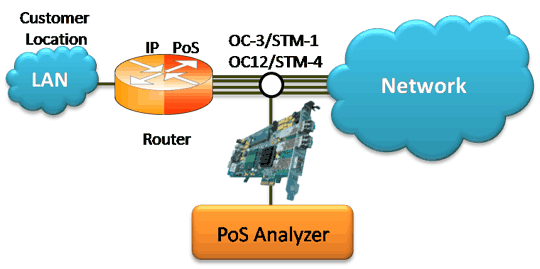
The PoS Analyzer captures a host of PoS protocols exchanged between the two nodes over SONET & provides
useful analysis, which includes distribution of protocols, protocol fields, frame lengths, and frame status. User can
obtain detailed analysis of the protocol and can perform various statistics measurements.
PoS Analyzer Main Features
- Supports a host of protocols PoS, IPCP, BCP, BPDU, POP, CHAP, HTTP, SNMP, STUN, FTP, DNS, and DHCP.
- Ability to test and perform numerous measurements across WAN- LAN or LAN-LAN connection.
- Ability to test and analyze PoS protocol in synchronous environment.
- Comprehensive hardware based filtering.
- Supports software based search and filtering capabilities.
- Provides Summary, Detail, Statistics, and Hex dump Views.
- Summary View displays Dev #, Layer 3 Protocol, LCP message type and higher protocol specific information like
Destination and Source IP address, Destination and Source TCP as well as UDP port details, HTTP/FTP message type,
and so on in a tabular format.
- Detail view displays decodes of user-selected frame from the Summary View.
- Hex Dump View displays raw frame data as hexadecimal and ASCII octet dump of a user-selected frame from the
Summary View.
- Statistics View displays statistics based on frame count, byte count, frames/sec, bytes/sec etc for the entire capture
data.
- Detail information of all the captured frames or only the filtered frames can be exported to ASCII file for the further
off-line analysis and printed.
- Capability to export Summary View details to comma separated values (CSV) format for subsequent import into a
database or spreadsheet.
- Capability to export detail decodes information to an ASCII/text file.
- Ability to capture and decode both PoS routed protocols, PoS bridged protocols.
- User can decode frames from the recorded trace files and can be played back using “Rx Packets to File” application.
References
- RFC 1661 PoS links in HDLC framing
- RFC 1662 PoS links in HDLC framing
Protocols Supported
A list of protocols that are supported by GL's PoS analyzer are as given below:

Supported Protocols Structure
for PoS Protocol Analysis
- LCP (Link control Protocol)
LCP is responsible for establishment, release, and maintenance of PoS link between two PoS nodes. LCP also helps
in selection of encapsulation format while exchanging layer3 information, selection of authentication protocol for the
peer entity, determining the packet size limit, etc.
- Authentication Protocol
PoS provides two types of authentication protocols.
- PAP - Password Authentication Protocol is used by the peer entity to establish its identity in PoS session.
It usually occurs just after the link establishment phase.
- CHAP - Challenge Authentication Protocol is used to periodically verify the identity of the peer. It can be
initiated at any time during an ongoing PoS session.
- Link Quality Report (LQR)
LQR helps in monitoring the quality of PoS link. Packets are sometimes dropped or corrupted because of noise and
equipment problem. LQR helps in sorting out such links so that traffic can be re-routed to alternate links if necessary.
- Bridging PDU (BPDU)
BPDU encapsulates other higher layer protocol e.g IP based protocols. This protocol enables the interconnection
between two remote LANs via PoS link.
- NCP
Network control protocol enables the selection of specific options and control protocols at connection time across
LAN-WAN connection. This means that network administrators do not have to statically configure the router interface
for remote interfaces. Rather, remote interfaces negotiate the link at connection time. NCP supports two types of
protocols, namely, IPCP and BCP.
- IPCP (Internet Protocol Control Protocol): The IP Control Protocol (IPCP) is responsible for configuring,
enabling, and disabling the IP protocol modules on either ends of the point-to-point link. IPCP uses the same packet
exchange mechanism as the Link Control Protocol (LCP).
- BCP (Bridging Control Protocol): The Bridging Control Protocol (BCP) is responsible for configuring,
enabling and disabling the bridge protocol modules on both ends of the PoS link. BCP uses the same packet exchange
mechanism as the Link Control Protocol (LCP).
- SNMP
Enables the administrator to collect the different management information from any network node in a network.
Each node maintains a MIB (Management information Base) and SNMP agent. The later collects the MIB information
from the device and make them available to network management system (NMS) via SNMP protocol. GL's PoS Analyzer
supports SNMPv1 and SNMPv2.
- DNS
The Domain Name System (DNS) is a distributed internet directory service. DNS is used mostly to translate between
domain names and IP addresses, and to control email delivery. The DNS system consists of three components: DNS
data (called resource records), servers (called name servers), and Internet protocols for fetching data from the servers.
The billions of resource records in the DNS are split into millions of files called zones. Zones are kept on authoritative
servers distributed all over the Internet, which answer queries based on the resource records stored in the zones.
- DHCP
The Dynamic Host Configuration Protocol (DHCP) is an Internet protocol for automating the configuration of
computers that use TCP/IP. DHCP can be used to automatically assign IP addresses, to deliver TCP/IP stack configuration
parameters such as the subnet mask and default router, and to provide other configuration information such as the
addresses for printer, time and news servers.
- STUN
The STUN protocol enables a SIP client to discover whether it is behind a NAT, and to determine the type of NAT.
The STUN proPoSal defines a special STUN server in the public address space to inform the STUN-enabled SIP client in
the corporate (private) address space of the Public NAT IP address and port being used for that particular session.
- HTTP
Application protocol for distributed, collaborative, hypermedia information systems and involves MIME like
communication between user agent (UA) and origin server identified by URI. GL's PoS Analyzer supports HTTP 1.1
and HTTP 1.0
- FTP
FTP, enables the data transfer between one user (PC) to another remote user (PC) over IP. It defines a set of
commands and replies exchanged between the two users over control connection. A separate full duplex data
connection is opened between the two communicating user for actual data transfer.
- ICMP
IP network doesn't ensure the reliable transfer of datagrams. Some packets are often lost during transmission.
So there should be some mechanism to report any problems in the IP network. The ICMP messages typically report
errors in the processing of datagrams.
- SMTP
SMTP (Simple Message Transfer Protocol) is mail transfer protocols that transport the mail reliably and efficiently
via Internet. When a SMTP client has a message to transmit, it opens a duplex connection with the server and transfers
the message using IP/TCP.
- POP3
Post Office Protocol- Version 3 is the mail retrieving protocol used by the client to retrieve the mails from the server.
Initially, the server host starts the POP3 service by listening on TCP port 110. When a client host wishes to make use
of the service, it establishes a TCP connection with the server host. When the connection is established, the POP3
server sends a greeting. The client and POP3 server then exchange commands and responses until the connection is
closed.
Summary, Detail, and Hexdump Views
The PoS analyzer application is invoked from the main menu of GL's OC-3 / STM-1 OC-12 / STM-4 Analyzer for real-time
analysis. The analyzer displays Summary, Detail, Statistics, and Hex Dump Views in different panes. The Summary pane
displays Dev#, Frame #, Time relative, Len, Error, Layer 3 protocol, LCP code, IPCP code, BCP code, PoS Message type,
Source/Destination IP address, TCP Source/Destination Port, UDP Source/Destination Port, Message Type, and so on.
The User can select a frame in Summary View to analyze and decode each frame in the Detail View. The Hex Dump View
displays the frame information in HEX and ASCII format.
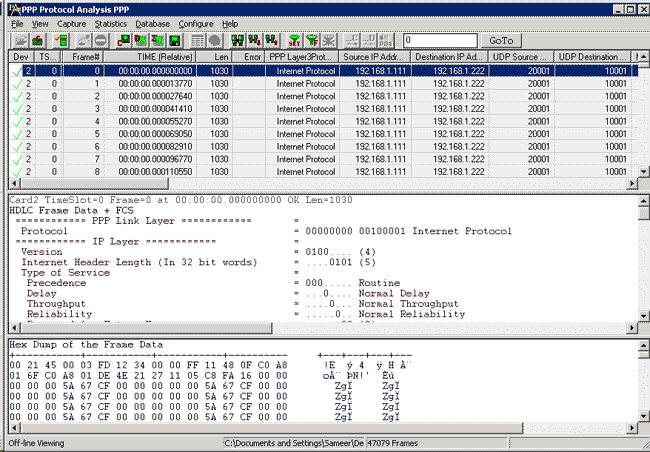
Protocol Summary, Detail, and Hex
Dump Views in PoS Protocol Analysis
Real-time Analysis
Multiple ports can be selected for a single instance of analyzer to capture the frames simultaneously. The recorded
trace file can then be analyzed offline and exported to ASCII file, or printed.
The real-time capturing requires users to specify ports and Frame Check Sequence (FCS).
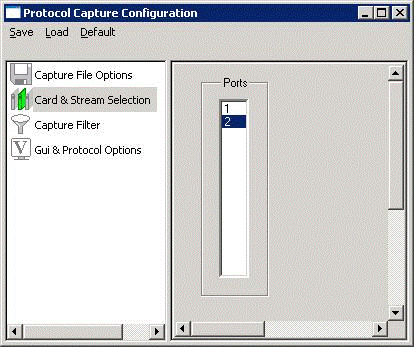
Port Selection for Real-time
Capture
Filtering and Search
Users can record all or filtered traffic into a trace file. Filter and search capabilities adds a powerful dimension to the
PoS Analyzer. These features isolate required frames from the captured frames in real-time, as well as offline. In real-time
capturing, filter allows capturing of frames having specified length, offset, mask, and value. The frames can also be filtered
after completion of capture based on Frame Number, Time, Length, Error, Layer3 Protocol, LCP Code, IPCP code, TCP and
UDP source and destination port, PoS Message type, and so on. Similarly, search capability helps user to search for a
particular frame based on specific search criteria.
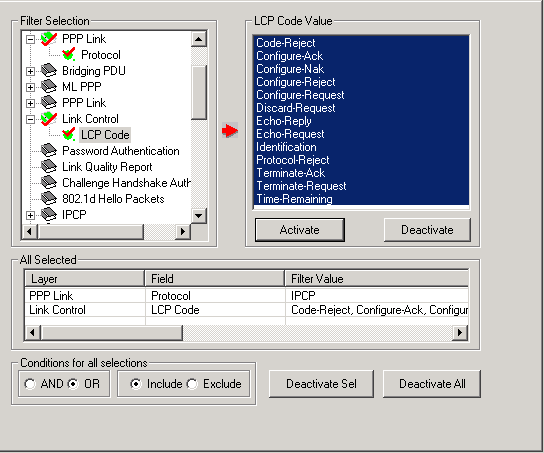
Offline Filtering and Search Criteria
for PoS Protocol Analysis

Real-time/Pre-Capture Filtering
Criteria for PoS Protocol Analysis
Statistics View
Statistics is an important feature available in PoS analyzer and can be obtained for all frames both in real-time as well
as offline mode. Various statistics can be obtained to study the performance and trend in the PoS network and it is based
on protocol fields and different parameters.
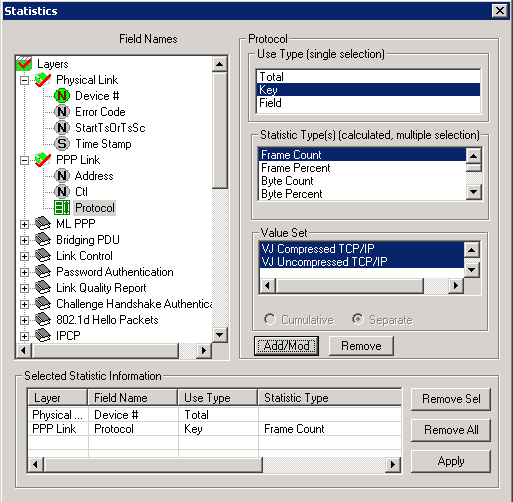
Statistics Options for PoS Protocol
Analysis
Enhanced Trace Saving Options
Users can control the captured trace files by saving the trace using different conventions such as trace files with
user-defined prefixes, trace file with date-time prefixes, and slider control to indicate the total number of files, file size,
frame count, or time limit. This feature also allows the captured frames to be saved into a trace file based on the filtering
criteria set using display filter feature.
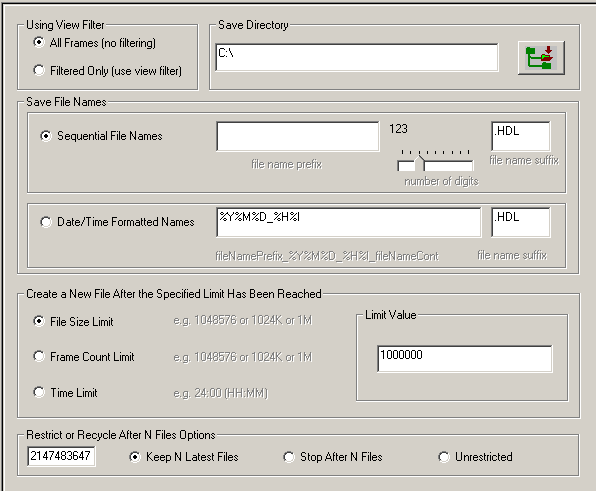
Protocol Trace Saving Options for
PoS Protocol Analysis
Buyer's Guide
| Item No. |
Item Description |
| LTS205 |
OC-3 / STM-1 PoS Protocol Analysis |
| LTS305 |
OC-12 / STM-4 PoS Protocol Analysis |
| |
Other Related Software |
| LTS200 |
OC-3 / STM-1 ATM Monitor, BERT, Tx/Rx Test, RAW |
| LTS300 |
OC-12 / STM-4 ATM Monitor, BERT, Tx/Rx Test, RAW |
| LTS201 |
OC-3 / STM-1 PoS Monitor, BERT, Tx/Rx Test, RAW |
| LTS301 |
OC-12 / STM-4 PoS Monitor, BERT, Tx/Rx Test, RAW |
| LTS202 |
OC-3 / STM-1 ATM and RAW Record / Playback |
| LTS302 |
OC-12 / STM-4 ATM and RAW Record / Playback |
| LTS203 |
OC-3 / STM-1 PoS and RAW Record / Playback |
| LTS303 |
OC-12 / STM-4 PoS and RAW Record / Playback |
| LTS204 |
OC-3 / STM-1 ATM Protocol Analysis |
| LTS304 |
OC-12 / STM-4 ATM Protocol Analysis |
| LTS206 |
OC-3 / STM-1 UMTS Protocol Analysis |
| LTS306 |
OC-12 / STM-4 UMTS Protocol Analysis |
| |
Related Hardware |
| LTS100 |
Dual OC-3 / STM-1 OC-12 / STM-4 PCI Express
Card |
| LTS105 |
Portable Dual OC-3 / STM-1 OC-12 / STM-4 |
| |
DDR2 Memory Options - 512 MB, 1 GB, 2 GB |
| |
SFP Options - |
| |
Fiber cables |
| |
Fiber connector |
| |
OC-3 / STM-1 OC-12 / STM-4 Monitor Parts |
|