ATM Protocol Analyzer
for OC-3 / STM-1
& OC-12 / STM-4 - LightSpeed1000™ (Legacy)
Overview
Asynchronous Transfer Mode (ATM) is a flexible network, which carries voice, video, and data in the same way, i.e. fixed length cells. It has generated a number of revenue opportunities because of its different classes of service support for multimedia traffic, efficient bandwidth management for burst traffic, support for LAN/WAN architecture and high performance via hardware switching.
ATM network basically has two kinds of interfaces i.e. UNI (Interface between ATM User and Public ATM switch) and NNI (Interface between two Public ATM switches). Similar to the OSI Protocol model, ATM protocol architecture has an ATM Layer as Layer 2, ATM Adaptation Layer (AAL) as Layer 3, and other higher layers depending on C-Plane, U-Plane or Layer Management Plane. User information is transferred across U-Plane and Signaling messages are transferred across C-Plane. ATM-UNI signaling is used to create and release SVCs along with a particular QoS attached to it depending bandwidth on demand.
GL's OC-3 / STM-1 OC-12 / STM-4 ATM Analyzer is used to analyze and decode different ATM protocols like ATM, AAL2 Protocols (CPS-SDU, SSSAR-SDU, and SSCS), AAL5 (CPCS), UNI and others across U plane and C plane of UNI and NNI interface. The analyzer can also decode ATM frames constituting Classical IP over ATM, or CIP based networks, and traditional SS7 Stack (ISUP, SCCP, MAP, CAMEL(CAP) etc) over ATM.
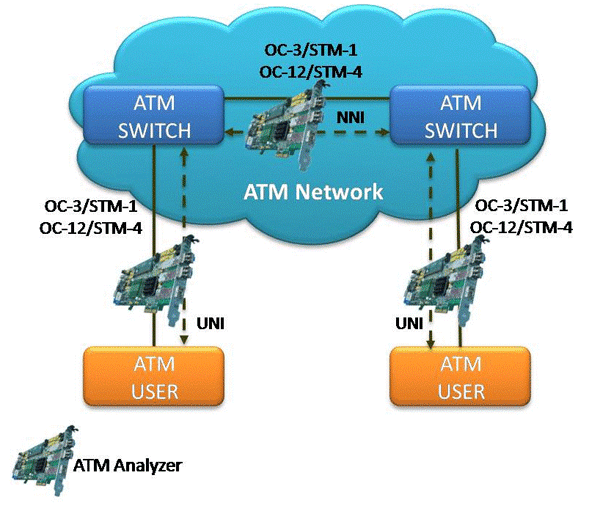
ATM in a OC-3 / STM-1 OC-12 / STM-4 Network
The ATM Analyzer can capture, decode, filter, and reassemble AAL-2 and AAL-5 frames in real-time, from within the ATM cells according to user defined VPI/VCI. The real-time ATM Analyzer requires GL's LightSpeed1000™ internal PCIe cards or USB external units, along with licenses and Windows® OS
ATM Analyzer Main Features
| Display Features |
|
| Supported Protocols | UNI signaling protocols i.e. UNI 4.0, UNI 3.1 and UNI Q-293. |
| Filtering and Search | Advanced filtering and search based on any user selected protocol fields |
| Capturing Streams and Decoding Frames |
|
| Export Options |
|
| Additional Features of ATM |
|
| Remote Monitoring | Remote monitoring capability using GL's Network Surveillance System |
Protocols Supported
For the list of supported protocols that are supported by GL's OC-3 / STM-1 OC-12 / STM-4 ATM analyzer visit ATM Supported Protocols web page..
Summary, Detail, and Hexdump Views
The ATM Protocol Analyzer application is invoked from the main menu of GL's OC-3 / STM-1 OC-12 / STM-4 ATM Analyzer for real-time analysis. The analyzer displays Summary, Detail, Hex Dump, Statistics, and Call Detail Views in different panes. The Summary pane displays Dev#, Frame#, Time, Length, Error, VPI/VCI, PT and so on. User can select a frame in Summary View to analyze and decode each frame in the Detail View. The Hex Dump View displays the frame information in HEX and ASCII format.
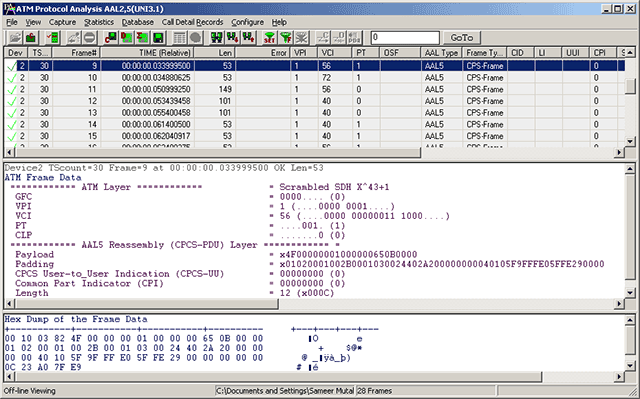
Protocol Summary, Detail, and Hex Dump Views in ATM Protocol Analysis
Real-time and Offline Analysis
Users can capture and analyze UNI or NNI interfaces in real-time and record all or filtered traffic into a trace file. The recorded trace file can then be analyzed offline and exported to ASCII file, and printed. User can capture raw ATM data and transmit using "Rx Packets to File" application.

Port Selection for Real-time Capture
Filtering and Search
Users can record all or filtered traffic into a trace file. Filter and search capabilities adds a powerful dimension to the ATM Analyzer. These features isolate required frames from all the captured frames in real-time, as well as offline. Users can specify VPI, VCI, and PT type values to filter frames during real-time capture. The frames can also be filtered after completion of capture according to Dev#, Frame #, Time, Length, Error, VPI/VCI, PT (Payload Type), HEC, OSF, AAL Type, Frame Type, CID, LI, CPI, UUI, and more. Similarly, search capability helps user to search for a particular frame based on specific search criteria.
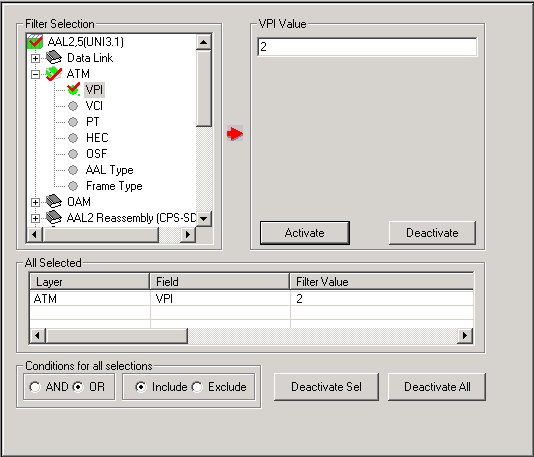
Offline Filtering and Search Criteria for ATM Protocol Analysis
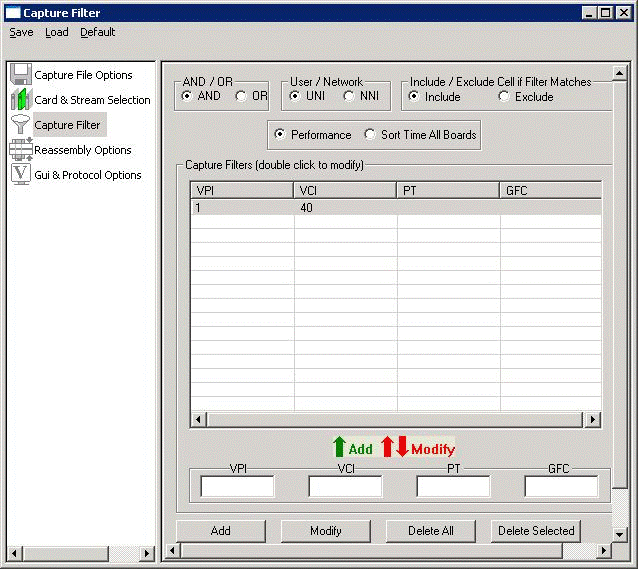
Real-time/Pre-Capture Filtering Criteria for ATM Protocol Analysis
Reassembly
Using reassembly option user can specify VPI /VCI values to reassemble as per the Segmentation and Reassembly rules defined by the specified AAL type. It multiplexes ATM cells as per the user specified VPI/VCI/AAL type into CPS or SAR frames. ATM cells not satisfying the user specification will be reassembled as per the default specification.
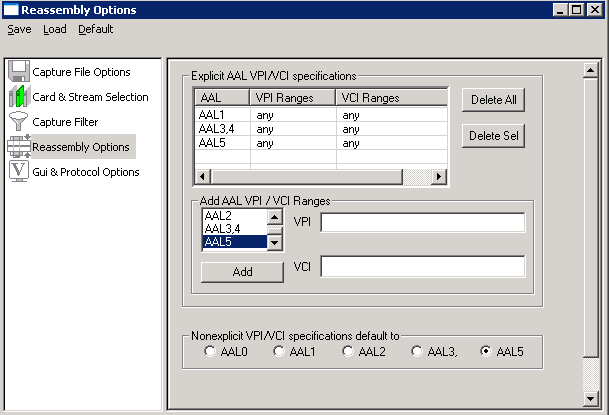
Reassembly Options for ATM Protocol Analysis
Call Detail Record and Statistics View
Call trace defining important call specific parameters like Call ID, Call disposition, Call duration, VPI/VCI, Call type (point-to-point/point-to-multipoint etc) calculated based on UNI signaling messages are displayed in Call Detail view.
Statistics is an important feature available in ATM analyzer and can be obtained for all frames both in real-time as well as offline mode. Various statistics can be obtained in Statistics View to study the performance and trend in the ATM network based on protocol fields and parameters.
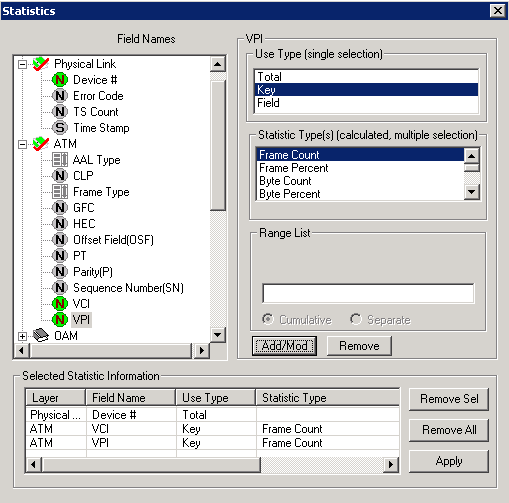
Statistics Options for ATM Protocol Analysis
Enhanced Trace Saving Options
Users can control the captured trace files by saving the trace using different conventions such as trace files with user-defined prefixes, trace file with date-time prefixes, and slider control to indicate the total number of files, file size, frame count, or time limit. This feature also allows the captured frames to be saved into a trace file based on the filtering criteria set using display filter feature.
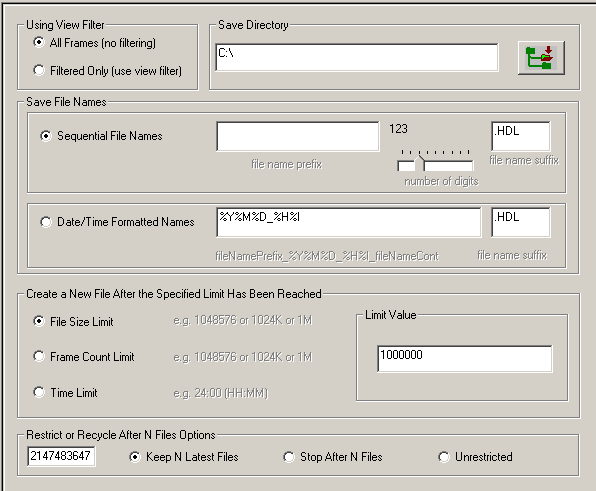
Protocol Trace Saving Options for ATM Protocol Analysis
Resources
Note: PCs which include GL hardware/software require Intel or AMD processors for compliance.
| Item No | Item Description |
| LTS204 | OC-3 / STM-1 ATM Protocol Analysis |
| LTS304 | OC-12 / STM-4 ATM Protocol Analysis |
| Other Related Software | |
|---|---|
| LTS200 | OC-3 / STM-1 ATM Monitor, BERT, Tx/Rx Test |
| LTS300 | OC-12 / STM-4 ATM Monitor, BERT, Tx/Rx Test |
| LTS201 | OC-3 / STM-1 PoS Monitor, BERT, Tx/Rx Test |
| LTS301 | OC-12 / STM-4 PoS Monitor, BERT, Tx/Rx Test |
| LTS202 | OC-3 / STM-1 ATM and RAW Record / Playback |
| LTS302 | OC-12 / STM-4 ATM and RAW Record / Playback |
| LTS203 | OC-3 / STM-1 PoS and RAW Record / Playback |
| LTS303 | OC-12 / STM-4 PoS and RAW Record / Playback |
| LTS205 | OC-3 / STM-1 PoS Protocol Analysis |
| LTS305 | OC-12 / STM-4 PoS Protocol Analysis |
| LTS206 | OC-3 / STM-1 UMTS Protocol Analysis |
| LTS306 | OC-12 / STM-4 UMTS Protocol Analysis |
| Related Hardware | |
| LTS100 | Lightspeed1000™ - Dual OC-3/12 STM-1/4 PCIe Card |
| LTS105 | Lightspeed1000™ - Portable Dual OC-3/12 STM-1/4 USB Unit |
| LTS404 LTS405 |
SFP, Single Mode SFP, Multimode |
SA019a |
1 Gbps / 10 Gbps Fiber Optic Cable, Single-Mode, Duplex LC to Duplex LC |
| Brochures |
| Product Brochure |
| Presentations |
| LightSpeed1000 OC3 OC12 Analyzer - Presentation |