CDMA 2000 Protocol Analyzer
Overview
CDMA technology has undergone many stages of revolution to offer improved voice and data service to the end users.
In order to deliver both voice as well as data service with very high transmission rate, CDMA network has incorporated many new nodes and protocols with respect to old 2G or 2.5G networks (GSM and GPRS network).
The latest 3G technology, called CDMA 2000 1xEV-DV is capable of delivering integrated voice and simultaneous multimedia services at peak data rates of 3.09 Mbps to the end subscriber.
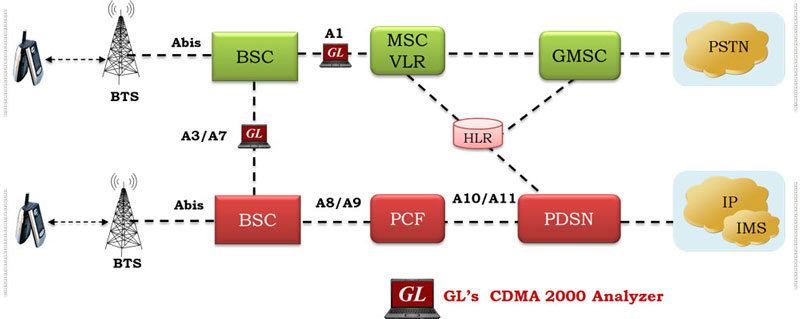
IS-2000 is the signaling standard, which defines protocols for several critical 3G CDMA interfaces pertaining to packet transmission namely A1, A7, A9 and A11 (shown below). An IS-2000 compliant Mobile Station (MS) can select either packet-switched data (PSD) or circuit-switched data (CSD) transport. CSD has maximum rate of 19.2 kbps and is delivered over traditional TDM circuits. PSD offers higher data rate for multimedia services. For each data session, a PPP (Point-to-Point Protocol) session is created between the Mobile Station and the Packet Data Serving Node (PDSN).
The CDMA2000 network comprises of the Radio Access Network (RAN) and the Core Network. A Mobile Station accesses the CDMA2000 network through the RAN. The RAN consists of the Air Link, Base Station Transceiver Subsystem (BTS), Base Station Controller (BSC), and a part of Packet Control Function (PCF). The RAN maps the Mobile Station ID to a unique link layer identifier that is used to communicate with the PDSN, validate the MS for access service, and maintain the established transmission links. The BTS connects to the BSC through un-channelized T1s and A-bis protocols (proprietary to a particular vendor) based on HDLC.
The BSC routes PSD and CSD messages between the cell sites and the MSC. In addition, the BSC is also responsible for mobility management. It connects to each Mobile Telephone Exchange (MTX) using channelized T1 lines for voice and circuit switched data; and to un-channelized T1 lines for signaling and control messages to the PDSN using Ethernet protocols.
The PCF routes IP data packets between the MS and the PDSN. The PDSN is the Gateway from the RAN into the public and private networks. The PDSN can act as either a standalone Network Access Server (NAS), Home Agent (HA) or a Foreign Agent (FA).
GL's CDMA Protocol Analyzer can be used to analyze and view protocols across A1 (between Base Station Controller and Mobile Switching Center), A3 and A7 (between two Base Station Controllers), A9 (between Base Station Controller and Packet Control Function), and A11 (between Packet Control Function and PDSN) signaling interfaces as depicted in the above figure
- Between BSC and BTS: Abis
- Between BSC and BSC: A3 and A7 (also known as 'Ater')
- Between BSC and PCF: A9 (also known as 'Aquinter')
- Between BSC and MSC: A1 (also known as 'A')
- Between PCF and PDSN: A11 (also known as 'Aquater')
GL Communications supports the following types of CDMA analyzers:
- Real-time CDMA Analyzer (Pre-requisites: GL's field proven E1 or T1 internal cards or USB Laptop E1 or T1 external units, required licenses and Windows Operating System)
- Offline CDMA Analyzers (Pre-requisites: Hardware dongle and Windows Operating System)
Main Features
- Supports decoding of Ethernet-based protocols (across Aquinter and Aquater interfaces), ATM based protocols (across Ater interface), & HDLC based protocols (across A interface).
- Allows customized filtering/searching of the captured data (real-time/offline) by setting various parameters such as VPI/VCI, Payload Type, MAC layer address, Frame length, IP address, Port number and so on based on the interfaces chosen.
- Displays Summary, Detail, Hex-dump, Statistics, and Call Trace Views, the contents of this view can also be copied to clipboard.
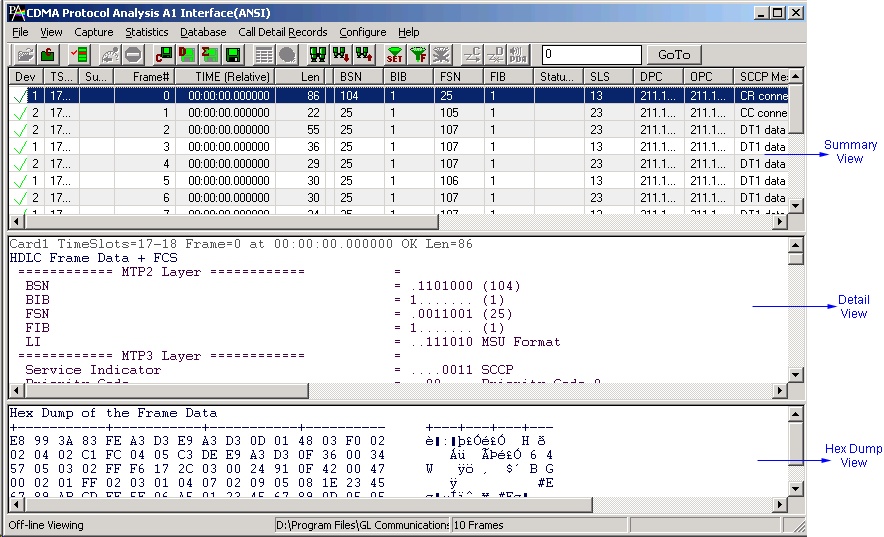
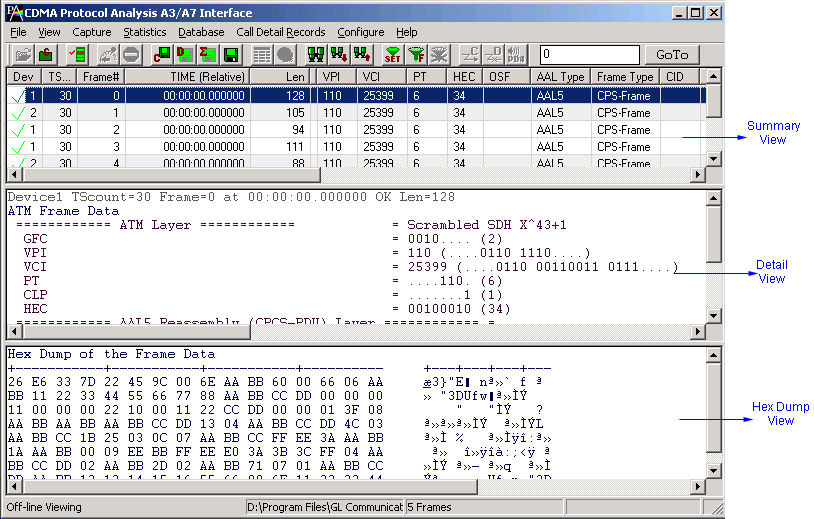
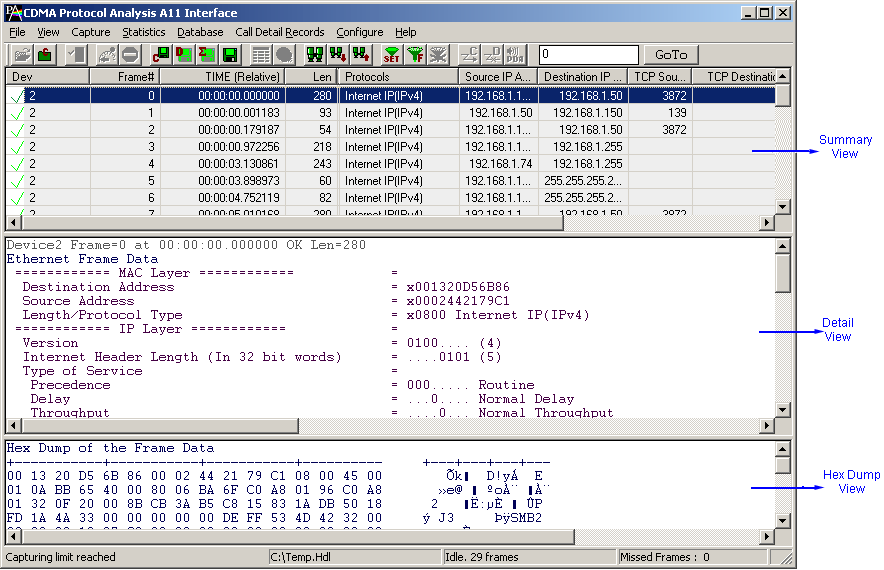
- Summary View displays Device Number, Time Slots:, SubChannels, Frame Number, Time, Frame Length etc in a tabular format.
- Detailed View displays decodes of user selected frame from the Summary View.
- Hex dump view displays raw frame data as hexadecimal and ASCII octet dump, the contents of this view can also be copied to clipboard.
- Statistics View displays statistics based on frame count, byte count, frames/sec, bytes/sec and so on for the entire data capture.
- Call Detail Record View displays called/ calling number, released calls, call status, & more.
- Capability to export Summary View details to comma separated values (CSV) format subsequent import into a database or spreadsheet.
- Capability to export detail decode information to an ASCII.
- Ability to edit.ini file to configure the A3 A7 IOS related parameters in order to get proper decoding of protocols across A3A7 interface.
- Supports simultaneous decode of multiple streams of CDMA traffic on different T1 E1 channels.
- Any protocol field can be added to the summary view, filtering, and search features providing users more flexibility to monitor required protocol fields.
- Option to create multiple aggregate column groups and prioritize the groups as per the requirement to display the summary results efficiently
- Allows the user to create search/filter criteria automatically from the current screen selection
- Remote monitoring capability using GL's Network Surveillance System.
Additional feature supported by Real-time CDMA Analyzer
- Supports capturing and decoding of Ethernet-based protocols (across Aquinter and Aquater or A9 A11 interfaces), ATM based protocols (across Ater or A3 A7 interfaces), & HDLC based protocols (across A or A1 interface).
- Multiple streams of CDMA traffic on various T1 E1 channels can be simultaneously decoded with different GUI instances.
- For A3 A7 interfaces,
- Captures, decodes, filters, and reassembles (with or without Inverse Multiplexing option) AAL-2 and AAL-5 frames in real-time, from within the ATM cells according to user defined VPI/VCI.
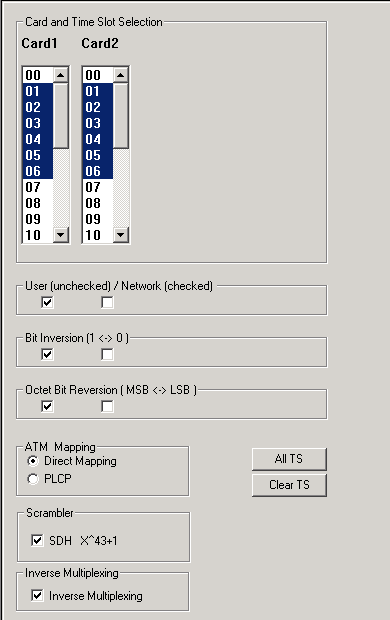
- ATM raw data capturing requires user to specify timeslots, bit inversion, octet bit reversion, user/network side, ATM mapping, scrambling, and inverse multiplexing options.
- Streams may be captured on the selected time slots (contiguous or non-contiguous) and on full bandwidth.
- Unscrambling of ATM cells based on SDH Xˆ43 + 1 algorithm.
- For A1,
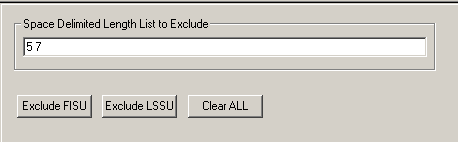
- Frames captured can be filtered real-time based on length of frames (FISSU - Length as 5 and LSSU - Length as 7) can be set.
- Supports decoding of frames with FCS of 16 bits and 32 bits, or none.
- Data transmission rate starting from 8kbps to N*64kbps is supported.
- Timeslots selection can be contiguous or non-contiguous.
- Call Detail Recording feature includes data link groups that help in defining the direction of the calls in a given network. and form logical groups comprised of unidirectional (either 'Forward' or 'Backward') data links.
- For A9 and A11,
- Frames captured can be filtered real-time based on Source IP address, Destination IP address, Mac Layer Address, Source/Destination port no etc can be applied.
Additional features supported by Offline CDMA Analyzer:
- Trace files for analysis can be loaded through simple command-line arguments.
- Multiple trace files can be loaded simultaneously with different GUI instances for offline analysis.
Supported Protocols
The supported protocol interfaces in CDMA 2000 protocol analyzer are A1 Interface (ANSI), A1 Interface (ITU), A3/A7 Interface, A9 Interface and A11 Interface.
| Supported Protocols | Specification Used |
| BSAP | 3GPP2 A.S0014-A, Version 2.0.1 July 2003 |
| MTP2 (ITU) | ITU-T Q.703 |
| MTP3 (ITU) | ITU-T Q.704 |
| MTP3 (ANSI) | ANSI T1.111-1996 |
| SCCP Management | ITU-T Q.711 (07/96) |
| SCCP ITU | ITU-T Q.711 to Q.714 |
| SCCP ANSI | ANSI T1.112 |
| Test & Network Management Messages (ITU) | ITU-T Q.703, Q.704 |
| Test & Network Management Messages (ANSI) | ANSI T1.111.4, ANSI T1.111.7 |
| A3/A7 Interface | 3GPP2 A.S0015-C, Version 1,0 February2005 |
| ATM | ITU-T I.361 |
| AAL | ITU-T I.363 |
| SSSAR | ITU-T I.366.1 |
| AAL2 | Class B (ITU-T I.363.2) |
| AAL5 | Class C & D (ITU-T I.363.5) |
| IP | RFC 791 |
| TCP | RFC 793 |
| A9 | 3GPP2 A.S0016-C, Version 1,0 Date: February 2005 |
| A11 | 3GPP2 A.S0017-A Version 2.0.1 July 2003 |
| MAC | IEEE 802.3 |
| IP | RFC 791 |
| Tcp | RFC 793 |
| Udp | RFC 768 |
For more information, visit Protocol glossary webpage
Summary, Detail and Hex dump Views
The CDMA analyzer application is invoked from the main menu of GL's T1 E1 Analyzer for real-time analyzer. The offline CDMA analyzer is invoked from the installation directory of the offline CDMA Analyzer. The analyzer displays Summary, Detail, Call Detail Record, Statistics and Hex dump View in different panes. The Summary pane displays various information such as Frame Number, Time, Length, Message Types, IP source and destination addresses and so on. User can select a frame in summary view to analyze and decode each frame in the Detail View. The Hex dump View displays the frame information in HEX and ASCII octet dump format.
Real-time and Offline Analysis
Users can capture and analyze CDMA frames using real-time analyzer and record all or filtered traffic into a trace file. The recorded trace file can be used for offline analysis and exported to a comma-delimited file, or ASCII file.
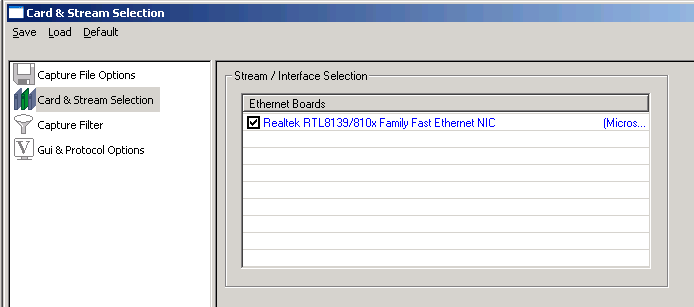
For A1 interface, CDMA raw data capturing requires user to specify timeslots, bit inversion, octet bit reversion, user/network side, and data transmission rate options. In case of A3, A7, additional options such as ATM Mapping, scrambling, and inverse multiplexing options can be applied. In case of A9 A11 interface, Ethernet boards have to be specified on which data can be received.

Filtering and Search
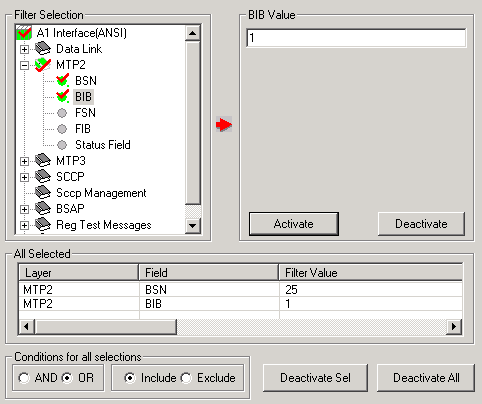
The user can record all or filtered traffic into a trace file and can create search/filter criteria automatically from the current screen selection. The filter and search options add a powerful dimension to the CDMA analyzer that isolates required frames from the captured frames in real-time/remote/offline. This allows filtering according to Data Link, MTP2, BSAP, SCCP, ATM, A3 & A7 IOS Application Layer, AAL2, A9 & A11 IOS Application Layer, IP, TCP/UDP and more.
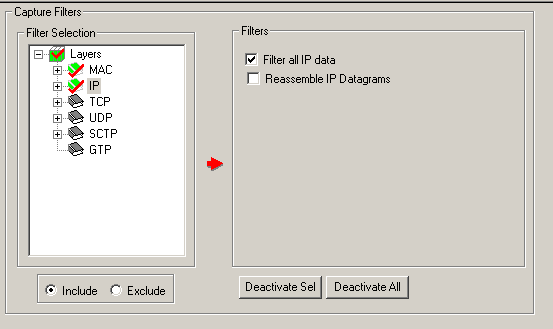
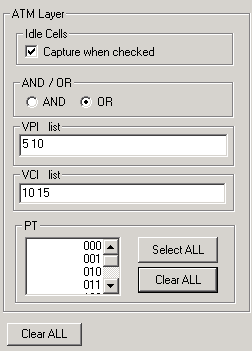
For A1, real-time capturing filter based on length of frames can be set. For A9 and A11, Ethernet based real-time capturing filter capabilities based on Source/Destination IP address, Mac Layer Address, and more can be applied. Users can specify custom VPI, VCI, and PT type values to filter frames during real-time capture for A3 A7 interfaces. Similarly, Search capability helps user to search for a particular frame based on specific search criteria.
Aggregate Column Group
The enhanced feature of the protocol analyzer is aggregate column groups. The user can also create multiple aggregate column groups and prioritize the groups as per the requirement to display the summary results in an efficient way.
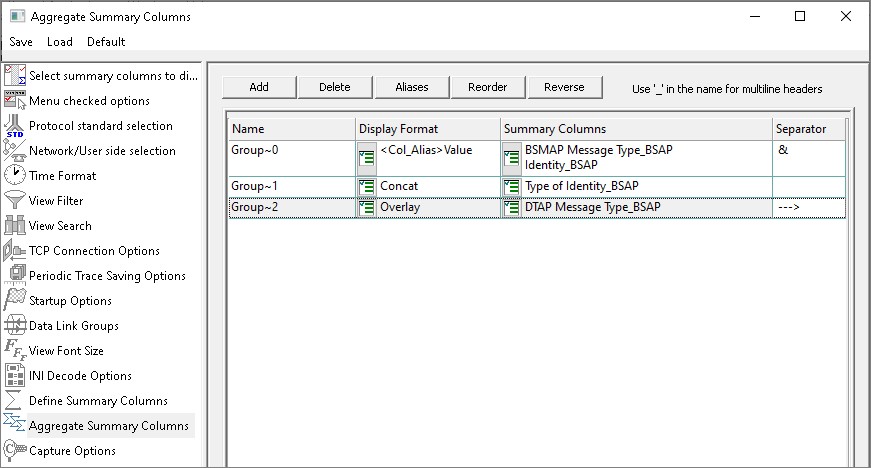
Aggregate Summary Column Group
The updated results are as shown below. Here the root aggregate group~0 summary columns are displayed first and then Group~1 and Group~2 as per the assigned priority.
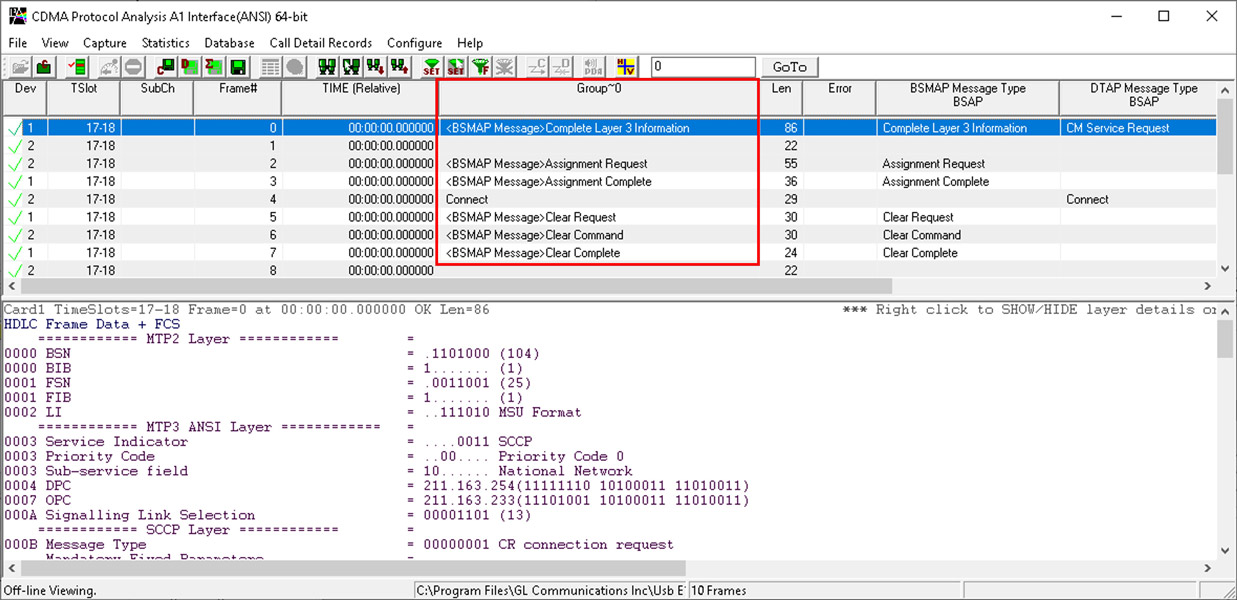
Display of Aggregate Column Group in Summary View
Reassembly in CDMA - A3 & A7 Interface
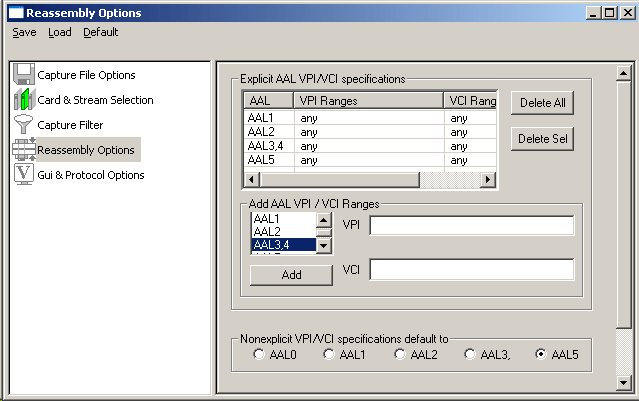
Using reassembly option user can specify VPI /VCI value to reassemble as per the Segmentation and Reassembly rules defined by the specified AAL type. It multiplexes ATM cells as per the user specified VPI/VCI/AAL type into CPS or SAR frames. ATM cells not satisfying the user specification will be reassembled as per the default specification.
Call Detail Record & Statistics View
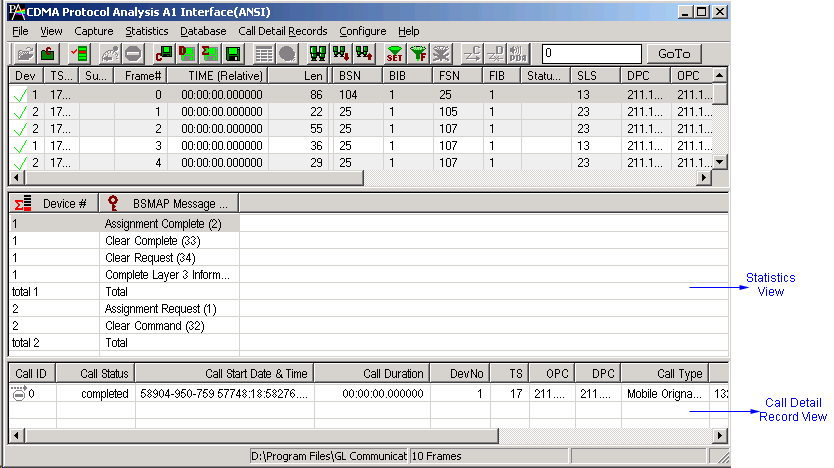
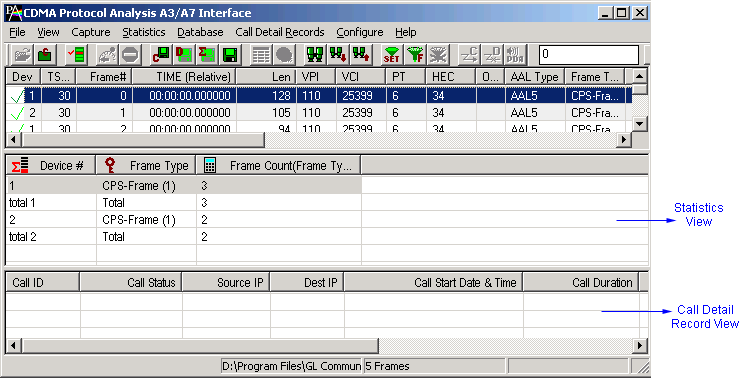
Important call specific parameters like call status, release cause, parties involved and more are displayed in Call Detail Record View. Call traces can also be logically grouped, with each group comprising of unidirectional (either 'Forward' or 'Backward') data links (applicable for A1 interface only). Additionally, users are provided with the option to search a particular call detail record from the captured traces.
Statistics is an important feature available in CDMA analyzer and can be obtained for all frames both in real-time as well as offline mode. Various statistics can be obtained to study the performance and trend in the CDMA network, based on protocol fields and different parameters.
Enhanced Trace Saving Options
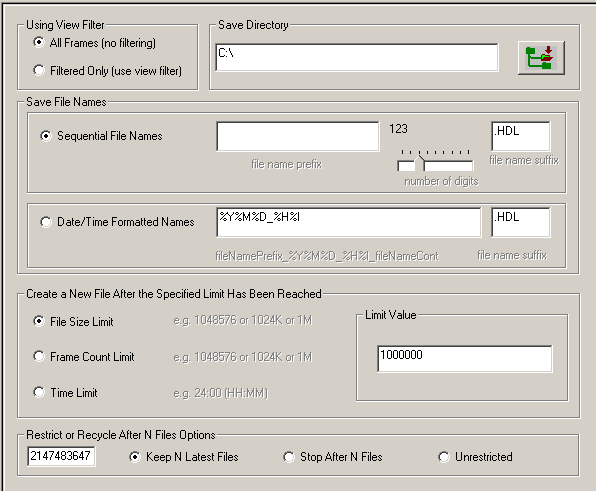
Users can control the captured trace files by saving the trace using different conventions such as trace files with user-defined prefixes, trace file with date-time prefixes, and slider control to indicate the total number of files, file size, frame count, or time limit. This feature also allows the captured frames to be saved into a trace file based on the filtering criteria set using display filter feature.
Save/Load All Configuration Settings
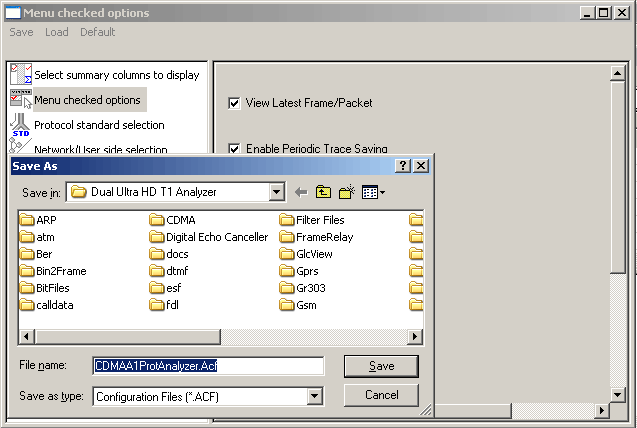
Protocol Configuration window provides a consolidated interface for all the important settings required in the analyzer. This includes various options such as protocol selection, startup options, stream/interface selection, filter/search criteria and so on. Any protocol field can be added to the summary view, filtering, and search features from this GUI providing the users more flexibility to monitor required protocol fields. All the configuration settings done can be saved to a file and then loaded from a configuration file. Users may also just revert to the default settings using the default option.
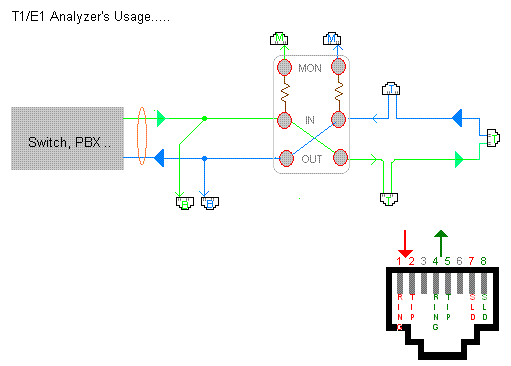
Bridge and Monitor Connections
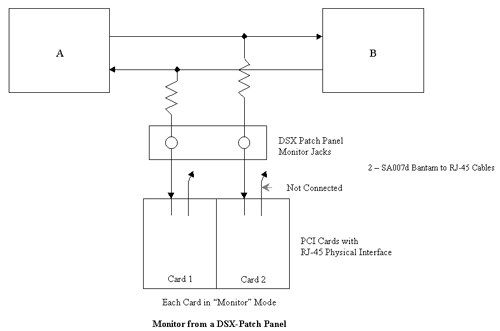
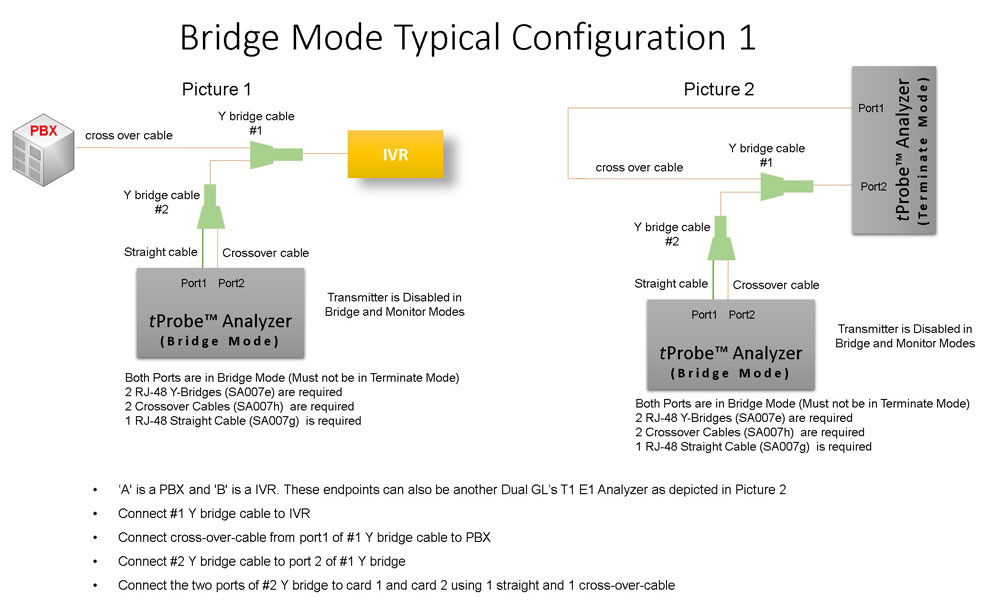
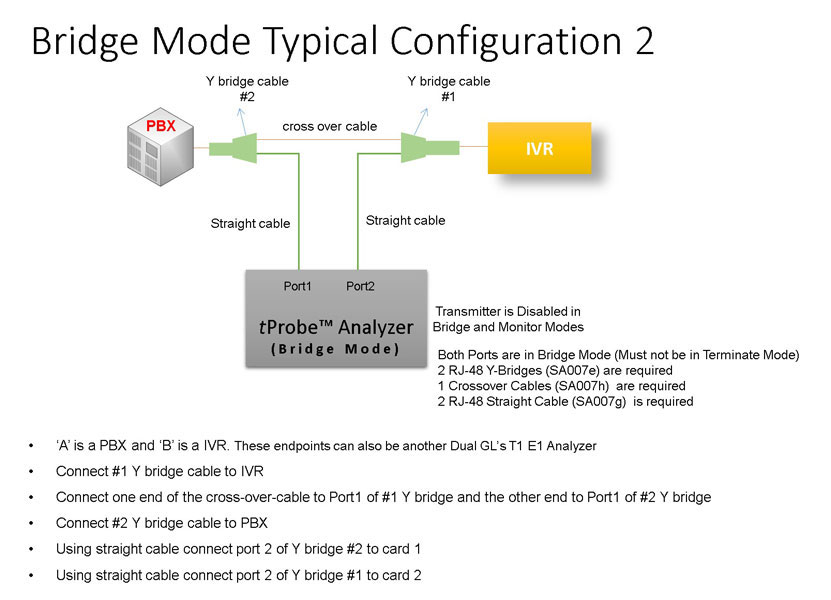
Resources
Note: PCs which include GL hardware/software require Intel or AMD processors for compliance.
Please Note1: The XX in the Item No. refers to the hardware platform, listed at the bottom of the Buyer's Guide, which the software will be running on. Therefore, XX can either be ETA or EEA (Octal/Quad Boards), PTA or PEA (tProbe Units), XUT or XUE (Dual PCIe Express) depending upon the hardware.
| Item No. | Item Description |
|---|---|
| XX142 | T1 or E1 CDMA Protocol Analyzer |
| OLV142 | Offline T1 or E1 CDMA Protocol Analyzer |
| Related Software | |
| XX090 | HDLC Playback and Analysis Software |
| XX160 | ATM Protocol Analyzer |
| Related Hardware | |
| FTE001 ETE001 |
QuadXpress T1 E1 Main Board (Quad Port– requires additional licenses) OctalXpress T1 E1 Main Board plus Daughter Board (Octal Port– requires additional licenses) |
| PTE001 | tProbe™ Dual T1 E1 Laptop Analyzer with Basic Analyzer Software |
| XTE001 |
Dual T1 E1 Express (PCIe) Boards (requires additional licenses) |
* Specifications and features subject to change without notice.
 Back to Protocol Analysis Index Page