Analysis of Fax over IP, TDM, & PSTN - FaxScan™

Overview
Call-center quality engineers, brokerages, government agencies, and other entities have a need to monitor fax transactions. Monitoring is done by recording the analog or IP traffic using suitable call capture applications. These files need to be decoded to investigate issues with protocol messages and Fax image quality.
FaxScan™ application is used to process 2-Wire and 4-Wire voice band capture files as well as Win PCAP captures to provide analysis of the T.38 packets, T.30 frames, decode a Fax TIF image, and general call-flow indicators for detail analysis. It is a valuable T.30 and T.38 debug and test tool, aiding significantly in system development. Fax sessions can contain standard G3 or V.34-based sessions.
FaxScan™
- process up to V.34 T.30 recordings in 2-wire, 4-wire, µ-law, A-law, 16 bit, 14 bit, and 13 bit PCM captures (requires VBA038 License)
- process V.34 T.38 and SIP/RTP PCAP captures (requires PKV104 License) Win PCAP captures can be processed from T.38 packets alone or as part of a capture file with multiple SIP calls.
The application is available as a stand-alone command-line fax analysis application, and as an integrated module within GL's Voice Band Analyzer application.
FaxScan™ can work with popular packet capture applications such as GL’s PacketScan™ or Wireshark®, as well as TDM / 2-Wire capture applications such as GL’s tProbe™ T1 E1 FXO FXS Analyzer, and VQuad™ Dual UTA HD. FaxScan™ is also available as an integrated analysis module within Voiceband Analyzer (VBA032).
FaxScan™ can analyze the captured PCM and PCAP files from the above applications for decoding fax messages. The output of this application includes TIFF-F files containing the fax image, and fields for data rate, resolution, encoding (Modified-Huffman, Modified-Read, Modified-Modified-Read), page size, error-red lines, total lines, total pages, and more.Main Features
- 3 modes of operation depending on the type of input file: PCM, SIP, and T.38
- Supports 2-wire or 4-wire PCM captures that are sampled at 8-Khz only
- G.711 A-Law, µ-Law encoded 8-bit PCM data formats
- 13-bit linear PCM, and16-bit linear PCM data formats
- Supports Modems: V.8, V.17, V.21, V.27, V.29, V.33, V.34
- Output contains page-by-page packet statistics and Fax image summary
- Fax image output in TIFF-F format (as specified in RFC 2301)
- Creates detailed SIP Ladder diagram files for SIP calls
- Reports Modem Rate, Resolution, Encoding, and Page Size
- 2400, 4800, 7200, 9600, 12000, 14400, 16800, 19200, 21600, 24000, 26400, 31200, or 33600 bits per second
- HIGH (204x196dpi), LOW (204x98dpi), or SUPER_HIGH (204x391dpi)
- Modified Huffman (MH), Modified READ (MR), or Modified-Modified READ (MMR)
- A4, B4, or A3
- Single- and multi-page ECM and non-ECM fax sessions are supported
- Decoding of transmitter-only captures is supported for non-ECM faxes
Fax and Modem Standards
| Standard | Description |
|---|---|
T.30 |
|
V.17 |
|
V.27 |
|
V.29 |
|
V.33 |
|
V.34 |
|
A Typical Fax Call Messaging
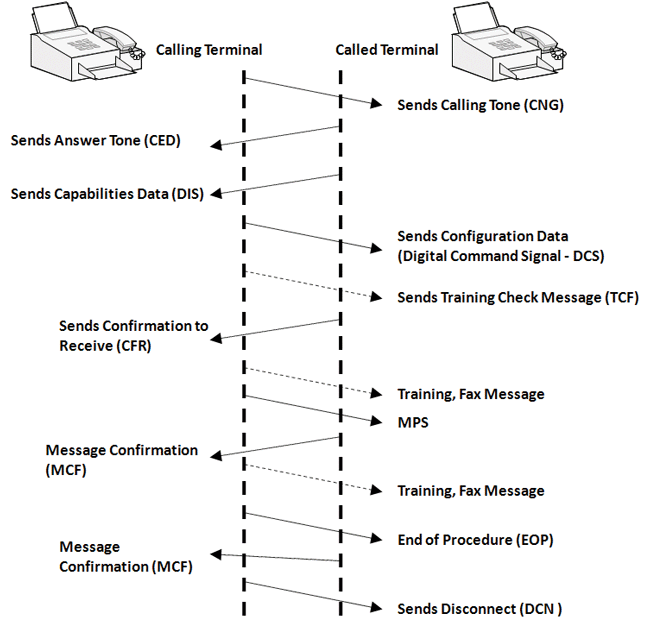
Typical Fax call - 2 page Fax shows a typical message exchange for a standard fax without error correction.
Fax messages are carried in V.21 HDLC data frames. In a simplified one page Fax transmission with no ECM, the initial response from the called facsimile machine is a CED tone (Fax Answering Tone) followed by a DIS (Digital Identification Signal).
This is responded to by the calling party with a DCS (Digital Command Signal) that informs the far side machine of the data rate and parameters that will be used to send the facsimile page followed by training sequence. The successful response is a CFR (Confirmation to Receive). The page is then sent. When the fax is received, the facsimile machine sends a MCF (Message Confirmation) to which the sending side sends a EOP (End of Procedure) and DCN (Disconnect) message.
Working Principle
FaxScan™ can be operated as a stand-alone from a Batch file or Windows® Command Line, or as a integrated module within the GL Voice Band Analyzer application to produce decoded fax image TIFF files and call logs.
FaxScan™ supports 3 modes of operation depending on the type of input file: PCM, SIP, and T.38 . The files captured by the call capture applications can be a single file or a pair of files as explained below -
- Single file PCM recording containing both the transmitting and receiving fax-machine signals
- Dual PCM recordings, one containing the transmitting fax machine signal and a second with the receiving fax machine signals
- Single PCAP file containing only T.38 packets; IPv6 are also supported. PCAP New Generation (PCAPNG) is currently not supported
Run FaxScan™ From Batch File
Files can be processed on a per line basis in a Windows® command line application or more conveniently by using Batch files for analyzing bulk fax call captures. The commands will generate ladder diagram and a tiff files after decoding and analyzing specified PCAP or PCM fax capture files.
The FaxScan™ command line syntax for analyzing a TDM fax call capture is as follows:
Faxscan.exe PCM –f <pcm file 1> –s <pcm file 2> –e pcm-encoding
Where
-f = One side or dual side recording
-s = Second file for dual side recordings
-e = A-law, µ-law, lin16, lin13 PCM encoding
The FaxScan™ command line syntax for analyzing a SIP fax call capture is as follows:
FaxScan.exe SIP -p -f <pcap file>
Where:
SIP = Mode of execution
-p = Indicates to create ladder for SIP events
-f = Input file for fax analysis -- rtp.pcap
The FaxScan™ command line syntax for analyzing a PCM fax call capture is as follows:
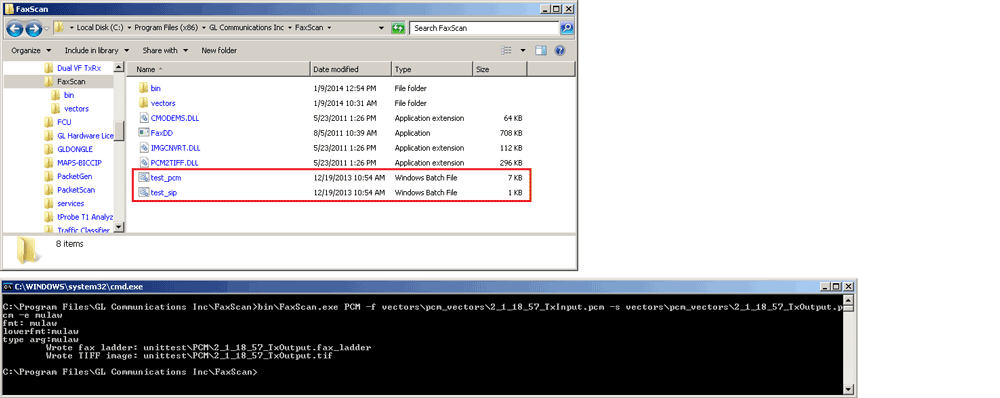
Batch File Operation
Integrated into Voice Band Analyzer (VBA)
The FaxScan™ is integrated as an optional module in the GL Voice Band Analyze. It can be used to analyze both 2-wire and 4-wire voice band captures for all types of traffic including Fax traffic. The Voice Band Analyzer can be set up for Manual, Batch, and Automatic operation.
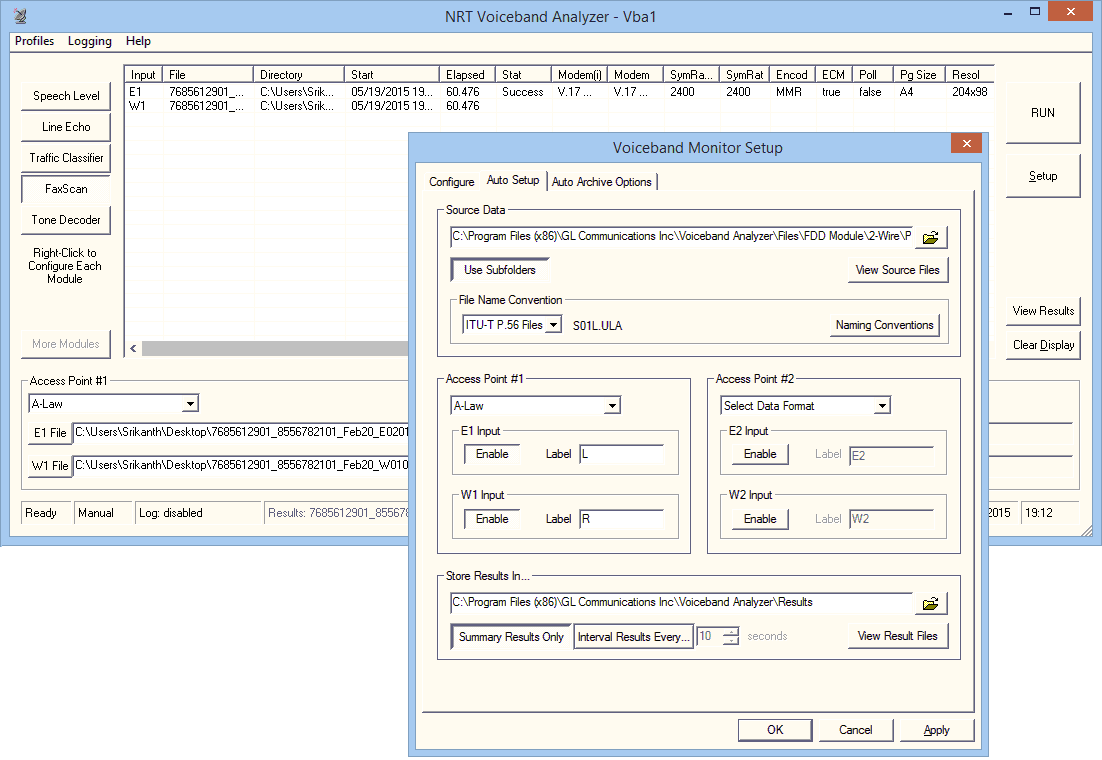
Screenshot of VBA and Auto Setup
Within VBA, users can choose to output the fax images only, or to include the log file with additional information on messages used during the fax transaction. Also selectable are the fields displayed in the main application screen

Screenshot of VBA Fax Results and Parameters
Analyzing Fax over IP (FoIP)
The figure above depicts a typical call is established between two Fax machines via 2 analog telephone adapters or gateways (ATA's) and transmitted over IP. Fax-Over-IP transmission happens in 2 modes
- T.38 Decoding and Analysis mode - In T.38 mode, the call is detected as a T.38
- Transparent mode (pass through) mode - In this mode, the gateway does not distinguish fax calls from voice calls. The fax traffic is carried between the two gateways in RTP packets using an uncompressed format resembling the G.711 codec. For Internet telephony gateways with support for PCM/G.711 audio and no support for T.38 real-time fax, it is recommended to switch the session to fax pass-through mode
GL’s FaxScan™ can process V.34 SIP/T.38 and SIP/RTP PCAP captures (requires PKV104 License) in T.38 mode as well as transparent mode. Win PCAP captures can be processed from T.38 packets alone or as part of a capture file with multiple SIP calls
Outputs of FaxScan™
FaxScan™ for PCM outputs two forms of analysis, Fax Call Flow (contains T.30 Analysis) and Fax Image in TIFF format.
FaxScan™ for PCAP outputs three forms of analysis, Fax Call Flow (contains T.30 or T.38 Analysis), SIP Call Flow, and Fax Image in TIFF format.
The T.30 / T.38 analysis takes the form of a sequence of events detected in the session. T.30 analysis is generated in all modes. It also summarizes the complete analysis with important fields such as
- Pages send and Received - The number of pages sent and received
- Total Lines - The total number of lines.
- Total Bad Lines - The number of bad lines received
- Pages Received with Errors - The number of pages with errors
- ECM, Polling Information
- Counts of various types of frames (DIS, DCS, DTC, FTT, ...)
- Modem Type, Data Rate and Symbol Rate
- T.38 details – count of lost packets, ECC frames, type of ECC frames, version of T.38, and more
FaxScan™ generates fax image output in TIFF – F (Tagged Image File Format) files, the common file format for the exchange of image files where Class F TIFF files are specific for the exchange of fax images.
SIP analysis is in the form of ladder diagram and is only available in SIP mode.
Optionally, users can also generate verbose log file for monitoring the step-by-step decoding of FaxScan™. Verbose output is useful in examining the T.38 protocol. When log file output is enabled, each packet is decoded and its type is printed. A small section of verbose output is shown in the figure below. You should use caution when requesting log file output, as log files are much larger than the normal ladder analysis output

Screenshot of T.30 Ladder

Screenshot of T.38 Ladder
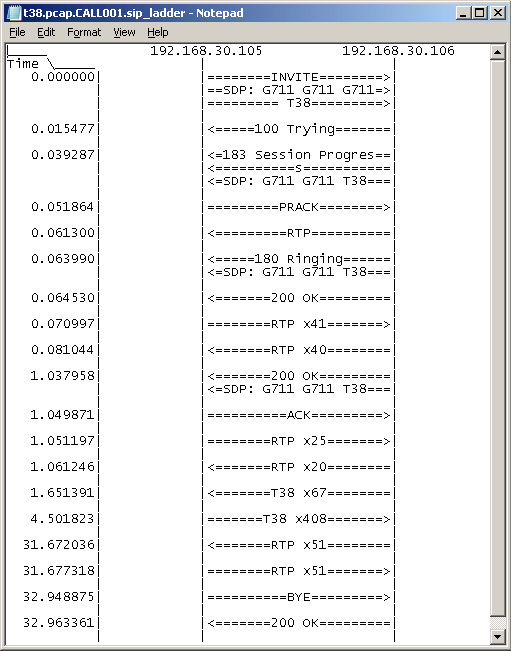
Screenshot of SIP Ladder
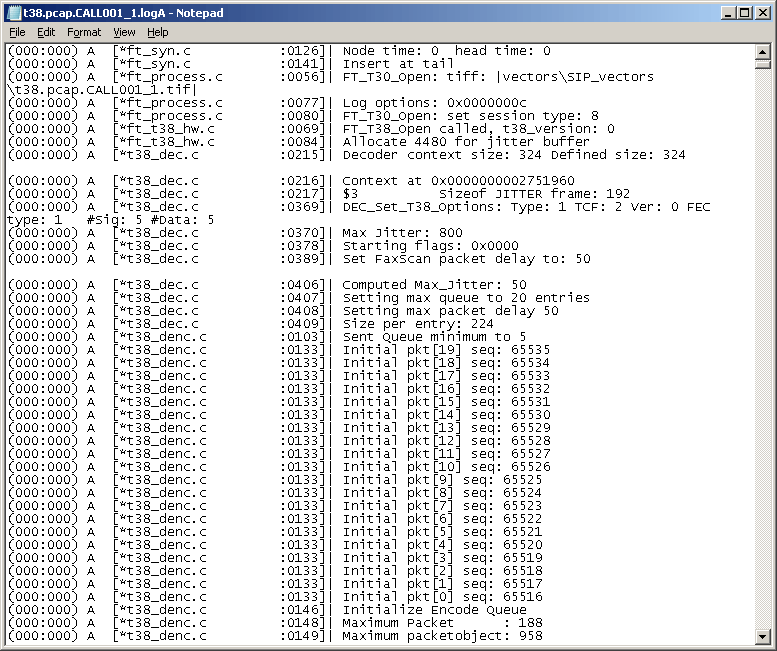
Screenshot of Detail Log Output
Resources
Please Note: The XX in the Item No. refers to the hardware platform, listed at the bottom of the Buyer's Guide, which the software will be running on. Therefore, XX can either be ETA or EEA (Octal/Quad Boards), PTA or PEA (tProbe Units), XUT or XUE (Dual PCIe Express) depending upon the hardware.
| Item No. | Item Description |
| VBA038 | FaxScan™ for PCM |
| PKV104 | FaxScan™ for SIP and Fax over IP (T.38) |
| Related Software | |
|---|---|
| XXFT0 XXFT2 XXFT3 XXFT4 XXFT5 XXFT6 |
T1 E1 Fax Simulator (Requires one of the licenses below) 2 Fax ports licenses 8 Fax ports licenses 30 Fax ports licenses 60 Fax ports licenses 120 Fax ports licenses |
| VQT022 VQT022a |
VQuad™ Fax Emulation (2 simultaneous ports) VQuad™ Fax Emulation (8 simultaneous ports) |
| DM060 DM480 |
Fax License (60 global faxes) Fax License (up to 480 global faxes) |
| Brochures |
| FaxScan™ Brochure |
| GL Product Lists |
| Webinar |

|
Specifications are subject to change without notice.
 Back to Message Automation & Protocol Simulation Index Page