GL Communications Inc.


Home >  Analysis (T1/E1/T3/E3/OC-3/OC-12/STM-1/STM-4)  >  Software Applications  >  Protocol Analysis

GPRS Analyzer


  Download GPRS Analyzer User's Guide

  Download GPRS Analyzer Product Brochure

  Download Sample Excel Spread sheets with reports/messages of GPRS Protocol Analyzer


Overview

GPRS (General Packet Radio Service) permits continuous data connectivity over wireless GSM networks. For example, mobile phones and laptops can be used to send and receive data over the Internet, e.g. e-mail and WEB surfing are typical examples. GL's GPRS Analyzer performs real time (and offline) analysis across the Gb (T1/E1) and Gn (Ethernet) interface. The companion GSM Analyzer can also monitor the Abis and A interfaces, simultaneously.

The GPRS Analyzer when connected between SGSN and BSS elements of a GPRS network, permits the monitoring of Gb interface. Similarly, when connected between SGSN and GGSN elements, permits monitoring of the Gn interface.

GL Communications supports the following types of GPRS analyzers:

  • Real-time GPRS Analyzer (Pre-requisites: GL's field proven E1 or T1 internal cards or USB Laptop E1 or T1 external units, required licenses and Windows 2000/XP/Vista Operating System)
  • Offline GPRS Analyzers (Pre-requisites: Hardware Dongle, and Windows 2000/XP/Vista Operating System)

Main Features

  • Supports filtering and search features based on Gb Interface parameters such as Data Link, Network Service, BssGp, LLC, Gprs Mobility/Session Mgmt, SMS, TOM and SNDCP and Gn Interface parameters such as Data Link, MAC, IP, UDP, TCP, ICMP, GTP'/GTP, GTP_IP, GTP_UDP, and GTP_TCP.
  • Provides Summary View, Detail View, Hex dump, statistics, and call trace views.
  • Summary view displays GB Interface information such as DLCI, FECN, BECN, SAPI, CTL, Session Mgmt Message etc and Gn Interface information such as Protocols, Source/Destination IP Address, UDP Source/Destination port, TCP Source/Destination Port, Message Type etc.
  • Detailed view displays easy to understand decodes of user selected frame
  • Hex dump view displays the frame information in HEX and ASCII format.
  • Statistics view displays statistics based on frame count, byte count, frames/sec, bytes/sec etc for the entire captured data. It also displays Total Frames, Average Frames and Utilization, Maximum Frames and Utilization, and so on.
  • Call Trace view displays called/ calling number, released calls, call status, & more.
  • Capability to export summary as well as detail information to an ASCII file for subsequent import into a database or spreadsheet.
  • Remote monitoring capability using GL's Network Surveillance System

Additional features supported by real-time GPRS analyzer are:

  • Multiple streams of GPRS traffic on various T1/E1 channels can be simultaneously decoded with different GUI instances

    For Gb Interface,

  • Streams can be captured on the selected time slots (contiguous or non-contiguous), sub-channels or full bandwidth. Frames may also be contained in either one, n x 64 kbps, or n x 56 kbps data channels.
  • Supports decoding of frames with FCS of 16 bits and 32 bits, or none
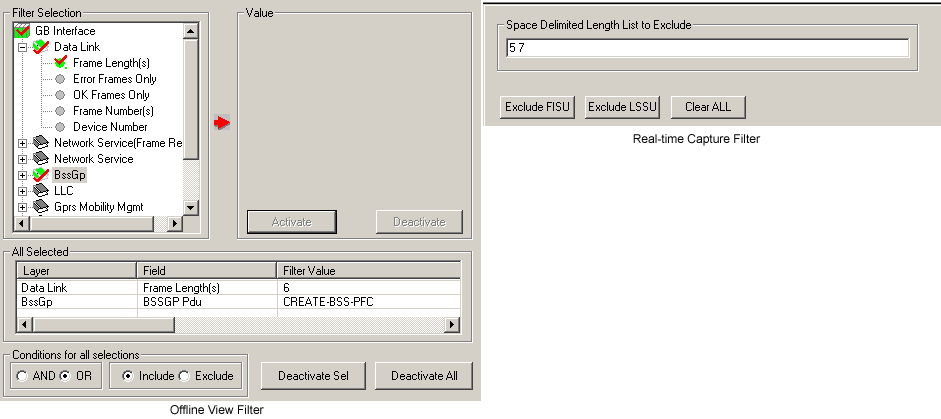
  • Capturing filter based on length of frames (FISU - Length as 5 and LSSU - Length as 7) can be set
  • Call Detail Recording feature includes data link groups that help in defining the direction of the calls in a given network and form logical groups comprised of unidirectional (either 'Forward' or 'Backward') data links.
  • Recorded trace files can be played back using HDLC Playback application.

    For Gn Interface,

  • Ethernet based capture and filtering capabilities such as filtering based on Source IP address, Destination IP address, MAC Layer Address, Source/Destination port no etc can be applied.
  • Capturing filter based on selection of layers such as MAC address, IP address, TCP Source/Destination Port, UDP Source/Destination Port, SCTP Source/Destination Port, and GTP can be set.

Additional features supported by Offline GPRS Analyzer:

  • Trace files for analysis can be loaded through simple command-line arguments
  • Multiple trace files can be loaded simultaneously with different GUI instances for offline analysis

Protocols Supported

The list of protocols that are supported by GL's GPRS analyzer are as given below:

  • Gb Interface

    The Gb interface is a GPRS interface which is located between the SGSN (Serving GPRS Support Node) and the PCU (Packet Control Unit).

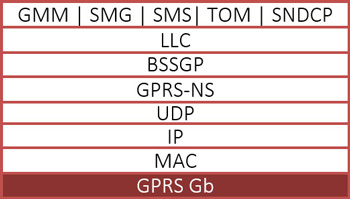
    GPRS Gb interface supports decoding of the following Interfaces:

    • Frame Relay
    • Network Service
    • BSSGP Pdu (Base Station System GPRS Protocol)
    • LLC (Logical Link Control)
    • SNDCP (Subnetwork Dependent Convergence Protocol)
    • GMM (GPRS Mobility Management)
    • SM (Session Management)

  • Gn Interface

    Gn Interface is the interface between GPRS Support Nodes (GSNs) within a PLMN (Public Land Mobile Network).

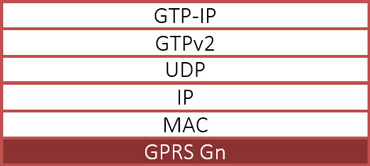
    GPRS Gn interface supports decoding of the following Interfaces:

    • MAC (Medium Access Control) Layer
    • LLC (Logical Link Control)
    • IP
    • UDP (User Datagram Protocol)
    • GTP (GPRS Tunnelling Protocol)/GTP'

Summary and Detailed View

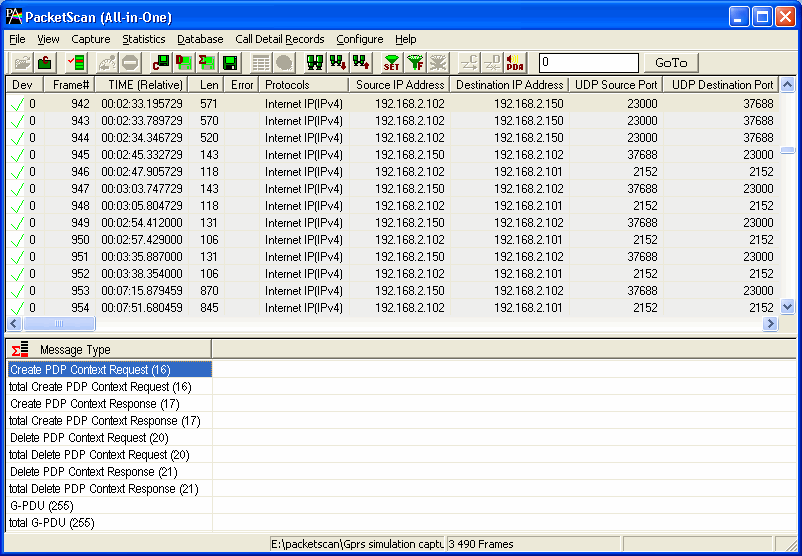
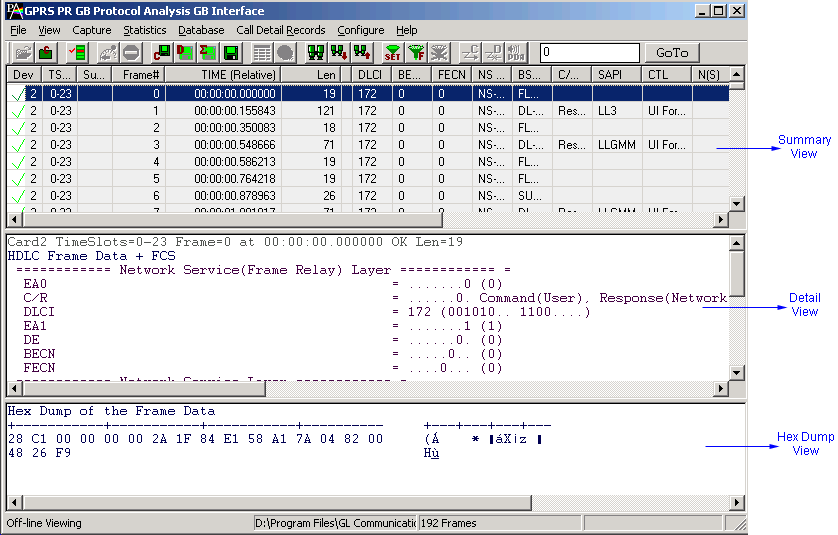
The GPRS analyzer application is invoked from the main menu of GL's T1/E1 Analyzer for real-time analysis. The offline GPRS analyzer is invoked from the installation directory of the offline GPRS analyzer. Both GPRS (Gb) as well as GPRS (Gn) analyzer has three different panes i.e. Summary View, Detail View and Hex Dump. The Summary pane for Gb interface displays Direction, Device Number, Frame Number, Time, Length, Time of Capture, Frame Error, DLCI Value, FECN Value, BECN Value, NS PDU Type, BSSGP PDU Type, SAPI Value, LLC Frame Type, N (S), N(R), N (U), Control Field Format, GPRS Mobility Management / Session Management Message Type, SNDCP Message Type, SMS Message Type etc. Summary pane for Gn interface displays Direction, Device Number, Frame Number, Time, Length, Time of Capture, Frame Error, Source IP Address, Destination IP Address, UDP Source and Destination Port, TCP Source Port and TCP Destination Port, GTP Message Type etc. User can select a frame in summary view to analyze and decode each frame in the detail view. The Hex dump view displays the frame information in HEX and ASCII formats.

Screen Shot of Summary and Detail View


Real-time and Offline Analysis

Users can capture and analyze multiple GPRS interfaces in real-time and record all or filtered traffic into a trace file. The recorded trace file can then be analyzed offline and exported to ASCII file, or printed.

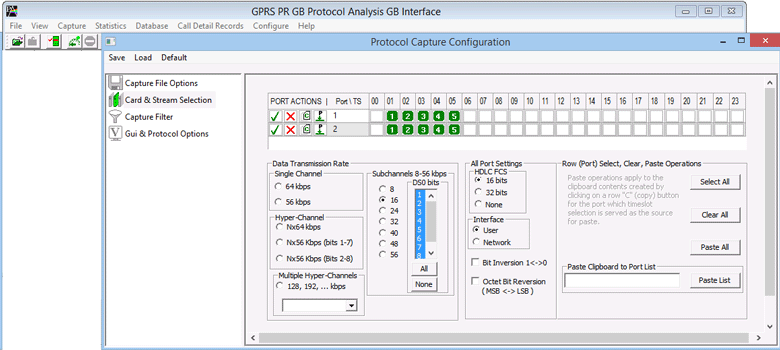
For real-time capturing on Gb interface, users are required to specify timeslots, bit inversion, octet bit reversion, user/network side, FCS, and data transmission rate. Recorded trace files over the Gb interface can be played back on T1/E1 using the HDLC file playback option.

Screen Shot of Timeslot selection


Ethernet Interface for the Gn Interface

The PC ethernet interface is used to monitor the Gn interface.

Screen Shot of Ethernet Card Selection


Filtering and Search

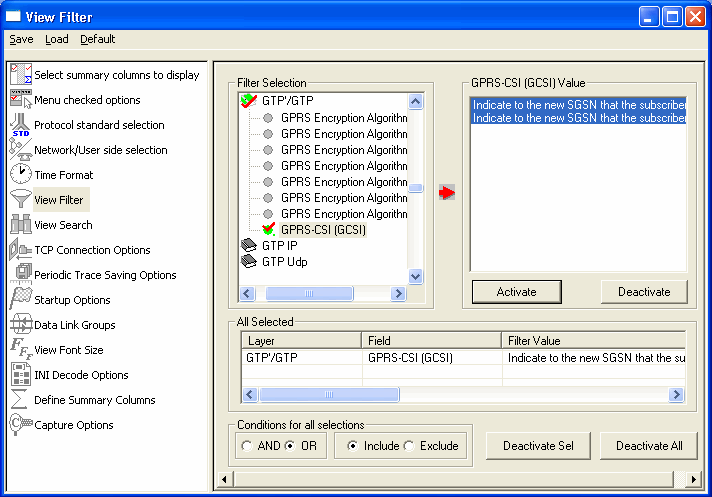
Users can record all or filtered traffic into a trace file. Filtering and search capability is another powerful feature available with the GPRS Analyzer. This enables the user to isolate interesting frames from all frames in real-time as well as in off-line modes.

For Gb interface, users can specify custom values for frame length to filter frames during real-time capture. The frames can also be filtered after completion of capture according to to Frame Number, Time, Length, Error, C/R, SAPI, CTL and more.

For Gn Interface, Ethernet based real-time capture filtering capabilities based on Source/Destination IP address, Mac Layer Address, and more can be applied.

Similarly, Search capability helps user to search for a particular frame based on specific search criteria.

Screen Shot of Setting the Filtering Criteria

Screen Shot of Setting the Filtering Criteria in Gn Interface


Call Trace and Statistics View

Call trace defining important call specific parameters like Call ID, Call Status, Call duration, Device Number, BVCI, Call type etc are calculated for Gb Interface and IMSI, NSAPI for Gn Interface. for each individual call from the captured data and display the information in an organized fashion. Call traces can also be logically grouped, with each group comprised of unidirectional (either 'Forward' or 'Backward') data links (applicable for Gb interface only)

Statistics is an important feature available in GPRS analyzer and can be obtained for all frames both in real-time as well as offline mode. Various statistics can be obtained to study the performance and trend in the GPRS network and it is based on protocol fields and different parameters such as User Type (Key/Total/Field), Statistic type (Frame count, Byte count, Frames/Sec) and patterns like Range List, Wild card etc.

Screen Shot of Statistics and Call Trace View


Enhanced Trace Saving Options

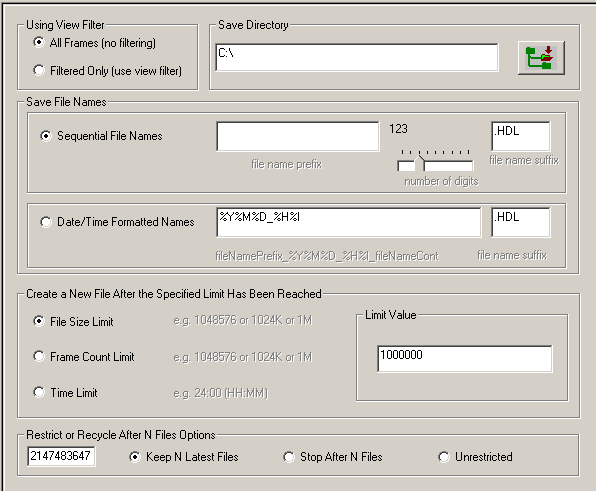
Users can control the captured trace files by saving the trace using different conventions such as trace files with user-defined prefixes, trace file with date-time prefixes, and slider control to indicate the total number of files, file size, frame count, or time limit. This feature also allows the captured frames to be saved into a trace file based on the filtering criteria set using display filter feature.

Screen Shot of Enhanced Trace Saving Options Window


Save/Load All Configuration Settings

Protocol Configuration window provides a consolidated interface for all the important settings required in the analyzer. This includes various options such as protocol selection, startup options, stream/interface selection, filter/search criteria and so on. All the configuration settings done in any of these options can be saved to a file, loaded from a configuration file, or user may just revert to the default values using the default option.

Screen Shot of Save/Load All Configuration Settings Window


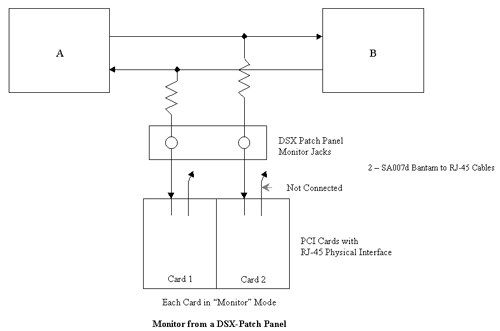
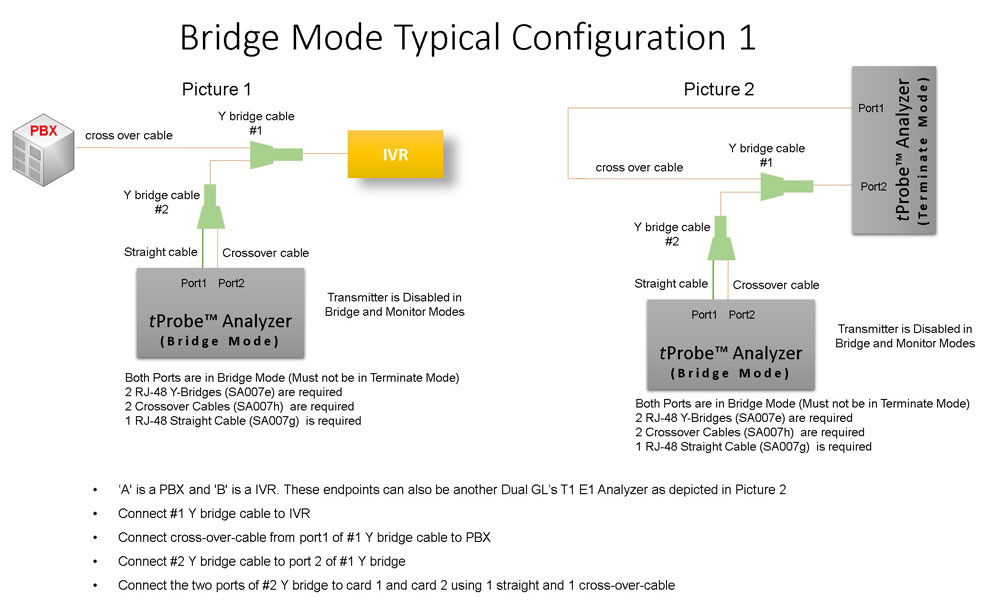
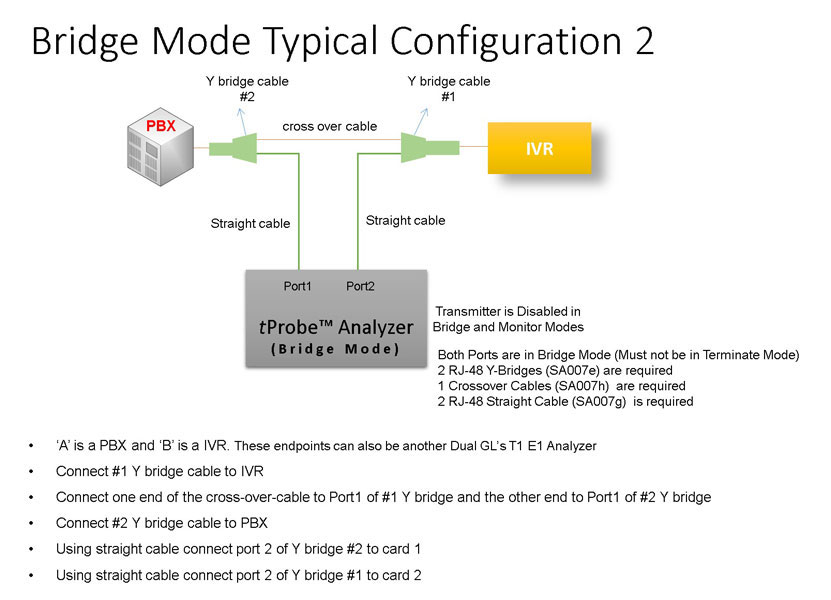
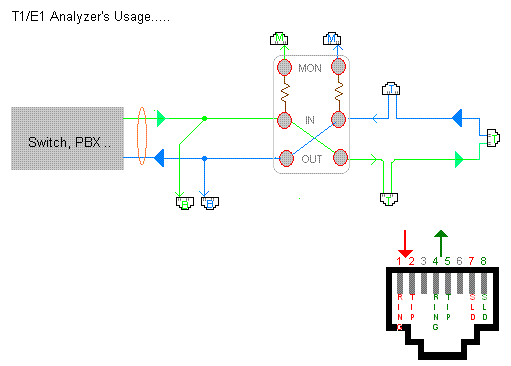
Bridge and Monitor Connections


Buyer's Guide:

Please Note: The XX in the Item No. refers to the hardware platform, listed at the bottom of the Buyer's Guide, which the software will be running on. Therefore, XX can either be HDT, HDE, HUT, HUE, UTA or UEA depending upon the hardware.

Item No. Item Description
XX155 GPRS Protocol Analyzer
OLV155 Offline GPRS Protocol Analyzer
  Related Software
XX090 HDLC Capture and Playback Software (T1 or E1)
XX100 ISDN Analysis Software (T1 or E1)
XX120 SS7 Analysis Software (T1 or E1)
XX130 Frame-Relay Analysis Software (T1 or E1)
XX150 GSM Analysis Software (T1 or E1)
XX153 TRAU Analysis Software (T1 or E1)
  Related Hardware
HDT001/HDE001 Legacy HD T1 or E1 (PCI) Cards with Basic Analyzer Software
HTE001 Universal T1/E1 Card
UTE001 Portable USB based Dual T1 or E1 Laptop Analyzer 

* Specifications and features subject to change without notice.

 Back to Protocol Analysis Index Page


Home Page Sitemap Global Presence Email