Call Processing Tool (Call Data Records)
Call processing tool to analyze call records for failure, voice quality, and proper signaling. CDR is a software-based Call Processing tool part of the GL’s TDM Call Capture and Analysis (CCA, PacketScan™, PPP Analyzer) solution.
Brochure Request a Demo / Quote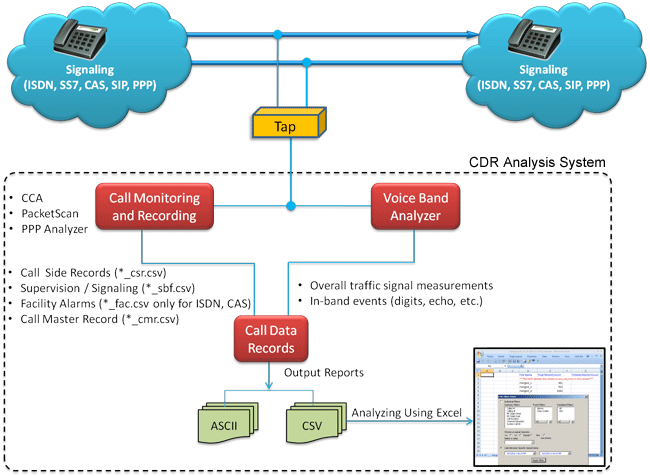
Overview
The telecommunication industries often face challenges in analyzing customer behavior from the large volumes of call records that are in the database over a period of time. Analyzing call records for failures, voice quality and proper signaling from a huge database is computationally intensive task and requires specialized call processing tools.
GL's Call Data Records (CDR) output centers around each 'call' and for each call it reports comprehensive information occurring on T1 and E1 lines and IP networks, including,
- Voice capture for both directions
- Supported codecs data rates are - a-law, µ-law, 16-bit PCM (Intel), 16-bit PCM (Motorola), MS Wave, G.726 (40 Kbps, 32 Kbps, 24 Kbps, and 16 Kbps), and 14-bit 16 KHz G.722 (64 kbps)
- Complete signaling information for each direction for CAS, ISDN, MFC-R2, SS7, SIP, MLPPP and more
- All alarms and errors occurring during the call including BPV, Frame Errors, CRC errors, LOS, and more
- Detailed voiceband event information occurring during the call including dual tones (DTMF, MF, MFC-R2), fax tones, modem signals, and more
- Detailed analysis of the voiceband call including noise level, speech level, speech activity factor, echo measurements, and more
- Categorization of the call as voice, fax, modem, or data
- Companion programs that allow easy search for any "unique feature, aspect, or parameter" of calls - even among hundreds of thousands of calls.
The generated measurements along with the recorded voice files of a particular call are combined in a custom Excel® Addin allowing the users to do custom filtering based on any measurements (ASL, AF, % Digits, %Voice, Mid-call-digits,...) or signaling messages (ISDN signaling, CAS Signaling, Release Codes, Call Duration, Call Events,...). Call Data Records application compiles the output of PacketScan™, PPP Analyzer, or CCA (Call Capture and Analysis) application and (optionally) VBA (Voice Band Analyzer) application and generates the following 2 types of reports -
- Call Summary Report - This report contains a single summary line for each call, giving information such as the inbound and outbound ports, channel number, time of seizure and release, and other summary information.
- Call Detail Report - This report contains call summary data, as well as the progression of supervisory and in-band events during the call and an overall summary of in-band measures for each direction.
GL Communications Inc's approach to Call Data Records (CDR) compilation is as depicted in the pictures below.
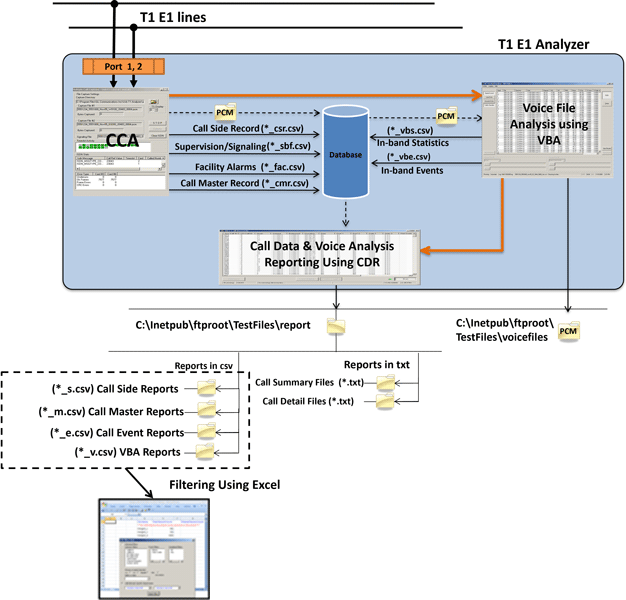
- Call Capture & Analysis (CCA):
This application monitors hundreds of call in real-time, captures bidirectional channel data and records it into PCM signal files, including logging of detailed analysis of selected voice band streams into *.csv files. Capture may be triggered according to various protocols such as signaling bits, ISDN, SS7, CAS, SIP, MLPPP etc. CCA also records signaling and alarm events, as well as producing a summary record for each call. The files containing the event and call summary records are collectively referred to as Call Record Files.
Each CCA instance can monitor a single T1 or E1 trunk. Multiple CCA instances may be run concurrently to monitor multiple trunks. Here, CCA is discussed mainly in the context of Call Data Records generation. The CCA allows to log capture events in CSV or binary files and to feed these results into Call Data Records (CDR) application to provide an overall summary of the call as well as the event-by-event account of each call.
- Multiple Call Capture and Analysis:
GL’s Multi CCA application is similar to CCA, where in it is used to monitor hundreds of calls, capture the bidirectional data, signaling and traffic, simultaneously from multiple T1 E1 lines, based on the user-defined trigger configurations. Once the capture trigger type is selected, users can control and run multiple capture instances on different T1 E1 ports from a single GUI.
- PacketScan™:
The analyzer in real-time is used to capture and monitor live IP, VoIP, and IP based video traffic.
It can be used as a stand-alone tool as well as a probe in a distributed system using a central database such as Oracle as implemented in GL's NetSurveyorWeb™ application. Besides the SIP (H.323, MGCP, and Megaco) messaging and RTP impairment reports, additional functions include reporting of Mean Opinion Score (MOS) / R-factor scores matched to the call as part of the Call Detail Record (CDR). It also has a powerful Trigger Action feature that can be used to select and save calls (audio or PCAP) based on parameters in the CDR. Also included is the ability to save the actual RTP of the call. The analyzer can also be configured and set to automatically start monitoring traffic with the filters, trigger actions and parameters previously saved. This also includes automatically connecting to a remote database for NetSurveyorWeb™ applications.
- Voice Band Analyzer (VBA):
This application operates in near-real-time, processing the signal files recorded by CCA. VBA may be configured to detect in-band events such as sporadic echo, digit tones, in-band impairments, and the like. It also produces summary measurements of the captured signals, including active speech levels, noise level, percent time active, DC offset and the like. VBA records its output into two files, the first containing overall channel measurements, and the second containing event records.
A single VBA instance will analyze any number of files. This is an optional component. Here, VBA is discussed mainly in the context of Call Data Records generation. Like VBA, a single CDR instance will compile any number of files into Call Data Records.
Working Principle
- CDR is a daemon process which keeps busily looking for files to process and continues till manually stopped
- Classifies the captured events from CCA, PacketScan™, PPP Analyzer into Call summary information (CSR, CMR), Channel supervision (CAS, ISDN, etc.), and Facility alarms results
- Classifies the captured events from VBA into In-band events (digits, echo, etc.) results and overall traffic signal measurements
- CDR can be configured to output its results to "comma-separated values" ("CSV") files or ASCII file for loading into a database or spreadsheet
- Call Data Records center around a "call". From the standpoint of records, a "call" consists of a recording of both (or all) sides of a conversation, along with records of importance to service providers. CDR processes file sets produced by all the captured calls as described in the following table. Each set consists of up to six files, all of which pertain to an individual call.
- All files are in "CSV" ("Comma-Separated Values") format, a widely used format in the Windows® world understood by popular data management applications such as Microsoft® Excel and Access. The files in each set are described in the following table:
- The generated call records can be processed in a custom Excel® Addin and analyzed comprehensively to get the calls of interest using a built-in add-in included with the
Excel® application.
"*" stands for the set of file names
| File | Designation | Description | Source |
|---|---|---|---|
| Call Summary | "*_csr.csv" | Call Side Records (CSR) | CCA |
| "*_cmr.csv" | Call Master Record (CMR) | CCA | |
| Supervision | "*_sbf.csv" | Channel supervision (CAS, ISDN, etc.) | CCA |
| Alarms | "*_fac.csv" | Facility alarms | CCA |
| In-band Statistics | "*_vbs.csv" | Overall traffic signal measurements | VBA |
| In-band Events | "*_vbe.csv" | In-band events (digits, echo, etc.) | VBA |
CDR Configuration
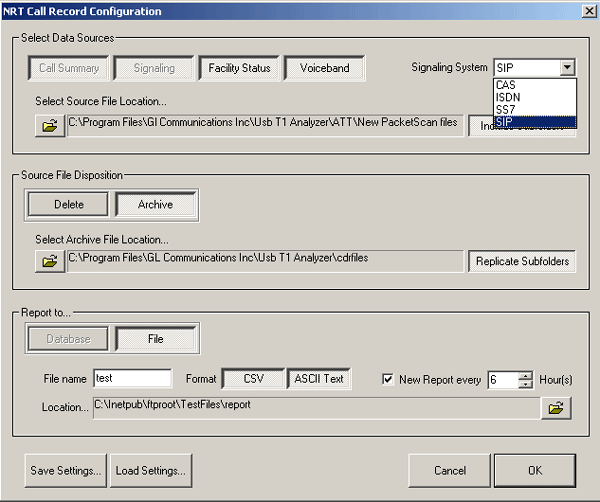
The configuration screen is organized into sections -
- Signaling System: supports ISDN, CAS, SS7, and SIP signaling system used by CCA / PacketScan™ to delimit calls. The signaling protocol used determines the Call Summary data that will be reported, and factors into CDR's evaluation of call status. Note that CCA / PacketScan™ and CDR must agree on the signaling protocol.
- Data Sources: specifies source files utilization and channel supervision protocol used. Includes Call Summary, Signaling, Facility Status, & Voiceband types of data source. Strictly speaking, only the Call Summary file is required. However, a meaningful call detail report requires, at a minimum, supervisory and alarm files as well.
- Source File Disposition: manages CDR files after report generation for a given completed call.
- Report To: allows specifying the details of CDR's output. Users may opt to output into a text file or direct output to a CSV ("comma-separated values") file. Files for successive calls may all be stored in a single folder or may be stored in subfolders subsidiary to a single folder. CCA, VBA, and CDR must all use the same folder/subfolder structure. User can enable both CSV and ASCII simultaneously.
- Control Buttons: controls naming and saving configurations.
CDR Output Formats
CDR can be configured to output its results to text or Comma-Separated Values ("CSV") files.
Text Output
The CDR output in text format provides call summary report and call detail reports in ASCII.
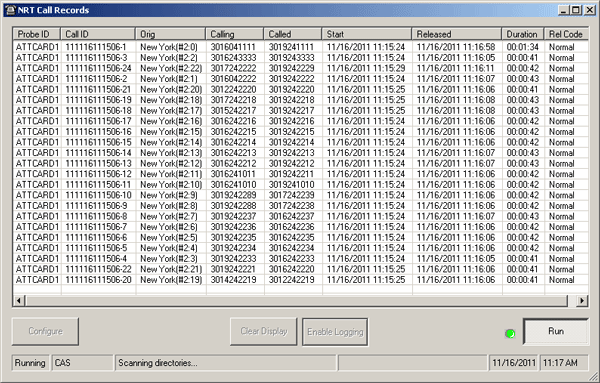
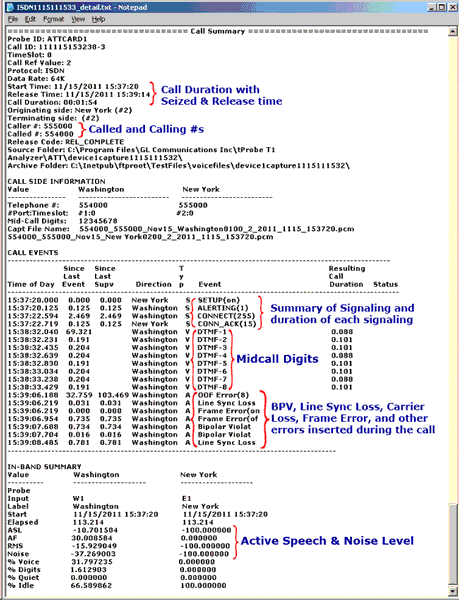
- Call Summary - gives an overall summary of the call, including the Probe ID, CALL ID, Timeslot, Call Ref Value, Protocol, Data Rate, Release Code and so on. Each call occupies one line of the report as indicated in the example
- Call Detail Report - Includes complete details of a call in four sections. The first Call Summary section gives a brief summary of the call as in the call summary text file. This is followed by Call Side Information, which gives Telephone number, Port and Timeslot number, Mid call digits, and Capture file name. This is then followed by Call Events section that gives an event-by-event account of the call. Events include channel supervision events, sporadic echo, alarms, and various traffic details. If VBA output is chosen, the Inband summary section appears with various in-band statistics details depending on each algorithm selected in VBA.
A sample Call Summary and Call Detail Records are shown in the screenshots below with the In-band summary including Active Speech Level algorithm (ASL, AF, RMS, Noise, and Clip fields) and Traffic Classifier algorithm (%Fax, %Voice, %Digits, %Quiet, and %Idle fields).

CSV Output
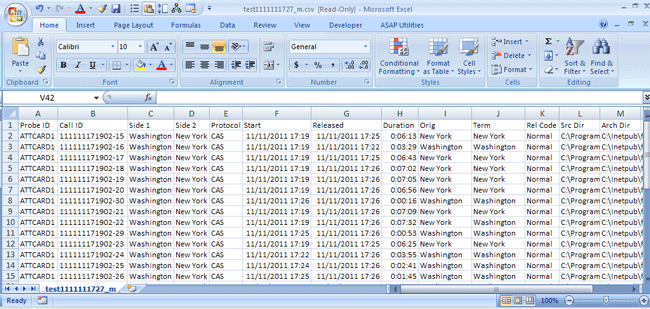
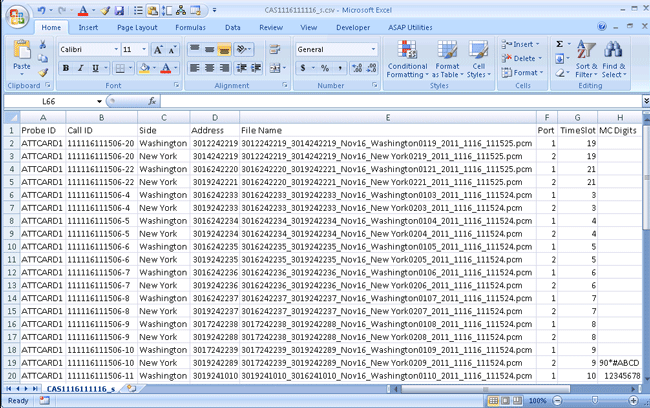
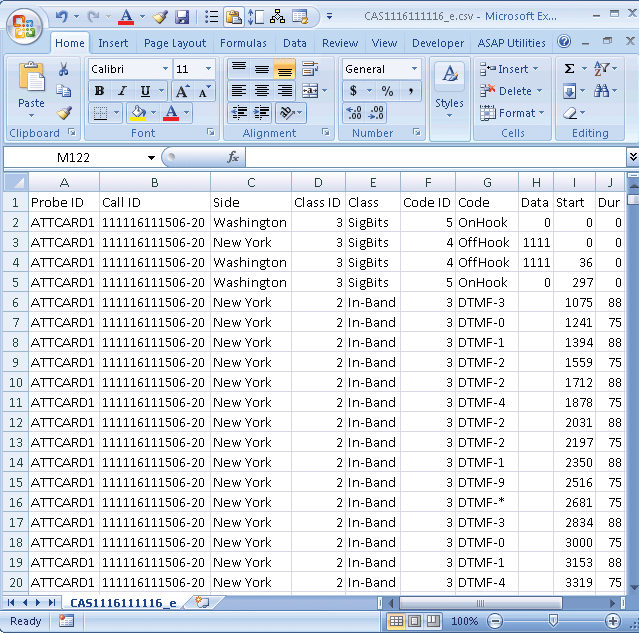
The CDR output in CSV format provides 4 different files for call summary, call side information, call events, and In-band summary. The name of the call summary records file will be the name you specified on the configuration screen followed by "_m.csv" where "_m" indicates call master records, "_s.csv", where the "_s" indicates call side records "_e.csv", where "_e" indicates event and "_v.csv", where the "_v" indicates voiceband statistics.

CDR Excel® Add-In for Advanced Filtering:
The generated CSV call records can be processed in Excel® application and analyzed more comprehensively to get the calls of interest using a built-in tool included with the Excel® application.
For more details visit : Call Detail Records (CDR) Analysis using custom Excel® Addin.
- The generated measurements along with the recorded voice files of a particular call are combined in the Excel® allowing the users to do custom filtering based on any measurements (ASL, AF, % Digits, %Voice, Mid-call-digits,...), or signaling messages (ISDN Signaling, CAS Signaling, Release Codes, Call Duration, Call Events,...).
- Retrieving Calls of Interest: The details of a selected call from the filtered records in Excel® can be printed or stored as PDF files for further scrutiny.
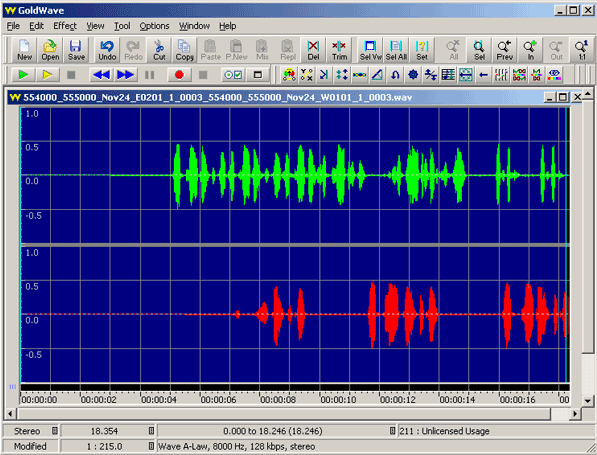
- Easy Invocation of Voice Files: The voice files of a particular call from the filtered records in Excel® can be downloaded or played back using third-party audio editing tools such as Goldwave®.
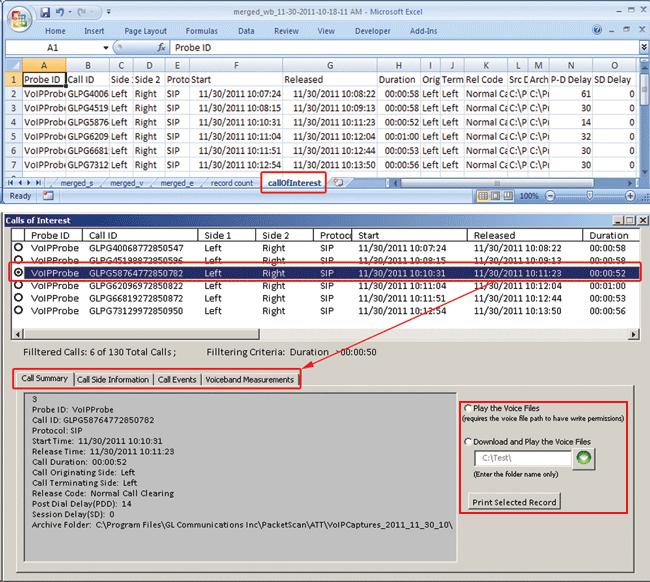
Excel® Add-in to filter Call Data Records based on various measurements,
date-time, and signaling messages
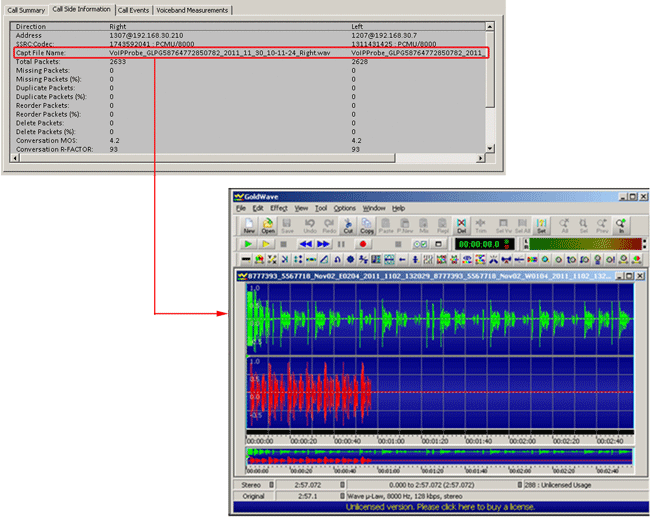
Play/Download the Stereo Voice Files from Filtered Calls
Resources
Please Note: The XX in the Item No. refers to the hardware platform, listed at the bottom of the Buyer's Guide, which the software will be running on. Therefore, XX can either be ETA or EEA (Octal/Quad Boards), PTA or PEA (tProbe Units), XUT or XUE (Dual PCIe Express) depending upon the hardware.
| Item No. | Item Description |
| CDR032 | Call Data Records |
| T1 E1 CDR Analysis System | |
|---|---|
| (The system requires any of the below mentioned T1 or E1 platforms with Basic Software) | |
| PTA031 PEA031 VBA032 VBA036 CDR032 MS Excel 2010 SA048 SA017B SA007e SA002b |
Enhanced Call Capture Analysis for T1 Enhanced Call Capture Analysis for E1 Voiceband Analyzer Traffic Analysis for VBA Call Data Records Advanced Filtering of Calls Goldwave Software RJ-48C Crossover Cables RJ-48 Y Bridge Dual 75/120 Ohm Transformer |
| Packet over TDM CDR Analysis System | |
| (The system requires any of the below mentioned T1 or E1 platforms with Basic Software) | |
| PTA135 PTA136 VBA032 VBA036 CDR032 MS Excel 2010 SA048 SA017B SA007e SA002b |
PPP and MLPPP Analyzer Packet Analysis for PPP and MLPPP Analyzer Voiceband Analyzer Traffic Analysis for VBA Call Data Records Advanced Filtering of Calls Goldwave Software RJ-48C Crossover Cables RJ-48 Y Bridge Dual 75/120 Ohm Transformer |
| Packet over IP CDR Analysis System | |
| PKV100 PTA136 PKV301 VBA032 VBA036 CDR032 MS Excel 2010 SA048 |
PacketScan Packet Analysis for PPP and MLPPP Analyzer LAN Switch w/Mirror Port Voiceband Analyzer Traffic Analysis for VBA Call Data Records Advanced Filtering of Calls Goldwave Software |
| Related Software | |
| XX031 | Call Capture and Analysis Software with Traffic Activated Trigger Option - Call Capture and Analysis Software & the following accessories, - CCA Cable Kit (2 -SA007e Y Bridges, 1 - SA017a & 1 - SA017b Straight & Crossover Cables, & 1 - SA007k Mono to Stereo Miniature Phone Y Cable) - Goldwave Software (SA048) |
| VQT035 | Voice Recorder (FXO RJ11 Hardware Tap / 2-Wire Capture Software) |
| XX020 | Record/Playback File Software |
| XX051 | Synchronous Trunk Record Playback |
| XX019 | Transmit/Receive File Utility Software |
| SA026 | Adobe Audition Software |
| SA048 | Goldwave Software |
| SA021 | File Edit Software |
| STE40 | Mux-Demux Software |
| VBA032 | Near Real-time Voice-band Analyzer |
| PKB070 | Audio Processing Utility |
| Related Hardware | |
| FTE001 ETE001 |
QuadXpress T1 E1 Main Board (Quad Port– requires additional licenses) OctalXpress T1 E1 Main Board plus Daughter Board (Octal Port– requires additional licenses) |
| PTE001 | tProbe™ Dual T1 E1 Laptop Analyzer with Basic Analyzer Software |
| XTE001 |
Dual T1 E1 Express (PCIe) Boards (requires additional licenses) |
| VQT251 | Dual UTA HD Next generation Dual UTA with FXO Wideband support |
| VQT252 | Dual UTA HD – Bluetooth Option |
| VQT461 | Dual UTA HD Smartphone ACC Cable |
 Back to List of T1 E1 Basic and Optional Applications Index Page