High-Speed Ethernet/IP Bit Error Rate Testing (BERT)
up to 100G
BER Traffic generation and verification across all layers - Ethernet, VLAN, MPLS, IP and UDP
Sample Test Report
Request a Demo / Quote Brochure
Overview
PacketExpert™ 100G supports wirespeed Bit Error Rate Testing (BERT) up to 100 Gbps over Framed Ethernet (Layer 2), Stacked VLAN (Q-in-Q), Stacked MPLS (Layer 2.5), IPv4/IPv6, and UDP. It can transmit and receive various bit patterns including industry standard PRBS patterns and user-defined patterns. The device can also intentionally introduce bit errors. Wirespeed BERT is supported on two 100 Gbps optical ports.
- BER test can be performed on various link speed such as 1G, 10G, 25G, 40G, 50G, and 100G
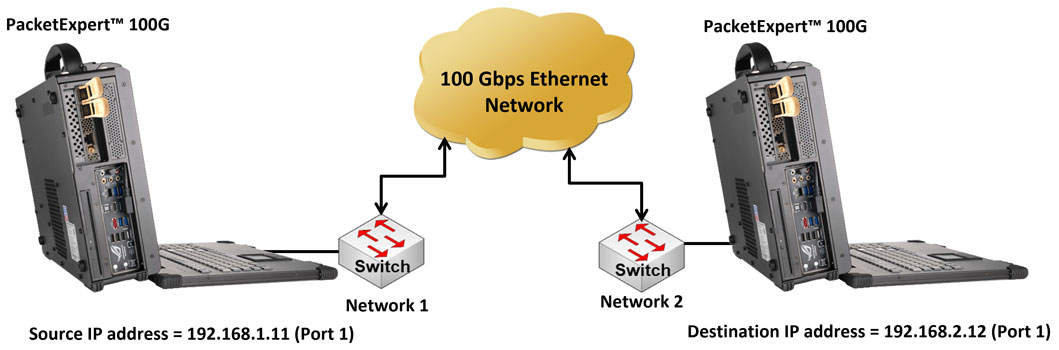
- Source and destination PacketExpert™ 100G applications can be in different IP networks, connected through the switches (As shown in the diagram, PacketExpert 100G devices are connected through the switches)
A simple BER test can help validate the routers’ ability to route IP packets correctly at various speeds and the ability of various other routers on the path to forward IP packets without packet drops and in the correct sequence. PacketExpert™ provides layer-wise wirespeed BERT implemented at all layers – Ethernet, VLAN, MPLS, IP and UDP. BERT application allows BER traffic generation and verification, bit error insertion, support for various pattern types, and BERT measurements. It also provides a real-time graphical representation of the bit error count plotted over time.
PacketExpert™ 100G - Bit Error Rate Testing
BERT test setup at Layer 3/4 involves connecting PCs through IP routers and LAN switches, which act as the DUT.
In Layer 3 test setup, the source and the destination PacketExpert™ ports are in different IP networks. These two networks are connected through a router.
A simple example above shows two LANs connected through a router. Layer 4 test setup is similar to the test setup for Layer 3, as UDP is carried over IP. At Layer 4, proper UDP packets are sent (instead of raw IP packets as in the case of Layer 3 testing). This verifies the ability of the IP network to sequentially route UDP packets to the destination. For Layer 4 testing, source and destination UDP ports need to be configured in addition to the MAC and IP addresses.
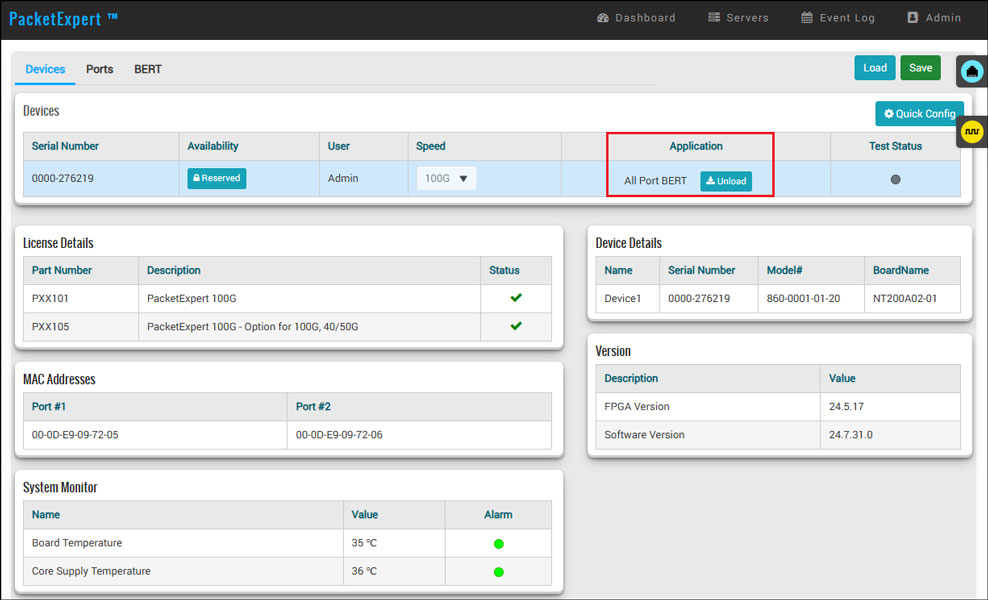
Loading BERT Application
Frequently Asked Questions
- What is Wirespeed Bit Error Rate Testing (BERT) on PacketExpert™ 100G?
- Wirespeed BERT on PacketExpert™ 100G generates and verifies BER traffic at full line rate up to 100 Gbps across Framed Ethernet, Stacked VLAN (Q-in-Q), Stacked MPLS, IPv4/IPv6, and UDP layers.
- Which layers can be tested with PacketExpert™ 100G BERT?
- BERT can be performed at the Ethernet (Layer 2), VLAN, MPLS (Layer 2.5), IP, and UDP layers.
- Which link speeds are supported for BER testing?
- BER testing can be performed at link speeds of 1G, 10G, 25G, 40G, 50G, and 100G.
- Which PRBS patterns are supported?
- Supported PRBS patterns include 29-1, 211-1, 215-1, 220-1, 223-1, 229-1, and 231-1.
- Are user-defined bit patterns supported?
- Yes. In addition to PRBS and fixed patterns (All Ones, All Zeroes, Alternating Ones and Zeroes), users can configure user-defined patterns ranging from 1 to 32 bits.
- Can PacketExpert™ 100G intentionally introduce bit errors?
- Yes. PacketExpert™ 100G can intentionally introduce bit errors into the outgoing (Tx) traffic to validate error detection.
- What types of bit error insertion are supported?
- Single Error Insertion allows manually introducing a single bit error, while Rate Error Insertion allows a constant error rate, ranging from 10-4 to 10-9, to be introduced into the outgoing stream.
- What is the purpose of inserting a sequence number into BERT packets?
- An optional sequence number inserted into each packet allows the system to measure out-of-sequence packets and packet loss.
- What does the 'Process FCS Error Frames' option do?
- The 'Process FCS Error Frames' option allows frames with FCS errors to be received and processed in BERT as normal BERT frames.
- Does BERT support stacked VLAN and stacked MPLS?
- Yes. Both BERT and Loopback support stacked VLAN and stacked MPLS, and BERT can be configured to send/receive streams containing stacked VLAN and/or stacked MPLS frames.
- Can PacketExpert™ 100G measure delay (latency) and jitter during BERT?
- Yes. In addition to BER, PacketExpert™ 100G measures packet delay (latency) and jitter during BERT runs, showing min/max/current/average values with threshold-based pass/fail criteria.
- How is test traffic configured during BERT execution?
- The Traffic Configuration option lets users set the traffic rate in units such as %, Kbps, Mbps, Gbps, bps, KBps, MBps, and GBps, and choose a frame size type, enabling realistic and repeatable traffic profiles for BERT validation.
- What frame size types are supported for traffic configuration?
- Supported frame size types are Fixed, Increment, Random, and EMIX.
- What is required for Layer 3 BERT test setup?
- In a Layer 3 test setup, the source and destination PacketExpert™ ports are placed in different IP networks connected through a router, validating the router's ability to correctly route IP packets.
- What is required for Layer 4 BERT test setup?
- Layer 4 testing is similar to Layer 3, but proper UDP packets are sent instead of raw IP packets, requiring source and destination UDP ports to be configured in addition to the MAC and IP addresses.
- What BERT result measurements are provided?
- BERT results include Bit Error Rate, Bit Error Count, Bit Error Seconds, Sync Loss Count, Sync Loss Seconds, Error Free Seconds, No Rx Data Count/Seconds, and overall BERT Status.
- What port-wise statistics are available?
- Port-wise statistics include Frame Count, Frame Rate, Link Utilization, Data Rate, Frame Type (Broadcast, Multicast, VLAN), Frame Length distribution, and Protocol Type (IPv4, IPv6, UDP, TCP, ICMP, IGRP, etc.), plus stacked VLAN/MPLS statistics by stack position.
- In what formats can BERT reports be generated?
- PacketExpert™ 100G can generate consolidated BERT reports in both CSV and PDF formats, including Interface, BERT Statistics, and Tx/Rx Statistics and Configuration details.
- How is the test verdict determined in a BERT test?
- The BERT test verdict is determined by comparing measured bit errors against a user-specified threshold value.
Wirespeed Ethernet BER Testing
The PacketExpert™ 100G can measure bit error rates over Framed Ethernet (Layer 2), MPLS (Layer 2.5), IP, and UDP layers at specific frame length and traffic rate Users can choose various PRBS patterns such as 29-1, 211-1, 215-1, 220-1, 223-1, 229-1, and 231-1. Additional patterns include All Ones, All Zeroes, Alternating Ones and Zeroes, and user-defined patterns ranging from 1 to 32 bits. By inserting an optional sequence number into each packet, the system can measure out-of-sequence packets and packet loss. The 'Process FCS Error Frames' option allows the reception of FCS frames in BERT as normal BERT frames. The test verdict is determined by a specified threshold value.
Both BERT and Loopback support stacked VLAN and stacked MPLS. BERT can be configured to send/receive streams with stacked VLAN and/or stacked MPLS frames.
Delay Measurement (Latency & Jitter) During BERT
In addition to BER, PacketExpert™ 100G measures packet delay (latency) and jitter during BERT runs. Users can view min/max/current/average values and apply threshold-based pass/fail to quickly confirm timing performance across routed paths.
- Confirms packet integrity + timing performance in a single test (BER + latency + jitter)
- Highlights delay variation caused by buffering, congestion, or DUT processing
- Enables automated validation using configurable jitter and delay thresholds
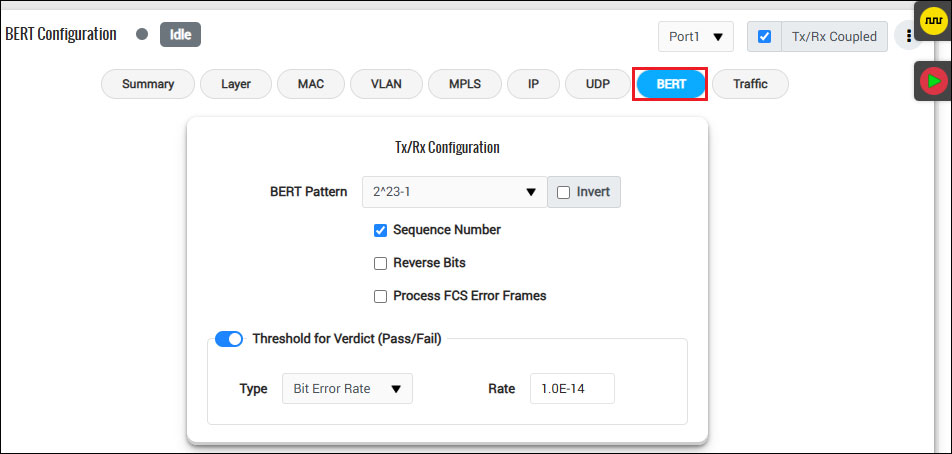
Tx Rx BERT Configuration
Flexible Options:
BERT and Loopback functionality can be accessed via various combinations according to testing needs:
- All Port BERT – Both port 1 and port 2 perform BERT (at full wirespeed, simultaneous Tx and Rx), per unit
- One Port BERT/one port Loopback – one port runs BERT while the other port runs loopback, per unit
- All Port Loopback – Both port 1 and port 2 run Loopback, per unit
Users can select the application to load, depending on the testing needs.
Traffic Configuration
The Traffic Configuration option allows users to control how test traffic is generated during BERT execution. Users can configure the traffic rate using multiple units, including %, Kbps, Mbps, Gbps, bps, KBps, MBps, and GBps, and select frame size types such as Fixed, Increment, Random, and EMIX. These settings enable realistic, repeatable traffic profiles and ensure accurate BERT validation under controlled load conditions.
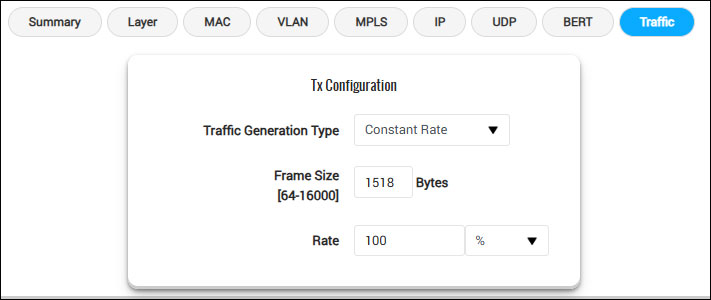
Traffic Configuration (Constant Rate)
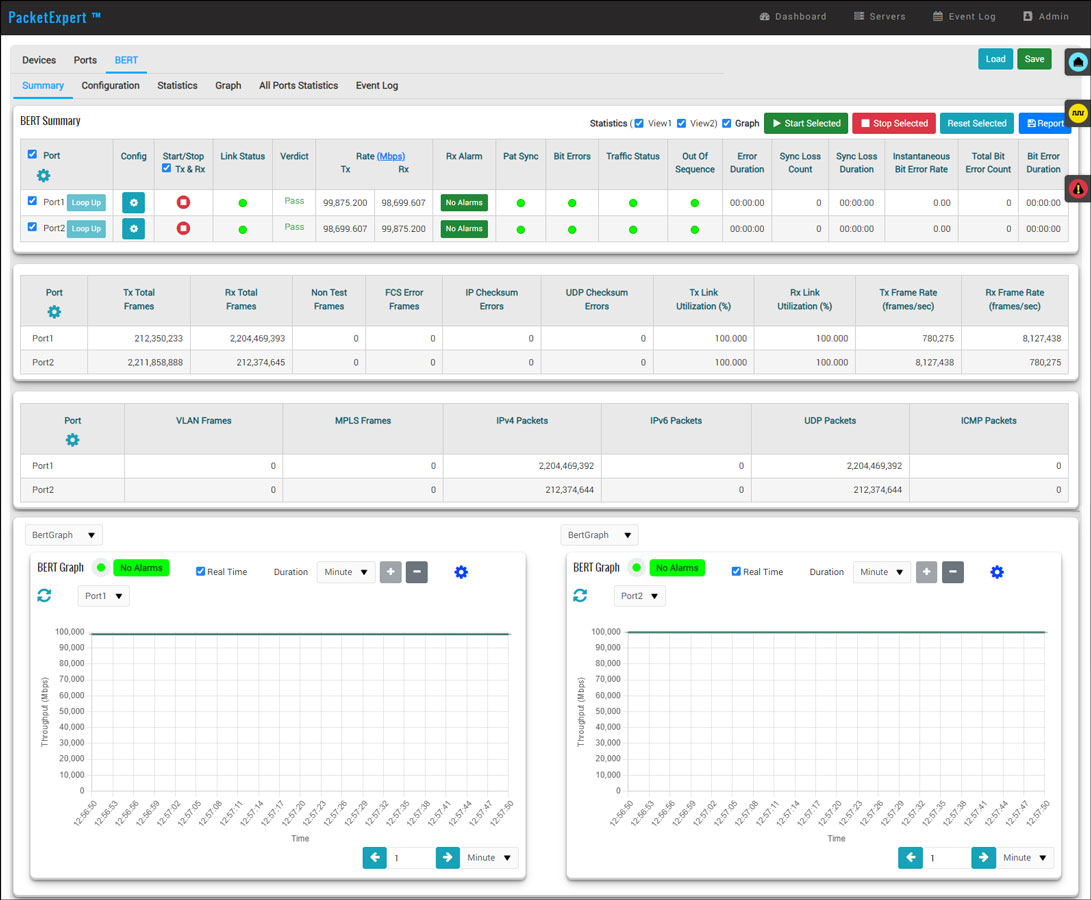
BERT Summary
PacketExpert™ 100G provides options to view the summary of the test along with BERT graphs showing throughput, bit errors, and sync status.
BERT Summary
BERT Results
PacketExpert™ 100G analyzes the received BER pattern and provides various vital measurements such as Bit Error Rate, Bit Error Count, Bit Error Seconds, Sync Loss Count, Sync Loss Seconds, Error Free Seconds, No Rx Data Count/Seconds, and BERT Status.
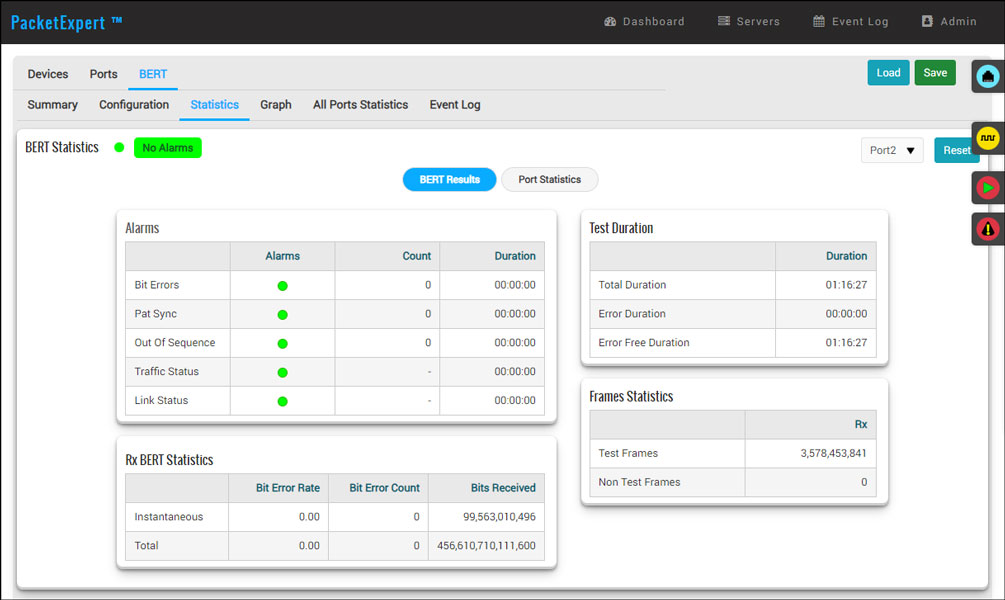
All Port BERT – Results
Error Insertion
PacketExpert™ 100G allows Bit Error Insertion into the outgoing (Tx) traffic.
In Bit Error Insertion, single error and Rate Error Insertion are supported. Single error insertion allows users to manually introduce a single Bit Error. Rate Error Insertion allows users to select a constant error rate, ranging from 10-4 to 10-9, to be introduced into the outgoing stream.
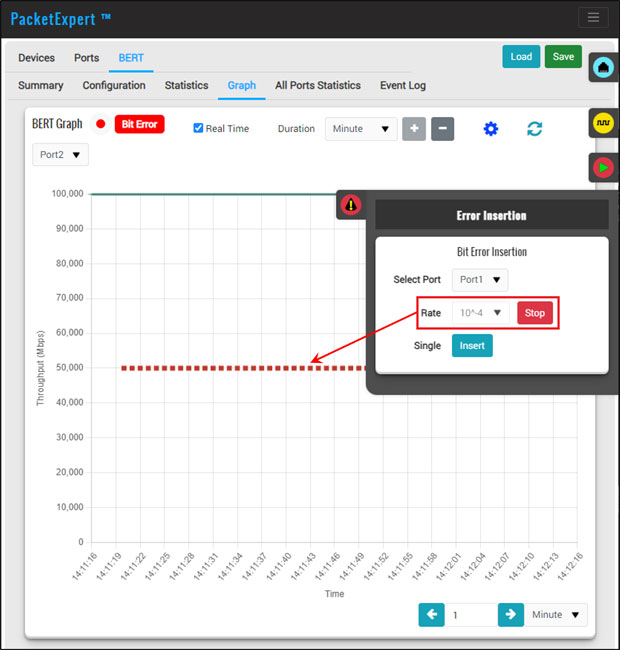
Bit Error Insertion
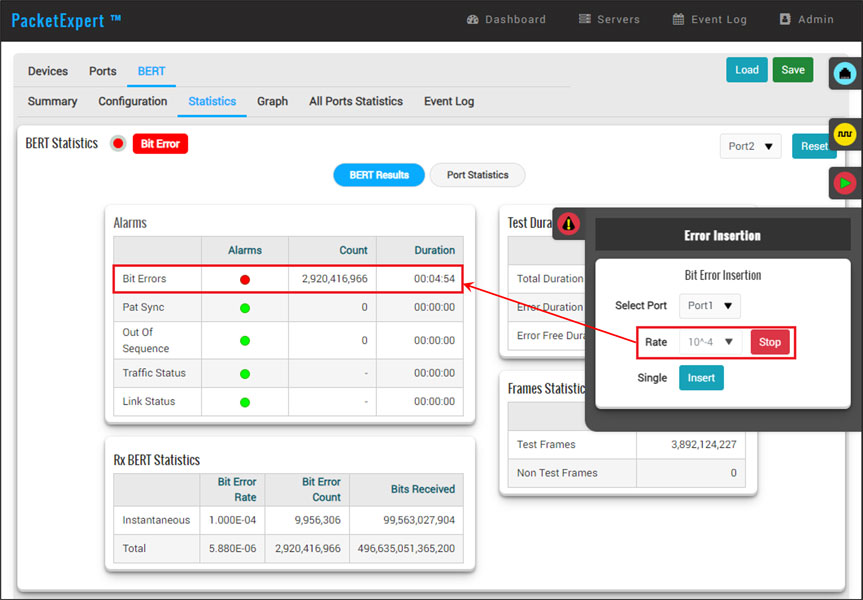
BERT Results with Bit Error Insertion
Port-Wise Frame Statistics
Detailed per-port statistics are provided. In addition to statistics like Frame Count, Frame Rate, Link Utilization (Layer 1 line rate in %), Data Rate (Layer 2 data rate in Mbps), etc., statistics are provided based on various categories like Frame Type (Broadcast, Multicast, VLAN), Frame Lengths (64, 65-127, 1024-1518, Oversized, Undersized), and Protocol Type (IPv4, IPv6, UDP, TCP, ICMP, IGRP etc.)
- Statistics for stacked VLAN and stacked MPLS are provided for detailed analysis. Statistics based on the packet count per VLAN/MPLS stack position are also provided
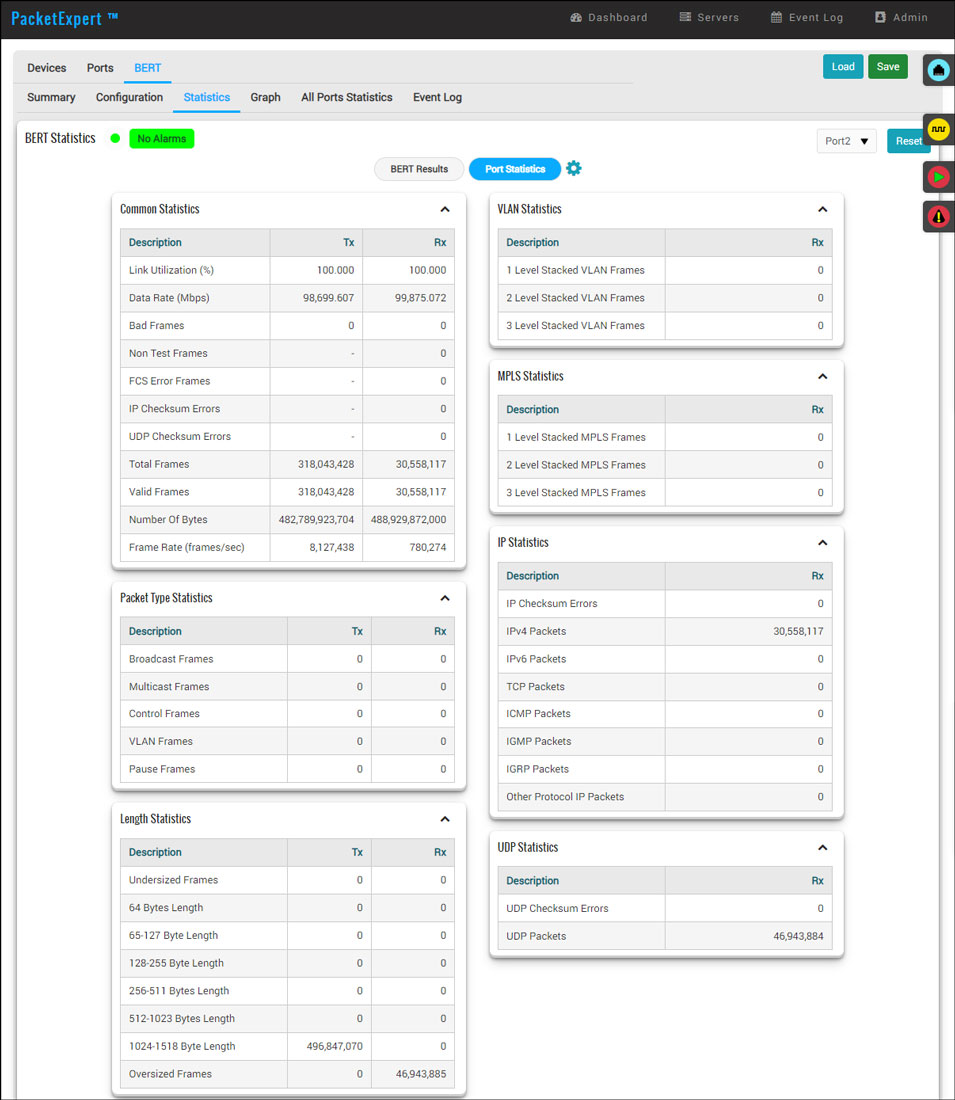
Tx and Rx Frame Statistics
- 'All Ports' result screen for BERT displays consolidated Frame Statistics for Tx Rx, BERT Status, and BERT Statistics results for both ports
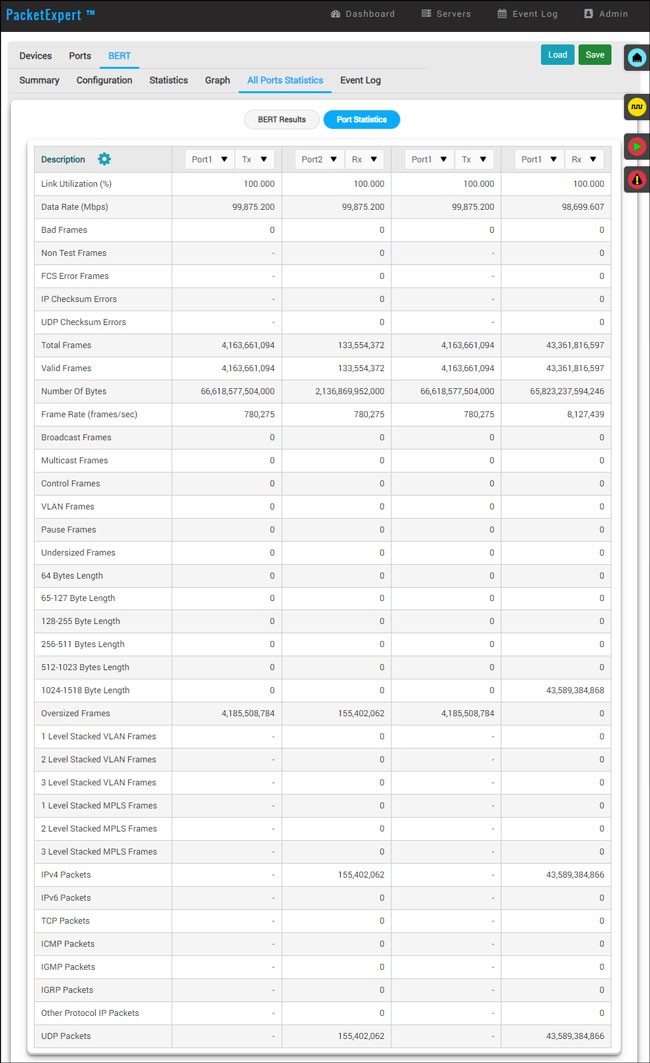
All Port BERT Statistics
Generate Report
PacketExpert™ 100G includes report generation option to generate consolidated reports in CSV and PDF file formats. The following sample CSV and PDF reports generated for ‘All Ports BERT' test includes Interface, BERT Statistics, Tx/Rx Statistics, and Tx/Rx Configuration details for 100G ports.
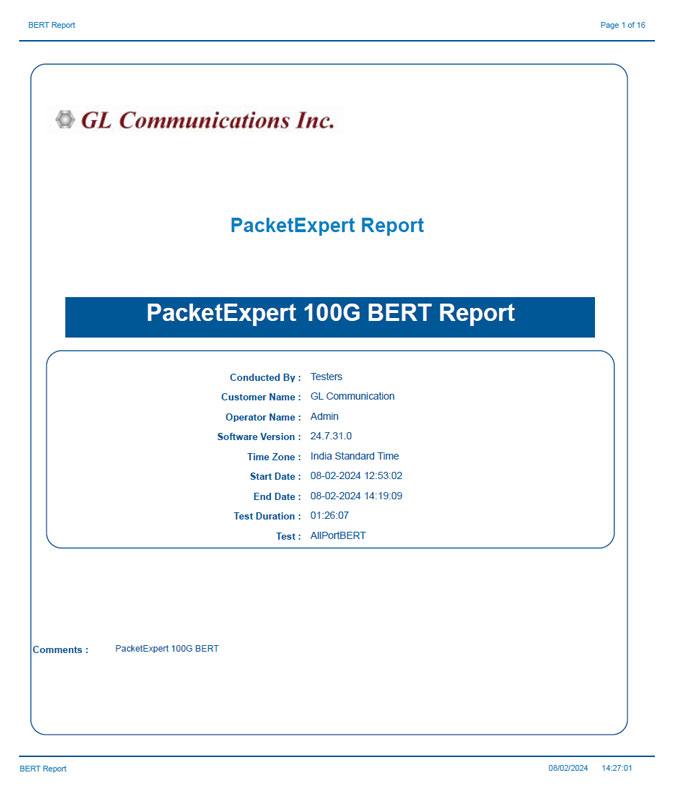
BERT Report Generated in PDF File Format
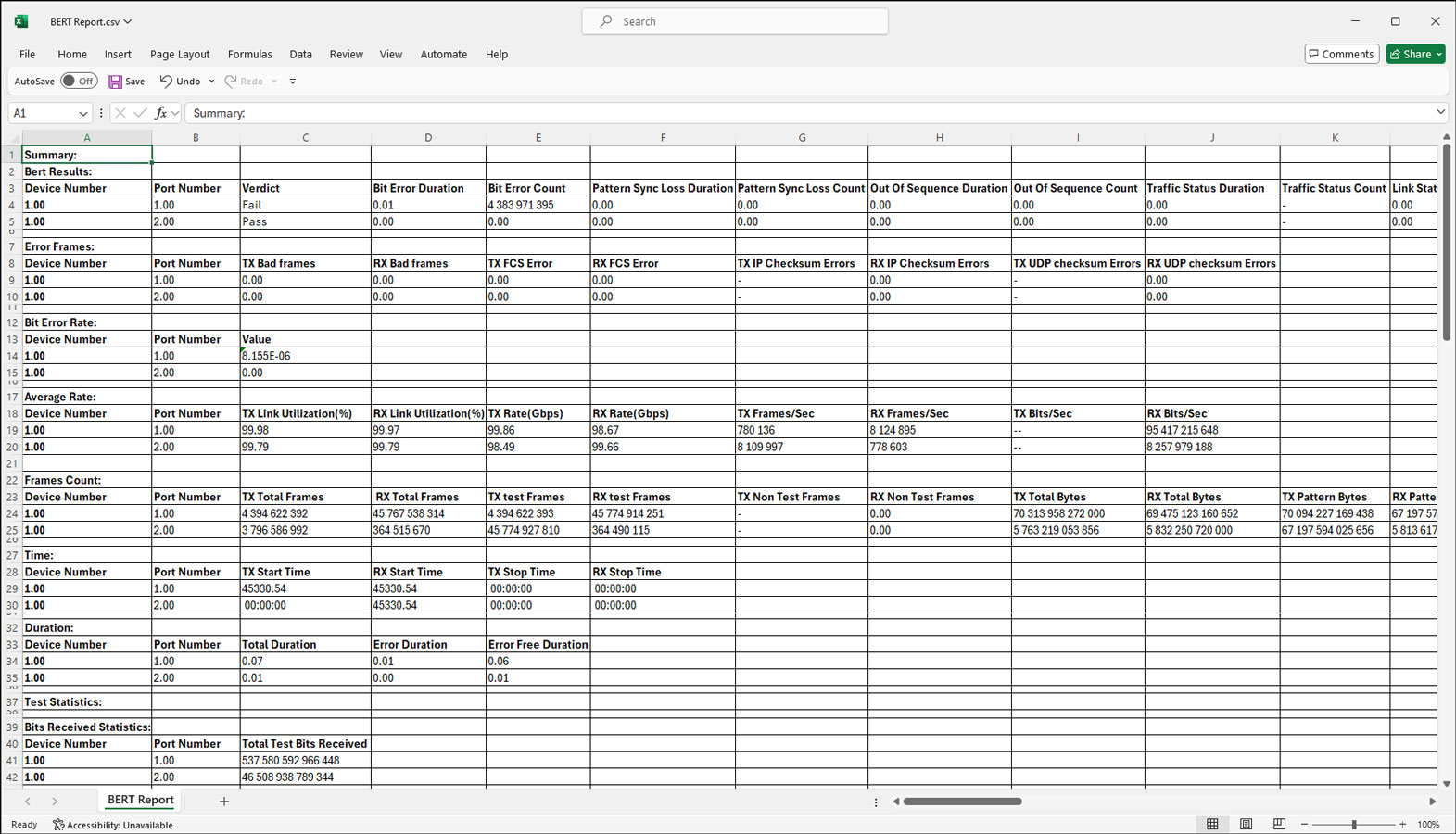
BERT Report Generated in CSV file format