ExpertTCP™ - TCP Throughput Testing (RFC 6349) on PacketExpert™ 100G
Validate TCP throughput using RFC 6349 methodology with Path MTU, RTT, bandwidth-delay product, and TCP window optimization, with multi-stream testing up to 10 Gbps on the PacketExpert™ 100G platform
Request a Demo / Quote Brochure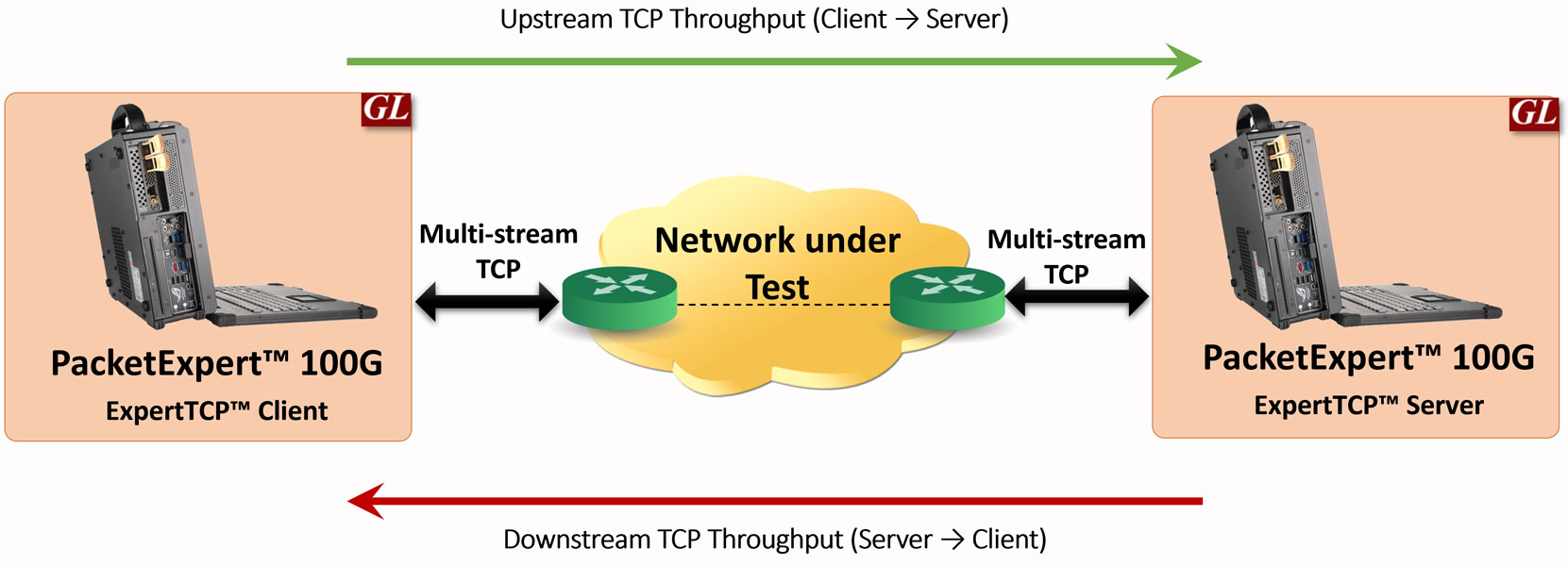
ExpertTCP Client-Server Mode
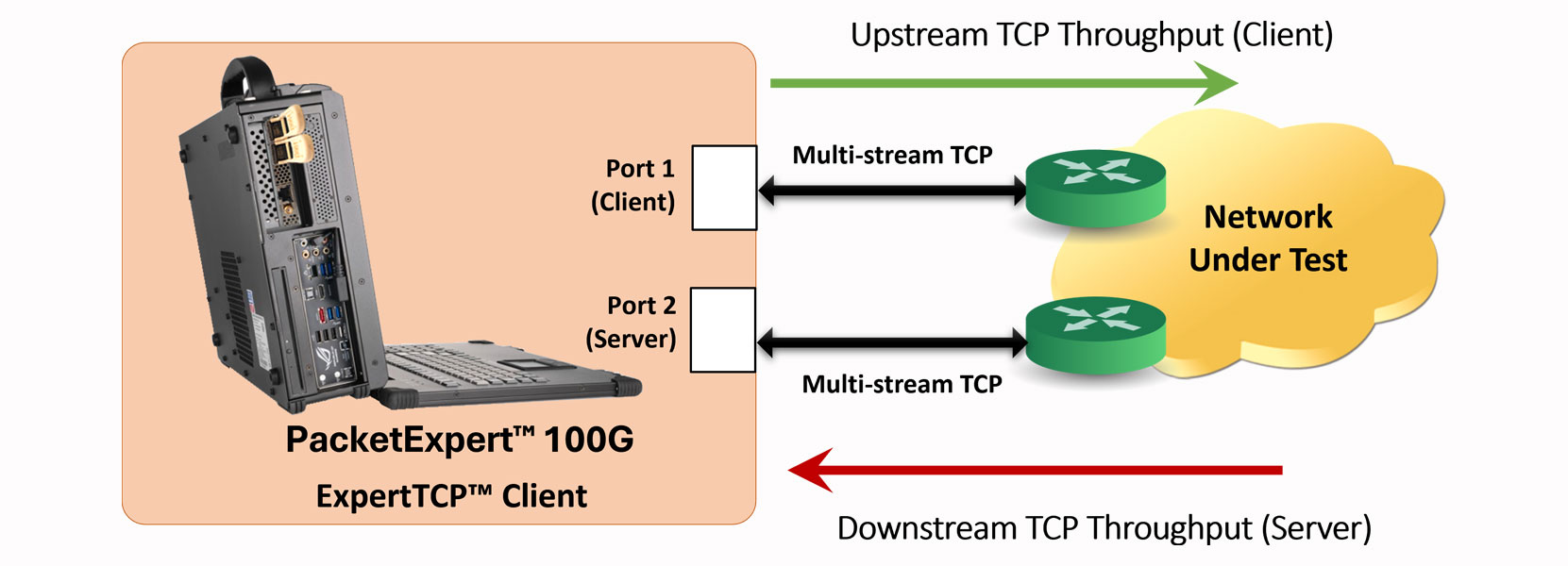
ExpertTCP™ Single Device Mode
Overview
ExpertTCP™ is an application within GL’s PacketExpert™ 100G platform that performs RFC 6349-based TCP throughput testing to evaluate realistic end-to-end TCP performance over Ethernet/IP networks. While traditional benchmarking methods such as RFC 2544 and Y.1564 validate Layer 2 and Layer 3 performance, they do not reflect actual application-layer behavior since most services including HTTP, FTP, email, cloud, and enterprise applications operate over TCP.
ExpertTCP™ addresses this gap by measuring key parameters including Path MTU, Baseline RTT, Bandwidth-Delay Product (BDP), TCP Receive Window (RWND), retransmissions, and TCP throughput efficiency. Testing is performed between two PacketExpert™ units operating as client and server, supporting upstream, downstream, and simultaneous bidirectional testing with results reported independently for each direction. The application operates on Gigabit and 10 Gbps Ethernet networks with an aggregate TCP generation rate of up to 1 Gbps, and features a web-based multi-user interface accessible through standard browsers on PCs, laptops, and tablets.
Key Features
- Performs RFC 6349-based TCP throughput testing for accurate end-to-end TCP performance validation over Ethernet/IP networks
- Supports testing on 2×1G and 2x10G interfaces of the PacketExpert™ 100G platform with an aggregate TCP generation rate of up to 10 Gbps
- Automatically executes Path MTU Discovery, Baseline RTT measurement, Bandwidth-Delay Product (BDP) calculation, and TCP Receive Window (RWND) optimization as part of the RFC 6349 workflow
- Measures key TCP performance metrics including throughput, retransmissions, RTT, transfer time, and TCP efficiency
- Supports upstream (Client → Server), downstream (Server → Client), and simultaneous bidirectional testing with independent results for each direction
- Enables testing using multiple TCP connections (streams) for realistic application traffic simulation
- Supports unidirectional and bidirectional throughput measurements between two PacketExpert™ units configured as client and server
- Provides per-connection throughput statistics including transmitted/received frames and bytes for detailed performance analysis
- Displays real-time test progress and runtime statistics during execution
- Offers web-based multi-user access through standard browsers on PCs, laptops, and tablets for easy configuration and monitoring
- Supports automated test execution and report generation in CSV format for documentation and analysis
- Helps identify TCP performance degradation caused by latency, packet loss, retransmissions, window size limitations, and buffering effects
- Suitable for SLA verification, interoperability testing, deployment validation, and application-level network performance troubleshooting
Use Cases
- Service Providers and Network Operators can use ExpertTCP™ to verify whether high-speed Ethernet/IP networks that pass RFC 2544 or Y.1564 also deliver the required TCP throughput and application performance. GL’s current ExpertTCP™ positioning specifically addresses this Layer 2/3 versus TCP performance gap
- Data Center and Enterprise Network Teams can validate TCP behavior across high-speed server, storage, and interconnect paths, helping identify bottlenecks caused by RTT, buffering, retransmissions, and packet loss. This aligns with GL’s focus on measuring throughput, RTT, optimal window sizing, and TCP efficiency
- Test and Measurement Engineers can use ExpertTCP™ for RFC 6349-based acceptance testing, interoperability validation, and performance benchmarking across asymmetric or bidirectional traffic scenarios. GL’s existing page highlights unidirectional and simultaneous bidirectional operation with results reported for each direction
- Lab and R&D Teams can analyze the effect of Path MTU, Baseline RTT, RWND, and multiple TCP connections on TCP throughput performance and efficiency, using runtime statistics and graphs for deeper analysis
Frequently Asked Questions
- Why is TCP throughput testing required in addition to RFC 2544 or Y.1564 testing?
- RFC 2544 and Y.1564 validate Layer 2/Layer 3 performance, but most applications operate over TCP. ExpertTCP™ helps verify realistic application-layer performance using RFC 6349 methodology.
- What interfaces support ExpertTCP™ on PacketExpert™ 100G?
- ExpertTCP™ operates on 2×1G interfaces with an aggregate TCP generation rate of up to 1 Gbps.
- How many PacketExpert™ units are required to perform the test?
- ExpertTCP supports two operational modes:
- Single Device Mode: Requires one PacketExpert™ unit, where Port 1 functions as the TCP Client and Port 2 functions as the TCP Server
- Client–Server Mode: Requires two PacketExpert™ units, with one unit configured as the TCP Client and the other as the TCP Server
- Does ExpertTCP™ support bidirectional testing?
- Yes. ExpertTCP™ supports upstream, downstream, and simultaneous bidirectional TCP throughput testing with independent results for each direction.
- What parameters are measured during ExpertTCP™ testing?
- ExpertTCP™ measures key TCP performance metrics including:
- Path MTU
- Baseline RTT
- Bandwidth-Delay Product (BDP)
- TCP Receive Window (RWND)
- TCP Throughput
- Retransmissions
- Throughput efficiency
- How many TCP connections can be configured during testing?
- ExpertTCP™ supports configuration of up to 16 TCP connections for multi-stream throughput evaluation.
- Can Path MTU be configured manually?
- Yes. Users can perform automatic Path MTU discovery or manually configure Path MTU values when required.
- Is ExpertTCP™ suitable for asymmetric network testing?
- Yes. ExpertTCP™ reports results separately for upstream and downstream directions, helping identify asymmetric network performance behavior.
- How is ExpertTCP™ accessed on PacketExpert™ 100G?
- ExpertTCP™ is available through the web-based multi-user interface, accessible from standard browsers on PCs, laptops, and tablets.
- Can test results be exported?
- Yes. ExpertTCP™ supports PDF report generation for documentation, analysis, and SLA validation.
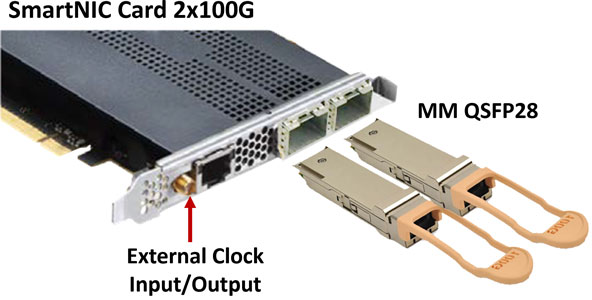
PacketExpert™ 100G - SmartNIC Specifications (Per Card)
| Optics |
|
 |
| PCIe | PCIe Gen 3, 16 lanes | |
| RAM | 8 GBytes DDR4 SDRAM | |
| 1000Base-T Port | RJ45 for IEEE1588v2 | |
| Single-ended Coaxial I/O | SMA connector, 50 Ohms for External Clock Input/Output | |
| Temperature Range | 0 °C to 45 °C | |
| Operating Humidity | 20% to 80% | |
| Storage | -10 to 60 °C | |
| Oscillator Accuracy | +/- 4.6ppm |
PacketExpert™ 100G Rack-mount Platforms
- Ideal for Lab environments that require centralized management of multiple servers and network devices
- Rack-mount units offer flexibility for scaling up or down as needed by adding or removing individual units
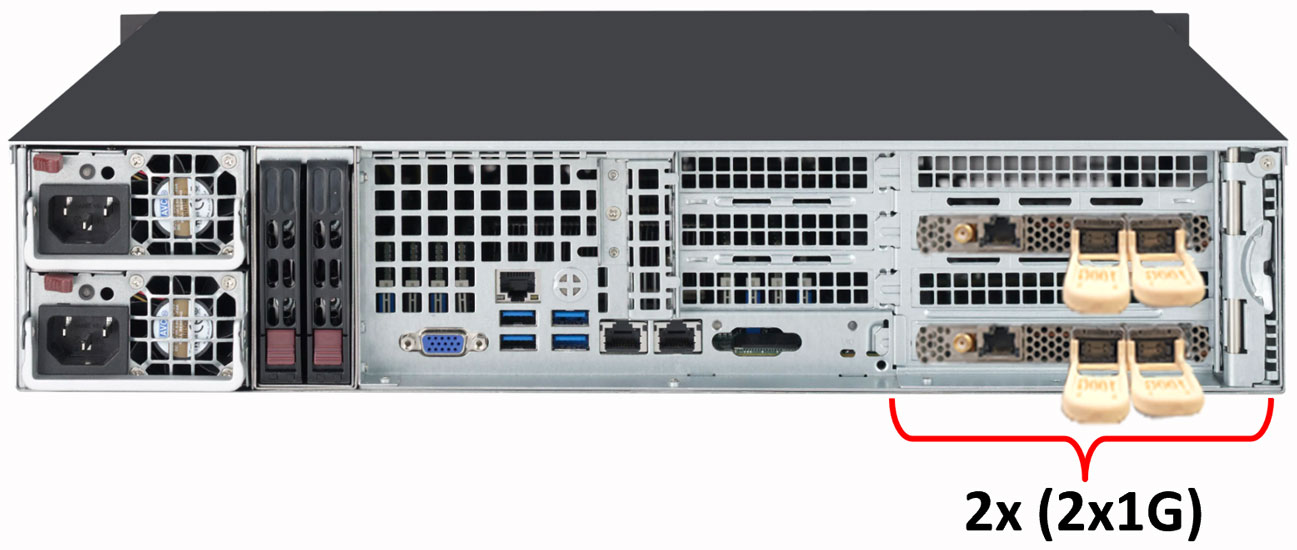
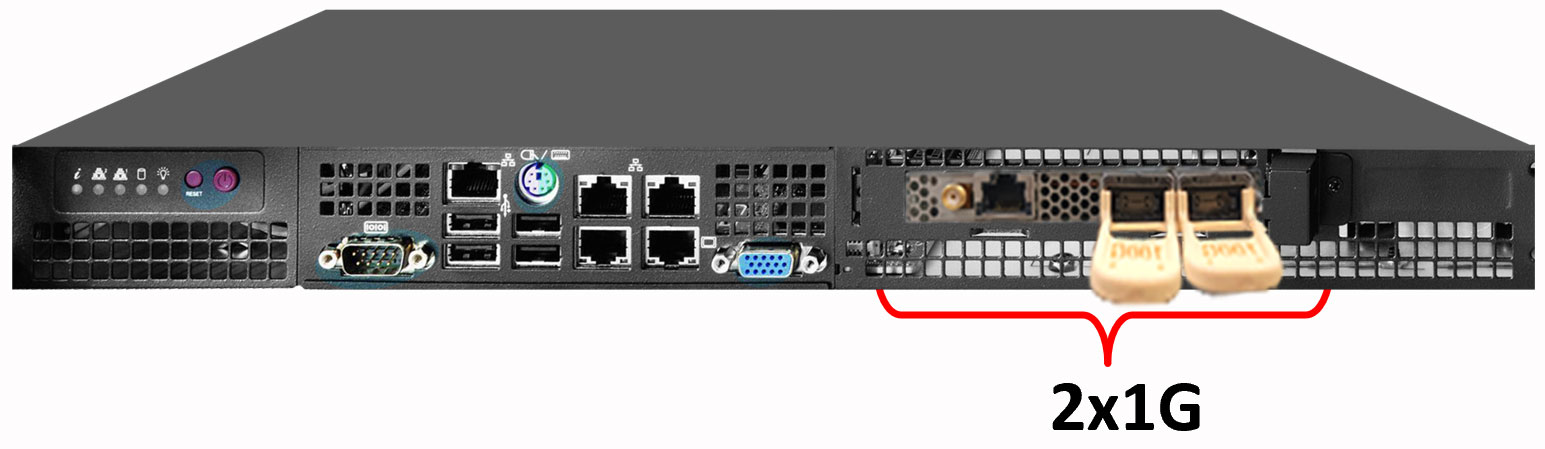
- The ExpertTCP™ application supports on 2x1G and 2x10G interfaces with an aggregate TCP generation rate of up to 10 Gbps
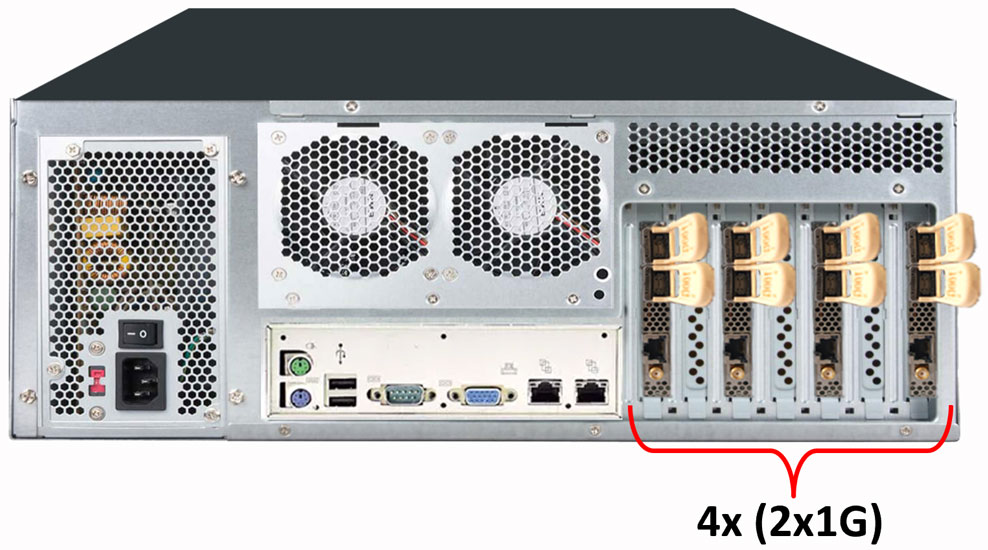
PacketExpert™ 100G – 4U Rack-mount
| Specifications - PacketExpert™ 100G – 4U Rack-mount | |
|---|---|
| Dimensions | 6.9” H x 16.9” W x 17.5” D |
| Weight | 72 lbs. |
| Number of Supported Cards/Ports | Up to 7 Cards x (2 x 100G Ports), Maximum of 14 Ports |
| Power supply | 800W |
PacketExpert™ 100G – 2U Rack-mount
| Specifications - PacketExpert™ 100G – 2U Rack-mount | |
|---|---|
| Dimensions | 3.5” H x 17.2” W x 17.7” D |
| Weight | 30 lbs. |
| Number of Supported Cards/Ports | Up to 2 Cards x (2 x 100G Ports), Maximum of 4 Ports |
| Power supply | 800W |
PacketExpert™ 100G – 1U Rack-mount
| Specifications - PacketExpert™ 100G – 1U Rack-mount | |
|---|---|
| Dimensions | 1.7" H x 17.2" W x 9.8" D |
| Weight | 10 lbs. |
| Number of Supported Cards/Ports | 1 x Full-height 1 Card x (2 x 100G Ports), Maximum of 2 Ports |
| Power supply | 200W |
PacketExpert™ 100G Portable Platforms
- Ideal for field engineers, military personnel, or researchers who need a powerful and portable computing solution in remote or rugged locations
- Suitable for environments where traditional desktops or laptops may be too fragile or lack necessary durability
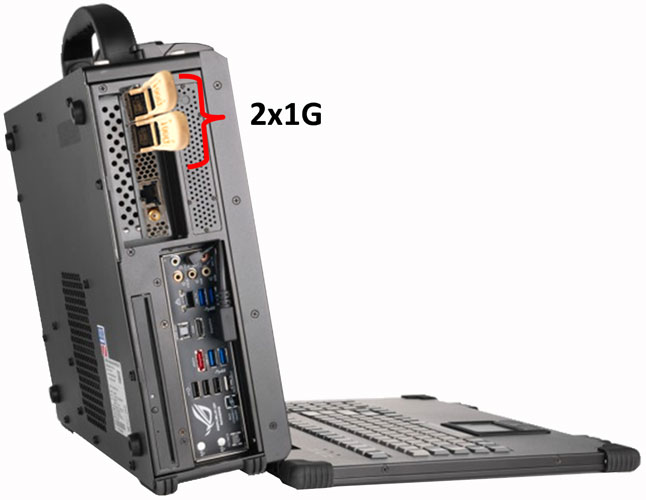
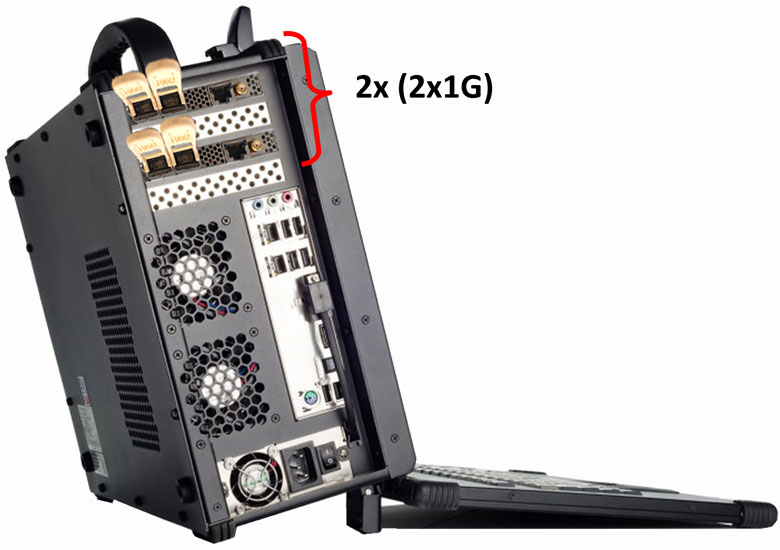
- The ExpertTCP™ application supports on 2x1G and 2x10G interfaces with an aggregate TCP generation rate of up to 1 Gbps
Ultra-Portable PacketExpert™ 100G
| Specifications - Ultra-Portable PacketExpert™ 100G | |
|---|---|
| Dimensions | 12.4” H x 16.41” W x 4.39” D |
| Display | 17.3” 1920 x 1080 |
| Weight | 16.5 lbs. |
| Number of Supported Cards/Ports | Up to 2 Cards x (2 x 100G Ports), Maximum of 4 Ports |
| Power supply | 400W (optional 500W) |
Portable PacketExpert™ 100G
| Specifications - Portable PacketExpert™ 100G | |
|---|---|
| Dimensions | 13.62” H x 16.50” W x 7.25” D |
| Display | 17.3” 1920 x 1080 |
| Weight | ~23 lbs. (10.4kg) |
| Number of Supported Cards/Ports | Up to 3 Cards x (2 x 100G Ports), Maximum of 6 Ports |
| Power supply | 680W 100/240VAC |
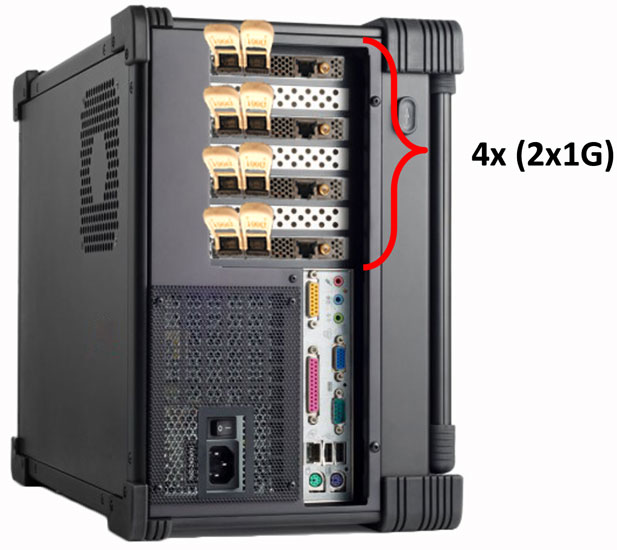
Portable PacketExpert™ 100G
| Specifications - Portable PacketExpert™ 100G | |
|---|---|
| Dimensions | 17.06” x 13.67” x 9.02” (H x W x D) |
| Display | 17.3” 1920 x 1080 |
| Weight | ~30 lbs. |
| Number of Supported Cards/Ports | Up to 6 Cards x (2 x 100G Ports), Maximum of 12 Ports |
| Power supply | 1000W 100-240VAC |
Test Configurations
Functional Procedure
The ExpertTCP™ Test Configuration on the PacketExpert™ 100G platform enables structured RFC 6349-based TCP throughput validation in either Single Device or Client–Server mode. The guided configuration workflow follows the recommended RFC 6349 methodology, ensuring accurate and repeatable TCP performance measurements. In Single Device mode, one PacketExpert™ unit uses Port 1 as the TCP Client and Port 2 as the TCP Server. In Client–Server mode, two PacketExpert™ units are configured as the TCP Client and TCP Server.
ExpertTCP™ specifies the TCP Throughput test to be conducted in 3 steps:
- Path MTU Discovery
- Determine Baseline RTT
- Conduct TCP Throughput test
The application supports all 3 tests in a seamless one touch way. User can configure the parameters and simply start the test. ExpertTCP™ will run through all the three tests and report the results.
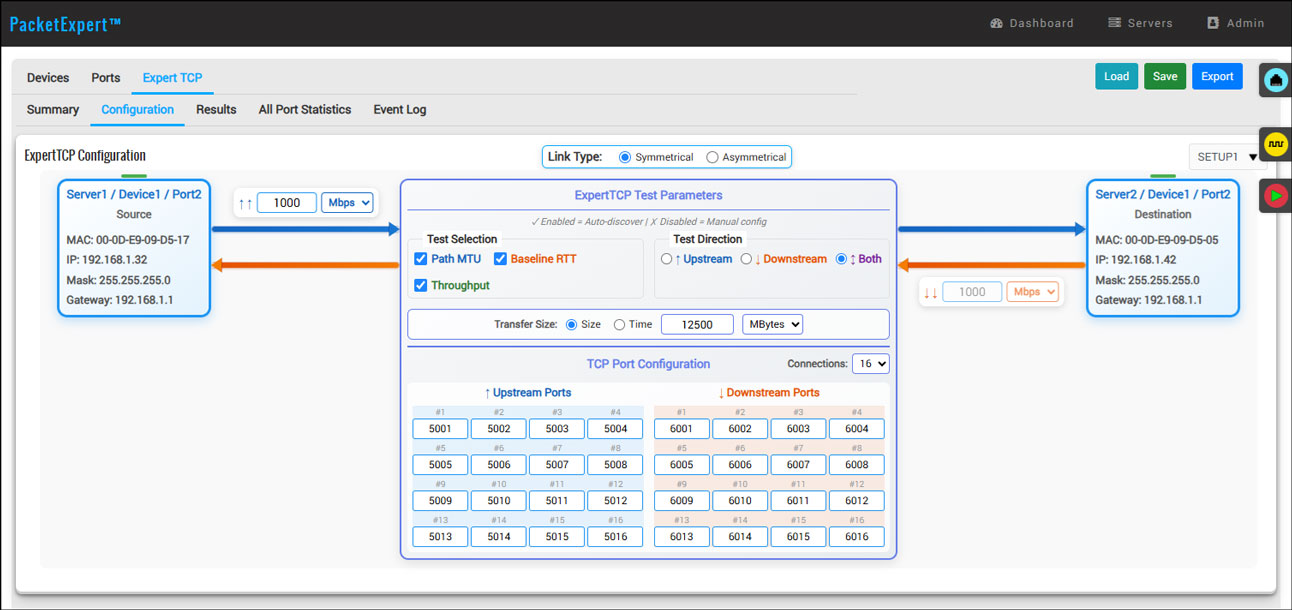
Path MTU Discovery – As specified in RFC 6349, the first step is to determine the Path Maximum Transmission Unit (MTU) supported across the network path. The TCP throughput test is then performed using this Path MTU value to prevent packet fragmentation, which can otherwise impact TCP performance and lead to inaccurate test results.
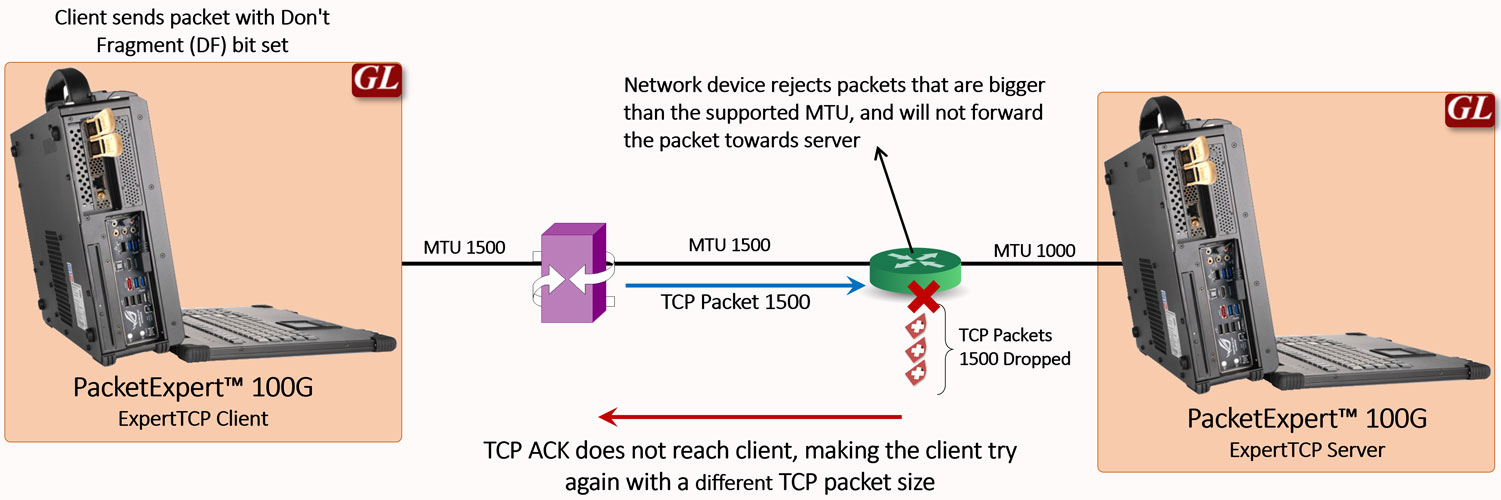
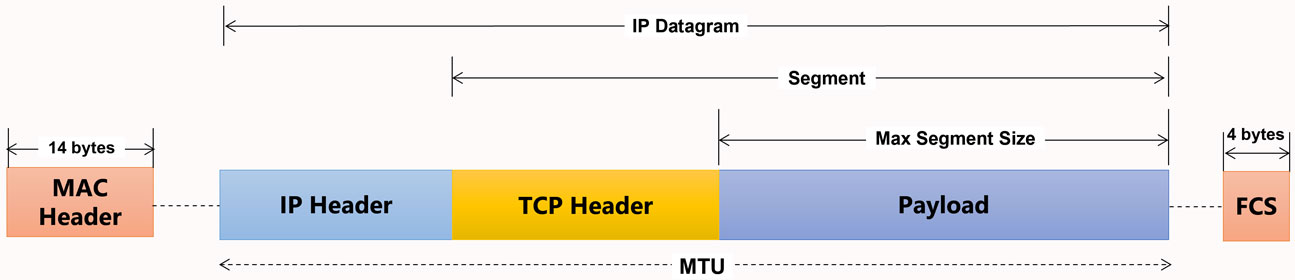
ExpertTCP™ determines the Path MTU separately for both upstream and downstream directions. It follows a method similar to the approach defined in RFC 4821 (Packetization Layer Path MTU Discovery), using TCP-based probing instead of ICMP. The discovered Path MTU is then used to determine the appropriate Maximum Segment Size (MSS) for the TCP throughput test.
Determine Baseline RTT – This step measures the inherent, non-congested Round-Trip Time (RTT) of the end-to-end network path. RTT represents the time taken for a TCP data packet to reach the destination and for the corresponding acknowledgment (ACK) packet to return to the sender.
RTT is an important metric in TCP, as it determines how much data can be transmitted before an acknowledgment (ACK) is received. This measurement is used to estimate the optimal TCP Receive Window (RWND) required for the subsequent Throughput test.
ExpertTCP™ performs the Baseline RTT test separately for each direction and automatically calculates the optimum TCP RWND based on the measured results. The corresponding Bandwidth-Delay Product (BDP) and RWND values are displayed for user reference.
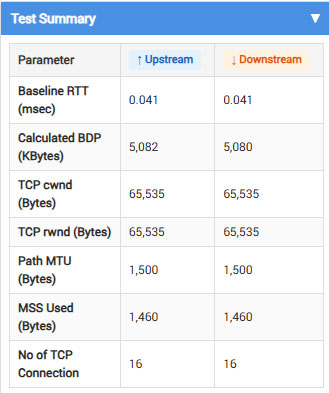
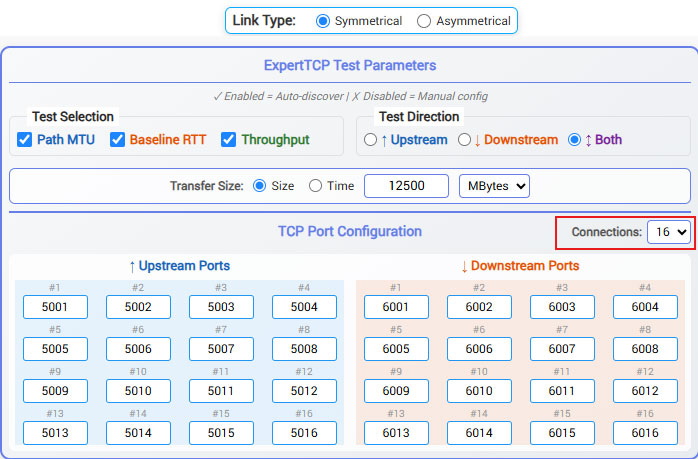
Conduct TCP Throughput Test – In this step, TCP throughput testing is performed using single or multiple TCP connections to determine the achievable TCP throughput. The TCP Receive Window (RWND) calculated during the Baseline RTT test is applied for the throughput measurement. When multiple TCP connections are configured, the available RWND is distributed across the connections. The system supports configuration of up to 16 TCP connections.
Statistics and Results
The Statistics and Results section provides visibility into TCP performance measured during the ExpertTCP™ RFC 6349 throughput test. Results are displayed separately for upstream (Client → Server) and downstream (Server → Client) directions to help evaluate end-to-end TCP performance across the network path.
- Path MTU – Maximum transmission unit supported across the network path without fragmentation
- Baseline RTT – Inherent round-trip delay of the network path prior to throughput testing
- Bandwidth-Delay Product (BDP) – Optimal amount of data that can be in transit on the network path
- TCP Receive Window (RWND) – Calculated window size required for efficient TCP throughput
- TCP Throughput Efficiency – Effectiveness of bandwidth utilization during the throughput test
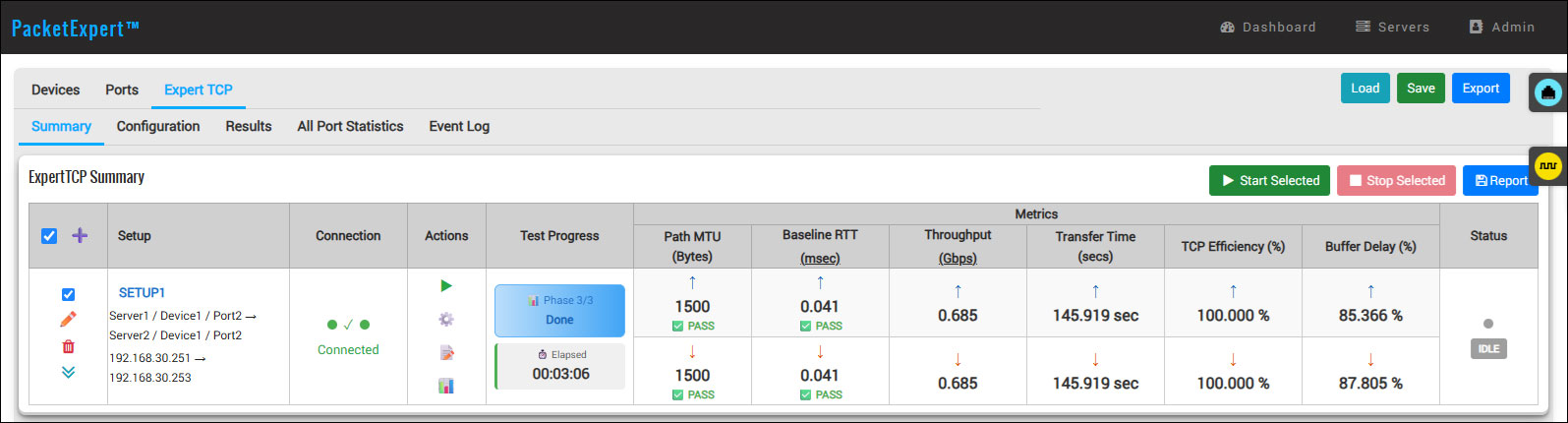
These measurements help determine the maximum achievable TCP throughput and identify performance limitations caused by latency, packet loss, retransmissions, or buffer constraints.
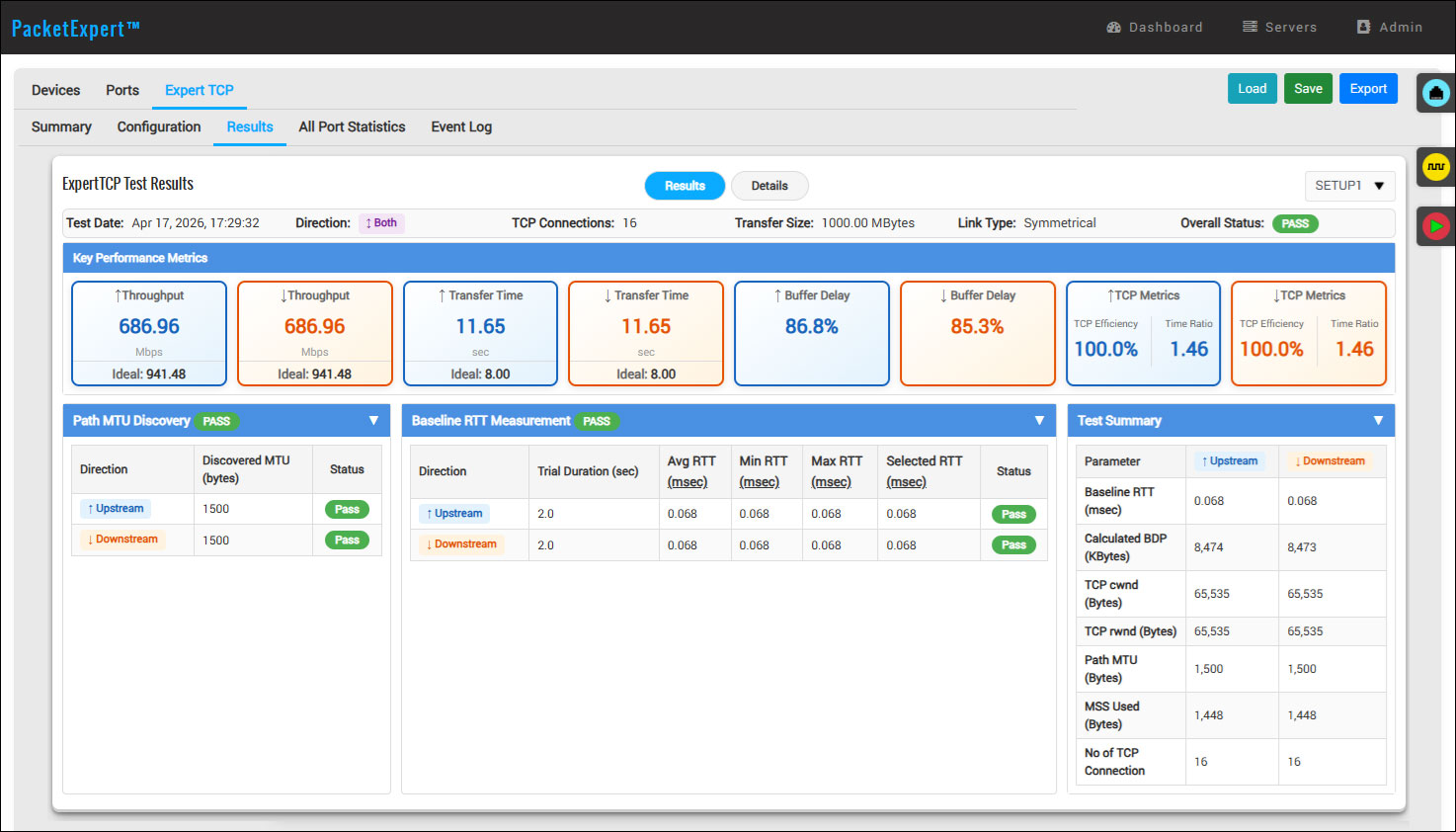
In addition, the system displays per-connection throughput statistics including average, minimum, and maximum throughput, along with RTT measurements, retransmission counts, and transfer duration. Detailed transmission statistics such as transmitted and received frames and bytes are also provided for each configured TCP connection, allowing users to evaluate connection-level behavior during the throughput test.
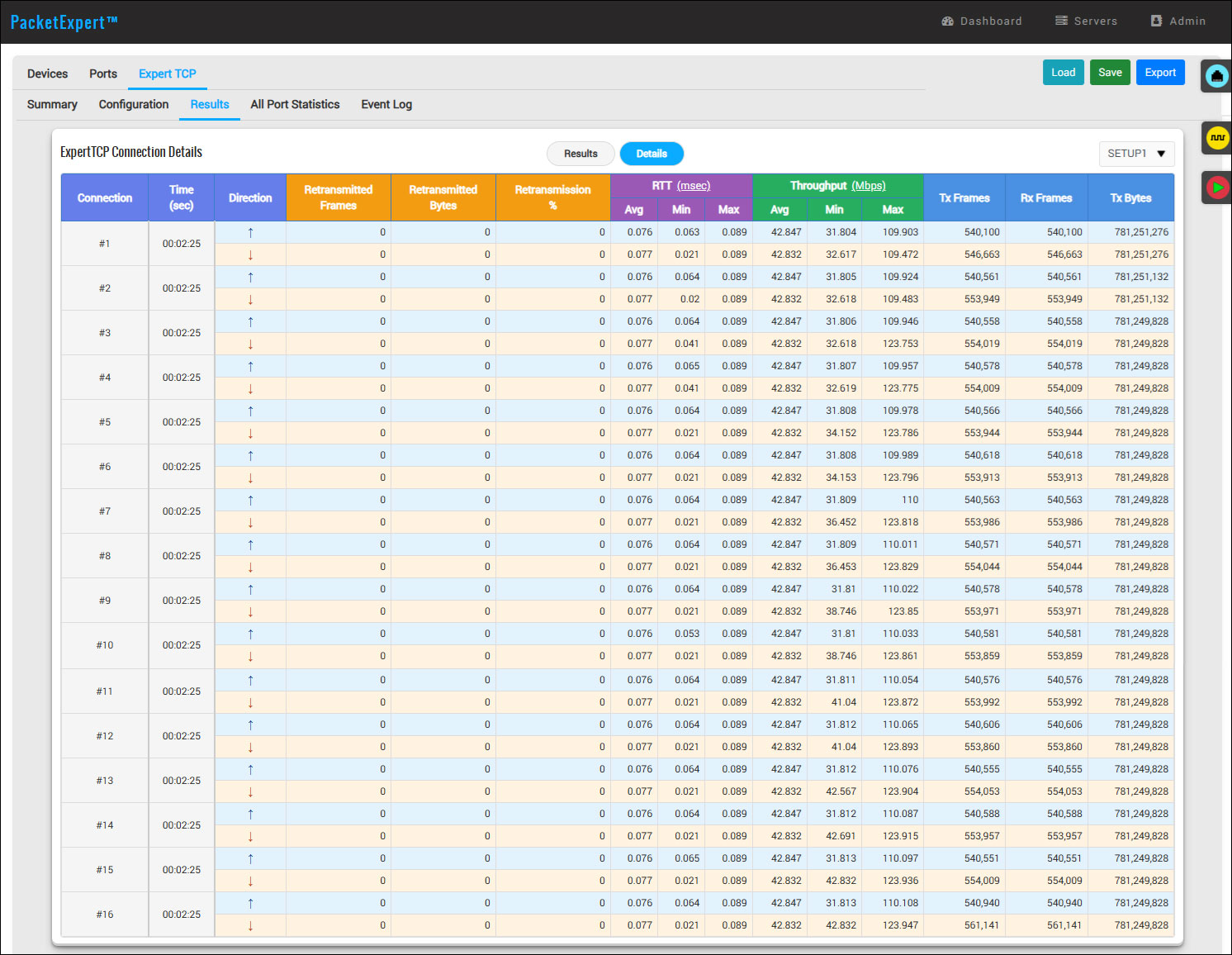
These statistics help network operators, service providers, and test engineers verify whether Ethernet/IP networks that meet Layer 2/Layer 3 performance benchmarks can also sustain expected application-level TCP throughput performance required for SLA validation, deployment verification, and troubleshooting scenarios.