Multi Stream Traffic Generator and Analyzer - PacketExpert™ 100G
Generate multiple streams of IP traffic to test network prioritization, throughput and impairments.
Sample Test Report
Request a Demo / Quote Brochure
Overview
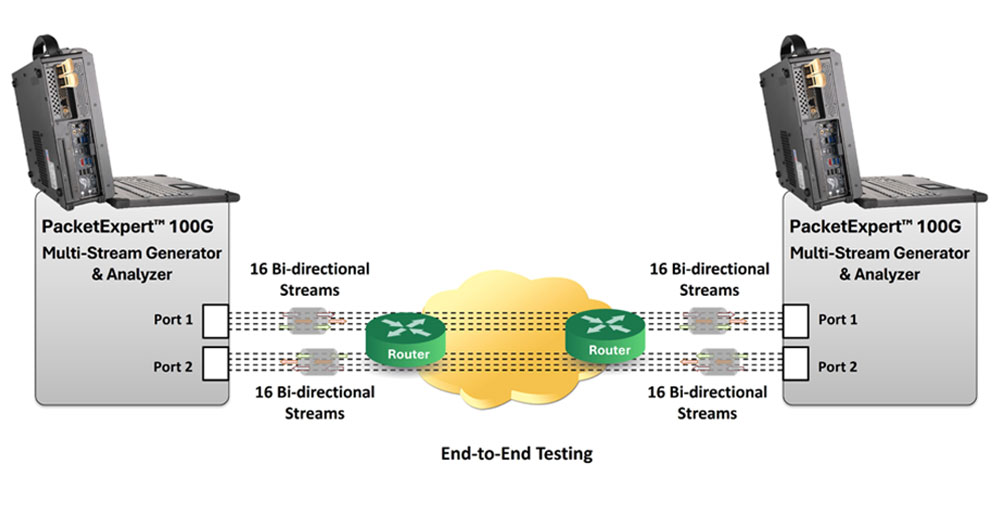
The Multi-Stream Traffic Generator and Analyzer is a basic application available within the PacketExpert™ 100G. This Ethernet tester can generate multi-stream Ethernet traffic with varying protocol headers, packet lengths and payloads. It supports up to 16 streams (per Port), making it ideal for end-to-end testing of Wide Area Networks at speeds of up to 100 Gbps. Measurements include throughput, packet loss, round trip delay, jitter and more.
Key Features
- Ethernet Traffic Generation and Analysis: Generates traffic from Layer 2 to Layer 4 at up to 100 Gbps with varying protocol headers and packet sizes
- Comprehensive Test Metrics: Provides packet loss, round trip delay and jitter measurements for each stream. Provides graphs for all streams
- User-Defined Stream Configurations: Supports multiple streams with customizable configurations, including MAC/VLAN/IP/UDP headers, rate, and frame size, allowing prioritization of different traffic types (e.g., voice, video, data)
- Streams: Supports up to 16 streams per port
- Frame Length Support: Accommodates frame lengths ranging from 64 bytes to 16,000 bytes (Jumbo frames)
- High Density Multi-Port: Supports flexible multi-port configurations with breakout cables, enabling 2×10G, 4×10G, as well as 2×25G, 4×25G setups. Ethernet operation via QSFP28 ports and compatible QSFP28-to-SFP adapters (8×10G and 6×25G coming soon)
- SyncE (Synchronous Ethernet): PacketExpert™ 100G continuously monitors the clock's Quality Level (QL) through a background "hearbeat" message. Any variation is immediately detected, and an event message is triggered
- Precision Time Protocol (PTP) Support: PacketExpert™ 100G uses PTP to synchronise with the master clock connected to the network to achieve accurate time across multiple devices which is essential for delay measurements in RFC 2544, ExpertSAM™ and MTGA
- Python Automation and Regression Testing: Supports Test automation and regression testing via Python and REST APIs
- Traffic Generation –
- Generates multiple streams with customizable protocol headers, packet sizes and payloads
- Streams can be defined with various header fields like Source and Destination MAC Address, VLAN and MPLS tags, Source and Destination IP Address, Source and Destination UDP ports
- Each stream can include a mixture of different frames sizes (up to 5)
- Emulate Carrier Ethernet traffic with stacked VLANs (C-Tag and S-Tag)
- Traffic Analysis –
- Real-time statistics of throughput, packet loss, round-trip delay, and jitter across multiple streams
- Real-time graphs of all statistics mentioned above, for each stream
- Comprehensive statistics for individual streams
- Delivers per-port frame statistics such as Total Frames and Bytes Received, Rx Frame Rate, and Rx Data Rate
Frequently Asked Questions
- What is the Multi-Stream Traffic Generator and Analyzer (MTGA)?
- Multi-Stream Traffic Generator and Analyzer (MTGA) is an application within PacketExpert™ 100G that generates and analyzes multi-stream Ethernet traffic with varying protocol headers, packet lengths, and payloads, supporting end-to-end WAN testing at speeds up to 100 Gbps.
- How many streams can be generated per port?
- MTGA supports up to 16 streams per port.
- Which link speeds are supported?
- MTGA supports link speeds of 1G, 10G, 25G, 40G, 50G, and 100G.
- What metrics does MTGA measure for each stream?
- For each stream, MTGA measures throughput, packet loss, round-trip delay, and jitter.
- What header fields can be configured per stream?
- Each stream can be configured with Source/Destination MAC Address, VLAN and MPLS tags, Source/Destination IP Address, and Source/Destination UDP ports.
- Can each stream use multiple frame sizes?
- Yes. Each stream can include a mixture of up to 5 different frame sizes.
- Does MTGA support stacked VLAN tagging?
- Yes. MTGA can emulate Carrier Ethernet traffic using stacked VLANs with C-Tag and S-Tag.
- What frame lengths are supported?
- Frame lengths from 64 bytes to 16,000 bytes (Jumbo frames) are supported.
- How is the payload configured?
- A two-byte hex payload can be configured for the test packet, which is repeated throughout the entire frame payload.
- How is the traffic/bandwidth rate configured?
- The Bandwidth Profile allows the frame generation rate to be configured in units such as percentage (%) of link speed, Mbps, and Gbps.
- What is Stream Selection and how many streams can run simultaneously?
- Stream Selection lets users choose any configured stream or all streams for simultaneous testing, with each port supporting up to 16 streams at speeds from 1G to 100G, provided the total selected bandwidth does not exceed the 100 Gbps link speed.
- What real-time graphs are available for traffic analysis?
- Real-time graphs are available for Throughput, Packet Loss, FDV (Jitter), and round-trip Delay, each plotted over time for every stream.
- What port-wise statistics are provided?
- Port-wise statistics include Frame Count, Frame Rate, Link Utilization, Frame Type (Unicast/Broadcast/Multicast, VLAN), Frame Length distribution, Protocol Type (IPv4, IPv6, UDP, TCP, ICMP, IGRP, etc.), and VLAN statistics per stack position.
- How is impairment characterization testing performed?
- Traffic generated on Port 1 is sent either to a loopback port on another device or to Port 2 on the same PacketExpert™ unit, traversing the network twice (upstream and downstream) so it is exposed to network impairments before being analyzed at Port 1.
- What results are reported for impairment testing?
- Impairment characterization results include Frame Loss Count, Frame Loss Rate (%), Throughput (Gbps), Frame Transfer Delay (msec), and Frame Delay Variation (msec).
- How can MTGA test QoS prioritization?
- MTGA can generate multiple traffic streams with different QoS tags, allowing users to verify QoS prioritization behavior across the network.
- What is Stress Testing with MTGA?
- Stress Testing generates up to 16 user-defined streams at full wirespeed, sends them through the test network to a loopback port or another port on the same device, and analyzes the received traffic to measure round-trip IP metrics.
- Does PacketExpert™ 100G support high-density multi-port configurations for MTGA?
- Yes. PacketExpert™ 100G supports flexible high-density multi-port configurations using breakout cables, including 2x10G, 4x10G, 2x25G, and 4x25G setups via QSFP28 ports and QSFP28-to-SFP adapters (8x10G and 6x25G coming soon).
- Does MTGA support PTP-based synchronization?
- Yes. PacketExpert™ 100G uses Precision Time Protocol (PTP) to synchronize with the network's master clock, enabling accurate delay measurements for MTGA, RFC 2544, and ExpertSAM™.
- Can MTGA testing be automated?
- Yes. MTGA supports test automation and regression testing via Python and REST APIs.
Stream Configuration
The stream configuration summary offers a quick view of all current settings.
Each stream can be customized with attributes such as frame size, header parameters (including VLAN tag details), IP and UDP layer settings, payload patterns, and traffic rate.
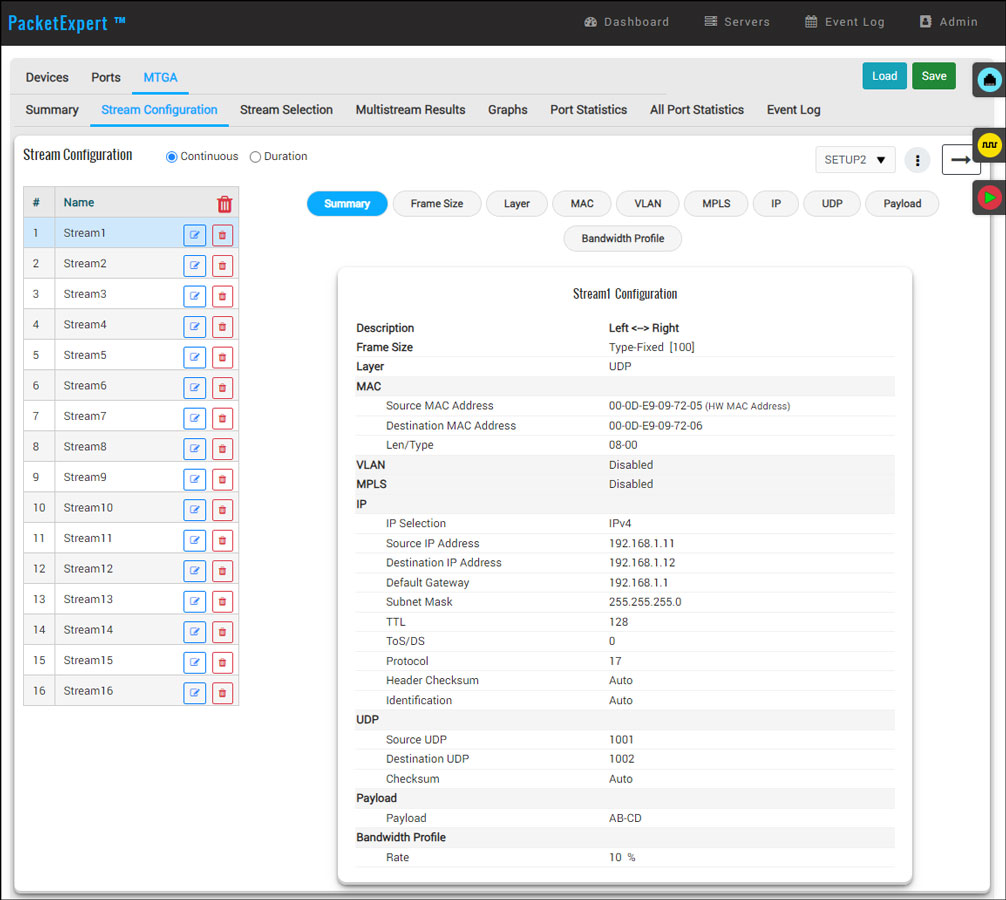
Stream Configuration Summary
Payload Configurations
A two-byte hex payload can be configured for the test packet, which will be repeated throughout the entire frame payload.
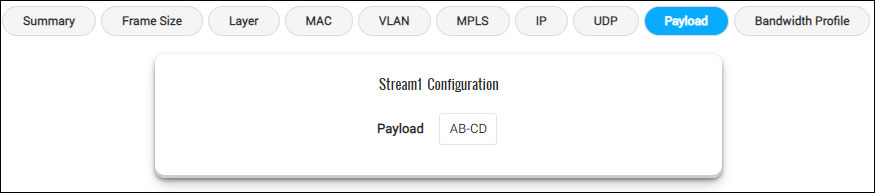
Payload Configuration
Bandwidth Profile Configurations
Bandwidth Profile allows to configure the frame generation rate using various units, such as a percentage (%) of link speed, Mbps and Gbps.
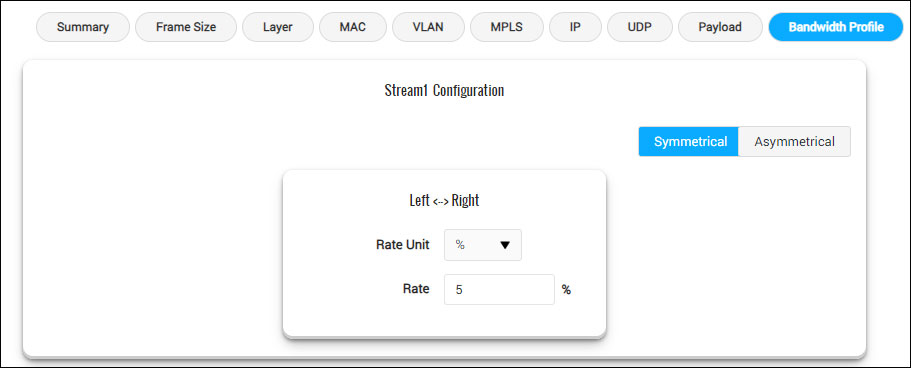
Bandwidth Profile Configuration
Stream Selection
Stream selection allows you to choose any configured stream or select all streams for testing. Each port supports up to 16 streams per port at 1G, 10G, 25G, 40G, 50G, or 100G speeds. If selecting all streams, ensure the total bandwidth does not exceed 100Gbps link speed.
The configured Frame Size and Rate (Gbps) for each stream are displayed, and the test is conducted simultaneously on all selected streams within the specified time duration or until the user stops the test.
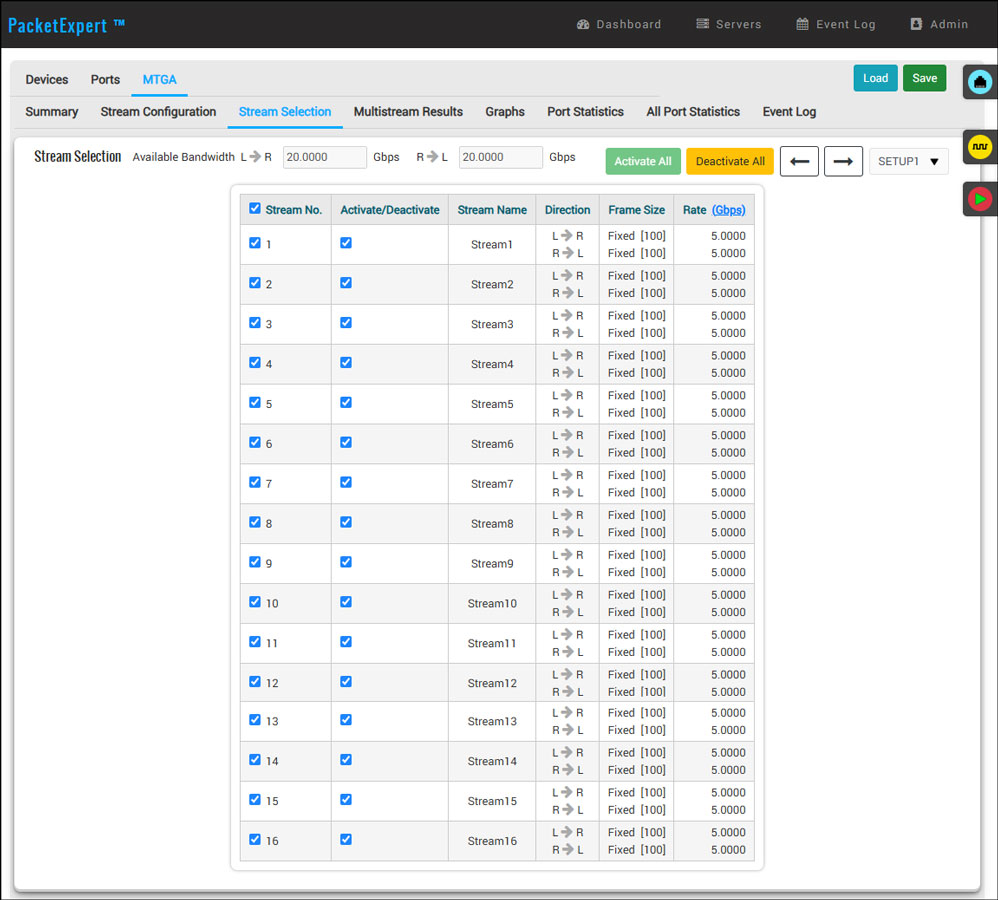
Stream Selection
Stream Statistics
The PacketExpert™ 100G Analyzer displays all the results for all streams.
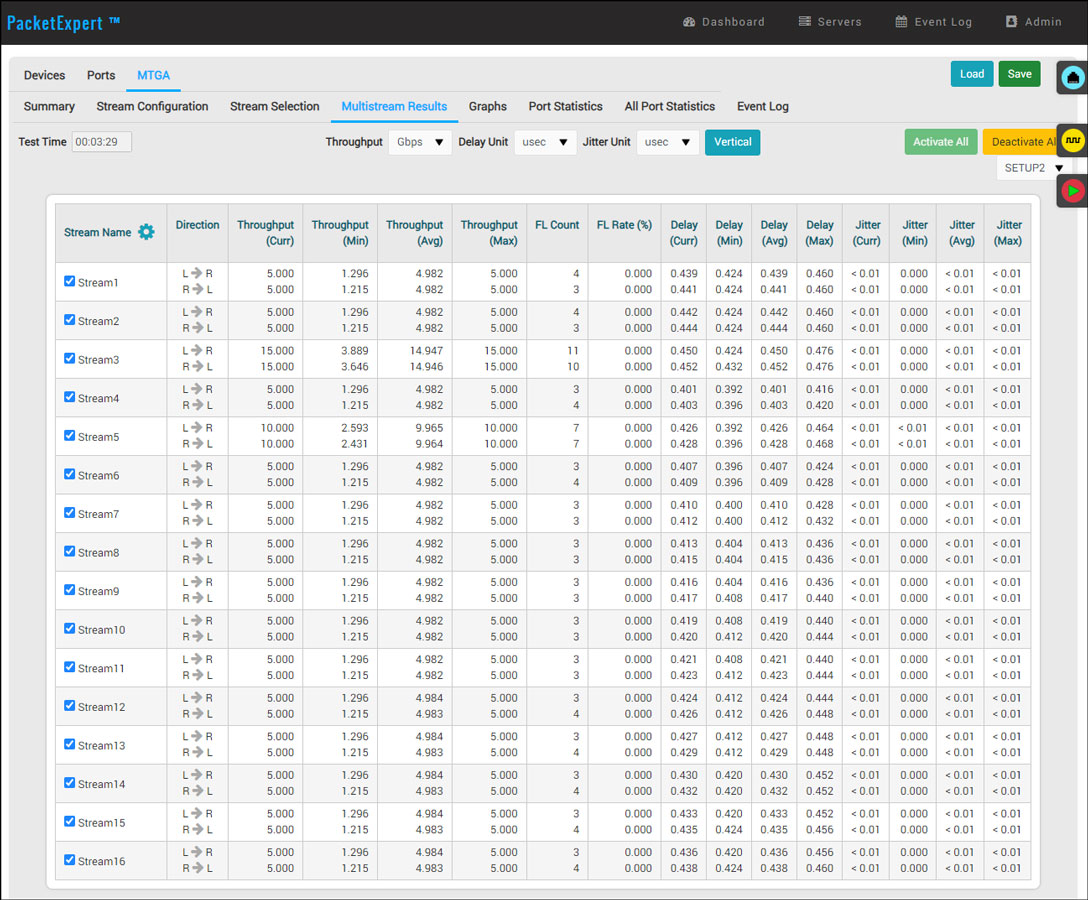
Stream Results
Stream-wise Graph
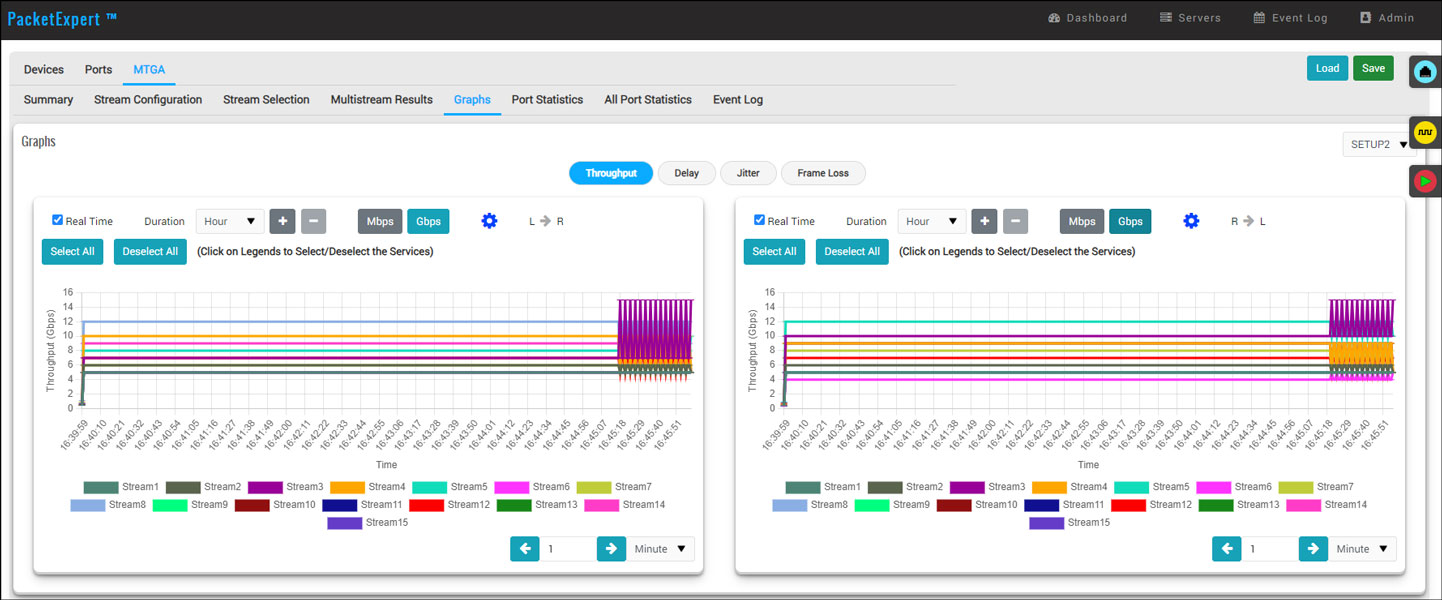
Throughput Graph
A real time display of throughput versus time for each stream.
Throughput Graph
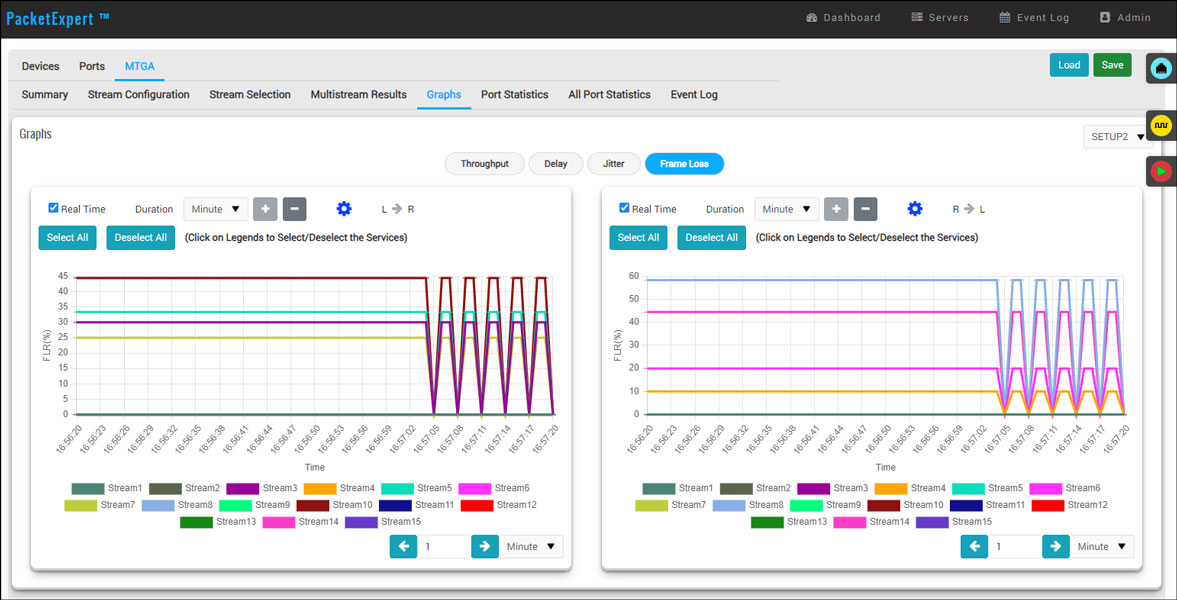
Packet Loss Graph
A real time display of packet loss versus time.
Packet Loss Graph
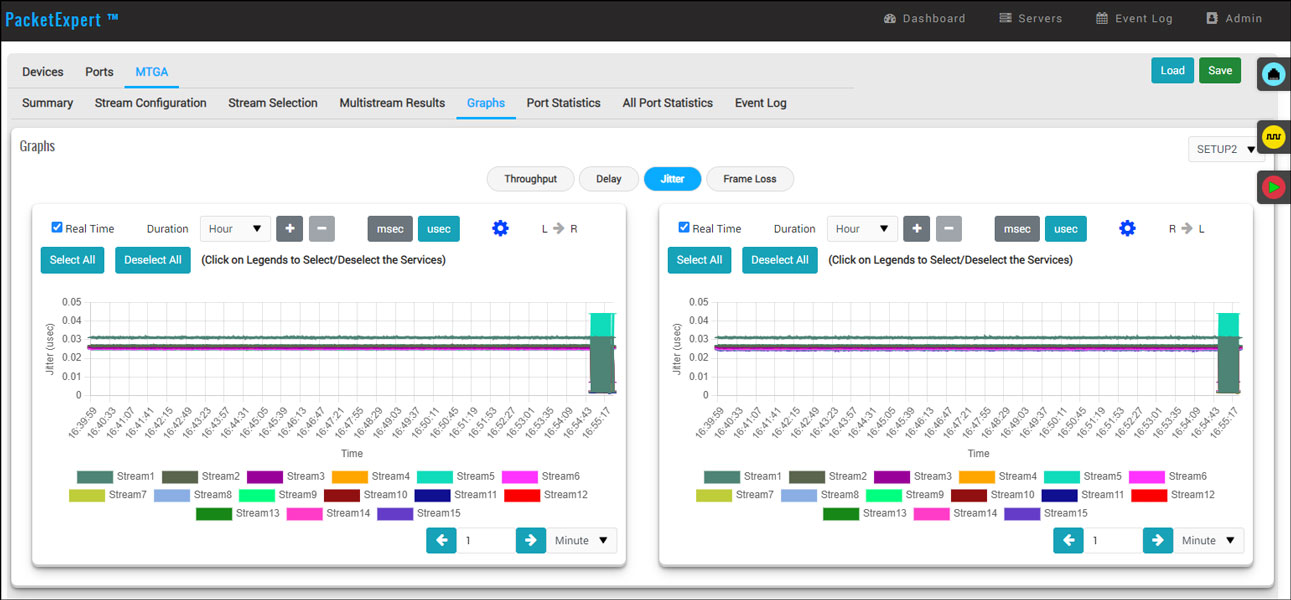
FDV (Jitter) Graph
A real time display of jitter versus time.
Frame Delay Variation (FDV) Graph
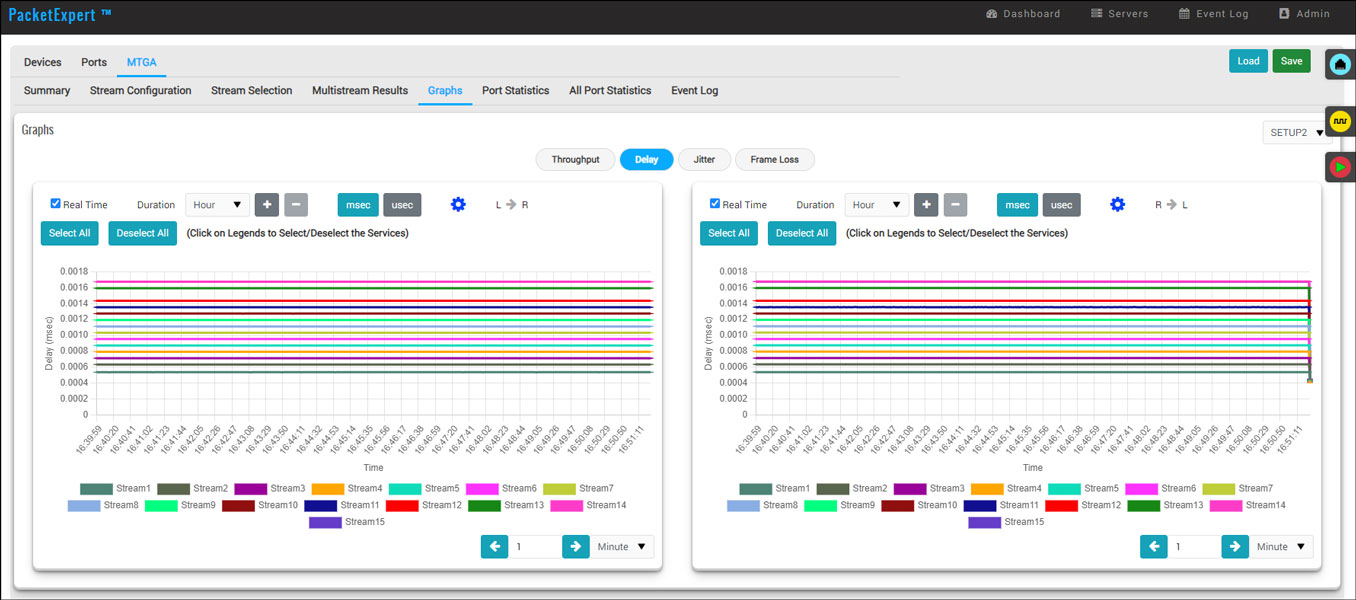
Delay Graph
A real time display of round trip delay versus time.
Round Trip Delay Graph
Port Statistics
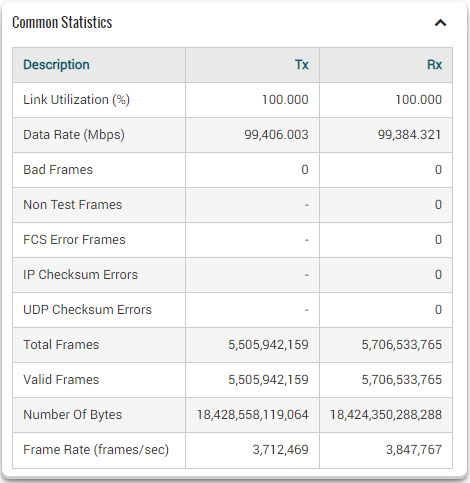
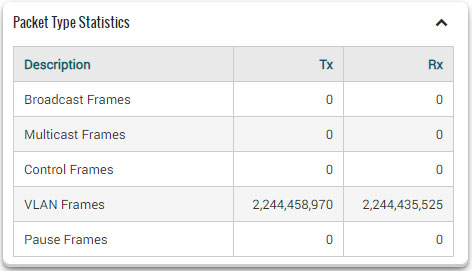
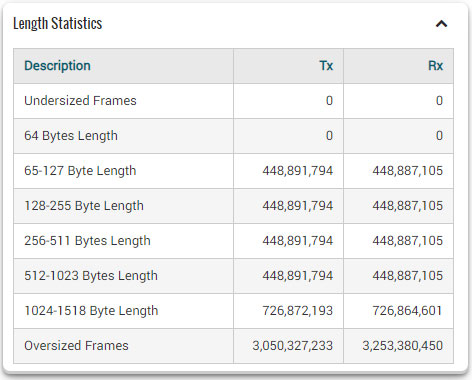
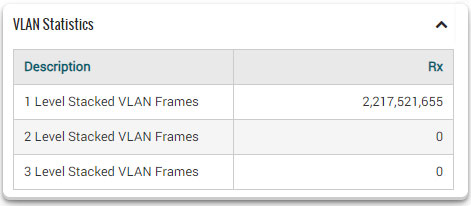
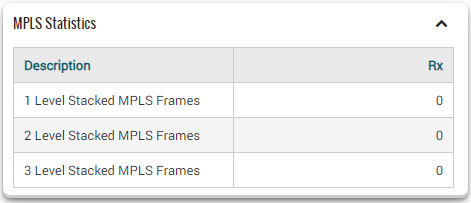
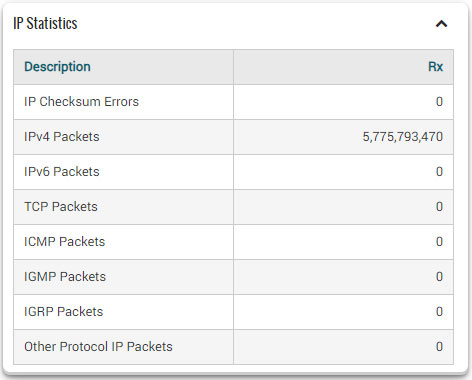
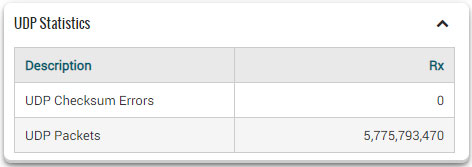
Detailed statistics per port are provided including Frame Count, Frame Rate, Link Utilization, etc. based on various categories such as Frame Type (Unicast/Broadcast/Multicast, VLAN), frame lengths (64, 65-127, 1024-1518, Oversized, Undersized), Protocol Type (IPv4, IPv6, UDP, TCP, ICMP, IGRP, etc). VLAN Statistics (per Stack position) are displayed for the configured stacks.
All Port Loopback Statistics
Applications
Network Testing for Impairment Characterization
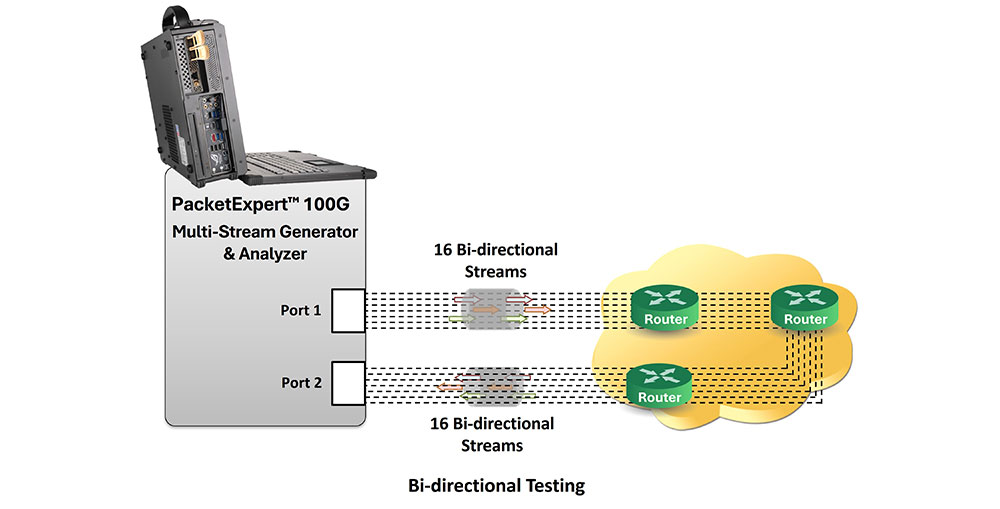
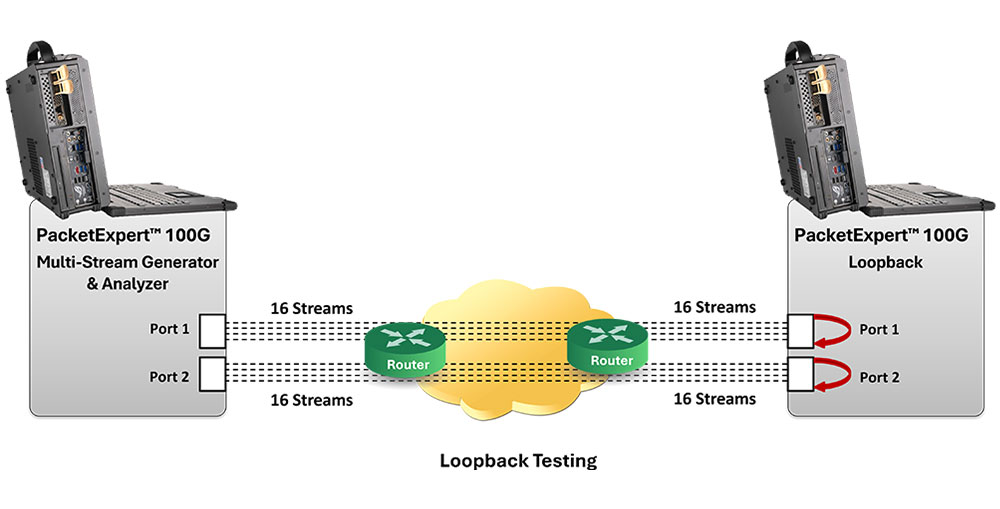
Two types of tests are possible: using a Loopback port on another device or the MTGA port on the same device. The multi-stream traffic generated on Port 1 is sent either to a Loopback port on another device or to Port 2 on the same PacketExpert through the network. The Loopback port or Port 2 sends the traffic back to Port 1, allowing the multi-stream traffic to traverse the network twice (in both upstream and downstream directions). During this process, the traffic is exposed to network degradations.
The received traffic at Port 1 is analyzed and IP metrics are reported. Results such as Frame Loss Count, Frame Loss Rate (%), Throughput (Gbps) Frame Transfer Delay (msec), and Frame Delay Variations (msec) are displayed for detailed network characterization.
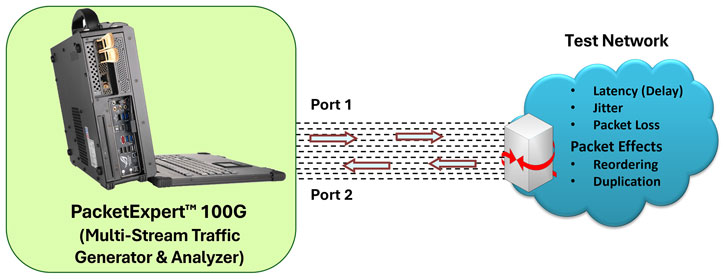
Multi-stream Traffic Generation and Analysis to test for Impairments
Quality of Service (QoS) Prioritization
The Multi-stream traffic Generator and Analyzer can generate multiple traffic streams with different QoS tags to verify QoS prioritization in the network.
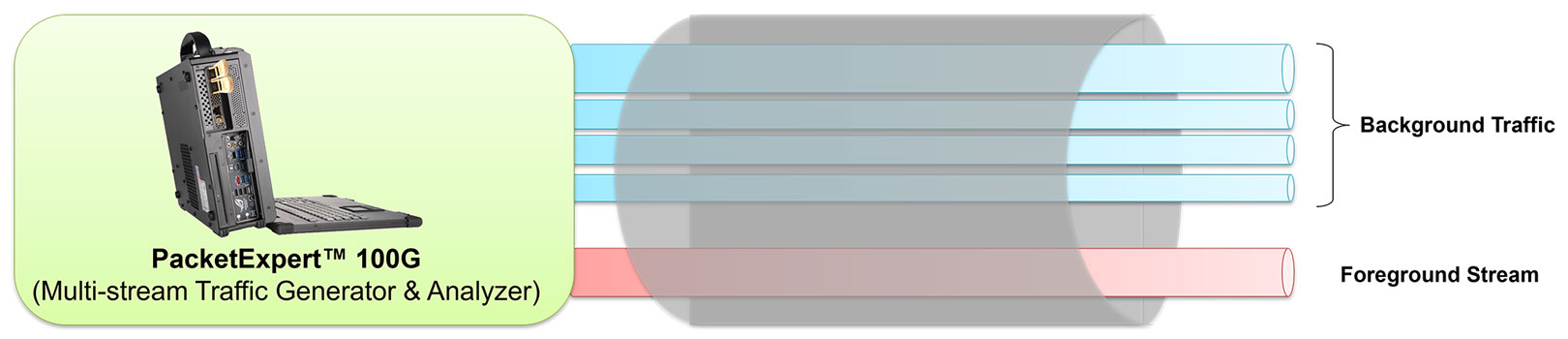
Background Traffic and Foreground Stream Generation
Stress Testing
Stress test devices and networks by generating up to 16 user-defined streams at full wirespeed. Send the traffic through the test network to a loopback port or another port on the same device. Analyze the received traffic to measure IP metrics, capturing the round trip performance.
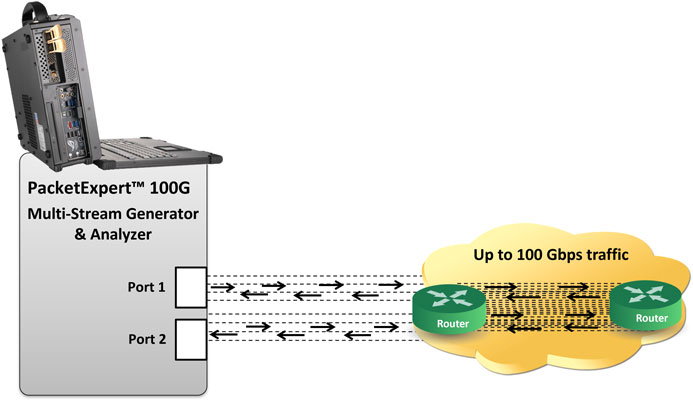
Bidirectional Stress Testing
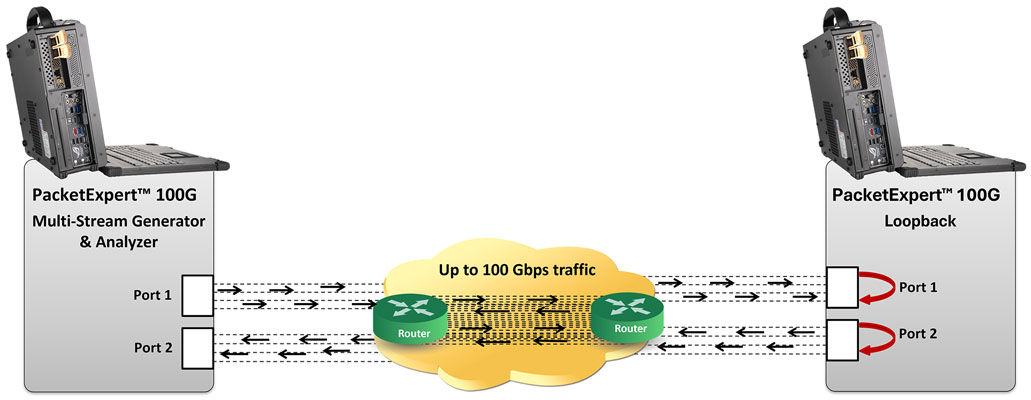
Loopback Stress Testing