SIGTRAN Protocol Analyzer
SIGTRAN protocol decoder software is a VoIP testing tool that permits real-time analysis, call trace, capture, and filtering of SS7 and ISDN signaling messages over IP.
Request a Demo / Quote Brochure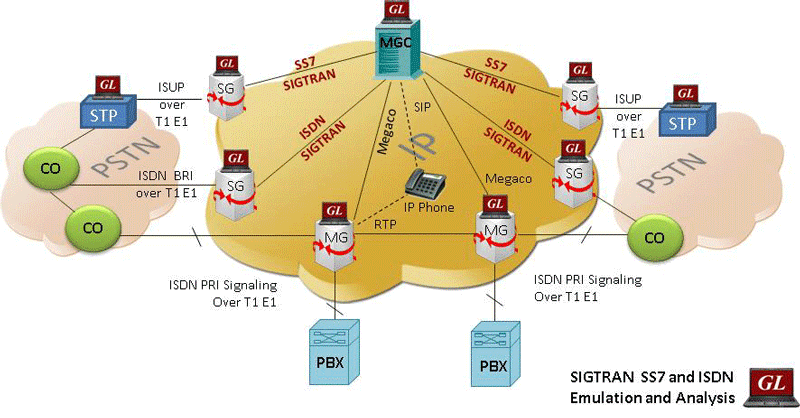
Overview
SIGTRAN protocol decoder software is a VoIP testing tool that permits real-time analysis, call trace, capture, and filtering of SS7 and ISDN signaling messages over IP. SIGTRAN uses a new connection oriented transport protocol called Stream Control Transport Protocol (SCTP). SCTP is at the same level but more efficient at transport than TCP, UDP, or RTP.
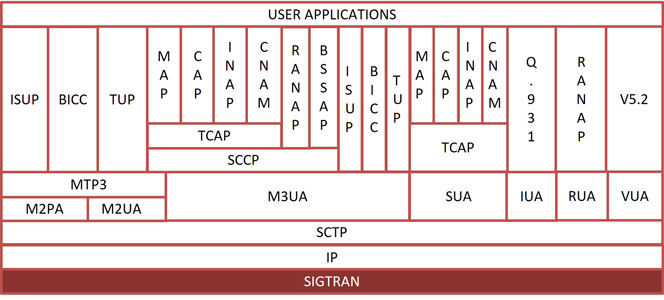
Analyzer supports SCTP, M2UA, M3UA, M2PA, SUA, IUA, SIGTRAN protocols. SIGTRAN is a stack of networking protocols having Stream Control Transport Protocol (SCTP) and a bunch of user adaptation (UA) layers over it.
GL's SIGTRAN Protocol Analyzer (PKV105) is available as an optional module within PacketScan™ analyzer (PKV100) or PacketScan™ HD analyzer (PKV120/PKV122) upon additional licensing . GL's SIGTRAN Analyzer over IP offers powerful features to capture, monitor, decode, and collect statistics of SCTP, and user adaptation (UA) layers such as M2UA, M3UA, M2PA, SUA, IUA, ISUP, MAP, CAP, and INAP. The analyzer permits real-time analysis, call trace, capture, and filtering of SS7 and ISDN signaling messages over IP.
GL’s SS7 and SIGTRAN Analyzer simultaneously can permit testing and verification of Signaling Gateways.
Related Applications
- MAPS™ SIGTRAN (SS7) Emulator
- MAPS™ SIGTRAN (ISDN) Emulator
- SS7 Analyzer
- ISDN Analyzer
SIGTRAN over IP
| Supported Protocols | Standard / Specification Used |
|---|---|
| ISUP ITU | ITU - Q.761, Q.762, Q.763 and Q.764 |
| ISUP ETSI | EN 300 356 -1 V3.2.2(1998-08) |
| ISUP ANSI | ANSI - T1.113.1 to T1.113.4 |
| IUA | RFC 4233 / RFC 5133 |
| BICC | BICC pl-080r1, T-REC-Q.1902.2-07/2001, T-REC-Q.1902.3-07/2001 |
| TUP ITU | T-REC-Q.723-11/1988 |
| SCTP | RFC 2960 |
| SCCP ITU | ITU-T Q.711-Q.714 |
| SCCP ANSI | ANSI rec. T.112 (1996), T1.116.2 (1996) |
| SCCP ETSI | EN 300 009 -1, sept 1996, 3rd edition |
| SUA ITU | RFC 3868 |
| SUA ANSI | Internet Engineering Task Force: Draft 2026 (sec.10) |
| M2UA | RFC 3331 |
| M2PA | RFC 4165 |
| SUA ITU | RFC 3868 |
| SUA ANSI | Internet Engineering Task Force: Draft 2026 (sec.10) |
| M3UA ITU | RFC 3332 |
| M3UA ANSI | RFC 3332 |
| MTP2- ITU | ITU-T Q.703 |
| MTP3 ITU | ITU-Y Q.701-Q.705 / ITU-T Q.782 |
| MTP3 ANSI | T1.111.4-1996 |
| MTP2, MTP3 ANSI | T1.111.4-1996 |
| ICMP | RFC 792 |
| MAP R99 | 3GPP TS 09.02 V7.14.0 (2003-09) |
| MAP R4 | 3GPP TS 29.002 V4.18.0 |
| TCAP ITU | ITU-T Q.771 - Q.775 |
| TCAP ANSI IS-41 | TIA/EIA, IS41.1-C, IS41.5 |
| INAP CS1 ITU / ETSI | Q1218 and ETS 300 374 1, Sept, 1994 |
| INAP CS2 ITU | INAP - Capability Set 2. (Q.1228) |
| INAP CS2 ETSI | INAP - Capability Set 2. (EN 301 140-1-v1.3.4-1999-06) |
| CAMEL V3 | 3GPP TS 29.078 V3.15.0 |
| CAMEL V6 | 3GPP TS 29.078 6.3.0 (2004-09) |
| Test & Network Management Messages (ITU) | ITU-T Q.703, Q.704 |
| Test & Network Management Messages (ANSI) | ANSI T1.111.4 - 1996 |
| ISDN-SIGTRAN | |
| Q.931 | ITU-T Q.931 / Q.932(Facility IE) / Q.955.3 (MLPP Procedures) |
| DASS2 | BTNR 190: June 1992 |
| DPNSS | ND1301:2001/03 |
Screenshots
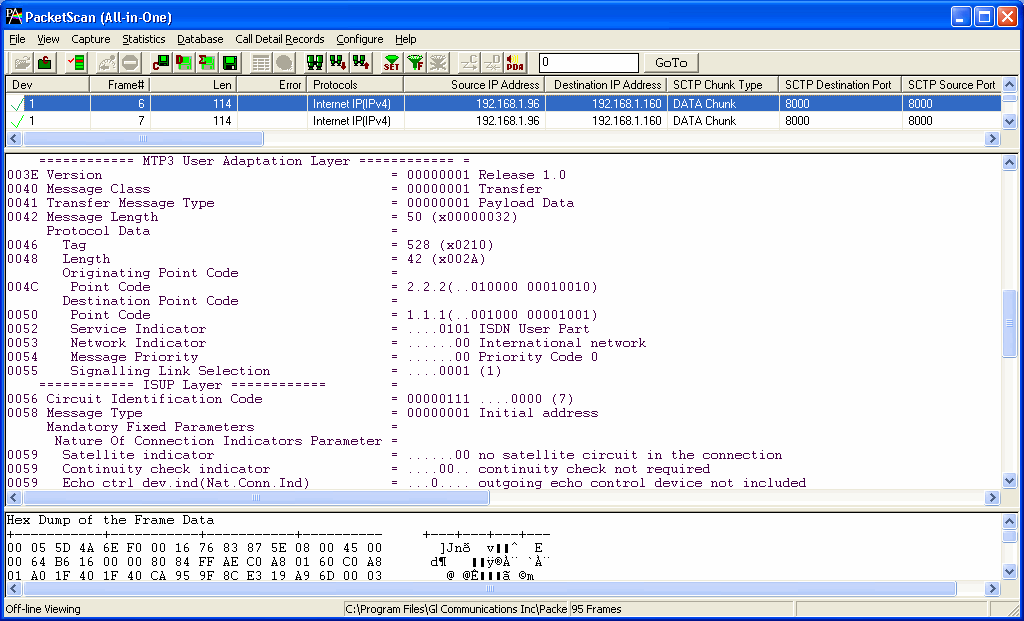
Summary, Detail, Hexdump view
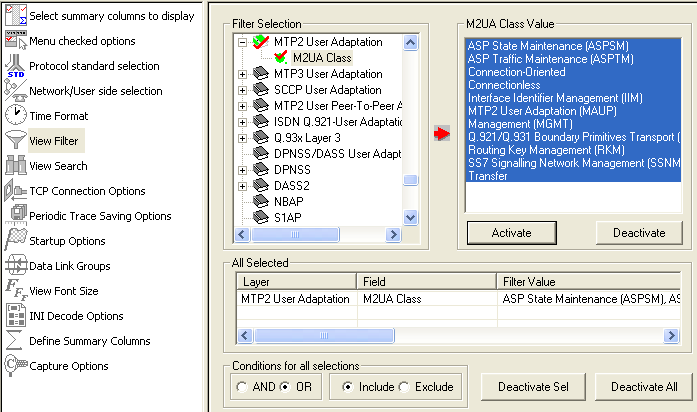
Protocol Filters
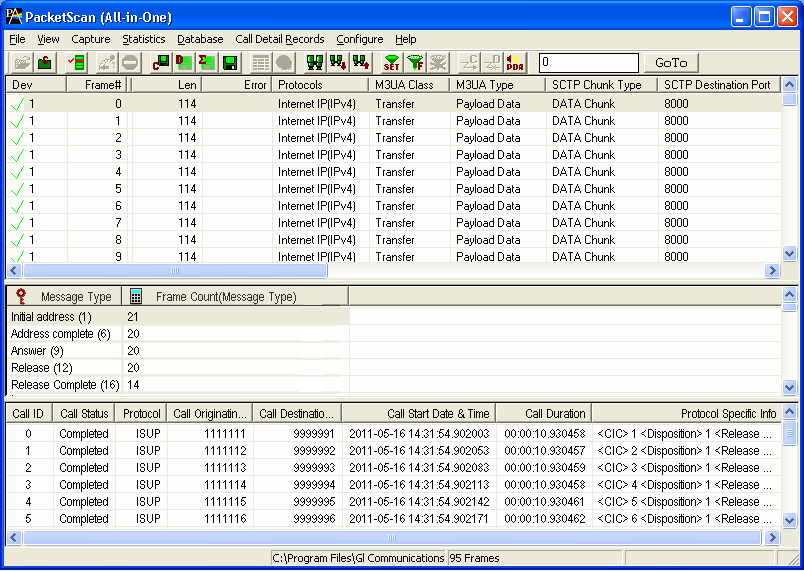
CDR and Statistics View
Resources
Please Note: The XX in the Item No. refers to the hardware platform, listed at the bottom of the Buyer's Guide, which the software will be running on. Therefore, XX can either be ETA or EEA (Octal/Quad Boards), PTA or PEA (tProbe Units), XUT or XUE (Dual PCIe Express) depending upon the hardware.
| Item No. | Item Description |
| PKV100 | PacketScan™ Software (required) |
| PKV105 | SIGTRAN Analyzer |
| Brochures |
| PacketScan™ Brochure |
| PacketScan™ - SIGTRAN Brochure |
| GL Product Lists |
| Presentations |
| Sigtran Presentation |
| VoIP Products Presentation |