Multi-Channel Bit Error Rate Test
Overview
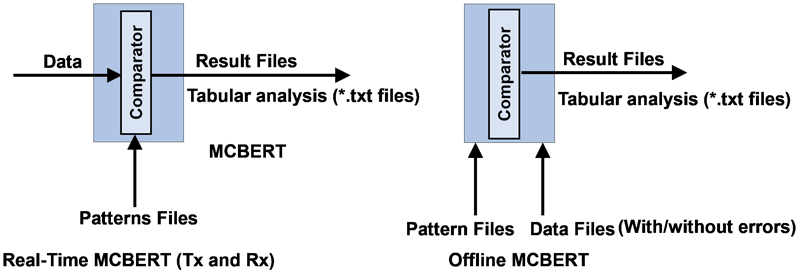
Multi-channel Bit Error Rate Testing (MCBERT) measures correctness of data transmitted and received on T1/E1 lines/timeslots with stored data in a reference file. The application can work in real-time with data currently being transmitted and received on T1/E1 lines/timeslots, or off-line with data stored in a file. The on-line T1/E1 testing can be done on full or fractional T1/E1 timeslots.
The following independent streams can be compared in real time to a chosen pattern file:
- Multiple 64kbps (56kbps) independent stream channels (need NOT be contiguous)
- A hyper channel per T1/E1 (n x 64kbps timeslots, where n = 1..24 T1, 1..32 E1; contiguous timeslots) line/trunk
- Multiple subchannels n x 8kbps (8k, 16k, ..., 56k). For example, for T1 it could be up to 24 x 8 separate 8kbps subchannels (eight subchannels per timeslot)
Operation:
Online Analysis:
The user chooses Reference file. (Program loads this to a 'circular' buffer.) Proper device
number and timeslots are selected to specify the online data to be verified. Mode of received data (64kbps, n x 64kbps or
n x 8kbps) is selected depending upon timeslot specification. Application is started and the MCBERT statistics are observed.
Offline Analysis
Data is captured into hard disc using applications like Record data to a file. Captured file is
selected using the 'Data from File' option and the reference file is selected using
'Pattern File' option.
Control and Setup buttons
- Rx, Tx, or Both: Provides options to select Rx only mode to receive the data, Tx only mode to transmit the selected BER pattern (or a pattern file), or Tx Rx mode to send and receive the data
- Time Slots: Allows user to select independent stream timeslots, or Hyperchannels timeslots, or subchannels to be tested
- Insert Error: Allows user to insert errors while transmitting the selected BER pattern or a file
- Start, Stop: Start or Stop the actual testing of the incoming data on the selected timeslots, (Online), or begin file comparison operation (Offline)
- Pattern: Provides BER patters for Tx and Rx
- User File: User can choose any type of file to be used as the reference file. The chosen file will be used for either online (real-time) testing or Offline (file comparison)
- Data from File: For Offline analysis, user can select any type of captured file to be compared against the reference file
- Reset: This button resets all the counter values to zero in the MCBERT statistics window
- Log: This option allows user to save the Statistics View details in a text file. By default, the application creates 'bertlog.txt' in C drive
- Save: Saves the selected stream into *.BRC option
- Load: Opens the previously saved configuration
- Bit Shift Synchronization: User Pattern option helps to achieve proper synchronization with smaller file sizes on Subchannels
Test Results Display Features:
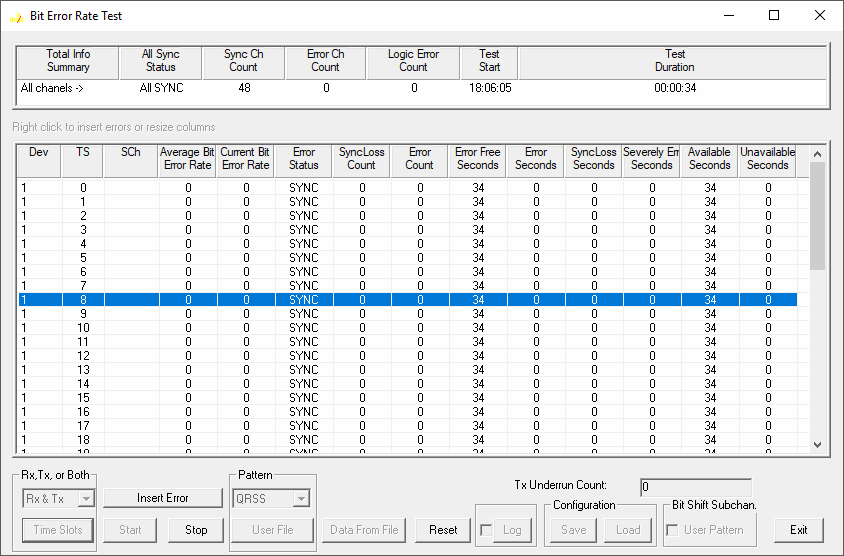
- The Summary Window on the top will display overall channel status such as All SYNC status, Logic Error Count, Sync Channel Count, Total Summary Info, Test Start time, Error Channel Count, Duration of the Test
- Dev: Device port number (card number) - displays the GL Communications card number selected and in use for this element of the test
- TS: Stream timeslot selection - displays the chosen timeslot, which is monitored and compared with the received data
- SCh: Stream sub channel selection - displays the specific sub channel, which is monitored and compared with the received data
- Average Error Rate: Multi-channel Bit Error Rate Testing (MCBERT) measures the correctness of data received on T1/E1 lines according to the repetitive pattern file
- Error Status: Displays SYNC if the received data currently matches with the reference data
- SyncLoss Count: Displays number of transitions from SYNC state to noSYNC state
- Error Free Seconds: Displays total seconds without any errors while in SYNC state
- Error Seconds: Displays total number of seconds with one or more errors (while in SYNC), and includes seconds during which there was noSync
- SyncLoss Seconds: Displays seconds when MCBERT was in noSync or PreSync state
- Severely Err Seconds: Displays number of Test Sec with a Bit Error Rate worse than 1*10-3 in each second
- Available Seconds: The number of seconds with a BER in each second better than .0*10-3
- Unavailable Seconds: It is the number of seconds with a BER in each second worse than 1.0*10-3. The count begins at ten and after ten consecutive unavailable seconds has been detected
Comparison with other GL's BERT Applications
Enhanced BERT
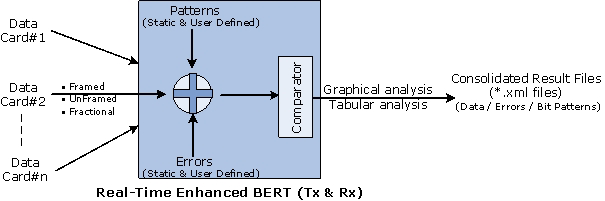
- Supports real-time generation of patterns, and errors (Logic error, BPV) on framed, unframed, and fractional
- Send/Receive BER pattern with Tx and Rx settings coupled or independently controlled. Supports multiple cards simultaneously with consolidated result view
- Supports sub-channels from 00 to FF along with contiguous & non-contiguous timeslot selections
- Supports both real-time and offline analysis of events graphically and in tabular formats
- Supports 16-static patterns as well as user-defined bit patterns
- Supports predefined and user-defined error insertions ranging from 0.01 to 1e-009
- Analysis and logs results in *.xml files
For more information, please visit Enhanced BERT page

Basic BERT
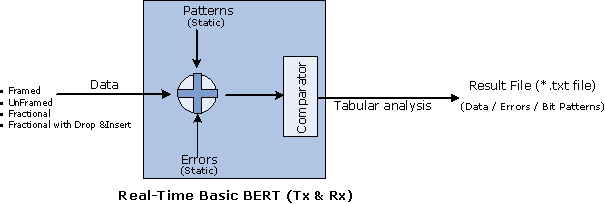
- Supports real-time generation of patterns, and errors (Logic error, BPV) on framed, unframed, full-frame, fractional, and fractional with drop and insert frames
- Sends/Receives BER pattern with Tx and Rx internally coupled
- Supports 16 static BER patterns QRSS, 2^5-1, 2^9-1, 2^11-1, 2^15-1, 2^20-1, 2^23-1, All ones, All zeros, 1:1, 1:7, 3 in 24, CSU Loop-Up (0001), CSU Loop-down (001), NIU Loop-UP (11000), and NIU Loop-Down (11100)
- Analysis and logs results in *.txt files
For more information, please visit T1/E1 Basic Bit Error Rate Test page
Application Notes
Resources
Please Note: The XX in the Item No. refers to the hardware platform, listed in the optional hardware section of the Buyer's Guide, which the software will be running on. Therefore, XX can either be HDT, HDE, HUT, HUE, UTA or UEA depending upon the hardware.
| Item No. | Item Description |
| XX018 | Multi-Channel BERT Software |
| Optional Hardware | |
|---|---|
| PTE001 | tProbe™ Dual T1 E1 Laptop Analyzer with Basic Analyzer Software |
| XTE001 | Dual Express (PCIe) T1 E1 Boards |
| FTE001 | QuadXpress T1E1 Main Board (Quad Port - requires additional licenses) |
| ETE001 | OctalXpress T1E1 Main Board plus Daughter Board (Octal Port - requires additional licenses) |
| Optional Software | |
| XX019 | Transmit / Receive File Utility Software |
| XX020 | Record and Playback of Files |
| XX051 | Synchronous Trunk Record Playback |
| XX610 | File based Record/Playback |
| Brochures |
| T1E1 Multi Channel Bert - Brochure |
| Presentations |
| T1E1 Analyzer - Presentation |
 Back to List of T1E1 Basic and Optional Applications Index Page