Live Monitoring of EC Operation
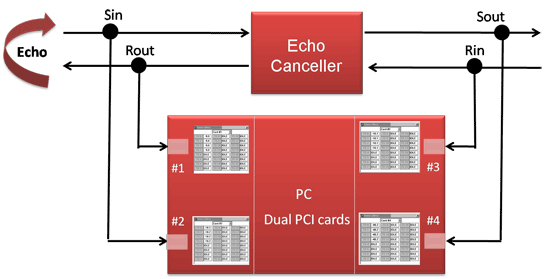
To view and listen to the inputs and outputs of an EC in real-time, do the following:
- Set up a connection as shown below and use the Real-Time Multi-Channel Audio Driver and Cool Edit Pro (now called Adobe Audition), or
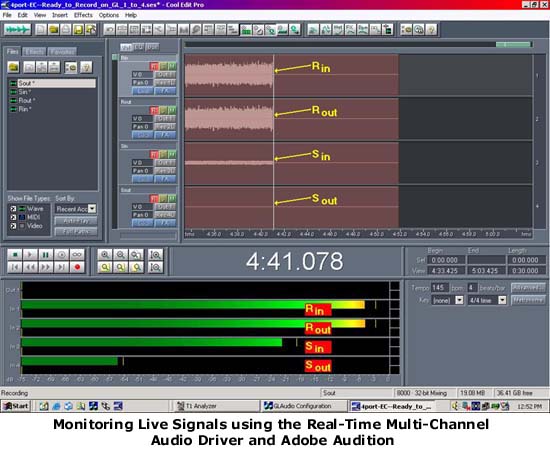
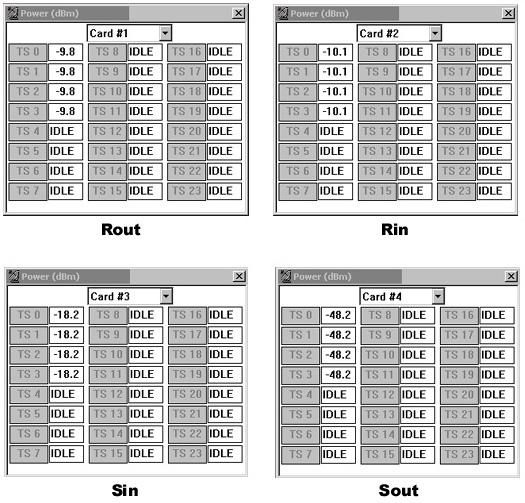
- Use Monitor Boxes as shown below, or
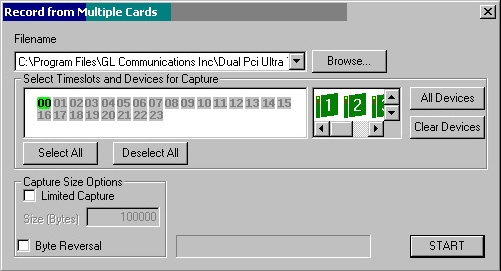
- Record the four signals simultaneously using "Record from Multiple Cards" as shown below
Resources
Note: PCs which include GL hardware/software require Intel or AMD processors for compliance.
Please Note1:The XX in the Item No. refers to the hardware platform, listed at the bottom of the Buyer's Guide, which the software will be running on. Therefore, XX can either be ETA or EEA (Octal/Quad Boards), PTA or PEA (tProbe Units), XUT or XUE (Dual PCIe Express) depending upon the hardware.
| Item No. | Item Description |
|---|---|
| XX017 | Real-Time T1 E1 Multi-Channel Audio Driver |
| SA026 | Adobe Audition Multitrack Sound File Viewing and Editing Software |
| SA048 | Goldwave Software |
| Related Software | |
| XX020 | Record and Playback of Files |
| XX051 | Synchronous Trunk Record Playback |
| XX062 | Echo Path Delay/Loss Simulation Software |
| XX066 | Digital Echo Canceller |
| PKB081 | Automated Acoustic Echo Cancellation (AEC) Compliance Test Software |
| Related Hardware | |
| PTE001 | tProbe™ Dual T1 E1 Laptop Analyzer with Basic Analyzer Software |
| FTE001 ETE001 |
QuadXpress T1 E1 Main Board (Quad Port– requires additional licenses) OctalXpress T1 E1 Main Board plus Daughter Board (Octal Port– requires additional licenses) |
| XTE001 | Dual T1 E1 Express (PCIe) Boards (requires additional licenses) |
| Recommended Accessories | |
| SA013 | T1 E1 On Site Training Class (not including travel or hotel) |
| SA021 | File Edit Software |
| SA026 | Adobe Audition Multitrack Sound File Viewing and Editing Software |
| SA017A | RJ48C to RJ48C Straight Cable, 10ft. cable |
| SA017A | RJ48C to RJ48C Crossover Cable, 10ft. cable |
| SA008a | Handset Adapter with Handset |
| SA022 | Extended 1 Yr. Software Upgrades and Hardware Warranty, and Comprehensive Support for Basic and Optional Software |
 Back to Echo Canceller Testing Solutions Main Page