Dual VF Tx Rx - Analog with tProbe™ Analyzer
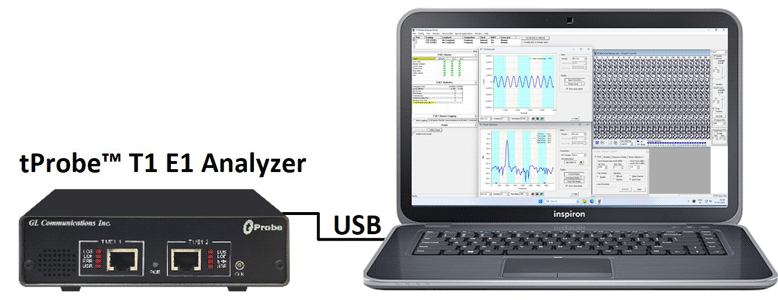
Overview
The Dual VF Tx Rx (earlier called as Simplified Audio Client) application is designed exclusively to perform non-intrusive and intrusive VF audio monitoring, VF audio recording, and testing easily. Dual VF Tx Rx provides an alternate & simple GUI similar to the basic applications in T1 E1 Analyzer software to perform analog Tx/Rx functions. SS1/SS4 Analyzer and SS1/SS4 Dialer applications also have been enhanced to operate in conjunction with the Dual VF Tx Rx and its modules.
Now, Dual VF Tx Rx is available as a part of T1 E1 analyzer basic applications.
Dual VF Tx Rx supports Analog operational mode featuring two VF interfaces per unit, with each VF interface providing independent Tx/Rx functionality.
- Mode 1: VF1 (Tx/Rx) and VF2 (Tx/Rx)
- Mode 2: VF Tx and VF Rx
The application supports Spectral displays, which can be observed for both Tx/Rx directions. Analog signal can also be listened using the inbuilt speaker inside the tProbe™ unit or using stereo headphones if the environment is too noisy.
VF monitor and record functions can be performed simultaneously using appropriate modes. The recording is independently and simultaneously made for both directions. The files are recorded in mu-law format for both directions and can later be analyzed using Goldwave software. Only one direction can also be monitored and recorded on the relevant port.
Additional future enhancements of Dual VF Tx Rx include support for SS7 traffic, Ethernet traffic, digital interface support including BERT, noise measuring (gains/ hits/ dropouts), voice/noise capture to file & playback from file, Digits captured to file and other capabilities.
Main Features
- Supports two independent VF I/O
- TX and RX simultaneously
- Full tone/digit generation/detection
- Multiple cards supported per system - VF Tx/Rx and VF1 / VF2
- SS1/SS4 & DTMF Goldwave Digit record/playback capability
- SS1/SS4 emulator and analyzer capture/record/playback capabilities
Analog Interface Configuration
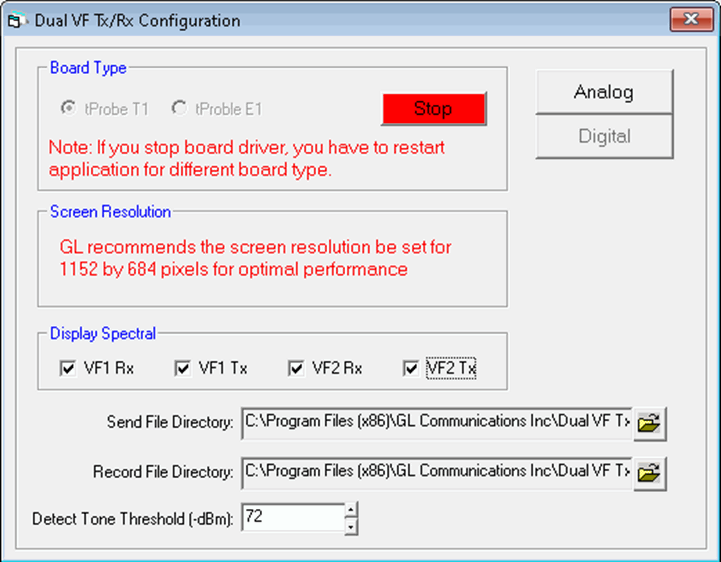
Analog Board Configuration
Configuration pane is available with the default board configuration parameters. Board Type option allows Dual VF Tx Rx to automatically connect to the T1 E1 devices when invoked, displaying the board in use. Audio traffic and files can be saved to the directory used for transmit and receive traffic. The tone threshold value for Tone detection can be set up to 80 dBm.
VF Tx / Rx Actions
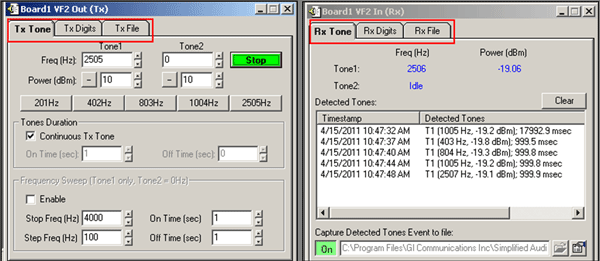
VF Tone, Digits, Files Tx/Rx Actions
In VF Tx /Rx operational mode, TX/Rx functions are supported on a single VF port (either VF1 or VF2). The sending and receiving traffic functions such as Tones, Digits, and Files are possible.
Transmit Tones option is used to send user-defined single/ dual Frequency tones on VF ports (VF1/VF2). Generate Tone 1 low frequency component listed from lowest to highest. If a monotone is transmitted, the tone frequency is set here. Tone 2 a high frequency component. If a monotone is transmitted, Tone 2 is set to zero. Detect Tones on selected VF port viewing the status and the spectral display.
Transmit Digits option used to generate DTMF/MF digits on VF ports (VF1/VF2) with defined On/Off time (ms) and Power (dBm). Support to Detect DTMF, MF digits on selected VF port.
Send Voice File option is used to send GL proprietary voice files of type PCM on VF ports (VF1/VF2) and record voice files (*.pcm) on selected VF port.
VF1 and VF2 (Tx / Rx) Actions
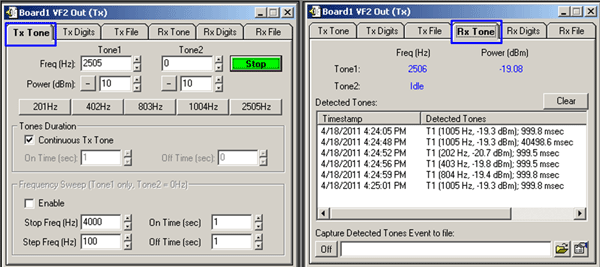
VF 1 and VF 2 Transmit and Receive Actions
In VF 1/VF 2 operational mode for each VF interface supports independent Tx/Rx between VF1 (Tx/Rx) and VF2 (Tx/Rx) simultaneously. The transmit actions on one VF port will be received on another VF port. The sending and receiving traffic functions such as Tones, Digits, and Files are possible.
The VF Tx/Rx Tones, Digits, and Files status and the spectral can be viewed for sending VF ports in the VF Status and Spectral Display.
VF Status and Spectral Display
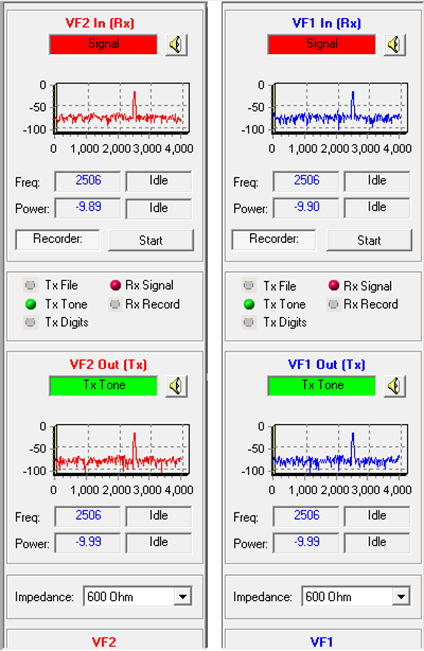 VF Status and Spectral Display
The Side panels display
- Tx/ Rx status for the tone, digits, voice transmitted/received on any particular VF port
- Frequency, Power count status of the VF In and Out
- Data transmitted or received on a specified VF port graphically (spectral Power (dBm) Vs Frequency (Hz))
- Sending/Receiving Speakers for Tx/Rx ports
- Multiple impedance options for audio In and Out ports
SS1/SS4 Emulator and Analyzer
SAC is enhanced to invoke SS1/SS4 analysis and emulation applications from within the GUI. The SS1/SS4 Dialing Digits (Dialer) and SS1/SS4 Analyzer applications provides the ability to dial and analyze tone sequences that make up SS1/SS4 dial digits. The SS1/SS4 Emulator includes options to setup Dial Code with control mask & space frequencies and duration, and other parameters related to the digit dialer. Users can create channel for Transmission (Tx), choosing Port and Timeslot.
Using SS1/SS4 Analyzer sequences of pulse and guard tones are detected, decoded, and assembled into their corresponding dial digits. The tone sequences are also verified for compliance against a "specification" parameter file which can correspond to published standards or user criteria. Refer to SS1/SS4 Signaling Emulator and SS1/SS4 Analyzer webpage for details.

SS1/SS4 Analyzer
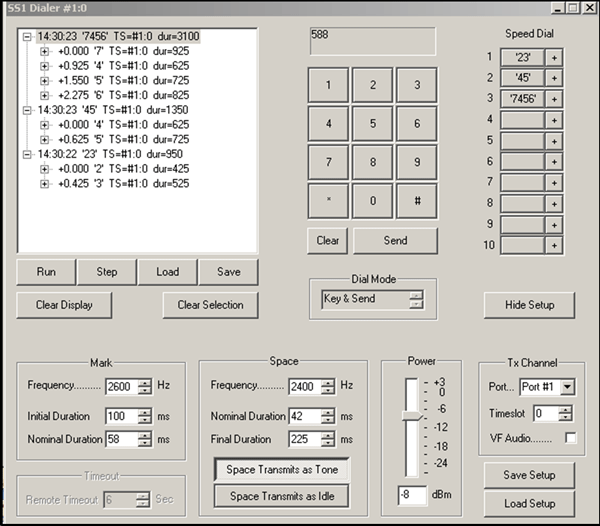
SS1/SS4 Simulation (Dialer)
Goldwave Capabilities
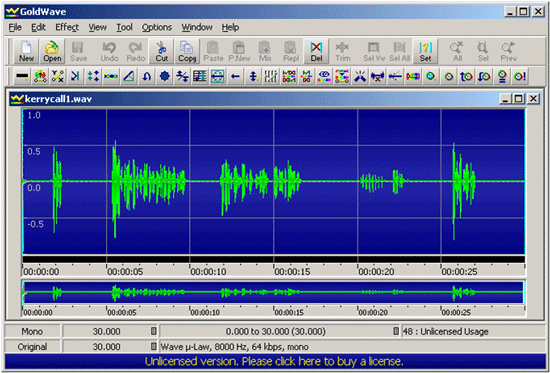
Goldwave Support
Dual VF Tx Rx includes Goldwave capabilities to view and analyze send and receive audio files. Any chosen mono and stereo (east and west) files in supporting file formats (*.pcm, A-Law, Mu-Law, *.wav, and others) that have been recorded can be viewed, heard, and analyzed using Goldwave.
Refer to Goldwave webpage doe comprehensive details on record or playback capabilities using Goldwave application.
Resources
Note: PCs which include GL hardware/software require Intel or AMD processors for compliance.
Please Note: The XX in the Item No. refers to the hardware platform, listed at the bottom of the Buyer's Guide, which the software will be running on. Therefore, XX can either be ETA or EEA (Octal/Quad Boards), PTA or PEA (tProbe Units), XUT or XUE (Dual PCIe Express) depending upon the hardware.
| Item No. | Item Description |
| XX605 |
Dual VF Tx Rx (earlier called as Simplified Audio Client) Software (Included with Basic Software) (optional xx626) |
| XX626 | SS1/SS4 Dialer and Signaling Analyzer (Optional) |
| Related Software | |
|---|---|
| XX022 | DTMF/MF Detector & Generator Software |
| SA048 | Goldwave Software |
| XX050 | Signaling Bits Recorder Software |
| XX020 | Record and Playback of Files |
| XX051 | Synchronous Trunk Record Playback |
| XX031 | Enhanced T1 E1 Call Capture/Analysis Software |
| XX012 | Pulse Mask Compliance, Jitter Generation, and Jitter Measurement |
| Related Hardware | |
| PTE001 | tProbe™ Dual T1 E1 Laptop Analyzer with Basic Analyzer Software |
| Brochure |
| T1 E1 Dual VF TX RX Brochure |
 Back to Client/Server Scripted Control Software Page