Live and Interactive Product Demo
Visit the following links to view the online and interactive demo of the respective products
VoIP Monitoring Online Demo
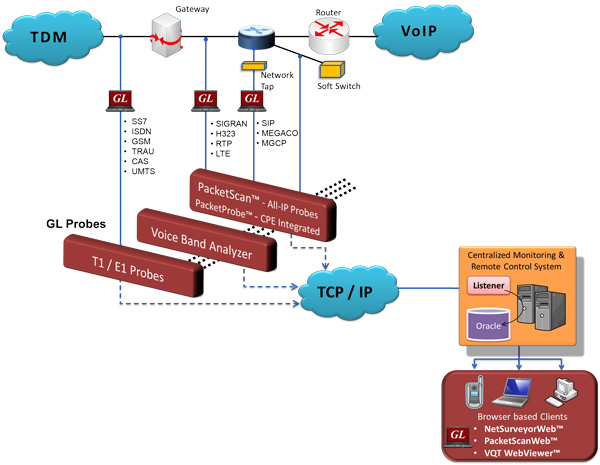
- NetSurveyorWeb™ is a centralized VoIP network monitoring system. A number of GL's PacketScan™ probes are deployed in remote locations across the network to passively monitor VoIP traffic. Whenever a monitored call completes, the scan/probe calculates a variety of quality metrics (MOS, loss, delay, jitter, etc) and sends the metrics to the central Oracle database for storage.
- The PacketScan™ is a feature-robust Windows® based software tool that captures and monitors live IP traffic. In the VoIP world, it can monitor and measure SIP, H323, Megaco, MGCP, T.38 and video calls. In addition to quality metrics PacketScan™ also captures signaling information and sends that to the NetSurveyorWeb™ database as well.
Live Demo
NetSurveyorWeb™ - VoIP Monitoring
A number of GL's PacketScan™ probes are deployed in remote locations across the network to passively monitor VoIP traffic.
Digital T1/E1 Line Monitoring, Test, and Diagnostic System
The NetSurveyorWeb™ for T1E1 Physical Layer provides an instant overall graphical view of the health of the TDM network with drill down to individual lines; secure access through WEB; remote monitoring and diagnostics to troubleshoot any T1 E1 line; and a central database and applications for controlling, collecting, and analyzing the information provided by the various probes.
Live Demo
NetSurveyorWeb™ - Digital T1/E1 Line Monitoring, Test, and Diagnostic System
Please change the “Protocol Type” on the demo page to "T1 E1 Layer 1"
SS7, ISDN Network Surveillance Online Demo
The NetSurveyorWeb™ is a web-based client connected to SS7 / ISDN / GSM / GPRS probes through a web server that facilitates result display using a web interface as shown in the screenshot.
Live Demo
NetSurveyorWeb™ - SS7, ISDN Network Surveillance
Please change the “Protocol Type” on the demo page to either "SS7" or "ISDN"
Voice Quality Testing (VQT) WebViewer™ Online Demo
GL's WebViewer™ provides the method to display and access, in real time, the entire VQuad™/VQT network including all individual VQuad™ probes as well as the central location. GL's VQuad™ provides automatic call control over several networks and supports transmit/capture of voice files in real-time from the various nodes. The degraded (recorded) voice files are automatically transferred to the Central Location where GL's VQT analyzes and generates the PESQ MOS.
Live Demo
Voice Quality Testing (VQT) WebViewer™
The degraded (recorded) voice files are automatically transferred to the Central Location where GL's VQT analyzes and generates the PESQ MOS.
Remote access Test PC with GL's Analysis & Simulation Tools using Dial up connection
For more details, Network Dial up Access for Remote Users.