T3 E3 Basic & Optional Applications
Brochure
General T3/E3 signal testing capabilities
- Monitor T3/E3 Lines
Monitor T3/E3 line application the T3 (DS3) /E3 line conditions for two T3/E3 ports. We can monitor LOS, LOF, AIS, IDLE, RAI/X-BIT, and Excessive 0's in case of T3. Others values such as T3 line frequency, power level, FEAC Messages, Frame errors, P-Bit Parity, C-Bit Parity, FEBE, and BPV also can be monitored. In case of E3 signal, LOS, AIS, RAI/X-BIT, and Excessive 0's status can be monitored. Others values such as E3 line frequency, power level, FEAC Messages, Frame errors, CV, and Excessive 0's also can be monitored.

Alarm and Error windows for the T3 (DS3) and E3 Analyzers
- Alarm Generation and Error Injection
This application internally generates various types of errors and / or alarms and transmits them on the outgoing T3 (DS3)/E3 stream. The application can automatically insert errors at regular intervals of time (secs) or insert single bit errors.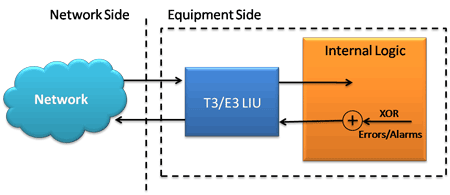
Logical diagram of alarm generation application
- Tx Rx Memory Loopback
This application is used for diagnostic purposes. It loops all the received data from the memory back to the transmitting port. Memory Loopback application can be run on one port, along with Bit Error Rate Test on the other port to verify the operation of this analyzer unit.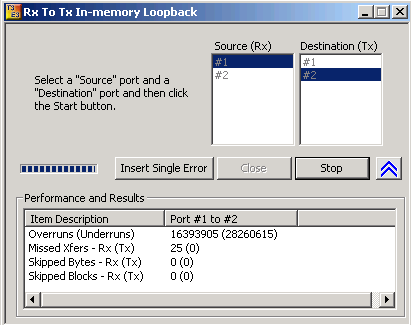
User interface for the Transmit-to-Receive Memory Loopback application
- Monitor Received Data
This application has the ability to monitor raw bit values on the selected ports. Underruns, MissedXfer, Skipped Bytes, and Skipped Blocks in Performance and Results pane provides the receive data pipe performance.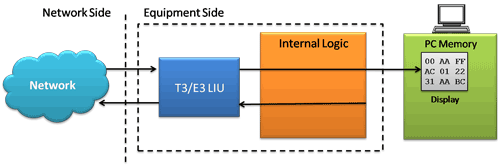
Logical diagram for the Monitor Received Data application
- Loopback Modes, Clock, Framing Formats, Structured/Unstructured Modes
Loopback capability between the local T3(DS3) /E3 interface and the remote CSU are used to diagnose problems with the T3 (DS3) /E3 analyzer or with the CSU when it is isolated from the network.The clock source option is used to select the timing reference for the outgoing T3 (DS3) /E3 signal.
The board can be configured to terminate or monitor the T3 (DS3) /E3 input signal depending on the user requirements.

User interface for Interface Configuration
- Transmit and Receive Configurations
Various options are provided to configure the Tx/Rx parameters for the T3 (DS3)/E3 signal.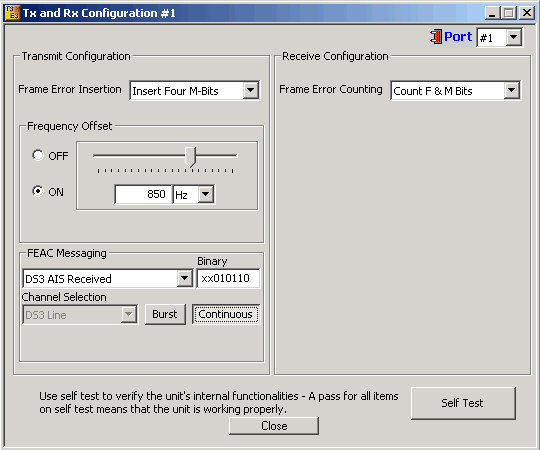
User interface for the Transmit and Receive configuration settings
- DSU Scrambling and Subrate
GL's USB T3E3 Analyzer supports scrambling and subrate for the following DSU vendors' algorithms for T3 interface: Digital Link, Larscom, Verilink, and Adtran. Scrambling was implemented to address various 0s-density when used in WAN interface. Data Service Unit (DSU) Subrate provides the ability to configure the DS3 network for a lower bandwidth service.For more details, please visit T3 (DS3) Subrate and Scrambling website
- Multiplex and De-multiplex T1 or E1 signals
Up to two user selected T1 (or E1) channels can be externally inserted using the T1/E1 input/output interface into any one of the transmitted T3 (DS3) or E3 signal. The inserted T1 or E1 signal can be selectively transmitted through one or more of the T1/E1 transmit channels or broadcasted through all the T1/E1 channels. Additionally, the received T1/E1 signal can be looped back and transmitted or the transmitted T1/E1 signals can be set to carry AIS as shown in the picture below. Similarly up to two user selected T1/E1 channels can be dropped.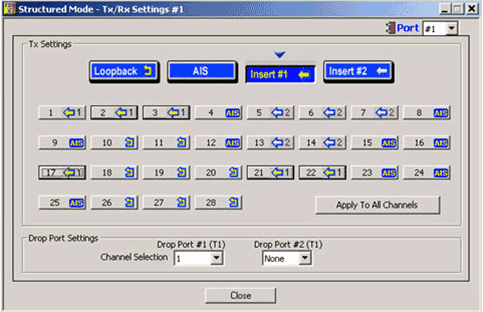
User interface for the Structured Mode (Drop / Insert) Settings
Other Applications
- Bit Error Rate Test - BERT (Full Frame and Unframed)
GL's T3 (DS3) / E3 Bit Error Rate Tester application measures the correctness of data received on T3 (DS3) /E3 channels for a repetitive fixed or pseudorandom pattern for the given transmission. The digital data in various fields such as digital circuits, mobile communications, antennas, digital broadcasting need to be monitored for error-free transmission. Bit Error Rate provides a figurative measurement of the number of erroneous bits received for the total number of bits transmitted. - Playback (Transmit from File) / Record (Capture to File) applications
This software permits the user to transmit and / or capture all the data on T3 (DS3) /E3 lines using GL's T3 (DS3) /E3 analyzer. Typical applications include transmission or capture of prerecorded video files, traffic loading applications, surveillance applications, and protocol analysis. The analyzer can capture (record) two complete T3 (DS3) /E3 streams to the hard drive as a binary file. It can also transmit (playback) already captured binary file through the T3 (DS3) /E3 stream.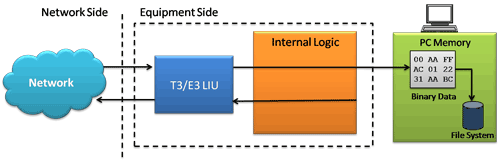
Logical diagram of capture (record) application
Files of any length can be transmitted and captured continuously (without loss) over T3 (DS3) /E3 line. Repeated (continuous) transmission of a single file is also possible.
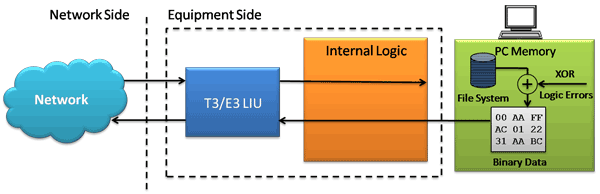
Logical diagram of transmit from file (playback) application
- Protocol Testing and Analysis - HDLC, Frame Relay,
ATM, and PPP
GL's T3 (DS3) /E3 analyzer supports protocol decoding and analysis of ATM, Frame Relay, MLPPP, and HDLC. All the protocol analyzers are based on similar architecture and support sophisticated filtering, statistics and real-time capture options. - Scripting and Automation
Windows Client/Server software empowers the T3 (DS3) /E3 analyzer users with the capability of remote operation, automation, and multi-site connectivity. T3 (DS3) /E3 Cards in server mode can be easily controlled through software clients at remote or local sites. With the GL's well-known Client-Server (WCS) approach it is possible to individually control one or more T3 (DS3) /E3 analyzers - HDL File Conversion Utility
This application converts a file from Ethereal format files (.PCAP, .CAP, and .PCAPNG) to GL proprietary file format (.HDL) and vice-versa. The application can automatically detect the format of the source PCAP file whether it is captured on Linux or Windows® and converts accordingly to HDL file. By converting the file to *.HDL format, the users can use the converted *.HDL files in T1 E1, T3 E3, LightSpeed1000™, or PacketScan™ applications to decode and analyze.
Resources
Note: PCs which include GL hardware/software require Intel or AMD processors for compliance.
| Item No. | Item Description |
| TE3001 | Portable (USB) Dual T3 E3 / T1 E1 Hardware Unit - requires TT3001 or EE3001 |
| Related Software | |
|---|---|
| TT3001 | T3 / T1 / E1 Analyzer Basic Software |
| EE3001 | E3 / E1 Analyzer Basic Software |
| TT3020/ EE3020 | T3/ E3 Record Playback Software (GUI) File Record Send over T3/E3 |
| TT3090 / EE3090 | T3 / E3 HDLC Tx/Rx Test + Analyzer (GUI) Send Receive Analyze HDLC over T3/E3 |
| TT3135 / EE3135 | T3 / E3 PPP Analyzer (GUI) Analysis and decode of PPP over T3/E3 |
| TT3130 / EE3130 | T3 / E3 Frame Relay Analyzer (GUI) Analysis and decode of Frame Relay over T3/E3 |
| TT3160 | T3 ATM Analyzer (GUI) Analysis and decode of ATM cells over T3 |
| TT3600 / EE3600 | T3 / E3 Basic Client Server Scripted Control Software Precise & Sequential Control of T3/E3 Analyzer via Client Server - Uses TCP/IP |
| TT3610 / EE3610 | T3 / E3 Client Server Tx/Rx File Tx / Rx Files on Unframed Unchannelized T3/E3 |
| TT3634 / EE3634 | T3 / E3 Client Server High Throughput HDLC Tx/Rx Test HDLC Simulation with Impairments |
| TT3635 / EE3635 | T3 / E3 Client Server High Throughput PPP Tx/Rx Test PPP Emulation, requires TT3634/EE3634 |
| Related Hardware | |
| UT301 / UT302 | T3 Analysis PCI Card w/ Basic Software and Client / Server and Command Line Utility |
| SA000d | High Stability Internal Clock Option ± 1 ppm Internal Clock |
| XTE001 |
Dual T1 E1 Express (PCIe) Boards (requires additional licenses) |
| FTE001 | QuadXpress T1E1 Main Board (Quad Port– requires additional licenses) |
| PTE001 | tProbe™ T1 E1 Base Unit |
*Specifications are subjected to change
 Back to Laptop T3 E3 T1 E1 Ethernet Analyzer Page