T3/E3 Loopback Data
Tx to Rx Memory Loopback
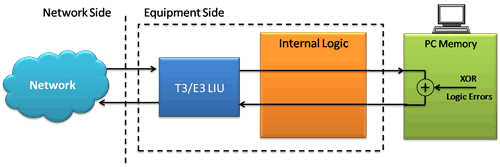
Logical Diagram for Transmit and Receive Memory Loopback for T3 (DS3)/E3 Analyzers
This application can be used for diagnostic purposes. It loops the received data (in memory) and transmit it back to the transmit port. By running Memory Loopback application in port 1 and the Bit Error Rate Test application on the other port, we can verify the internal data streaming function of port 1. We can also loopback the data across the port, for example, the data received in port 1 can be transmitted through port 2.
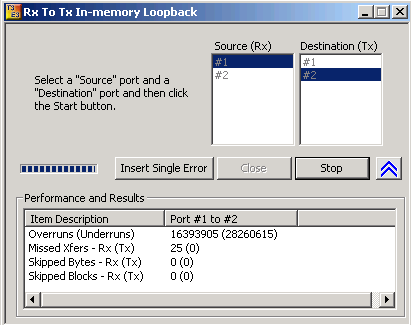
Transmit and Receive Memory Loopback Options
The logic diagram for Tx Rx memory loopback application shows that the data received from the network is retransmitted back via the PC memory. While doing this loopback, optionally logic errors (XOR) can be inserted into the loopback stream. The application allows insertion of single bit errors manually.
- Destination (Tx): indicates the port number through which the data is sent out.
- Source (Rx): indicates the port number from which the data is received. For example in the above figure the data received on port #1 is looped back and is sent out through port #2.
- Insert Single Error: Manual insertion of single error by 'XOR'ing a single bit on the data being looped back
- Statistics such as Underruns, MissedXfer (Missed Transfer), Skipped Bytes and Blocks can be observed on the Performance and Results pane for the selected port
 Back to List of T3E3 Basic and Optional Applications Main Page