Packet Data Analysis (PDA)
TDM/IP packet analyzer solution that supports real-time monitoring, analysis, and decoding of TDM and IP protocols. Our packet analyzer can capture and analyze packets from multiple interfaces and protocols, including T1 E1, T3 E3, SONET/SDH, Ethernet, IP, and VoIP
Request a Quote Brochure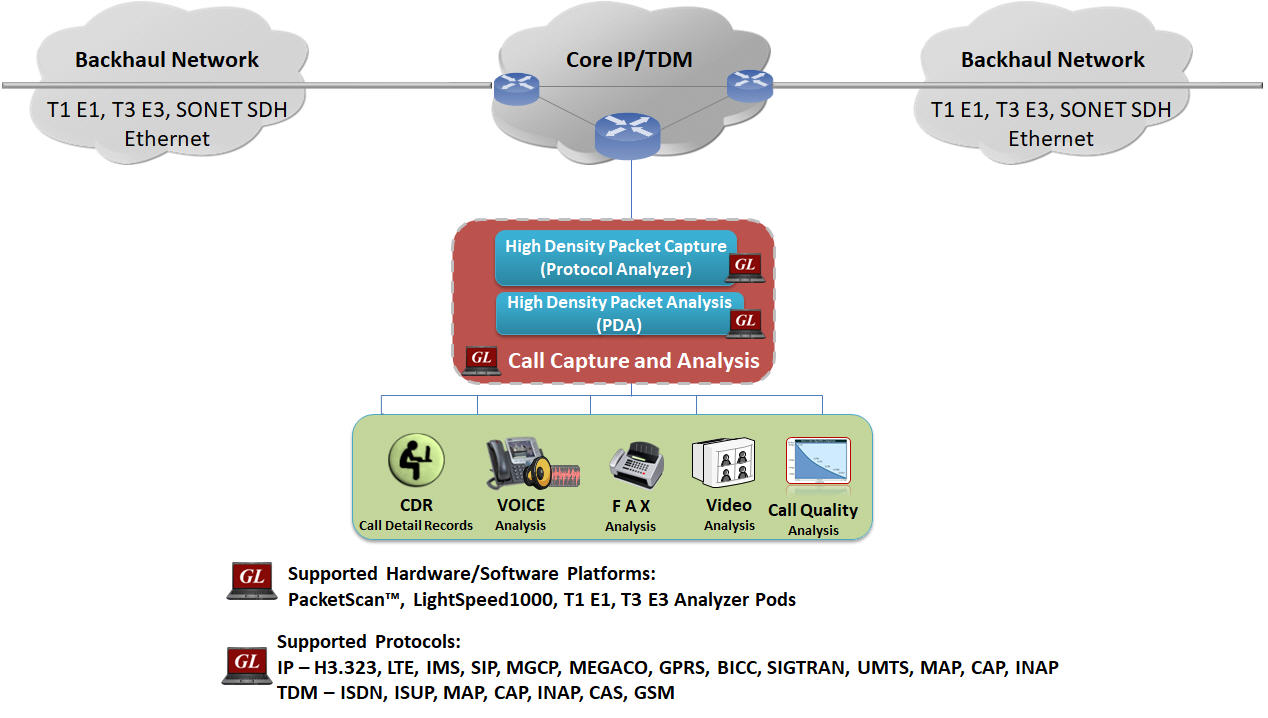
Overview
Packet Data Analysis (PDA) is an outstanding tool for live monitoring of signaling and traffic over IP/TDM. Packet Data Analysis (PDA) is distributed with GL’s Packet Analyzers, allowing users to monitor live IP/TDM networks including capture, analysis, and reporting of every call in detail. Supported protocols include SIP, SIP ED137B, RTP, MEGACO, MGCP, H.323, Skinny (SCCP), RANAP (UMTS IuCS), PPP, GSM A, ISDN, SS7, MAP, CAP, INAP, GSM, and CAS.
GL’s Packet Analyzers can capture IP packets over different transmission lines, including IP, T1, E1, T3, E3, and OC-3 STM-1 / OC-12 STM-4. PDA then processes the captured packets, identifies, and segregates calls based on signaling and traffic parameters.
Packet Data Analyzer (PDA) is a real-time IP, TDM, and VoIP analysis tool in PacketScan™, SS7, ISDN, GSM, CAS, and MLPPP Analyzer (T1 E1, T3 E3, OC-3 STM-1 / OC-12 STM-4) that non-intrusively captures and monitors live IP, TDM, VoIP, and IP based Video traffic.
- Segregates, captures, and collects statistics on VoIP/TDM calls
- Provides graphical presentation of analysis, including ladder diagrams of protocols
- Monitors QoS (quality of service) on voice and video calls for IP
PDA is an outstanding tool for live monitoring of VoIP/TDM traffic. It can also monitor, report, analyze, and capture calls for infinite time, limited only by the finite space of your hard disk or network hard drive.
Detailed call statistics such as packet loss, gap, jitter, delay, RTP performance statistics, R-factor & MOS scores, and unparalleled voice band statistics can be monitored simultaneously. Sophisticated filters permit zooming and recording of specific calls of interest. All or filtered traffic can be recorded into a trace file.
Users can listen/record audio and video data of a session VoIP calls in real-time; perform power, frequency, spectral, tone and digit analysis, and video analysis with ease and precision; get an exact picture of QOS (quality of the service) and the technical adherence of the system under test (adherence to the protocols specified by the standardizing authority).
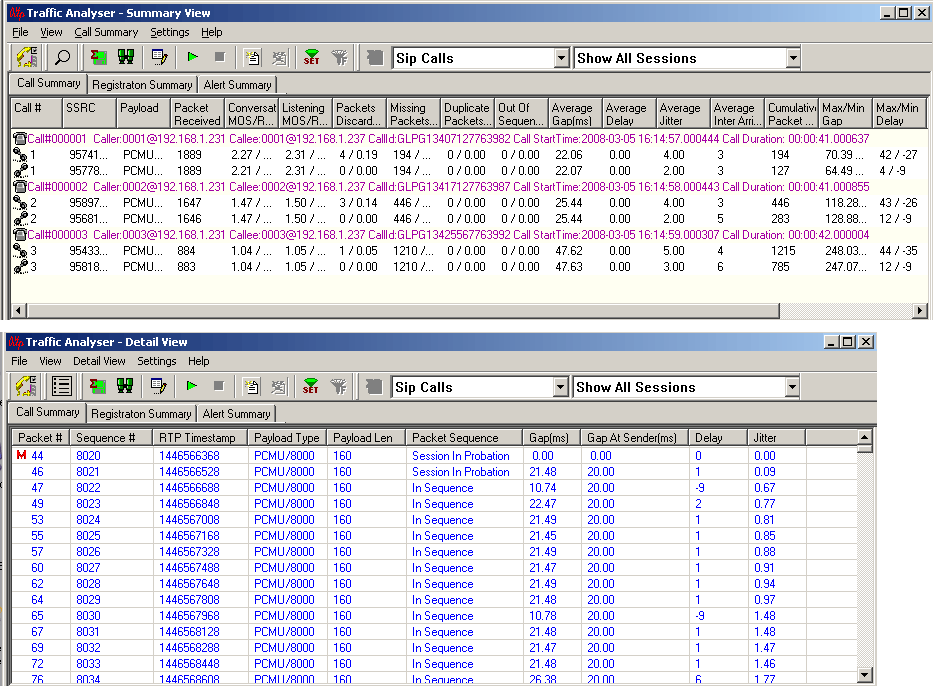
Packet Data Analyzer supports the following three views:
- Summary View (Call Quality Matrix) displays complete summary of VoIP/TDM call information in graphical format along with a summary of alerts
- Detail View (Diagnostic View) displays packet by packet statistics for particular call information in tabular format. This allows the user to have a detail look at the two (or one) RTP sessions that are part of a single call. This distinction assists in any comparisons that are to be made between the two sessions. Here each frame of the selected session is dissected and its contents are displayed in a tabular form for easier viewing and comparisons. Vital aspects from the RTP frame needed for close analysis are included provides in tabular and graphical formats. A host of counters gives the user an instantaneous snapshot of the VoIP/TDM traffic on the network
These interfaces allow users to define parameters such as E-Model based MOS and R-Factor score, VQmon settings, & Dynamic Payload Mapping. It also supports real-time digit capturing like DTMF, MF and user-defined digits/tones.
- Registration Summary View (IP) displays statistics and status of the SIP registration process, an active registration graph, and registration trace graph of each SIP registration
Packet Data Analysis (PDA)
Main Features
| Packet Data Analysis |
|
| Performance Metrics |
|
| QOS Parameters |
|
| Traffic Recording |
|
| Triggers and Actions |
|
| Traffic (Digits, Audio, Video, Fax) Handling |
|
| SIP Registration Details |
|
| Supported Codecs |
|
| Exporting Calls |
|
Detailed Packet Analysis
Packet Data Analysis (PDA) is an outstanding tool for live monitoring of signaling and traffic over IP. Packet Data Analysis (PDA) is distributed with GL’s Packet Analyzers, allowing users to monitor live IP networks including capture, analysis, and reporting of every call in detail. Supported protocols include SIP, MEGACO, MGCP, H.323, SCCP, RANAP (UMTS IuCS), GSM A, CAMEL, BICC, ISUP, MAP, Gb, and GTP. It can capture IP packets over different transmission lines, including IP, T1, E1, T3, E3, and OC-3 STM-1 / OC-12 STM-4. PDA then processes the captured packets, identifies, and segregates calls based on signaling and traffic parameters.
PacketScan™ provides in-depth real-time and post-process data investigation. The PDA view assists in any comparisons that are to be made between the two RTP sessions. Packet Data Analysis (PDA) view displays call information in graphical format (Traffic Analyzer Call Quality Matrix- Summary View) as well as in tabular format (RTP Diagnostic - Detail View).
Graphs
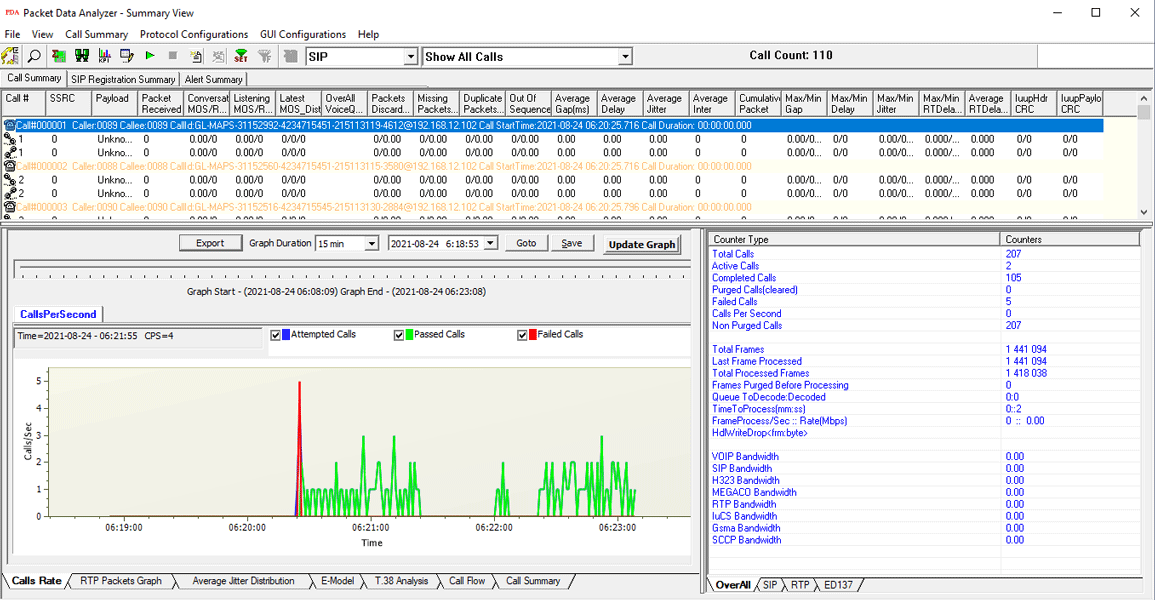
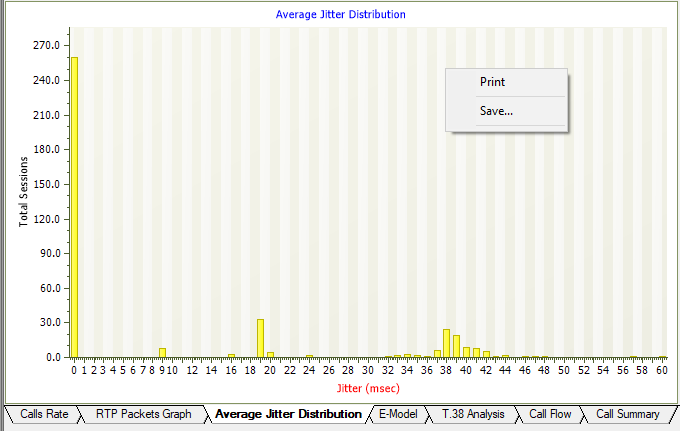
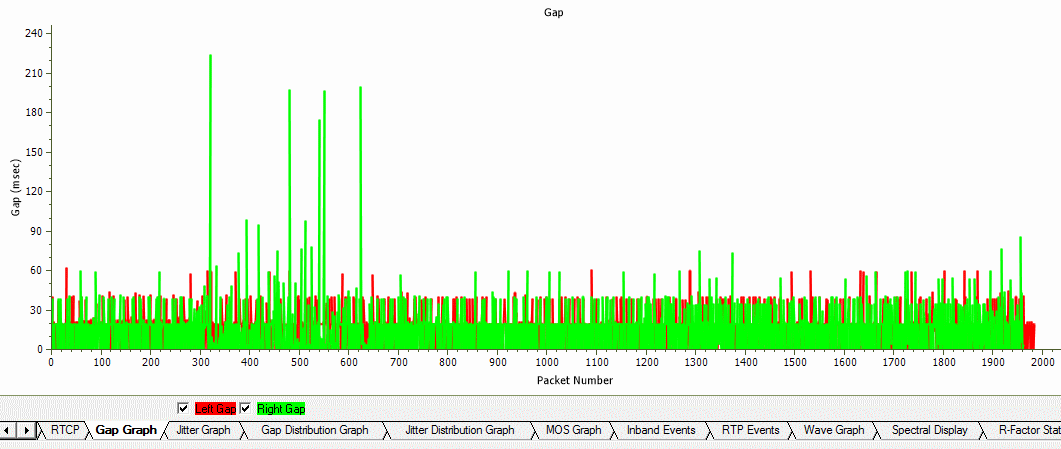
Graphs are provided for key statistics for network monitoring and troubleshooting. Graphs available include – Active Calls, Average Jitter, E-Model MOS/R-Factor/Packets Discarded, RTP Packets Summary, ladder diagram for T.38 based fax calls and call signaling, Gap, Jitter, Gap/Jitter Distribution, Wave and Spectral Display for media stream analysis, VoIP calls and more.
Active Calls Graph
Average Jitter Distribution Graph
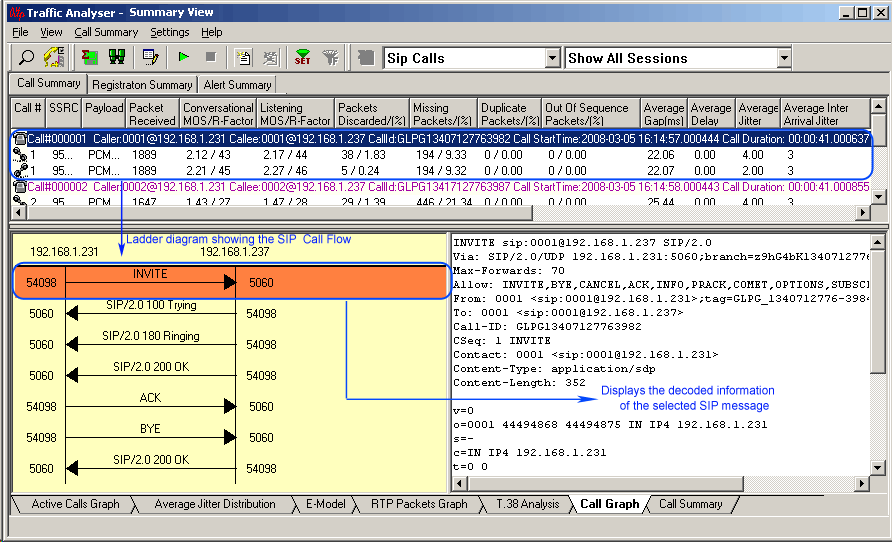
Call Graph
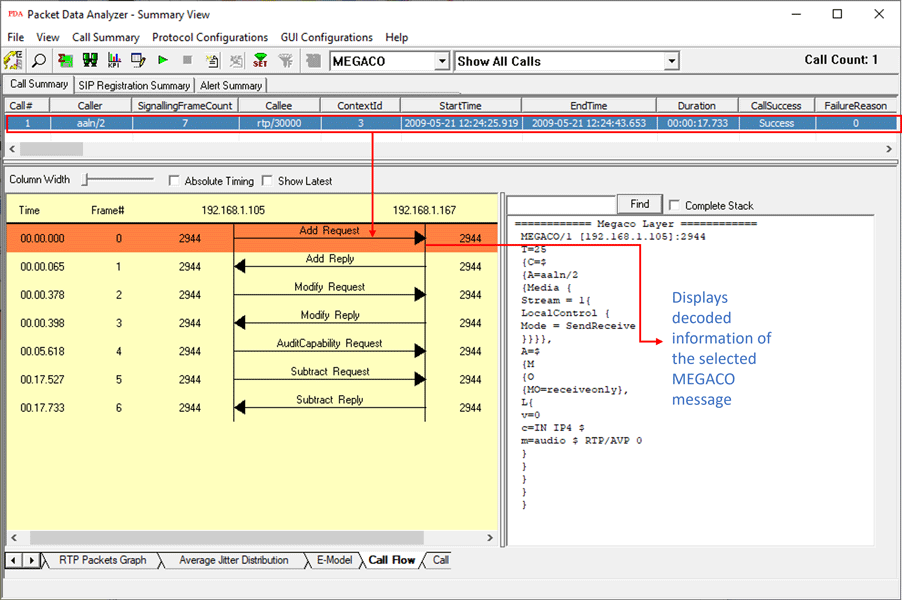
MEGACO Call Graph
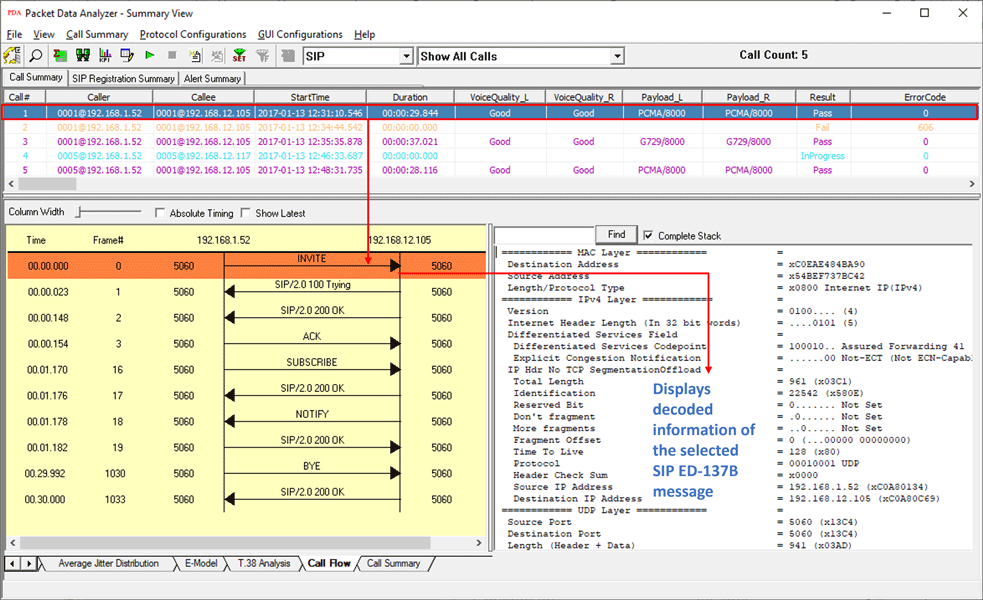
SIP ED-137 Call Graph
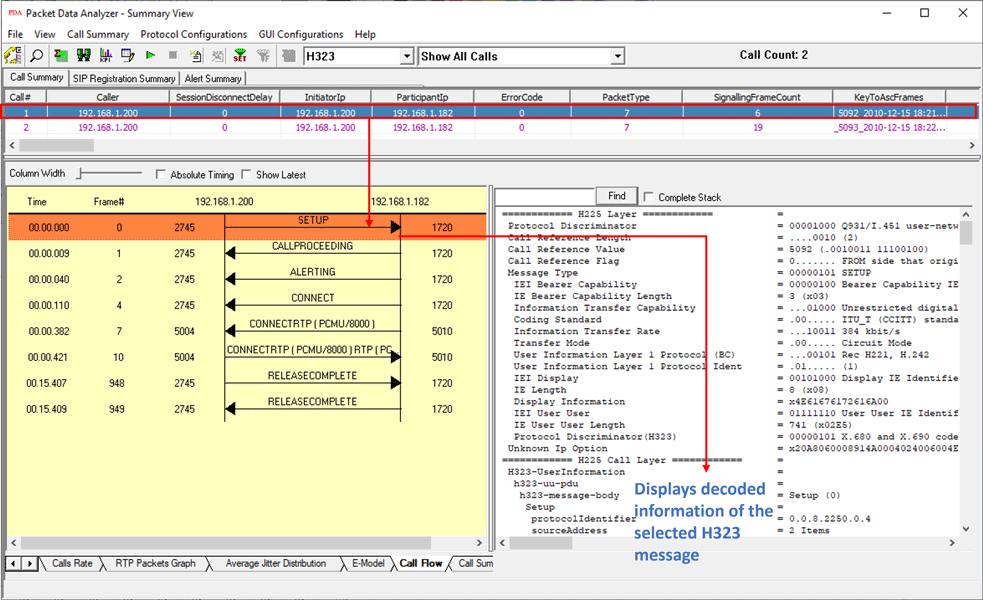
H.323 Call Graph
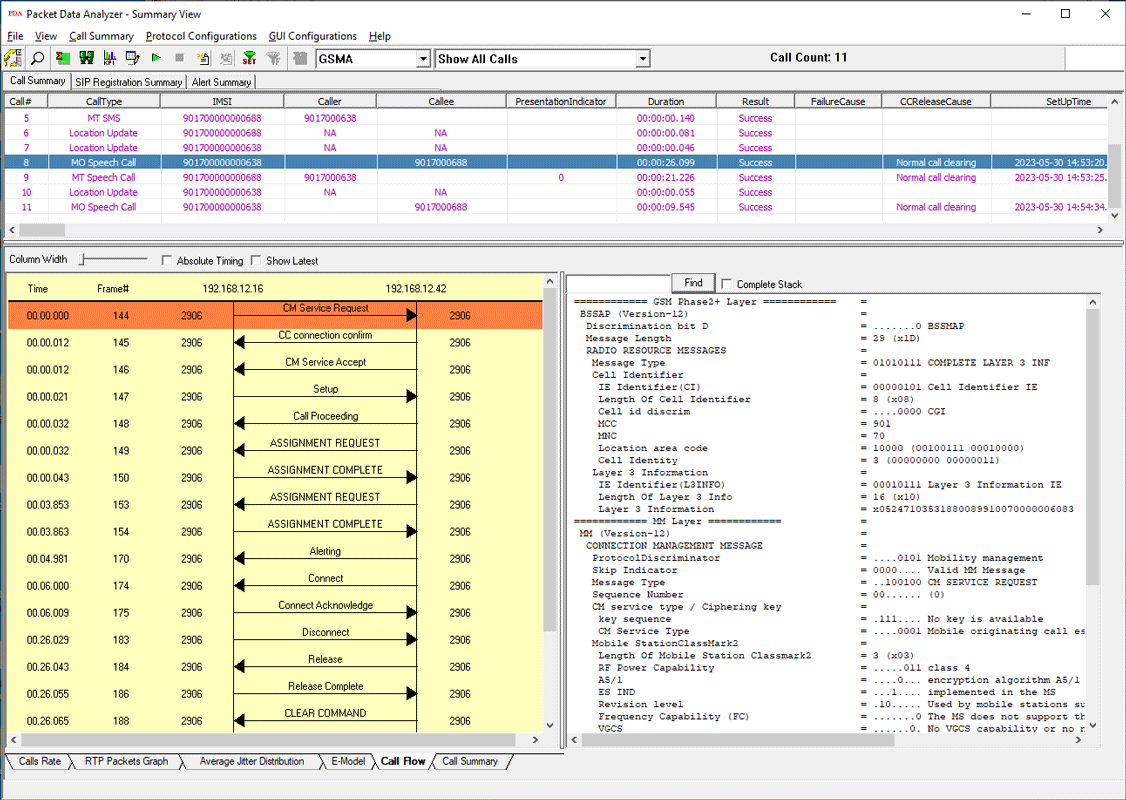
GSM A IP Call Graph
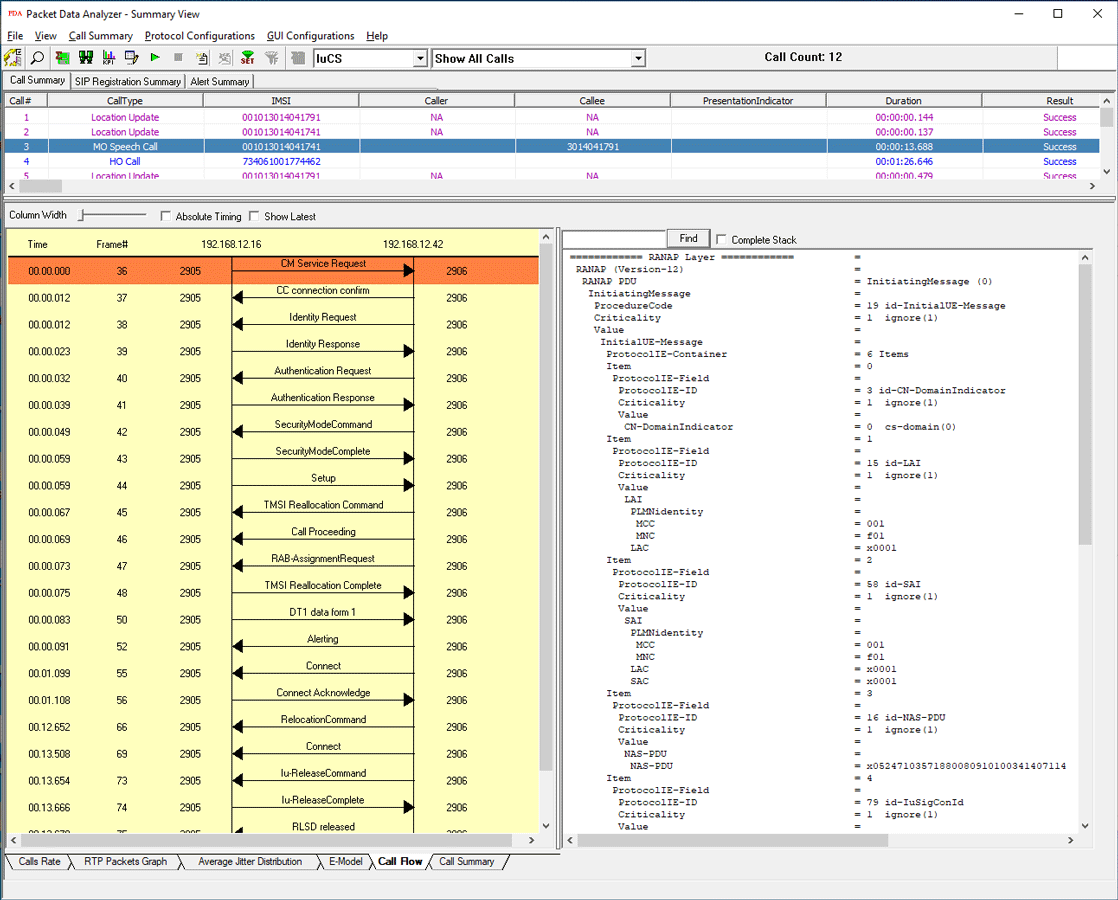
UMTS IuCs Call Graph
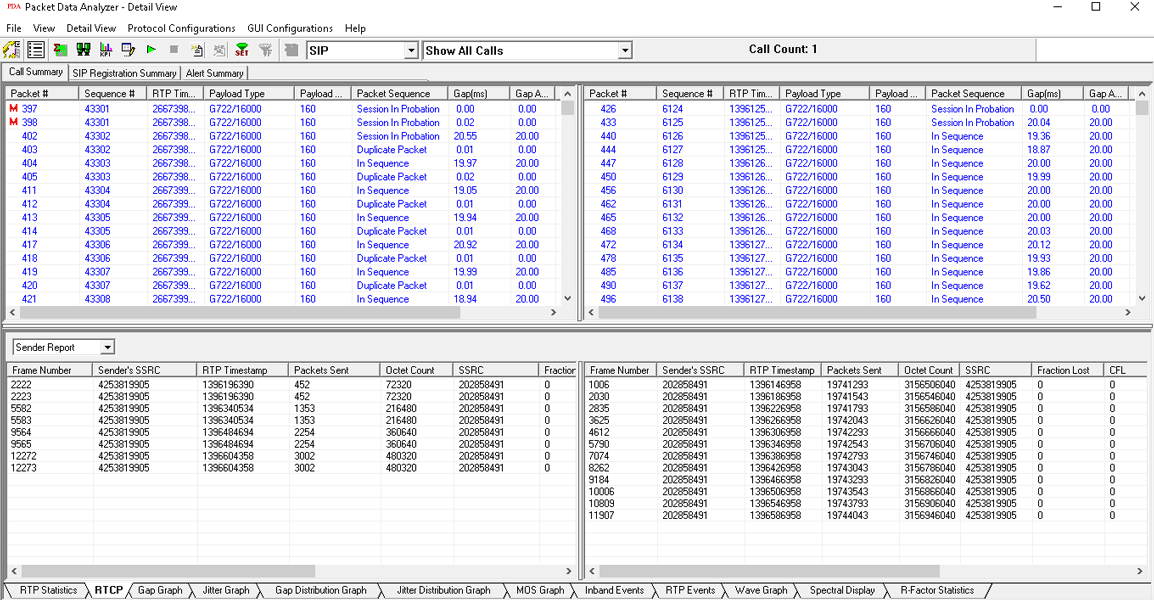
RTCP Details Screen
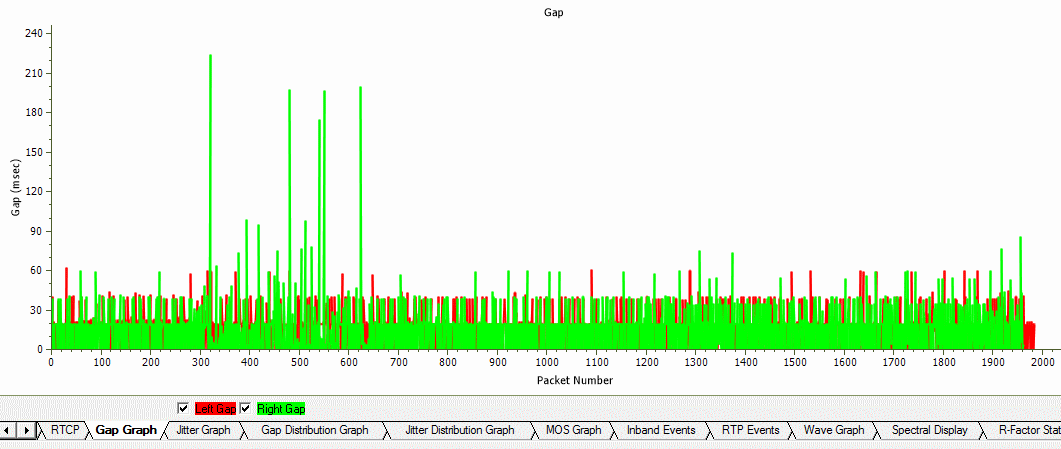
Gap Graph
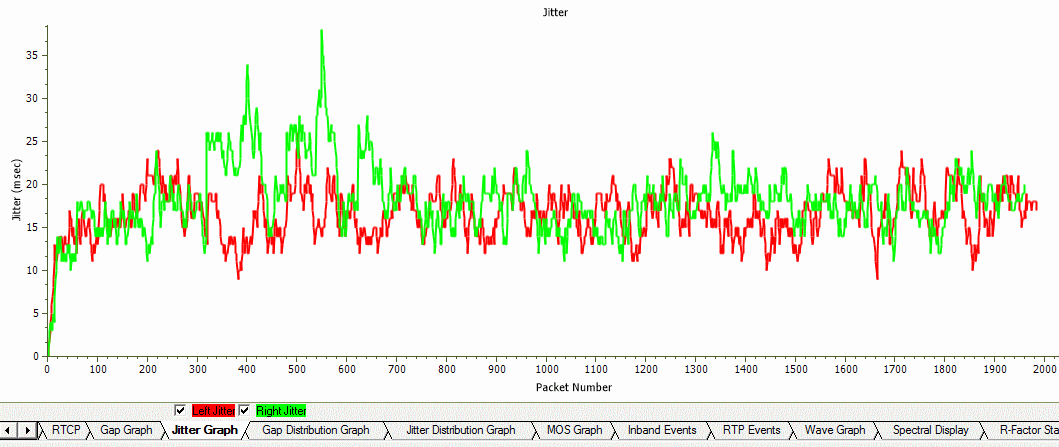
Jitter Graph
Gap Distribution Graph
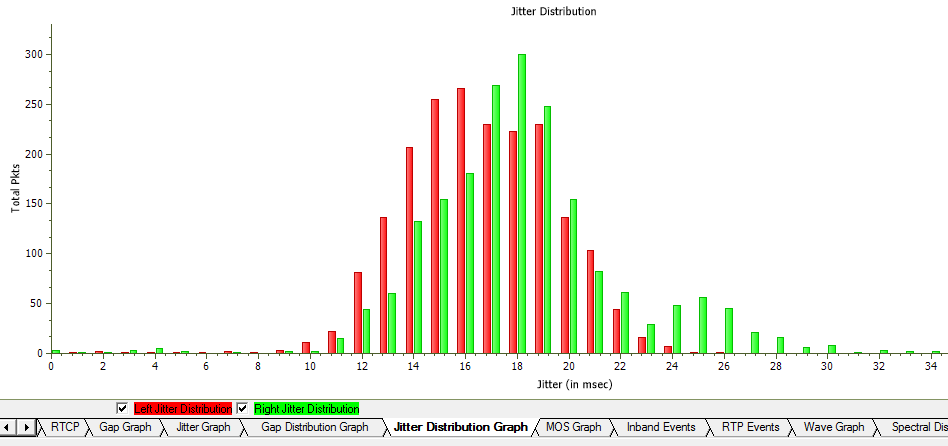
Jitter Distribution Graph
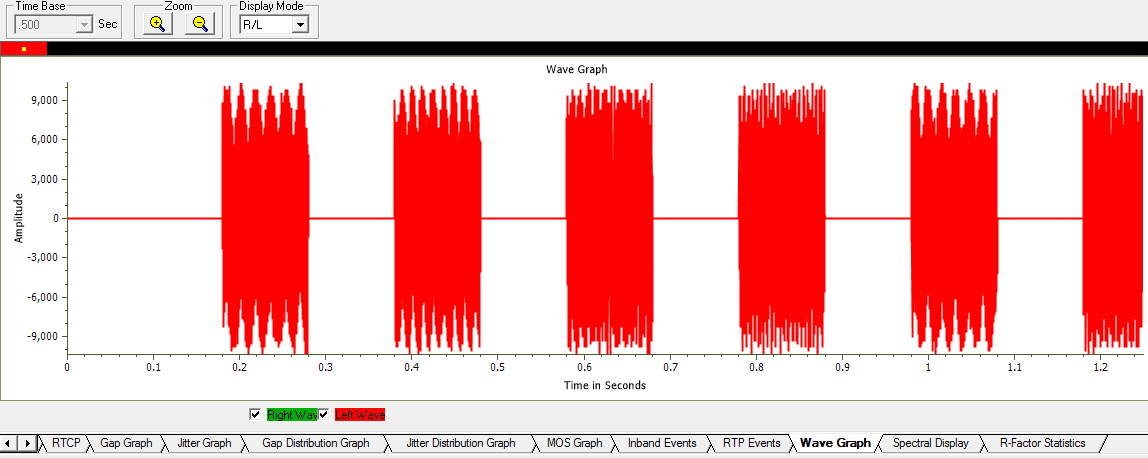
Full Duplex Wave Graph
CDR Report Generation
PacketScan™ can generate PDF reports summarizing all calls or a certain subset of the calls captured. The PDA Summary View can also export all terminated call details as a text file (CSV format) during the live capture. This feature requires activating the Export Terminated Calls option from PDA prior to live capturing. This structured text file can be imported into Excel® using a custom add-in (Excel-Dashboard-Tool-IP.xlsm) to generate different chart types such as call volumes, call duration, call failure causes, CMOS, LMOS, packet loss and more.
For more details, refer CDR Analysis Tools webpage.
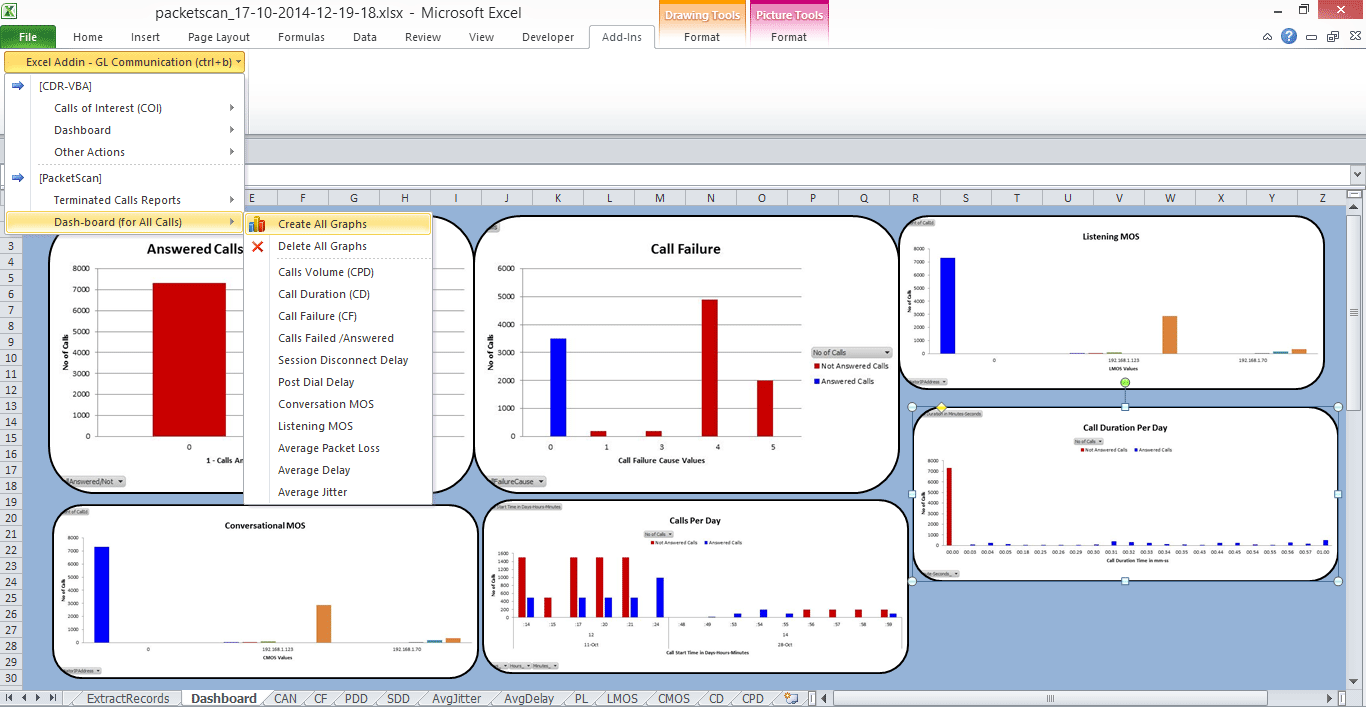
PDA Completed Calls Report in CSV
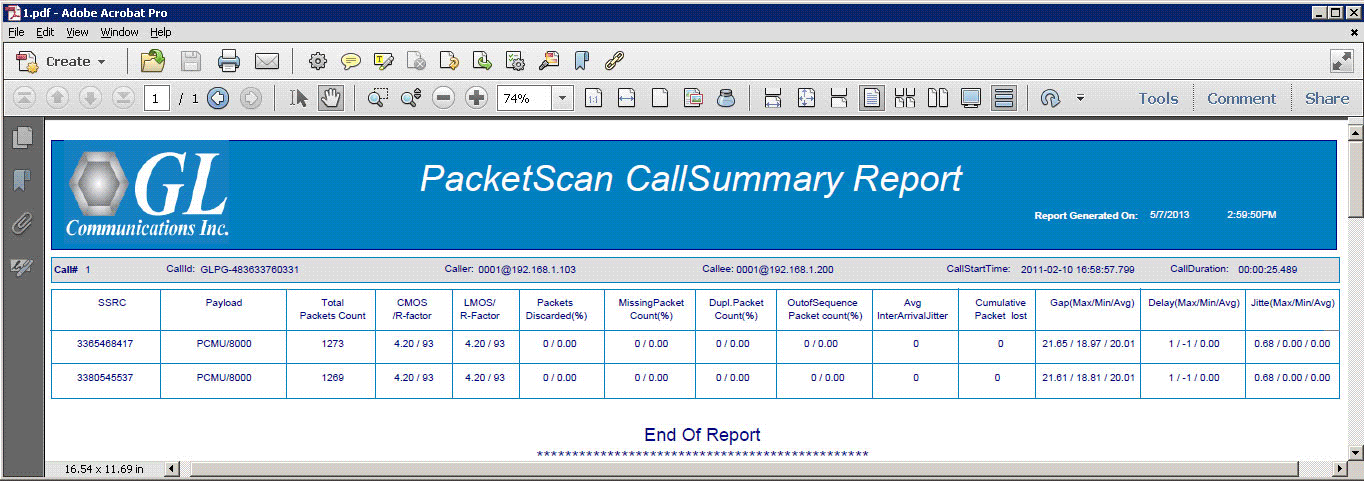
PDA Summary PDF Report
Performance Metrics
- Call Summary displays signaling, audio, and video QoS parameters for each call
Signaling parameters include Caller & Callee id information, call duration, session information (Establishment Ratio, Establishment Effective Ratio, Session Defects, Ineffective Session Attempts, Completion Ratio, Request delay, Post Pickup Delay), and so on
Audio parameters include media type, packet count, jitter, delay, gap, MOS, R-factor, lost packets, and so on
Video QoS parameters such as Video Channels, Codec Info, SSRC, Frame Count, Packet Count, Packets Lost, Frame Rate, Media Delivery Index (Delay Factor : Media Loss Rate), Average Media Delivery Index are calculated for all video calls - Detailed statistical information are provided for Inband (DTMF & MF ) events, RFC 2833 events, RTP/RTCP packet count and reports per direction, Duplicate and Missing Packets
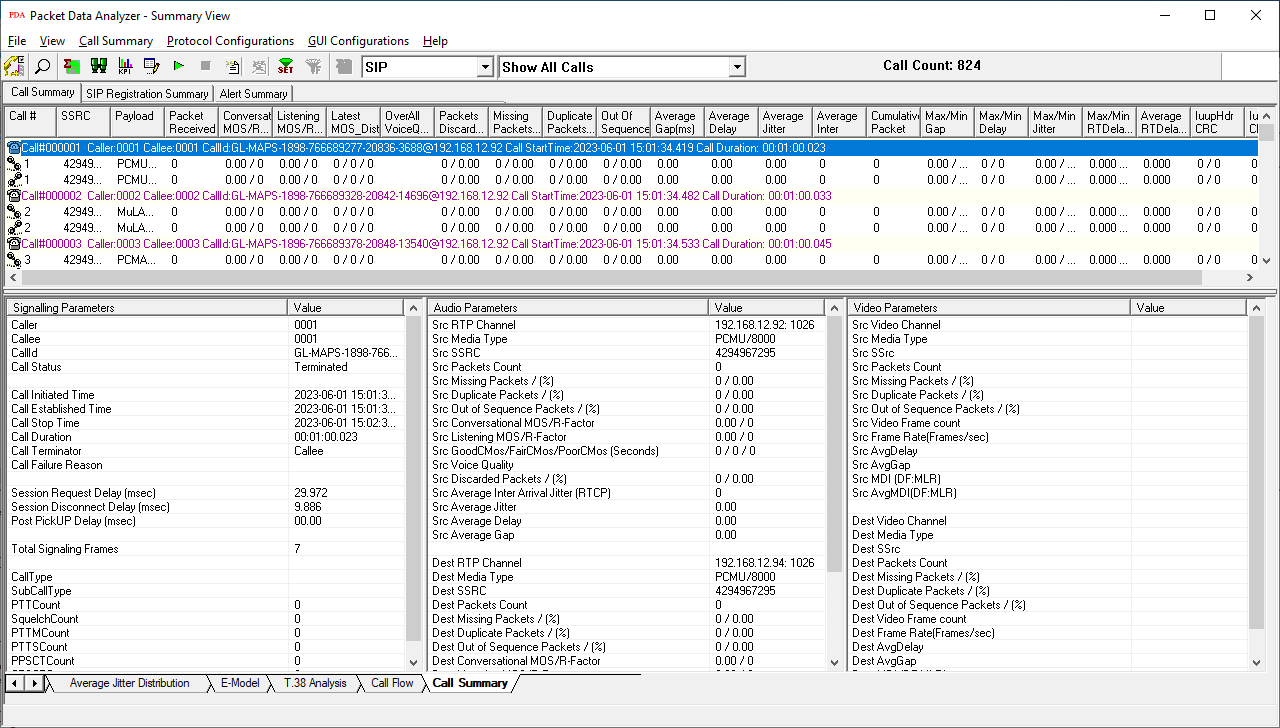
Call Summary - Signaling, Audio, and Video Parameters
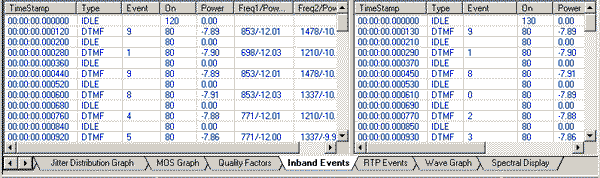
Inband Events Screen
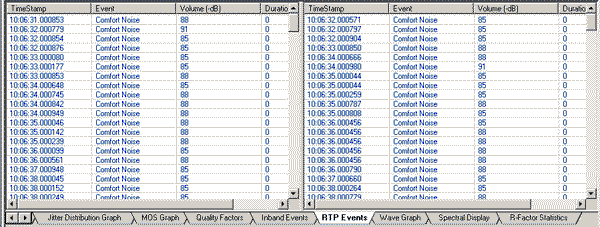
RTP Events Screen
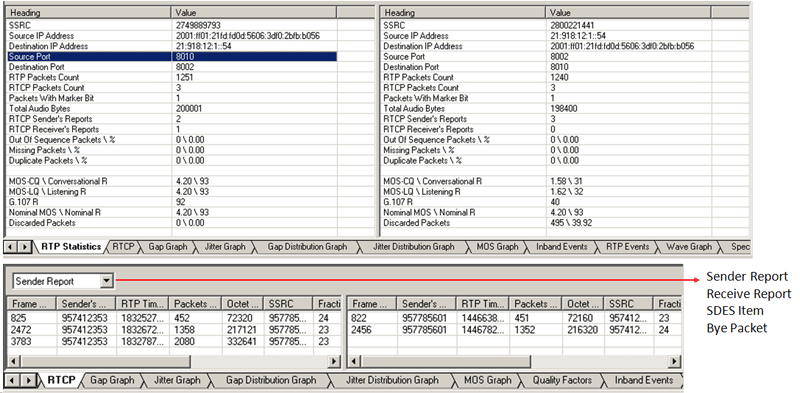
RTP and RTCP Statistics
- Calculates minimum, maximum, and average Round Trip Delay (RTD) values for SIP calls
- Call Quality Of Service (QoS) for all calls with E-Model based (G.107) Mean Opinion Score (MOS) and R-factor with individual and summary statistics presented in graphical and tabular formats
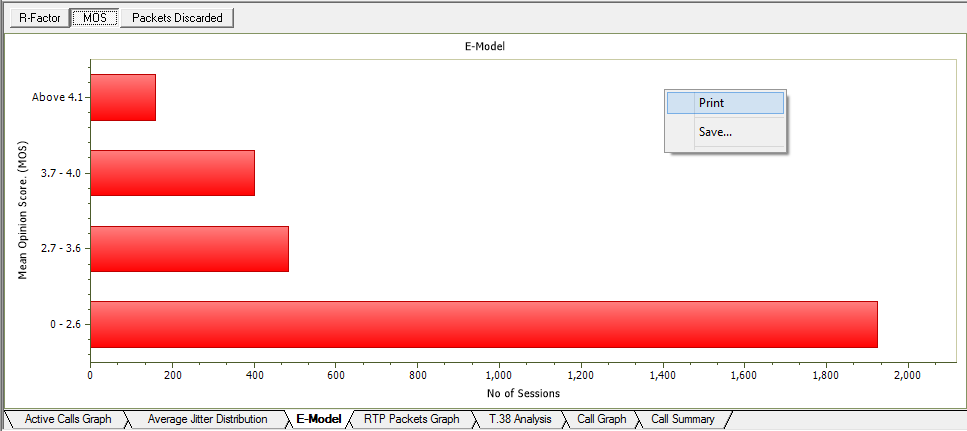
E-Model Graph - R Factor, MOS,
Packet
discarded graphs in PDA Summary View
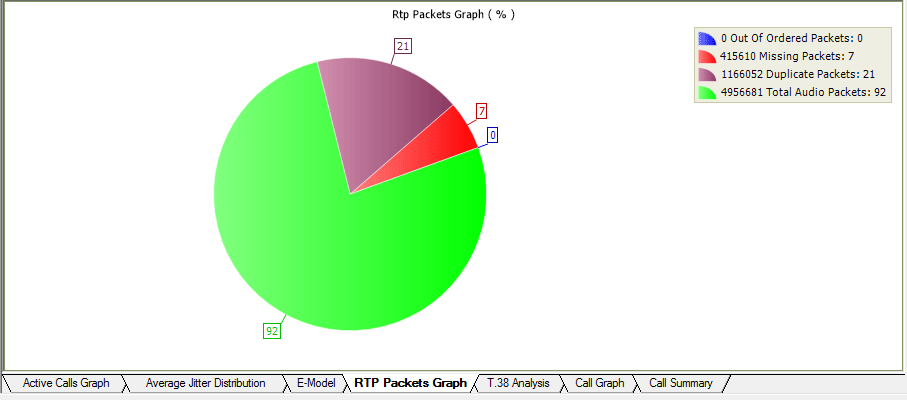
RTP Packets Graph
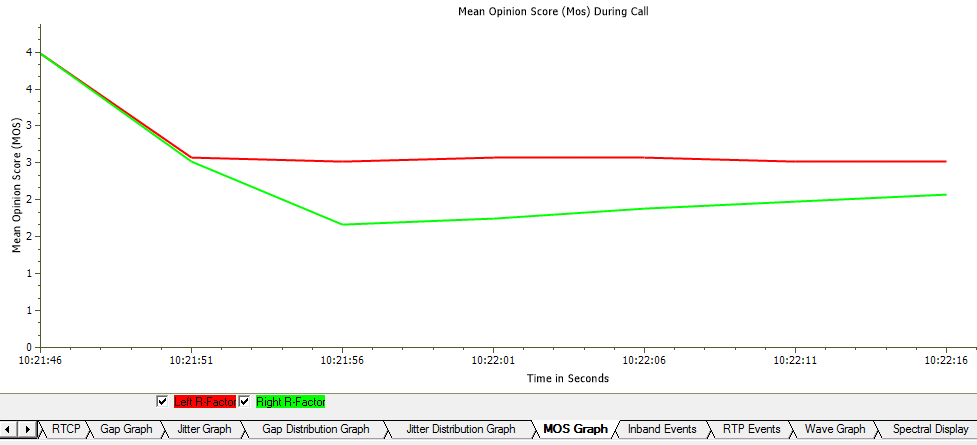
MOS Graph
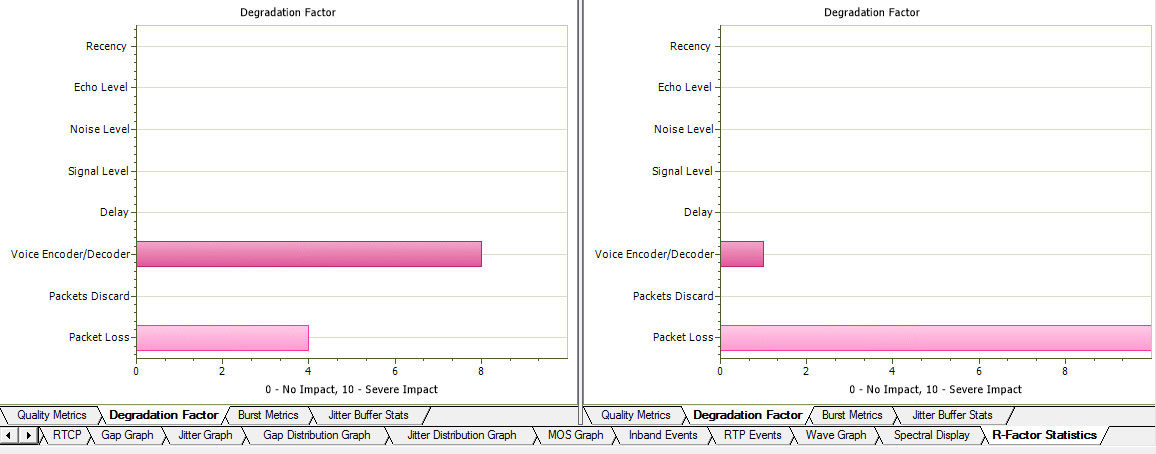
Degradation Factors
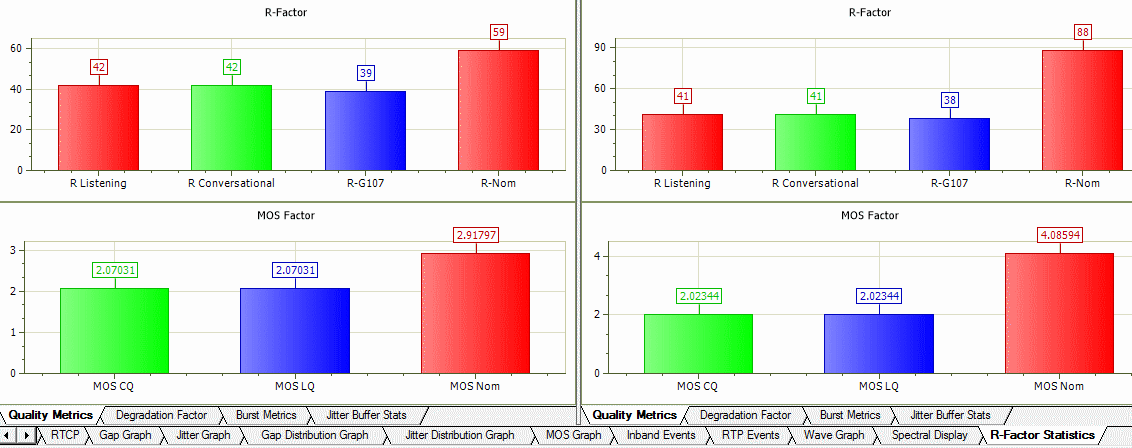
Quality Metrics
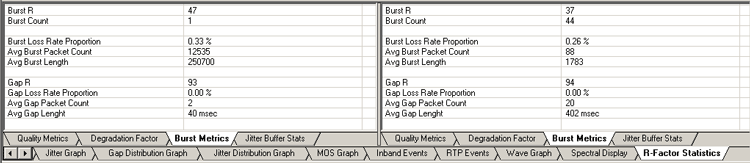
Burst Metrics
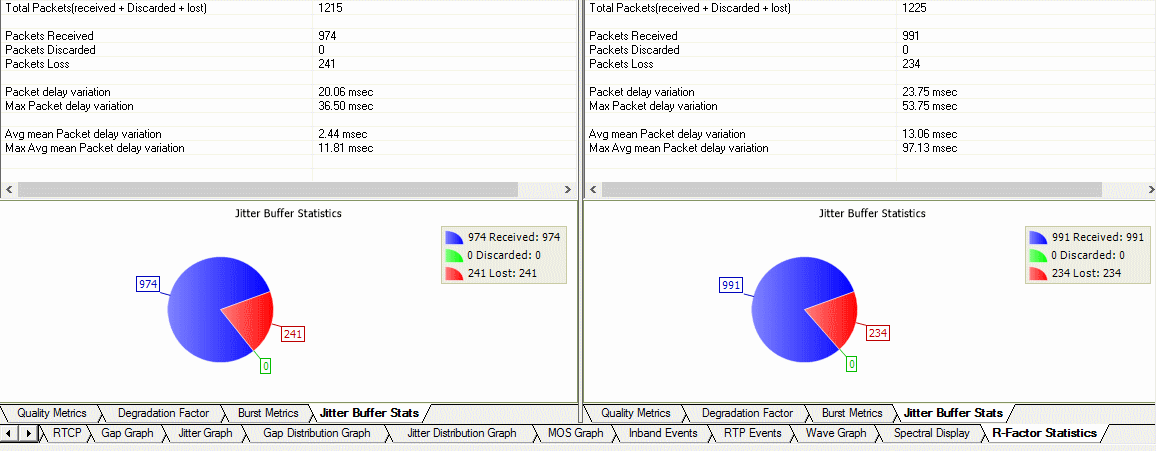
Jitter Buffer Statistics
- User can get real-time call trace for SIP Sessions and on H225 calls
Triggers and Action Feature
- Supports triggers and action feature to further filter calls based on certain protocol parameters followed by a set of actions for the completed calls. Some of such parameters are MOS, R-factor, jitter, packet loss, duplicate packets, or called / calling numbers
- The actions include saving a call to a file, recording the audio to a file, sending an email, generating an alert summary, creating Call Detail Records, viewing custom calls in summary view, and extracting fax images from the captured calls in TIFF format
- Users can specify the file formats of calls as *.hdl, *.pcap, *.pcapng, and/or *.wav format. Call Detail Record outputs 3 CSV files, call master record, call side record, and call events record, along with the voice file recordings for each direction. These files can be used with GL's Voice Band Analyzer, and Call Data Records for further analysis and retrieval of calls of interest
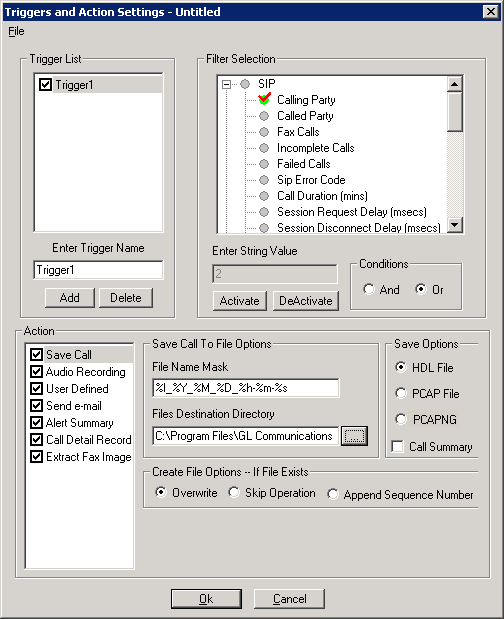
Triggers and Action Settings
- Alert Summary - Generates alerts when particular vital parameters go beyond a specified value. The Alert Summary provides an active list of the alerts that have occurred during the test session.
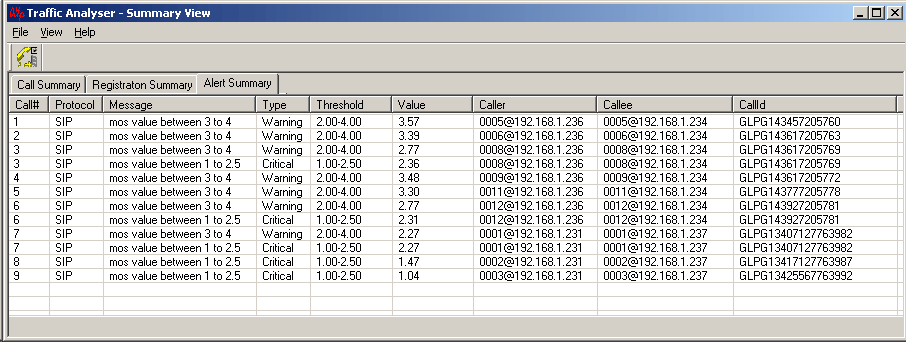
Alert Summary View
Traffic Handling Features (Fax, Digits)
- T.38 fax calls
PacketScan™ software supports capturing and decoding of Fax (T.38 data) calls over VoIP. PacketScan™ fax decodes can be viewed in the form of T.38 call graph and call summary with decoded information for all T.38 messages received on the call. The captured fax calls by PacketScan™ can also be analyzed using GLInsight™ by saving the fax calls directly in (*.PCAP) Ethereal file format. T.38 has been enhanced to reassemble the fragmented data and to identify the T.30 message from it. Identified T.30 message is displayed in the T.38 ladder diagram.
PacketScan™ also allows users to extract fax image in the TIFF format from the selected fax call in either GL's proprietary *.HDL file format or in Ethereal *.PCAP file format.
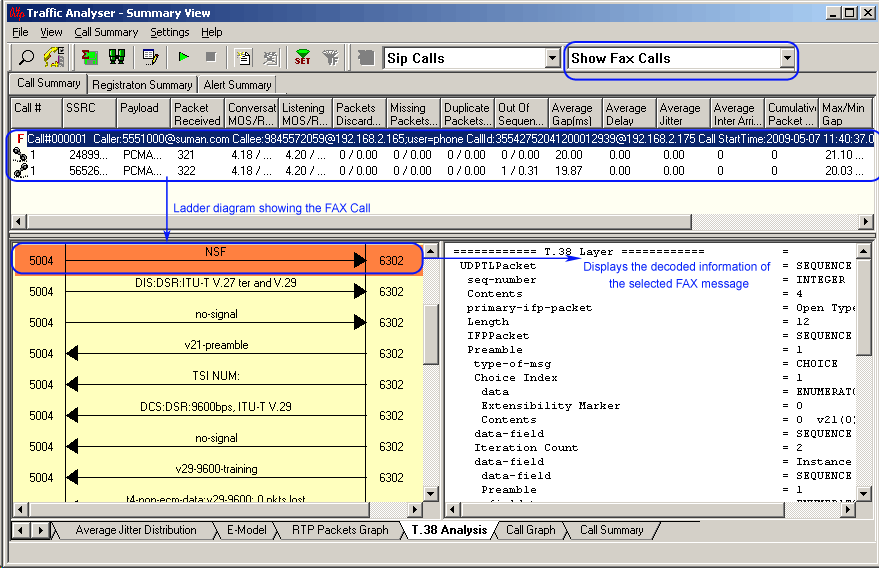
T.38 Analysis over IP
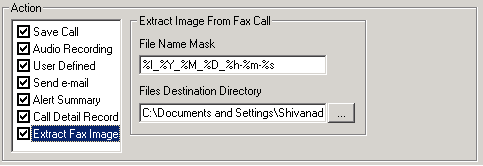
Extract Fax Image
- Real-Time Digit Capturing
PacketScan™ provides a means for digit examination and capturing. An easy-to-read window indicates the direction of the captured digits along with the duration, power and frequencies. DTMF, MF and User-defined digits/tones are fully supported.
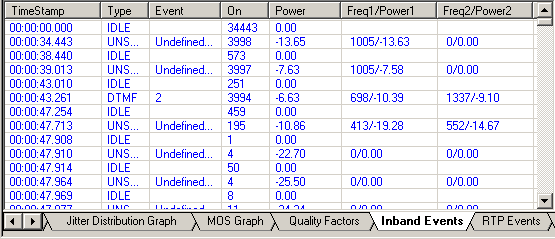
Real-Time Digit Capturing Window
Audio Handling Features
- Play to Speaker
Play To Speaker application allows the user to play the RTP streams of a call to the PC speaker using a soundcard. A host of options such as Jitter Buffer settings, As Is, Audio Mixing and so on are available for users to play a live call in real-time or play captured voice files.
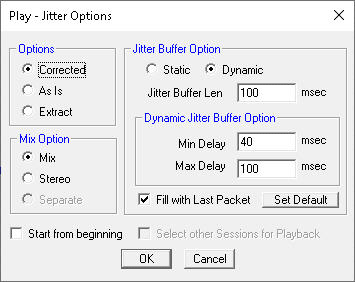
Play Jitter Options
- Write To File
Various options are provided to save captured calls and use the files with voice quality analysis software to calculate the mean opinion score of the call. This application writes the RTP stream to a file in *.wav format.
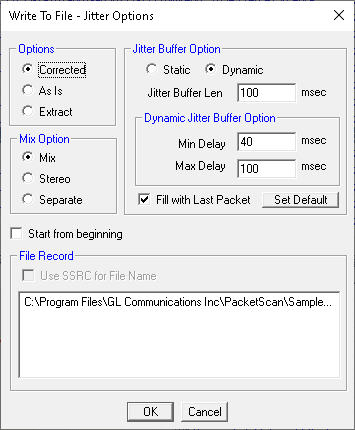
Write to File
- Save Call
Supports Save Call feature to save successful and failed calls in either in GL’s proprietary *.HDL file format, Ethereal *.PCAP file format, or *.PCAPNG file format. Call Summary details could also be saved for a particular call and this will be saved as a *.rtf file. This allows the users to get data from real-time traffic locations for detailed analysis of a flawed call.
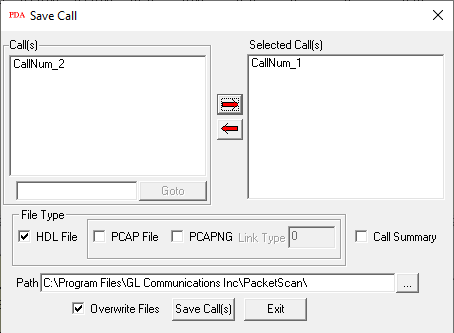
Save Call
Record Video and Report Video Quality Metrics
Real-time audio/video monitoring of RTP streams using Audio Playback, Record Video, and Write to File features.
This feature allows the user to record audio and video data of a session to a file in QuickTime (*.qt) format. PacketScan™ can monitor video calls and display both audio and video RTP streams in summary view. The recorded video data in Quick Time Format (*.qt) can be viewed by VLC Viewer (3rd party application).
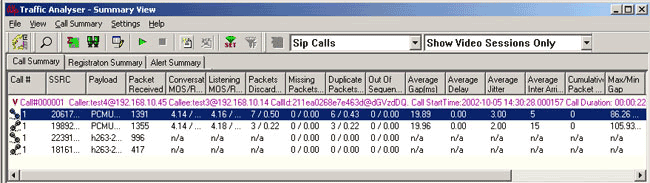
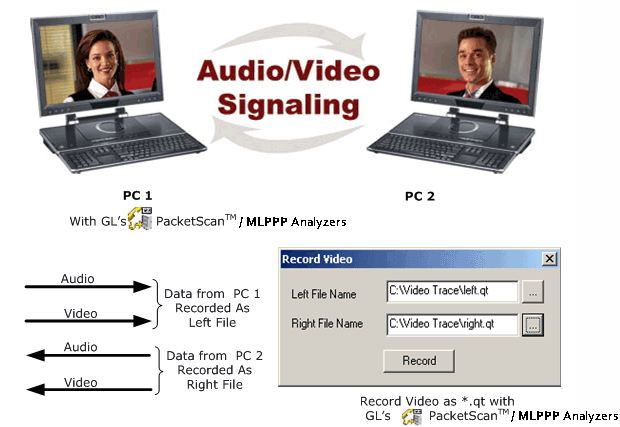
Record video option is available for both Auto Detected RTP Calls and SIP Calls. Supported Video Codecs are:
- H263+
- H263++ CIF 190 kbps
- H263++ CIF 350 kbps
- H263++ CIF 512 kbps
- H263++ QCIF 128 kbps
- H263++ QCIF 64 kbps
- H263++ QCIF 80 kbps
- H264*
*Note that Video recording is supported only for H263+ codec. However, video QoS statistics is available for all codecs.
H.263 is a video codec designed by the ITU-T as a low-bitrate encoding solution for video capture and videoconferencing. H.263 provides video capture and video conference monitoring capability, while H264 is an industry standard codec for video compression.
QCIF - Quarter Common Intermediate Format, a videoconferencing format that specifies data rates of 30 frames per second (fps), with each frame containing 144 lines and 176 pixels per line.
CIF - A video format used in videoconferencing systems that specifies a data rate of 30 frames per second (fps), with each frame containing 288 lines and 352 pixels per line.
H.264 is the latest video coding standard of the ITU-T Video Coding Experts Group (VCEG) and the ISO/IEC Moving Picture Experts Group (MPEG). H.264 is an industry standard for video compression, the codec offers better compression performance over previous standards.
It has demonstrated the significantly improved coding efficiency, lower compressed bit rate for the same image quality, substantially enhanced error robustness, and increased flexibility and scope of applicability relative to its predecessors;
Wide application of H.264 includes;
- Mobile TV broadcasting
- Internet video
- Video conferencing
Support Video QoS for H.263+ and H.264 video codec; Video Statistics such as Source/Destination Video Channels, Media Type, SSRC, Average Delay/Gap, Packet Counts, Codec Type, Missing Packets, Delay, Gap, Video Frame Count, Out Of Sequence count, Duplicate Packets count, Media Delivery Index (MDI- (Delay Factor : Media Loss Rate)), and Frame Rate are provided for each video session. PacketScan™ with Voice, Data, and Video QoS capability addresses customers long felt need of call quality analysis in IP networks.
Media Delivery Index (MDI) measurement is used as a diagnostic tool or as a quality indicator for monitoring a network intended to deliver applications such as streaming media, MPEG video, Voice over IP, or other information sensitive to arrival time and packet loss. Media Delivery Index (MDI) can be used to monitor both the quality of a delivered video stream and to show system margin for IPTV systems by giving an accurate measurement of jitter and delay at network level (Internet Protocol, IP), which are the real causes for quality loss. The Media Delivery Index is typically shown as two numbers separated by a colon the Delay Factor (DF) and the Media Loss Rate (MLR).
Call Summary – Signaling, Audio, and Video Parameters
Registration Summary
Packet Data Analysis is enhanced to display the SIP registration information in tabular as well as graphical format in Registration Summary. This interface displays the SIP registration information in a tabular format which includes user agent, registrar, registered time, status, time to live (TTL), expiry time, remaining time, Registration Request Delay (RRD) and Registration attempts for each user agent. In addition, it displays the active registration graph of the entire registration summary and provides the trace display of each registration.
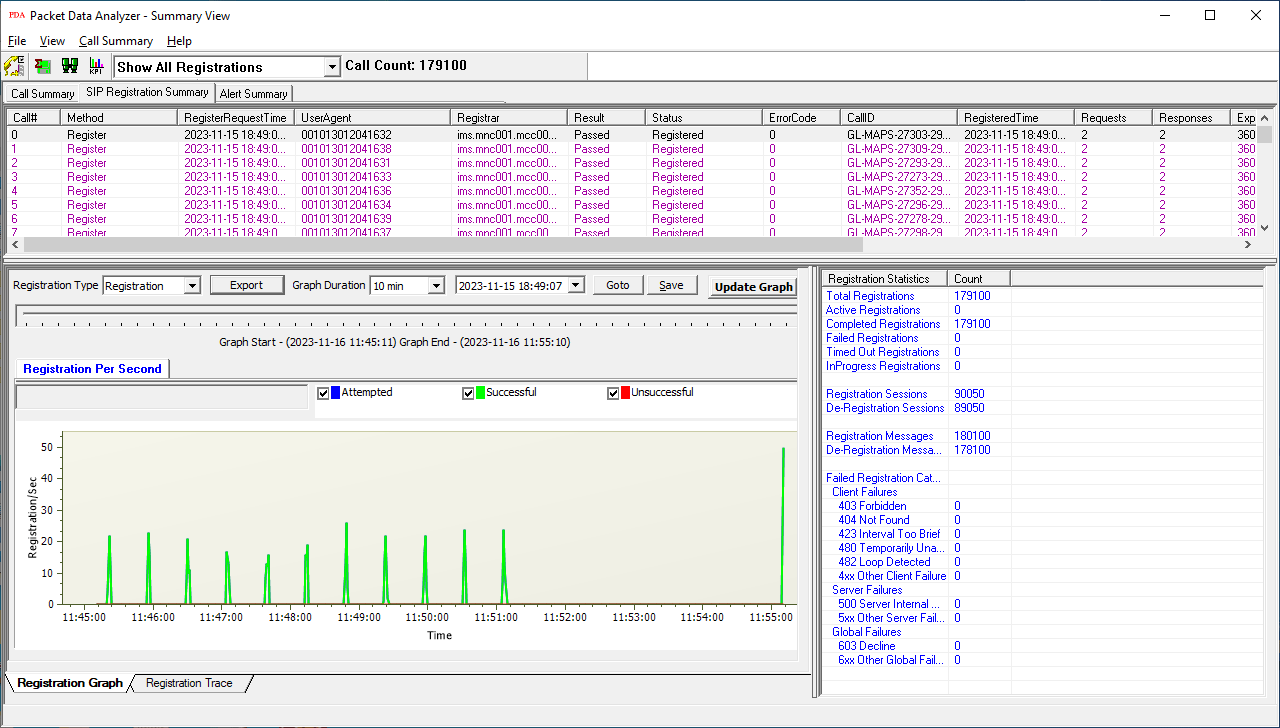
Registration Summary
Include graphs that display the active registration and registration trace message sequences of registered calls at the bottom of the registration summary. The registration statistics display the count of the total, completed, failed, & active registrations along with registration and de-registration packet count.
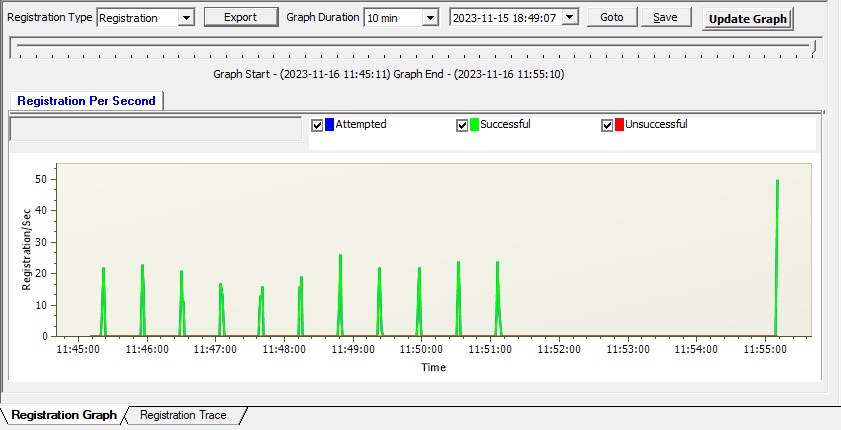
Registration Active Graph
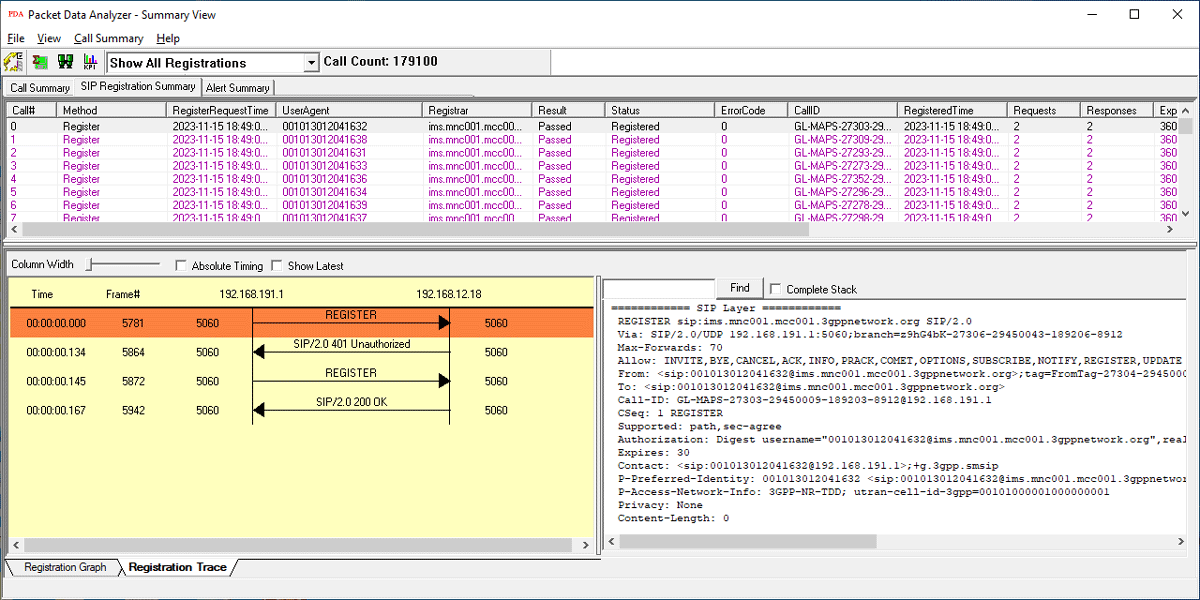
Registration Trace
Detailed Packet Analysis
Packet Data Analysis (PDA) is an outstanding tool for live monitoring of signaling and traffic over TDM. Packet Data Analysis (PDA) is distributed with GL's CAS, ISDN, SS7, UMTS, and GSM protocol analyzer. Allowing users to monitor live TDM networks including capture, analysis, and reporting of every call-in detail. Supported protocols include CAS, ISDN, ISUP, CAMEL, MAP, INAP, and GSM.
GL's Packet Analyzers can capture TDM traffic over different transmission lines, including T1, E1, T3, E3, and OC-3 STM-1 / OC-12 STM-4. PDA then processes the captured frames, identifies, and segregates calls based on signaling parameters to generate reports.
Packet Data Analyzer supports Summary View which display complete summary of TDM call information in graphical format along with a summary of alerts.
Packet Data Analyzer (PDA) Summary View
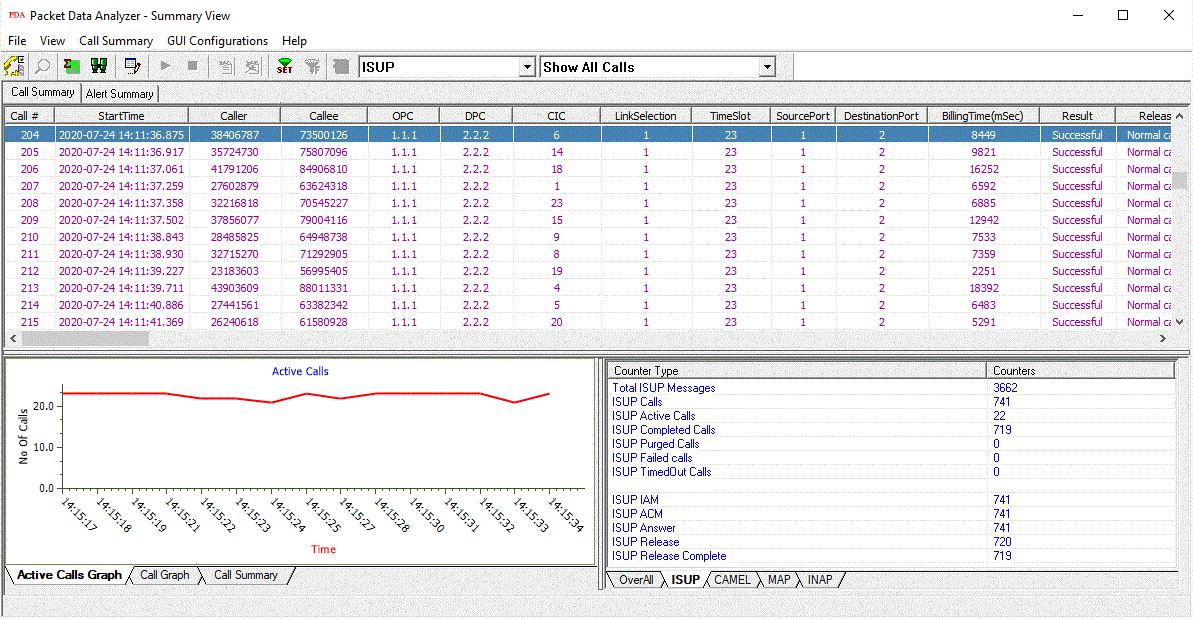
Packet Data Analyzer (PDA) Summary View
Working Principle
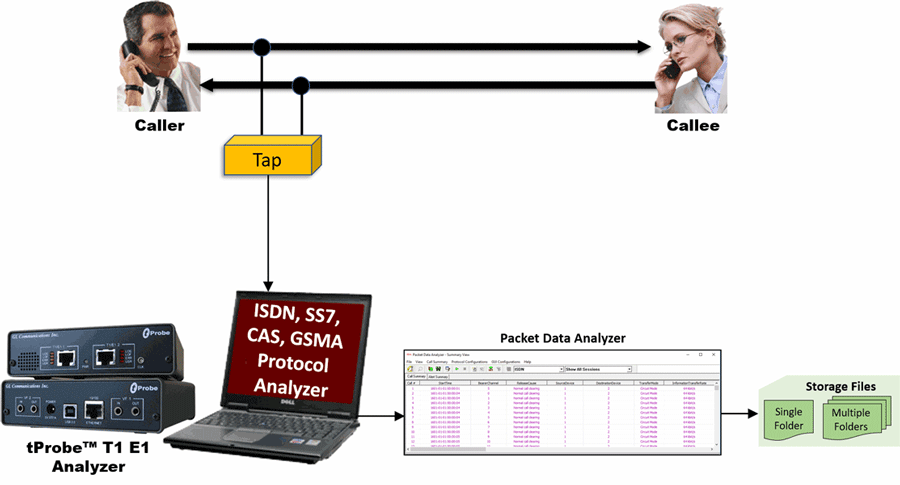
Packet Data Analyzer (PDA) records bi-directional traffic of caller and callee into two PCM files on the bearer channels associated to Call. Bearer channels can be extracted from the signaling information which can be mapped to Data Link Group configuration and it varies for different protocols. For example, ISDN calls gives channel number, ISUP calls gives Circuit Identity Code (CIC), user needs to pre-configure datalink group mapping for PDA to record traffic.
PDA acts as a client and connects to WCS server to record PCM files. Using the bearer channel extracted from signaling information PDA will scan data link groups for mapping and records the Traffic.
Screenshots of Data Link Groups for ISDN, ISUP, CAS, GSMA protocols.
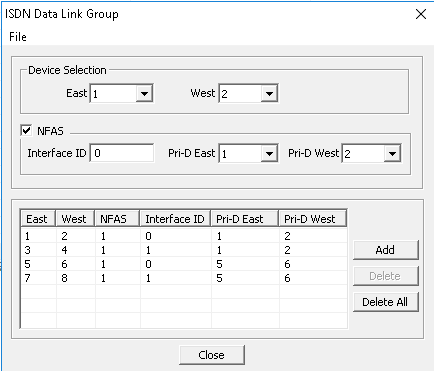
ISDN Data Link group
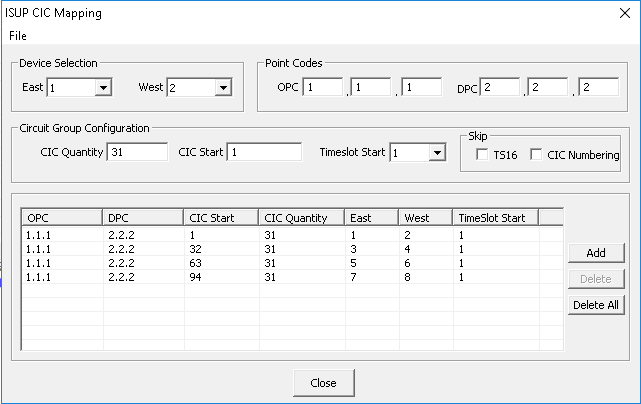
ISUP CIC Mapping
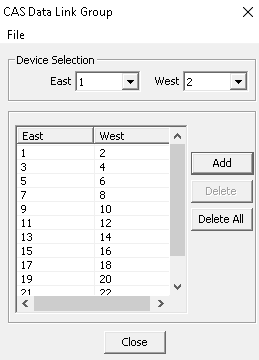
CAS Data Link group
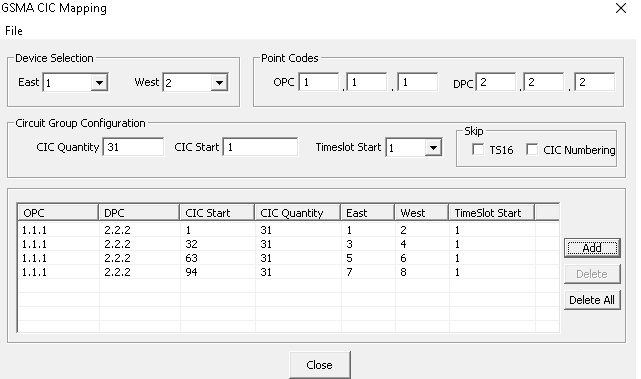
GSMA Data Link group
Graphs
Graphs are provided in The PDA Summary and Detail Views for key values to give a pictorial representation of the statistics, thereby allowing the user to monitor the network with ease; following graphs are displayed in PDA for TDM Active Calls Graph and Call Graph.
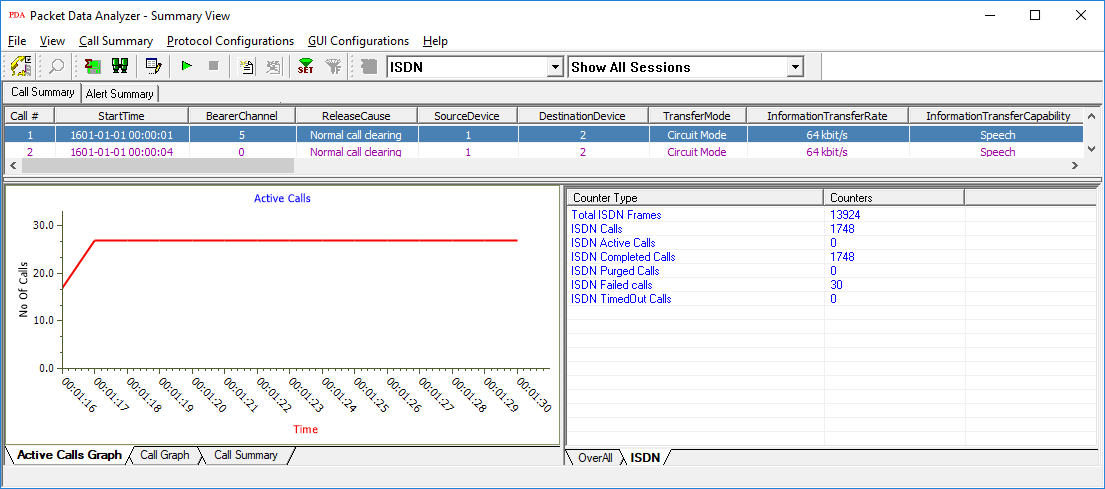
ISDN Active Calls Graph
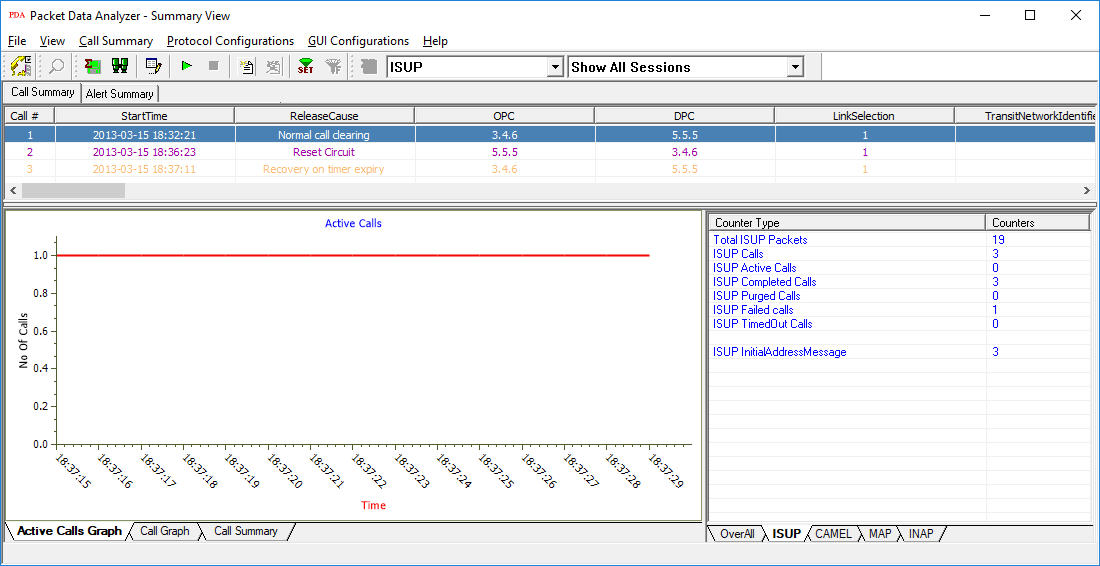
ISUP Active Calls Graph
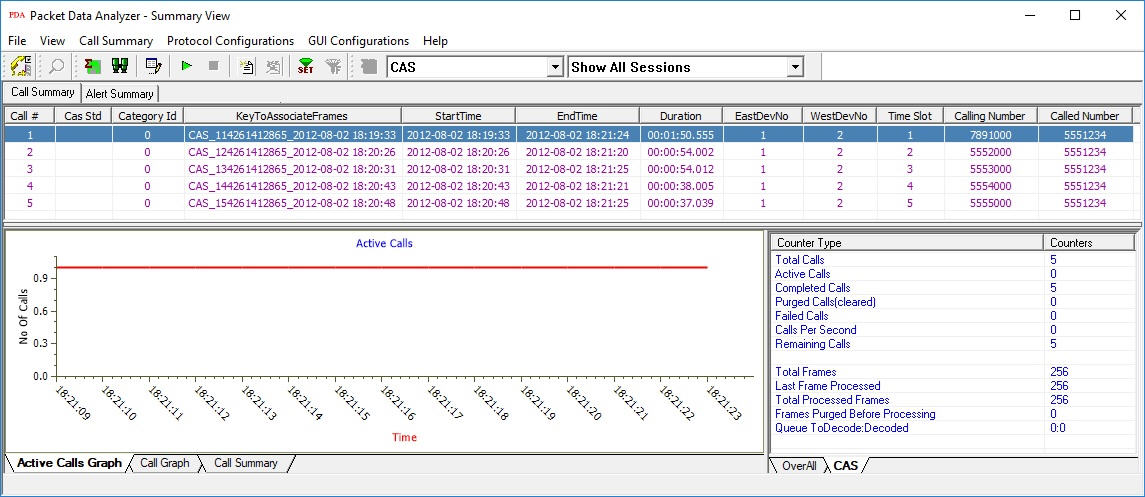
CAS Active Calls Graph
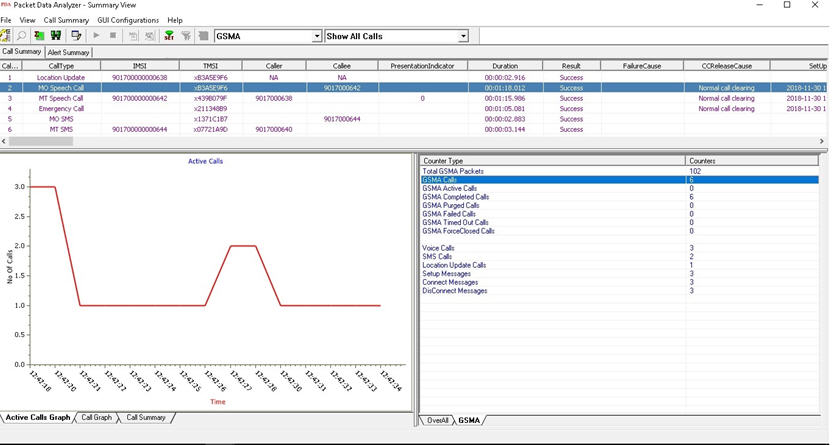
GSMA Active Calls Graph
Call Graph displays the message sequence of captured CAMEL, MAP, INAP, ISUP, ISDN, and CAS calls. For TDM protocols includes CAS, ISDN, SS7 information such as the Timeslot, Caller, Callee, and Release Cause.
Message sequence pictorially display all the messages exchanged in a session with relative time stamp of the frame (from the call start time) and frame numbers. Frame number is provided to identify the message to the corresponding frame in Packet Data Analyzer. For example, in the following figure, the ISDN call capture between two Source (#1) and Destination (#2) devices shows that, the call is placed from Device #1 to the Device #2. User can also view the decoded message by selecting a message displayed in the graph.
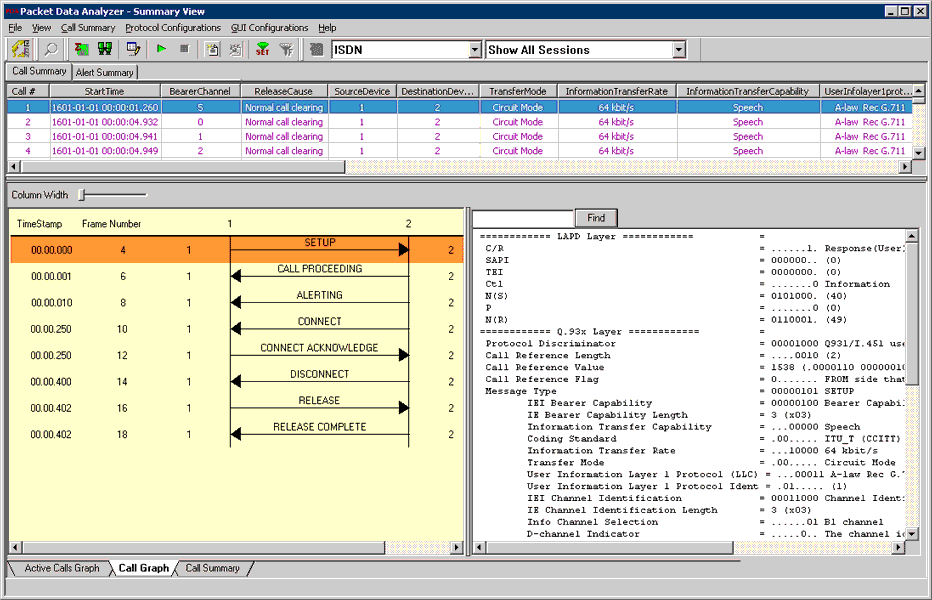
ISDN Call Graph
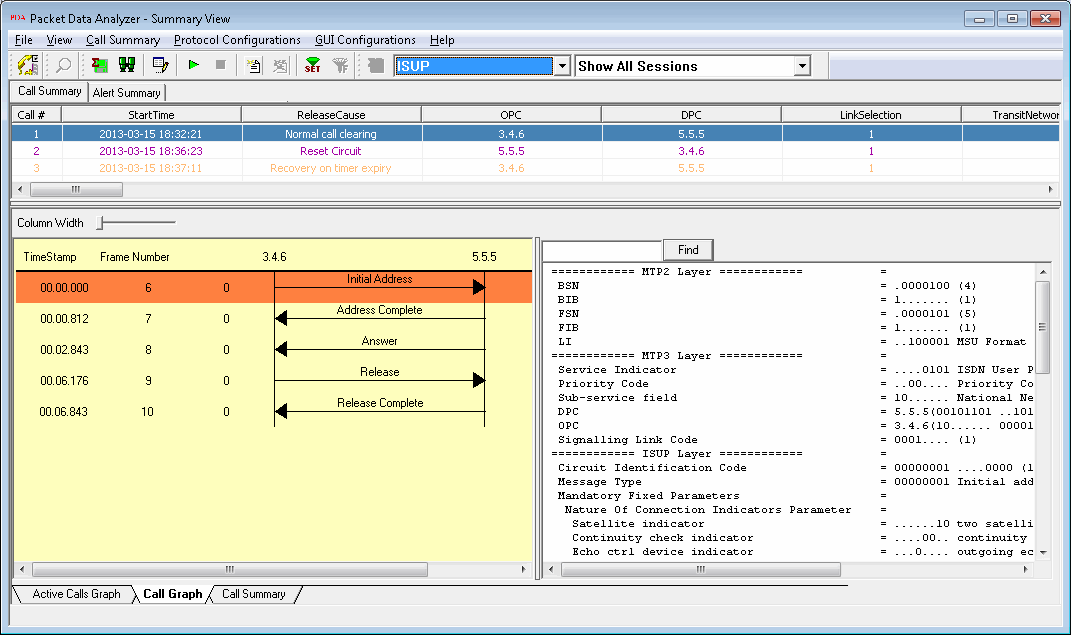
ISUP Call Graph
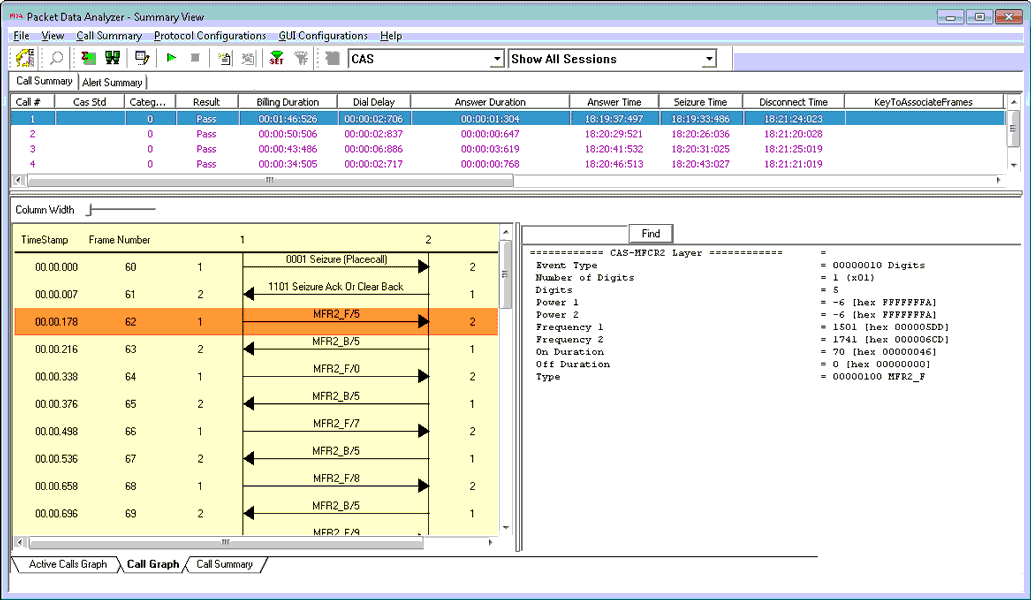
CAS Call Graph
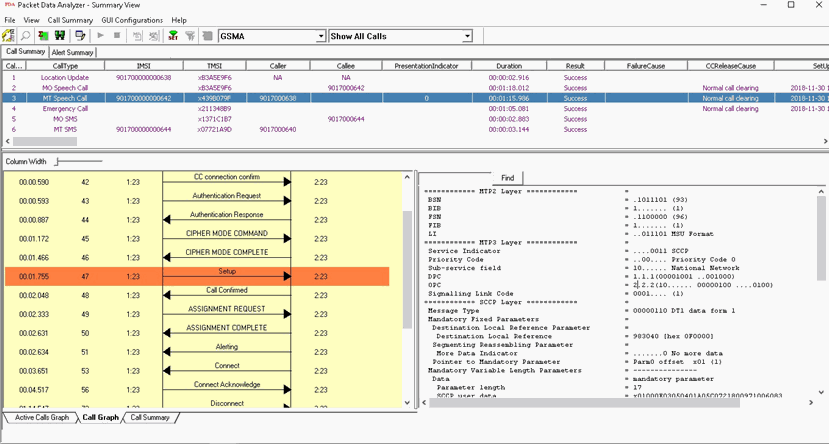
GSMA Call Graph
Performance Metrics
- Call Summary displays signaling parameters for each call.
Signaling parameters include Caller & Callee id information, call duration, call status, call-initiated time, call established time, call stop time, call duration, call terminator, call failure reason, and total signaling frames.
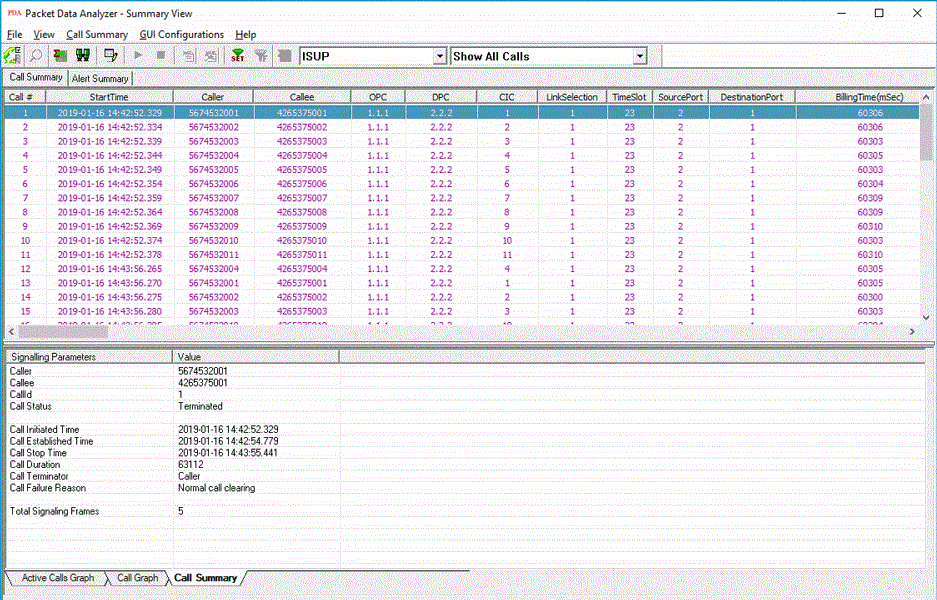
Call Summary - Signaling Parameters
Triggers and Action Feature
- Allows to filter calls based on CAS, ISDN and SS7 protocol parameters followed by a set of actions for the completed calls.
- The actions include saving a call to a file, recording the audio to a file, sending an email, generating an alert summary, creating Call Detail Records, and viewing custom calls in summary view, and extracting fax images from the captured calls in TIFF format.
- Users can specify the file formats of calls as *.hdl, *.pcap, *.pcapng, and/or *.wav format. Call Detail Record outputs 3 CSV files, call master record, call side record, and call events record, along with the voice file recordings for each direction. These files can be used with GL's Voice Band Analyzer, and Call Data Records for further analysis and retrieval of calls of interest
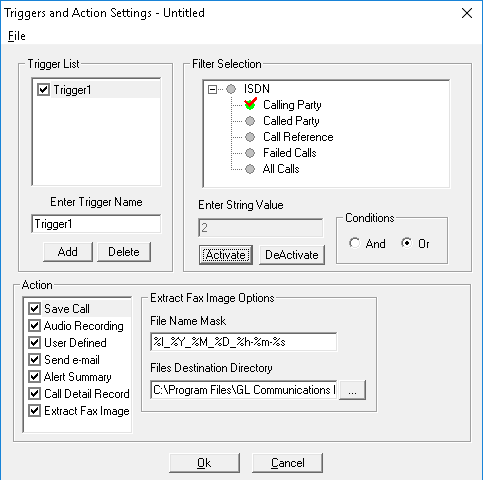
Triggers and Action Settings
- Alert Summary - Generates alerts when particular vital parameters go beyond a specified value. The Alert Summary provides an active list of the alerts that have occurred during the test session.
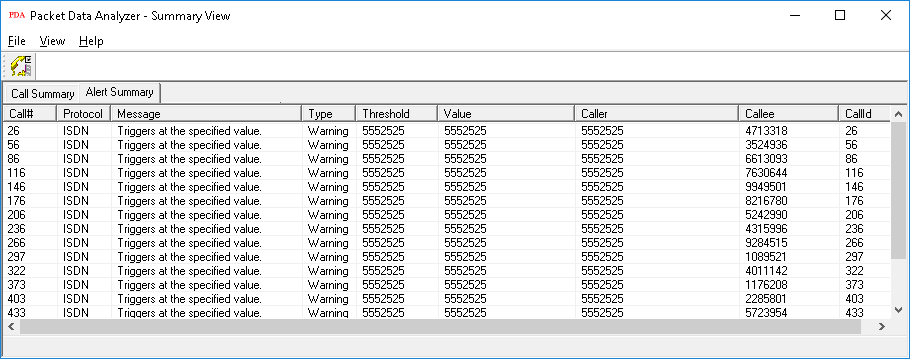
Alert Summary View
Audio Handling Features
-
Save Call
Supports Save Call feature to save successful and failed calls in either in GL's proprietary *.HDL file format, Ethereal *.PCAP file format, or *.PCAPNG file format. This allows the users to get data from real-time traffic locations for detailed analysis of a flawed call.
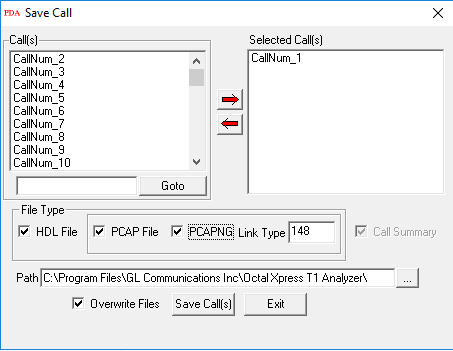
Save Call
Resources
Please Note: The XX in the Item No. refers to the hardware platform, listed at the bottom of the Buyer's Guide, which the software will be running on. Therefore, XX can either be ETA or EEA (Octal/Quad Boards), PTA or PEA (tProbe Units), XUT or XUE (Dual PCIe Express) depending upon the hardware.
| Item No. | Item Description |
| For IP Analyzers | |
|---|---|
| PKV100 | PacketScan™ with Packet Data Analysis |
| PKV101 | PacketScan™ - Offline with Packet Data Analysis |
| PKV120 | PacketScan™ HD – High Density IP Traffic Analyzer w/ 4x1GigE includes PKV100 – Online (not Offline) for temporary audio codec support |
| PKV120p | PacketScan™ HD w/4 x 1GigE - Portable |
| PKV122 | PacketScan™ HD – High Density IP Traffic Analyzer w/ 2x10GigE includes PKV100 – Online (not Offline) for temporary audio codec support |
| PKV122p | PacketScan™ HD w/2 x 10 GigE - Portable |
PKV124 |
|
PKV124P |
|
| PKV121 | PacketScan™ FB - (Offline Analyzer) |
| PKV123 | PacketRecorder™ HD & PacketRePlay™ HD |
| For T1 E1 Datacom Analyzer | |
| XX150 | T1 or E1 Real-time GSM Protocol Analyzer |
| OLV150 | Offline T1 or E1 GSM Protocol Analyzer |
| XX151 | GSM Motorola Mobis option |
| XX031 | Enhanced T1 E1 Call Capture/Analysis Software |
| XX092 | T1 E1 Channel Associated Signaling (CAS) Analyzer (includes xx600, xx610, xx620, and xx630; performs R1, MFC-R2, and other CAS Signaling Analysis) |
| XX093 | Call Capture Option for CAS Protocol with PDA |
| XX100 | Real-Time ISDN Protocol Analyzer |
| OLV100 | Offline / Remote ISDN Protocol Analyzer |
| XX101 | Call Capture Option for ISDN Protocol with PDA |
| XX120 | SS7 Analyzer Software |
| OLV120 | Offline/ Remote SS7 Analyzer Software (includes WCS xx600, requires xx640 and xx641) |
| XX121 | Call Capture Option for SS7 Protocol with PDA |
| XX135 | T1 or E1 MLPPP Analyzer |
| OLV135 | Offline T1 or E1 MLPPP Analyzer |
| XX136 | PPP and MLPPP Packet Analysis – Real-time Packet Voice, Video, and Fax Analysis |
| For T3 E3 | |
| XX135 | T3 E3 PPP Analyzer (GUI) |
| XX136 | PPP and MLPPP Packet Analysis – Real-time Packet Voice, Video, and Fax Analysis |
| For OC3 OC12 | |
| LTS205 LTS215 LTS305 LTS315 |
Protocol Analysis for PoS OC3 / STM1 Packet Data Analysis (PDA) for PoS OC3 / STM1 Protocol Analysis for PoS OC12 / STM4 Packet Data Analysis (PDA) for PoS OC12 / STM4 |
| LTS206 LTS216 LTS306 LTS316 |
Protocol Analysis UMTS OC3 / STM1 Packet Data Analysis (PDA) UMTS OC3 / STM1 Protocol Analysis UMTS OC12 / STM4 Packet Data Analysis (PDA) UMTS OC3 / STM1 |
| Related Software | |
| PXE100 | PacketExpert™ Record Playback |
| ETH100 | PacketCheck™ |
| XX020 | T1 E1 Record/Playback File Application |
| XX635 | PPP Emulation and Analysis |
| XX636 | MC-MLPPP Emulation and Analysis |
| Related Hardware | |
| XTE001 | Dual Express (PCIe) T1 E1 Boards |
| PTE001 | tProbe™ Dual T1 E1 Laptop Analyzer with Basic Analyzer Software |
| HDT001/HDE001 | Legacy HD T1 or E1 (PCI) Cards with Basic Analyzer Software |
| HTE001 | Universal T1 E1 Card with Basic Analyzer Software |
| UTE001 | Portable USB based Dual T1 or E1 Laptop Analyzer with Basic Analyzer Software |
| FTE001 | QuadXpress T1 E1 Main Board (Quad Port– requires additional licenses) |
| ETE001 | OctalXpress T1 E1 Main Board plus Daughter Board (Octal Port– requires additional licenses) |
* Specifications and features subject to change without notice.
| Brochures |
| Analyzer Brochure |
| PacketScan™ Brochure |
| GL Product Lists |
| Presentations |
| PacketScan™ Presentation |
| View Presentation |