
Background
The Media Gateway Control Protocol (MGCP) is a signaling and call control protocol used between the Media Gateway Controller (MGC) and Media Gateway (MG). The MGC uses MGCP to instruct MG about the events, media, signals to be played on Endpoint, to create a Connection, and to audit the status of the Endpoints and connections involved in the conversion of media from one type of network, to the media required in other type of the network. The Media Gateway uses MGCP to report events (such as off-hook, or dialed digits) to the Call Agent.
Overview
GL's Message Automation & Protocol Simulation (MAPS™) designed for MGCP testing can simulate MGC to test Media Gateways with various types of calls. It can also control scenario involved in Media conversion. This test tool can also be used to perform protocol conformance testing (MGCP protocol implementations) as per IETF Standard according to RFC 3435.
The application is available as
MAPS™ MGCP Protocol Emulation with Conformance Test Suite (Item # PKS124)
The MAPS™ MGCP Protocol Conformance Scripts is designed with 70+ test cases, as per RFC 3435. Test suite includes in-built scripts, which tests the functionality of the Media Gateway for MGCP protocol valid and in-valid behaviour.
With the purchase of RTP Core license (PKS102), MAPS™ MGCP supports transmission and detection of various RTP traffic such as, digits, voice file, single tone, dual tones, IVR, FAX*, and Video*. With regular RTP traffic, the maximum Simultaneous Calls up to 2500, and Calls per Second up to 250 is achievable. Almost all industry standard voice codec supported.
GL’s MAPS™ MGCP is also available in High Density version (requires a special purpose network appliance and PKS109 RTP HD licenses). This is capable of high call intensity (hundreds of calls/sec) and high volume of sustained calls (tens of thousands of simultaneous calls/platform).
GL also offers MAPS™ Media Gateway Controller (MGC) a multi interface simulator is configured to handle signaling and call control between the Signaling Gateway (SG) and Media Gateway (MG) in the network. With the purchase of PKS300 MAPS™ MGC multi-interface license, end-to-end test scenario can be setup simulating SIGTRAN, MEGACO and MGCP interfaces. GL recommends purchasing additional MG simulation with appropriate RTP licenses for high density traffic simulation.
** Some of these traffic types requires additional licenses – contact GL for more information
Features
|
Signaling |
|
|
Codec |
|
|
Traffic |
|
|
High Density Call Capabilities* |
|
|
Other GUI Features |
|
|
Conformance Testing |
|
|
CLI |
|
|
Applications |
|
MGCP Simulation
Typical MGCP Call Scenario
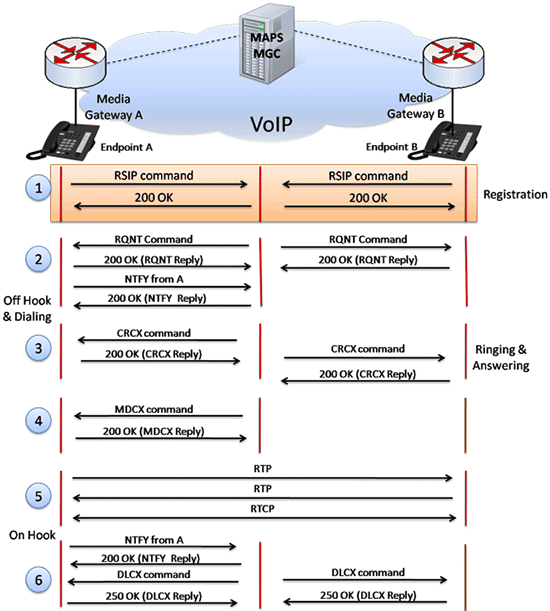
MGCP Call Flow
Call Simulation
MAPS™ can be configured as a Media Gateway (MG) and as Media Gateway Controller (MGC) to simulate the entire registration and call procedures between the two entities.
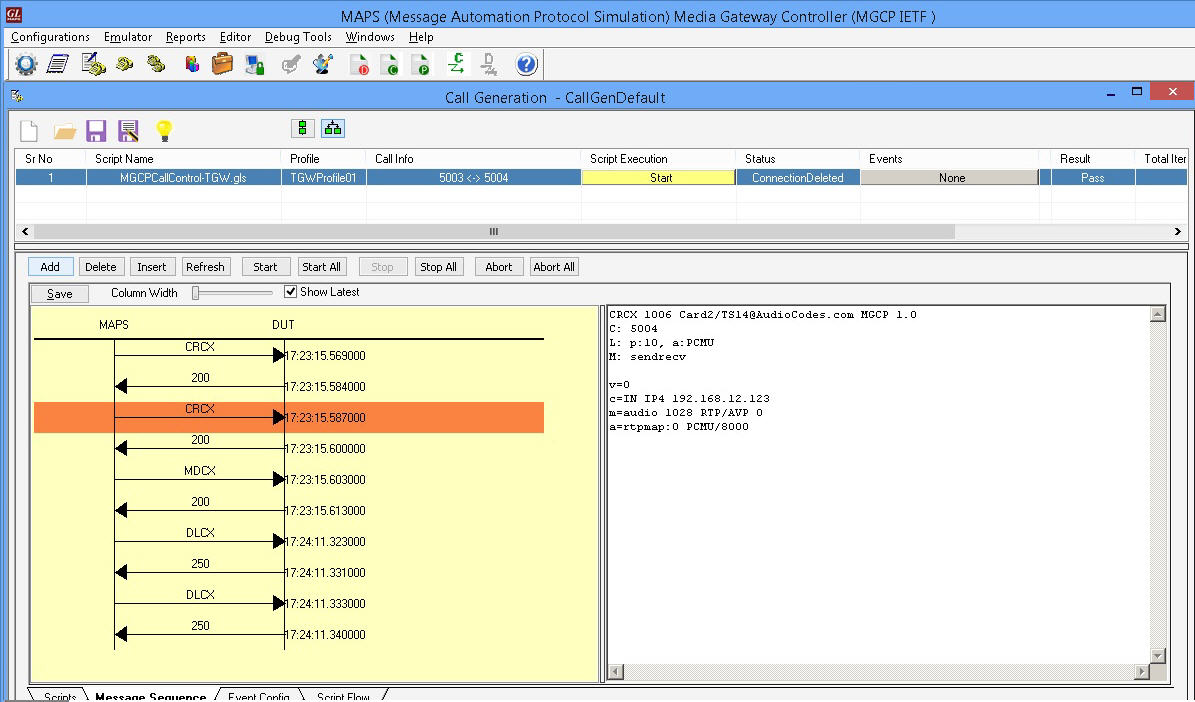 MGC Call Generation |
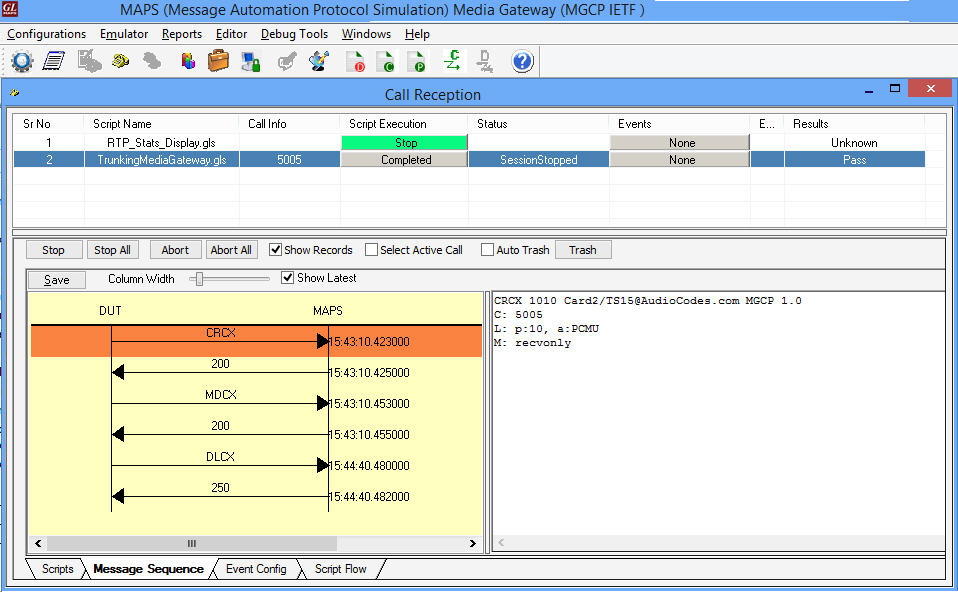 TGW Call Reception (MG) |
Conformance Testing
MGC Conformance Testing
MAPS™ includes inbuilt MGC basic and conformance scripts (*.gls) that allows itself to act as Media Gateway (MG) performing MGC conformance testing. As seen in the figure below, MAPS™ acts as MG, so that entire MGC testing can be automated using conformance scripts.
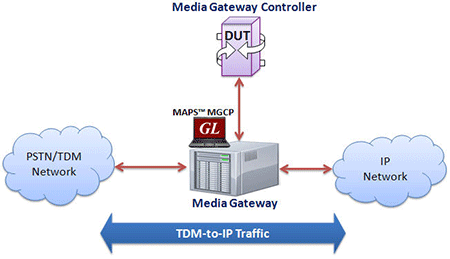
Simulate Media Gateway
MAPS™ (Media Gateway) indicates to MGC that it is in the process of restarting with Restart In Progress (RSIP) command Media Gateway informs MGC with RSIP command about rebooting of the Gateway, and it also indicates the resources available in the Gateway to place a Call.
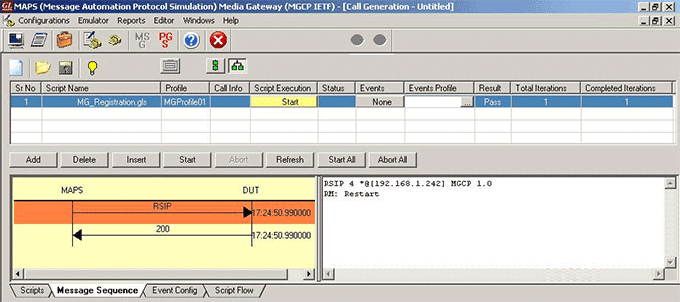
MAPS™ acting as MG
MG Conformance
Testing MAPS™ include inbuilt MG basic and conformance scripts (*.gls) that allows itself be configured as a Media Gateway Controller (MGC). It can generate calls to a device under test (DUT) and receive incoming call from DUT. The Device under Test can be any Media Gateway (MG), or Trunking Gateway.
As depicted in the scenario below, MAPS™ acts as MGC, so that entire MG (Media Gateway) testing can be automated.
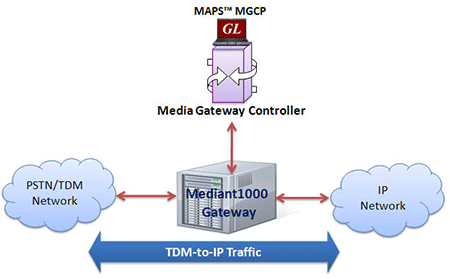
Simulate Media Gateway Controller
The MGC initiates the call control and signaling functionality by sending signaling information to the Media Gateway (MG). MGC uses MGCP protocol signaling to instruct MG. Users can control number of dumb Terminals in the Media Gateway through scripts.
For example, the inbuilt TX_MGC_TP_MG_V_CR_01.gls conformance script is executed to ensure that the MGC sends CRCX with mandatory parameters. The DUT (MG), on receipt of a valid CRCX message with a call id, responds with a 200 message.
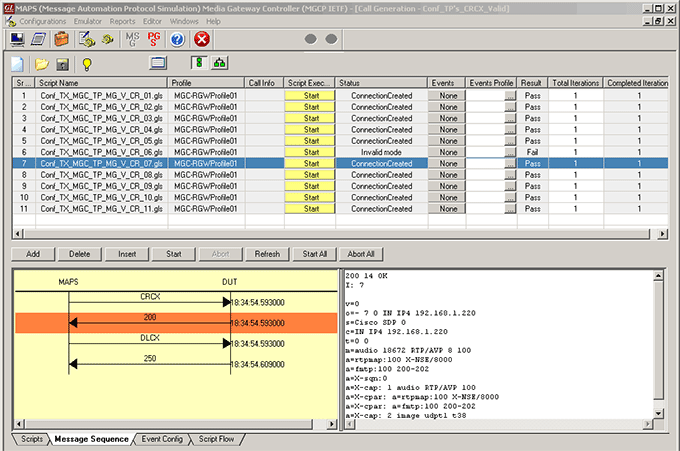
MAPS™ acting as MGC
MGC Multi-Interface
Multi-Interface Test Setup
MAPS™ Media Gateway Controller (MGC) a multi interface simulator is configured to handle signaling and call control between the Signaling Gateway (SG) and Media Gateway (MG) across the network. MAPS™ MGC simulates SS7 signaling procedure between the SGs on both the ends of the network while handling bulk traffic (RTP Media) between the MG terminals.
For the following test scenario, MAPS™ for Sigtran & MGCP (single interface application) can be configured as SGs and MAPS™ MGCP HD as MGs creating multi-interface network at MGC.
- SG1 initiates signaling towards SG2 over SIGTRAN via MGC Simulator
- MGC Simulator sets up bearer channel with MG1 and MG2 using MGCP and obtains the IP Address of each node.
- MGC Simulator forwards the IP Address of MG2 to MG1 Simulator
- MG1 initiates bulk media traffic towards MG2 Simulator over RTP
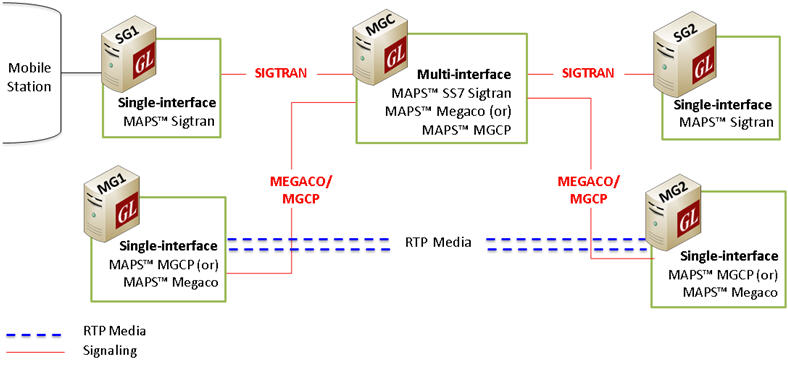
End-to-End Test Setup
The procedure below depicts the end-to-end message flow between the SGs and MGs nodes via MGC, simulating multi-interface in the MGCP network.
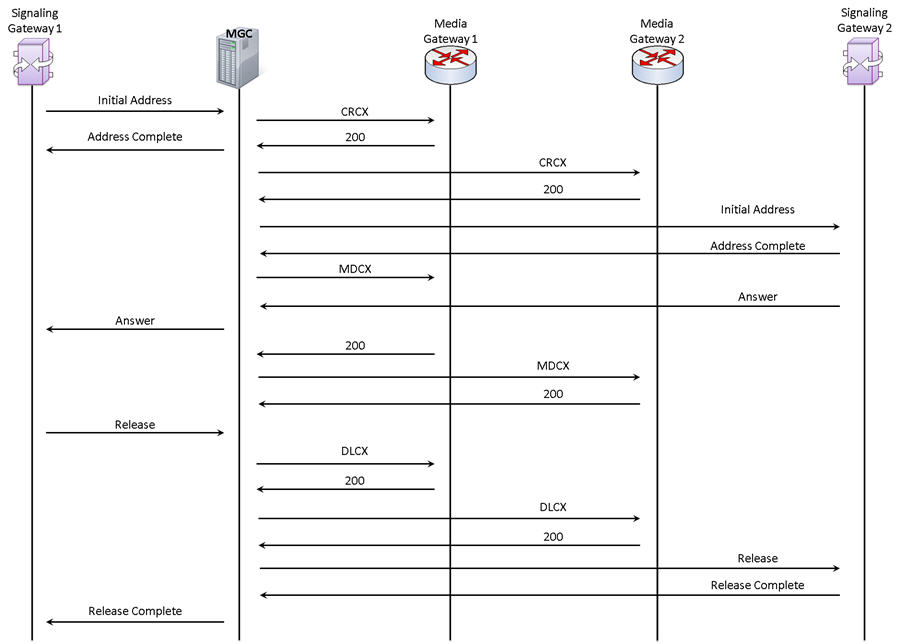
Typical SIGTRAN & MGCP Multi-Interface Procedure
Multi-Interface Call Simulation using MAPS™ MGCP
GL’s MAPS™ MGCP can be configured to act as MGC, controlling singling between the SGs and handling bulk traffic between the MGs in a multi-Interface MGCP network. The screenshot below depicts the SS7 Sigtran signaling flow between the SGs and MGCP procedure between MGs simulated using MAPS MGC (multi-interface).
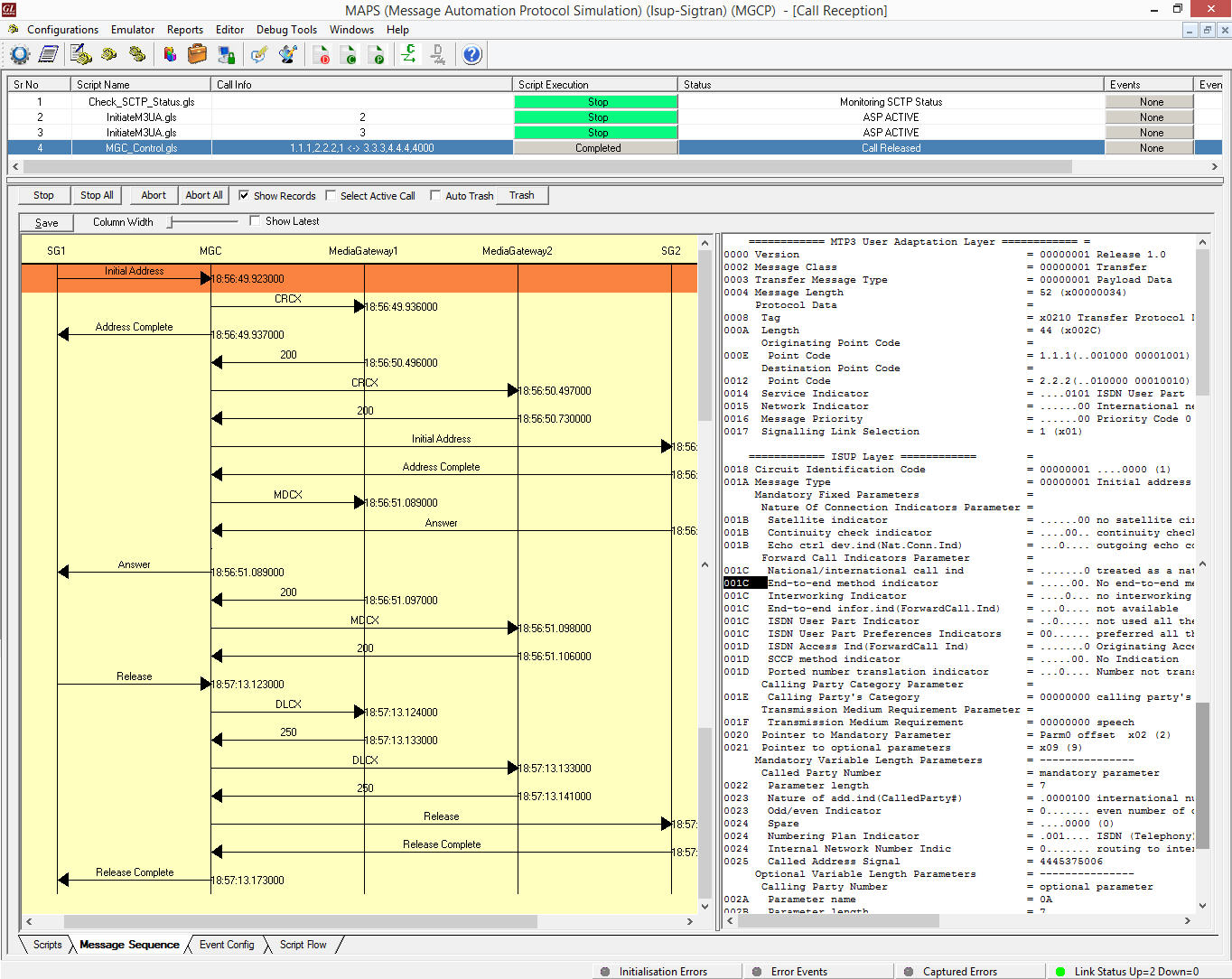
Multi-Interface MGC Call Processing
Screenshots
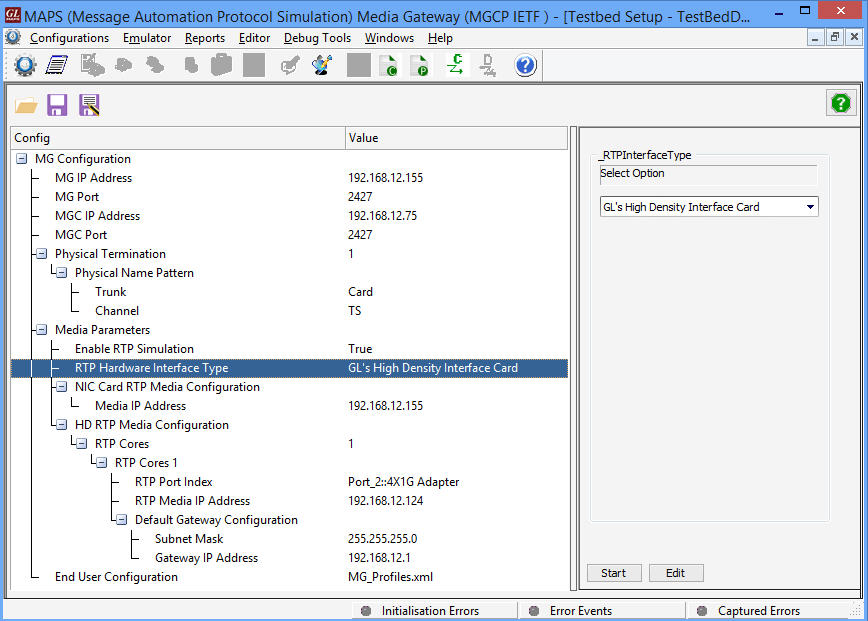
Testbed Setup Configuration

Load Generation Parameters

Script Editor
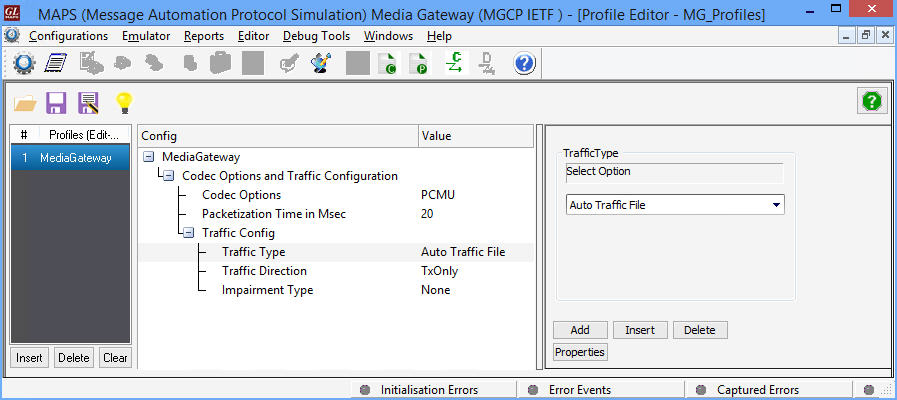
Profile Editor
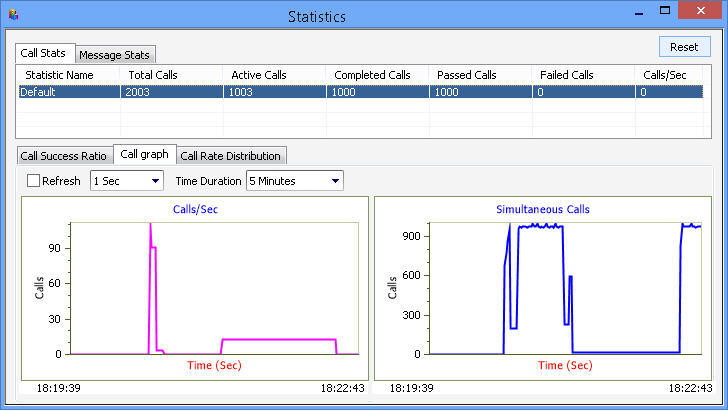
Call Call Statistics & Graph
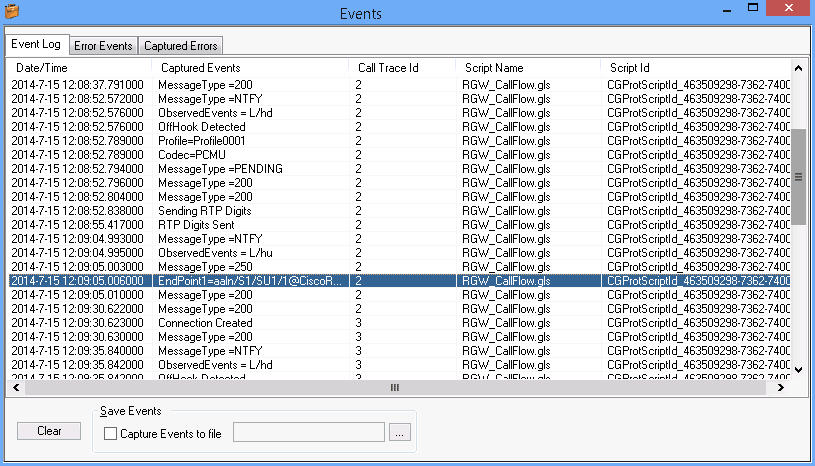
Events Log
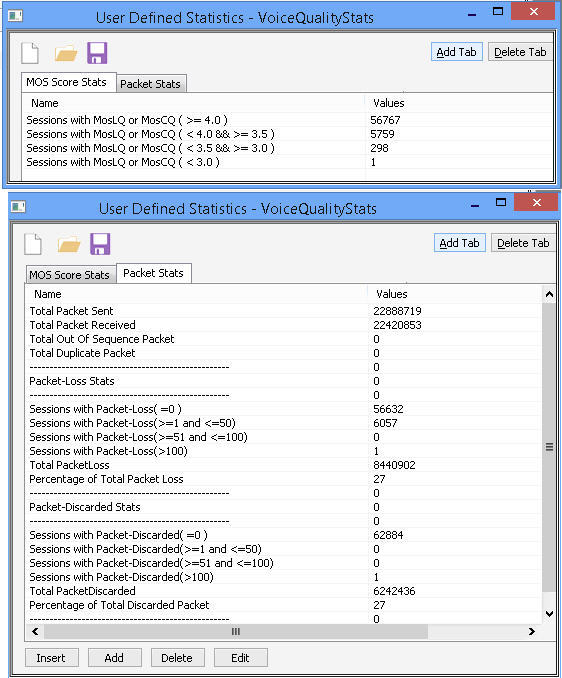
Voice Quaity Stats
Resources
Please Note: The XX in the Item No. refers to the hardware platform, listed at the bottom of the Buyer's Guide, which the software will be running on. Therefore, XX can either be ETA or EEA (Octal/Quad Boards), PTA or PEA (tProbe Units), XUT or XUE (Dual PCIe Express) depending upon the hardware.
| Item No. | MAPS™ SIP Protocol Emulation |
| PKS124 | MAPS™ MGCP Protocol Emulation with Conformance Test Suite |
| PKS109 | MAPS™ High Density RTP Generator |
PKS111 |
|
| PKS112 | Message Session Relay Protocol for MAPS-SIP |
| PKS170 | CLI Support for MAPS™ |
| PKS300 | MAPS™ Multi-Interface MGC |
| PKS102 | RTP Soft Core for RTP Traffic Generation |